[](https://github.com/pqrs-org/KE-complex_modifications/actions)
[](https://github.com/pqrs-org/KE-complex_modifications/blob/main/LICENSE.md)
# KE-complex_modifications
complex_modifications for Karabiner-Elements.
## complex_modifications documents
- [karabiner.json Reference Manual](https://karabiner-elements.pqrs.org/docs/json/)
- [Typical complex_modifications examples](https://karabiner-elements.pqrs.org/docs/json/typical-complex-modifications-examples/)
- [complex_modifications manipulator definition](https://karabiner-elements.pqrs.org/docs/json/complex-modifications-manipulator-definition/)
## JSON file format in this repository
The JSON files in this repository bundle multiple rules into a single file so users can pick and enable what they need.
For example, the "Emacs key bindings" package includes several rule sets for different use cases.
| The distributed JSON file | Complex Modifications |
| -------------------------------------------------------------- | -------------------------------------------------------------- |
| 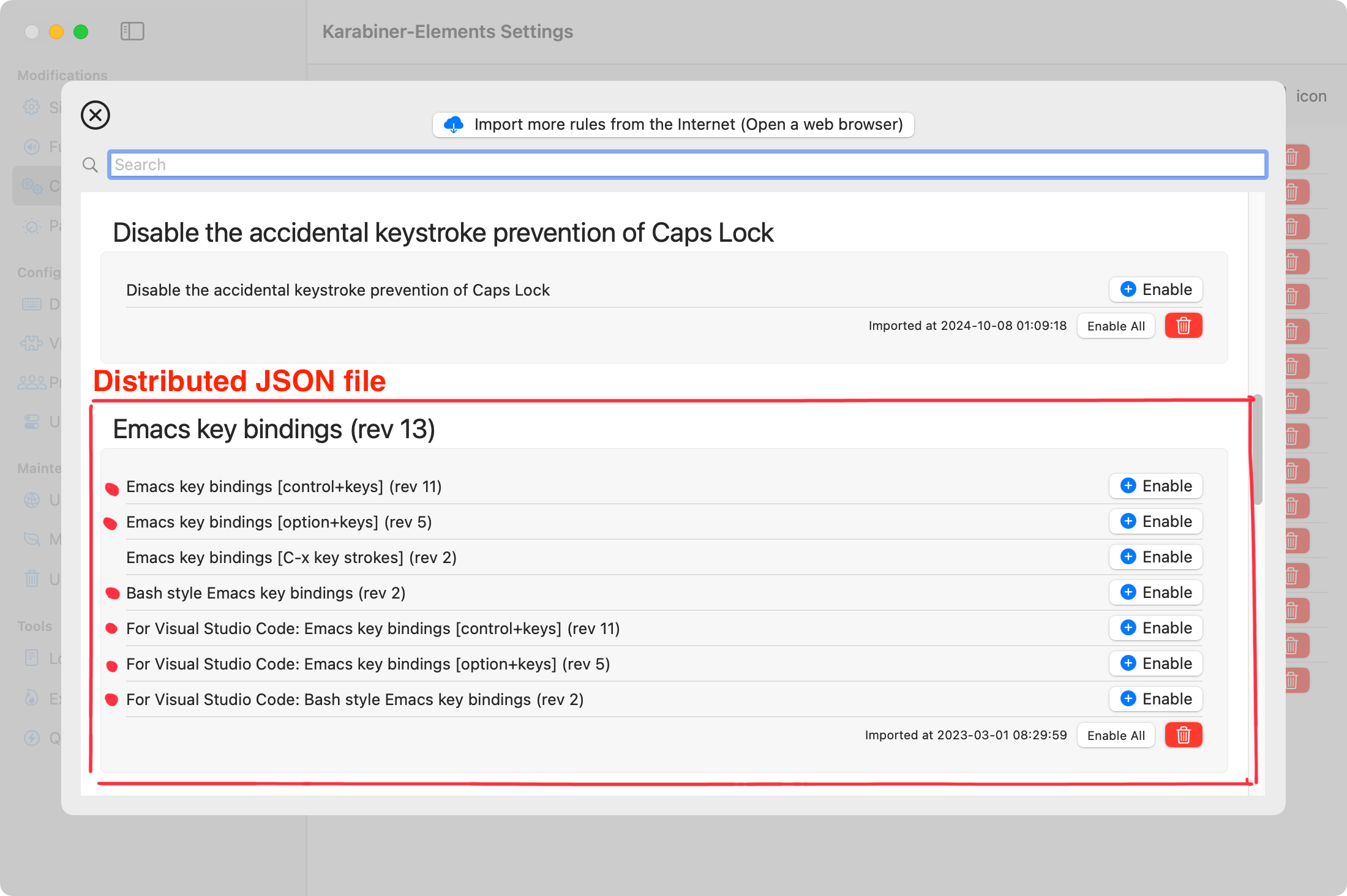 | 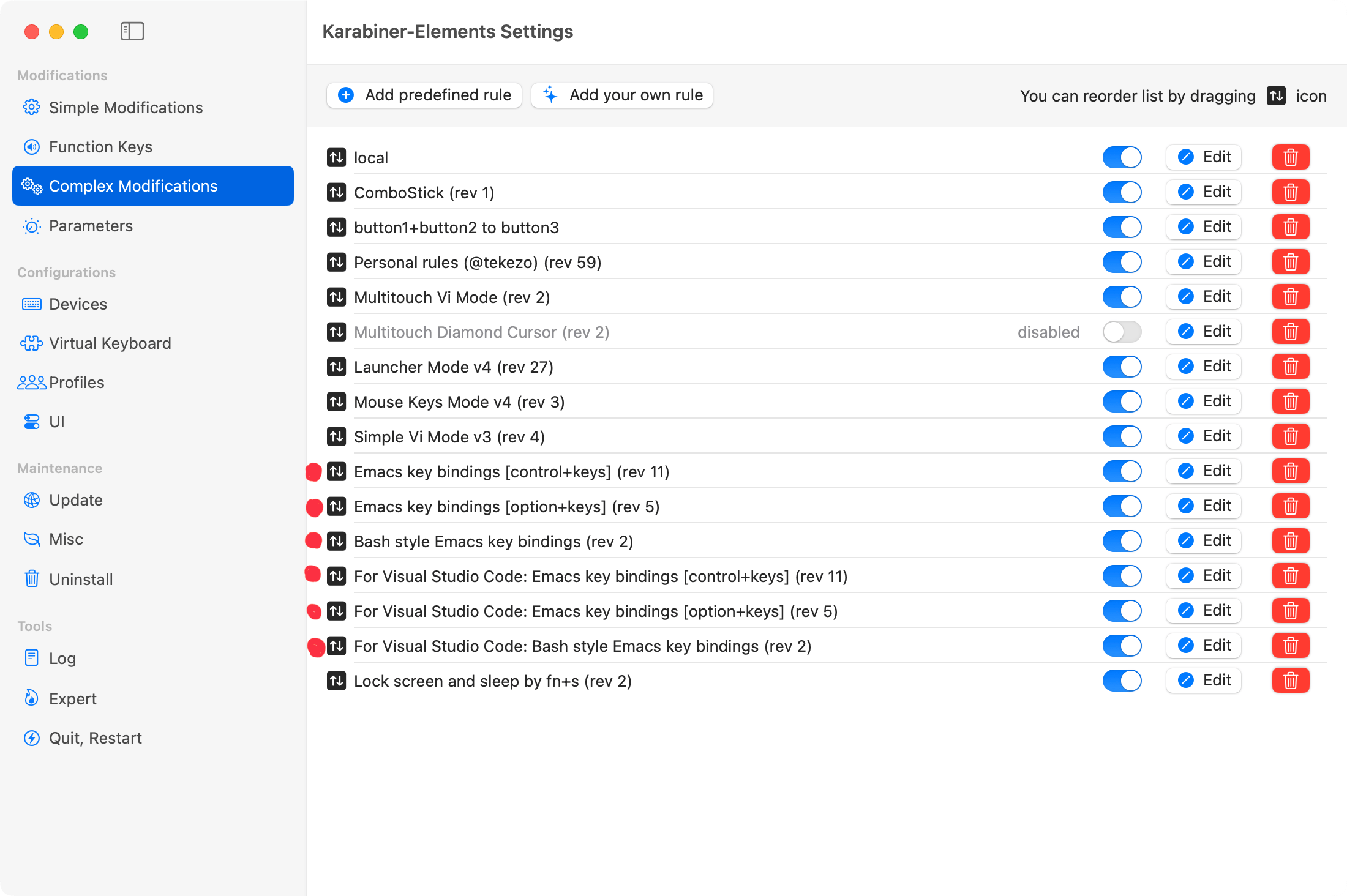 |
To package them this way, the JSON has the following structure.
Each element under rules is a single rule as defined in Complex Modifications.
If you list GitHub usernames in the "maintainers" field, the distribution site will automatically link to those accounts:
```json
{
"title": "Emacs key bindings (rev XXX)",
"maintainers": ["tekezo"],
"rules": [
{
"description": "Emacs key bindings [control+keys] (rev XXX)",
"manipulators": [
{
"type": "basic",
"from": {},
"to": []
}
]
},
{
"description": "Emacs key bindings [option+keys] (rev XXX)",
"manipulators": [
{
"type": "basic",
"from": {},
"to": []
}
]
}
]
}
```
## How to add your rules
Follow the steps below to create a PR and add your settings!
1. Fork this repository on GitHub.
2. Clone the repository in Terminal.
```shell
git clone --depth 1 https://github.com/{your_account}/KE-complex_modifications.git
cd KE-complex_modifications
git submodule update --init --recursive --depth 1
```
3. Create a git branch in Terminal.
```shell
git switch -c my-settings
```
4. Put a JSON generator file (`.js`) into [src/json](https://github.com/pqrs-org/KE-complex_modifications/tree/main/src/json).
(Or put a `.json` file directly into [public/json](https://github.com/pqrs-org/KE-complex_modifications/tree/main/public/json) directory.)
5.
(Optional) Update public/groups.json if you want to add your rules to a particular category.
Add the following entry into [public/groups.json](public/groups.json).
```json5
{
"path": "json/your_awesome_configuration.json", // required
"extra_description_path": "extra_descriptions/your_awesome_configuration.html" // optional
},
```
You can use the tag `⇧Shift` to make a nice ⇧Shift in your html.
6. Run `make` command in Terminal to validate your files.
If you placed a generator file into `src/json`, json file will be generated in the `public/json` by this command.
```shell
make all
```
If there is a problem, an error message is displayed. Fix your files until no errors are shown.
```text
"../public/json/personal_tekezo.json": `Personal rules (@tekezo) (rev 47)` error: `to` entry error: `key_code` error: unknown key_code: `"space"`
make[1]: *** [all] Error 1
make: *** [all] Error 2
```
7. Test your files
Copy a json file to `~/.config/karabiner/assets/complex_modifications`.
```shell
cp public/json/your_awesome_configuration.json ~/.config/karabiner/assets/complex_modifications
```
Import rules from `Karabiner-Elements Settings > Complex Modifications > Rules > Add rule`.
8.
(Optional) Test your files on local web server.
Run local web server by the following command in Terminal.
```shell
make preview-server
```
Then open .
9. Run `git commit` and `git push` in Terminal.
```shell
git add -A
git commit -m 'your commit message'
git push --set-upstream origin my-settings
```
10. Create a PR on GitHub.
## How to add additional description for your rules
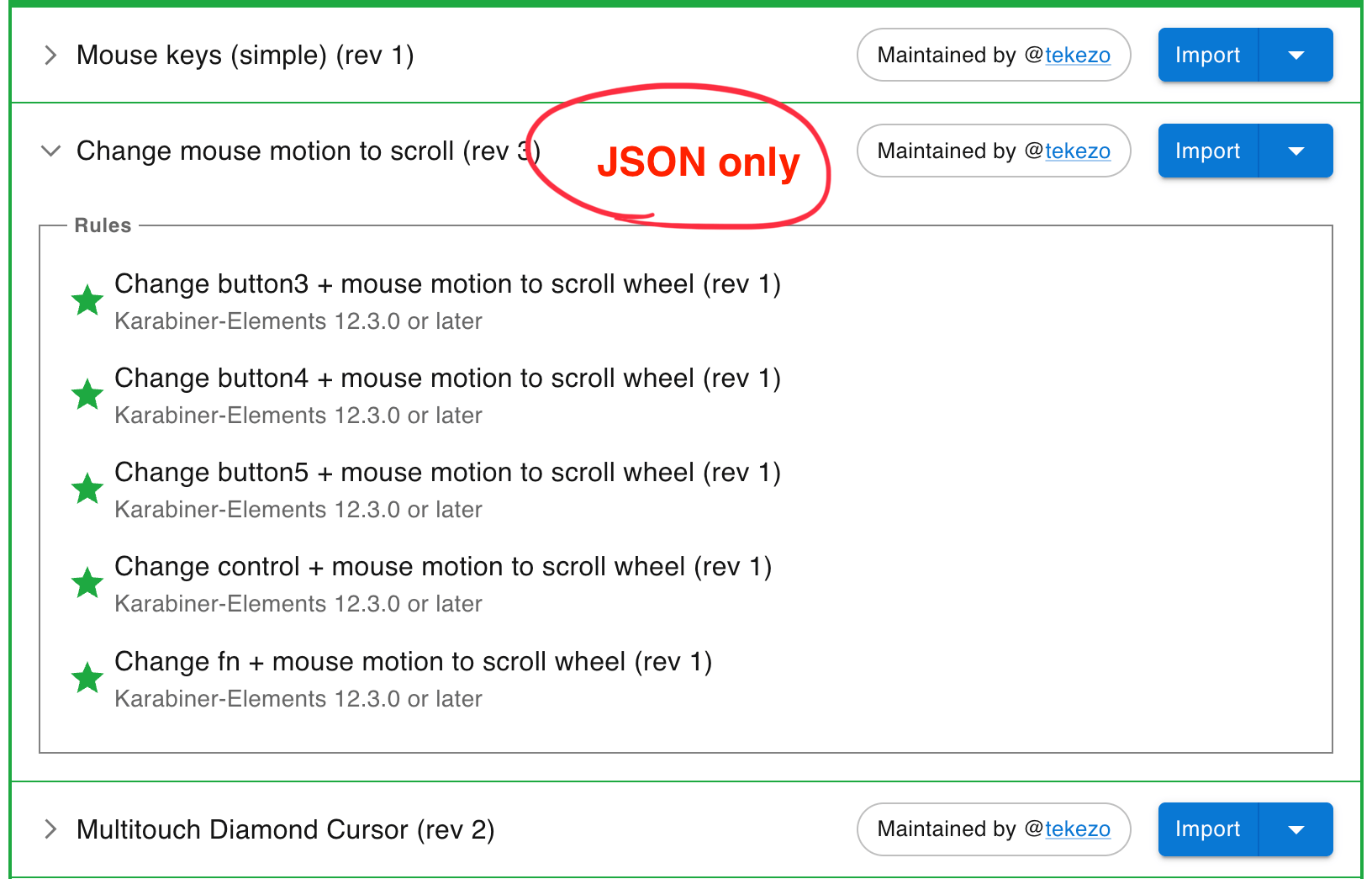
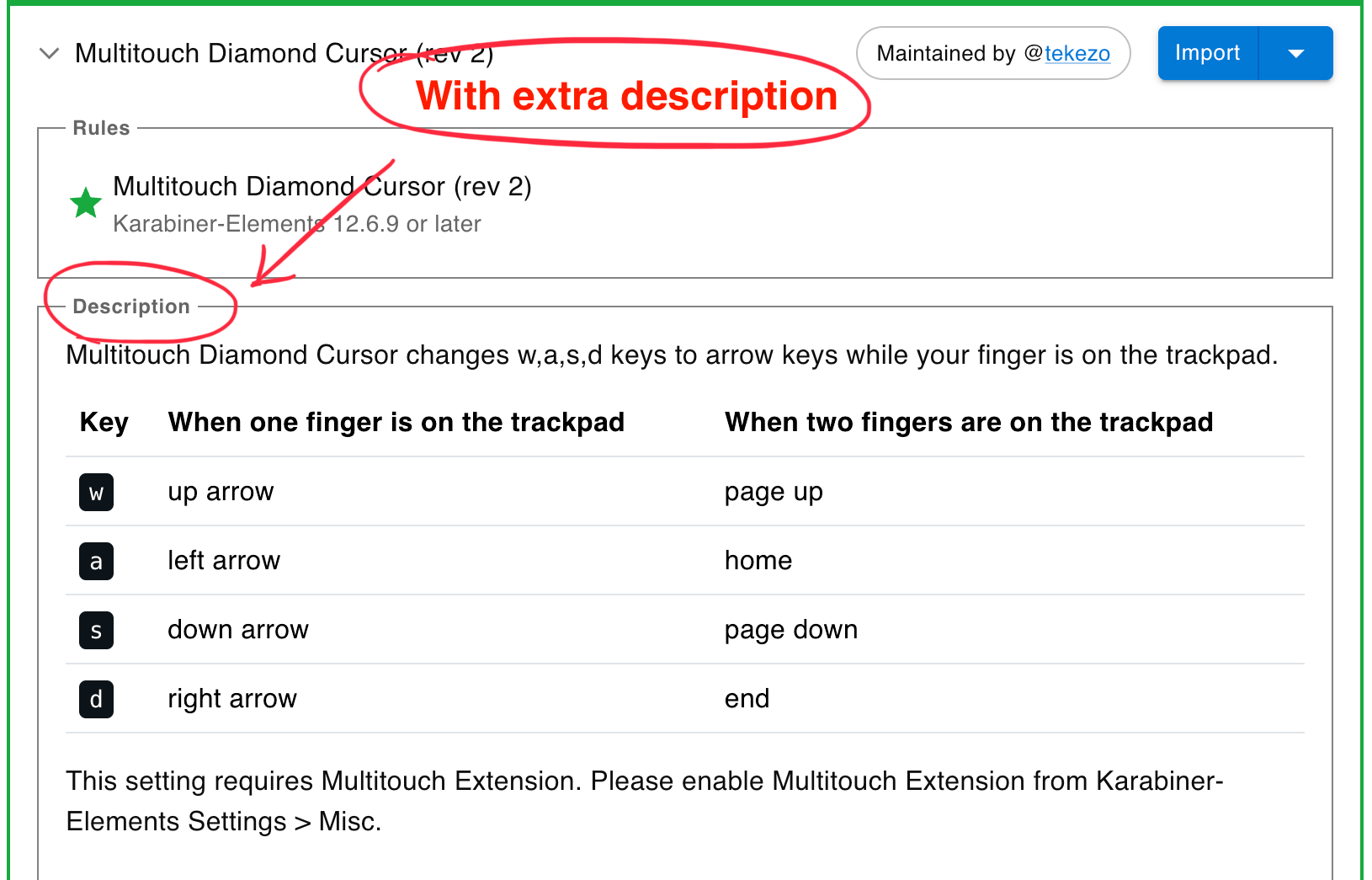
Use the `description` field to explain how each distributed JSON rule works.
If a one-line description is not enough (e.g., for complex rules), you can add supplementary text on the site:
1. Place an HTML file under `public/extra_descriptions/`.
2. Reference that HTML file from `public/groups.json`.
The additional description will then appear on the site as shown in the screenshot.
| JSON only | With extra description |
| --------------------------------------- | ----------------------------------------------------- |
|  |  |
- Example of extra description:
-
- Example of HTML file:
-
- Example entry in groups.json:
```json
{
"path": "json/multitouch_diamond_cursor.json",
"extra_description_path": "extra_descriptions/multitouch_diamond_cursor.json.html"
}
```
### Tips for writing extra description HTML file
- Bootstrap's CSS are applied automatically, so you can adjust spacing with utility classes like mt-4, etc.
- Do not include `` and `` tags. Write only the HTML for the description section.
- You can include images with tags like ` `.
Be sure to add the images to the repository.
- As described above, you can preview your HTML by `make preview-server` command and open `http://localhost:8000/` in your browser.
The HTML file will not be loaded unless you specify `extra_description_path` in `public/groups.json`, so be sure to update `groups.json`.
- After modifying an HTML file, reload the page in your browser to reflect the changes on the preview server.
Automatic hot reload is not supported.
## Sync your fork
To update your previously forked repositories, run the following command in Terminal.
### Run only once
```shell
git remote add upstream https://github.com/pqrs-org/KE-complex_modifications.git
```
### Run every time
```shell
# switch to main branch
git switch main
# fetch upstream
git fetch --all --prune --prune-tags
# update local repository
git reset --hard upstream/main
# update submodules
git submodule update --init --recursive
# clean files
git clean -x -d -f .
# update GitHub repository
git push
```
## Notes on creating your generators
The code in `src/json/*.js` is executed by [Duktape](https://duktape.org/), which is built into the Karabiner-Elements's command line interface ( `karabiner_cli`).
Unlike the latest Node.js, the basic language specification is ES5.1, so the following features cannot be used.
- `let` (`const` is specially supported)
- Arrow functions
- Default parameters
- Spread (...) syntax
- Template literals
### Examples
There are many existing codes. Here are some of the more distinctive ones among them.
- Use the predefined list of bundle identifiers in `frontmost_application_if`.
- [capslock_shift_copy_paste.json.js](https://github.com/pqrs-org/KE-complex_modifications/blob/main/src/json/capslock_shift_copy_paste.json.js)
- Generate remappings from a list of characters
- [colemak_layout.json.js](https://github.com/pqrs-org/KE-complex_modifications/blob/main/src/json/colemak_layout.json.js)
- Include file from another file
- [personal_thooams.json.js](https://github.com/pqrs-org/KE-complex_modifications/blob/main/src/json/personal_thooams.json.js)
- [control_backspace_to_function_backspace.json.js](https://github.com/pqrs-org/KE-complex_modifications/blob/main/src/json/control_backspace_to_function_backspace.json.js)
- Generate rules from key combinations
- [matias_ergo_pro.json.js](https://github.com/pqrs-org/KE-complex_modifications/blob/main/src/json/matias_ergo_pro.json.js)
`.
Be sure to add the images to the repository.
- As described above, you can preview your HTML by `make preview-server` command and open `http://localhost:8000/` in your browser.
The HTML file will not be loaded unless you specify `extra_description_path` in `public/groups.json`, so be sure to update `groups.json`.
- After modifying an HTML file, reload the page in your browser to reflect the changes on the preview server.
Automatic hot reload is not supported.
## Sync your fork
To update your previously forked repositories, run the following command in Terminal.
### Run only once
```shell
git remote add upstream https://github.com/pqrs-org/KE-complex_modifications.git
```
### Run every time
```shell
# switch to main branch
git switch main
# fetch upstream
git fetch --all --prune --prune-tags
# update local repository
git reset --hard upstream/main
# update submodules
git submodule update --init --recursive
# clean files
git clean -x -d -f .
# update GitHub repository
git push
```
## Notes on creating your generators
The code in `src/json/*.js` is executed by [Duktape](https://duktape.org/), which is built into the Karabiner-Elements's command line interface ( `karabiner_cli`).
Unlike the latest Node.js, the basic language specification is ES5.1, so the following features cannot be used.
- `let` (`const` is specially supported)
- Arrow functions
- Default parameters
- Spread (...) syntax
- Template literals
### Examples
There are many existing codes. Here are some of the more distinctive ones among them.
- Use the predefined list of bundle identifiers in `frontmost_application_if`.
- [capslock_shift_copy_paste.json.js](https://github.com/pqrs-org/KE-complex_modifications/blob/main/src/json/capslock_shift_copy_paste.json.js)
- Generate remappings from a list of characters
- [colemak_layout.json.js](https://github.com/pqrs-org/KE-complex_modifications/blob/main/src/json/colemak_layout.json.js)
- Include file from another file
- [personal_thooams.json.js](https://github.com/pqrs-org/KE-complex_modifications/blob/main/src/json/personal_thooams.json.js)
- [control_backspace_to_function_backspace.json.js](https://github.com/pqrs-org/KE-complex_modifications/blob/main/src/json/control_backspace_to_function_backspace.json.js)
- Generate rules from key combinations
- [matias_ergo_pro.json.js](https://github.com/pqrs-org/KE-complex_modifications/blob/main/src/json/matias_ergo_pro.json.js)