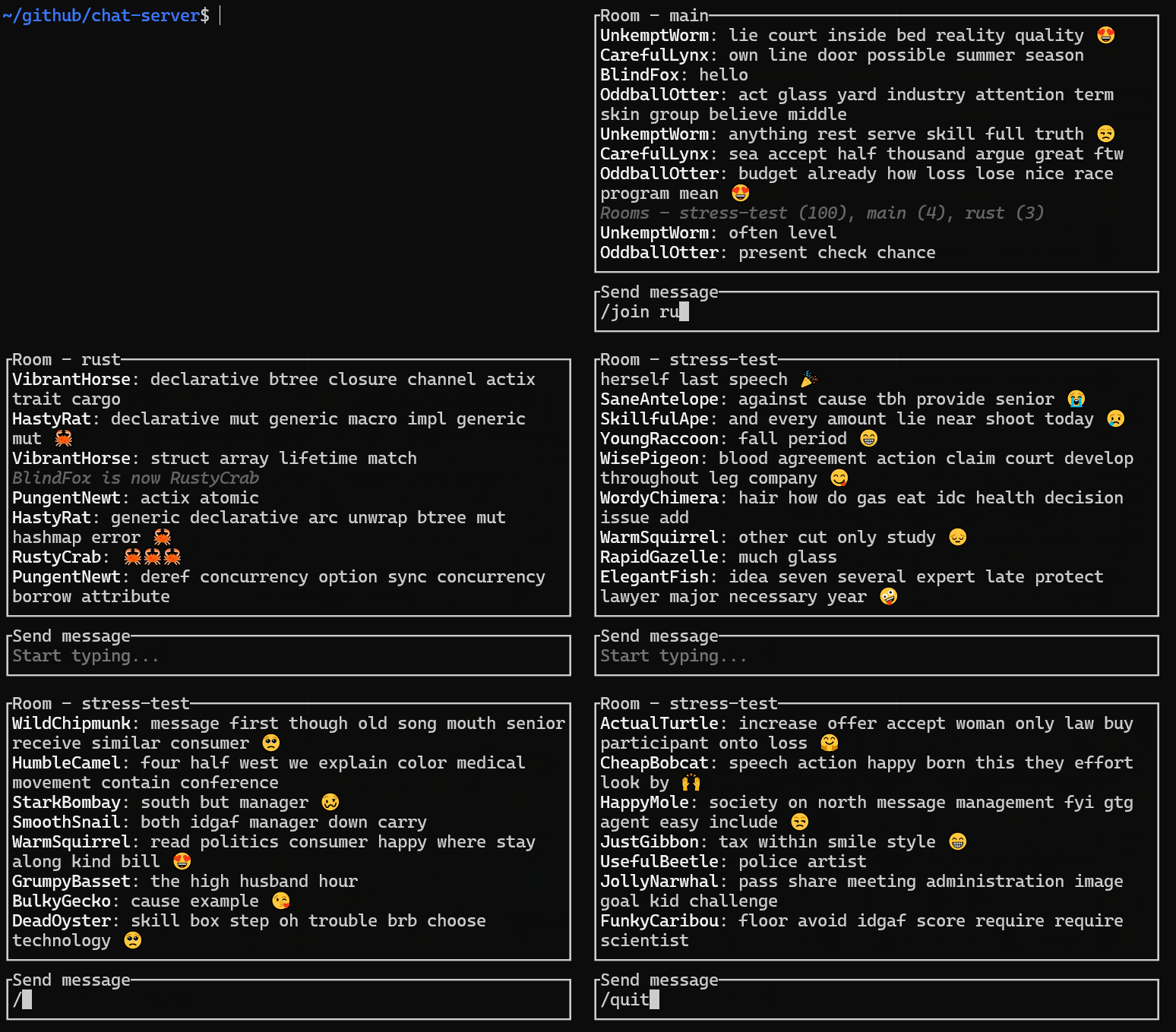
# 并发编程新手指南: 使用Tokio实现多线程聊天服务器 _2024年5月4日 · #rust · #async · #concurrency · #tokio_ ![聊天服务器演示](../../../assets/chat-server-demo.gif)
目录 [导读](#introduction)
[01\) 最简单的回显服务器](#01-最简单的回显服务器)
[02\) 串行处理多个连接](#02-串行处理多个连接)
[03\) 修改消息](#03-修改消息)
[04\) 将字节流解析为行](#04-将字节流解析为行)
[05\) 服务器增加`/help`和`/quit`命令](#05-服务器增加help和quit命令)
[06\) 并发处理多个连接](#06-并发处理多个连接)
[07\) 让用户聊天](#07-让用户聊天)
[08\) 让用户真正的聊天](#08-让用户真正的聊天)
[09\) 为用户分配名称](#09-为用户分配名称)
[10\) 使用`/name`命令编辑自己的名字](#10-使用name命令编辑自己的名字)
[11\) 在客户端断开连接时释放用户名](#11-在客户端断开连接时释放用户名)
[12\) 增加`main`聊天室](#12-增加main聊天室)
[13\) 使用`/join`加入或创建聊天室](#13-使用join加入或创建聊天室)
[14\) 使用`/rooms`列出所有聊天室](#14-使用rooms列出所有聊天室)
[15\) 删除空聊天室](#15-删除空聊天室)
[16\) 使用`/users`命令列出当前聊天室的用户](#16-使用users命令列出当前聊天室的用户)
[17\) 性能优化](#17-性能优化)
[18\) 收尾工作](#18-收尾工作)
[结论](#结论)
[讨论](#讨论)
[进一步阅读](#进一步阅读)
## Introduction 我最近使用 `tokio` 编写了一个多线程聊天服务器,我对此很满意。我想通过这篇易于理解、循序渐进的教程分享我学到的东西,让我们开始吧。 > [!NOTE] > 每一步的源代码都在 [这个仓库](https://github.com/pretzelhammer/chat-server) 的 [examples 目录](https://github.com/pretzelhammer/chat-server/tree/main/examples) 找到。 ## 01\) 最简单的回显服务器 让我们开始写一个最简单的回显服务器。 ```rust use tokio::{io::{AsyncReadExt, AsyncWriteExt}, net::TcpListener}; #[tokio::main] async fn main() -> anyhow::Result<()> { let server = TcpListener::bind("127.0.0.1:42069").await?; let (mut tcp, _) = server.accept().await?; let mut buffer = [0u8; 16]; loop { let n = tcp.read(&mut buffer).await?; if n == 0 { break; } let _ = tcp.write(&buffer[..n]).await?; } Ok(()) } ``` `#[tokio::main]` 是一个过程宏,它可以自动生成 `tokio` 运行时所需的重复性代码, 如下的代码: ```rust #[tokio::main] async fn my_async_fn() { todo!() } ``` 大致等同于转换成这样: ```rust fn main() { tokio::runtime::Builder::new_multi_thread() .enable_all() .build() .unwrap() .block_on(my_async_fn) } async fn my_async_fn() { todo!() } ``` 快速回顾一下,如果我们有一个如下的异步函数: ```rust async fn my_async_fn(t: T) -> T { todo!() } ``` 可以转换为: ```rust fn my_async_fn(t: T) -> impl Future { todo!() } ``` `Future` 表示某种形式的异步计算,我们可以使用 `await` 获取其结果。 我们使用 `anyhow` 模块进行优雅的错误传播。在任何想要返回 `Result>` 的地方,我们可以使用 `anyhow::Result` 优雅替代。 下面这一行代码我们绑定了一个IP地址,创建了一个TCP监听器: ```rust let server = TcpListener::bind("127.0.0.1:42069").await?; ``` > [!IMPORTANT] > 这里使用 `tokio::net::TcpListener` 而不是 `std::net::TcpListener`。前者是异步,后者是同步。调用异步 `bind` 返回一个 `Future` ,因为在Rust中 `Future` 是惰性的,所以我们 **必须调用** `await` ,否则该代码不会执行! 一个经验法则,如果在 `tokio` 和 `std` 中都有相同名称的处理 IO 的类型,我们应该使用 `tokio` 中的。 其余的代码简单明了: ```rust let (mut tcp, _) = server.accept().await?; let mut buffer = [0u8; 16]; loop { let n = tcp.read(&mut buffer).await?; if n == 0 { break; } let _ = tcp.write(&buffer[..n]).await?; } ``` 我们接受一个连接,创建一个缓冲区,然后循环从连接中读取数据到缓存后再将缓存数据写回连接,直至连接关闭。 我们可以使用类似 `telnet` 工具连接服务器,查看服务器回显我们输入的数据: ```console $ telnet 127.0.0.1 42069 > my first e c h o server! my first e c h o server! > hooray! hooray! ``` > [!TIP] > 退出 `telnet` 需要按下 `^]` (Ctrl + 右方括号) 进入命令模式,然后输入 `quit` 回车即可. 如果你想要探索代码可以 `git clone` [这个仓库](https://github.com/pretzelhammer/chat-server) ,然后通过 `just example {number}` 命令运行指定的例子。 你也可以修改 `examples/server-{number}.rs` 中的源代码。一旦例子运行后,可以使用 `just telnet` 命令和例子进行交互。 译注:要使用just命令,先要 [安装just](https://github.com/casey/just/blob/master/README.%E4%B8%AD%E6%96%87.md) 。 ## 02\) 串行处理多个连接 上面的代码中有一个烦人的bug,一旦处理完一个连接后服务器就退出了!接下来我们执行 `just telnet` 将会得到 `telnet: Unable to connect to remote host: Connection refused` 的错误,这时候我们需要执行 `just example 01` 命令手动重启服务器程序。 🤦 下面我们将修复这个bug: ```rust use tokio::{io::{AsyncReadExt, AsyncWriteExt}, net::TcpListener}; #[tokio::main] async fn main() -> anyhow::Result<()> { let server = TcpListener::bind("127.0.0.1:42069").await?; loop { let (mut tcp, _) = server.accept().await?; let mut buffer = [0u8; 16]; loop { let n = tcp.read(&mut buffer).await?; if n == 0 { break; } let _ = tcp.write(&buffer[..n]).await?; } } } ``` 非常简单,我们只需要加一个 `loop` 包裹 `server.accept()` 行!现在我们执行 `just example 02` 运行更新后的服务器程序,无论我们连续执行多少次 `just telnet` ,服务器都会保持正常运行。 ## 03\) 修改消息 当前回显服务器很好了,但是能以某种方式修改消息那就更棒了。我们尝试在每一条回显消息行尾增加一个 ❤️ 表情怎么样? 代码如下: ```rust use tokio::{io::{AsyncReadExt, AsyncWriteExt}, net::TcpListener}; #[tokio::main] async fn main() -> anyhow::Result<()> { let server = TcpListener::bind("127.0.0.1:42069").await?; loop { let (mut tcp, _) = server.accept().await?; let mut buffer = [0u8; 16]; loop { let n = tcp.read(&mut buffer).await?; if n == 0 { break; } // convert byte slice to a String let mut line = String::from_utf8(buffer[..n].to_vec())?; // remove line terminating chars added by telnet line.pop(); // remove \n char line.pop(); // remove \r char // add our own line terminator :) line.push_str(" ❤️\n"); let _ = tcp.write(line.as_bytes()).await?; } } } ``` 令人激动的回显服务器演示: ```console $ just telnet > hello hello ❤️ > it works! it works! ❤️ ``` 但是,当我们写一个长的消息,我们就会发现bug: ```console > this is the best day ever! this is the be ❤️ day ever ❤️ ``` 啊哈! 可能有人会说这个很容易,我们可以增加缓冲区的大小,但是增加多少呢?我们可以使用像 `Vec` 这样动态增长的缓冲区,但是如果客户端发送了一个**非常非常长的行**怎么办?我们需要解决这些问题,由于这是一个通用性问题,所以可以从其他人那里找到对应的解决方案。 ## 04\) 将字节流解析为行 Tokio在 `tokio-util` 模块提供的方便可靠的解决方案,我们可以这样使用: ```rust use futures::{SinkExt, StreamExt}; use tokio::net::TcpListener; use tokio_util::codec::{FramedRead, FramedWrite, LinesCodec}; #[tokio::main] async fn main() -> anyhow::Result<()> { let server = TcpListener::bind("127.0.0.1:42069").await?; loop { let (mut tcp, _) = server.accept().await?; let (reader, writer) = tcp.split(); let mut stream = FramedRead::new(reader, LinesCodec::new()); let mut sink = FramedWrite::new(writer, LinesCodec::new()); while let Some(Ok(mut msg)) = stream.next().await { msg.push_str(" ❤️"); sink.send(msg).await?; } } } ``` 这个例子中有很多新东西。 `split` 方法将 `TcpStream` 拆分为 `ReadHalf` 和 `WriteHalf`。 这对想要把读写两个部分添加到不同的结构、或者发送给不同线程、或者并发的读写 `TcpStream` 的情况将非常有用(我们后面将要做的)。 `ReadHalf` 实现了 `AsyncRead` , `WriteHalf` 实现了 `AsyncWrite`, 然而正如之前所述,直接使用这些方法会比较繁琐且容易出错,所以这里使用了编解码中的 `LinesCodec`、 `FramedRead` 和 `FramedWrite`。 `LinesCodec` 处理底层细节将字节流转换为换行分隔的 `UTF-8` 的字符串,并与 `FramedRead` 一起使用,我们可以包装 `ReadHalf` 实现 `Stream>`,这比 `AsyncRead` 更容易使用。`Stream` 就像是 `Iterator` 的异步版本。举个例子,假如我们有一个如下同步的函数: ```rust fn iterate(items: impl Iterator) { for item in items { todo!() } } ``` 重构后的异步版本是: ```rust use futures::{Stream, StreamExt}; async fn iterate(mut items: impl Stream + Unpin) { while let Some(item) = items.next().await { todo!() } } ``` 同样,我们使用 `LinesCodec` 和 `FramedWrite` 包装 `WriteHalf` 获得 `Sink` 的实现,它比 `AsyncWrite` 更易使用。正如你猜测的那样, `Sink` 是 `Stream` 的反操作, 它消耗数据而不是生产数据。 剩余的代码非常简单: ```rust while let Some(Ok(mut msg)) = stream.next().await { msg.push_str(" ❤️"); sink.send(msg).await?; } ``` 我们从流中获取消息,然后在行末增加一个❤️表情,最后发送到接收端。如果我们要更花哨一点,可以将流映射并将其转发到接收端,就像这样: ```rust stream.map(|msg| { let mut msg = msg?; msg.push_str(" ❤️"); Ok(msg) }).forward(sink).await? ``` `forward` 返回 `Future` ,当 `Stream` 处理完成后转换为 `Sink`,且 `Sink` 关闭和刷新后,该 `Future` 完成。 现在,无论我们的消息长度是多少,我们都能正确的在收到的消息尾部添加一个爱心表情: ```console $ just telnet > this is a really really really long message kinda this is a really really really long message kinda ❤️ ``` ## 05\) 服务器增加`/help`和`/quit`命令 `Telnet` 退出比较烦人。通常使用的技巧如 `esc`, `^C`, 和 `^D` 都不起作用。我们必须按下 `^]` 进入命令模式,然后输入 `quit` 回车才能退出。🤦 我们可以通过自定义命令实现服务器更用户友好,从 `/help` 和 `/quit`命令开始。 `/help` 将打印服务器支持的命令列表及说明,`/quit` 将导致服务器关闭本连接(从而使得telnet退出)。 这些命令使用方法是在客户端连接之后立即发送给客户端,以便用户知道。下面是所有代码: ```rust use futures::{SinkExt, StreamExt}; use tokio::net::TcpListener; use tokio_util::codec::{FramedRead, FramedWrite, LinesCodec}; const HELP_MSG: &str = include_str!("help.txt"); #[tokio::main] async fn main() -> anyhow::Result<()> { let server = TcpListener::bind("127.0.0.1:42069").await?; loop { let (mut tcp, _) = server.accept().await?; let (reader, writer) = tcp.split(); let mut stream = FramedRead::new(reader, LinesCodec::new()); let mut sink = FramedWrite::new(writer, LinesCodec::new()); // send list of server commands to // the user as soon as they connect sink.send(HELP_MSG).await?; while let Some(Ok(mut msg)) = stream.next().await { // handle new /help command if msg.starts_with("/help") { sink.send(HELP_MSG).await?; // handle new /quit command } else if msg.starts_with("/quit") { break; // handle regular message } else { msg.push_str(" ❤️"); sink.send(msg).await?; } } } } ``` 让我们来试试看: ```console $ just telnet Server commands /help - prints this message /quit - quits server > /help # new command Server commands /help - prints this message /quit - quits server > woohoo it works woohoo it works ❤️ > /quit # new command Connection closed by foreign host. ``` ## 06\) 并发处理多个连接 现在我们服务器最大的问题是一次只能处理一个连接!如果我们在两个不同的终端运行 `just telnet` ,可以看到服务器只会响应第一个连接的请求,直到第一个连接退出才会响应第二个连接。尽管我们已经使用了大量的异步API,但是目前实现和同步单线程没有区别。让我们来改变一下: ```rust use futures::{SinkExt, StreamExt}; use tokio::net::{TcpListener, TcpStream}; use tokio_util::codec::{FramedRead, FramedWrite, LinesCodec}; const HELP_MSG: &str = include_str!("help.txt"); #[tokio::main] async fn main() -> anyhow::Result<()> { let server = TcpListener::bind("127.0.0.1:42069").await?; loop { let (tcp, _) = server.accept().await?; // spawn a separate task for // to handle every connection tokio::spawn(handle_user(tcp)); } } async fn handle_user(mut tcp: TcpStream) -> anyhow::Result<()> { let (reader, writer) = tcp.split(); let mut stream = FramedRead::new(reader, LinesCodec::new()); let mut sink = FramedWrite::new(writer, LinesCodec::new()); sink.send(HELP_MSG).await?; while let Some(Ok(mut msg)) = stream.next().await { if msg.starts_with("/help") { sink.send(HELP_MSG).await?; } else if msg.starts_with("/quit") { break; } else { msg.push_str(" ❤️"); sink.send(msg).await?; } } Ok(()) } ``` `tokio::spawn` 接受一个 `Future` 并生成一个异步任务来执行。执行是立即开始,我们不需要像在`Future`那样在返回的join句柄使用 `await` 调用。一个任务和一个线程一样,区别是线程是由操作系统管理,而任务是由 `tokio` 管理。你可能已经通过其它的名词知道这个概念: 轻量级线程、绿色线程、用户空间线程。 ## 07\) 让用户聊天 现在正式开始,我们升级回显服务器为聊天服务器,让独立的并发连接相互通信。 > [!NOTE] > 代码开始变得冗长且复杂,下面所有代码将重点突出关键修改,但是你仍可以在 [这个仓库](https://github.com/pretzelhammer/chat-server) 的 [examples目录](https://github.com/pretzelhammer/chat-server/tree/main/examples) 找到所有代码。通过运行 `just diff {number} {number}` 来查看两个示例之间的差异。例如,运行`just diff 06 07` 查看这个示例和上一个示例之间的差异。 ```rust // ... async fn main() -> anyhow::Result<()> { // ... // create broadcast channel let (tx, _) = broadcast::channel::(32); // ... // clone it for every connected client tokio::spawn(handle_user(tcp, tx.clone())); } async fn handle_user( mut tcp: TcpStream, tx: Sender ) -> anyhow::Result<()> { // ... // get a receiver from the sender let mut rx = tx.subscribe(); // ... while let Some(Ok(mut user_msg)) = stream.next().await { // ... // send all messages to the channel tx.send(user_msg)?; // ... // receive all of our and others' // messages from the channel let peer_msg = rx.recv().await?; sink.send(peer_msg).await?; } // ... } ``` 我们在不同客户端之间使用广播通道进行通信。在创建通道后,我们得到一个发送者 `Sender` 和一个接收者 `Receiver` ,我们可以调用任意次数的 `clone` 来克隆它并将其发送给不同线程。每一个通过`Sender` 发送和 `Receiver` 接收的值的类型都需要实现 `Clone` 特性。 在此之前,我们从客户端的流获取消息并立即写到客户端接收端。现在,当我们从客户端的流获取消息后,我们通过广播通道将其传递,然后再通过广播通道取回并发送给客户端接收端。每一个客户端都会从共享通道中收到它自己的以及其它的客户端发送的消息。 让我们通过同时连接两个客户端来尝试我们的新代码: ```console $ just telnet # concurrent client 1 > 1: hello # msg 1 1: hello ❤️ > 1: anybody there? # msg 2 1: anybody there? ❤️ $ just telnet # concurrent client 2 > 2: hey there # msg 3 1: hello ❤️ > 2: how are you # msg 4 1: anybody there? ❤️ > 2: i am right here # msg 5 2: hey there ❤️ > 2: wtf # msg 6 2: how are you ❤️ ``` 每一个客户端都可以看到彼此发送的消息,但是由于某些原因,目前看起来好像有点延迟和错乱,应该是某个地方不对。 代码中的bug如下: ```rust // the client must first send a message while let Some(Ok(mut user_msg)) = stream.next().await { // in order to receive a message let peer_msg = rx.recv().await?; // and these two things always alternate } ``` 为了接收对端消息,我们必须首先发送一个消息。如果我们是一个潜水者呢?又或者对方更健谈呢?另一方面,如果我们更健谈,那么我们主要看到自己的回显消息,几乎看不到对方发送的消息。 为了解决这个问题,我们需要能够同时 `await` 两个 `Future` 。在这种情况下,一个是从 `stream.next()` 用于获取客户端的发送的消息, 另外一个从 `rx.recv()` 用于通道发来的消息。 ## 08\) 让用户真正的聊天 `tokio::select!` 让我们同时探询多个 `Future` : ```rust async fn handle_user( mut tcp: TcpStream, tx: Sender ) -> anyhow::Result<()> { // ... loop { tokio::select! { user_msg = stream.next() => { // ... }, peer_msg = rx.recv() => { // ... }, } } // ... } ``` 我们执行先完成的分支,其它将被抛弃。 现在,如果我们尝试我们服务器: ```console $ just telnet # concurrent client 1 > 1: hello # msg 1 1: hello ❤️ > 1: anybody there? # msg 2 1: anybody there? ❤️ 2: i am right here ❤️ 2: how are you ❤️ > 1: i am doing great # msg 5 $ just telnet # concurrent client 2 1: hello ❤️ 1: anybody there? ❤️ > 2: i am right here # msg 3 2: i am right here ❤️ > 2: how are you? # msg 4 2: how are you ❤️ 1: i am doing great ❤️ ``` 可以工作!先别庆祝,我们需要考虑安全取消。如之前所述,Rust的 `Future` 是惰性的,它只有在 `poll` 的时候才会执行。`poll` 和 `await` 有点不同。`await` 一个 `Future` 意味着要 `poll` 直至完成,而 `poll` 一个 `Future` 意味着它取得一些进展,但不一定是完成。 译注:`poll` 取得一些进展是指状态机发生变化即 `Pending` 状态,而状态机完成是指 `Ready` 状态。 一方面,这个功能很棒,因为我们开始 `poll` 一个 `Future` 随后可以决定不再需要等待其最终结果,我们可以停止`poll`从而不会浪费CPU做无效的工作。另一方面,这个功能在某些场景下会有危险,比如我们在一个 `Future` 正在执行重要操作的中途取消它,这时候如果执行没有完成,会造成数据的丢失;或者让数据处于损坏状态。 让我们看一个取消`Future`的例子。取消并不是一个显式的操作,它只是意味着我们开始轮询一个`Future`,但是在完成之前就停止了轮询。 ```rust use tokio::time::sleep; use std::time::Duration; async fn count_to(num: u8) { for i in 1..=num { sleep(Duration::from_millis(100)).await; println!("{i}"); } } #[tokio::main] async fn main() { println!("start counting"); // the select! macro polls each // future until one of them completes, // and then we execute the match arm // of the completed future and drop // all of the other futures tokio::select! { _ = count_to(3) => { println!("counted to 3"); }, _ = count_to(10) => { println!("counted to 10"); }, }; println!("stop counting"); // this sleep is here to demonstrate // that the count_to(10) doesn't make // any progress after we stop polling // it, even if we go to sleep and do // nothing else for a while sleep(Duration::from_millis(1000)).await; } ``` 上述程序输出结果: ``` start counting 1 1 2 2 3 3 counted to 3 stop counting ``` 上述我们取消了 `count_to(10)` 的`Future`. 在这个简单示例中,如果我们不关心计数是否完成那么这个`Future`取消就是安全的,如果完成计数对应用程序至关重要,那么取消操作就是有问题的。为了保证`Future`完成,我们在`tokio::select!`之后使用`await`: ```rust // ... async fn main() { println!("start counting"); let count_to_10 = count_to(10); tokio::select! { _ = count_to(3) => { println!("counted to 3"); }, _ = count_to_10 => { // ❌ println!("counted to 10"); }, }; println!("stop counting"); println!("jk, keep counting"); count_to_10.await; // ❌ println!("finished counting to 10"); } ``` Throws: ``` error[E0382]: use of moved value: count_to_10 ``` 糟糕,我们犯了书中最常见的错误,试图使用已经移动的值,改成可变引用: ```rust // ... async fn main() { println!("start counting"); let count_to_10 = count_to(10); tokio::select! { _ = count_to(3) => { println!("counted to 3"); }, _ = &mut count_to_10 => { // ❌ println!("counted to 10"); }, }; println!("stop counting"); println!("jk, keep counting"); count_to_10.await; println!("counted to 10"); } ``` 现在抛出如下异常: ``` error[E0277]: {async fn body@src/main.rs:23:28: 28:2} cannot be unpinned -> src/main.rs:34:5 | 23 | async fn count_to(num: u8) { | ----------------- within this impl futures::Future ... 34 | / tokio::select! { 35 | | _ = count_to(3) => { 36 | | println!("counted to 3"); 37 | | }, ... 41 | | }; | | ^ | | | | |_____within impl futures::Future, | the trait Unpin is not implemented for | {async fn body@src/main.rs:23:28: 28:2}, | which is required by &mut impl | futures::Future: futures::Future | required by a bound introduced by this call | = note: consider using the pin! macro consider using Box::pin if you need to access the pinned value outside of the current scope ``` 我们需要固定`Future`,按编译器建议进行修改: ```rust #[tokio::main] async fn main() { println!("start counting"); let count_to_10 = count_to(10); tokio::pin!(count_to_10); // ✔️ tokio::select! { _ = count_to(3) => { println!("counted to 3"); }, _ = &mut count_to_10 => { println!("counted to 10"); }, }; println!("stop counting"); println!("jk, keep counting"); count_to_10.await; println!("finished counting to 10"); } ``` 编译后运行输出: ``` start counting 1 1 2 2 3 3 counted to 3 stop counting jk, keep counting 4 5 6 7 8 9 10 finished counting to 10 ``` 在Rust中,`pin` 就是将其内存位置固定。一旦它被固定就不能移动,`Future` 在 `poll` 前需要固定的原因是其底层可能包含自引用指针,一旦 `Future` 移动,这些指针将会失效。 如果最后一部分你暂时不理解也没关系,我也不是完全理解。不用担心,当这类问题出现时,我们可以遵从一个通用算法来解决: **1\)** 如果我们写的泛型代码使用 `Future` 或产生 `Future` ,我们可以在trait的边界上增加 `+ Unpin` ,如下面的例子不会被编译: ```rust use futures::{Stream, StreamExt}; async fn iterate( mut items: impl Stream ) { while let Some(item) = items.next().await { // ❌ todo!() } } ``` 抛出异常: ``` error[E0277]: impl Stream cannot be unpinned ``` 但是我们将`Unpin`添加到函数签名中,它就可以正常工作了: ```rust async fn iterate( mut items: impl Stream + Unpin // ✔️ ) { while let Some(item) = items.next().await { todo!() } } ``` **2\)** 然而,假设在代码的其他地方导致的编译错误,是因为我们传递给这个函数的stream不是 `Unpin` 。我们可以从函数签名中删除 `Unpin` ,并在函数内使用 `pin!` 宏固定stream: ```rust async fn iterate( mut items: impl Stream ) { tokio::pin!(items); // ✔️ while let Some(item) = items.next().await { todo!() } } ``` 将它固定到栈上,这样他就不会从当前作用域逃离。 **3\)** 如果笃定对象需要逃离当前作用域,可以使用 `Box::pin` 将其固定在堆上: ```rust async fn iterate( mut items: impl Stream ) { let mut items = Box::pin(items); // ✔️ while let Some(item) = items.next().await { todo!() } } ``` **4\)** 或者可以让调用者指定: ```rust async fn iterate + ?Sized>( mut items: Pin<&mut S> ) { while let Some(item) = items.next().await { todo!() } } ``` 然而,在这种情况下,调用者也是我们,所以方案2和3没什么用。 > [!IMPORTANT] > 总结:当我们将 `Future` 传递给可能无法 `poll` 完成的时候,需要留意哪些是可以安全取消,哪些是不能安全取消,比如 `tokio::select!` 。 如果你正在编写一个 `poll Future` 的Rust库, 你需要在文档中说明 `Future` 是否可以安全取消。如果你正在使用这样的库,你需要仔细阅读文档。 ## 09\) 为用户分配名称 在当前聊天服务器迭代版本中,很难区分谁说了什么。我们准备将每一个连接地址放到对应消息的前面以区分,就像下面这样: ```console $ just telnet > hello 127.0.0.1:51270: hello ``` 然而这样看起来比较丑陋和乏味。我们使用随机的形容词加上一个动物作为名称,在客户端加入时分配给它: ```rust pub static ADJECTIVES: [&str; 628] = [ "Mushy", "Starry", "Peaceful", "Phony", "Amazing", "Queasy", // ... ]; pub static ANIMALS: [&str; 243] = [ "Owl", "Mantis", "Gopher", "Robin", "Vulture", "Prawn", // ... ]; pub fn random_name() -> String { let adjective = fastrand::choice(ADJECTIVES).unwrap(); let animal = fastrand::choice(ANIMALS).unwrap(); format!("{adjective}{animal}") } ``` 以下是一些由此产生的名字样本: ``` HushedLlama DimpledDinosaur UrbanMongoose YawningMinotaur RomanticRhino DapperPeacock PlasticCentaur BubblyChicken AnxiousGriffin SpicyAlpaca MindlessOctopus WealthyPelican CruelCapybara RegalFrog PinkPoodle QuirkyGazelle PoshGopher CarelessBobcat SomberWeasel ZenMammoth DazzlingSquid ``` 为了保持`main`文件简洁,我们将这个功能放到`lib`文件中并导入: ```rust use chat_server::random_name; // ... async fn handle_user( mut tcp: TcpStream, tx: Sender ) -> anyhow::Result<()> { // ... // generate random name let name = random_name(); // ... // tell user their name sink.send(format!("You are {name}")).await?; // ... user_msg = stream.next() => { // ... // prepend user's name to their messages tx.send(format!("{name}: {user_msg}"))?; }, // ... } ``` 再试一次: ```console $ just chat You are MeatyPuma > hello MeatyPuma: hello PeacefulGibbon: howdy ``` 非常好。 > [!NOTE] > 我从使用 `just telnet` 切换到 `just chat` ,这是因为我厌倦了使用 `telnet` ,构建了一个更好用的客户端,即 `just chat` 。 ## 10\) 使用`/name`命令编辑自己的名字 我们希望名字在服务器是唯一的。通过使用 `HashSet` 维护名称。由于我们还想让用户通过 `/name` 修改他们自己的名字,所以我们需要跨线程共享使用这个名称集合。 > [!TIP] > 要实现跨线程共享可变数据,我们可以用 `Arc>` 来包装,如果你之前用过 `Rc>`,这个其实就等同是一个线程安全的 `Rc>` 。 让我们用一个新类型把 `Arc>>` 包装一下以更易读: ```rust // ... #[derive(Clone)] struct Names(Arc>>); impl Names { fn new() -> Self { Self(Arc::new(Mutex::new(HashSet::new()))) } // returns true if name was inserted, // i.e. the name is unique fn insert(&self, name: String) -> bool { self.0.lock().unwrap().insert(name) } // returns unique name fn get_unique(&self) -> String { let mut name = random_name(); let mut guard = self.0.lock().unwrap(); while !guard.insert(name.clone()) { name = random_name(); } name } } #[tokio::main] async fn main() -> anyhow::Result<()> { // ... let names = Names::new(); // ... tokio::spawn(handle_user(tcp, tx.clone(), names.clone())); } async fn handle_user( mut tcp: TcpStream, tx: Sender, names: Names, ) -> anyhow::Result<()> { // ... // get a unique name for new user let mut name = names.get_unique(); // ... // tell them their name sink.send(format!("You are {name}")).await?; // ... user_msg = stream.next() => { // ... // handle new /name command if user_msg.starts_with("/name") { let new_name = user_msg .split_ascii_whitespace() .nth(1) .unwrap() .to_owned(); // check if name is unique let changed_name = names.insert(new_name.clone()); if changed_name { // notify everyone that user // changed their name tx.send(format!("{name} is now {new_name}"))?; name = new_name; } else { // tell user that name is // already taken sink.send( format!("{new_name} is already taken") ).await?; } } // ... }, // ... } ``` 让我们测试一下: ```console $ just chat Server commands /help - prints this message /name {name} - change name /quit - quits server You are FancyYak > hello FancyYak: hello > /name pretzelhammer # new command FancyYak is now pretzelhammer > 🦀🦀🦀 pretzelhammer: 🦀🦀🦀 ``` > [!CAUTION] > Rust承诺编译安全的程序是没有内存漏洞的,但它没有承诺不会有死锁。当我们在程序中添加锁时,需要小心避免创建死锁场景。 这里有一些避免死锁的建议: **1\)** 不要在 `await` 点持有锁 `await` 点是指异步函数中调用 `await` 的地方。当调用 `await` 时,程序将控制权还给 `tokio` 调度器。如果你的 `Future` 持有锁意味着任何其它执行的 `Future` 无法获取该锁,这种情况下将会导致其在等待时永远阻塞,从而导致持有锁的 `Future` 没有机会执行,这就是死锁。 有点抽象,我们来看一个具体的例子。假设我们有一个单线程的 `tokio` 运行时,有三个 `Future`准备被轮询: ``` Tokio scheduler, future queue: +---------+---------+---------+ | fut A | fut B | fut C | +---------+---------+---------+ ``` 由于这是一个单线程运行时,一次只能执行一个 `Future` 。`tokio` 轮询第一个`Future`: `future A`,它运行的代码看起来像这样: ```rust async do_stuff(mutex: Mutex) { // acquires lock let guard = mutex.lock().unwrap(); // hits await point, i.e. yields to scheduler other_async_fn().await?; // releases lock dbg!(guard); } ``` 当它到达 `await` 点时,`Future` 返回到队列的末尾: ``` Tokio scheduler, future queue: +---------+---------+---------+ | fut B | fut C | fut A* | +---------+---------+---------+ * holding lock ``` 这时候 `tokio` 尝试轮询下一个 `Future` : `future B`,其通过相同的代码路径运行,试图获取 `future A` 当前持有的同一个互斥锁!这将导致它永久阻塞! `future B` 在 `future A` 释放锁之前无法继续执行,但是 `future A` 在 `future B` 返回调度器之前无法执行,所以死锁产生了。 _但是如果我们使用异步互斥锁而不是同步互斥锁呢?_ 技巧1适用于同步互斥锁,如 `std::sync::Mutex` ,但不适用于异步互斥锁,如 `tokio::sync::Mutex` 。对于设计用于异步上下文中的互斥锁,我们可以在 `await` 点上持有锁,只是它们会变慢。 `tokio` 文档说明如下: > 与一般的观点相反,在异步代码中使用标准库中的普通锁是可行且更可取的方式。 > > 与阻塞互斥锁相比,异步互斥锁提供了在 `await` 点上保持锁定的能力。这使得异步互斥锁比阻塞互斥锁开销更大,因此在可以使用阻塞互斥锁的情况下,应该优先使用它。异步互斥锁的主要用于是提供对IO资源的共享可变访问,如数据库连接。如果互斥锁对应的值是数据,那么使用标准库中的阻塞互斥锁通常更合适的。 一般来说,如果我们的代码结构不需要在 `await` 点上持有锁,那么最好使用同步互斥锁,如果必须在 `await` 点上持有锁,则切换使用异步互斥锁。 **2\)** 不要重复多次获取同一个锁 简单例子: ```rust fn main() { let mut mutex = Mutex::new(5); // acquire lock let g = mutex.lock().unwrap(); // try to acquire lock again mutex.lock().unwrap(); // deadlocks } ``` 虽然上述例子的代码错误非常明显,但是在真实代码TM中发生时,定位和调试都非常难。 _"如果使用读写锁,因为其支持为多个并发线程提供多个读锁,是不是就不用担心这个问题?"_ 出人意料的是这个问题同样存在,即使在同一个线程中两次获取读锁也会产生死锁。借用标准库的 `RwLock` 文档的图表说明如下: ``` // Thread 1 | // Thread 2 let _rg = lock.read(); | | // will block | let _wg = lock.write(); // may deadlock | let _rg = lock.read(); | ``` 引用 `parking_lot` 模块中 `RwLock` 文档如下 : > 为避免读写锁的饥饿,该锁使用公平锁策略,当写锁在等待获取锁时,即使锁还在未锁状态,如果读锁尝试获取锁的话也将阻塞,因此,试图在单线程中递归获取读锁可能会导致死锁。 我想我们必须非常小心 🤷 **3\)** 在任何地方都要以相同的顺序获取锁 如果我们执行某个操作时要安全获取多个锁,那么我们要以相同的顺序获取这些锁,否则死锁很容易发生,就像下面这样: ``` // Thread 1 | // Thread 2 let _a = a.lock(); | let _b = b.lock(); // ... | // ... let _b = b.lock(); | let _a = a.lock(); ``` _头都大了!肯定有一种更简单或更好的方法来处理锁的事情吧?_ **4\)** 使用无锁数据结构 因为无锁数据结构不会死锁,所以可以忽略提示1-3。但是,无锁数据结构通常比大多数基于锁的数据结构执行更慢。 **5\)** 全部使用 `channel` 因为通道不会引起死锁,使用该方案可以让您忽略提示1-3。我对使用通道与使用锁相比是否会降低或提高并发程序的性能的问题没法提供足够的信息。瞎猜一下,就像大多数计算机科学问题的答案一样,那就是**具体问题具体分析**。 这种方法也常称之为 `actor模式` ,如果你在 `cargo` 上搜索 `actor` ,你会发现很多该模型框架,这些框架可以让更你容易编写 `actor模式` 程序。 不管怎么说,这不是一个一蹴而就的事情。还是回到我们的聊天服务器。 ## 11\) 在客户端断开连接时释放用户名 我们的程序有一个bug,就是当用户断开连接时,名称不会从集合中删除,因此在获取名称之后,在重新启动服务器之前,它永远不会被再次使用。不幸的是,在解决这个问题,我们必须先解决一个棘手的问题。 这个棘手的问题是用户可能由于错误而断开连接,我们使用 `?` 处理 `handle_user` 函数中的错误并将错误传播到 `main` 函数,但清理名称不应该是 `main` 的责任,这应该是 `handle_user` 中要处理细节。我们可以使用 `Result` 的模式匹配来替代 `?` 处理,但这会导致代码冗长且丑陋。如果我们想要应付一堆重复、丑陋、冗长代码,应该怎么做呢?答案是使用宏。 快速回顾一下,请记住 `Rust` 中的所有块都是表达式,我们可以用一个值 `break` 代码块。示例如下: ```rust fn main() { // breaking from loop with value let value = loop { break "value"; }; assert_eq!(value, "value"); // to break from a non-loop block // it needs to be labelled let value = 'label: { break 'label "value"; }; assert_eq!(value, "value"); } ``` 此外, `?` 操作不是魔法,可以通过宏来实现: ```rust macro_rules! question_mark { ($result:expr) => { match $result { Ok(ok) => ok, Err(err) => return Err(err.into()), } } } ``` 这正是我们想要的,除了 `return` 应该要修改为 `break` ,因为我们想要在我们的函数中的处理错误,而不是将错误传播给调用者。我们实现一个新的宏 `b!` (是 `break` 的缩写): ```rust macro_rules! b { ($result:expr) => { match $result { Ok(ok) => ok, Err(err) => break Err(err.into()), } } } ``` 然后我们可以重构一个将错误传播给调用者的函数,像下面这样: ```rust fn some_function() -> anyhow::Result<()> { // initialize state here loop { fallible_statement_1?; fallible_statement_2?; // etc } // clean up state here, but // this may never be reached // because the ? returns from // the function instead of // breaking from the loop Ok(()) } ``` 转换成捕获并处理自己的错误的函数: ```rust fn some_function() { // initialize state here let result = loop { b!(fallible_statement_1); b!(fallible_statement_2); // etc }; // clean up state here, always reached if let Err(err) = result { // handle errors if necessary } // nothing to return anymore since // we take care of everything within // the function :) } ``` 有了所有的上下文,这是更新后的代码(译注:即所有 `?` 调用的地方改用 `b!` 包裹): ```rust // ... async fn handle_user( mut tcp: TcpStream, tx: Sender, names: Names, ) -> anyhow::Result<()> { // ... // we now catch errors here let result: anyhow::Result<()> = loop { // all fallible statements // from before are now wrapped // with our b!() macro }; // the line below is always reached // and the user's name is always freed, // regardless if they quit normally or // abruptly disconnected due to an error names.remove(&name); // return result to caller if they want // to do anything extra result } ``` 现在,当用户因任何原因断开连接时,我们总可以收回他们的名字。 ## 12\) 增加`main`聊天室 现在所有的用户都在同一个聊天室里,无法选择聊天室。将谈话保持在一个主题很难的,如果有多个侧谈同时发生,讨论就很难继续进行。所以应该在服务器中增加创建和加入不同聊天室的功能。第一步,重构当前的代码,将所有加入服务器的人添加到一个默认聊天室,称为 `main` 。更新后的代码: ```rust // ... struct Room { tx: Sender, } impl Room { fn new() -> Self { let (tx, _) = broadcast::channel(32); Self { tx, } } } const MAIN: &str = "main"; #[derive(Clone)] struct Rooms(Arc>>); impl Rooms { fn new() -> Self { Self(Arc::new(RwLock::new(HashMap::new()))) } fn join(&self, room_name: &str) -> Sender { // get read access let read_guard = self.0.read().unwrap(); // check if room already exists if let Some(room) = read_guard.get(room_name) { return room.tx.clone(); } // must drop read before acquiring write drop(read_guard); // create room if it doesn't yet exist // get write access let mut write_guard = self.0.write().unwrap(); let room = write_guard .entry(room_name.to_owned()) .or_insert(Room::new()); room.tx.clone() } } #[tokio::main] async fn main() -> anyhow::Result<()> { // ... let rooms = Rooms::new(); // ... tokio::spawn(handle_user(tcp, names.clone(), rooms.clone())); } async fn handle_user( mut tcp: TcpStream, names: Names, rooms: Rooms, ) -> anyhow::Result<()> { // ... // when user connects to server // automatically put them in // the main room let room_name = MAIN.to_owned(); let room_tx = rooms.join(&room_name); let mut room_rx = room_tx.subscribe(); // notify everyone in room that // a new user has joined let _ = room_tx.send(format!("{name} joined {room_name}")); // ... tokio::select! { user_msg = stream.next() => { // ... // send messages to the room // we're currently in b!(room_tx.send(format!("{name}: {user_msg}"))); }, // receive messages from the // room we're currently in peer_msg = room_rx.recv() => { // ... }, } // ... // notify everyone in room that // we have left let _ = room_tx.send(format!("{name} left {room_name}")); // ... } ``` `Room` 是对 `broadcast::Sender` 的包装,`Rooms` 是 `Arc>>` 的包装,因为我们需要维护房间名到广播 `channel` 的映射,并且能在多个线程中共享和修改这个映射。 我们还添加了用户加入和离开一个聊天室的通知。来一起看看是什么样的: ```console $ just chat You are AwesomeVulture AwesomeVulture joined main JealousHornet joined main JealousHornet: we are at the main room! > can we create other rooms? AwesomeVulture: can we create other rooms? JealousHornet: not yet, back to work we go JealousHornet left main ``` ## 13\) 使用`/join`加入或创建聊天室 因为我们之前实现了类似的方法,增加一个 `join` 方法非常容易: ```rust // ... async fn handle_user( mut tcp: TcpStream, names: Names, rooms: Rooms, ) -> anyhow::Result<()> { // ... // automatically join main room // on connect, as before let mut room_name = MAIN.to_owned(); let mut room_tx = rooms.join(&room_name); let mut room_rx = room_tx.subscribe(); // ... if user_msg.starts_with("/join") { let new_room = user_msg .split_ascii_whitespace() .nth(1) .unwrap() .to_owned(); // check if user is already in the room // they're trying to join if new_room == room_name { b!(sink.send(format!("You are in {room_name}")).await); continue; } // notify current room that we've left b!(room_tx.send(format!("{name} left {room_name}"))); // join new room, this creates // the room if it doesn't // already exist room_tx = rooms.join(&new_room); room_rx = room_tx.subscribe(); room_name = new_room; // notify new room that we have joined b!(room_tx.send(format!("{name} joined {room_name}"))); } // ... // notify our current room that we've left // on disconnect, as before let _ = room_tx.send(format!("{name} left {room_name}")); // ... } ``` 现在我们可以开始举办披萨派对了: ```console $ just chat Server commands /help - prints this message /name {name} - change name /join {room} - joins room /quit - quits server You are ElasticBonobo ElasticBonobo joined main BlondCyclops joined main > /join pizza # new command ElasticBonobo joined pizza BlondCyclops joined pizza > let's have a pizza party ElasticBonobo: let's have a pizza party BlondCyclops: 🍕🥳 ``` ## 14\) 使用`/rooms`列出所有聊天室 现在,服务器上的披萨派对还不太容易被发现。如果用户进入 `main` 聊天室,他们就无法知道服务器上的其他用户都在 `pizza` 聊天室。让我们增加一个 `/rooms` 命令,列出服务器上的所有聊天室: ```rust // ... #[derive(Clone)] struct Rooms(Arc>>); impl Rooms { fn list(&self) -> Vec<(String, usize)> { // iterate over rooms map let mut list: Vec<_> = self .0 .read() .unwrap() .iter() // receiver_count tells us // the # of users in the room .map(|(name, room)| ( name.to_owned(), room.tx.receiver_count(), )) .collect(); list.sort_by(|a, b| { use std::cmp::Ordering::*; // sort rooms by # of users first match b.1.cmp(&a.1) { // and by alphabetical order second Equal => a.0.cmp(&b.0), ordering => ordering, } }); list } } // ... async fn handle_user( mut tcp: TcpStream, names: Names, rooms: Rooms, ) -> anyhow::Result<()> { // ... // handle new /rooms command if user_msg.starts_with("/rooms") { let rooms_list = rooms.list(); let rooms_list = rooms_list .into_iter() .map(|(name, count)| format!("{name} ({count})")) .collect::>() .join(", "); b!(sink.send(format!("Rooms - {rooms_list}")).await); } // ... } ``` 现在每个人都被邀请参加我们的披萨派对: ```console $ just chat Server commands /help - prints this message /name {name} - change name /rooms - list rooms /join {room} - joins room /quit - quits server You are SilentYeti SilentYeti joined main > /rooms # new command Rooms - pizza (2), main (1) > /join pizza SilentYeti joined pizza > can i be part of this pizza party? 🥺 SilentYeti: can i be part of this pizza party? 🥺 BulkyApe: of course ❤️ AmazingDragon: 🔥🔥🔥 ``` ## 15\) 删除空聊天室 我们的程序有一个bug,就是聊天室一旦被创建后永远不会被删除,即使它里面没人。程序运行一段时间后,服务器聊天室列表将是这样的: ```console > /rooms Rooms - a (0), bunch (0), of (0), abandoned (0), rooms (0) ``` 让我们来修复它: ```rust // ... #[derive(Clone)] struct Rooms(Arc>>); impl Rooms { // ... fn leave(&self, room_name: &str) { let read_guard = self.0.read().unwrap(); let mut delete_room = false; if let Some(room) = read_guard.get(room_name) { // if the receiver count is 1 then // we're the last person in the room // and can remove it delete_room = room.tx.receiver_count() <= 1; } drop(read_guard); if delete_room { let mut write_guard = self.0.write().unwrap(); write_guard.remove(room_name); } } fn change( &self, prev_room: &str, next_room: &str ) -> Sender { self.leave(prev_room); self.join(next_room) } // ... } async fn handle_user( mut tcp: TcpStream, names: Names, rooms: Rooms, ) -> anyhow::Result<()> { // ... if user_msg.starts_with("/join") { // ... // now correctly deletes the room // we're leaving if it becomes empty room_tx = rooms.change(&room_name, &new_room); // ... } // ... // when we disconnect we also // need to leave and delete the // room if it's empty rooms.leave(&room_name); // ... } ``` ## 16\) 使用`/users`命令列出当前聊天室的用户 聊天室的用户是不可发现的。增加一个 `/users` 命令用于列出当前聊天室中的所有用户。要实现这个功能,我们需要在 `Room` 结构体添加一个 `HashSet` 保存用户名,并更新 `Rooms` 的相应方法,在用户加入,更改或离开聊天室时增加用户名的相关处理: ```rust // ... struct Room { // ... // keep track of the names // of the users in the room users: HashSet, } impl Room { fn new() -> Self { // ... let users = HashSet::new(); Self { // ... users, } } } #[derive(Clone)] struct Rooms(Arc>>); impl Rooms { // ... fn join(&self, room_name: &str, user_name: &str) -> Sender { // ... room.users.insert(user_name.to_owned()); // ... } fn leave(&self, room_name: &str, user_name: &str) { // ... room.users.remove(user_name); // ... } // update user's name in room if they // changed it using the /name command fn change_name( &self, room_name: &str, prev_name: &str, new_name: &str ) { let mut write_guard = self.0.write().unwrap(); if let Some(room) = write_guard.get_mut(room_name) { room.users.remove(prev_name); room.users.insert(new_name.to_owned()); } } // returns list of users' names in the room fn list_users(&self, room_name: &str) -> Option> { self .0 .read() .unwrap() .get(room_name) .map(|room| { // get users in room let mut users = room .users .iter() .cloned() .collect::>(); // alphabetically sort // users by names users.sort(); users }) } } // ... async fn handle_user( mut tcp: TcpStream, names: Names, rooms: Rooms, ) -> anyhow::Result<()> { // ... // send our name when joining a room room_tx = rooms.join(&room_name, &name); // ... if user_msg.starts_with("/name") { // ... if changed_name { // let room know we changed our name rooms.change_name(&room_name, &name, &new_name); // ... } // ... } else if user_msg.starts_with("/join") { // ... // send our name when changing rooms room_tx = rooms.change(&room_name, &new_room, &name); // ... // handle new /users command } else if user_msg.starts_with("/users") { let users_list = rooms .list_users(&room_name) .unwrap() .join(", "); b!(sink.send(format!("Users - {users_list}")).await); } // ... rooms.leave(&room_name, &name); // ... } ``` 现在我们可以在聊天室里找到我们的朋友: ```console $ just chat Server commands /help - prints this message /name {name} - change name /rooms - list rooms /join {room} - joins room /users - lists users in current room /quit - quits server You are StarryDolphin StarryDolphin joined main > /users # new command Users - ColorfulSheep, PaleHedgehog, StarryDolphin > hey colorful sheep! 👋 StarryDolphin: hey colorful sheep! 👋 ColorfulSheep: good to see you again starry dolphin! 🙌 ``` ## 17\) 性能优化 我们将把性能优化分为三类:减少堆内存分配、减少锁竞争以及为运行性能提供的编译优化。 还有其它类别,但我认为这些与我们的当前项目最相关。 ### 减少堆内存分配 最快的代码是永远不会运行的代码。如果我们不需要在堆上分配内存,那么我们就不需要调用分配器。 #### `String` -> `CompactString` 程序中有大量的短字符串。在服务器上拥有数千个用户和数百个聊天室,并且用户名和聊天室名大多数都少于24个字符。我们可以将它们存储为 `CompactString` 而不是 `String` 。因为 `String` 是存储在堆上,而 `CompactString` 会将短于24字节长度的字符串存储在栈上,只有字符串长度大于24字节时才存储在堆上。如果我们强制用户名和聊天室名的最大长度为24个`ASCII`字符,那么就能保证永远不会为它们执行任何堆内存分配。 #### `Sender` -> `Sender>` 你应该还记得,当我们`send` 数据到广播通道时,每一个 `recv` 都会克隆这个数据。也就是说,当一个用户发送一个五段长的 `String` 消息到1000人的聊天室中,我们就要克隆这个消息1000次,也也意味着1000次的堆内存分配。我们知道消息一旦发送就是不可变的,所以没有必要发送 `String` ,可以使用 `Arc` 替代,因为克隆`Arc` 只是增加原子计数所以代价很低。 #### 其它的小优化 在梳理代码后,我们发现一些地方我们不小心分配了不必要的 `Vec` 和 `String` ,主要是 `/rooms` 和 `/users` 命令,当它们在产生响应时只分配一个 `String` 。 ### 减少锁竞争 高锁竞争将增加线程等待锁释放的时间,减少锁竞争可以减少线程等待时间提高系统吞吐量。 #### `Mutex>` -> `DashSet` 当前程序将名字保存在 `Mutex>` 中,这是一个全局锁。与其给整个集合加一把锁,为什么不给集合中的每一个数据都分配一把锁? `DashSet` 没那么极端,它在内部将数据分成多个分区,每一个分区一把锁。如下 `ASCII` 图表帮助理解: ``` +-------------------------------+ | Mutex | | +---------------------------+ | | | HashSet | | | | +-----+-----+-----+-----+ | | | | | key | key | key | key | | | | | +-----+-----+-----+-----+ | | | +---------------------------+ | +-------------------------------+ +-----------------------------------+ | DashSet | | +---------------+---------------+ | | | RwLock | RwLock | | | | +-----+-----+ | +-----+-----+ | | | | | key | key | | | key | key | | | | | +-----+-----+ | +-----+-----+ | | | +-------------------+-----------+ | +-----------------------------------+ ``` 在保护相同数据情况下,使用更多的锁意味着线程之间的锁竞争更少。 #### `RwLock>` -> `DashMap` 将聊天室数据保存 `RwLock>` 中,和上述同样的原因,使用 `DashMap` 可以减少锁竞争。 #### 更好的随机名字生成 我们的随机名称生成器存在一个严重问题。这是一个[生日问题](https://en.wikipedia.org/wiki/Birthday_problem),只是换了一个名称。即使我们有600个独特的形容词和250个独特的动物,可以使用它们生成150k个独特的名称,我们期望前1k个生成的名称中发生碰撞的概率应该非常低,对吧?不幸的是,在生成460个名称后,发生碰撞的概率就已经超过50%,而在生成1000个名称后,发生碰撞的概率已经超过96%。更多的碰撞意味着随着服务器活跃用户数量的增加,线程将花费更多的时间来为每个加入服务器的用户寻找唯一的名称。 我重构了名称生成器生成,以伪随机方式迭代所有可能的名称组合,因此生成的名称看起来仍是随机的,但现在可以保证对于600个唯一的形容词和250个唯一的动物,我们会连续生成150k个唯一的名称,而不会发生任何碰撞。 #### 系统默认内存分配器 -> `jemalloc` `jemalloc` 在多线程程序运行更快,因为它使用每线程的内存区,从而减少了内存分配的争用。听起来不错,所以我们把内存分配器改成 `jemalloc` 吧。 译注:实际使用的是 `tikv-jemallocator` ,使用可以[参考这个](https://crates.io/crates/tikv-jemallocator)。 ### 为运行性能提供的编译优化 默认的 `cargo build` 命令被配置为快速编译运行缓慢的程序。相反,我们希望编译慢但是运行快速的程序。为此,我们需要在 `Cargo.toml` 文件中添加以下内容: ```toml [profile.release] codegen-units = 1 lto = "fat" ``` 译注:`lto`(链接时优化)是一种整体程序优化技术, `fat` 形式会最大化性能提升并减小二进制文件大小,但会增加构建时间 然后使用如下标志执行 `build` 命令: ```console $ RUSTFLAGS="-C target-cpu=native" cargo build --release ``` 无论如何,这一部分内容很多。你可以在[这里](https://github.com/pretzelhammer/chat-server/blob/main/examples/server-17.rs)查看完整的源代码,并且你可以通过运行 `just diff 16 17` 来查看未优化版本和优化版本之间的差异。 ## 18\) 收尾工作 到目前为止,我们忽略了日志记录、命令行参数解析和错误处理,因为它们很无聊,大多数人不喜欢阅读它们。让我们快速浏览一下。 下面是我们如何设置 `tracing` 来记录 `stdout`: ```rust use std::io; use tracing_subscriber::{fmt, EnvFilter, layer::SubscriberExt}; fn setup_logging() { let subscriber = tracing_subscriber::registry() .with(EnvFilter::from_default_env()) .with(fmt::Layer::new() .without_time() .compact() .with_ansi(true) .with_writer(io::stdout) ); tracing::subscriber::set_global_default(subscriber) .expect("Unable to set a global subscriber"); } ``` 在主函数开始地方执行 `setup_logging` ,然后我们就可以调用 `tracing` 库中的 `trace!`、`debug!` 、 `info!`、 `warn!` 和 `error!` 宏,它们的功能类似 `println!` 。我们还可以通过 `RUST_LOG` 环境变量来自定义日志级别。 现在我们的服务器总是运行在 `127.0.0.1` 的 `42069` 端口。我们需要让服务器管理员在不重新编译代码的情况下自定义,我们可以命令行参数来接受这些配置,使用 `clap` 模块解析: ```rust use std::net::{IpAddr, SocketAddr, Ipv4Addr}; use clap::Parser; const DEFAULT_IP: IpAddr = IpAddr::V4(Ipv4Addr::new(127, 0, 0, 1)); const DEFAULT_PORT: u16 = 42069; #[derive(Parser)] #[command(long_about = None)] struct Cli { #[arg(short, long, default_value_t = DEFAULT_IP)] ip: IpAddr, #[arg(short, long, default_value_t = DEFAULT_PORT)] port: u16, } fn parse_socket_addr() -> SocketAddr { let cli = Cli::parse(); SocketAddr::new(cli.ip, cli.port) } ``` 对于错误处理,我们忽略了一堆琐碎的事情,因为没有一样特别值得写的。 你可以在[这里](https://github.com/pretzelhammer/chat-server/blob/main/examples/server-18.rs)查看所有日志记录和错误处理的完整代码。你可以运行 `just diff 17 18` 查看与前面版本的代码差异。 ## 结论 我们学到了很多!服务器的最终完整代码在[这里](https://github.com/pretzelhammer/chat-server/blob/main/src/bin/chat-server.rs)。你可以使用 `just server` 运行它。要开始聊天,请运行 `just chat` 。如果觉得孤独,请运行 `just bots` 。 ## 讨论 在 [Github](https://github.com/pretzelhammer/rust-blog/discussions/75) 上讨论这篇文章。 ## 进一步阅读 - [Rust 中常见的有关生命周期的误解](./common-rust-lifetime-misconceptions.md) - [Rust 标准库特性指南](./tour-of-rusts-standard-library-traits.md) - [Sizedness in Rust](../../sizedness-in-rust.md) - [RESTful API in Sync & Async Rust](../../restful-api-in-sync-and-async-rust.md) - [2020 年的 Rust 学习指南](./learning-rust-in-2020.md) - [Learn Assembly with Entirely Too Many Brainfuck Compilers](../../too-many-brainfuck-compilers.md)