
Speech-to-text CLI. 100% local. Built for developers.


---
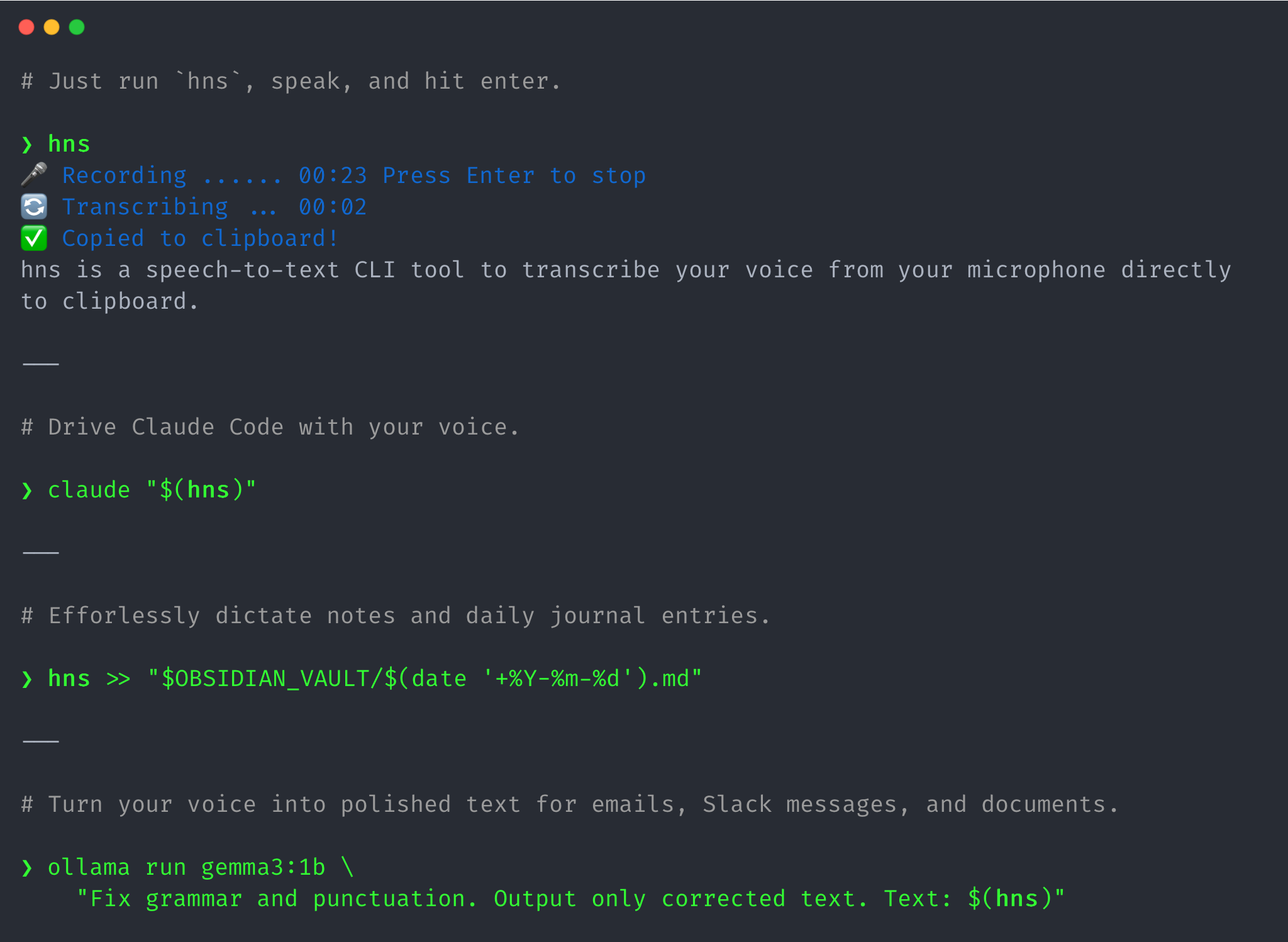
hns is a speech-to-text CLI tool to transcribe your voice from your microphone directly to clipboard. Integrate hns with Claude Code, Ollama, LLM, and more CLI tools for powerful workflows.
`hns` transcribes your voice 100% locally using [faster-whisper](https://github.com/SYSTRAN/faster-whisper). The whisper model is downloaded automatically on first run and after that, `hns` can be used completely offline. After transcription, the text is displayed in the terminal (written to stdout) as well as automatically copied to your clipboard, ready to be pasted anywhere with `Ctrl+V` or `Cmd+V`.
With `hns`, you can:
- [Drive AI coding agents like Claude Code, Codex CLI, and Cursor CLI with your voice](https://hns-cli.dev/docs/drive-coding-agents/)
- [Dictate and get polished text for emails, Slack messages, and documents](https://hns-cli.dev/docs/voice-to-polished-text/)
- [Speak freely in a stream-of-consciousness style and get polished, coherent journal entry or note](https://hns-cli.dev/docs/effortless-daily-journaling/)
...and much more! Just integrate `hns` with your favorite CLI tools.
## Quick Start
1. Install with `uv tool install hns` and then run `hns` in your terminal.
3. When you see `🎤 Recording...`, speak the following sentence clearly into your microphone: **"In the beginning the Universe was created. This has made a lot of people very angry and been widely regarded as a bad move"**.
4. Press `Enter` when you're done. The transcribed text will be printed to your terminal and copied directly to your clipboard, ready to be pasted anywhere with `Ctrl+V` or `Cmd+V`.
## Highlights
- **Instant Clipboard**: Transcribed text is automatically copied to your clipboard for immediate pasting
- **Composability (The Unix Way)**: Transcription is written to stdout and progress/status messages to stderr. Easy to integrate with other CLI tools
- **100% Local & Private**: Audio is processed entirely on your local machine. No data leaves your device
- **Works Offline**: After the initial model download, no internet connection is required
- **Multi-Language Support**: Transcribe in any language supported by Whisper
- **Configurable**: Choose models and languages via environment variables
- **Open Source** - MIT licensed, fully transparent
## Docs
- **[Overview](https://hns-cli.dev/docs/)**
- **Get Started**
- [Quick Start](https://hns-cli.dev/docs/quick-start/): Get `hns` up and running in less than 30 seconds.
- [Installation](https://hns-cli.dev/docs/installation/): Different ways to install `hns`, configure it, and upgrade to the latest version.
- [Configuration](https://hns-cli.dev/docs/configuration/): Configure `hns` to match your hardware and transcription needs. Set up Whisper models and language preferences for optimal performance.
- [CLI Reference](https://hns-cli.dev/docs/cli-reference/): Detailed reference for all available command-line options for `hns`.
- **Use Cases**
- [Overview](https://hns-cli.dev/docs/use-cases/): Unlock powerful workflows by integrating `hns` with various CLI tools.
- [Drive AI Coding Agents With Your Voice](https://hns-cli.dev/docs/drive-coding-agents/): Provide detailed, context-rich prompts to coding agents like Claude Code, Codex CLI, and Cursor CLI with your voice for faster development cycles.
- [Turn Your Voice Into Polished Text](https://hns-cli.dev/docs/voice-to-polished-text/): Integrate `hns` with LLMs to transforms your raw dictation into polished text for emails, Slack messages, and documents, streamlining your daily communication.
- [Effortless Daily Journaling With Your Voice](https://hns-cli.dev/docs/effortless-daily-journaling/): Speak freely in a stream-of-consciousness style and get polished, coherent journal entries or notes by integrating `hns` with LLMs.
## Usage
## Demo
Watch with sound on!
https://github.com/user-attachments/assets/2aa3752e-bd16-4536-81bd-0679c3be3616