📝 WriteHERE
Heterogeneous Recursive Planning based Open Writing Project



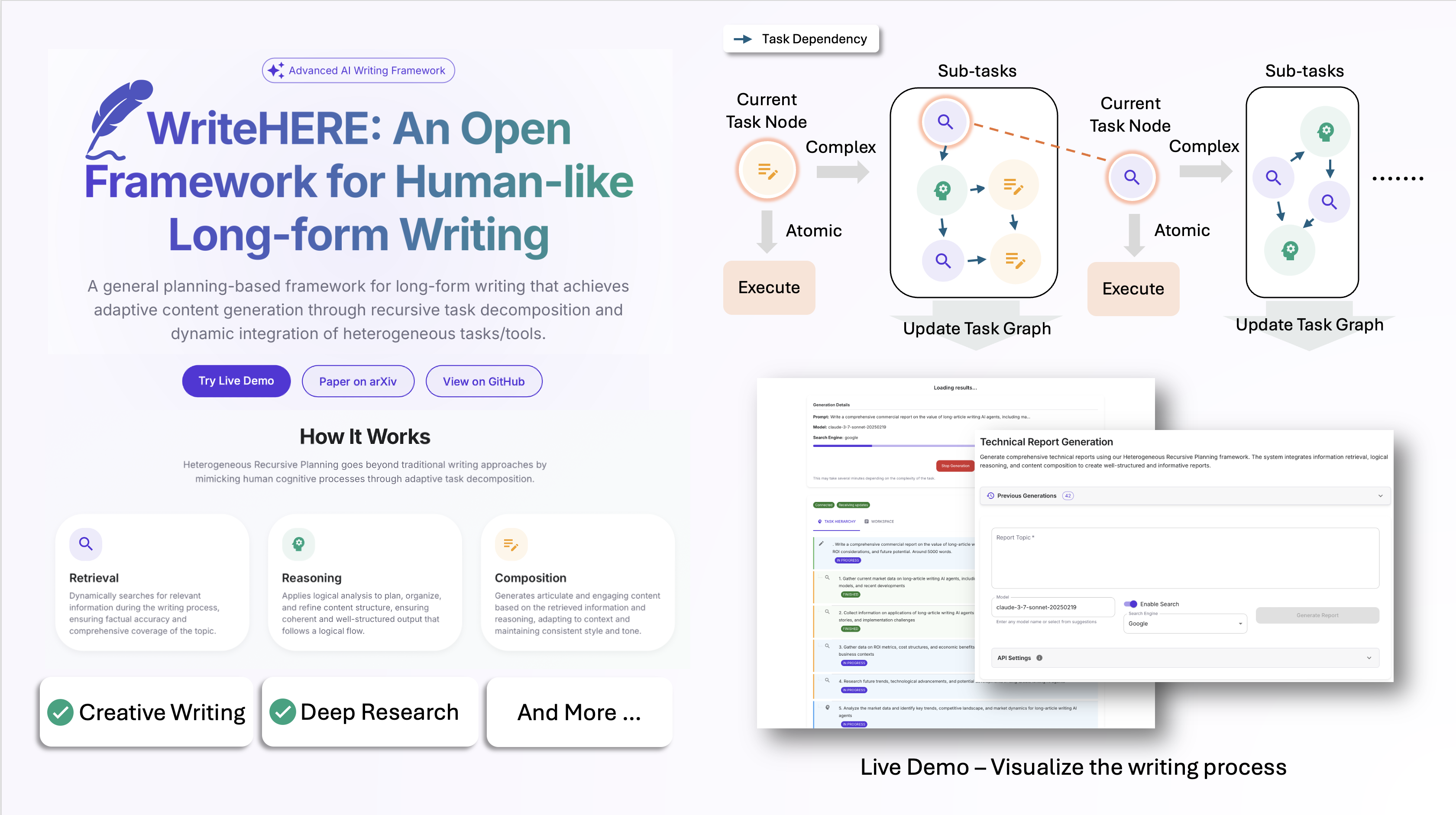
WriteHERE is an open-source framework that revolutionizes long-form writing through human-like adaptive planning. Unlike traditional AI writing tools that follow rigid workflows, WriteHERE dynamically decomposes writing tasks and integrates three fundamental capabilities:
1. **Recursive Planning**: Breaks down complex writing tasks into manageable subtasks
2. **Heterogeneous Integration**: Seamlessly combines retrieval, reasoning, and composition
3. **Dynamic Adaptation**: Adjusts the writing process in real-time based on context
Our evaluations show that this approach consistently outperforms state-of-the-art methods in both fiction writing and technical report generation.
## 🎉 News
- **[Sep 2025]** Our paper has been accepted as an oral presentation at EMNLP 2025. See you in Suzhou! 🎊
## 🔍 Overview
Unlike traditional approaches that rely on predetermined workflows and rigid thinking patterns, this framework:
1. **Eliminates workflow restrictions** through a planning mechanism that interleaves recursive task decomposition and execution
2. **Facilitates heterogeneous task decomposition** by integrating different task types
3. **Adapts dynamically** during the writing process, similar to human writing behavior
Our evaluations on both fiction writing and technical report generation demonstrate that this method consistently outperforms state-of-the-art approaches across all evaluation metrics.
## 🌐 Open Source Philosophy
WriteHERE is developed with these core principles:
- **Fully Open Source**: All code is freely available for use, modification, and distribution under the MIT License
- **Non-Commercial**: Developed for research and educational purposes without commercial interests
- **Full Transparency**: The entire system architecture and decision-making processes are transparent to users
- **Community-Driven**: We welcome contributions, feedback, and collaborative improvements from the community
## 🚀 Getting Started
### Prerequisites
- Python 3.6+
- Node.js 14+ (for the frontend)
- API keys for:
- OpenAI (GPT models)
- Anthropic (Claude models)
- SerpAPI (for search functionality in report generation)
### Quickstart
You can use WriteHERE in two ways: with or without the visualization interface.
#### Running Without Visualization
This is the simpler approach when you don't need real-time visualization or want to use the engine for batch processing.
1. **Setup the environment**:
```bash
python -m venv venv
source venv/bin/activate
pip install -v -e .
# Create api_key.env file based on example
cp recursive/api_key.env.example recursive/api_key.env
# Edit the file to add your keys
nano recursive/api_key.env
```
2. **Run the engine directly**:
```bash
cd recursive
python engine.py --filename --output-filename --done-flag-file --model --mode
```
Example for generating a story:
```bash
python engine.py --filename ../test_data/meta_fiction.jsonl --output-filename ./project/story/output.jsonl --done-flag-file ./project/story/done.txt --model gpt-4o --mode story
```
Example for generating a report:
```bash
python engine.py --filename ../test_data/qa_test.jsonl --output-filename ./project/qa/result.jsonl --done-flag-file ./project/qa/done.txt --model claude-3-sonnet --mode report
```
#### Running With Visualization Interface
This option provides a web interface to visualize and monitor the writing process in real-time.
1. **One-step setup and launch**:
```bash
./setup_env.sh # One-time setup of the environment
./start.sh # Start the application
```
This will:
- Create a clean Python virtual environment
- Install all required dependencies
- Start the backend server on port 5001
- Start the frontend on port 3000
- Open your browser at http://localhost:3000
You can customize the ports using command-line arguments:
```bash
./start.sh --backend-port 8080 --frontend-port 8000
```
#### For Anaconda/Miniconda Users
If you're using Anaconda and encounter dependency conflicts, use:
```bash
./run_with_anaconda.sh
```
This script creates a dedicated Anaconda environment called 'writehere' with the correct dependencies and runs both servers.
You can customize ports with this script:
```bash
./run_with_anaconda.sh --backend-port 8080 --frontend-port 8000
```
### Manual Installation
If you prefer to set up the components manually:
#### Backend Setup
1. Create a Python virtual environment:
```bash
python -m venv venv
source venv/bin/activate
```
2. Install main dependencies:
```bash
pip install -v -e .
```
3. Install backend server dependencies:
```bash
pip install -r backend/requirements.txt
```
4. Start the backend server:
```bash
cd backend
python server.py
```
To use a custom port:
```bash
python server.py --port 8080
```
#### Frontend Setup
1. Install frontend dependencies:
```bash
cd frontend
npm install
```
2. Start the frontend development server:
```bash
npm start
```
To use a custom port:
```bash
PORT=8000 npm start
```
### Troubleshooting
If you encounter any issues, please check the [Troubleshooting Guide](TROUBLESHOOTING.md) for common problems and solutions.
## ✨ Features
- **Recursive Task Decomposition**: Breaks down complex writing tasks into manageable subtasks
- **Dynamic Integration**: Seamlessly combines retrieval, reasoning, and composition tasks
- **Adaptive Workflow**: Flexibly adjusts the writing process based on context and requirements
- **Versatile Applications**: Supports both creative fiction and technical report generation
- **User-Friendly Interface**: Intuitive web interface for easy interaction
- **Real-Time Visualization**: See the agent's "thinking process" as it works
- **Transparent Operation**: All agent decisions and processes are visible to users
- **Fully Customizable**: Modify prompts, parameters, and workflows to suit your needs
## 📂 Project Structure
```
.
├── backend/ # Backend Flask server
├── frontend/ # React frontend
├── recursive/ # Core engine implementation
│ ├── agent/ # Agent implementation and prompts
│ ├── executor/ # Task execution modules
│ ├── llm/ # Language model integrations
│ ├── utils/ # Utility functions and helpers
│ ├── cache.py # Caching for improved efficiency
│ ├── engine.py # Core planning and execution engine
│ ├── graph.py # Task graph representation
│ ├── memory.py # Memory management
│ ├── test_run_report.sh # Script for generating reports
│ └── test_run_story.sh # Script for generating stories
├── test_data/ # Example data for testing
└── start.sh # All-in-one startup script
```
## 📊 Real-time Task Visualization
When using the visualization interface, you can see the task execution process in real-time. As the agent works on generating content, you can observe:
1. The hierarchical decomposition of tasks
2. Which tasks are currently being worked on
3. The status of each task (ready, in progress, completed)
4. The type of each task (retrieval, reasoning, composition)
This visualization provides insight into the agent's "thinking process" and helps you understand how complex writing tasks are broken down and solved step by step.
## 👥 Contributing
We welcome contributions from the community to help improve WriteHERE! Here's how you can contribute:
### Code Contributions
1. **Fork the repository** and create your feature branch from `main`
2. **Set up your development environment** following the installation instructions above
3. **Make your changes**, ensuring they follow the project's coding style and conventions
4. **Add tests** for any new functionality
5. **Ensure all tests pass** by running the test suite
6. **Submit a pull request** with a clear description of your changes and their benefits
### Bug Reports and Feature Requests
- Use the **Issues** tab to report bugs or suggest new features
- For bugs, include detailed steps to reproduce, expected behavior, and actual behavior
- For feature requests, describe the functionality you'd like to see and how it would benefit the project
### Documentation Improvements
- Help improve our documentation by fixing errors, adding examples, or clarifying instructions
- Documentation changes can be submitted through pull requests just like code changes
### Community Support
- Answer questions from other users in the Issues section
- Share your experiences and use cases with the community
### Development Guidelines
- Follow the existing code style and architecture
- Document new functions, classes, and modules
- Write clear commit messages that explain the purpose of your changes
- Keep pull requests focused on a single feature or bug fix
By contributing to WriteHERE, you agree that your contributions will be licensed under the project's MIT License.
## 📚 Citation
If you use this code in your research, please cite our paper:
```bibtex
@misc{xiong2025heterogeneousrecursiveplanning,
title={Beyond Outlining: Heterogeneous Recursive Planning for Adaptive Long-form Writing with Language Models},
author={Ruibin Xiong and Yimeng Chen and Dmitrii Khizbullin and Mingchen Zhuge and Jürgen Schmidhuber},
year={2025},
eprint={2503.08275},
archivePrefix={arXiv},
primaryClass={cs.AI},
url={https://arxiv.org/abs/2503.08275}
}
```
## ⚖️ License
[MIT License](LICENSE)
This project is open-source. You are free to use, modify, and distribute the code for research, educational, and personal purposes.