# Marigold Computer Vision
This project implements Marigold, a Computer Vision method for estimating image characteristics. Initially proposed for
extracting high-resolution depth maps in our CVPR 2024 paper **"Repurposing Diffusion-Based Image Generators for Monocular
Depth Estimation"**, we extended the method to other modalities as described in our follow-up paper **"Marigold: Affordable
Adaptation of Diffusion-Based Image Generators for Image Analysis"**.
## Marigold: Affordable Adaptation of Diffusion-Based Image Generators for Image Analysis
[](https://marigoldcomputervision.github.io)
[](https://arxiv.org/abs/2505.09358)
[](https://huggingface.co/spaces/prs-eth/marigold)
[](https://huggingface.co/spaces/prs-eth/marigold-normals)
[](https://huggingface.co/spaces/prs-eth/marigold-iid)
[](https://huggingface.co/prs-eth/marigold-depth-v1-1)
[](https://huggingface.co/prs-eth/marigold-normals-v1-1)
[](https://huggingface.co/prs-eth/marigold-iid-appearance-v1-1)
[](https://huggingface.co/prs-eth/marigold-iid-lighting-v1-1)
[](https://huggingface.co/docs/diffusers/using-diffusers/marigold_usage)
Team:
[Bingxin Ke](http://www.kebingxin.com/),
[Kevin Qu](https://www.linkedin.com/in/kevin-qu-b3417621b/),
[Tianfu Wang](https://tianfwang.github.io/)
[Nando Metzger](https://nandometzger.github.io/),
[Shengyu Huang](https://shengyuh.github.io/),
[Bo Li](https://www.linkedin.com/in/bobboli0202/),
[Anton Obukhov](https://www.obukhov.ai/),
[Konrad Schindler](https://scholar.google.com/citations?user=FZuNgqIAAAAJ)
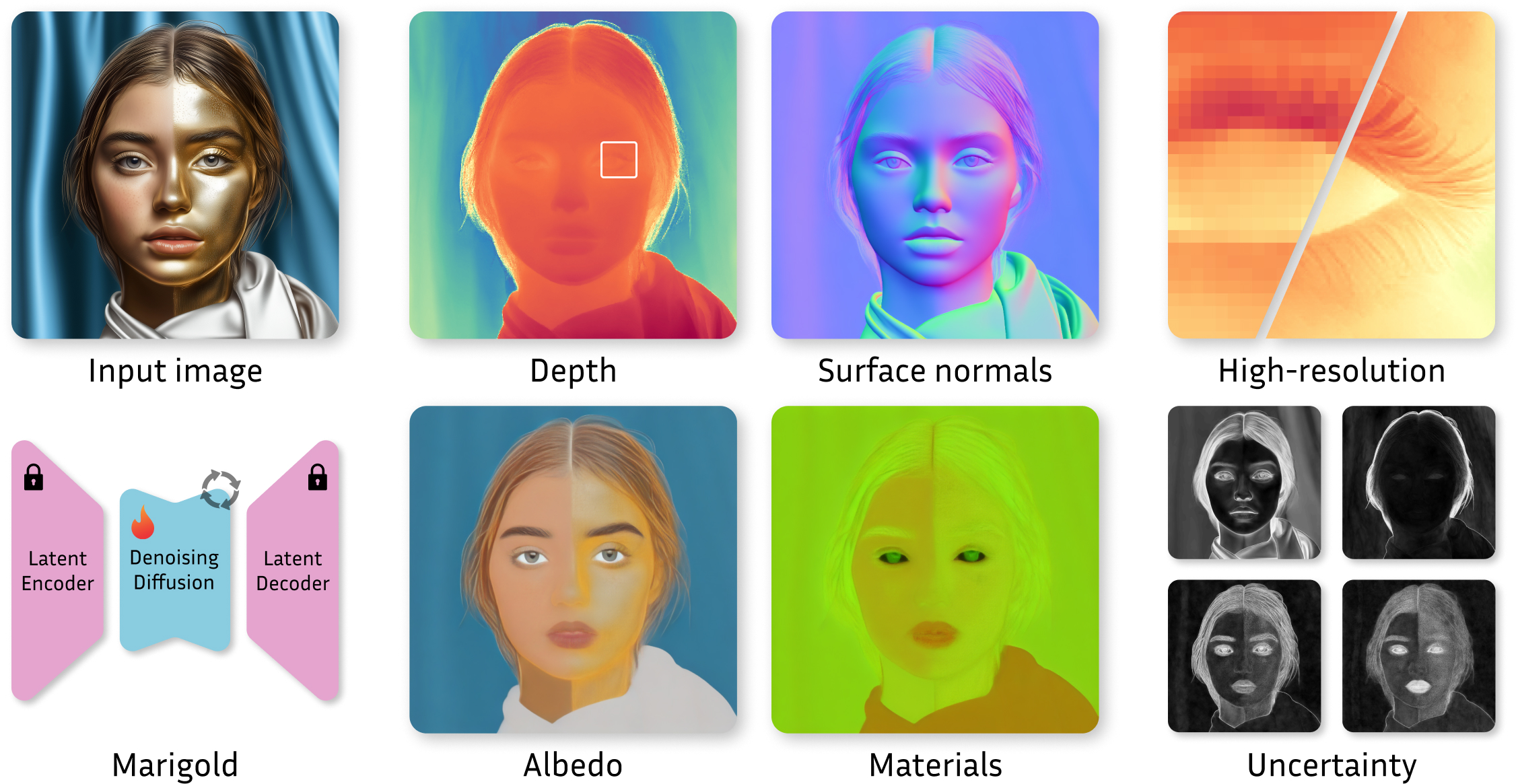
We present Marigold, a family of conditional generative models and a fine-tuning protocol that extracts the knowledge
from pretrained latent diffusion models like Stable Diffusion and adapts them for dense image analysis tasks, including
monocular depth estimation, surface normal prediction, and intrinsic decomposition. Marigold requires minimal
modification of the pre-trained latent diffusion model's architecture, trains with small synthetic datasets on a single
GPU over a few days, and demonstrates state-of-the-art zero-shot generalization.
## Repurposing Diffusion-Based Image Generators for Monocular Depth Estimation
[](https://marigoldmonodepth.github.io)
[](https://arxiv.org/abs/2312.02145)
[](https://huggingface.co/spaces/prs-eth/marigold)
[](https://huggingface.co/prs-eth/marigold-depth-v1-1)
[](https://colab.research.google.com/drive/12G8reD13DdpMie5ZQlaFNo2WCGeNUH-u?usp=sharing)
In **CVPR 2024 (Oral, Best Paper Award Candidate)**
Team:
[Bingxin Ke](http://www.kebingxin.com/),
[Anton Obukhov](https://www.obukhov.ai/),
[Shengyu Huang](https://shengyuh.github.io/),
[Nando Metzger](https://nandometzger.github.io/),
[Rodrigo Caye Daudt](https://rcdaudt.github.io/),
[Konrad Schindler](https://scholar.google.com/citations?user=FZuNgqIAAAAJ)
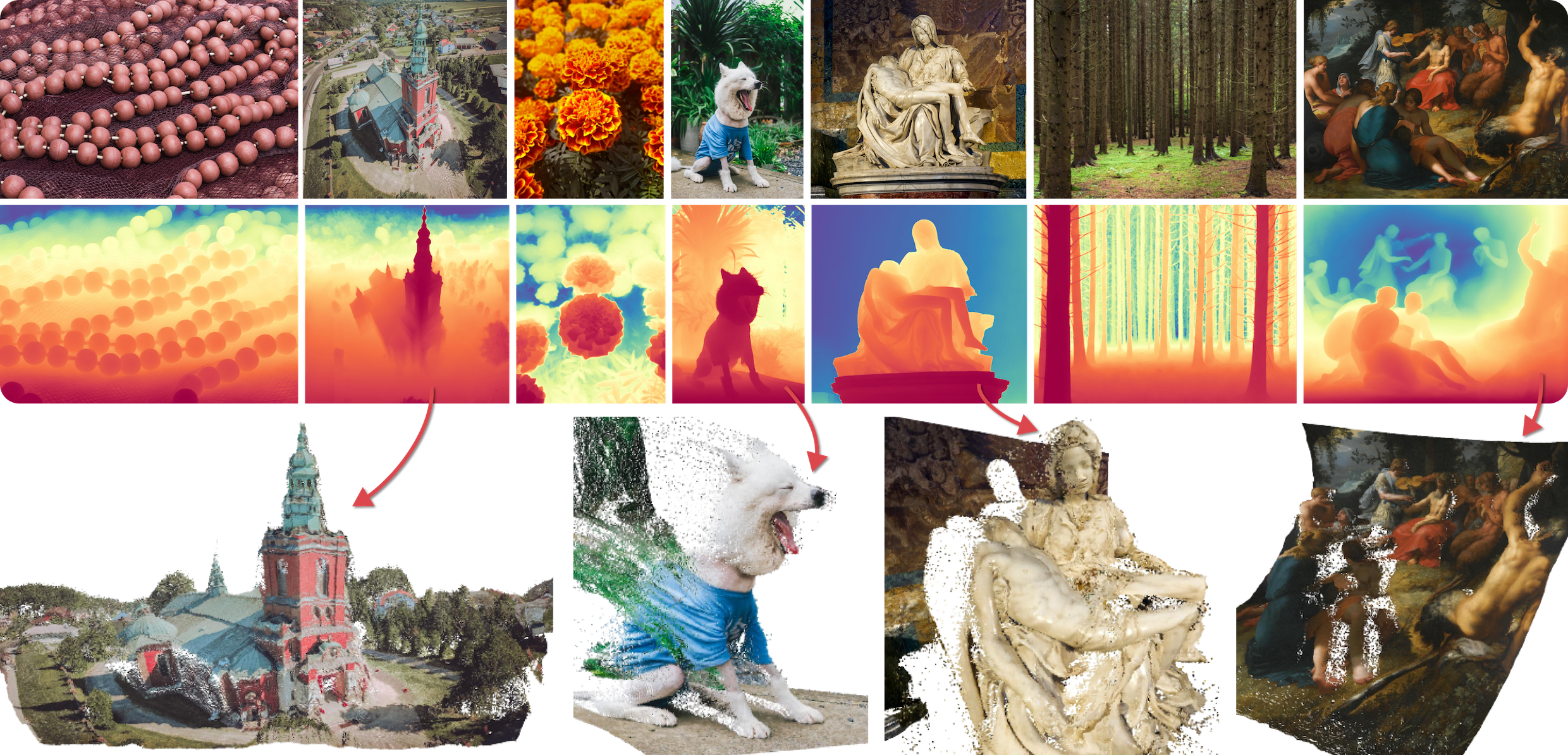
We present Marigold, a diffusion model, and an associated fine-tuning protocol for monocular depth estimation. Its core
principle is to leverage the rich visual knowledge stored in modern generative image models. Our model, derived from
Stable Diffusion and fine-tuned with synthetic data, can zero-shot transfer to unseen data, offering state-of-the-art
monocular depth estimation results.
## 📢 News
2025-05-15: Released code and a [checkpoint](https://huggingface.co/prs-eth/marigold-iid-lighting-v1-1) of Marigold Intrinsic Image Decomposition predicting Albedo, diffuse Shading, and non-diffuse Residual (Marigold-IID-Lighting v1.1).
2025-05-15: Released code and a [checkpoint](https://huggingface.co/prs-eth/marigold-iid-appearance-v1-1) of Marigold Intrinsic Image Decomposition predicting Albedo, Roughness, and Metallicity (Marigold-IID-Appearance v1.1).
2025-05-15: Released code and a [checkpoint](https://huggingface.co/prs-eth/marigold-normals-v1-1) of Marigold Surface Normals Estimation (v1.1).
2025-05-15: Released an updated [checkpoint](https://huggingface.co/prs-eth/marigold-depth-v1-1) of Marigold Depth (v1.1), trained with updated noise scheduler settings (zero-SNR and trailing timestamps), and augmentations.
2024-05-28: Training code is released.
2024-05-27: Marigold pipelines are merged into the `diffusers` core starting v0.28.0 [release](https://github.com/huggingface/diffusers/releases/tag/v0.28.0)!
2024-03-23: Added a Latent Consistency Model (LCM) [checkpoint](https://huggingface.co/prs-eth/marigold-depth-lcm-v1-0).
2024-03-04: The paper is accepted at CVPR 2024.
2023-12-22: Contributed to Diffusers [community pipeline](https://github.com/huggingface/diffusers/tree/main/examples/community#marigold-depth-estimation).
2023-12-19: Updated [license](LICENSE.txt) to Apache License, Version 2.0.
2023-12-08: Added the first interactive [Hugging Face Space Demo](https://huggingface.co/spaces/prs-eth/marigold) of depth estimation.
2023-12-05: Added a [Google Colab](https://colab.research.google.com/drive/12G8reD13DdpMie5ZQlaFNo2WCGeNUH-u?usp=sharing)
2023-12-04: Added an [arXiv paper](https://arxiv.org/abs/2312.02145) and inference code (this repository).
## 🚀 Usage
**We offer several ways to interact with Marigold**:
1. A family of free online interactive demos:


 (kudos to the HF team for the GPU grants)
1. Marigold pipelines are part of
 - a one-stop shop for diffusion 🧨!
1. Run the demo locally (requires a GPU and an `nvidia-docker2`, see [Installation Guide](https://docs.nvidia.com/datacenter/cloud-native/container-toolkit/latest/install-guide.html)):
`docker run -it -p 7860:7860 --platform=linux/amd64 --gpus all registry.hf.space/prs-eth-marigold:latest python app.py`
1. Extended demo on a Google Colab:
 1. If you just want to see the examples, visit our gallery:
 1. Finally, local development instructions with this codebase are given below.
## 🛠️ Setup
The inference code was tested on:
- Ubuntu 22.04 LTS, Python 3.10.12, CUDA 11.7, GeForce RTX 3090 (pip)
### 🪧 A Note for Windows users
We recommend running the code in WSL2:
1. Install WSL following [installation guide](https://learn.microsoft.com/en-us/windows/wsl/install#install-wsl-command).
1. Install CUDA support for WSL following [installation guide](https://docs.nvidia.com/cuda/wsl-user-guide/index.html#cuda-support-for-wsl-2).
1. Find your drives in `/mnt//`; check [WSL FAQ](https://learn.microsoft.com/en-us/windows/wsl/faq#how-do-i-access-my-c--drive-) for more details. Navigate to the working directory of choice.
### 📦 Repository
Clone the repository (requires git):
```bash
git clone https://github.com/prs-eth/Marigold.git
cd Marigold
```
### 💻 Dependencies
Install the dependencies:
```bash
python -m venv venv/marigold
source venv/marigold/bin/activate
pip install -r requirements.txt
```
Keep the environment activated before running the inference script.
Activate the environment again after restarting the terminal session.
## 🏃 Testing on your images
### 📷 Prepare images
Use selected images from our paper:
```bash
bash script/download_sample_data.sh
```
Or place your images in a directory, for example, under `input/in-the-wild_example`, and run the following inference command.
### 🚀 Run inference (for practical usage)
```bash
# Depth
python script/depth/run.py \
--checkpoint prs-eth/marigold-depth-v1-1 \
--input_rgb_dir input/in-the-wild_example \
--output_dir output/in-the-wild_example \
--fp16
```
```bash
# Normals
python script/normals/run.py \
--checkpoint prs-eth/marigold-normals-v1-1 \
--input_rgb_dir input/in-the-wild_example \
--output_dir output/in-the-wild_example \
--fp16
```
```bash
# IID (appearance model)
python script/iid/run.py \
--checkpoint prs-eth/marigold-iid-appearance-v1-1 \
--input_rgb_dir input/in-the-wild_example \
--output_dir output/in-the-wild_example \
--fp16
# IID (lighting model)
python script/iid/run.py \
--checkpoint prs-eth/marigold-iid-lighting-v1-1 \
--input_rgb_dir input/in-the-wild_example \
--output_dir output/in-the-wild_example \
--fp16
```
### ⚙️ Inference settings
The default settings are optimized for the best results. However, the behavior of the code can be customized:
- `--half_precision` or `--fp16`: Run with half-precision (16-bit float) to have faster speed and reduced VRAM usage, but might lead to suboptimal results.
- `--ensemble_size`: Number of inference passes in the ensemble. Larger values tend to give better results in evaluations at the cost of slower inference; for most cases 1 is enough. Default: 1.
- `--denoise_steps`: Number of denoising diffusion steps. Default settings are defined in the model checkpoints and are sufficient for most cases.
- By default, the inference script resizes input images to the *processing resolution*, and then resizes the prediction back to the original resolution. This gives the best quality, as Stable Diffusion, from which Marigold is derived, performs best at 768x768 resolution.
- `--processing_res`: the processing resolution; set as 0 to process the input resolution directly. When unassigned (`None`), will read default setting from model config. Default: `None`.
- `--output_processing_res`: produce output at the processing resolution instead of upsampling it to the input resolution. Default: False.
- `--resample_method`: the resampling method used to resize images and depth predictions. This can be one of `bilinear`, `bicubic`, or `nearest`. Default: `bilinear`.
- `--seed`: Random seed can be set to ensure additional reproducibility. Default: None (unseeded). Note: forcing `--batch_size 1` helps to increase reproducibility. To ensure full reproducibility, [deterministic mode](https://pytorch.org/docs/stable/notes/randomness.html#avoiding-nondeterministic-algorithms) needs to be used.
- `--batch_size`: Batch size of repeated inference. Default: 0 (best value determined automatically).
- `--color_map`: [Colormap](https://matplotlib.org/stable/users/explain/colors/colormaps.html) used to colorize the depth prediction. Default: Spectral. Set to `None` to skip colored depth map generation.
- `--apple_silicon`: Use Apple Silicon MPS acceleration.
### 🎮 Run inference (for academic comparisons)
These settings correspond to our paper. For academic comparison, please run with the settings below (if you only want to do fast inference on your own images, you can set `--ensemble_size 1`).
```bash
# Depth
python script/depth/run.py \
--checkpoint prs-eth/marigold-depth-v1-1 \
--denoise_steps 1 \
--ensemble_size 10 \
--input_rgb_dir input/in-the-wild_example \
--output_dir output/in-the-wild_example
```
```bash
# Normals
python script/normals/run.py \
--checkpoint prs-eth/marigold-normals-v1-1 \
--denoise_steps 4 \
--ensemble_size 10 \
--input_rgb_dir input/in-the-wild_example \
--output_dir output/in-the-wild_example
```
```bash
# IID (appearance model)
python script/iid/run.py \
--checkpoint prs-eth/marigold-iid-appearance-v1-1 \
--denoise_steps 4 \
--ensemble_size 1 \
--input_rgb_dir input/in-the-wild_example \
--output_dir output/in-the-wild_example
# IID (lighting model)
python script/iid/run.py \
--checkpoint prs-eth/marigold-iid-lighting-v1-1 \
--denoise_steps 4 \
--ensemble_size 1 \
--input_rgb_dir input/in-the-wild_example \
--output_dir output/in-the-wild_example
```
```bash
# Depth (the original CVPR version)
python script/depth/run.py \
--checkpoint prs-eth/marigold-depth-v1-0 \
--denoise_steps 50 \
--ensemble_size 10 \
--input_rgb_dir input/in-the-wild_example \
--output_dir output/in-the-wild_example
```
You can find all results in the `output` directory. Enjoy!
### ⬇ Checkpoint cache
By default, the checkpoint ([depth](https://huggingface.co/prs-eth/marigold-depth-v1-1), [normals](https://huggingface.co/prs-eth/marigold-normals-v1-1), [iid](https://huggingface.co/prs-eth/marigold-iid-appearance-v1-1)) is stored in the Hugging Face cache.
The `HF_HOME` environment variable defines its location and can be overridden, e.g.:
```bash
export HF_HOME=$(pwd)/cache
```
Alternatively, use the following script to download the checkpoint weights locally:
```bash
bash script/download_weights.sh marigold-depth-v1-1 # depth checkpoint
bash script/download_weights.sh marigold-normals-v1-1 # normals checkpoint
bash script/download_weights.sh marigold-iid-appearance-v1-1 # iid appearance checkpoint
bash script/download_weights.sh marigold-iid-lighting-v1-1 # iid lighting checkpoint
# bash script/download_weights.sh marigold-depth-v1-0 # CVPR depth checkpoint
```
At inference, specify the checkpoint path:
```bash
# Depth
python script/depth/run.py \
--checkpoint checkpoint/marigold-depth-v1-1 \
--denoise_steps 4 \
--ensemble_size 1 \
--input_rgb_dir input/in-the-wild_example \
--output_dir output/in-the-wild_example
```
```bash
# Normals
python script/normals/run.py \
--checkpoint checkpoint/marigold-normals-v1-1 \
--denoise_steps 4 \
--ensemble_size 1 \
--input_rgb_dir input/in-the-wild_example \
--output_dir output/in-the-wild_example
```
```bash
# IID (appearance model)
python script/iid/run.py \
--checkpoint checkpoint/marigold-iid-appearance-v1-1 \
--denoise_steps 4 \
--ensemble_size 1 \
--input_rgb_dir input/in-the-wild_example \
--output_dir output/in-the-wild_example
# IID (lighting model)
python script/iid/run.py \
--checkpoint checkpoint/marigold-iid-lighting-v1-1 \
--denoise_steps 4 \
--ensemble_size 1 \
--input_rgb_dir input/in-the-wild_example \
--output_dir output/in-the-wild_example
```
## 🦿 Evaluation on test datasets
Install additional dependencies:
```bash
pip install -r requirements+.txt -r requirements.txt
```
Set data directory variable (also needed in evaluation scripts) and download the evaluation datasets ([depth](https://share.phys.ethz.ch/~pf/bingkedata/marigold/evaluation_dataset), [normals](https://share.phys.ethz.ch/~pf/bingkedata/marigold/marigold_normals/evaluation_dataset)) into the corresponding subfolders:
```bash
export BASE_DATA_DIR= # Set target data directory
# Depth
wget -r -np -nH --cut-dirs=4 -R "index.html*" -P ${BASE_DATA_DIR} https://share.phys.ethz.ch/~pf/bingkedata/marigold/evaluation_dataset/
# Normals
wget -r -np -nH --cut-dirs=4 -R "index.html*" -P ${BASE_DATA_DIR} https://share.phys.ethz.ch/~pf/bingkedata/marigold/marigold_normals/evaluation_dataset.zip
unzip ${BASE_DATA_DIR}/evaluation_dataset.zip -d ${BASE_DATA_DIR}/
rm -f ${BASE_DATA_DIR}/evaluation_dataset.zip
```
For download instructions of the intrinsic image decomposition test data, please refer to [iid-appearance instructions](script/iid/dataset_preprocess/interiorverse_appearance/README.md) and [iid-lighting instructions](script/iid/dataset_preprocess/hypersim_lighting/README.md).
Run inference and evaluation scripts, for example:
```bash
# Depth
bash script/depth/eval/11_infer_nyu.sh # Run inference
bash script/depth/eval/12_eval_nyu.sh # Evaluate predictions
```
```bash
# Normals
bash script/normals/eval/11_infer_scannet.sh # Run inference
bash script/normals/eval/12_eval_scannet.sh # Evaluate predictions
```
```bash
# IID
bash script/iid/eval/11_infer_appearance_interiorverse.sh # Run inference
bash script/iid/eval/12_eval_appearance_interiorverse.sh # Evaluate predictions
bash script/iid/eval/21_infer_lighting_hypersim.sh # Run inference
bash script/iid/eval/22_eval_lighting_hypersim.sh # Evaluate predictions
```
```bash
# Depth (the original CVPR version)
bash script/depth/eval_old/11_infer_nyu.sh # Run inference
bash script/depth/eval_old/12_eval_nyu.sh # Evaluate predictions
```
Note: although the seed has been set, the results might still be slightly different on different hardware.
## 🏋️ Training
Based on the previously created environment, install extended requirements:
```bash
pip install -r requirements++.txt -r requirements+.txt -r requirements.txt
```
Set environment parameters for the data directory:
```bash
export BASE_DATA_DIR=YOUR_DATA_DIR # directory of training data
export BASE_CKPT_DIR=YOUR_CHECKPOINT_DIR # directory of pretrained checkpoint
```
Download Stable Diffusion v2 [checkpoint](https://huggingface.co/stabilityai/stable-diffusion-2) into `${BASE_CKPT_DIR}` ([backup link](https://share.phys.ethz.ch/~pf/bingkedata/marigold/checkpoint/stable-diffusion-2.tar))
### Prepare for training data
**Depth**
Prepare for [Hypersim](https://github.com/apple/ml-hypersim) and [Virtual KITTI 2](https://europe.naverlabs.com/research/computer-vision/proxy-virtual-worlds-vkitti-2/) datasets and save into `${BASE_DATA_DIR}`. Please refer to [this README](script/depth/dataset_preprocess/hypersim/README.md) for Hypersim preprocessing.
**Normals**
Prepare for [Hypersim](https://github.com/apple/ml-hypersim), [Interiorverse](https://interiorverse.github.io/) and [Sintel](http://sintel.is.tue.mpg.de/) datasets and save into `${BASE_DATA_DIR}`. Please refer to [this README](script/normals/dataset_preprocess/hypersim/README.md) for Hypersim preprocessing, [this README](script/normals/dataset_preprocess/interiorverse/README.md) for Interiorverse and [this README](script/normals/dataset_preprocess/sintel/README.md) for Sintel.
**Intrinsic Image Decomposition**
*Appearance model*: Prepare for [Interiorverse](https://interiorverse.github.io/) dataset and save into `${BASE_DATA_DIR}`. Please refer to [this README](script/iid/dataset_preprocess/interiorverse_appearance/README.md) for Interiorverse preprocessing.
*Lighting model*: Prepare for [Hypersim](https://github.com/apple/ml-hypersim) dataset and save into `${BASE_DATA_DIR}`. Please refer to [this README](script/iid/dataset_preprocess/hypersim_lighting/README.md) for Hypersim preprocessing.
### Run training script
```bash
# Depth
python script/depth/train.py --config config/train_marigold_depth.yaml
```
```bash
# Normals
python script/normals/train.py --config config/train_marigold_normals.yaml
```
```bash
# IID (appearance model)
python script/iid/train.py --config config/train_marigold_iid_appearance.yaml
# IID (lighting model)
python script/iid/train.py --config config/train_marigold_iid_lighting.yaml
```
Resume from a checkpoint, e.g.:
```bash
# Depth
python script/depth/train.py --resume_run output/marigold_base/checkpoint/latest
```
```bash
# Normals
python script/normals/train.py --resume_run output/train_marigold_normals/checkpoint/latest
```
```bash
# IID (appearance model)
python script/iid/train.py --resume_run output/train_marigold_iid_appearance/checkpoint/latest
# IID (lighting model)
python script/iid/train.py --resume_run output/train_marigold_iid_lighting/checkpoint/latest
```
### Compose checkpoint:
Only the U-Net and scheduler config are updated during training. They are saved in the training directory. To use the inference pipeline with your training result:
- replace `unet` folder in Marigold checkpoints with that in the `checkpoint` output folder.
- replace the `scheduler/scheduler_config.json` file in Marigold checkpoints with `checkpoint/scheduler_config.json` generated during training.
Then refer to [this section](#evaluation) for evaluation.
**Note**: Although random seeds have been set, the training result might be slightly different on different hardwares. It's recommended to train without interruption.
## ✏️ Contributing
Please refer to [this](CONTRIBUTING.md) instruction.
## 🤔 Troubleshooting
| Problem | Solution |
|----------------------------------------------------------------------------------------------------------------------------------------------|----------------------------------------------------------------|
| (Windows) Invalid DOS bash script on WSL | Run `dos2unix ` to convert script format |
| (Windows) error on WSL: `Could not load library libcudnn_cnn_infer.so.8. Error: libcuda.so: cannot open shared object file: No such file or directory` | Run `export LD_LIBRARY_PATH=/usr/lib/wsl/lib:$LD_LIBRARY_PATH` |
| Training takes a long time to start | Use folders for data instead of tar files (modification in config files is required). |
## 🎓 Citation
Please cite our papers:
```bibtex
@InProceedings{ke2023repurposing,
title={Repurposing Diffusion-Based Image Generators for Monocular Depth Estimation},
author={Bingxin Ke and Anton Obukhov and Shengyu Huang and Nando Metzger and Rodrigo Caye Daudt and Konrad Schindler},
booktitle = {Proceedings of the IEEE/CVF Conference on Computer Vision and Pattern Recognition (CVPR)},
year={2024}
}
@misc{ke2025marigold,
title={Marigold: Affordable Adaptation of Diffusion-Based Image Generators for Image Analysis},
author={Bingxin Ke and Kevin Qu and Tianfu Wang and Nando Metzger and Shengyu Huang and Bo Li and Anton Obukhov and Konrad Schindler},
year={2025},
eprint={2505.09358},
archivePrefix={arXiv},
primaryClass={cs.CV}
}
```
## 🎫 License
This code of this work is licensed under the Apache License, Version 2.0 (as defined in the [LICENSE](LICENSE.txt)).
The models are licensed under RAIL++-M License (as defined in the [LICENSE-MODEL](LICENSE-MODEL.txt))
By downloading and using the code and model you agree to the terms in [LICENSE](LICENSE.txt) and [LICENSE-MODEL](LICENSE-MODEL.txt) respectively.