
 Indeed, that's much simpler. `Atributika` is easy-to-use, declarative, flexible, and handles the rough edges for you.
## Features
Atributika
+ NSAttributedString builder.
+ Detects and styles HTML-like **tags** using a custom high-speed parser.
+ Detects and styles **hashtags** and **mentions** (i.e., #something and @someone).
+ Identifies and styles **links** and **phone numbers**.
+ Detects and styles regexes and NSDataDetector patterns.
+ Styles the entire string or just specified ranges.
+ Allows all the above to be chained together to parse complex strings!
+ Provides a clean and expressive API to construct styles.
+ Offers a separate set of detection utilities for standalone use.
+ Compatible with iOS, tvOS, watchOS, and macOS.
AtributikaViews
+ Custom views with **highlightable and clickable** links.
+ Custom text styles for `normal/highlighted/disabled` states.
+ Supports custom highlighting.
## V5
V5 is a major rewrite of the project, executed in early 2023. It's not fully compatible with the previous version and requires some manual migration. The introduction of breaking changes was necessary for the project's further evolution.
Here's what's new:
NSAttributedString Building
+ Completely rewritten HTML parser, which fixed a multitude of bugs and improved handling of edge cases.
+ More generic and robust text transforming and attribute fine-tuning APIs.
AttributedLabel / AttributedTextView
+ Moved to a standalone library, independent of Atributika.
+ Offers proper accessibility support.
+ Improved performance and touch handling.
+ AttributedLabel is based on UILabel (lightweight, with vertically-centered text).
+ AttributedTextView is based on UITextView (supports scrolling and text selection, with text aligned to the top of the frame).
New examples have been added to the Demo application, including:
+ Basic web browser powered by AttributedTextView
+ SwiftUI integration
+ Highlightable links for Markdown documents
## Examples
### Detect and style tags, provide base style for the rest of string, don't forget about special html symbols
```swift
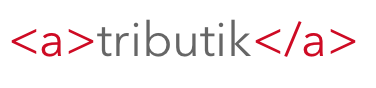
let redColor = UIColor(red:(0xD0 / 255.0), green: (0x02 / 255.0), blue:(0x1B / 255.0), alpha:1.0)
let a = Attrs().foregroundColor(redColor)
let font = UIFont(name: "AvenirNext-Regular", size: 24)!
let grayColor = UIColor(white: 0x66 / 255.0, alpha: 1)
let base = Attrs().font(font).foregroundColor(grayColor)
let str = "<a>tributik</a>"
.style(tags: ["a": a])
.styleBase(base)
.attributedString
```
Indeed, that's much simpler. `Atributika` is easy-to-use, declarative, flexible, and handles the rough edges for you.
## Features
Atributika
+ NSAttributedString builder.
+ Detects and styles HTML-like **tags** using a custom high-speed parser.
+ Detects and styles **hashtags** and **mentions** (i.e., #something and @someone).
+ Identifies and styles **links** and **phone numbers**.
+ Detects and styles regexes and NSDataDetector patterns.
+ Styles the entire string or just specified ranges.
+ Allows all the above to be chained together to parse complex strings!
+ Provides a clean and expressive API to construct styles.
+ Offers a separate set of detection utilities for standalone use.
+ Compatible with iOS, tvOS, watchOS, and macOS.
AtributikaViews
+ Custom views with **highlightable and clickable** links.
+ Custom text styles for `normal/highlighted/disabled` states.
+ Supports custom highlighting.
## V5
V5 is a major rewrite of the project, executed in early 2023. It's not fully compatible with the previous version and requires some manual migration. The introduction of breaking changes was necessary for the project's further evolution.
Here's what's new:
NSAttributedString Building
+ Completely rewritten HTML parser, which fixed a multitude of bugs and improved handling of edge cases.
+ More generic and robust text transforming and attribute fine-tuning APIs.
AttributedLabel / AttributedTextView
+ Moved to a standalone library, independent of Atributika.
+ Offers proper accessibility support.
+ Improved performance and touch handling.
+ AttributedLabel is based on UILabel (lightweight, with vertically-centered text).
+ AttributedTextView is based on UITextView (supports scrolling and text selection, with text aligned to the top of the frame).
New examples have been added to the Demo application, including:
+ Basic web browser powered by AttributedTextView
+ SwiftUI integration
+ Highlightable links for Markdown documents
## Examples
### Detect and style tags, provide base style for the rest of string, don't forget about special html symbols
```swift
let redColor = UIColor(red:(0xD0 / 255.0), green: (0x02 / 255.0), blue:(0x1B / 255.0), alpha:1.0)
let a = Attrs().foregroundColor(redColor)
let font = UIFont(name: "AvenirNext-Regular", size: 24)!
let grayColor = UIColor(white: 0x66 / 255.0, alpha: 1)
let base = Attrs().font(font).foregroundColor(grayColor)
let str = "<a>tributik</a>"
.style(tags: ["a": a])
.styleBase(base)
.attributedString
```
 ### Detect and style hashtags and mentions
```swift
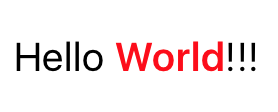
let str = "#Hello @World!!!"
.styleHashtags(Attrs().font(.boldSystemFont(ofSize: 45)))
.styleMentions(Attrs().foregroundColor(.red))
.attributedString
```
### Detect and style hashtags and mentions
```swift
let str = "#Hello @World!!!"
.styleHashtags(Attrs().font(.boldSystemFont(ofSize: 45)))
.styleMentions(Attrs().foregroundColor(.red))
.attributedString
```
 ### Detect and style links
```swift
let str = "Check this website http://google.com"
.styleLinks(Attrs().foregroundColor(.blue))
.attributedString
```
### Detect and style links
```swift
let str = "Check this website http://google.com"
.styleLinks(Attrs().foregroundColor(.blue))
.attributedString
```
 ### Detect and style phone numbers
```swift
let str = "Call me (888)555-5512"
.stylePhoneNumbers(Attrs().foregroundColor(.red))
.attributedString
```
### Detect and style phone numbers
```swift
let str = "Call me (888)555-5512"
.stylePhoneNumbers(Attrs().foregroundColor(.red))
.attributedString
```
 ### Uber String
```swift
let links = Attrs().foregroundColor(.blue)
let phoneNumbers = Attrs().backgroundColor(.yellow)
let mentions = Attrs().font(.italicSystemFont(ofSize: 12)).foregroundColor(.black)
let b = Attrs().font(.boldSystemFont(ofSize: 12))
let u = Attrs().underlineStyle(.single)
let base = Attrs().font(.systemFont(ofSize: 12)).foregroundColor(.gray)
let str = "@all I found really nice framework to manage attributed strings. It is called Atributika. Call me if you want to know more (123)456-7890 #swift #nsattributedstring https://github.com/psharanda/Atributika"
.style(tags: ["u": u, "b": b])
.styleMentions(mentions)
.styleHashtags(links)
.styleLinks(links)
.stylePhoneNumbers(phoneNumbers)
.styleBase(base)
.attributedString
```
### Uber String
```swift
let links = Attrs().foregroundColor(.blue)
let phoneNumbers = Attrs().backgroundColor(.yellow)
let mentions = Attrs().font(.italicSystemFont(ofSize: 12)).foregroundColor(.black)
let b = Attrs().font(.boldSystemFont(ofSize: 12))
let u = Attrs().underlineStyle(.single)
let base = Attrs().font(.systemFont(ofSize: 12)).foregroundColor(.gray)
let str = "@all I found really nice framework to manage attributed strings. It is called Atributika. Call me if you want to know more (123)456-7890 #swift #nsattributedstring https://github.com/psharanda/Atributika"
.style(tags: ["u": u, "b": b])
.styleMentions(mentions)
.styleHashtags(links)
.styleLinks(links)
.stylePhoneNumbers(phoneNumbers)
.styleBase(base)
.attributedString
```
 ## AttributedLabel
```swift
let tweetLabel = AttributedLabel()
tweetLabel.numberOfLines = 0
tweetLabel.highlightedLinkAttributes = Attrs().foregroundColor(.red).attributes
let baseLinkAttrs = Attrs().foregroundColor(.blue)
let a = TagTuner {
Attrs(baseLinkAttrs).akaLink($0.tag.attributes["href"] ?? "")
}
let hashtag = DetectionTuner {
Attrs(baseLinkAttrs).akaLink("https://twitter.com/hashtag/\($0.text.replacingOccurrences(of: "#", with: ""))")
}
let mention = DetectionTuner {
Attrs(baseLinkAttrs).akaLink("https://twitter.com/\($0.text.replacingOccurrences(of: "@", with: ""))")
}
let link = DetectionTuner {
Attrs(baseLinkAttrs).akaLink($0.text)
}
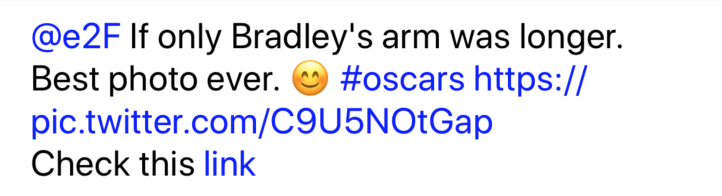
let tweet = "@all I found really nice framework to manage attributed strings. It is called Atributika. Call me if you want to know more (123)456-7890 #swift #nsattributedstring https://github.com/psharanda/Atributika"
tweetLabel.attributedText = tweet
.style(tags: ["a": a])
.styleHashtags(hashtag)
.styleMentions(mention)
.styleLinks(link)
.attributedString
tweetLabel.onLinkTouchUpInside = { _, val in
if let linkStr = val as? String {
if let url = URL(string: linkStr) {
UIApplication.shared.openURL(url)
}
}
}
view.addSubview(tweetLabel)
```
## AttributedLabel
```swift
let tweetLabel = AttributedLabel()
tweetLabel.numberOfLines = 0
tweetLabel.highlightedLinkAttributes = Attrs().foregroundColor(.red).attributes
let baseLinkAttrs = Attrs().foregroundColor(.blue)
let a = TagTuner {
Attrs(baseLinkAttrs).akaLink($0.tag.attributes["href"] ?? "")
}
let hashtag = DetectionTuner {
Attrs(baseLinkAttrs).akaLink("https://twitter.com/hashtag/\($0.text.replacingOccurrences(of: "#", with: ""))")
}
let mention = DetectionTuner {
Attrs(baseLinkAttrs).akaLink("https://twitter.com/\($0.text.replacingOccurrences(of: "@", with: ""))")
}
let link = DetectionTuner {
Attrs(baseLinkAttrs).akaLink($0.text)
}
let tweet = "@all I found really nice framework to manage attributed strings. It is called Atributika. Call me if you want to know more (123)456-7890 #swift #nsattributedstring https://github.com/psharanda/Atributika"
tweetLabel.attributedText = tweet
.style(tags: ["a": a])
.styleHashtags(hashtag)
.styleMentions(mention)
.styleLinks(link)
.attributedString
tweetLabel.onLinkTouchUpInside = { _, val in
if let linkStr = val as? String {
if let url = URL(string: linkStr) {
UIApplication.shared.openURL(url)
}
}
}
view.addSubview(tweetLabel)
```
 ## Requirements
Current version is compatible with:
* Swift 5.0+
* iOS 11.0 or later
* tvOS 11.0 or later
* watchOS 4.0 or later
* macOS 10.13 or later
Note: `AttributedLabel` / `AttributedTextView` are available only on iOS
## Why does Atributika have one 't' in its name?
Because in Belarusian/Russian we have one letter 't' (атрыбутыка/атрибутика). So basically it is transcription, not a real word.
## Integration
### [Swift Package Manager](https://github.com/apple/swift-package-manager)
Add dependency to `Package.swift` file.
```swift
dependencies: [
.package(url: "https://github.com/psharanda/Atributika.git", .upToNextMajor(from: "5.0.0"))
]
```
### Carthage
Add `github "psharanda/Atributika"` to your `Cartfile`
### CocoaPods
Atributika is available through [CocoaPods](http://cocoapods.org). To install
it, simply add the following line to your Podfile:
```ruby
pod "Atributika"
pod "AtributikaViews"
```
### Manual
1. Add Atributika to you project as a submodule using `git submodule add https://github.com/psharanda/Atributika.git`
2. Open the `Atributika` folder & drag `Atributika.xcodeproj` into your project tree
3. Add `Atributika.framework` to your target's `Link Binary with Libraries` Build Phase
4. Import Atributika with `import Atributika` and you're ready to go
## License
Atributika is available under the MIT license. See the LICENSE file for more info.
## Requirements
Current version is compatible with:
* Swift 5.0+
* iOS 11.0 or later
* tvOS 11.0 or later
* watchOS 4.0 or later
* macOS 10.13 or later
Note: `AttributedLabel` / `AttributedTextView` are available only on iOS
## Why does Atributika have one 't' in its name?
Because in Belarusian/Russian we have one letter 't' (атрыбутыка/атрибутика). So basically it is transcription, not a real word.
## Integration
### [Swift Package Manager](https://github.com/apple/swift-package-manager)
Add dependency to `Package.swift` file.
```swift
dependencies: [
.package(url: "https://github.com/psharanda/Atributika.git", .upToNextMajor(from: "5.0.0"))
]
```
### Carthage
Add `github "psharanda/Atributika"` to your `Cartfile`
### CocoaPods
Atributika is available through [CocoaPods](http://cocoapods.org). To install
it, simply add the following line to your Podfile:
```ruby
pod "Atributika"
pod "AtributikaViews"
```
### Manual
1. Add Atributika to you project as a submodule using `git submodule add https://github.com/psharanda/Atributika.git`
2. Open the `Atributika` folder & drag `Atributika.xcodeproj` into your project tree
3. Add `Atributika.framework` to your target's `Link Binary with Libraries` Build Phase
4. Import Atributika with `import Atributika` and you're ready to go
## License
Atributika is available under the MIT license. See the LICENSE file for more info.