
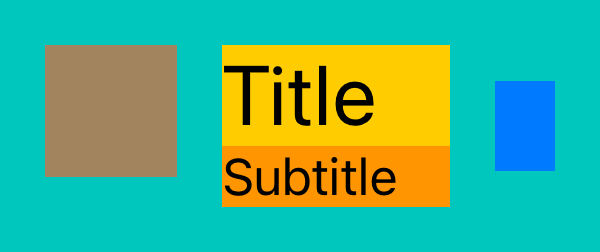
 1. Let's scan the layout horizontally and translate it into FixFlex code:
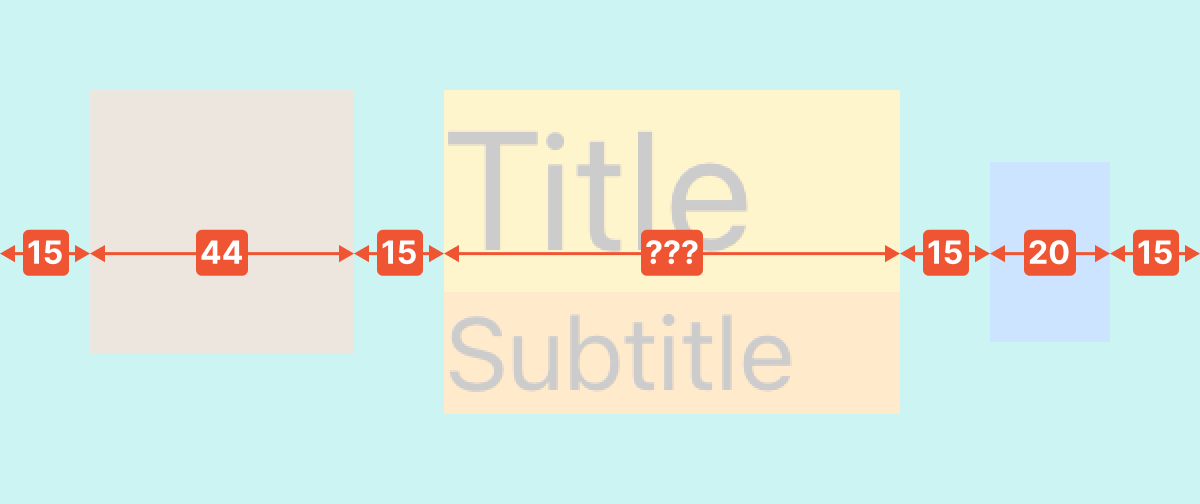 Most of the views and spacings have a fixed width (`Fix`), while the title and subtitle widths are flexible, designed to occupy the remaining space (`Flex`):
```swift
parent.fx.hstack(Fix(15),
Fix(iconView, 44),
Fix(15),
Flex([titleLabel, subtitleLabel]),
Fix(15),
Fix(chevron, 20),
Fix(15))
```
2. Vertically, we have three distinct groups of views. Starting with the icon:
Most of the views and spacings have a fixed width (`Fix`), while the title and subtitle widths are flexible, designed to occupy the remaining space (`Flex`):
```swift
parent.fx.hstack(Fix(15),
Fix(iconView, 44),
Fix(15),
Flex([titleLabel, subtitleLabel]),
Fix(15),
Fix(chevron, 20),
Fix(15))
```
2. Vertically, we have three distinct groups of views. Starting with the icon:
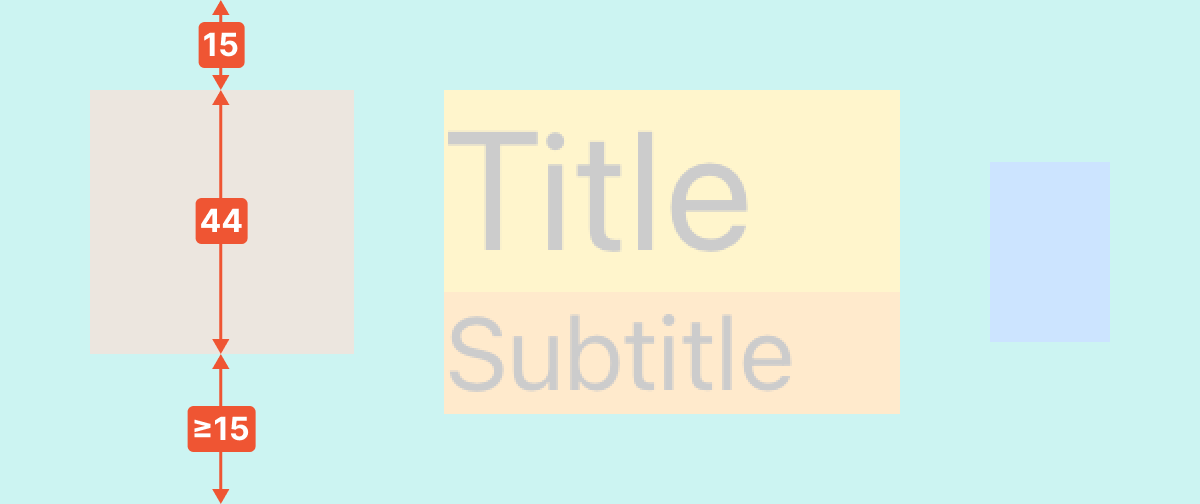 We do a spacing at the top using `Fix`. The bottom spacing should be at least 15pt, for the case when the labels' height is less than the icon's height:
```swift
parent.fx.vstack(Fix(15),
Fix(iconView, 44),
Flex(min: 15))
```
3. Next, we perform a vertical scan of the title and subtitle:
We do a spacing at the top using `Fix`. The bottom spacing should be at least 15pt, for the case when the labels' height is less than the icon's height:
```swift
parent.fx.vstack(Fix(15),
Fix(iconView, 44),
Flex(min: 15))
```
3. Next, we perform a vertical scan of the title and subtitle:
 ```swift
parent.fx.vstack(Fix(15),
Flex(titleLabel),
Flex(subtitleLabel),
Fix(15))
```
4. Finally, we scan the chevron vertically:
```swift
parent.fx.vstack(Fix(15),
Flex(titleLabel),
Flex(subtitleLabel),
Fix(15))
```
4. Finally, we scan the chevron vertically:
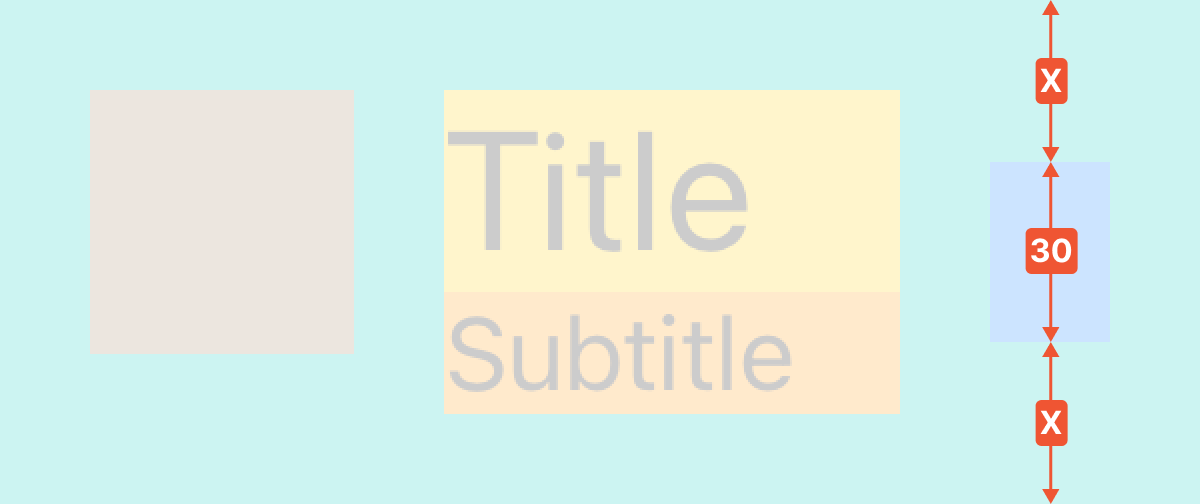 To center the chevron, we ensure the top spacing is equal to the bottom spacing using `Fill`:
```swift
parent.fx.vstack(Fill(),
Fix(chevron, 30),
Fill())
```
That's it! The best part is how easy it is to modify FixFlex layout code, inserting extra padding or views effortlessly, without the need to rewire constraints.
## API
### hstack/vstack
`FixFlex` provides two functions for laying out views horizontally (`hstack`) and vertically (`vstack`), accessible through the `view.fx.*` namespace.
You can specify `startAnchor`/`endAnchor` to layout items between arbitrary anchors instead of the view's edges. `startOffset`/`endOffset` are used to add spacing or offsets from the `startAnchor` and `endAnchor` respectively. Pass `nil` to leave a side unpinned (useful for allowing overflow).
By default, `hstack` works in natural positioning mode and operates using `leadingAnchor`/`trailingAnchor`. This setup ensures that the layout is mirrored for Right-to-Left languages. However, this behavior can be overridden by enabling the `useAbsolutePositioning` flag. When this flag is set to true, `hstack` shifts to using `leftAnchor`/`rightAnchor` for layout positioning.
```swift
func hstack(
startAnchor: NSLayoutXAxisAnchor? = nil, // if nil, we use leadingAnchor or leftAnchor
startOffset: CGFloat? = 0, // if nil, we do not pin to startAnchor
endAnchor: NSLayoutXAxisAnchor? = nil, // if nil, we use trailingAnchor or rightAnchor
endOffset: CGFloat? = 0, // if nil, we do not pin to endAnchor
useAbsolutePositioning: Bool = false, // if true, we use leftAnchor/rightAnchor based positioning (force Left-To-Right)
_ intents: SizingIntent...
) -> StackingResult
```
```swift
func vstack(
startAnchor: NSLayoutYAxisAnchor? = nil, // if nil, we use topAnchor
startOffset: CGFloat? = 0, // if nil, we do not pin to startAnchor
endAnchor: NSLayoutYAxisAnchor? = nil, // if nil, we use bottomAnchor
endOffset: CGFloat? = 0, // if nil, we do not pin to endAnchor
_ intents: SizingIntent...
) -> StackingResult
```
`StackingResult` gives access to everything created during stacking so you can adjust or deactivate pieces later:
- `constraints`: all constraints activated for the stack
- `layoutGuides`: guides created for spacers/fills
A `SizingIntent` is essentially an instruction for calculating the width or height of:
- a spacer (for which a `UILayoutGuide` is created behind the scenes)
- a view
- an array of views (when they are aligned in parallel)
Concrete instances of `SizingIntent` can be created using specialized builder functions:
### Fix
Used for specifying the exact size of a view/spacer.
```swift
func Fix(_ value: CGFloat) -> SizingIntent
func Fix(_ view: _View, _ value: CGFloat) -> SizingIntent
func Fix(_ views: [_View], _ value: CGFloat) -> SizingIntent
```
### Flex
Useful for sizes that change dynamically. Optionally, it is possible to specify min/max constraints and in-place priority settings for hugging and compression resistance.
```swift
func Flex(min: CGFloat? = nil, max: CGFloat? = nil) -> SizingIntent
func Flex(_ view: _View, min: CGFloat? = nil, max: CGFloat? = nil, huggingPriority: _LayoutPriority? = nil, compressionResistancePriority: _LayoutPriority? = nil) -> SizingIntent
func Flex(_ views: [_View], min: CGFloat? = nil, max: CGFloat? = nil, huggingPriority: _LayoutPriority? = nil, compressionResistancePriority: _LayoutPriority? = nil) -> SizingIntent
```
### Fill
`Fill` allows a view/spacer to proportionally occupy the available free space based on its weight. It's particularly useful for achieving equal spacing, centering elements, or for designing symmetrical layouts like tables or grids.
```swift
func Fill(weight: CGFloat = 1.0) -> SizingIntent
func Fill(_ view: _View, weight: CGFloat = 1.0) -> SizingIntent
func Fill(_ views: [_View], weight: CGFloat = 1.0) -> SizingIntent
```
### Match
This is used to match the size of a view or spacer to a specified `NSLayoutDimension`. It is particularly useful for aligning the sizes of different views or spacers, or for making their sizes proportional to each other.
```swift
public func Match(dimension: NSLayoutDimension, multiplier: CGFloat = 1, offset: CGFloat = 0) -> SizingIntent
public func Match(_ view: _View, dimension: NSLayoutDimension, multiplier: CGFloat = 1, offset: CGFloat = 0) -> SizingIntent
public func Match(_ views: [_View], dimension: NSLayoutDimension, multiplier: CGFloat = 1, offset: CGFloat = 0) -> SizingIntent
```
### SizingIntent Modifiers
You can customize generated pieces via callbacks on `SizingIntent`:
- `onCreateStartConstraint(_:)` lets you tweak each constraint that pins an item to the previous anchor (or stack start)
- `onCreateEndConstraint(_:)` lets you tweak the constraint that pins the final item to the end anchor
- `onCreateDimensionConstraint(_:)` lets you tweak each size constraint (e.g., priority or identifier)
- `onCreateLayoutGuide(_:)` gives you the implicit `UILayoutGuide` for configuration
Each `SizingIntent` can also specify a `spacingBefore(_:)` to add (or subtract, via negative values) the gap before that item—handy for overlaps or custom per-item spacing.
### Behavior notes
- `hstack` defaults to leading/trailing so layouts mirror in RTL; set `useAbsolutePositioning: true` to force left/right.
- `startOffset`/`endOffset = nil` leaves the leading/trailing item unpinned and should only be used when other constraints define its position.
- `Flex` on views keeps existing hugging/compression unless you pass overrides; the spacer-only overload applies `.required` by default.
## How it works
FixFlex is not a black box and doesn't use any magic. It is simply a declarative and convenient way to create constraints and layout guides. Let's take a look at how FixFlex is translated into standard Auto Layout calls when we want to center vertically two labels:
To center the chevron, we ensure the top spacing is equal to the bottom spacing using `Fill`:
```swift
parent.fx.vstack(Fill(),
Fix(chevron, 30),
Fill())
```
That's it! The best part is how easy it is to modify FixFlex layout code, inserting extra padding or views effortlessly, without the need to rewire constraints.
## API
### hstack/vstack
`FixFlex` provides two functions for laying out views horizontally (`hstack`) and vertically (`vstack`), accessible through the `view.fx.*` namespace.
You can specify `startAnchor`/`endAnchor` to layout items between arbitrary anchors instead of the view's edges. `startOffset`/`endOffset` are used to add spacing or offsets from the `startAnchor` and `endAnchor` respectively. Pass `nil` to leave a side unpinned (useful for allowing overflow).
By default, `hstack` works in natural positioning mode and operates using `leadingAnchor`/`trailingAnchor`. This setup ensures that the layout is mirrored for Right-to-Left languages. However, this behavior can be overridden by enabling the `useAbsolutePositioning` flag. When this flag is set to true, `hstack` shifts to using `leftAnchor`/`rightAnchor` for layout positioning.
```swift
func hstack(
startAnchor: NSLayoutXAxisAnchor? = nil, // if nil, we use leadingAnchor or leftAnchor
startOffset: CGFloat? = 0, // if nil, we do not pin to startAnchor
endAnchor: NSLayoutXAxisAnchor? = nil, // if nil, we use trailingAnchor or rightAnchor
endOffset: CGFloat? = 0, // if nil, we do not pin to endAnchor
useAbsolutePositioning: Bool = false, // if true, we use leftAnchor/rightAnchor based positioning (force Left-To-Right)
_ intents: SizingIntent...
) -> StackingResult
```
```swift
func vstack(
startAnchor: NSLayoutYAxisAnchor? = nil, // if nil, we use topAnchor
startOffset: CGFloat? = 0, // if nil, we do not pin to startAnchor
endAnchor: NSLayoutYAxisAnchor? = nil, // if nil, we use bottomAnchor
endOffset: CGFloat? = 0, // if nil, we do not pin to endAnchor
_ intents: SizingIntent...
) -> StackingResult
```
`StackingResult` gives access to everything created during stacking so you can adjust or deactivate pieces later:
- `constraints`: all constraints activated for the stack
- `layoutGuides`: guides created for spacers/fills
A `SizingIntent` is essentially an instruction for calculating the width or height of:
- a spacer (for which a `UILayoutGuide` is created behind the scenes)
- a view
- an array of views (when they are aligned in parallel)
Concrete instances of `SizingIntent` can be created using specialized builder functions:
### Fix
Used for specifying the exact size of a view/spacer.
```swift
func Fix(_ value: CGFloat) -> SizingIntent
func Fix(_ view: _View, _ value: CGFloat) -> SizingIntent
func Fix(_ views: [_View], _ value: CGFloat) -> SizingIntent
```
### Flex
Useful for sizes that change dynamically. Optionally, it is possible to specify min/max constraints and in-place priority settings for hugging and compression resistance.
```swift
func Flex(min: CGFloat? = nil, max: CGFloat? = nil) -> SizingIntent
func Flex(_ view: _View, min: CGFloat? = nil, max: CGFloat? = nil, huggingPriority: _LayoutPriority? = nil, compressionResistancePriority: _LayoutPriority? = nil) -> SizingIntent
func Flex(_ views: [_View], min: CGFloat? = nil, max: CGFloat? = nil, huggingPriority: _LayoutPriority? = nil, compressionResistancePriority: _LayoutPriority? = nil) -> SizingIntent
```
### Fill
`Fill` allows a view/spacer to proportionally occupy the available free space based on its weight. It's particularly useful for achieving equal spacing, centering elements, or for designing symmetrical layouts like tables or grids.
```swift
func Fill(weight: CGFloat = 1.0) -> SizingIntent
func Fill(_ view: _View, weight: CGFloat = 1.0) -> SizingIntent
func Fill(_ views: [_View], weight: CGFloat = 1.0) -> SizingIntent
```
### Match
This is used to match the size of a view or spacer to a specified `NSLayoutDimension`. It is particularly useful for aligning the sizes of different views or spacers, or for making their sizes proportional to each other.
```swift
public func Match(dimension: NSLayoutDimension, multiplier: CGFloat = 1, offset: CGFloat = 0) -> SizingIntent
public func Match(_ view: _View, dimension: NSLayoutDimension, multiplier: CGFloat = 1, offset: CGFloat = 0) -> SizingIntent
public func Match(_ views: [_View], dimension: NSLayoutDimension, multiplier: CGFloat = 1, offset: CGFloat = 0) -> SizingIntent
```
### SizingIntent Modifiers
You can customize generated pieces via callbacks on `SizingIntent`:
- `onCreateStartConstraint(_:)` lets you tweak each constraint that pins an item to the previous anchor (or stack start)
- `onCreateEndConstraint(_:)` lets you tweak the constraint that pins the final item to the end anchor
- `onCreateDimensionConstraint(_:)` lets you tweak each size constraint (e.g., priority or identifier)
- `onCreateLayoutGuide(_:)` gives you the implicit `UILayoutGuide` for configuration
Each `SizingIntent` can also specify a `spacingBefore(_:)` to add (or subtract, via negative values) the gap before that item—handy for overlaps or custom per-item spacing.
### Behavior notes
- `hstack` defaults to leading/trailing so layouts mirror in RTL; set `useAbsolutePositioning: true` to force left/right.
- `startOffset`/`endOffset = nil` leaves the leading/trailing item unpinned and should only be used when other constraints define its position.
- `Flex` on views keeps existing hugging/compression unless you pass overrides; the spacer-only overload applies `.required` by default.
## How it works
FixFlex is not a black box and doesn't use any magic. It is simply a declarative and convenient way to create constraints and layout guides. Let's take a look at how FixFlex is translated into standard Auto Layout calls when we want to center vertically two labels:
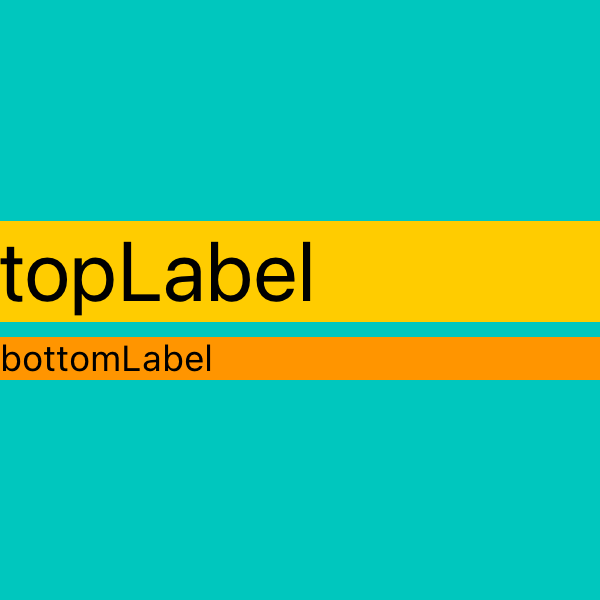 ```swift
parent.fx.hstack(Flex([topLabel, bottomLabel]))
parent.fx.vstack(Fill(),
Flex(topLabel),
Fix(5),
Flex(bottomLabel),
Fill())
```
Under the hood, FixFlex creates constraints and layout guides which are equivalent to the following:
```swift
topLabel.translatesAutoresizingMaskIntoConstraints = false
bottomLabel.translatesAutoresizingMaskIntoConstraints = false
let layoutGuideTop = UILayoutGuide()
let layoutGuideMiddle = UILayoutGuide()
let layoutGuideBottom = UILayoutGuide()
parent.addLayoutGuide(layoutGuideTop)
parent.addLayoutGuide(layoutGuideMiddle)
parent.addLayoutGuide(layoutGuideBottom)
NSLayoutConstraint.activate([
// hstack
topLabel.leadingAnchor.constraint(equalTo: parent.leadingAnchor),
topLabel.trailingAnchor.constraint(equalTo: parent.trailingAnchor),
bottomLabel.leadingAnchor.constraint(equalTo: parent.leadingAnchor),
bottomLabel.trailingAnchor.constraint(equalTo: parent.trailingAnchor),
//vstack
layoutGuideTop.topAnchor.constraint(equalTo: parent.topAnchor),
layoutGuideTop.bottomAnchor.constraint(equalTo: topLabel.topAnchor),
topLabel.bottomAnchor.constraint(equalTo: layoutGuideMiddle.topAnchor),
layoutGuideMiddle.heightAnchor.constraint(equalToConstant: 5),
layoutGuideMiddle.bottomAnchor.constraint(equalTo: bottomLabel.topAnchor),
bottomLabel.bottomAnchor.constraint(equalTo: layoutGuideBottom.topAnchor),
layoutGuideBottom.bottomAnchor.constraint(equalTo: parent.bottomAnchor),
layoutGuideTop.heightAnchor.constraint(equalTo: layoutGuideBottom.heightAnchor),
])
```
Huh, that's a lot of code to write, and imagine needing to modify it — inserting an extra view or changing the order. Once you try FixFlex, you won't want to go back!
## Examples
### Fill Parent With Inset
```swift
parent.fx.hstack(Flex([topLabel, bottomLabel]))
parent.fx.vstack(Fill(),
Flex(topLabel),
Fix(5),
Flex(bottomLabel),
Fill())
```
Under the hood, FixFlex creates constraints and layout guides which are equivalent to the following:
```swift
topLabel.translatesAutoresizingMaskIntoConstraints = false
bottomLabel.translatesAutoresizingMaskIntoConstraints = false
let layoutGuideTop = UILayoutGuide()
let layoutGuideMiddle = UILayoutGuide()
let layoutGuideBottom = UILayoutGuide()
parent.addLayoutGuide(layoutGuideTop)
parent.addLayoutGuide(layoutGuideMiddle)
parent.addLayoutGuide(layoutGuideBottom)
NSLayoutConstraint.activate([
// hstack
topLabel.leadingAnchor.constraint(equalTo: parent.leadingAnchor),
topLabel.trailingAnchor.constraint(equalTo: parent.trailingAnchor),
bottomLabel.leadingAnchor.constraint(equalTo: parent.leadingAnchor),
bottomLabel.trailingAnchor.constraint(equalTo: parent.trailingAnchor),
//vstack
layoutGuideTop.topAnchor.constraint(equalTo: parent.topAnchor),
layoutGuideTop.bottomAnchor.constraint(equalTo: topLabel.topAnchor),
topLabel.bottomAnchor.constraint(equalTo: layoutGuideMiddle.topAnchor),
layoutGuideMiddle.heightAnchor.constraint(equalToConstant: 5),
layoutGuideMiddle.bottomAnchor.constraint(equalTo: bottomLabel.topAnchor),
bottomLabel.bottomAnchor.constraint(equalTo: layoutGuideBottom.topAnchor),
layoutGuideBottom.bottomAnchor.constraint(equalTo: parent.bottomAnchor),
layoutGuideTop.heightAnchor.constraint(equalTo: layoutGuideBottom.heightAnchor),
])
```
Huh, that's a lot of code to write, and imagine needing to modify it — inserting an extra view or changing the order. Once you try FixFlex, you won't want to go back!
## Examples
### Fill Parent With Inset
 ```swift
parent.fx.hstack(
Fix(15),
Flex(child),
Fix(15)
)
parent.fx.vstack(
Fix(15),
Flex(child),
Fix(15)
)
```
### Pin To Parent Trailing Bottom
```swift
parent.fx.hstack(
Fix(15),
Flex(child),
Fix(15)
)
parent.fx.vstack(
Fix(15),
Flex(child),
Fix(15)
)
```
### Pin To Parent Trailing Bottom
 ```swift
parent.fx.hstack(
Flex(),
Fix(child, 100),
Fix(15)
)
parent.fx.vstack(
Flex(),
Fix(child, 50),
Fix(15)
)
```
### Center In Parent
```swift
parent.fx.hstack(
Flex(),
Fix(child, 100),
Fix(15)
)
parent.fx.vstack(
Flex(),
Fix(child, 50),
Fix(15)
)
```
### Center In Parent
 ```swift
parent.fx.hstack(
Fill(),
Fix(child, 100),
Fill()
)
parent.fx.vstack(
Fill(),
Fix(child, 50),
Fill()
)
```
### Center Label In Parent
```swift
parent.fx.hstack(
Fill(),
Fix(child, 100),
Fill()
)
parent.fx.vstack(
Fill(),
Fix(child, 50),
Fill()
)
```
### Center Label In Parent
 ```swift
parent.fx.hstack(
Fill(),
Flex(label),
Fill()
)
parent.fx.vstack(
Fill(),
Flex(label),
Fill()
)
```
### Vertically Center Two Labels
```swift
parent.fx.hstack(Flex([topLabel, bottomLabel]))
parent.fx.vstack(
Fill(),
Flex(topLabel),
Fix(5),
Flex(bottomLabel),
Fill()
)
```
### Cell With Icon Title Subtitle And Chevron
```swift
parent.fx.hstack(
Fix(15),
Fix(iconView, 44),
Fix(15),
Flex([titleLabel, subtitleLabel]),
Fix(15),
Fix(chevron, 20),
Fix(15)
)
parent.fx.vstack(
Fix(15),
Fix(iconView, 44),
Flex(min: 15)
)
parent.fx.vstack(
Fix(15),
Flex(titleLabel),
Flex(subtitleLabel),
Fix(15)
)
parent.fx.vstack(
Fill(),
Fix(chevron, 30),
Fill()
)
```
### Card With Icon Title And Subtitle
```swift
parent.fx.hstack(
Fill(),
Flex(label),
Fill()
)
parent.fx.vstack(
Fill(),
Flex(label),
Fill()
)
```
### Vertically Center Two Labels
```swift
parent.fx.hstack(Flex([topLabel, bottomLabel]))
parent.fx.vstack(
Fill(),
Flex(topLabel),
Fix(5),
Flex(bottomLabel),
Fill()
)
```
### Cell With Icon Title Subtitle And Chevron
```swift
parent.fx.hstack(
Fix(15),
Fix(iconView, 44),
Fix(15),
Flex([titleLabel, subtitleLabel]),
Fix(15),
Fix(chevron, 20),
Fix(15)
)
parent.fx.vstack(
Fix(15),
Fix(iconView, 44),
Flex(min: 15)
)
parent.fx.vstack(
Fix(15),
Flex(titleLabel),
Flex(subtitleLabel),
Fix(15)
)
parent.fx.vstack(
Fill(),
Fix(chevron, 30),
Fill()
)
```
### Card With Icon Title And Subtitle
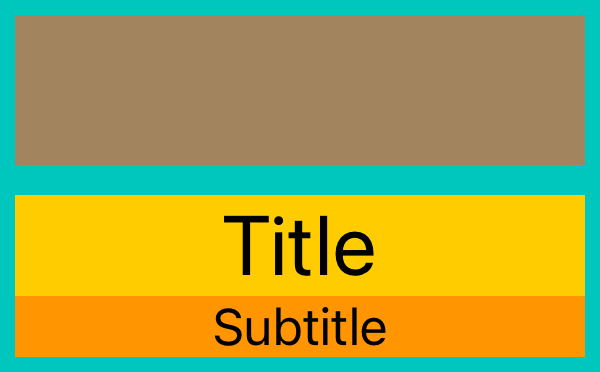 ```swift
parent.fx.hstack(
Fix(5),
Flex([iconView, titleLabel, subtitleLabel]),
Fix(5)
)
parent.fx.vstack(
Fix(5),
Fix(iconView, 50),
Fix(10),
Flex(titleLabel),
Flex(subtitleLabel),
Fix(5)
)
```
### Labels Row With Not Enough Space For Both
```swift
parent.fx.hstack(
Fix(5),
Flex([iconView, titleLabel, subtitleLabel]),
Fix(5)
)
parent.fx.vstack(
Fix(5),
Fix(iconView, 50),
Fix(10),
Flex(titleLabel),
Flex(subtitleLabel),
Fix(5)
)
```
### Labels Row With Not Enough Space For Both
 ```swift
parent.fx.vstack(
Flex([leftLabel, rightLabel])
)
parent.fx.hstack(
Flex(leftLabel, compressionResistancePriority: .required),
Fix(5),
Flex(rightLabel)
)
```
### Labels Split
```swift
parent.fx.vstack(
Flex([leftLabel, rightLabel])
)
parent.fx.hstack(
Flex(leftLabel, compressionResistancePriority: .required),
Fix(5),
Flex(rightLabel)
)
```
### Labels Split
 ```swift
parent.fx.vstack(
Fix(5),
Flex([label1, label2, label3]),
Fix(5)
)
parent.fx.hstack(
Fix(5),
Fill(label1, weight: 2),
Fix(5),
Fill(label2),
Fix(5),
Fill(label3),
Fix(5)
)
```
### Flex Min Max
```swift
parent.fx.vstack(
Fix(5),
Flex([label1, label2, label3]),
Fix(5)
)
parent.fx.hstack(
Fix(5),
Fill(label1, weight: 2),
Fix(5),
Fill(label2),
Fix(5),
Fill(label3),
Fix(5)
)
```
### Flex Min Max
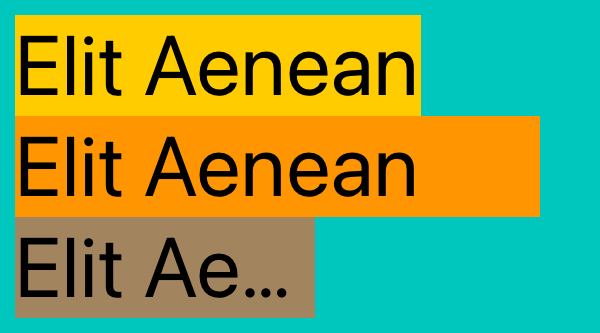 ```swift
parent.fx.vstack(
Fix(5),
Flex(label1),
Flex(label2),
Flex(label3),
Fix(5)
)
parent.fx.hstack(
Fix(5),
Flex(label1),
Flex(),
Fix(5)
)
parent.fx.hstack(
Fix(5),
Flex(label2, min: 175),
Flex(),
Fix(5)
)
parent.fx.hstack(
Fix(5),
Flex(label3, max: 100),
Flex(),
Fix(5)
)
```
### Put Between Anchors
```swift
parent.fx.vstack(
Fix(5),
Flex(label1),
Flex(label2),
Flex(label3),
Fix(5)
)
parent.fx.hstack(
Fix(5),
Flex(label1),
Flex(),
Fix(5)
)
parent.fx.hstack(
Fix(5),
Flex(label2, min: 175),
Flex(),
Fix(5)
)
parent.fx.hstack(
Fix(5),
Flex(label3, max: 100),
Flex(),
Fix(5)
)
```
### Put Between Anchors
 ```swift
parent.fx.vstack(
Flex([label, leadingView, trailingView])
)
parent.fx.hstack(
Fill(),
Flex(label),
Fill()
)
parent.fx.hstack(
startAnchor: label.leadingAnchor,
endAnchor: label.trailingAnchor,
Fix(leadingView, 20),
Flex(),
Fix(trailingView, 20)
)
```
### Put Between Anchors Absolute
```swift
parent.fx.vstack(
Flex([label, leadingView, trailingView])
)
parent.fx.hstack(
Fill(),
Flex(label),
Fill()
)
parent.fx.hstack(
startAnchor: label.leadingAnchor,
endAnchor: label.trailingAnchor,
Fix(leadingView, 20),
Flex(),
Fix(trailingView, 20)
)
```
### Put Between Anchors Absolute
 ```swift
parent.fx.vstack(
Flex([label, leadingView, trailingView])
)
parent.fx.hstack(
Fill(),
Flex(label),
Fill()
)
parent.fx.hstack(
startAnchor: label.leftAnchor,
endAnchor: label.rightAnchor,
useAbsolutePositioning: true,
Fix(leadingView, 20),
Flex(),
Fix(trailingView, 20)
)
```
### Optional Offsets Allow Overflow
```swift
parent.fx.vstack(
Flex([label, leadingView, trailingView])
)
parent.fx.hstack(
Fill(),
Flex(label),
Fill()
)
parent.fx.hstack(
startAnchor: label.leftAnchor,
endAnchor: label.rightAnchor,
useAbsolutePositioning: true,
Fix(leadingView, 20),
Flex(),
Fix(trailingView, 20)
)
```
### Optional Offsets Allow Overflow
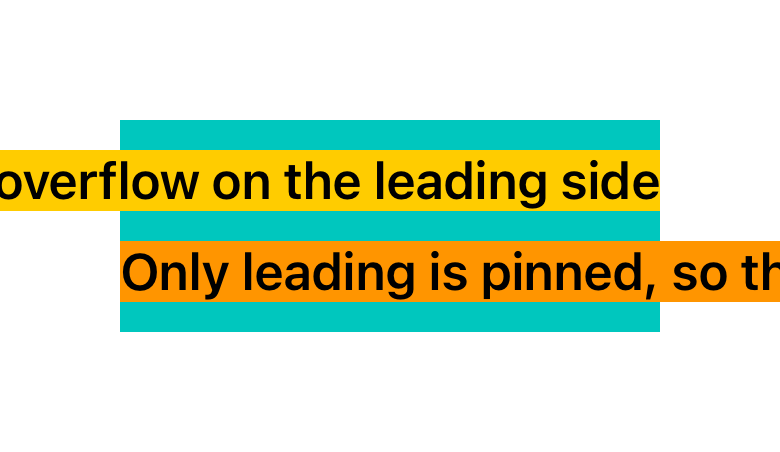 ```swift
container.fx.vstack(
Fix(10),
Flex(leadingOverflowLabel),
Fix(10),
Flex(trailingOverflowLabel),
Fix(10)
)
container.fx.hstack(
startOffset: nil,
Flex(leadingOverflowLabel)
)
container.fx.hstack(
endOffset: nil,
Flex(trailingOverflowLabel)
)
```
### Overlap With Spacing Before
```swift
container.fx.vstack(
Fix(10),
Flex(leadingOverflowLabel),
Fix(10),
Flex(trailingOverflowLabel),
Fix(10)
)
container.fx.hstack(
startOffset: nil,
Flex(leadingOverflowLabel)
)
container.fx.hstack(
endOffset: nil,
Flex(trailingOverflowLabel)
)
```
### Overlap With Spacing Before
 ```swift
parent.fx.hstack(
Fill(),
Fix(first, 60),
Fix(second, 60).spacingBefore(-20),
Fix(third, 60).spacingBefore(-20),
Fill()
)
parent.fx.vstack(
Fill(),
Fix([first, second, third], 60),
Fill()
)
```
### Shadow Using Match
```swift
parent.fx.hstack(
Fill(),
Fix(first, 60),
Fix(second, 60).spacingBefore(-20),
Fix(third, 60).spacingBefore(-20),
Fill()
)
parent.fx.vstack(
Fill(),
Fix([first, second, third], 60),
Fill()
)
```
### Shadow Using Match
 ```swift
parent.fx.vstack(
Fill(),
Flex(label),
Fill()
)
parent.fx.hstack(
Fill(),
Flex(label),
Fill()
)
parent.fx.vstack(
startAnchor: label.topAnchor,
Fix(10),
Match(matchView, dimension: label.heightAnchor),
Flex()
)
parent.fx.hstack(
startAnchor: label.leadingAnchor,
Fix(10),
Match(matchView, dimension: label.widthAnchor),
Flex()
)
```
## Integration
### [Swift Package Manager](https://github.com/apple/swift-package-manager)
Use Swift Package Manager and add dependency to `Package.swift` file.
```swift
dependencies: [
.package(url: "https://github.com/psharanda/FixFlex.git", .upToNextMajor(from: "1.3.0"))
]
```
Alternatively, in Xcode select `File > Add Package Dependencies…` and add FixFlex repository URL:
```
https://github.com/psharanda/FixFlex.git
```
### Carthage
Add `github "psharanda/FixFlex"` to your `Cartfile`
### CocoaPods
`FixFlex` is available through [CocoaPods](http://cocoapods.org). To install
it, simply add the following line to your Podfile:
```ruby
pod "FixFlex"
```
## Contributing
We welcome contributions! If you find a bug, have a feature request, or want to contribute code, please open an issue or submit a pull request.
## License
FixFlex is available under the MIT license. See the LICENSE file for more info.
```swift
parent.fx.vstack(
Fill(),
Flex(label),
Fill()
)
parent.fx.hstack(
Fill(),
Flex(label),
Fill()
)
parent.fx.vstack(
startAnchor: label.topAnchor,
Fix(10),
Match(matchView, dimension: label.heightAnchor),
Flex()
)
parent.fx.hstack(
startAnchor: label.leadingAnchor,
Fix(10),
Match(matchView, dimension: label.widthAnchor),
Flex()
)
```
## Integration
### [Swift Package Manager](https://github.com/apple/swift-package-manager)
Use Swift Package Manager and add dependency to `Package.swift` file.
```swift
dependencies: [
.package(url: "https://github.com/psharanda/FixFlex.git", .upToNextMajor(from: "1.3.0"))
]
```
Alternatively, in Xcode select `File > Add Package Dependencies…` and add FixFlex repository URL:
```
https://github.com/psharanda/FixFlex.git
```
### Carthage
Add `github "psharanda/FixFlex"` to your `Cartfile`
### CocoaPods
`FixFlex` is available through [CocoaPods](http://cocoapods.org). To install
it, simply add the following line to your Podfile:
```ruby
pod "FixFlex"
```
## Contributing
We welcome contributions! If you find a bug, have a feature request, or want to contribute code, please open an issue or submit a pull request.
## License
FixFlex is available under the MIT license. See the LICENSE file for more info.