# 
[](https://pypi.org/project/cronstable/)
[](https://github.com/ptweezy/cronstable/releases/latest)
[](https://github.com/ptweezy/cronstable/releases)
[](https://pypi.org/project/cronstable/)
[](https://pypi.org/project/cronstable/)
[](https://github.com/ptweezy/cronstable/releases/latest)
[](https://github.com/ptweezy/cronstable/releases/latest)
[](https://github.com/ptweezy/cronstable/actions/workflows/release.yml)
[](https://codecov.io/gh/ptweezy/cronstable)
[](https://github.com/ptweezy/cronstable/pkgs/container/cronstable)
[](https://hub.docker.com/r/ptweezy/cronstable)
[](https://mypy-lang.org/)
[](LICENSE)
/ kraahn-stuh-bl /
A stability-focused, container-friendly, optionally-distributed, fault-tolerant, leader-electing, resumable, configurable, precompiled, multi-architecture, portable, batteries-included, security-hardened, production-ready cron replacement.
## Why cronstable?
cronstable keeps cron's model (a schedule file running your commands) and
builds in the tooling that otherwise accumulates around it: retries,
alerting, durable state, orchestration, clustering, and a live dashboard.
### Scheduling
* "Crontab" is in YAML format, and cronstable reads classic crontab files
as-is too (see [classic crontab files](#classic-crontab-files))
* **Business-day schedules**: `LW` is the month's last weekday, `L-3` is three
days before month-end, `15W` is the weekday nearest the 15th, and `5#3` is
the third Friday. These express payroll and billing cadences, and Quartz day
expressions largely paste straight in (see
[business-day schedules](https://github.com/ptweezy/cronstable/wiki/Business-Day-Schedules))
* Built-in **schedule linting**: cronstable reports dead schedules that can
never fire again instead of dropping them silently, and flags error-prone
patterns (AND day semantics, uneven `*/n` steps, day-31-in-April, schedules
that DST skips or repeats) at config load, in the dashboards, and over the
API (see [schedule introspection](#schedule-introspection))
* Arbitrary time zone support
* **iCal calendar export**: subscribe any calendar app to `GET /calendar.ics`,
or to one job's `/jobs/{name}/calendar.ics`, and the fleet's upcoming fires
appear on the on-call engineer's calendar. The scheduler's own engine
enumerates them, and the dashboard draws the same data as a seven-day week
calendar (see
[calendar export](https://github.com/ptweezy/cronstable/wiki/Calendar-Export))
### Failure handling
* Flexible configuration: you decide how to determine if a cron job fails or not
* Option to automatically retry failing cron jobs, with exponential backoff
* Built-in sending of Sentry, Mail, and webhook (Slack-compatible)
notifications when cron jobs fail
* **End-to-end encrypted push notifications**: a dedicated reporter seals each
alert to a paired device's own key (libsodium sealed box), so the relay
that forwards it to the platform push service never sees job names,
hostnames, or log lines. Pairing is a dashboard QR scan or one API call,
and an opt-in Bonjour/mDNS advert lets a companion app find the daemon on
the LAN (see [push notifications](#push-notifications), plus the
[Push Notifications](https://github.com/ptweezy/cronstable/wiki/Push-Notifications)
and [LAN Discovery](https://github.com/ptweezy/cronstable/wiki/LAN-Discovery)
wiki pages)
* **Per-job SLA monitoring**: an `sla:` block declares thresholds for late and
missing runs: too long without a success, a due slot that never started, a
run exceeding its runtime bound. A breach fires a dedicated
`onLate` reporting hook once (mail, Sentry, shell, webhook), gauges and
counters land in the metrics, and the dashboards badge the job **OVERDUE**
(see [late-run detection](#late-run-detection-sla-monitoring) and the
[Late-Run Detection](https://github.com/ptweezy/cronstable/wiki/Late-Run-Detection)
wiki page)
### Durability and orchestration
* **Opt-in durable state**: point a single `state:` config block at a local
directory (or an Amazon S3 Files / EFS mount to share it fleet-wide) and jobs
gain durability: missed-run catch-up after downtime, and retries that
survive a daemon restart. The daemon hands the same store to
the jobs themselves over a loopback endpoint, so a job command can use
durable key/value, an ETL cursor/watermark, a fleet-wide mutex or semaphore,
idempotency keys, a shared artifact store, and run-scoped secrets with
`cronstable state|cursor|lock|artifact|idempotent|secret` (see
[durable state](https://github.com/ptweezy/cronstable/wiki/Durable-State)).
Without it, cronstable stays stateless
* **Opt-in orchestration DAGs**: a `dags:` block turns the scheduler into a
small, durable workflow engine: tasks with `dependsOn` edges, cross-task
data hand-off (XCom), dynamic fan-out/mapping, sensors, human approval gates,
whole-DAG backfill, and crash-resume of a partial graph. It all runs on the
same state store, coordinated across a fleet under a single lease so a task
never double-launches (see
[orchestration and DAGs](https://github.com/ptweezy/cronstable/wiki/Orchestration-and-DAGs))
### Observability and control

* Optional **[live control panel](#web-dashboard)**: watch every job's status,
tail its logs live, run or cancel jobs on demand, review run history and
success rates, drive DAG runs and approvals, and follow the whole cluster,
from one self-contained page with ten themes and a shortcut for everything,
plus a **[terminal twin](#terminal-dashboard)** (`cronstable tui`) with the
same keys
* Optional HTTP REST API, to fetch status, start jobs, cancel running jobs, and
read per-job run history on demand
* **Runtime pause/resume**: pause any job's scheduled fires for a bounded
window (an hour by default, thirty days at most) over the API, the
dashboards, or MCP, without touching the config. cronstable records each
skipped slot, pending retries defer, catch-up does not replay the window, and
with a `state:` store the pause survives restarts and every node honors it
(see [pausing jobs](https://github.com/ptweezy/cronstable/wiki/Pausing-Jobs))
* **Built-in TLS on the listeners**: `web.listen` accepts `https://` addresses
served from a `web.tls` block, mixed freely with plaintext and unix-socket
entries on one runner. An optional `clientCa` makes the listener require a
client certificate signed by your own CA (mutual TLS), so it authenticates
its callers rather than only encrypting them.
A web certificate replaced in place takes effect without a daemon restart.
The job-facing state API gains the same block as `state.jobApi.tls`, and
`cronstable tui` / `cronstable mcp` gain `--cacert`, `--client-cert`,
`--client-key` and `--insecure` (see
[serving the API over TLS](#serving-the-api-over-tls) and
[listener TLS](https://github.com/ptweezy/cronstable/wiki/Listener-TLS))
* Optional **[MCP server](https://github.com/ptweezy/cronstable/wiki/MCP)** for
AI agents. An agent can observe cronstable and author or debug schedules
with the daemon's own engine: validate or explain an expression, or explain
field by field why a job did not run at a timestamp. It can also control the
daemon when you opt in.
The server is read-only by default and exposes tools, resources, and triage
prompts covering jobs, DAGs, the cluster/fleet, metrics, and durable state.
cronstable serves it at `POST /mcp` on the web listeners and through a
`cronstable mcp` stdio bridge, and it is written in pure Python with no new
dependencies
* Built-in **Prometheus metrics** at `/metrics` (plus per-job statsd push
metrics), covering run outcomes, durations, retries, schedules, and cluster
health (see [metrics](#metrics))
* Opt-in **per-job resource monitoring**: one `monitorResources: true` samples
each run's CPU time and peak memory across its whole process tree, live and
per run, in the dashboard, the metrics, and the failure reports (see
[resource monitoring](#resource-monitoring))
### Fleets
* A **job-set id**: an order-independent fingerprint of every job's effective
configuration, so replicas deployed from the same config can confirm they
hold an identical set of jobs (see [job-set id](#job-set-id))
* **Opt-in clustering and leader election**: instances confirm over mutual TLS
that a configured set of peers is running the same job set, and elect a
leader so several replicas can run from one config without double-running
jobs (see
[clustering and leader election](#clustering-and-leader-election))
### Deployment
* **Built for locked-down containers.** Runs in the foreground, logs
everything to stdout/stderr, 12-factor style, and works unmodified under
restricted Kubernetes PodSecurity: as a non-root user, on a read-only root
filesystem with an `fsGroup`-mounted config, under a `RuntimeDefault`
seccomp profile, and with every Linux capability dropped, so it needs no
writable paths or elevated privileges (see
[production container deployment](#production-container-deployment))
* **Prebuilt for practically everything.** Multi-architecture images on GHCR
and Docker Hub, plus self-contained binaries for Linux (glibc and musl),
macOS (signed and notarized), FreeBSD, and Windows, so Python on the host
is optional (see [installation](#installation))
[](#web-dashboard)
> Web UI tour.
## Quick start
You can have a running scheduler with a live dashboard in about a minute.
Install it (see [installation](#installation) for Docker, Homebrew, and
no-Python binary options):
```shell
pip install cronstable
```
Describe your first job in a `cronstable.yaml`:
```yaml
jobs:
- name: hello
command: echo "hello from cronstable on $(hostname)"
schedule: "* * * * *" # every minute
captureStdout: true
web:
listen:
- http://127.0.0.1:8080 # optional: the REST API + dashboard
```
Run it (always in the foreground):
```shell
cronstable -c cronstable.yaml
```
Open and watch `hello` fire once a minute, with its
output tailing live in the [dashboard](#web-dashboard). From there, each of
these is a few lines of config away:
* **Never miss a silent failure**: retries with backoff and a Slack/mail/Sentry
report when a job ultimately fails ([tutorial](#tutorial-1-alert-when-a-job-fails-then-retry-it)).
* **Survive restarts**: a one-line `state:` block makes history, retries and
missed-run catch-up durable ([tutorial](#tutorial-2-survive-restarts-catch-up-what-was-missed)).
* **Chain jobs into a pipeline**: a durable DAG with data hand-off and an
approval gate ([tutorial](#tutorial-3-your-first-dag-a-durable-pipeline)).
* **Run replicas safely**: leader election so two copies never double-fire
([tutorial](#tutorial-4-two-replicas-zero-double-runs)).
* **See it all at once**: `docker compose -f example/grand-tour/docker-compose.yml up
--build` boots a nine-node cluster running every feature together
([example gallery](#example-gallery)).
Already have a crontab? You don't have to translate it:
`cronstable -c my.crontab` (a `crontab -l` export) runs the classic format
as-is (see [classic crontab files](#classic-crontab-files); the six-field
*system* format of `/etc/crontab` carries an extra user column that has to
come out first).
## Installation
### Run with Docker
Prebuilt multi-architecture images (seven Linux platforms) are published on
every release to two registries, the GitHub Container Registry
(`ghcr.io/ptweezy/cronstable`) and Docker Hub (`ptweezy/cronstable`). Mount
your crontab and go:
```shell
docker run --rm \
-v "$PWD/cronstable.yaml:/etc/cronstable.d/cronstable.yaml:ro" \
ghcr.io/ptweezy/cronstable:latest
```
The image runs as a non-root user and reads its configuration from
`/etc/cronstable.d` by default. The default image is built on Debian (slim).
Alpine, Ubuntu, RHEL/UBI, Fedora, openSUSE, Amazon Linux, and distroless
variants are published from the same release under a `-` tag suffix.
The platform list, the variant table, and each variant's architecture coverage
are in
[installation](https://github.com/ptweezy/cronstable/wiki/Installation) in the
wiki. For production, pin a specific version instead of `latest`, and see
[production container deployment](#production-container-deployment) for the
hardened Kubernetes/Docker setup.
### Install using pip
cronstable requires Python >= 3.10 (for systems with an older Python, use the
binary instead). Install it in a virtual environment:
```shell
pip install cronstable
```
or let [pipx](https://github.com/pipxproject/pipx) create an isolated one
for you:
```shell
pipx install cronstable
```
### Install using Homebrew or winget
Both package managers install the self-contained release binary for your
platform, so no Python is required.
macOS or Linux:
```shell
brew install ptweezy/tap/cronstable
```
Windows:
```shell
winget install ptweezy.cronstable
```
Upgrade later with `brew upgrade cronstable` or
`winget upgrade ptweezy.cronstable`.
### Install using binary
Alternatively, download a self-contained binary from GitHub:
. Every release attaches
binaries for Linux (glibc and musl builds for `amd64`, `arm64`, `i686`,
`armv7`, `armv6`, `ppc64le`, `s390x`, `riscv64` and `loong64`, plus a glibc-only
`mips64le` and `armel`), macOS (`amd64` and `arm64`, signed and notarized by
Apple), FreeBSD (`amd64` and `arm64`), OpenBSD, NetBSD, illumos (`amd64`) and
Windows (`amd64`, `arm64` and `i686`), plus `.deb`, `.rpm`, Alpine `.apk` and
FreeBSD `.pkg` packages. The 64-bit glibc builds need only glibc 2.17, so they
run on everything from RHEL 7 onward. Python is not required on the target
system. It is embedded in the executable:
```shell
# pick the asset for your OS and architecture (glibc amd64 Linux shown; append
# -musl on Alpine, or use cronstable-macos- on a Mac)
curl -fsSL -o cronstable \
https://github.com/ptweezy/cronstable/releases/latest/download/cronstable-linux-amd64
chmod +x cronstable
./cronstable --version
```
The binary unpacks an embedded Python runtime at startup, so under a
read-only root filesystem it needs a small writable and executable temp mount.
The container image and `pip`/`pipx` installs never self-extract. The full
asset table, the glibc/musl compatibility notes, and the tmpfs/`emptyDir`
recipe are in
[installation](https://github.com/ptweezy/cronstable/wiki/Installation) in the
wiki.
Windows releases additionally attach `cronstable-windows-.zip`, a
one-directory build that extracts to a single `cronstable` folder and can
host the [Windows
service](https://github.com/ptweezy/cronstable/wiki/Windows-Service), and
`cronstable-windows-.msi`, a machine-wide installer that registers
the service for GPO/Intune/SCCM deployment (see the [Windows
MSI](https://github.com/ptweezy/cronstable/wiki/Windows-MSI) wiki page).
## Running on Windows
cronstable runs natively on Windows (x64, ARM64 and 32-bit x86). Install it
with `pip install cronstable`, or take one of the builds on the
[releases page](https://github.com/ptweezy/cronstable/releases), none of which
need Python: the self-contained `cronstable-windows-amd64.exe` /
`cronstable-windows-arm64.exe` / `cronstable-windows-i686.exe`, the
one-directory
`cronstable-windows-.zip` (the shape that can host the Windows service),
or the machine-wide `cronstable-windows-.msi`. Everything else, like the
YAML crontab, scheduling, reporting, retries, the HTTP API and the
[web dashboard](#web-dashboard), works the same as on POSIX. A few platform
details differ:
* **Default config location.** Without `-c`, cronstable looks in the
machine-wide `%ProgramData%\cronstable` (the Windows analog of
`/etc/cronstable.d`) whenever that directory holds configuration, and in the
per-user `%APPDATA%\cronstable` otherwise (for example,
`C:\Users\you\AppData\Roaming\cronstable`). `cronstable init` writes a
commented starter configuration into whichever one applies, and `-c`
overrides the choice with any path:
```shell
cronstable -c C:\path\to\cronstable.yaml
```
* **Default shell.** A string `command` with no explicit `shell` runs through
the native command processor (`%ComSpec%`, that is, `cmd.exe`), which fills
the same role `/bin/sh` fills on POSIX. `shell: cmd` and `shell: powershell`
both work as written: cronstable gives cmd.exe the `/c` invocation and
quoting it expects, and every other shell `-c`. For PowerShell, or any other
interpreter, set `shell:` or pass `command` as a list, which bypasses the
shell entirely:
```yaml
jobs:
- name: powershell-job
command:
- powershell
- -Command
- Get-Date
schedule: "*/5 * * * *"
captureStdout: true
```
* **Graceful shutdown.** Press `Ctrl-C` to stop cronstable. It shuts down once
the running jobs finish, the same as `SIGTERM` on POSIX. Each job runs in its
own console process group, so the keystroke never reaches the jobs
themselves. Closing the console window and shutting the machine down drain
the same way, within the few seconds of grace the OS allows.
The authenticated `POST /shutdown` route stops a console-less daemon, and
stops the Windows service cleanly, without tripping its recovery actions.
Logging off does not stop it: an unattended daemon sees that event for every
user on the machine.
* **Running unattended, as a real Windows service.** `cronstable service
install -c C:\ProgramData\cronstable` registers the scheduler with the
Service Control Manager, so it starts at boot, runs whether or not anyone is
logged on, appears in `services.msc`, and gets Windows' own recovery
actions. Stopping it drains the running jobs first, and it keeps telling the
SCM the stop is still in progress for as long as that takes. `cronstable
service reload` makes it reparse the configuration immediately, the forced
reload that `SIGHUP` triggers on POSIX. The whole thing is a ctypes shim over
advapi32, so it adds no dependency.
The published one-file `.exe` cannot host a service, because its bootloader
runs the program in a child process the SCM never sees. The `install`
command says so. Install with pip or pipx for that, or use the `schtasks`
recipe. See
[Windows Service](https://github.com/ptweezy/cronstable/wiki/Windows-Service)
and
[Running on Windows](https://github.com/ptweezy/cronstable/wiki/Running-on-Windows).
* **Migrating from Task Scheduler.** `cronstable import-taskscheduler
tasks.xml -o jobs.yaml` converts an estate's exports into cronstable jobs.
It maps time, calendar and boot triggers, `Exec` actions, working
directories, execution time limits, instance policy and priority. It is a
one-shot converter rather than a loader, because exporting a task does not
unregister it. It lists everything it cannot carry across, with the reason,
instead of dropping it, and on a whole-machine export that list is long:
most registered tasks on a stock Windows install are COM-handler or
event-driven internals rather than schedules. See
[Importing from Task Scheduler](https://github.com/ptweezy/cronstable/wiki/Importing-Task-Scheduler).
* **Not supported on Windows.** Per-job `user`/`group` switching has no
`setuid`/`setgid` equivalent, so cronstable rejects it with a configuration
error, and it skips `unix://` web listeners with a warning. Use an `http://`
listener instead.
## Production container deployment
cronstable is built to run unmodified under the hardened security contexts that
corporate and enterprise Kubernetes / container platforms enforce. At runtime
the daemon only *reads* its configuration and secrets and writes its output to
stdout/stderr. It never needs a writable working directory, temp files, or log
files, so it can run as an unprivileged non-root user with the `RuntimeDefault`
seccomp profile, a read-only root filesystem, all Linux capabilities dropped,
and config/secret volumes mounted with an `fsGroup`.
Only the optional per-job [user/group switching](#change-to-another-usergroup)
requires root. Two exceptions need a small writable mount: a `unix://` web
listener's socket, and the standalone binary's temp directory (see
[install using binary](#install-using-binary)).
The published image (`ghcr.io/ptweezy/cronstable` and `docker.io/ptweezy/cronstable`)
is already built this way (non-root, with `cronstable -c /etc/cronstable.d` as its
entrypoint and no writable paths required), so for most deployments you can use
it directly and mount your crontab read-only.
[Production deployment](https://github.com/ptweezy/cronstable/wiki/Production-Deployment)
in the wiki has the full setup: a Kubernetes `Deployment` with a fully
restricted security context, baking configuration into your own image, the
writable-path exceptions in detail, and health checks.
## Web dashboard
cronstable ships with a **built-in web dashboard**: one self-contained page (no
build step, no external assets, no database) served straight from the daemon.
Point a browser at the HTTP listener and you have a keyboard-driven control
room for every job, and, when you use them, for the cluster, the DAGs, and the
durable state store too.
[](https://raw.githubusercontent.com/ptweezy/cronstable/main/docs/img/dashboard-overview.png)
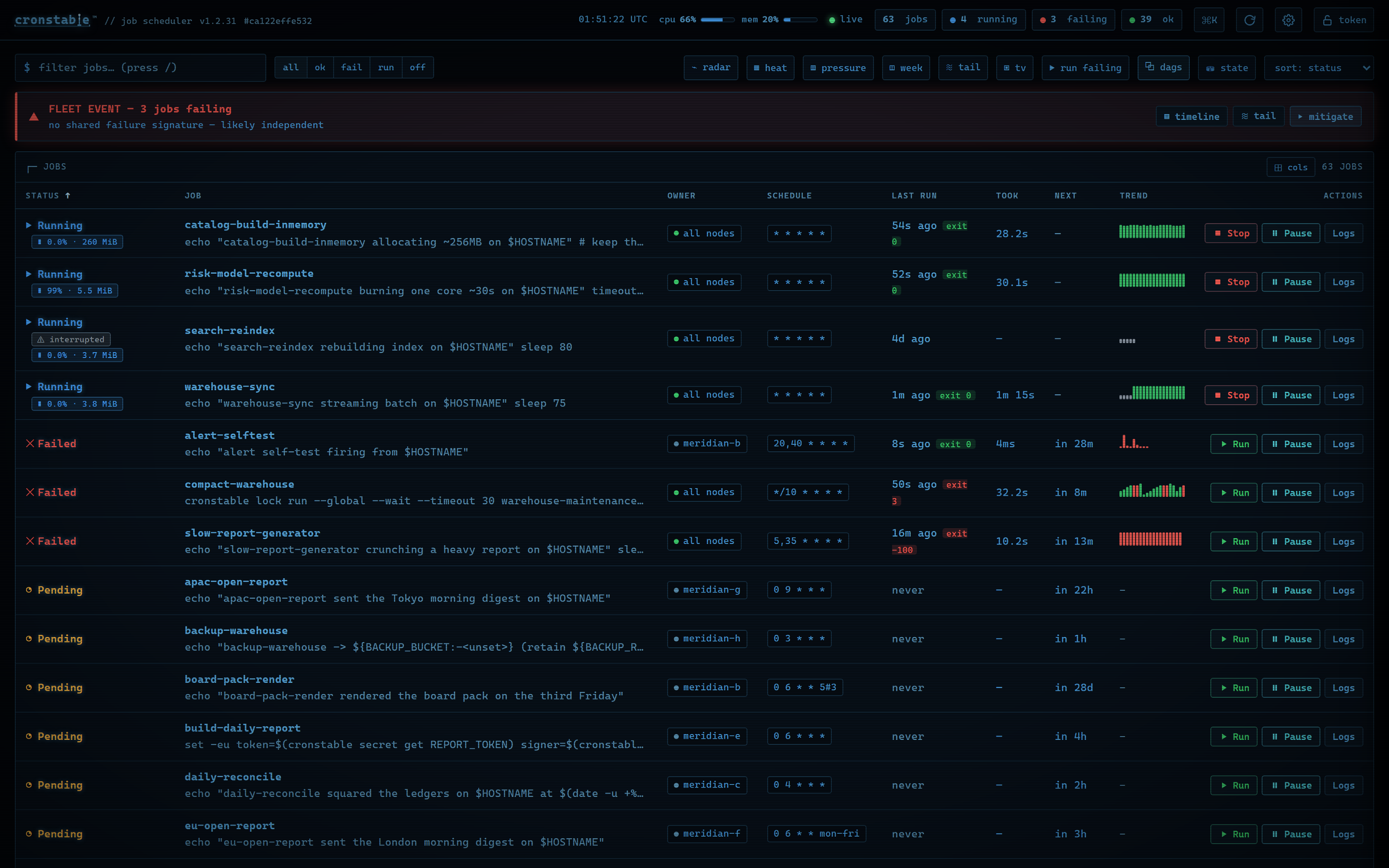

The overview shows every job with its **live status**, a **countdown to its
next run**, the last run's duration and exit-code badge, and a **sparkline of
recent runs**. Jobs with [resource monitoring](#resource-monitoring) add live
**CPU and memory** chips while they run, and a cluster adds each job's
**owner node**. Everything is sortable, filterable, and searchable, and when
something is failing a **verdict bar** correlates the failures into one
headline ("4 share exit=69, likely one cause"). Click any job (or press
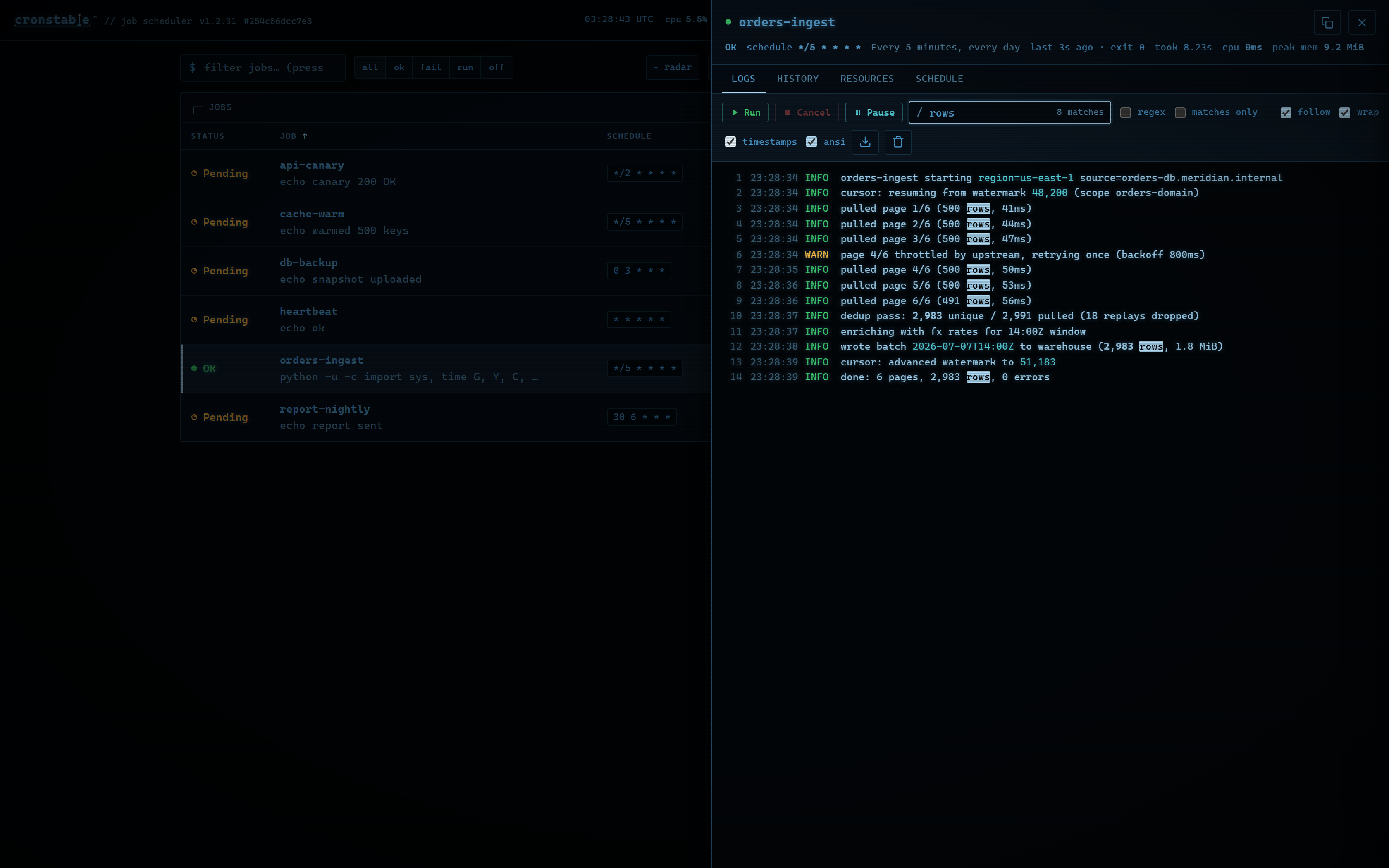
`Enter`) to open its detail drawer:
| Live log tail | Run history | Schedule, explained |
| :---: | :---: | :---: |
| [](https://raw.githubusercontent.com/ptweezy/cronstable/main/docs/img/dashboard-logs.png) | [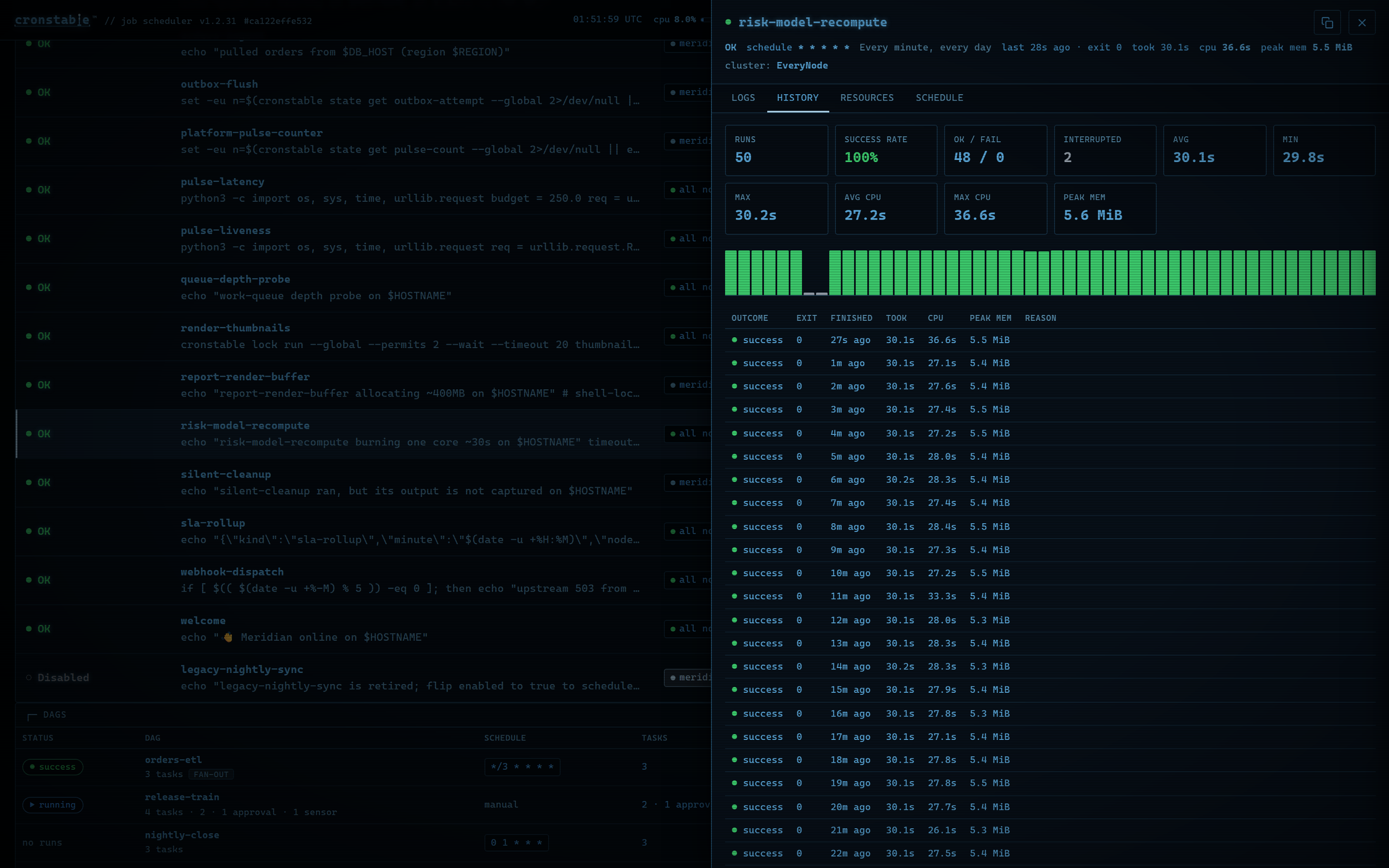](https://raw.githubusercontent.com/ptweezy/cronstable/main/docs/img/dashboard-history.png) | [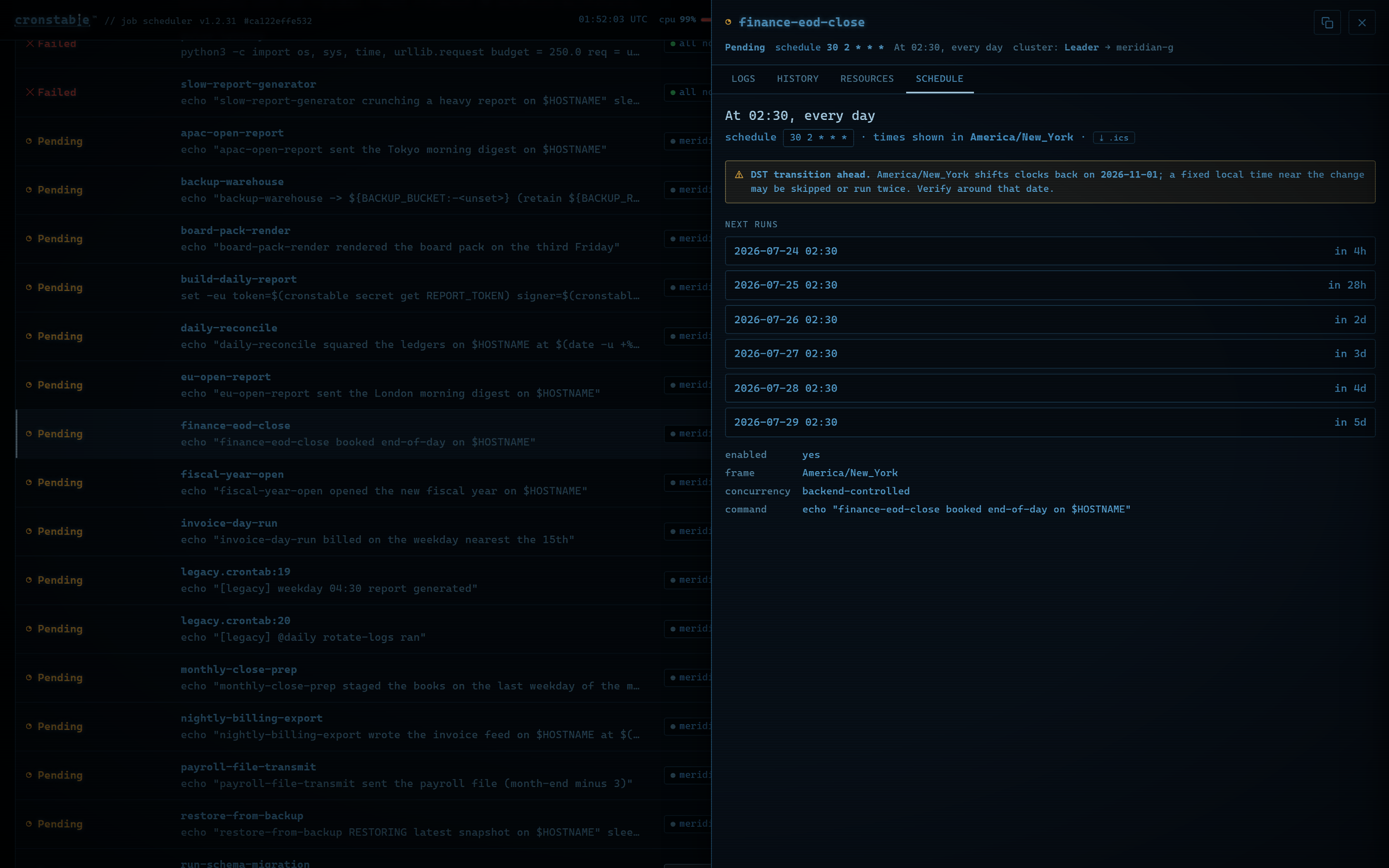](https://raw.githubusercontent.com/ptweezy/cronstable/main/docs/img/dashboard-schedule.png) |
| Follow a running job's output **live** over Server-Sent Events, with ANSI color, in-log **grep** (plain text or regex), per-line timestamps, line-wrap, and one-click download. | **Success rate** plus average / min / max duration over the retained history, with a color-coded per-run chart; with [resource monitoring](#resource-monitoring) on, **CPU time and peak memory** per run and in the stats. | A **plain-English** reading of the cron expression and a **time-zone-aware preview of the next run times**, computed live in the browser. |
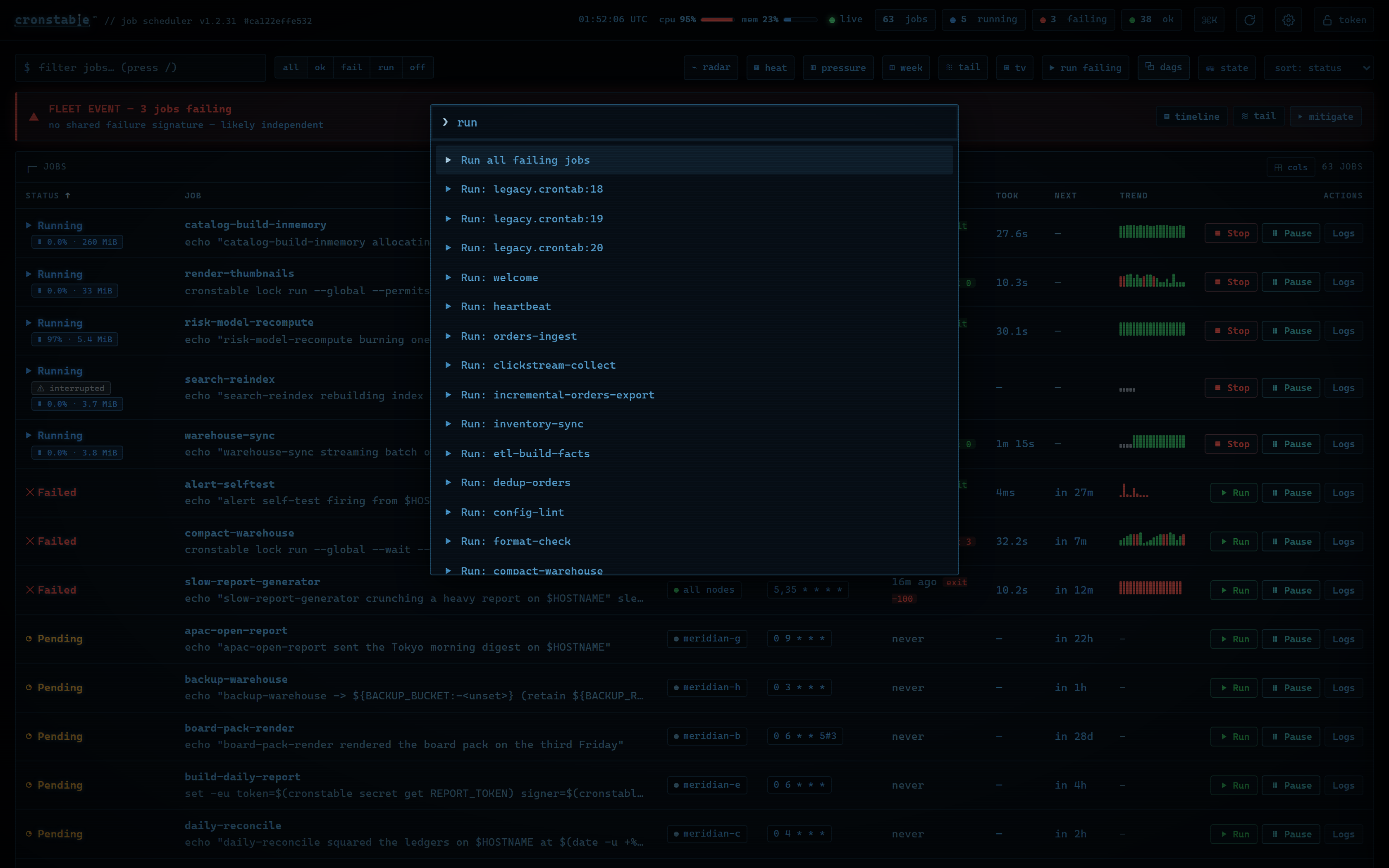
Every action has a key. A fuzzy command palette (`Ctrl-K` / `⌘K`) runs any
action or jumps to any job, `?` lists every shortcut, `/` filters, `j`/`k`
move the cursor, `r` runs the selected job and `x` cancels it. A click runs a
single job on demand, or every failing job at once.
| Fuzzy command palette | Keyboard-first, with a shortcut for everything |
| :---: | :---: |
| [](https://raw.githubusercontent.com/ptweezy/cronstable/main/docs/img/dashboard-palette.png) | [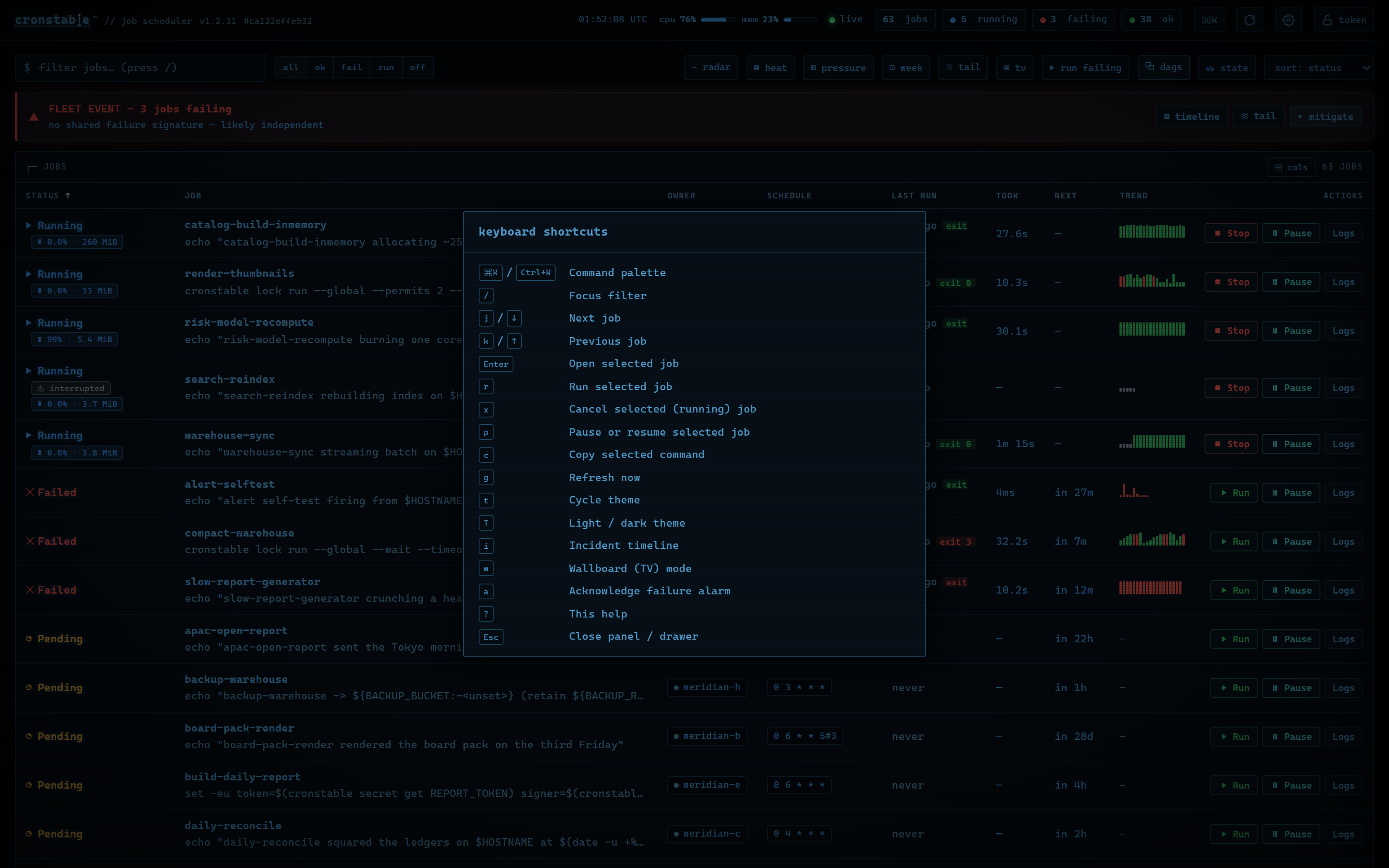](https://raw.githubusercontent.com/ptweezy/cronstable/main/docs/img/dashboard-shortcuts.png) |
### Orchestration, live
[DAGs](https://github.com/ptweezy/cronstable/wiki/Orchestration-and-DAGs) get
their own card and drawer: trigger or backfill a run, watch the **task graph**
advance node by node, inspect per-task attempts, XCom values and logs, and
decide **approval gates** with a click, from any node in the fleet.
| The task graph | A human approval gate |
| :---: | :---: |
| [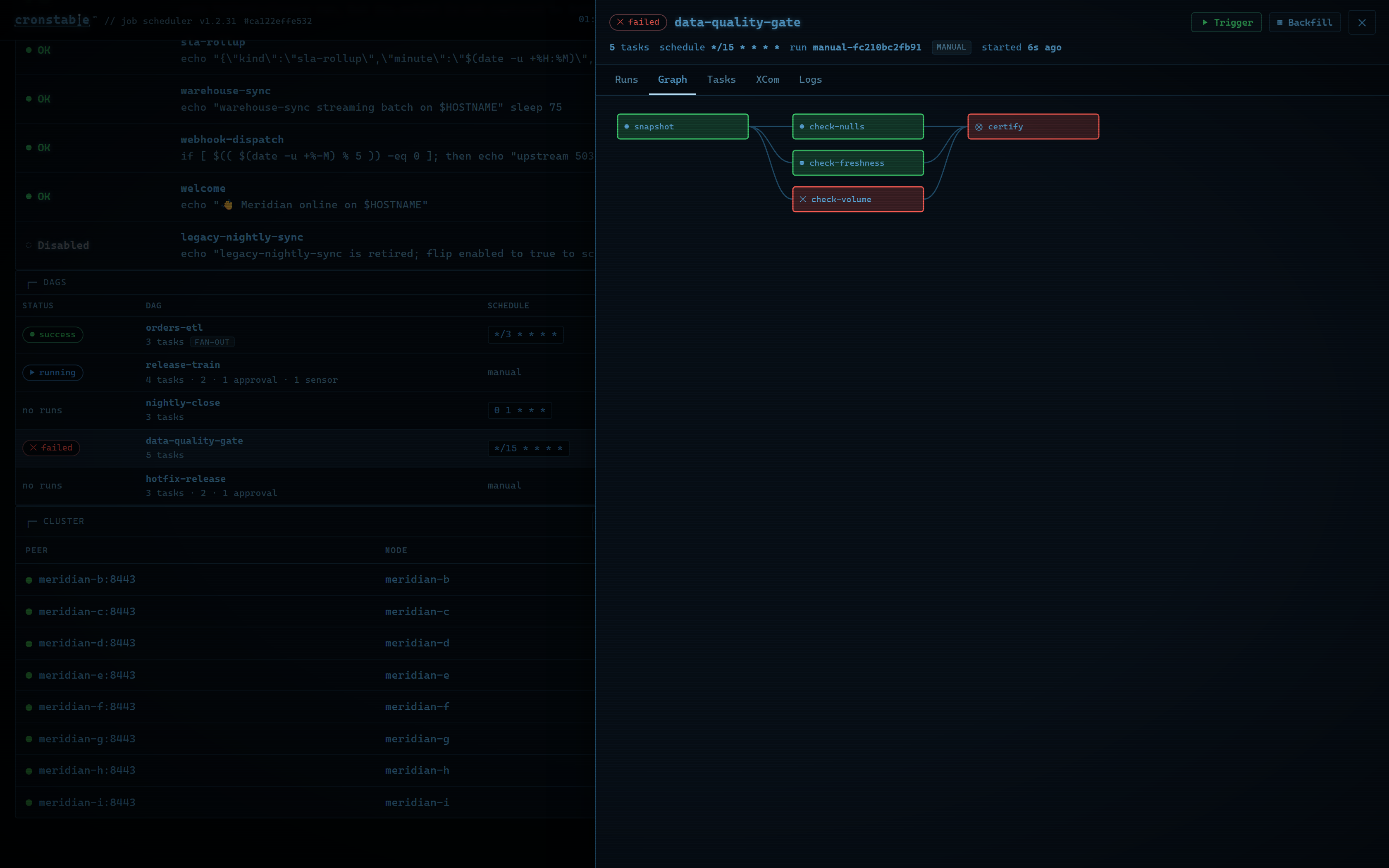](https://raw.githubusercontent.com/ptweezy/cronstable/main/docs/img/dashboard-dag-graph.png) | [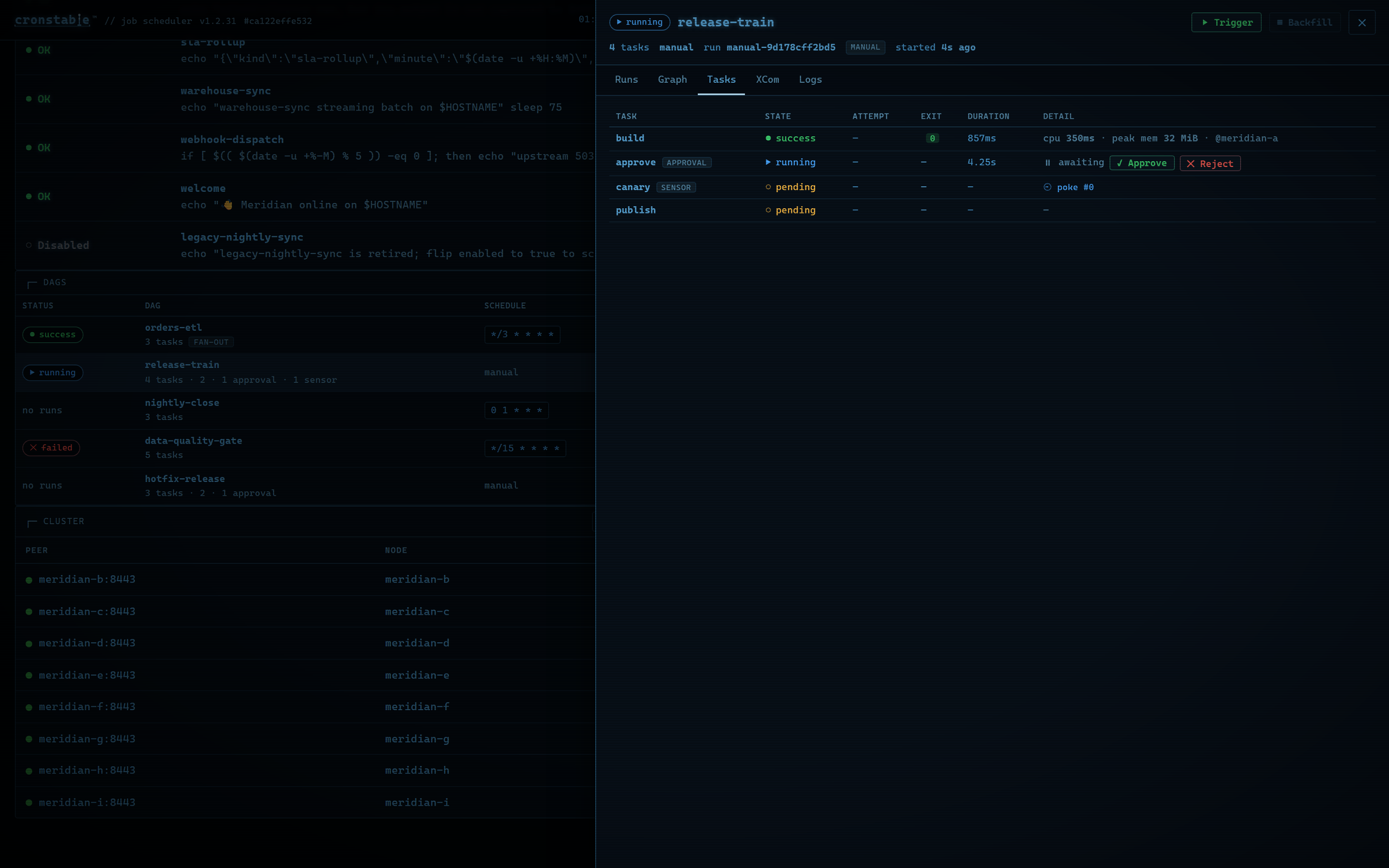](https://raw.githubusercontent.com/ptweezy/cronstable/main/docs/img/dashboard-dag-approval.png) |
| A `data-quality-gate` diamond: fan-out checks that reconverge on a `certify` task, colored by state as the run advances. | A release train **parked on a human**: the build succeeded, the approval gate is `awaiting`, and the sensor and publish tasks queue behind your decision. |
### The whole fleet on one page
With [clustering](#clustering-and-leader-election) on, a **cluster panel**
shows the quorum math, this node's role, per-peer attestation status, and,
with `cluster.observability`, every node's **whole-host CPU and memory**. The
**fleet view** goes further: a jobs × nodes matrix of the entire fleet's runs,
assembled from data that piggybacks on the gossip the nodes already exchange,
so any node can serve the whole fleet from one page.
| Cluster panel | Fleet view |
| :---: | :---: |
| [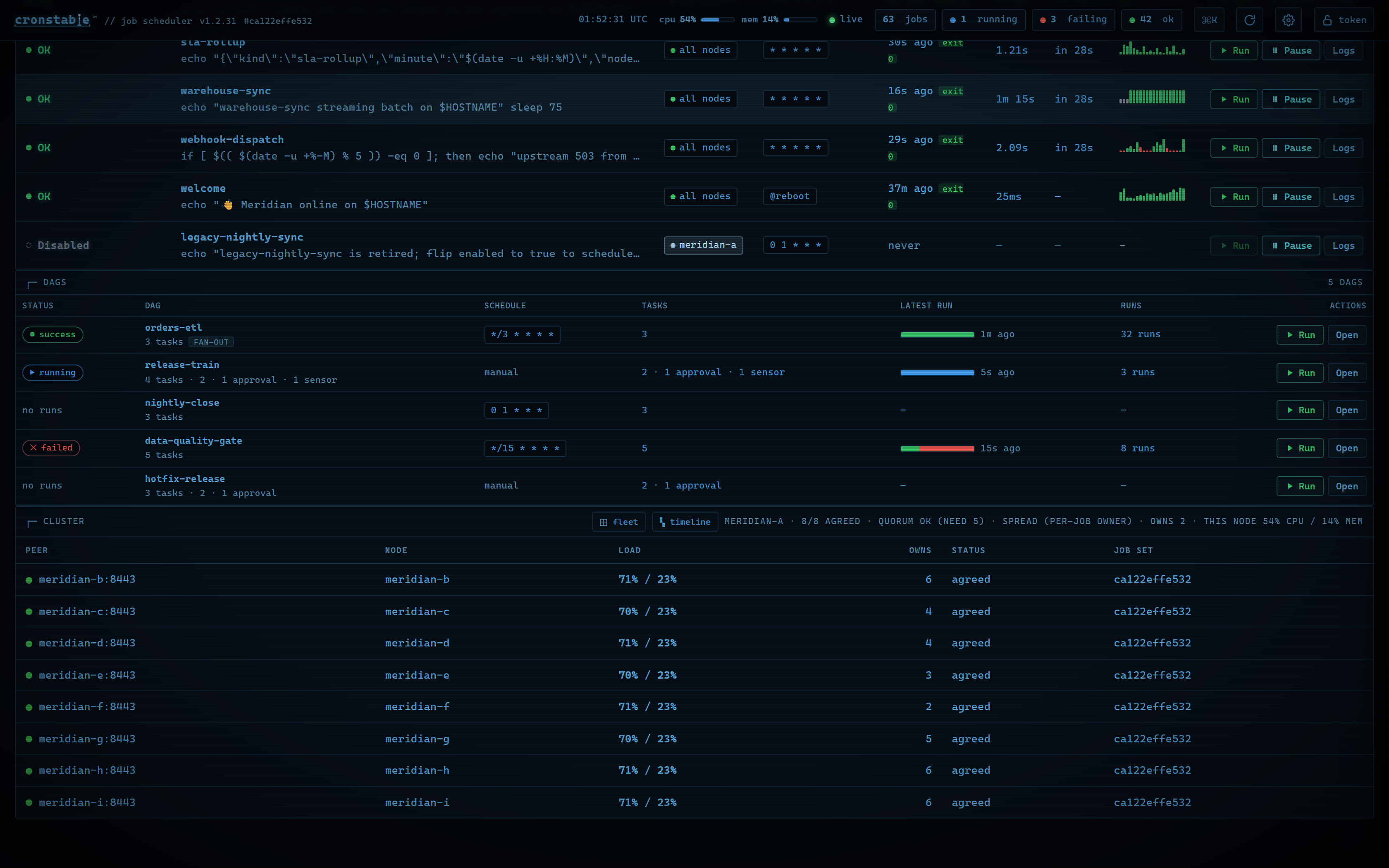](https://raw.githubusercontent.com/ptweezy/cronstable/main/docs/img/dashboard-cluster.png) | [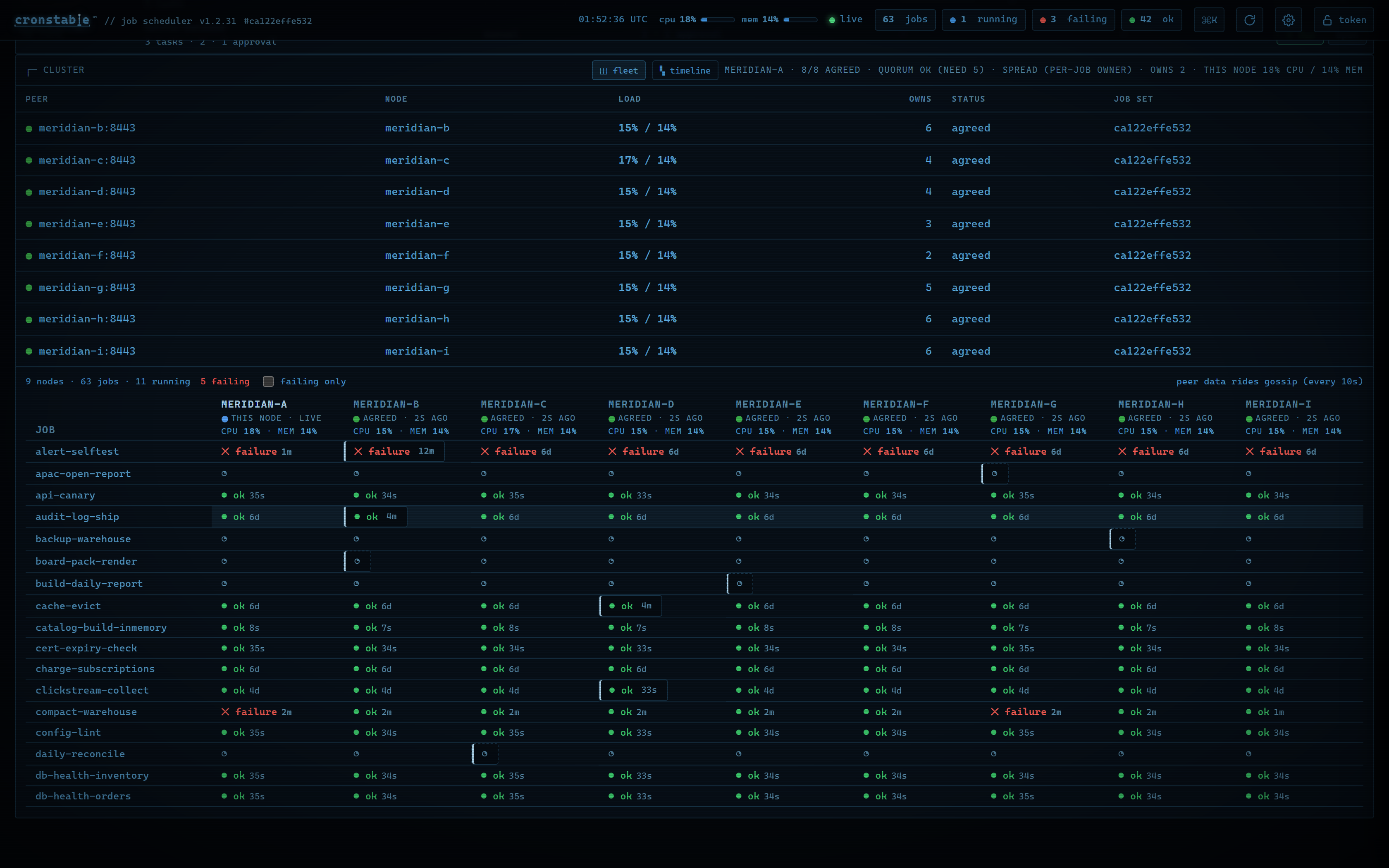](https://raw.githubusercontent.com/ptweezy/cronstable/main/docs/img/dashboard-fleet.png) |
| Nine nodes, `8/8 agreed`, quorum met, per-node **load meters** and per-node **owns** counts under `distribution: spread`. | Every node's state for every job, one glance: ok / failing / running cells with ages, per-column node health, and a **failing only** filter. |
### When things break
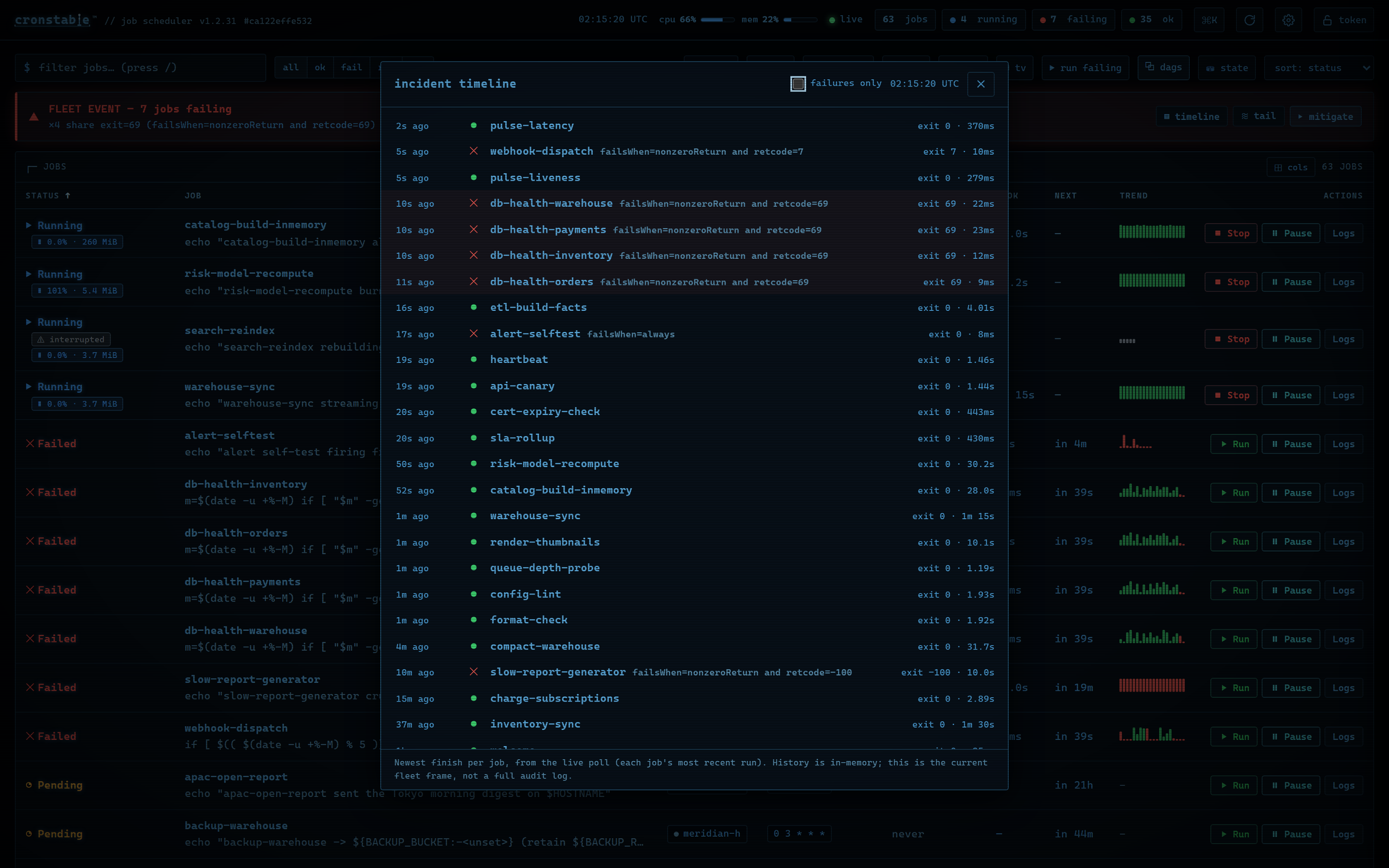
Three panels are built for incident response. The verdict bar's incident
timeline lays out every job's most recent finish, newest first, with the
correlated blast-radius set highlighted. The mitigate console starts or
cancels the failing set in bulk and copies a Markdown incident summary for
your ticket. The multi-tail console merges up to four jobs' live logs into one
pane, like tailing a set of pods.
| Incident timeline | Merged multi-tail |
| :---: | :---: |
| [](https://raw.githubusercontent.com/ptweezy/cronstable/main/docs/img/dashboard-incident-timeline.png) | [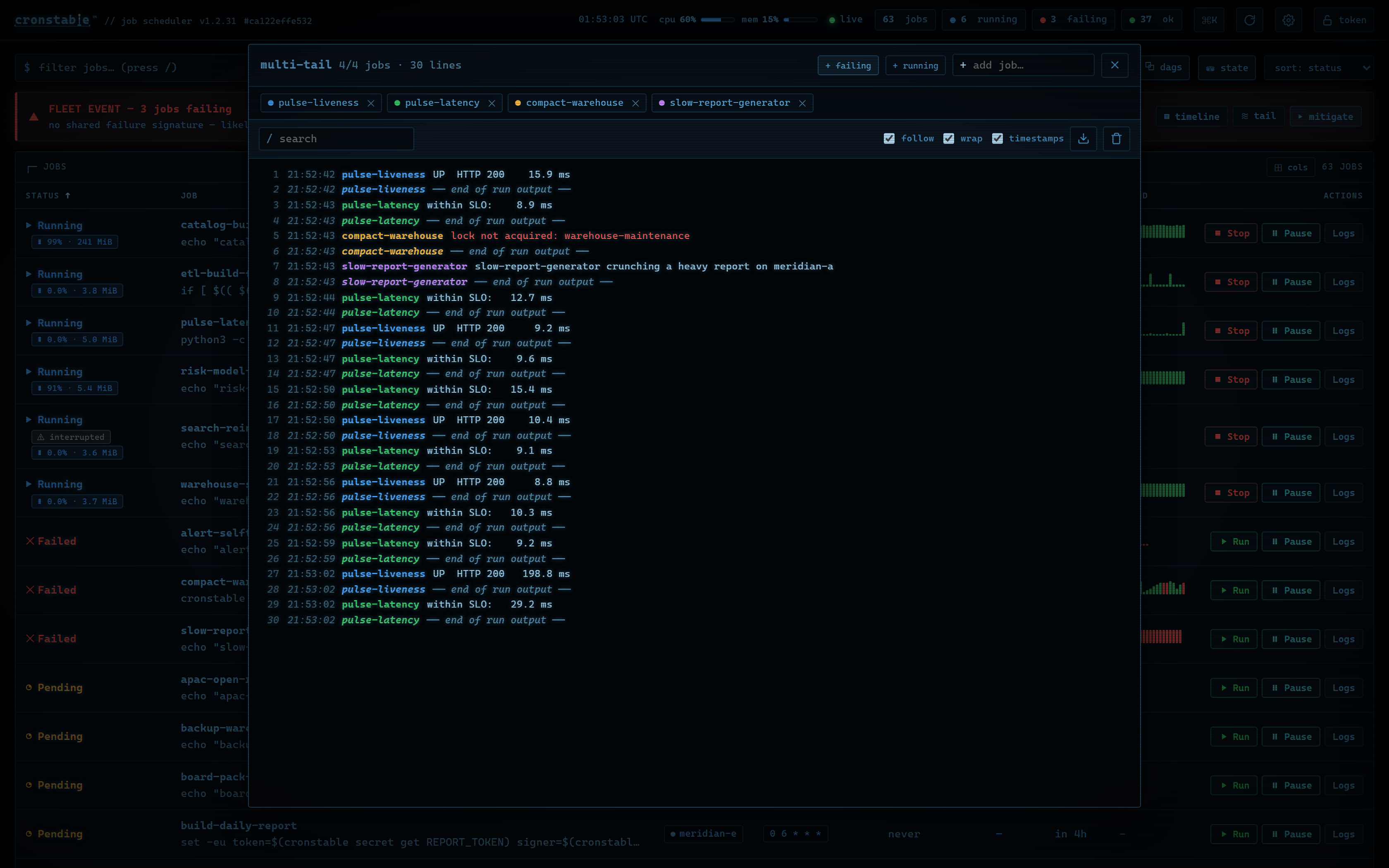](https://raw.githubusercontent.com/ptweezy/cronstable/main/docs/img/dashboard-multitail.png) |
| "What happened, in what order": relative times, outcome glyphs, failure reasons, exit codes, durations, and a **failing only** filter. | Four streams, one pane: identity-colored prefixes, `end of run output` markers, auto re-attach on each job's next run. |
### Wallboards, heatmaps, and the state store
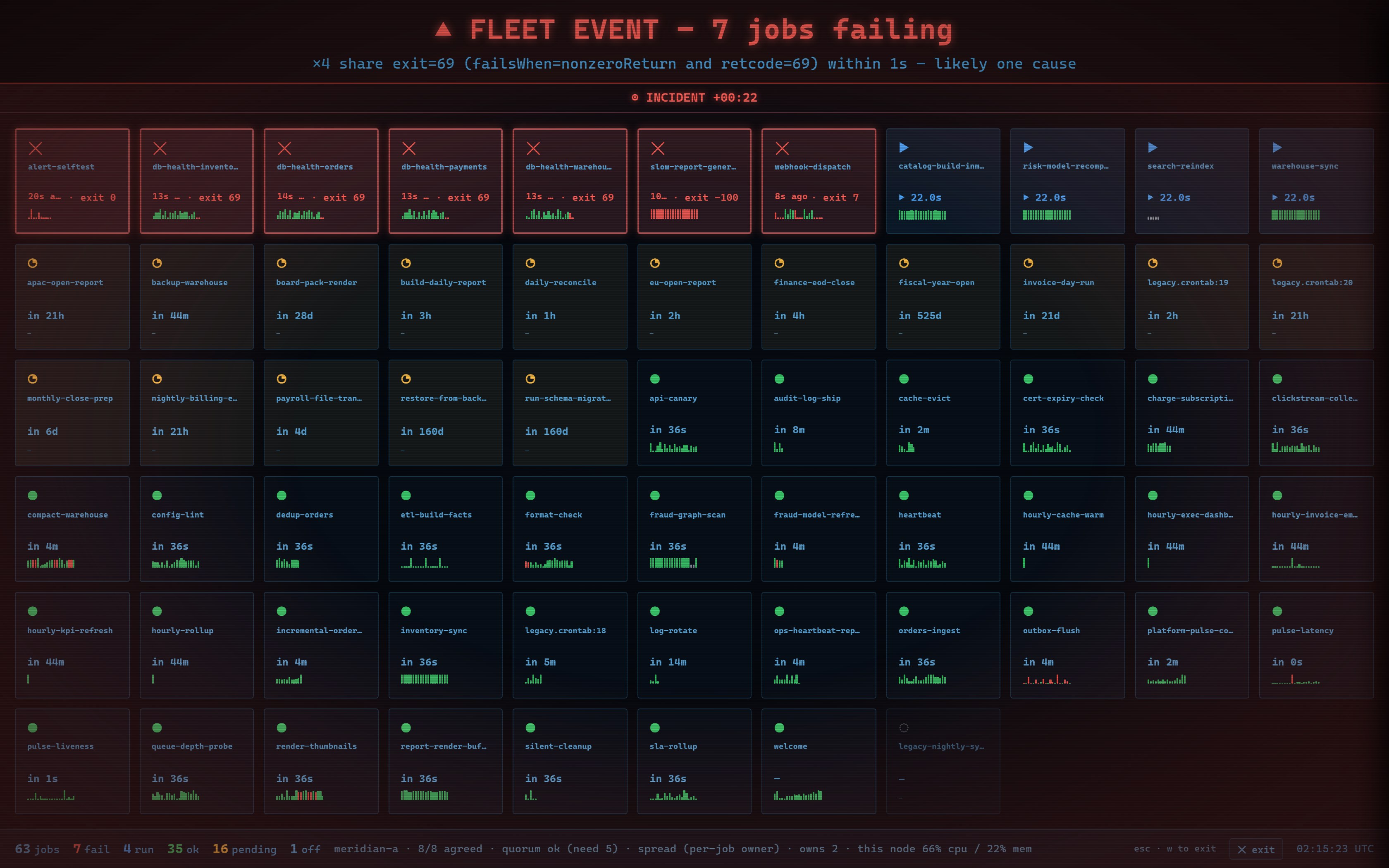
Press `w` for a full-screen **wallboard** built for a TV: worst-first tiles,
an incident stamp when something is failing, a `NO SIGNAL` banner when the
data goes stale (never a stale all-green), and a zen **screensaver** that
takes over when every job is ok. The **activity heatmap** turns run history
into a punchcard (worst outcome per bucket, shaded by volume), and the
opt-in **state inspector** shows the [durable state store](https://github.com/ptweezy/cronstable/wiki/Durable-State)'s
health: record counts by kind, op latencies and errors, locks, cursors,
counters, artifacts, and quarantine.
| Wallboard / TV mode | Activity heatmap | Durable-state inspector |
| :---: | :---: | :---: |
| [](https://raw.githubusercontent.com/ptweezy/cronstable/main/docs/img/dashboard-wallboard.png) | [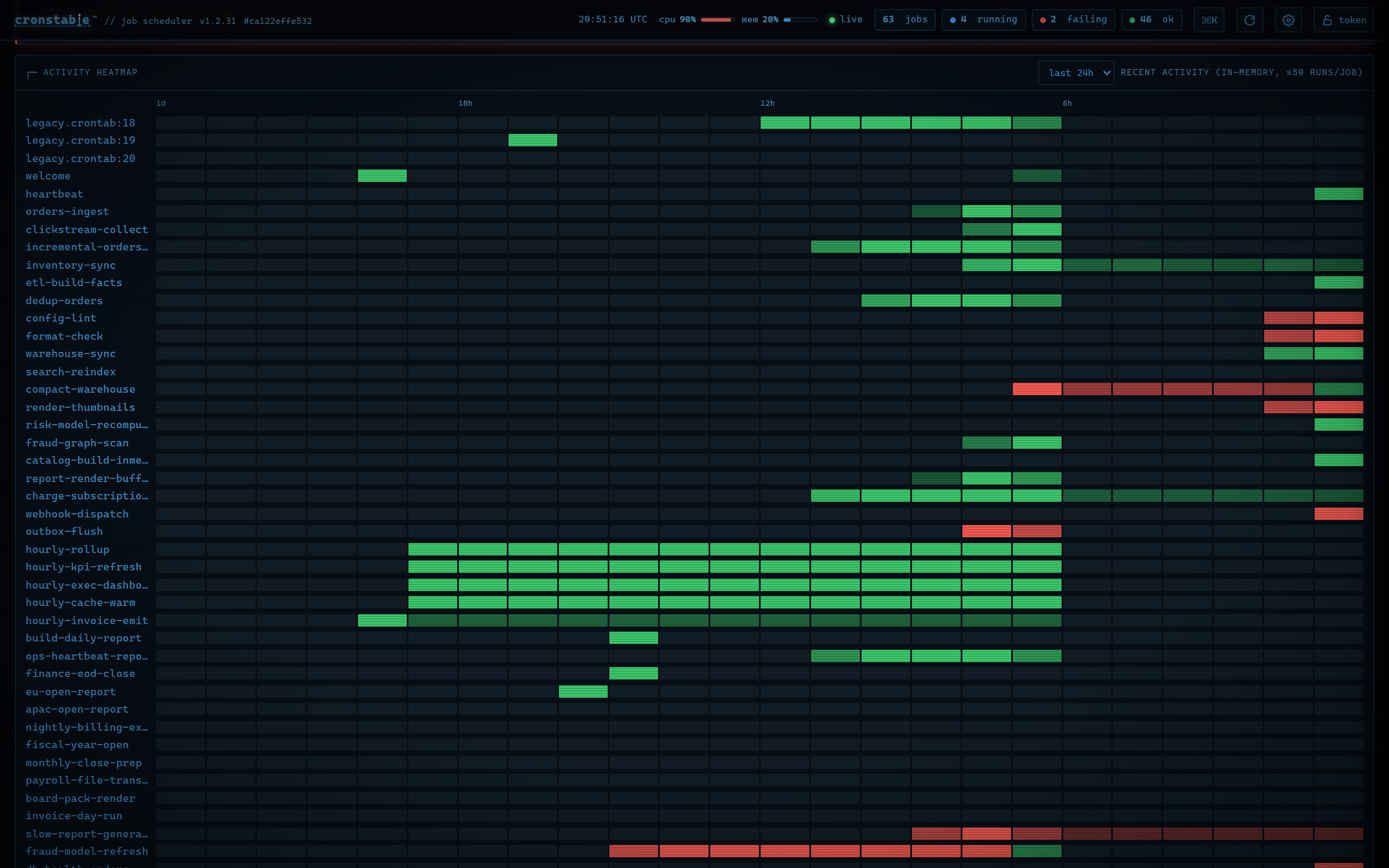](https://raw.githubusercontent.com/ptweezy/cronstable/main/docs/img/dashboard-heatmap.png) | [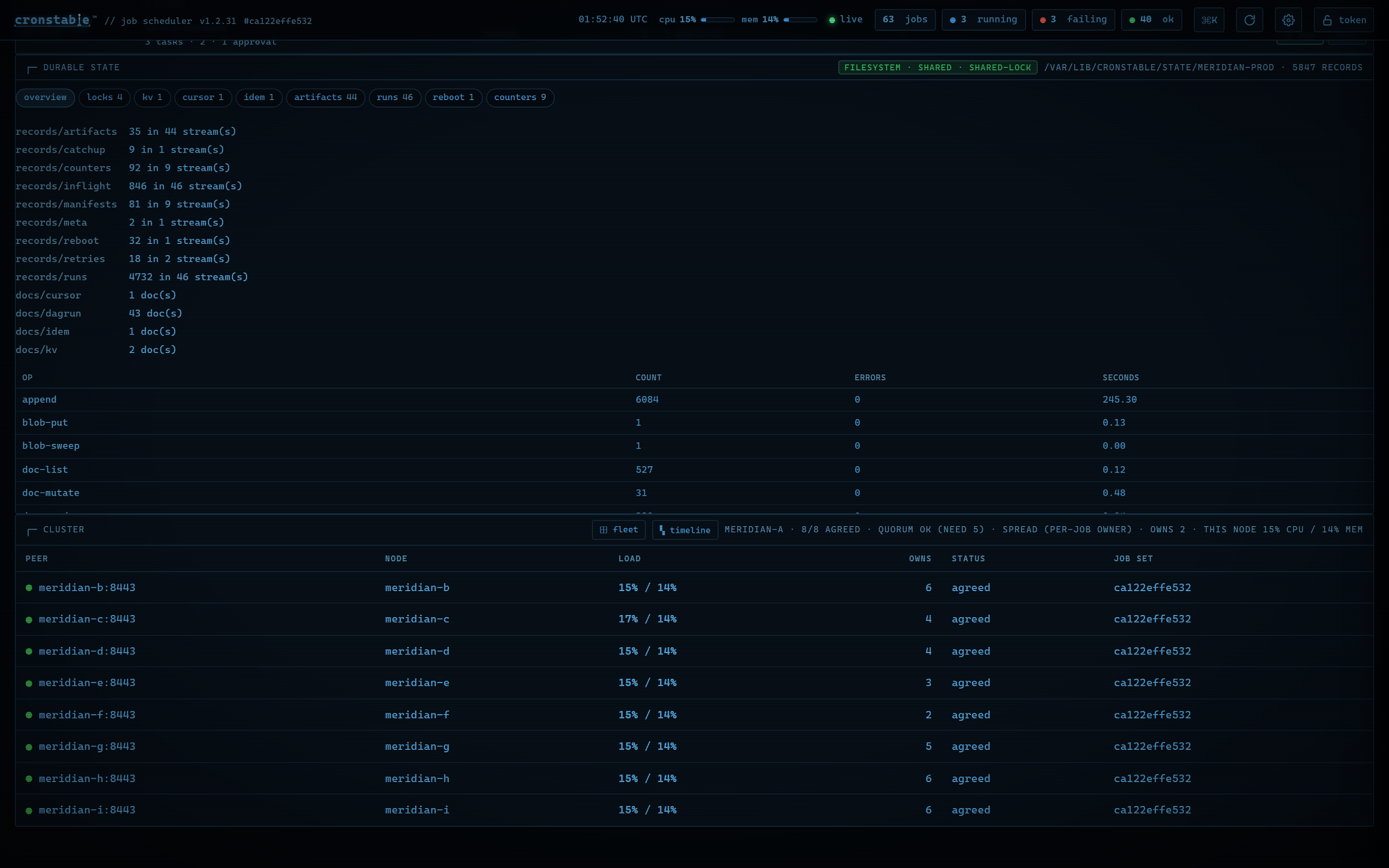](https://raw.githubusercontent.com/ptweezy/cronstable/main/docs/img/dashboard-state.png) |
### Themes, readability, and accessibility
**Ten themes**: **standard** (the default, a flat neutral charcoal),
**carolina** (Carolina blue), **amber**, **green**, and flat **modern**, each in
a dark and a light (paper) variant. Cycle hues with `t`, flip
light/dark with `T`:
[](https://raw.githubusercontent.com/ptweezy/cronstable/main/docs/img/dashboard-themes.webp)
*(One board, ten themes, two interface fonts, animated: [WebP](https://raw.githubusercontent.com/ptweezy/cronstable/main/docs/img/dashboard-themes.webp), [GIF](https://raw.githubusercontent.com/ptweezy/cronstable/main/docs/img/dashboard-themes.gif). The five stills that follow are pulled from it.)*
| Carolina | Amber |
| :---: | :---: |
| [](https://raw.githubusercontent.com/ptweezy/cronstable/main/docs/img/dashboard-theme-carolina.png) | [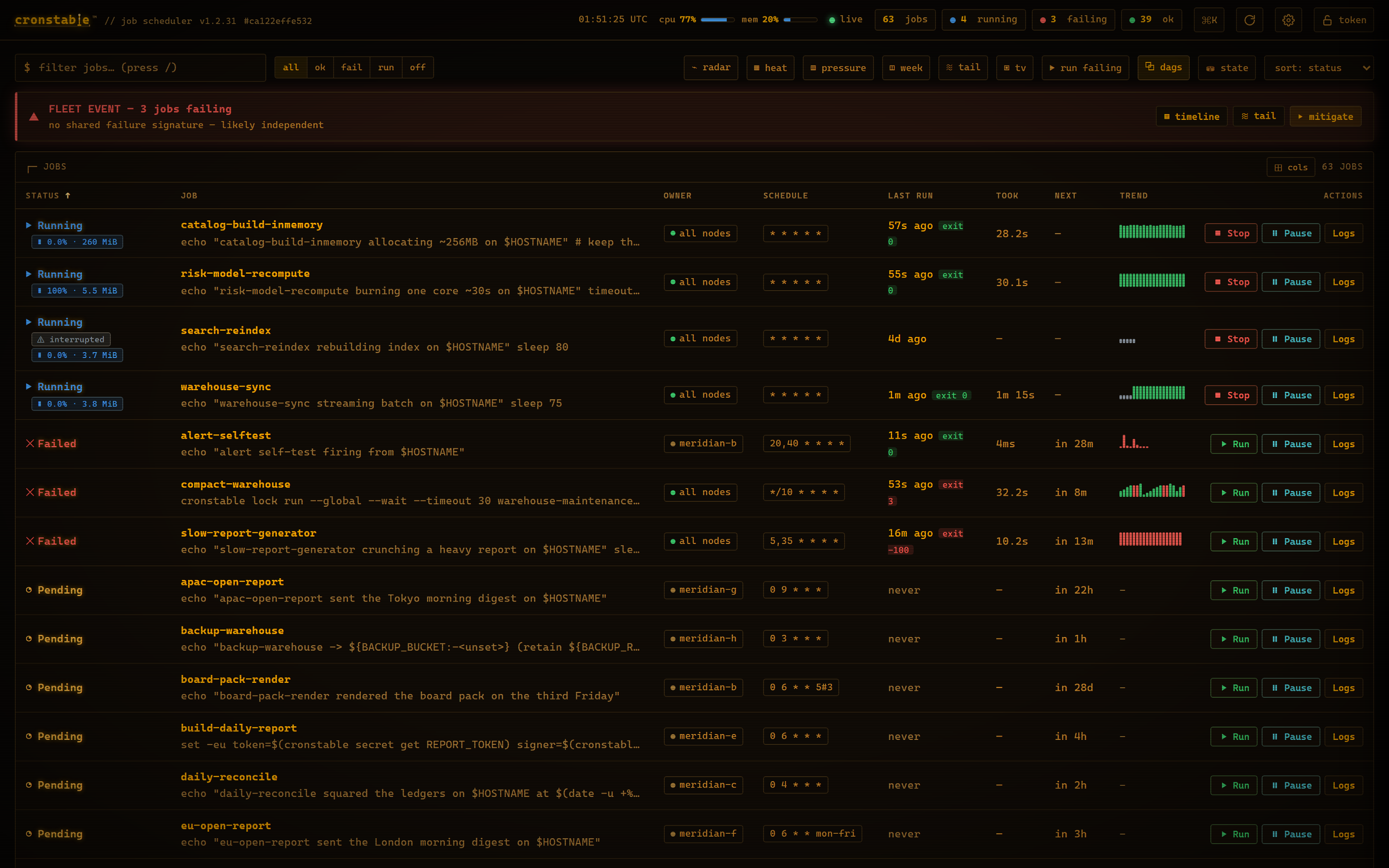](https://raw.githubusercontent.com/ptweezy/cronstable/main/docs/img/dashboard-theme-amber.png) |
| Green | Flat modern |
| :---: | :---: |
| [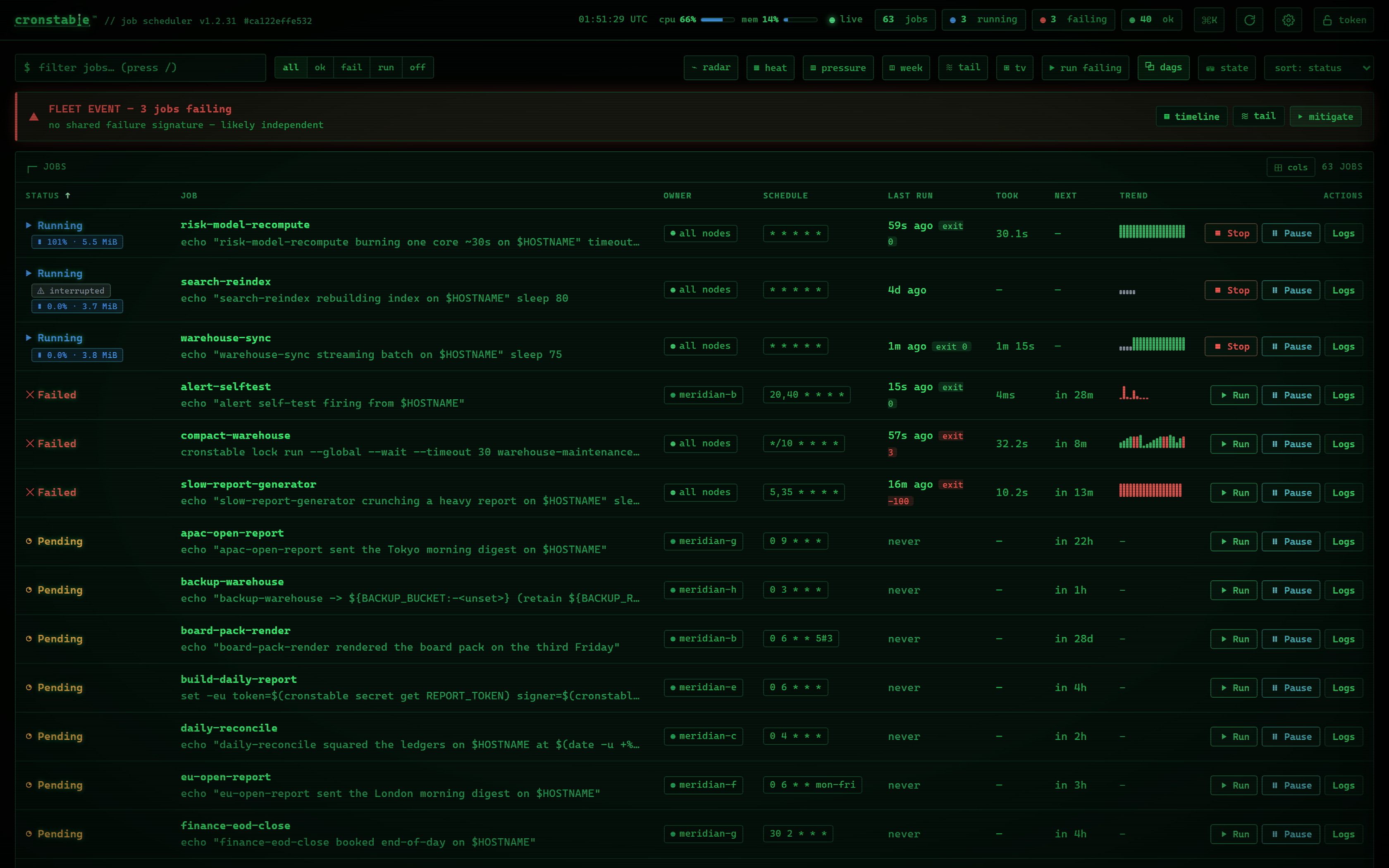](https://raw.githubusercontent.com/ptweezy/cronstable/main/docs/img/dashboard-theme-green.png) | [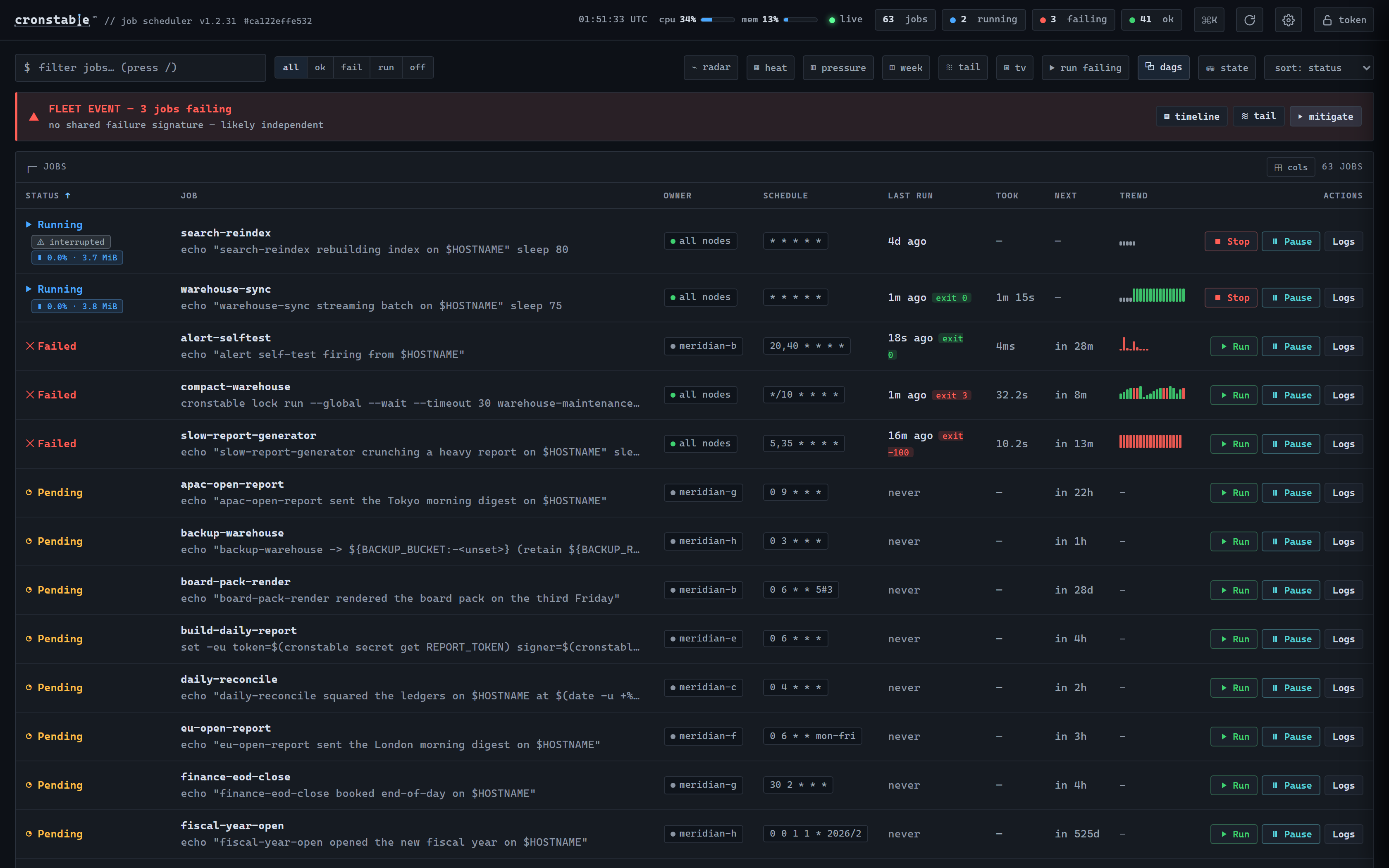](https://raw.githubusercontent.com/ptweezy/cronstable/main/docs/img/dashboard-theme-modern.png) |
| Standard, on paper (light) |
| :---: |
| [](https://raw.githubusercontent.com/ptweezy/cronstable/main/docs/img/dashboard-theme-standard-light.png) |
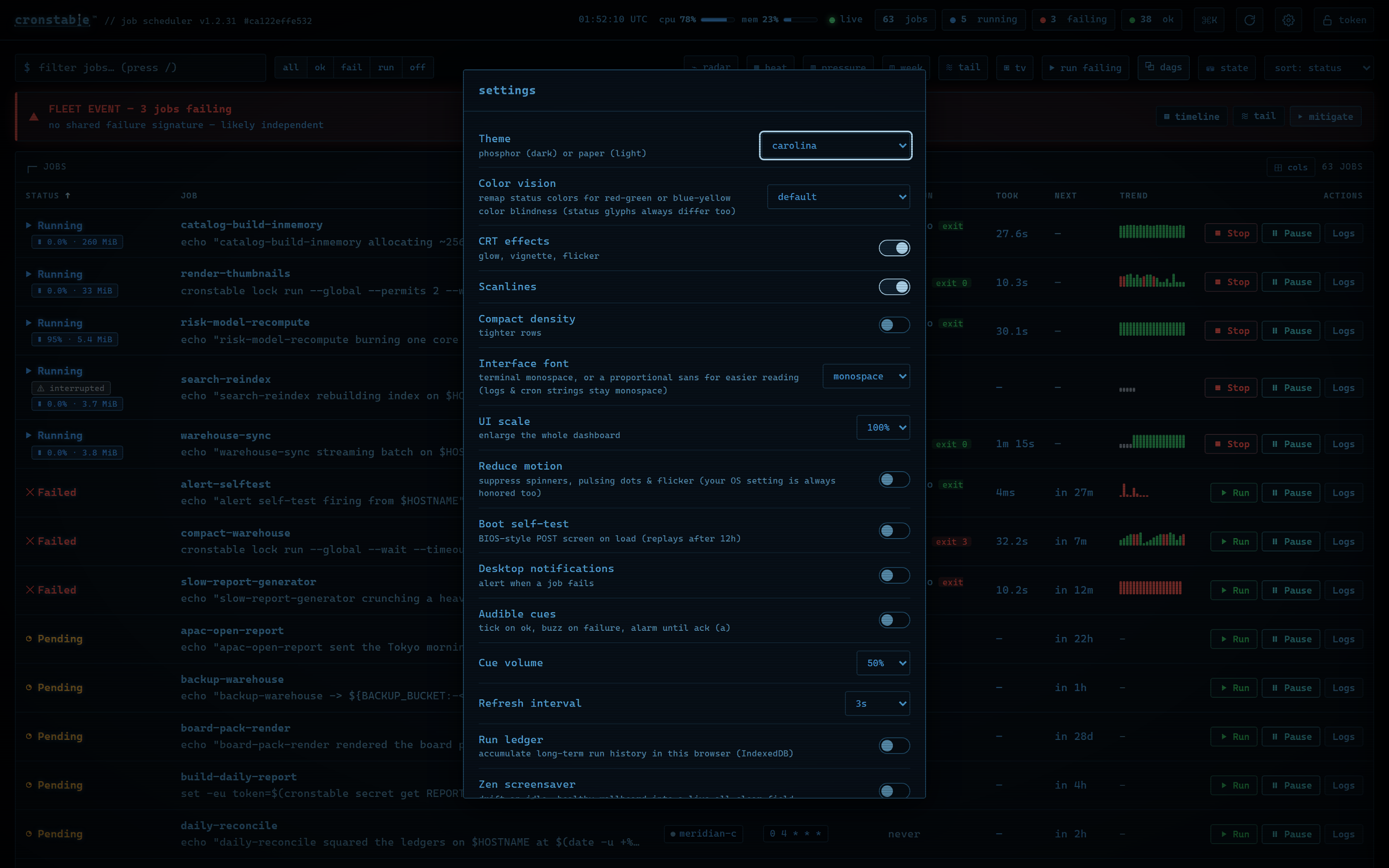
Beyond the themes: an optional proportional-sans interface font (shown per
theme in the preceding animation), UI scaling, deuteranopia- and
tritanopia-safe palettes, reduced-motion support, and notification toggles,
all remembered per browser, with status always carried by glyphs and text, not
color or animation alone. There is also an optional (on by default, once per
12 hours) BIOS-style boot self-test that checks the daemon, job set, cluster,
and schedules for real while it types:
| Settings | Startup self-test |
| :---: | :---: |
| [](https://raw.githubusercontent.com/ptweezy/cronstable/main/docs/img/dashboard-settings.png) | [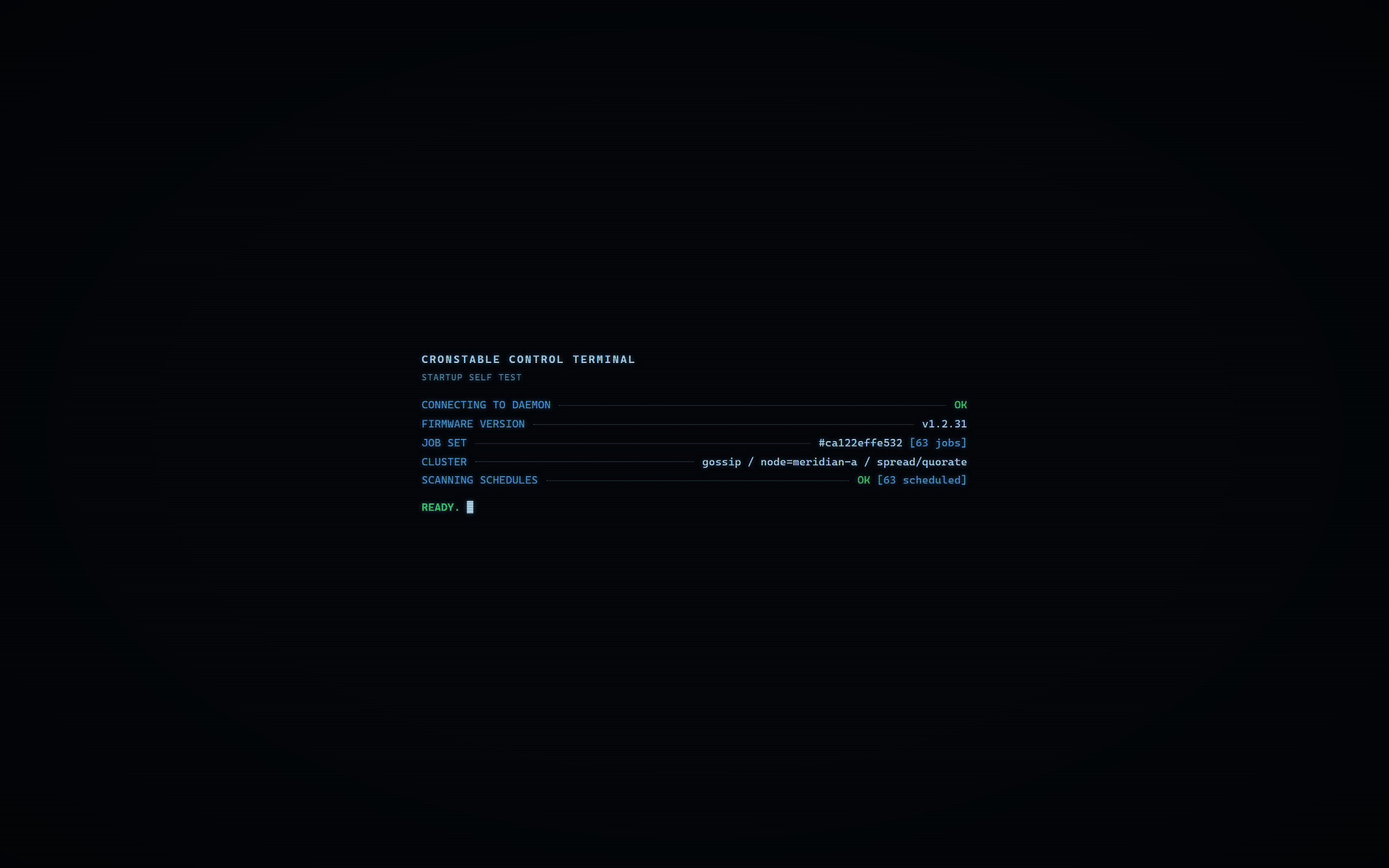](https://raw.githubusercontent.com/ptweezy/cronstable/main/docs/img/dashboard-boot.png) |
The `l` in the header's "cronstable" is a live cart-and-double-pendulum
simulation. I like to call him double-P, Peter Parker, or PP.
Run history and live logs are kept **in memory only** (unless you opt into the
durable state store), and the page is served with a strict
Content-Security-Policy. A one-line `web:` block turns it on: the
[**web dashboard tour**](https://github.com/ptweezy/cronstable/wiki/Web-Dashboard)
in the wiki is the full walkthrough, and
[remote web/HTTP interface](#remote-webhttp-interface) later shows how to
enable it.
**Try it:** `docker compose -f example/zen-demo/docker-compose.yml up` boots
a single node with a demo job set.
`docker compose -f example/cluster/docker-compose.yml up` boots a 3-node
cluster (`cronstable-a`/`cronstable-b`/`cronstable-c`), so you can open each
node's dashboard and watch the cluster panel and leader election live.
For **every feature at once**, run
`docker compose -f example/grand-tour/docker-compose.yml up --build` (the
[grand tour](example/grand-tour); see its
[README](example/grand-tour/README.md)): a 9-node mutual-TLS cluster sharing
one durable state store and running the classic job set, durable-state jobs,
orchestration DAGs and second-level probes together, with all five
cross-platform failure reporters wired to live sinks. More one-command demos
are in the [example gallery](#example-gallery).
## Terminal dashboard
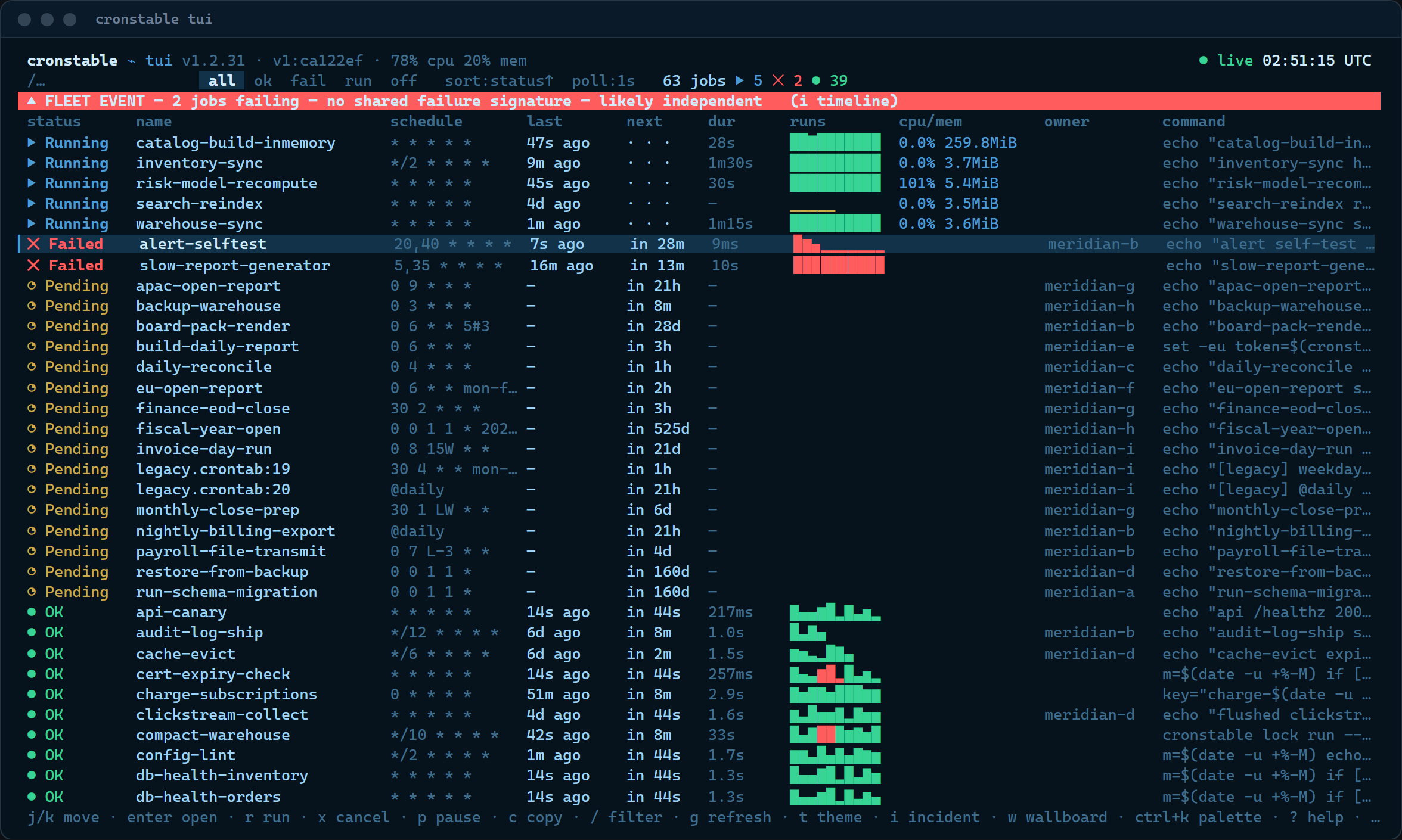
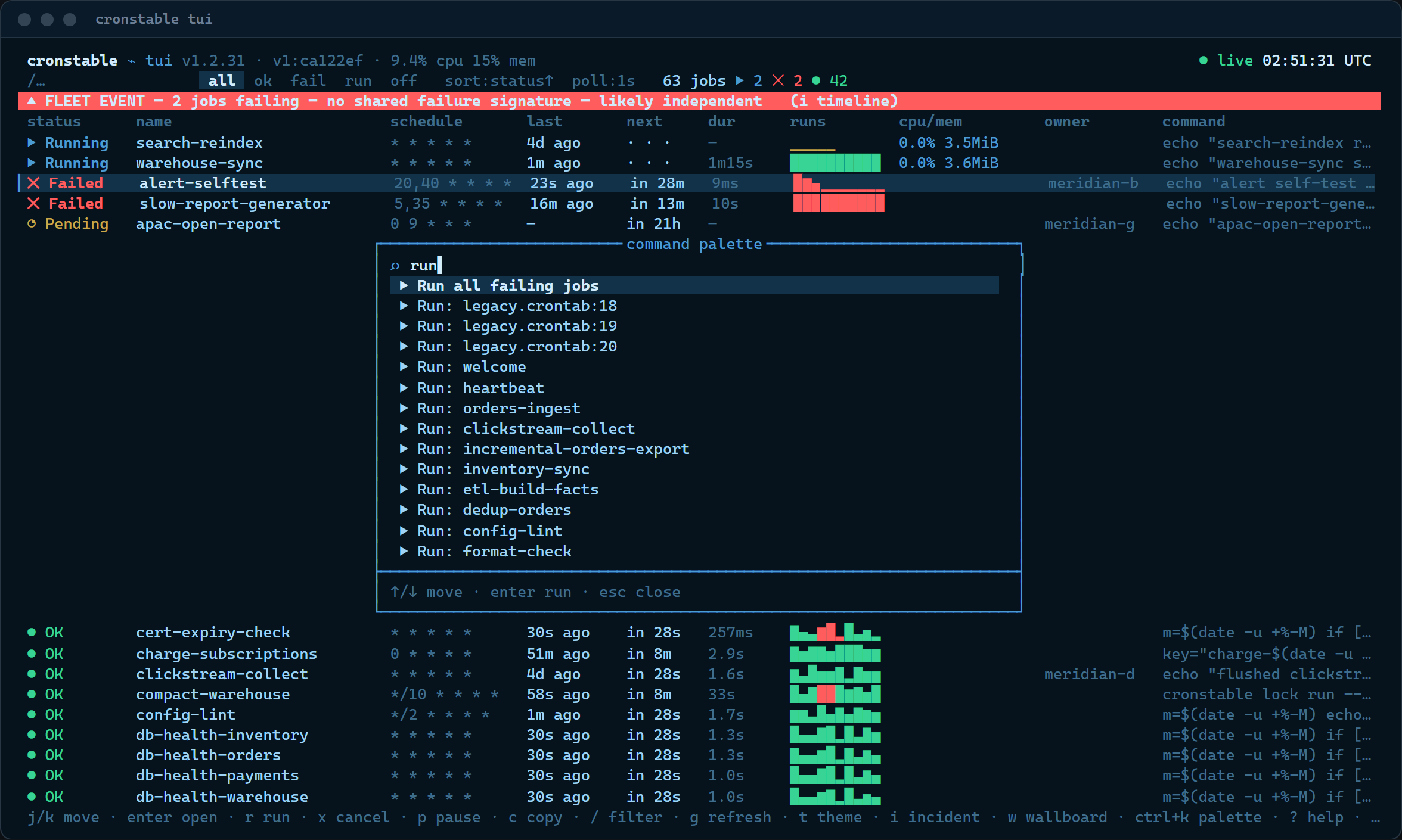
The dashboard has a **TUI sibling**: `cronstable tui` opens the board in
your terminal, over SSH, in a tmux pane, or on a box where a browser is
not an option. It is a client of the same HTTP control API (nothing extra
to enable on the daemon), and the shortcut table is the same one as the
web page's: `j`/`k` move, `Enter` opens a job's drawer, `r` runs, `x`
cancels, `/` filters, `Ctrl-K` opens the fuzzy command palette, and `?`
lists everything.
[](https://raw.githubusercontent.com/ptweezy/cronstable/main/docs/img/tui-overview.png)
Press `Enter` on any job for its drawer, the same three tabs as the
web page, plus resources for monitored jobs:
| Live log tail | Run history | Schedule, explained |
| :---: | :---: | :---: |
| [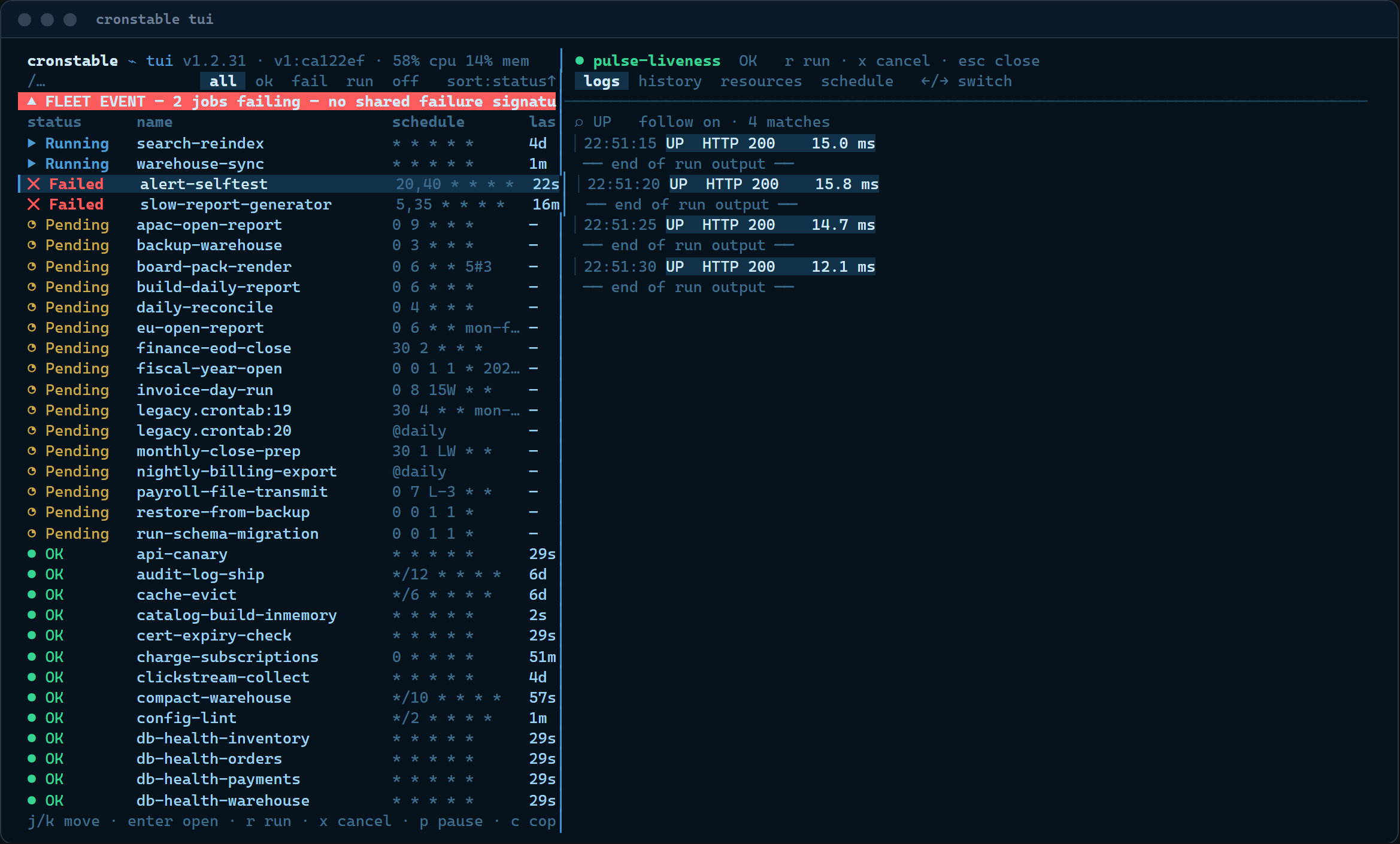](https://raw.githubusercontent.com/ptweezy/cronstable/main/docs/img/tui-logs.png) | [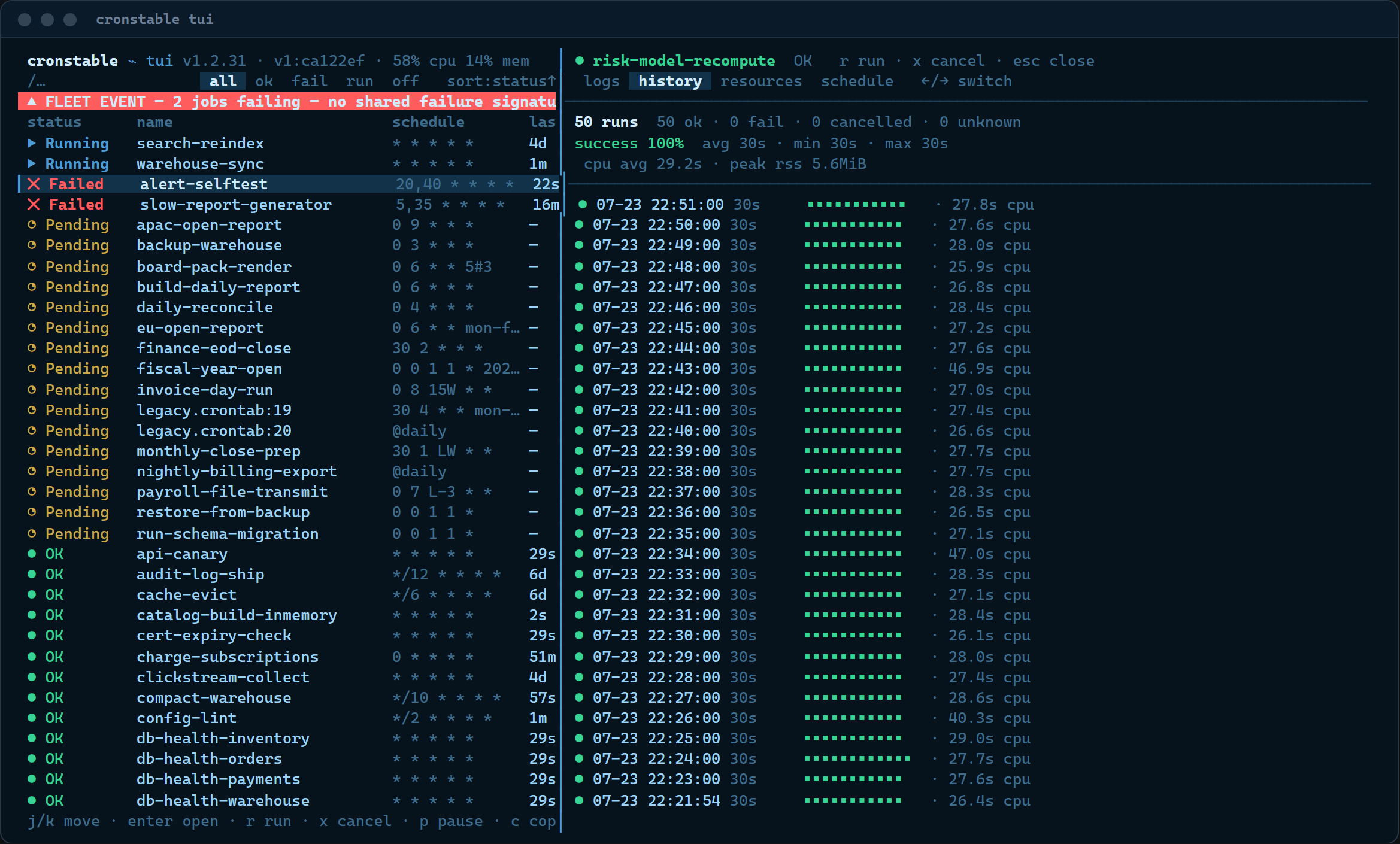](https://raw.githubusercontent.com/ptweezy/cronstable/main/docs/img/tui-history.png) | [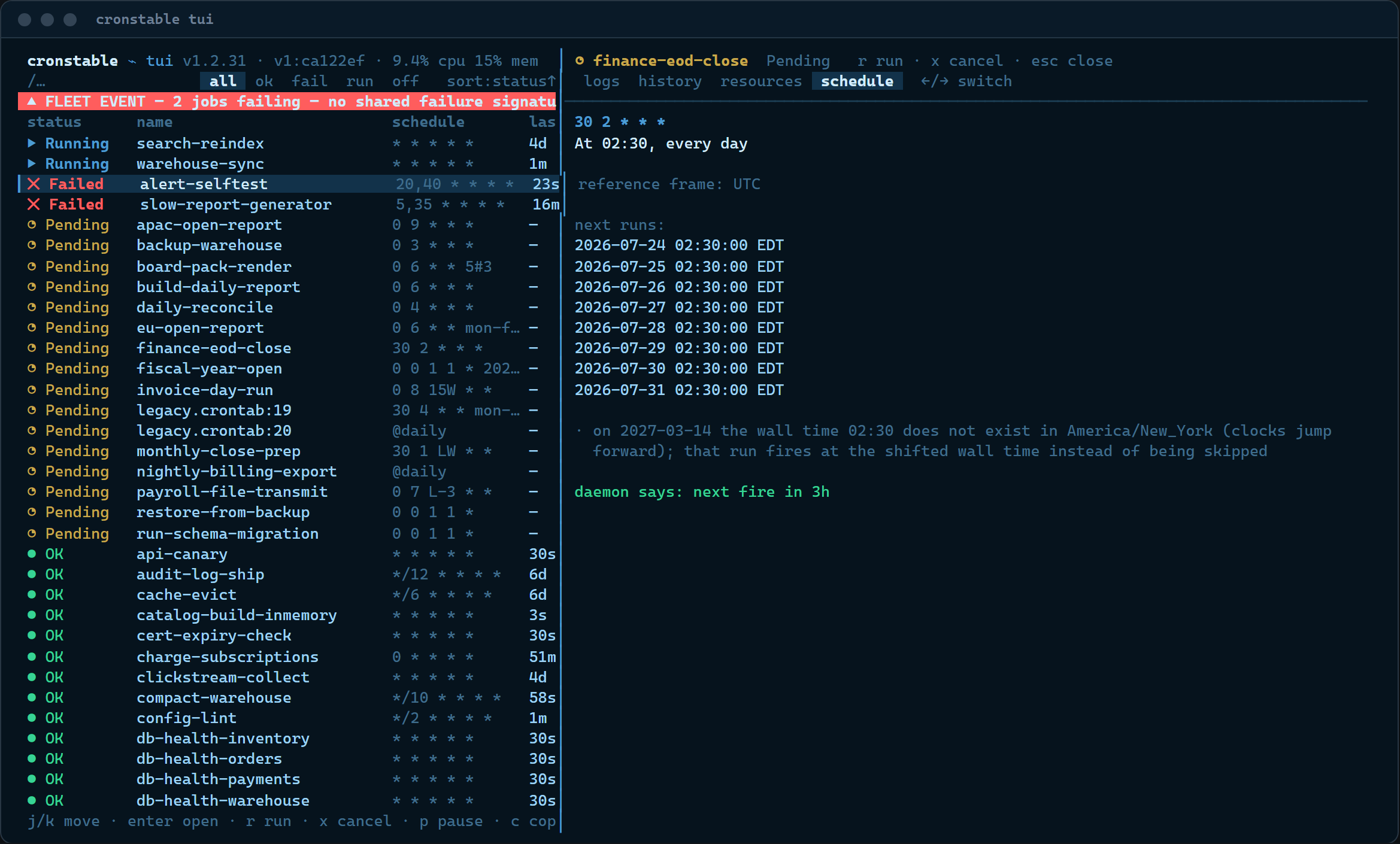](https://raw.githubusercontent.com/ptweezy/cronstable/main/docs/img/tui-schedule.png) |
| Fuzzy command palette | Keyboard-first, with the web page's keys |
| :---: | :---: |
| [](https://raw.githubusercontent.com/ptweezy/cronstable/main/docs/img/tui-palette.png) | [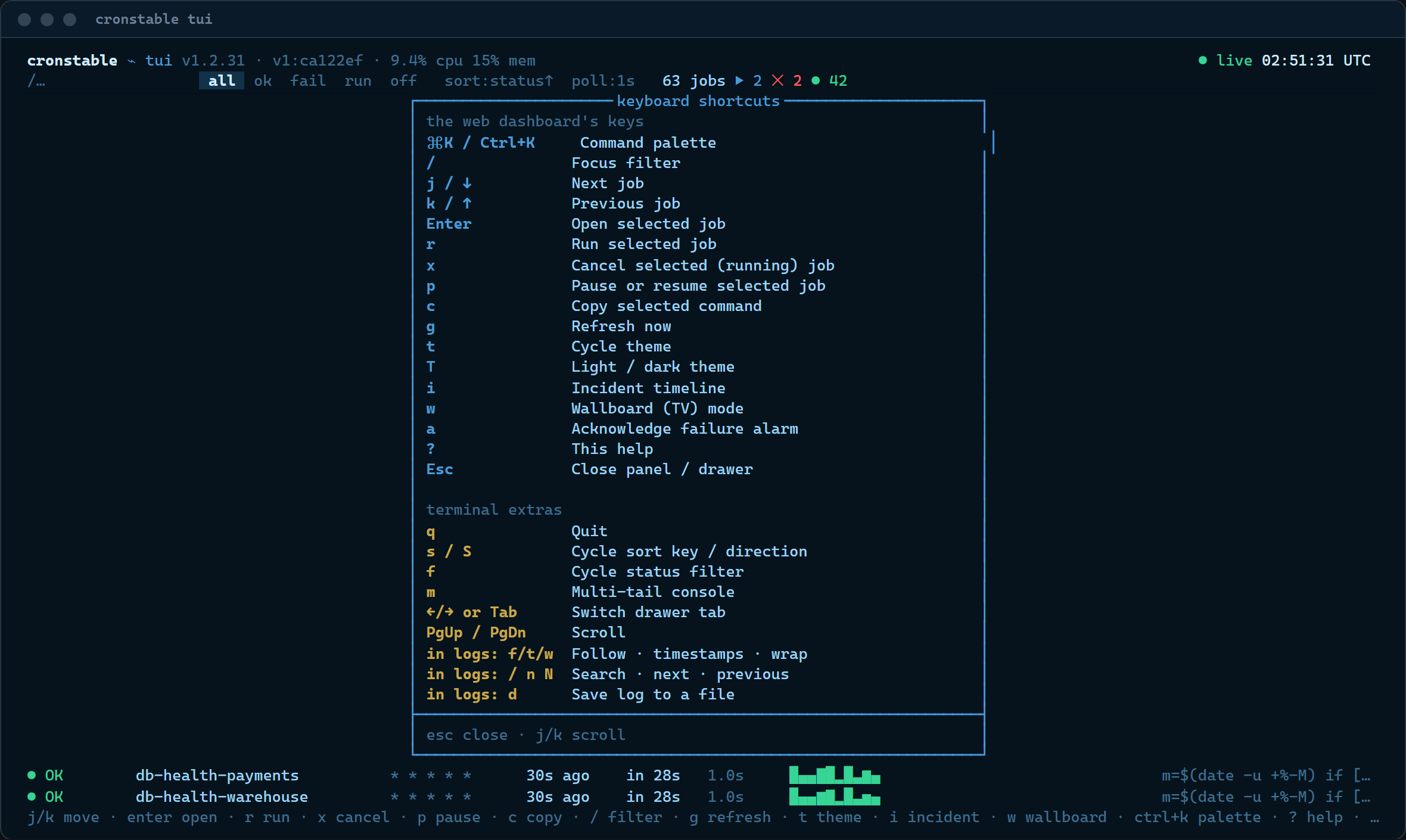](https://raw.githubusercontent.com/ptweezy/cronstable/main/docs/img/tui-shortcuts.png) |
DAGs get the same drawer as the browser, and approval gates are decided
with a keypress:
| The task graph, mid-flight | A human approval gate |
| :---: | :---: |
| [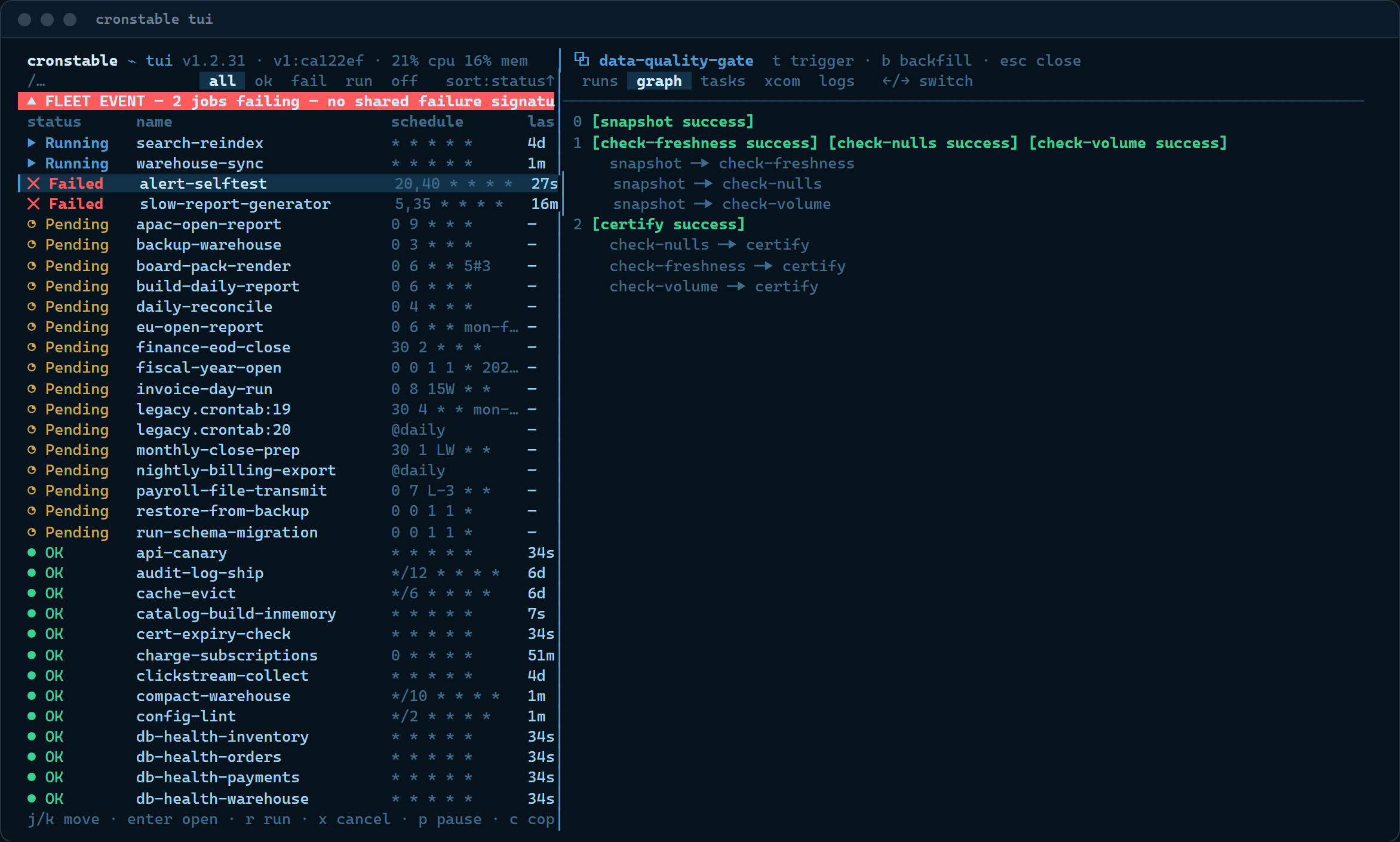](https://raw.githubusercontent.com/ptweezy/cronstable/main/docs/img/tui-dag-graph.png) | [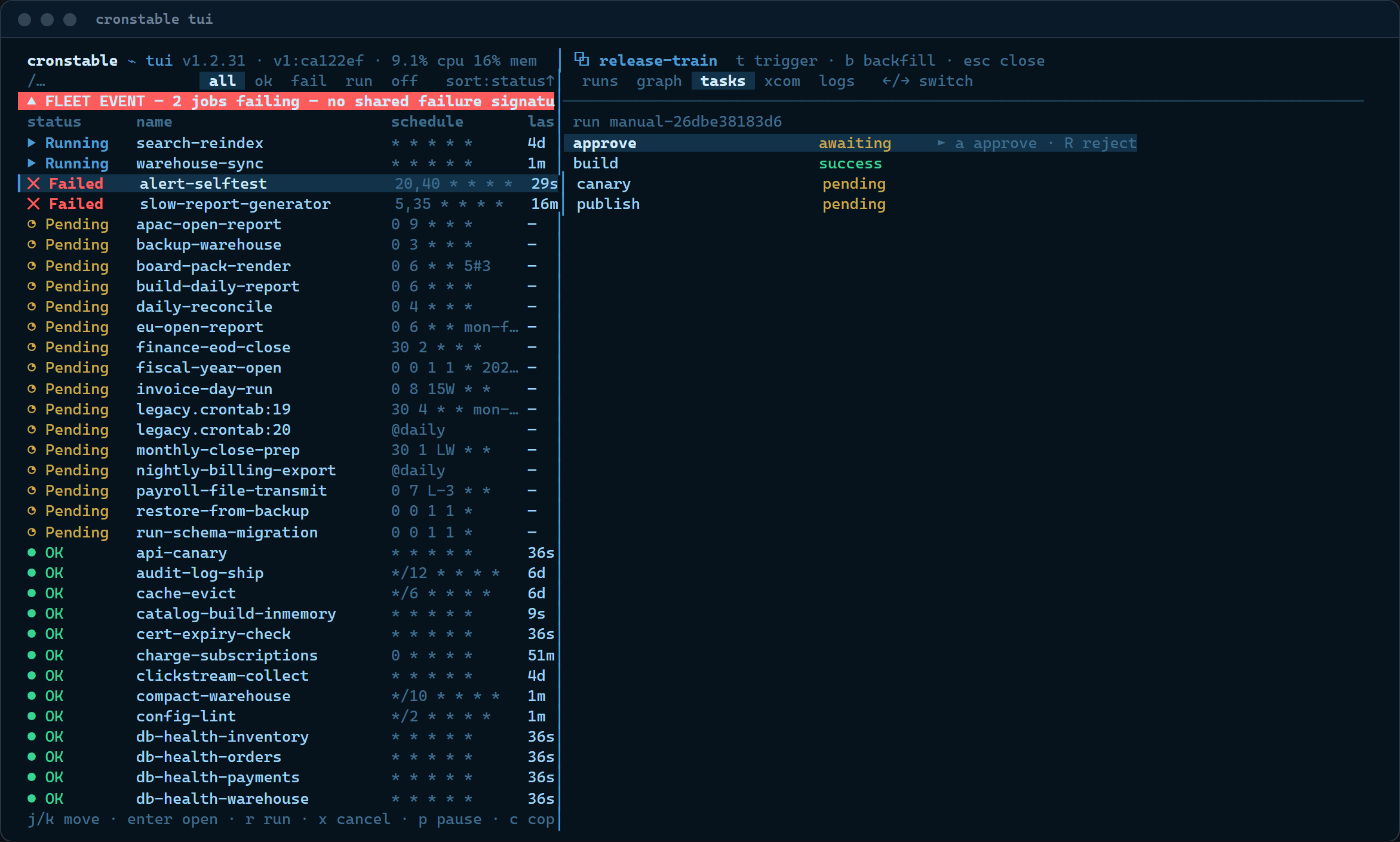](https://raw.githubusercontent.com/ptweezy/cronstable/main/docs/img/tui-dag-approval.png) |
With clustering on, the cluster panel and the full fleet matrix render
in the terminal too:
| Cluster panel | Fleet view |
| :---: | :---: |
| [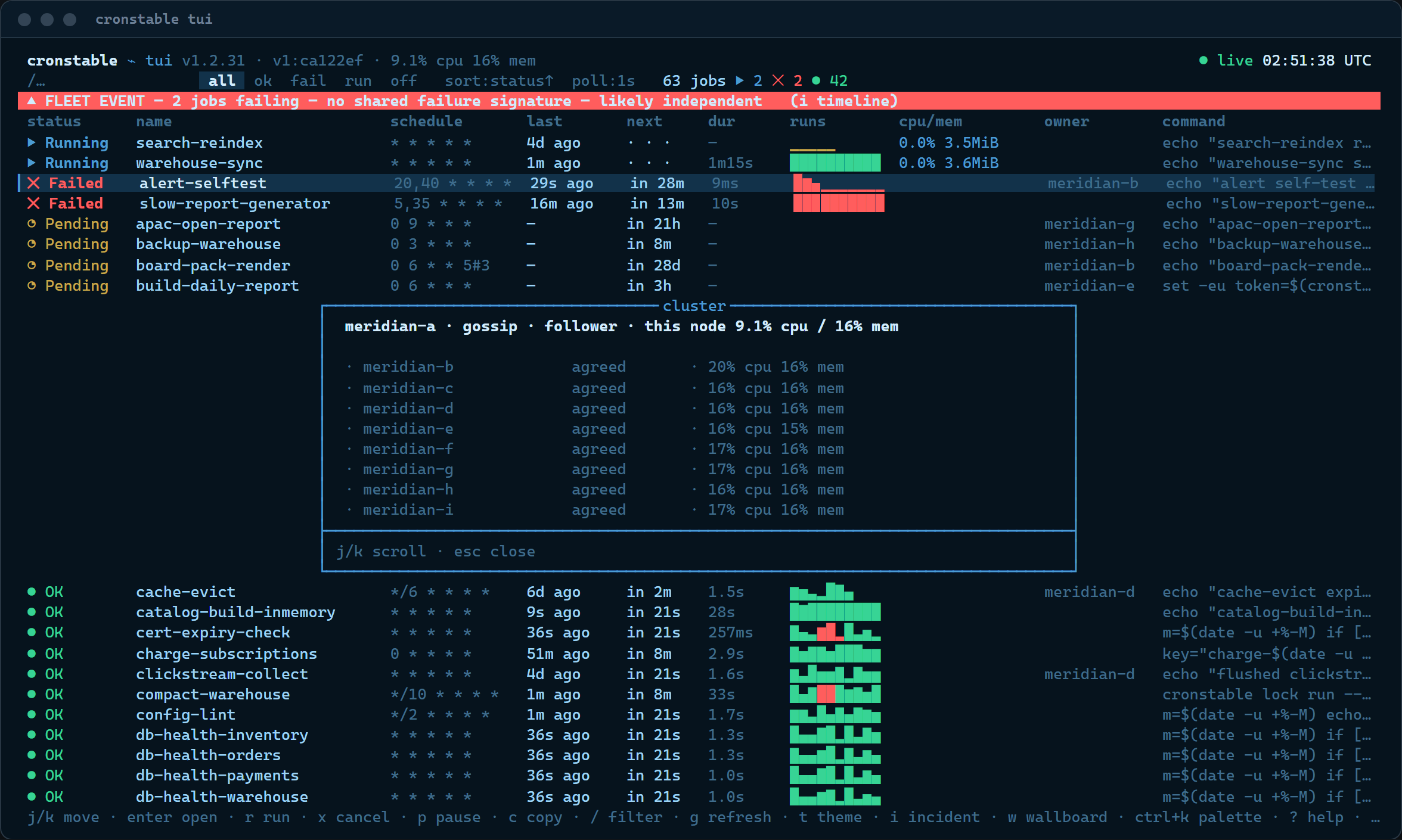](https://raw.githubusercontent.com/ptweezy/cronstable/main/docs/img/tui-cluster.png) | [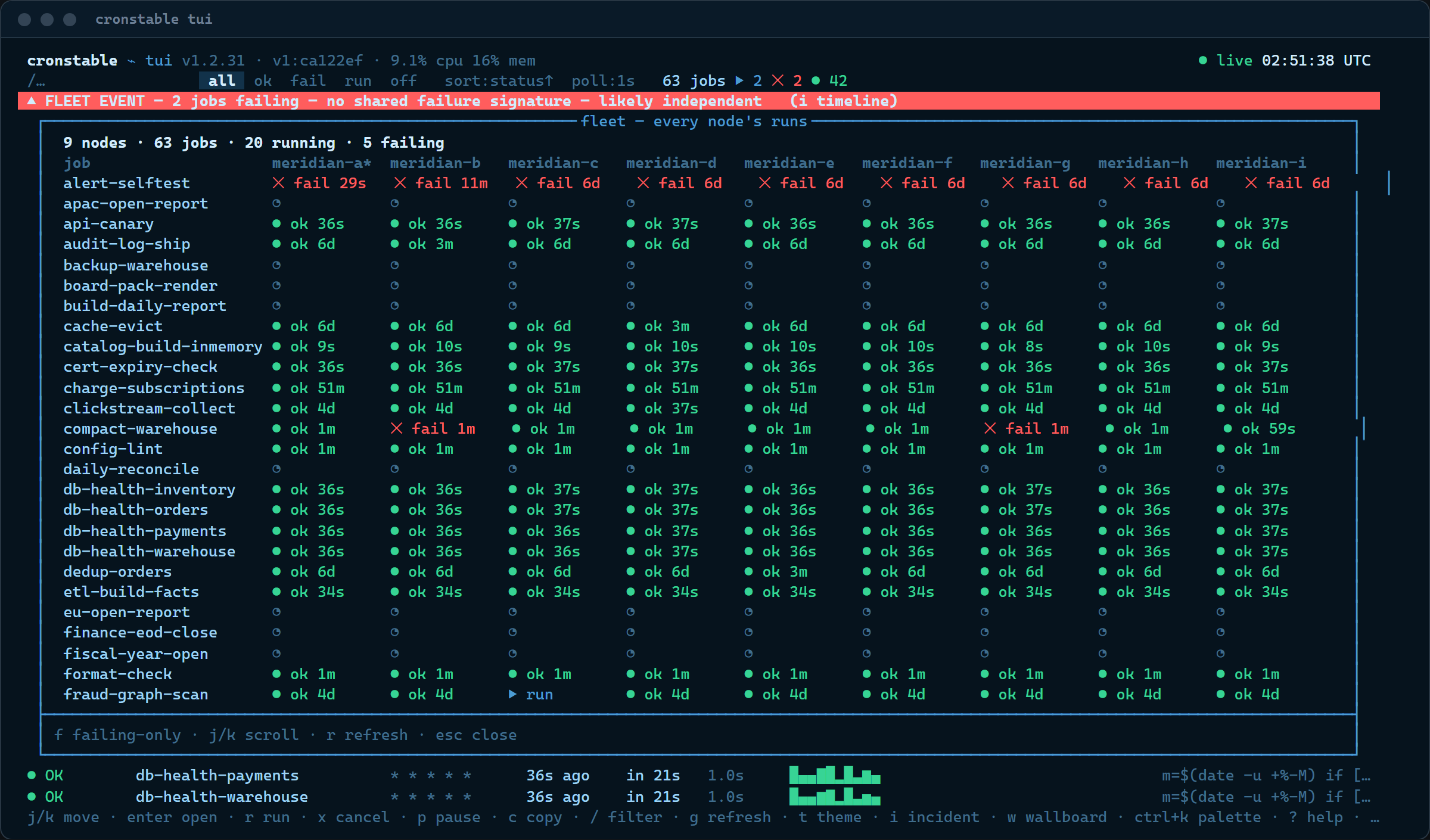](https://raw.githubusercontent.com/ptweezy/cronstable/main/docs/img/tui-fleet.png) |
The same incident tools are here, from the timeline to the multi-tail:
| Incident timeline | Merged multi-tail |
| :---: | :---: |
| [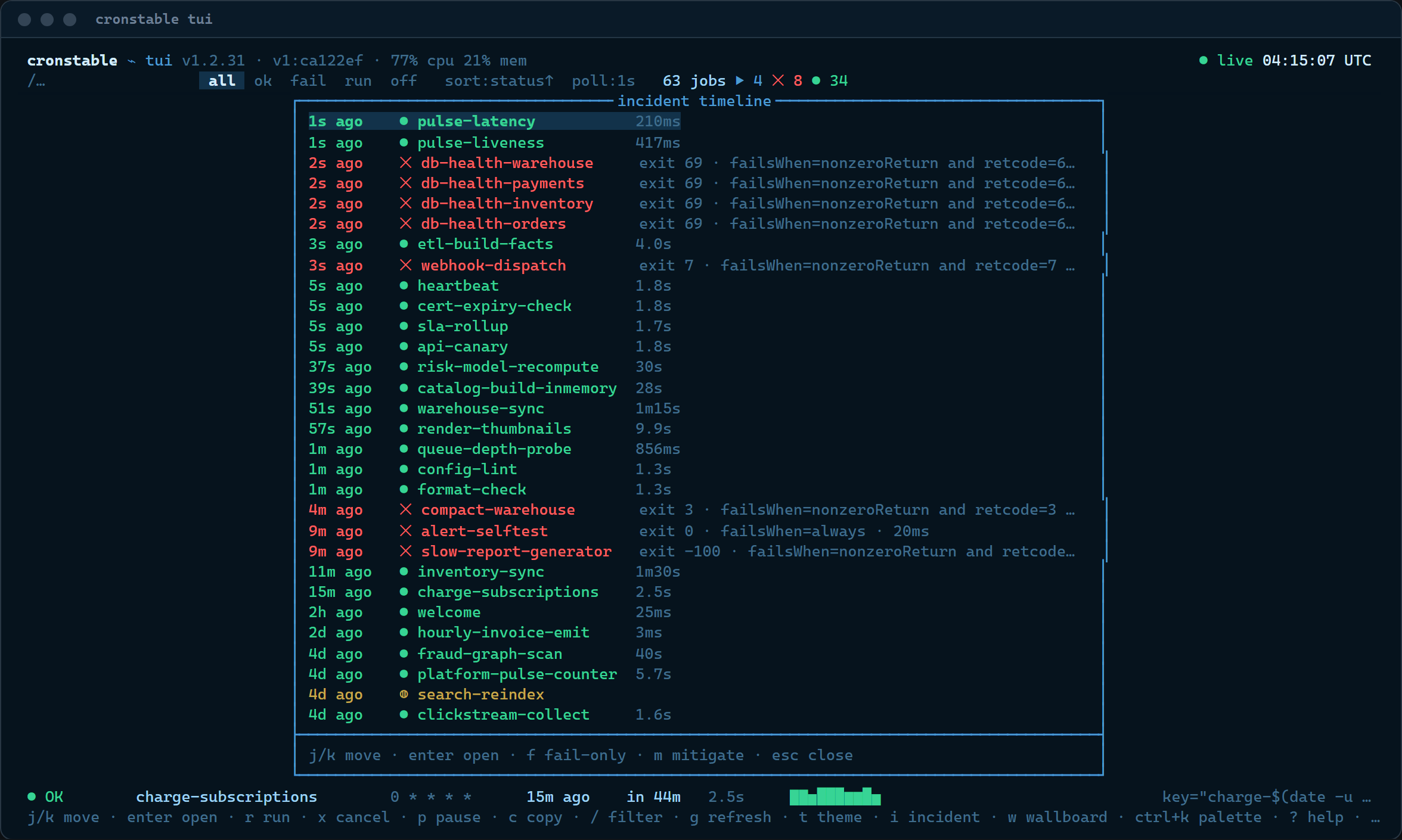](https://raw.githubusercontent.com/ptweezy/cronstable/main/docs/img/tui-incident-timeline.png) | [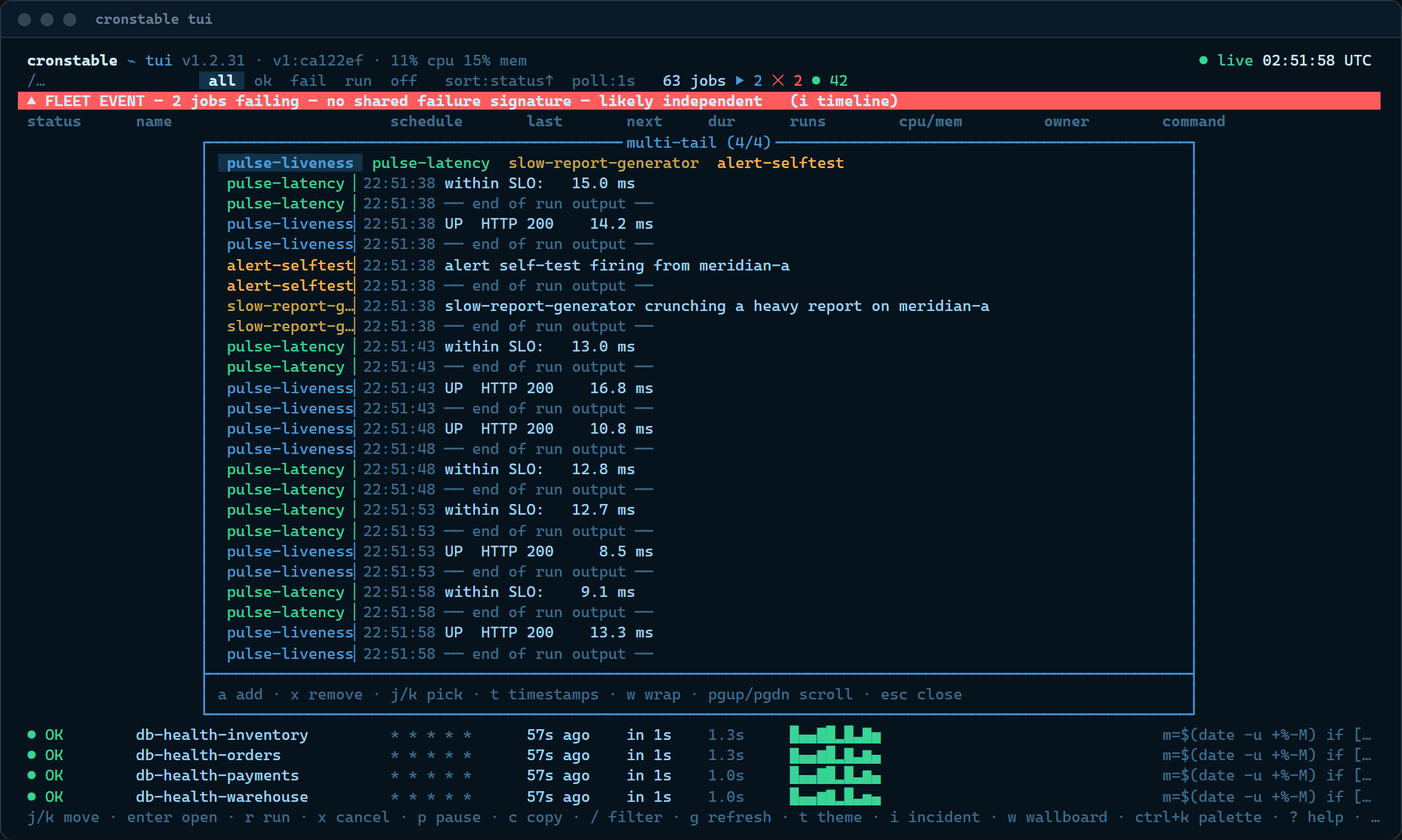](https://raw.githubusercontent.com/ptweezy/cronstable/main/docs/img/tui-multitail.png) |
So are the wallboard, the heatmap, and the state inspector:
| Wallboard / TV mode | Activity heatmap | Durable-state inspector |
| :---: | :---: | :---: |
| [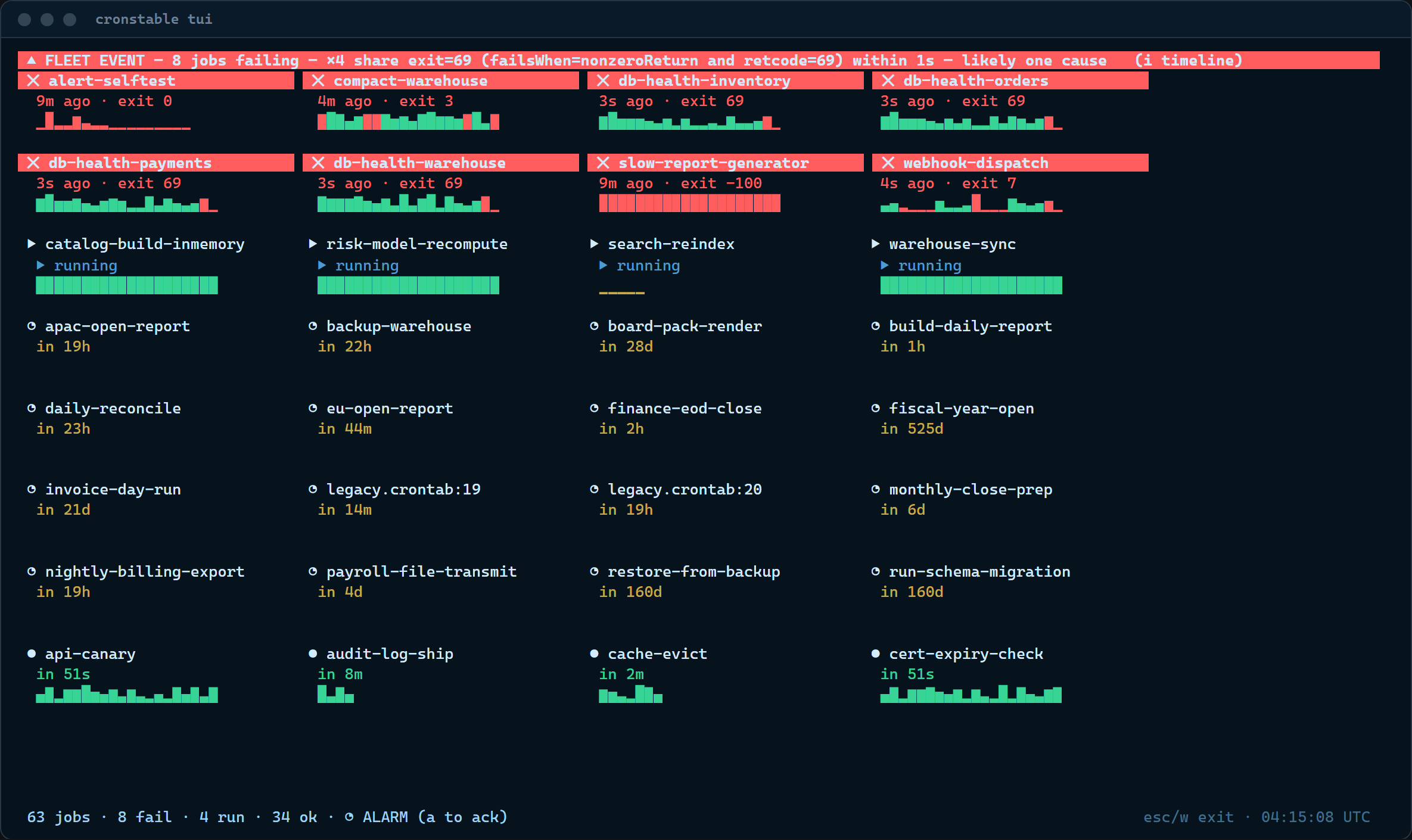](https://raw.githubusercontent.com/ptweezy/cronstable/main/docs/img/tui-wallboard.png) | [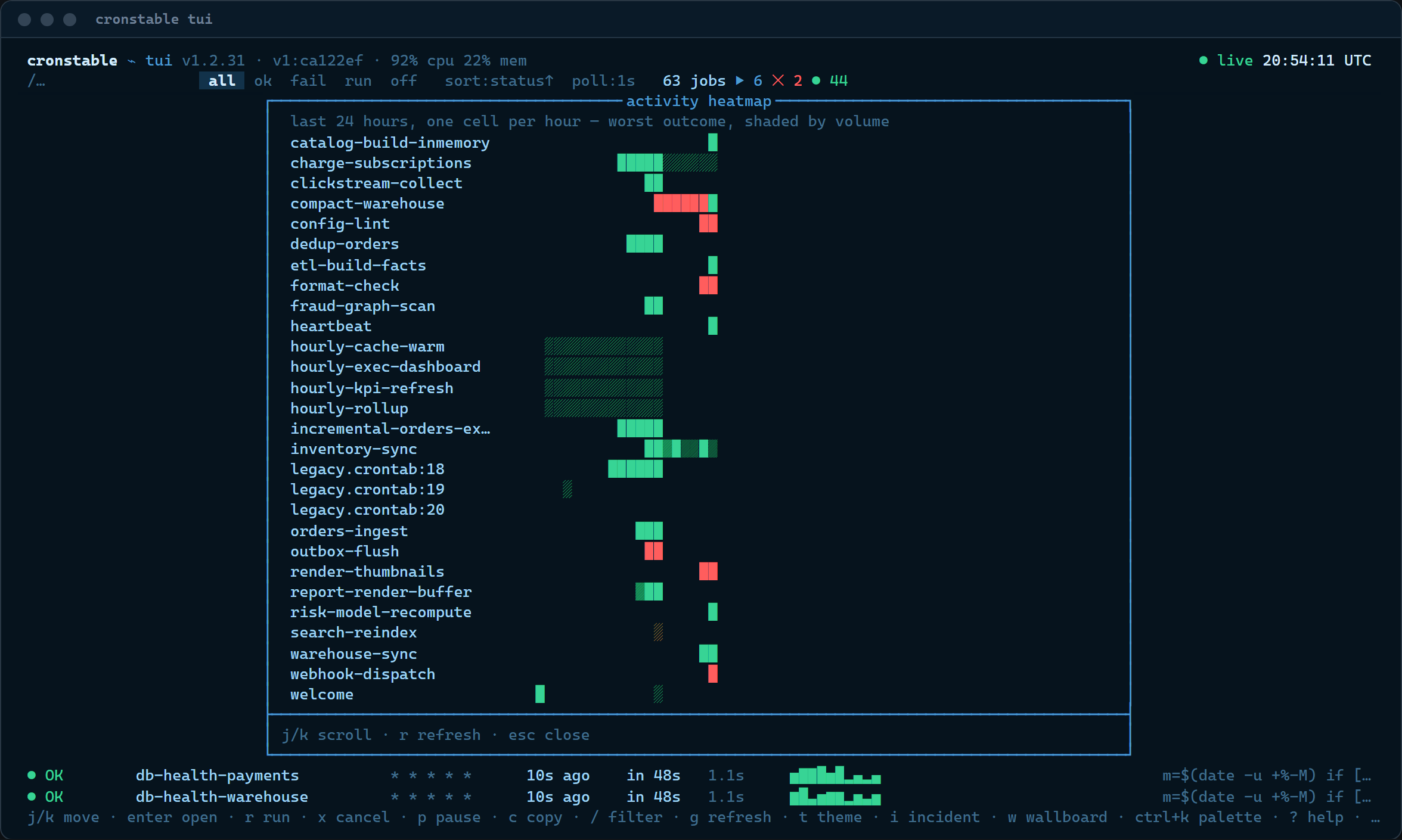](https://raw.githubusercontent.com/ptweezy/cronstable/main/docs/img/tui-heatmap.png) | [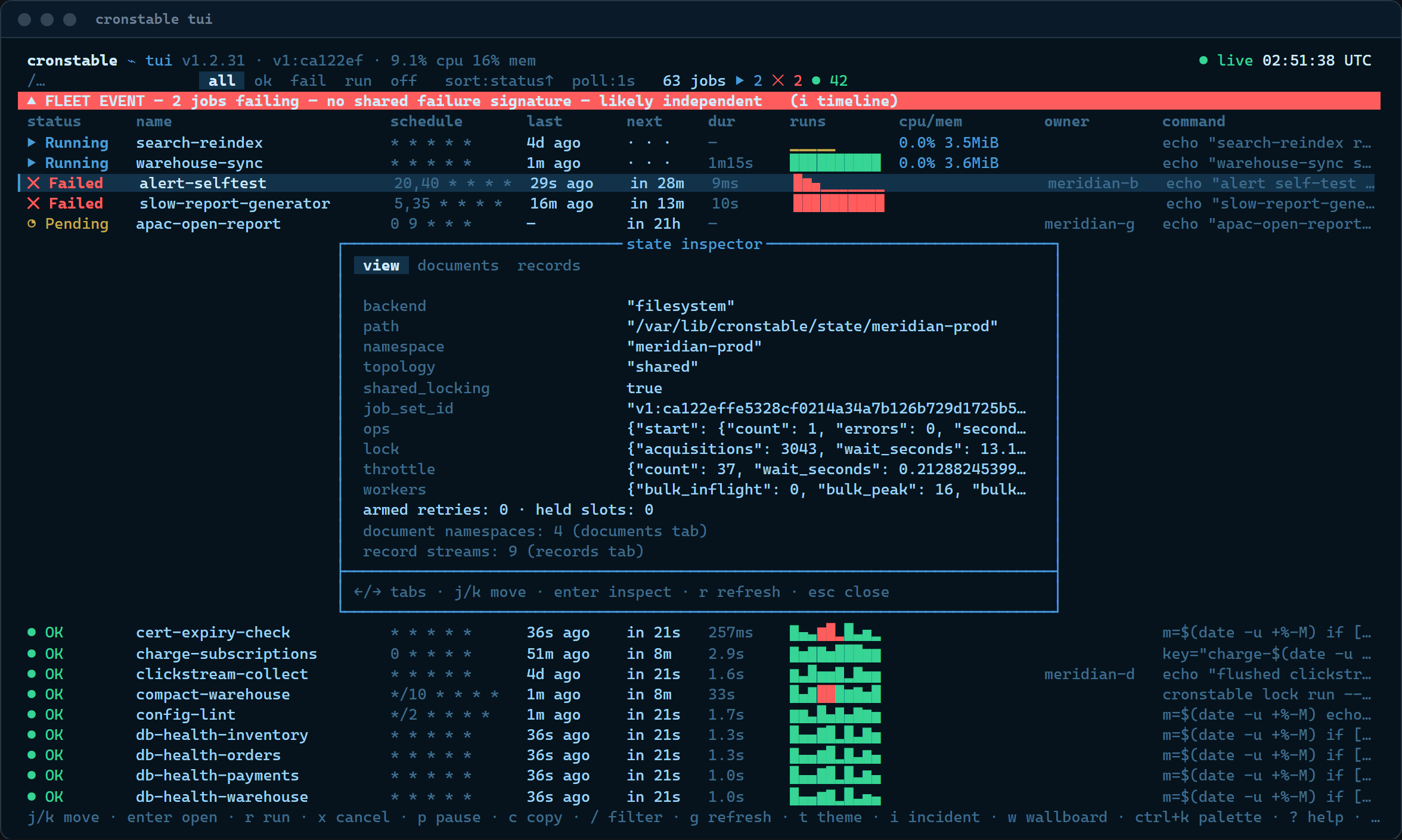](https://raw.githubusercontent.com/ptweezy/cronstable/main/docs/img/tui-state.png) |
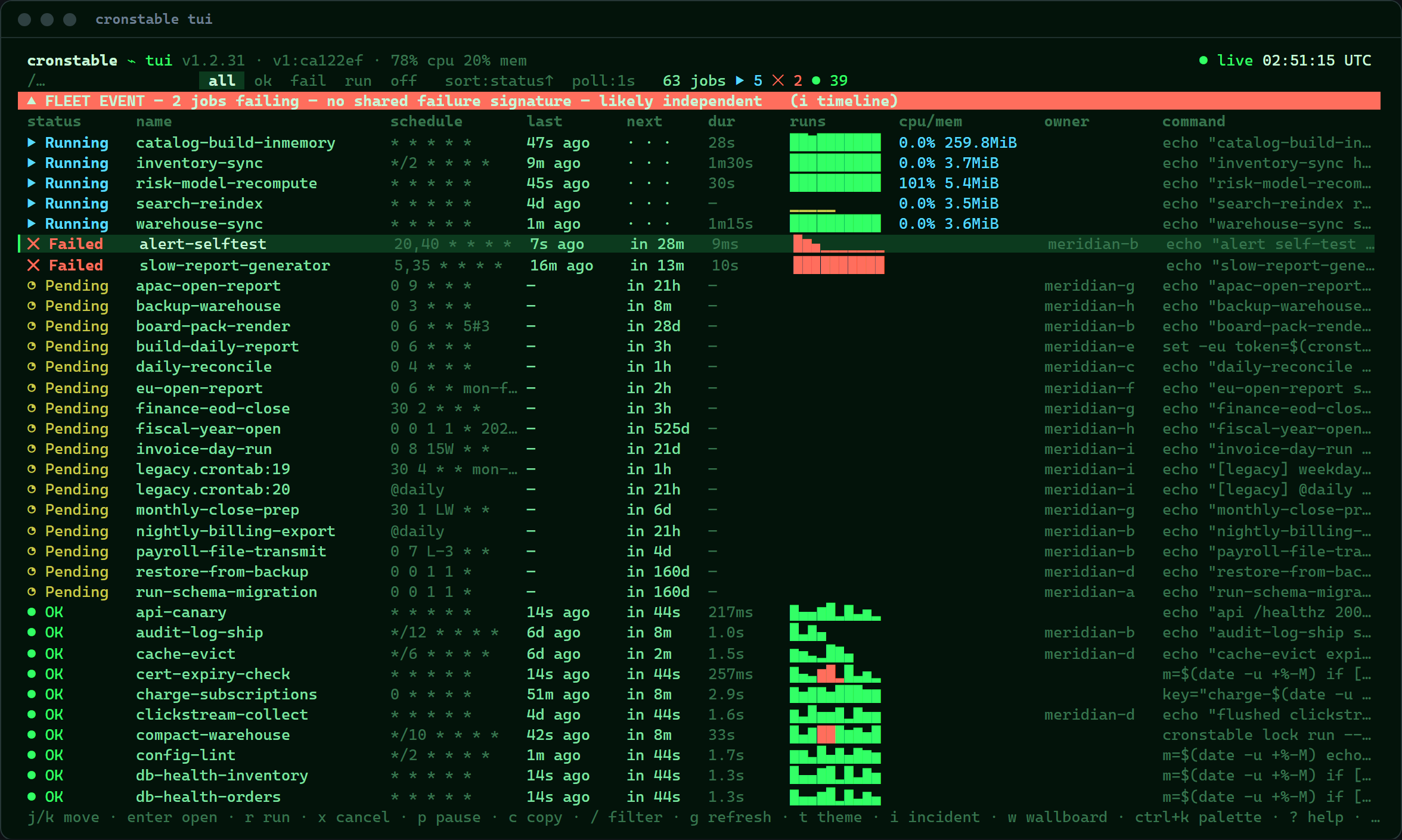
The same ten themes as the browser (`t` cycles the hue, `T` flips
dark ↔ paper), with the same color-vision-safe remaps and an
`--ascii` glyph mode:
| Carolina | Amber |
| :---: | :---: |
| [](https://raw.githubusercontent.com/ptweezy/cronstable/main/docs/img/tui-theme-carolina.png) | [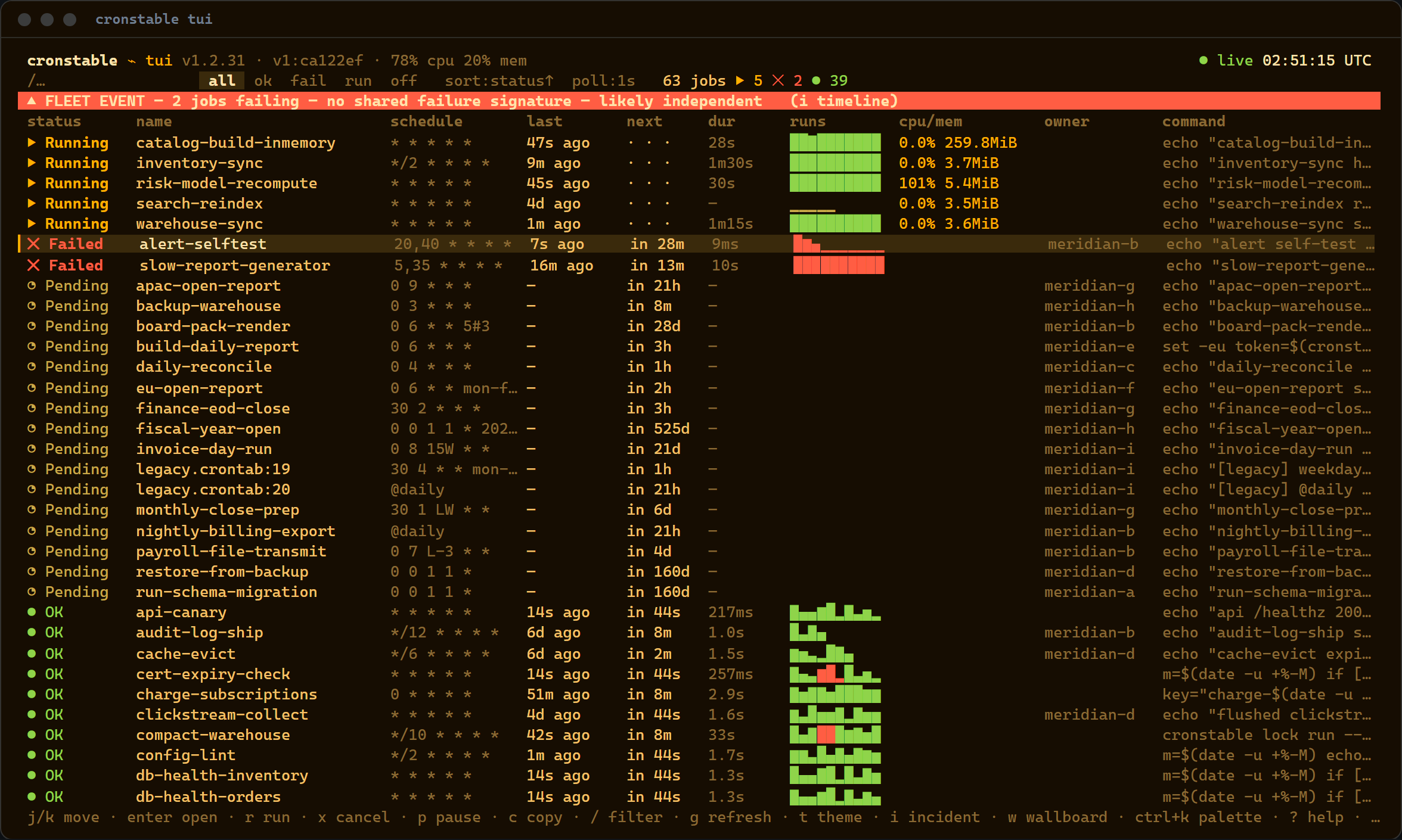](https://raw.githubusercontent.com/ptweezy/cronstable/main/docs/img/tui-theme-amber.png) |
| Green | Flat modern |
| :---: | :---: |
| [](https://raw.githubusercontent.com/ptweezy/cronstable/main/docs/img/tui-theme-green.png) | [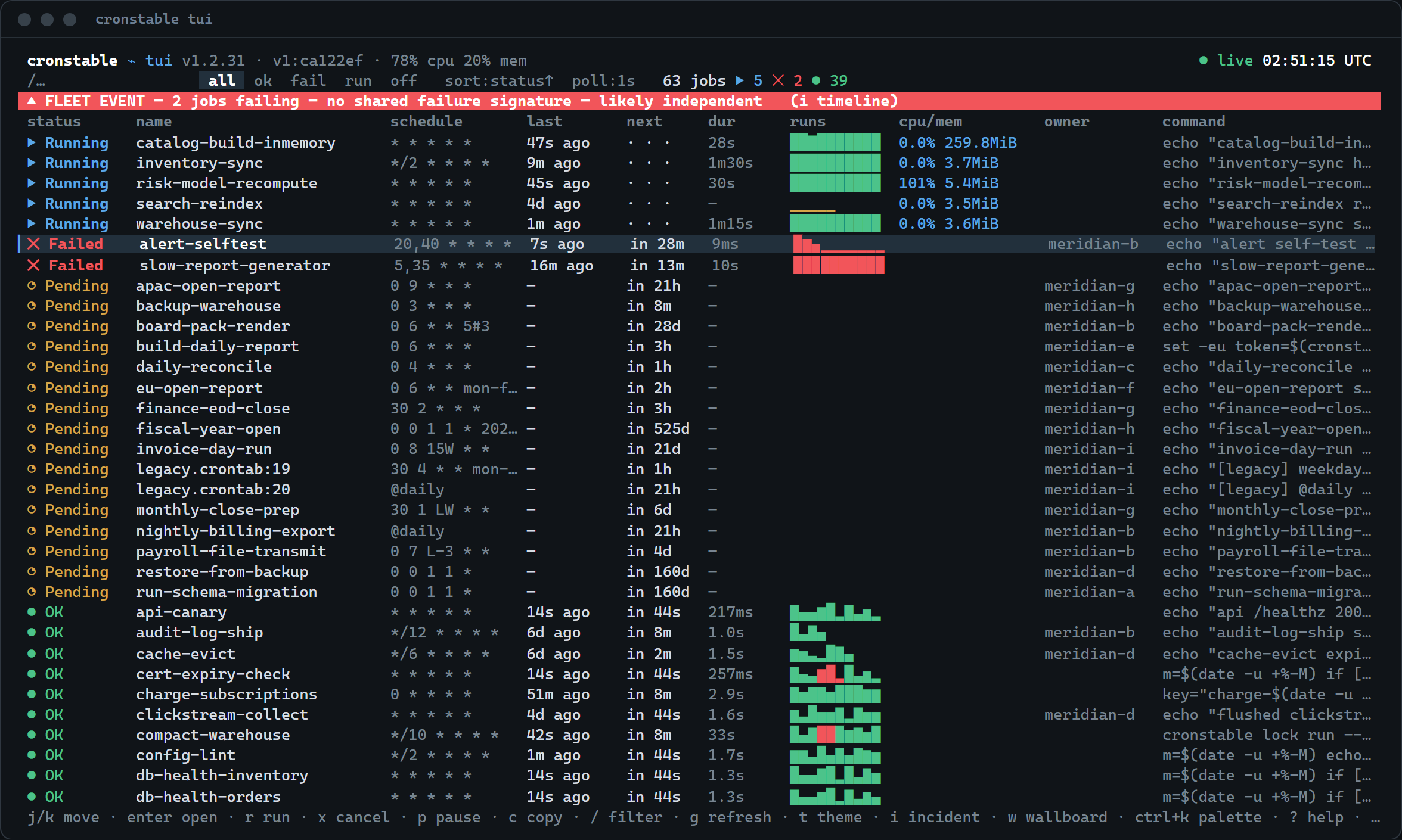](https://raw.githubusercontent.com/ptweezy/cronstable/main/docs/img/tui-theme-modern.png) |
| Standard, on paper (light) |
| :---: |
| [](https://raw.githubusercontent.com/ptweezy/cronstable/main/docs/img/tui-theme-standard-light.png) |
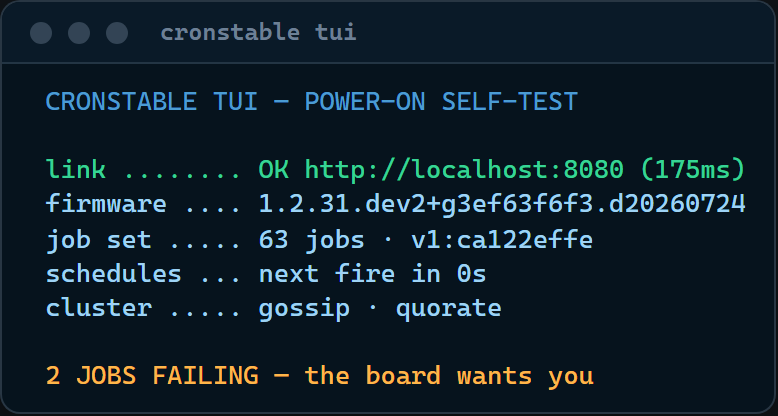
The TUI runs the same BIOS-style boot self-test, next to the settings
sheet:
| Startup self-test | Settings |
| :---: | :---: |
| [](https://raw.githubusercontent.com/ptweezy/cronstable/main/docs/img/tui-boot.png) | [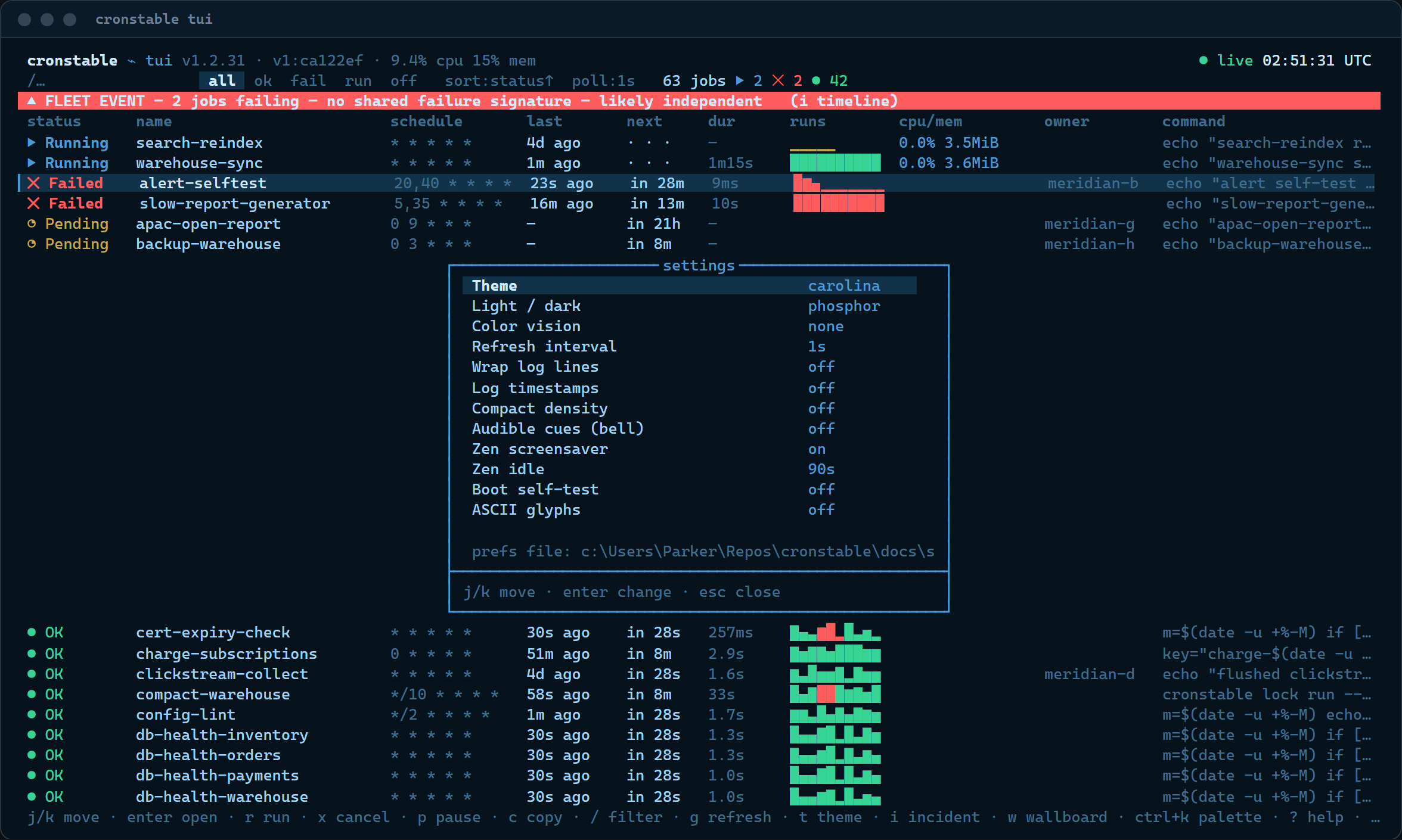](https://raw.githubusercontent.com/ptweezy/cronstable/main/docs/img/tui-settings.png) |
Run `cronstable tui` against the local daemon, or point it elsewhere with
`--url` and `--token-env`. The `--tv` flag starts on the wallboard, and
`--job` deep-links a drawer. The
[**Terminal Dashboard**](https://github.com/ptweezy/cronstable/wiki/Terminal-Dashboard)
wiki page is the full reference (options, every key, the panel tour).
## Tutorials
Four short walkthroughs you can copy and run, each built on the
[quick start](#quick-start) config and each pointing at the wiki page that
covers it in full.
### Tutorial 1: Alert when a job fails, then retry it
Classic cron mails root. Instead: retry with exponential backoff, and page a
Slack channel only if the job *ultimately* fails.
```yaml
jobs:
- name: nightly-backup
command: /usr/local/bin/backup --incremental
schedule: "0 3 * * *"
captureStderr: true # include stderr in the report
onFailure:
retry:
maximumRetries: 5
initialDelay: 5 # 5s, 10s, 20s, 40s, ... capped at 300s
maximumDelay: 300
backoffMultiplier: 2
onPermanentFailure: # fires once, after the last retry is spent
report:
webhook:
url:
fromEnvVar: SLACK_WEBHOOK_URL
```
By default a job *fails* when it exits non-zero **or** writes to a captured
stderr. Tune that per job with [`failsWhen`](#handling-failure). The webhook's
default body is Slack-compatible (Mattermost and Teams work as-is), and mail,
Sentry, and a shell command are equally one block away, with jinja2 templating
over the run's name, output, and exit code. Deeper:
[failure detection and retries](https://github.com/ptweezy/cronstable/wiki/Failure-Detection-and-Retries)
and [reporting](https://github.com/ptweezy/cronstable/wiki/Reporting) in the wiki.
### Tutorial 2: Survive restarts, catch up what was missed
Stateless is the default. When a deploy or a reboot lands mid-schedule, one
`state:` block gives jobs a memory:
```yaml
state:
path: /var/lib/cronstable # a local dir, or a shared mount for a fleet
jobs:
- name: hourly-invoice-emit
command: python -m billing.emit_hourly
schedule: "0 * * * *"
onMissed: run-all # replay each hour missed while we were down
startingDeadlineSeconds: 21600 # ...unless the slot is older than 6h
onFailure:
retry:
maximumRetries: 10
initialDelay: 30
maximumDelay: 600
backoffMultiplier: 2
```
With the `state.path` line alone, run history survives restarts (the
dashboard rehydrates it), armed retries re-arm at their absolute deadlines,
`@reboot` means once per *boot* rather than once per daemon start, and
Prometheus counters stop resetting to zero.
`onMissed` adds catch-up on top: `run-once` coalesces any number of missed
slots into one launch, `run-all` replays each one, bounded by
`startingDeadlineSeconds`. The same store also hands your job *commands*
durable primitives (key/value, cursors, fleet-wide locks, idempotency keys,
artifacts, run-scoped secrets) over a loopback endpoint:
`cronstable state|cursor|lock|idempotent|artifact|secret`. Deeper:
[durable state](https://github.com/ptweezy/cronstable/wiki/Durable-State).
### Tutorial 3: Your first DAG, a durable pipeline
A `dags:` block turns the scheduler into a small, durable workflow engine.
This one builds, waits for a human, then publishes:
```yaml
state:
path: /var/lib/cronstable # DAGs live on the state store
dags:
- name: release-train # no schedule: manual-only
tasks:
- id: build
command: make dist
- id: approve
type: approval # parks the graph on a human decision
dependsOn: [build]
- id: publish
dependsOn: [approve]
command: make publish
retries: 2 # task-level retries, DAG-owned
retryDelaySeconds: 60
```
Trigger it and approve the gate (or click **Approve** in the dashboard's DAG
drawer):
```shell
curl -X POST http://127.0.0.1:8080/dags/release-train/trigger
# -> {"dag": "release-train", "runKey": "manual-..."}
curl -X POST http://127.0.0.1:8080/dags/release-train/runs//tasks/approve/decision \
-H 'Content-Type: application/json' -d '{"decision": "approve", "by": "alice"}'
```
Every transition is durable: restart the daemon mid-run and the run resumes
exactly where it was, and across a fleet the run advances under a lease so a
task never launches twice. Scheduled DAGs add catch-up and `backfill` over a
date range. Tasks can pass data with `cronstable xcom push/pull`, fan out
dynamically over a list an upstream task produced, and poll for conditions
with `type: sensor`. Deeper:
[orchestration and DAGs](https://github.com/ptweezy/cronstable/wiki/Orchestration-and-DAGs).
### Tutorial 4: Two replicas, zero double-runs
Run the same config on two (or nine) hosts that share a POSIX mount, and let
them elect a leader through a fenced lease file, with no certificates and no
coordination service:
```yaml
state:
path: /mnt/shared/cronstable/state # shared durable state (optional but natural here)
cluster:
backend: filesystem
filesystem:
path: /mnt/shared/cronstable # the mount is the election store
nodeName: node-a # unique and stable per replica!
electLeader: true
jobs:
- name: charge-subscriptions
command: python -m billing.charge
schedule: "0 6 * * *"
clusterPolicy: Leader # the default: exactly the leader runs it
```
Only the elected leader fires `Leader` jobs. Stop it, and a follower adopts
the lease within its TTL. Per job, `clusterPolicy` picks the trade-off:
`Leader` (never double-runs, may skip when quorum is lost), `PreferLeader`
(never skips, may double-run under a partition), or `EveryNode` (genuinely
per-node work).
Without a shared mount, the `gossip` backend elects over mutual TLS with no
shared store at all, `kubernetes` uses a `coordination.k8s.io` Lease, and
`etcd` a lease-bound key. `distribution: spread` load-balances job ownership
across the fleet instead of concentrating it on one leader. Deeper:
[clustering and leader election](https://github.com/ptweezy/cronstable/wiki/Clustering-and-Leader-Election).
## Example gallery
Every example in [`example/`](example) is a self-contained, annotated,
runnable project. Each compose file lives in its example's folder (the `demo`
quickstart uses the root `docker-compose.yml`). Highlights:
| Example | One command | Shows off |
| --- | --- | --- |
| [`demo`](example/demo) | `docker compose up` | The dashboard playground: varied jobs, live logs, retries, a long-runner, an on-demand job. |
| [`grand-tour`](example/grand-tour) | `docker compose -f example/grand-tour/docker-compose.yml up --build` | **Everything at once**: a 9-node mTLS cluster, shared durable state, five DAG patterns, second-level probes, all five cross-platform reporters wired to live sinks. |
| [`cluster`](example/cluster) | `docker compose -f example/cluster/docker-compose.yml up` | A 3-node gossip cluster: peer attestation, quorum, leader election, live failover. |
| [`cluster-large`](example/cluster-large) | `docker compose -f example/cluster-large/docker-compose.yml up` | A 10-node, CPU-heavy fleet for watching `distribution: spread` and the load meters. |
| [`dag`](example/dag) | `cronstable -c example/dag` | Orchestration alone, single node: dependencies, XCom, fan-out, a sensor, an approval gate. |
| [`dag-cluster`](example/dag-cluster) | `docker compose -f example/dag-cluster/docker-compose.yml up` | DAGs coordinating across three nodes on one shared store: crash-resume, exactly-once tasks. |
| [`job-state`](example/job-state) | `cronstable -c example/job-state` | The job-facing state primitives: KV, cursors, locks, idempotency keys, artifacts, secrets. |
| [`mcp`](example/mcp) | `docker compose -f example/mcp/docker-compose.yml up --build` | The MCP server: an AI agent (Claude, Cursor, Copilot) observing and driving the scheduler over `POST /mcp`, or the `cronstable mcp` stdio bridge. |
| [`pulse-monitor`](example/pulse-monitor) | `docker compose -f example/pulse-monitor/docker-compose.yml up` | Second-level scheduling as a real-time uptime / SLA monitor. |
| [`pulse-cluster`](example/pulse-cluster) | `docker compose -f example/pulse-cluster/docker-compose.yml up` | The same probes fanned across a 3-node leader-electing cluster. |
| [`zen-demo`](example/zen-demo) | `docker compose -f example/zen-demo/docker-compose.yml up` | A deliberately calm board, for the wallboard's zen screensaver. |
| [`crontab`](example/crontab) | `cronstable -c example/crontab` | Classic Vixie crontabs running as-is next to YAML jobs. |
| [`kubernetes`](example/kubernetes) | `kubectl apply -f example/kubernetes/deployment.yaml` | Leader election through a `coordination.k8s.io/v1` Lease. |
| [`etcd`](example/etcd) | `docker compose -f example/etcd/docker-compose.yml up` | Leader election through an etcd lease, over plain HTTP. |
| [`docker`](example/docker) | `docker build` | The minimal "add cronstable to your own image" recipe. |
## Usage
Configuration is in YAML format. To start cronstable, give it a configuration
file or directory path as the `-c` argument. For example:
```shell
cronstable -c /tmp/my-crontab.yaml
```
This starts cronstable (always in the foreground!), reading
`/tmp/my-crontab.yaml` as configuration file. If the path is a directory, any
`*.yaml` or `*.yml` files inside that directory are taken as
configuration files, along with any classic crontabs (`*.crontab`, `*.cron`,
or a file named `crontab`; see
[classic crontab files](#classic-crontab-files)).
### Configuration basics
This configuration runs a command every 5 minutes:
```yaml
jobs:
- name: test-01
command: echo "foobar"
shell: /bin/bash
schedule: "*/5 * * * *"
```
The command can be a string or a list of strings. If command is a string,
cronstable runs it through a shell, which is `/bin/bash` in the preceding
example, but is `/bin/sh` by default.
If the command is a list of strings, cronstable runs it directly, without a
shell. The command's ARGV comes straight from the configuration:
```yaml
jobs:
- name: test-01
command:
- echo
- foobar
schedule: "*/5 * * * *"
```
The `schedule` option can be a string in the classic crontab format (5, 6 or 7
fields; ranges, steps, lists, `jan`/`mon` names, and Quartz's `?` standing
alone in a day field), parsed by cronstable's built-in cron engine. For the
full dialect, see
[schedules and time zones](https://github.com/ptweezy/cronstable/wiki/Schedules-and-Timezones).
Expressions in other dialects (Quartz `#`/`W`, the seconds-first 6-field
layout) fail with an error naming the dialect and how to convert.
You can also include `@reboot`, which runs the job only when cronstable first
starts up. The `schedule` option can also be an object with properties. The
following configuration runs a command every 5 minutes, but only on the
specific date 2017-07-19, and does not run it on any other date:
```yaml
jobs:
- name: test-01
command: echo "foobar"
schedule:
minute: "*/5"
dayOfMonth: 19
month: 7
year: 2017
dayOfWeek: "*"
```
#### Schedule introspection
Six features answer questions about schedules, each with its own wiki page:
* Schedule linting: cronstable lints every schedule at config load for legal
expressions that probably do not mean what they say (no future occurrence,
the day-of-month AND day-of-week rule, non-dividing `*/n` steps, wall
times DST skips or repeats). Findings surface on `/jobs` and `/status`,
and `GET /schedule/preview` checks any expression before it becomes a job
([Schedule Linting](https://github.com/ptweezy/cronstable/wiki/Schedule-Linting)).
* Hashed schedules: an `H` field hashes a stable slot from the job's name,
so a fleet of hourly jobs spreads across the hour instead of stampeding
at `:00`
([Hashed Schedules](https://github.com/ptweezy/cronstable/wiki/Hashed-Schedules)).
* Schedule pressure: `GET /schedule/pressure` buckets the next 24 hours of
fires into a collision heatmap, drawn in both dashboards
([Schedule Pressure](https://github.com/ptweezy/cronstable/wiki/Schedule-Pressure)).
* Duplicate detection: `GET /schedule/duplicates` groups jobs whose
schedules fire on identical instants, by semantic equality
([Duplicate Schedule Detection](https://github.com/ptweezy/cronstable/wiki/Duplicate-Schedule-Detection)).
* Suggest a slot: `GET /schedule/suggest` recommends the least-loaded slot
for a new job from the fleet's real fires
([Suggest a Slot](https://github.com/ptweezy/cronstable/wiki/Suggest-a-Slot)).
* Why didn't it run: `GET /schedule/why?job=&at=`
decomposes the scheduler's own match test field by field for one job and
one instant
([Why Didn't It Run?](https://github.com/ptweezy/cronstable/wiki/Why-No-Run)).
#### Second-level schedules
Schedules are minute-granular by default, but cronstable can also run jobs at
**second granularity**. There are two equivalent spellings:
* a full **seven-field** crontab string, where the first field is the second
(`second minute hour dayOfMonth month dayOfWeek year`); or
* the object form with a `second:` property.
Both of the following jobs run every 15 seconds (at seconds 0, 15, 30 and 45 of
every minute):
```yaml
jobs:
- name: every-15s-string
command: echo "tick"
schedule: "*/15 * * * * * *" # 7 fields: the leading field is seconds
- name: every-15s-object
command: echo "tick"
schedule:
second: "*/15"
```
The second field accepts the same syntax as the others (`*`, `*/5`, `0,30`,
`10-20`, ...). `second: "*"` (or `* * * * * * *`) fires every second.
While any enabled job specifies seconds, the scheduler wakes once per second
instead of once per minute. Minute-granular jobs are unaffected and still fire
exactly once in their scheduled minute. If no job uses seconds, cronstable
keeps its original once-a-minute cadence, so there is no overhead for the
common case.
Second-level scheduling is a YAML feature: [classic crontab files](#classic-crontab-files)
keep their standard five-field, minute-granular format. (A **six-field** string
is read as the classic five fields plus a trailing `year` column, *not* as
seconds; seconds require the full seven fields.)
For a runnable end-to-end example, see
[`example/pulse-monitor`](example/pulse-monitor), a small real-time uptime / SLA
monitor that probes a service every few seconds
(`docker compose -f example/pulse-monitor/docker-compose.yml up`), and its clustered sibling
[`example/pulse-cluster`](example/pulse-cluster), which fans the probes across a
three-node leader-electing cluster
(`docker compose -f example/pulse-cluster/docker-compose.yml up`).
Important: by default cronstable interprets all time as UTC, but you can
request local time instead. For instance, the following cron job runs
every day at 19h27 *local time* because of the `utc: false` option:
```yaml
jobs:
- name: test-01
command: echo "hello"
schedule: "27 19 * * *"
utc: false
captureStdout: true
```
You can also request that the schedule be interpreted in an arbitrary time
zone, using the `timezone` attribute:
```yaml
jobs:
- name: test-01
command: echo "hello"
schedule: "27 19 * * *"
timezone: America/Los_Angeles
captureStdout: true
```
You can ask for environment variables to be defined for the command:
```yaml
jobs:
- name: test-01
command: echo "foobar"
shell: /bin/bash
schedule: "*/5 * * * *"
environment:
- key: PATH
value: /bin:/usr/bin
```
You can also provide an environment file to define environments for the
command:
```yaml
jobs:
- name: test-01
command: echo "foobar"
shell: /bin/bash
schedule: "*/5 * * * *"
env_file: .env
```
The env file must be a list of `KEY=VALUE` pairs. Empty lines and lines
starting with `#` are ignored.
Variables declared in the `environment` option override those found in the
`env_file`.
### Classic crontab files
Already have a crontab? The daemon runs it as-is. A file named `*.crontab`,
`*.cron`, or plain `crontab` (so `-c /etc/crontab` works) is read in the
classic Vixie format, whether passed directly to `-c`, dropped into a config
directory next to YAML files, or pulled in with `include:`:
```crontab
SHELL=/bin/bash
PATH=/usr/local/bin:/usr/bin:/bin
# m h dom mon dow command
*/15 * * * * /usr/local/bin/backup --incremental
30 4 * * mon-fri /usr/local/bin/report --daily
@daily /usr/local/bin/rotate-logs
0 0 * * * pg_dump mydb > /backup/mydb-$(date +\%F).sql
```
Comments, `NAME=value` environment lines (position-sensitive, `SHELL` and
`CRON_TZ` honored), the `@reboot`/`@daily`/... nicknames, and `\%` escapes
all work as in `man 5 crontab`. Each entry becomes an ordinary cronstable job
named `:`, configured to cronstable's standard defaults rather
than an emulation of cron's environment:
* Schedules run in **UTC** unless the crontab sets `CRON_TZ`.
* Failure means a non-zero exit or stderr output (no `MAILTO` mail).
* The `%`-as-stdin feature is a load-time error instead of a silent surprise
(`\%` still gives a literal `%`).
When an entry needs retries, reporting, timeouts, or any other per-job option,
move it to YAML. The full mapping and every deviation are documented in
[classic crontabs](https://github.com/ptweezy/cronstable/wiki/Classic-Crontabs),
and a runnable example (a config directory mixing a crontab with YAML and the
dashboard) lives in [example/crontab](example/crontab).
### Specifying defaults
The config can have a special `defaults` section. Any attributes defined in
this section provide default values for cron jobs to inherit, although cron
jobs can still override the defaults as needed:
```yaml
defaults:
environment:
- key: PATH
value: /bin:/usr/bin
shell: /bin/bash
utc: false
jobs:
- name: test-01
command: echo "foobar" # runs with /bin/bash as shell
schedule: "*/5 * * * *"
- name: test-02 # runs with /bin/sh as shell
command: echo "zbr"
shell: /bin/sh
schedule: "*/5 * * * *"
```
Note: if the configuration option is a directory holding several
configuration files, each file's `defaults` section provides default options
only for cron jobs inside that same file. The defaults have no effect beyond
any individual YAML file.
### Reporting
cronstable has six built-in reporters: `sentry`, `mail`, `shell`, `webhook`
(Slack-compatible with no extra configuration), and `push`
([end-to-end encrypted push notifications](#push-notifications), later on this
page). Each can fire on the `onFailure`, `onPermanentFailure`, `onSuccess`,
and `onLate` hooks. The mail `subject`/`body` and sentry `body` are jinja2
templates over the run's outcome and captured output, and secrets (DSNs,
passwords, webhook URLs) can come from `value`, `fromFile`, or `fromEnvVar`:
```yaml
- name: test-01
command: |
echo "hello" 1>&2
exit 10
schedule:
minute: "*/2"
captureStderr: true
onFailure:
report:
sentry:
dsn:
fromEnvVar: SENTRY_DSN
mail:
from: example@foo.com
to: example@bar.com
smtpHost: 127.0.0.1
subject: Cron job '{{name}}' failed
body: |
{{stderr}}
(exit code: {{exit_code}})
shell:
shell: /bin/bash
command: echo "Error code $CRONSTABLE_RETCODE"
webhook:
url:
fromEnvVar: SLACK_WEBHOOK_URL
```
A report includes the output streams the job captures (`captureStderr` is on
by default, `captureStdout` off; see
[output capturing](https://github.com/ptweezy/cronstable/wiki/Output-Capturing)
for the capture options, including the `streamPrefix` line prefix).
[Reporting](https://github.com/ptweezy/cronstable/wiki/Reporting) in the wiki
documents every reporter's options (HTML mail, sentry fingerprints, webhook
method/headers/body and per-service examples), the template variables, and
the shell reporter's `CRONSTABLE_*` environment.
### Push notifications
The `push` reporter delivers end-to-end encrypted alerts to paired devices.
Each alert is sealed to the device's X25519 public key (a libsodium sealed
box) before it leaves the daemon. The hosted relay that forwards it to the
platform push service (APNs) sees only ciphertext and routing metadata, never
job names, hostnames, or log lines.
The reporter needs the `push` extra (`pip install "cronstable[push]"`), a
daemon-global `push:` section, and an opt-in on the reporting hooks. If a
config enables push without any of those, cronstable refuses to start rather
than silently not alerting:
```yaml
push:
relay:
url: https://relay.example.net/v1/notify
devicesFile: /var/lib/cronstable/devices.json
defaults:
onFailure:
report:
push:
enabled: true
```
(With a `state:` section configured, `devicesFile` can be dropped: pairings
live in the durable store and are visible to every node sharing it.)
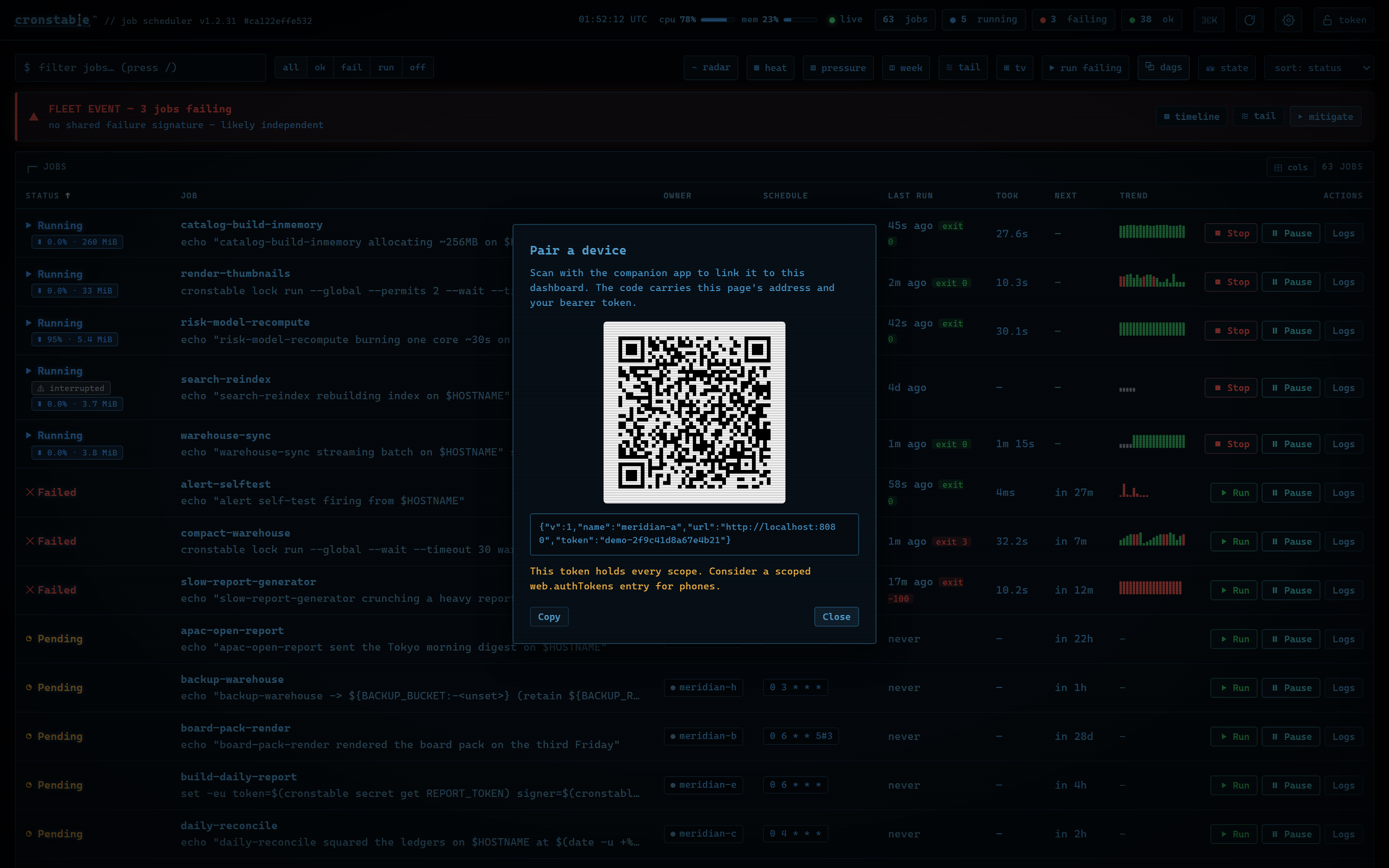
Pair a device from the dashboard, with **Pair a device** in the command
palette or settings. The QR is a deep link, so a phone-camera scan opens the
companion app, or a landing page with install pointers when the app is
missing. Or pair with one call:
[](https://raw.githubusercontent.com/ptweezy/cronstable/main/docs/img/dashboard-pair.png)
```shell
curl -X POST -H "Authorization: Bearer $TOKEN" -H "Content-Type: application/json" \
-d '{"name": "my-iphone", "platform": "ios", "publicKey": "", "pushToken": ""}' \
http://127.0.0.1:8080/push/devices
```
Setting `web.bonjour: true` (with the `discovery` extra installed)
additionally advertises the web API as a `_cronstable._tcp` mDNS service on
the local network, so a companion app finds the daemon without a typed URL.
See [LAN discovery](https://github.com/ptweezy/cronstable/wiki/LAN-Discovery)
in the wiki.
See
[push notifications](https://github.com/ptweezy/cronstable/wiki/Push-Notifications)
in the wiki for the report options, pairing and revocation, storage, size
limits, and the relay trust model.
### Windows Event Log
On Windows, the `eventlog` reporter writes each outcome to the Event Log,
where a Windows shop's monitoring already looks: Event Viewer, a Windows
Event Forwarding subscription, SCOM, and every SIEM connector. It needs no
extra and no dependency, and each record carries a stable event ID plus a
fixed set of insertion strings, so a rule written against it keeps working:
```yaml
defaults:
onFailure:
report:
eventlog:
enabled: true
```
```powershell
Get-WinEvent -FilterHashtable @{ LogName = 'Application'; ProviderName = 'cronstable'; ID = 1001, 1002 }
```
Jobs use event IDs 1000 (succeeded), 1001 (failed), 1002 (failed
permanently) and 1003 (overdue). Daemon and orchestration events use 1010
and 1011. cronstable does not register its event source, so Event Viewer
prefixes the rendered text with its generic "description cannot be found"
note. The provider, ID, level and every insertion string are unaffected, so
the XML view, `wevtutil`, forwarding and SIEM connectors read the record
normally. On any other platform the reporter does nothing, and the config
load says so once.
See
[Windows Event Log](https://github.com/ptweezy/cronstable/wiki/Windows-Event-Log)
in the wiki for the full ID and field tables, the optional source
registration, and the reasons behind both defaults.
### Metrics
The daemon exposes built-in Prometheus metrics whenever the
[HTTP REST API](https://github.com/ptweezy/cronstable/wiki/HTTP-API) is
enabled, with no exporter sidecar needed:
```yaml
web:
listen:
- http://127.0.0.1:8080
```
`GET /metrics` then serves job run outcomes, duration histograms, retries,
next-run times, config-reload health, and cluster/leader-election state, in
both the Prometheus text format and OpenMetrics. See
[metrics with Prometheus](https://github.com/ptweezy/cronstable/wiki/Metrics-with-Prometheus)
for the full metric reference, scrape configuration, and example alert rules.
The daemon also has built-in support for pushing per-job metrics to
[statsd](https://github.com/etsy/statsd):
```yaml
jobs:
- name: test01
command: echo "hello"
schedule: "* * * * *"
statsd:
host: my-statsd.example.com
port: 8125
prefix: my.cron.jobs.prefix.test01
```
With this config, cronstable writes the following metrics over UDP
to the statsd listening on `my-statsd.example.com:8125`:
```text
my.cron.jobs.prefix.test01.start:1|g # this one is sent when the job starts
my.cron.jobs.prefix.test01.stop:1|g # the rest are sent when the job stops
my.cron.jobs.prefix.test01.success:1|g
my.cron.jobs.prefix.test01.duration:3|ms
```
### Resource monitoring
To find out which cron job is consuming the machine, turn on per-job resource
accounting with a single flag (or once under `defaults:` for every job):
```yaml
jobs:
- name: nightly-model-refresh
command: python -m models.refresh
schedule: "0 4 * * *"
monitorResources: true
```
While the job runs, cronstable samples its **whole process tree** (children and
shell-outs included) with [psutil](https://github.com/giampaolo/psutil), and
the run ends with its **total CPU time (user + system)** and **peak resident
memory**. The numbers surface everywhere the run does:
* **live** on the dashboard job row and drawer while it runs (`cpu 61% · 288 MiB`);
* per run and aggregated (avg/max CPU, peak memory) in the dashboard
**History** tab and `GET /jobs/{name}/runs`;
* as **CPU/memory charts** in the dashboard's **Resources** tab (a live
view of the running instance, the recorded profile of any recent run, and
per-run trend strips), plus a node-wide history chart behind the header
meter (`GET /jobs/{name}/resources`, `GET /node/history`);
* as Prometheus families on `GET /metrics`
(`cronstable_job_cpu_seconds_total`, `cronstable_job_last_run_max_rss_bytes`, ...)
and over [statsd](#metrics) when the job has a sink;
* in the durable run record's `resources` object when a
[state store](https://github.com/ptweezy/cronstable/wiki/Durable-State) is
configured, so it survives restarts;
* in report templates (`cpu_seconds` / `max_rss_bytes`) and the shell
reporter's environment (`CRONSTABLE_CPU_SECONDS` / `CRONSTABLE_MAX_RSS_BYTES`),
so a failure page can say how big the run was when it died.
Resource monitoring is observability only: it never changes a run's verdict.
It is off by default, with zero overhead when off. The numbers are sampled, so
short-lived runs are approximate, although the long, heavy runs that matter
are sampled many times.
The map form tunes the sampling cadence and how many chart points each run
keeps (`monitorResources: { interval: 0.5, history: 240 }`). Series are
downsampled in place, so even a days-long run stays a few KB. DAG tasks accept
the same flag, and their usage lands in the task record of the `dag_run`
document. On a cluster, `cluster.observability` additionally shares each
node's **whole-host** CPU/memory, so the dashboard's cluster panel and fleet
view show where the load actually is. The full semantics live in the
[configuration reference](https://github.com/ptweezy/cronstable/wiki/Configuration-Reference).
### Handling failure
By default, cronstable considers a job *failed* if the process exits non-zero
or writes to standard error (with stderr capturing enabled). The `failsWhen`
option tunes this per job with four booleans: `producesStdout` (default
false), `producesStderr` (default true), `nonzeroReturn` (default true), and
`always` (default false).
A `retry` option inside `onFailure` retries failing jobs with exponential
backoff, and `onPermanentFailure` reports only after all retries are
exhausted and cronstable gives up:
```yaml
- name: test-01
command: |
echo "hello" 1>&2
exit 10
schedule:
minute: "*/10"
captureStderr: true
onFailure:
retry:
maximumRetries: 10
initialDelay: 1
maximumDelay: 30
backoffMultiplier: 2
onPermanentFailure:
report:
mail:
from: example@foo.com
to: example@bar.com
smtpHost: 127.0.0.1
```
`maximumRetries: -1` retries forever, mostly useful with an `@reboot`
schedule to restart a long-running process when it fails. Retries are
in-memory by default, so a daemon restart forgets an armed retry. With a
`state:` section configured they survive restarts and resume where they left
off. See
[failure detection and retries](https://github.com/ptweezy/cronstable/wiki/Failure-Detection-and-Retries)
and [durable state](https://github.com/ptweezy/cronstable/wiki/Durable-State)
in the wiki.
### Late-run detection (SLA monitoring)
Failure hooks only see runs that happened. An `sla:` block watches for the
runs that did not: each job can declare up to three independent thresholds,
evaluated once per minute by an in-process monitor. A dedicated `onLate`
reporting hook fires once when a threshold is breached, and takes the same
`report` block (mail, Sentry, shell, webhook) as `onFailure`:
```yaml
- name: nightly-etl
command: python -m etl.run
schedule: "0 4 * * *"
sla:
maxTimeSinceSuccessSeconds: 129600 # no success for 36h
lateAfterSeconds: 900 # a due slot not started within 15min
maxRuntimeSeconds: 7200 # a run still going after 2h
onLate:
report:
webhook:
url:
fromEnvVar: SLACK_WEBHOOK_URL
```
Breaches latch: one report per breach, not one per minute, with a recovery
log line and no report when the check clears. `maxRuntimeSeconds` observes and
never stops a run (use `executionTimeout` to enforce a limit). The monitor
skips paused and disabled jobs, and under leader election only the job's
owning node evaluates, so one breach pages once.
Breaches surface as an **OVERDUE** badge in both dashboards, an `sla` object
on `GET /jobs`, and `cronstable_job_late{job_name, check}` /
`cronstable_job_sla_breaches_total{job_name, check}` in the metrics. The
monitor runs inside the daemon and cannot report its own death, so pair it
with an external Prometheus staleness alert. See
[late-run detection](https://github.com/ptweezy/cronstable/wiki/Late-Run-Detection)
in the wiki.
### Concurrency
Sometimes it may happen that a cron job takes so long to run that when its
next scheduled slot comes due, a previous instance may still be running. The
`concurrencyPolicy` option controls how cronstable handles this situation, and
takes one of the following values:
Allow
: allows concurrently running jobs (default)
Forbid
: forbids concurrent runs, skipping next run if previous hasn't finished yet
Replace
: cancels currently running job and replaces it with a new one
### Execution timeout
If you have a cron job that may sometimes stop responding, you can
instruct cronstable to terminate the process after N seconds if it is still
running by then, with the `executionTimeout` option. For example, the
following cron job takes 2 seconds to complete, and cronstable terminates it
after 1 second:
```yaml
- name: test-03
command: |
echo "starting..."
sleep 2
echo "all done."
schedule:
minute: "*"
captureStderr: true
executionTimeout: 1 # in seconds
```
When terminating a job, it is always a good idea to give that job process some
time to terminate properly. For example, it may have opened a file, and even
if you tell it to shut down, the process may need a few seconds to flush
buffers and avoid losing data.
On the other hand, programs are sometimes buggy and get stuck, refusing to
terminate nicely no matter what. For this reason, cronstable always checks
whether a process exited some time after being asked to do so. If it has
not, cronstable tries to kill the process forcefully. The `killTimeout`
option indicates how many seconds to wait for the process to terminate
gracefully before killing it more forcefully. On Unix systems, cronstable
first sends a `SIGTERM`, but if the process does not exit after `killTimeout`
seconds (30 by default), it sends `SIGKILL`. For example, this cron job
ignores `SIGTERM`, so cronstable sends it a `SIGKILL` after half a second:
```yaml
- name: test-03
command: |
trap "echo '(ignoring SIGTERM)'" TERM
echo "starting..."
sleep 10
echo "all done."
schedule:
minute: "*"
captureStderr: true
executionTimeout: 1
killTimeout: 0.5
```
### Change to another user/group
You can request that cronstable change to another user, group, or both for a
specific cron job. The field `user` indicates the user (uid or user name) that
the subprocess must run as. The field `group` (gid or group name) indicates
the group id. If only `user` is given, the group defaults to the main group of
that user. Example:
```yaml
- name: test-03
command: id
schedule:
minute: "*"
captureStderr: true
user: www-data
```
To have permissions to change to another user, cronstable must be running as
root.
This feature is POSIX-only (it relies on `setuid`/`setgid`). On Windows, a job
with `user` or `group` set is rejected with a configuration error; see
[Running on Windows](#running-on-windows).
### Working directory
By default a job starts in whatever directory cronstable itself is running in.
`workingDirectory` names the directory instead. It matters most on Windows,
where an elevated console starts the daemon in the system directory, so every
relative path in a script resolves somewhere unintended. It is the equivalent
of the "Start in" box on a Task Scheduler action.
```yaml
- name: nightly-import
command: import.bat
schedule:
minute: "0"
hour: "2"
workingDirectory: C:\jobs\importer
```
cronstable expands `~` and `${VAR}` and makes the result absolute at config
load. The OS checks that the directory exists at spawn, not at load, so a
missing one fails that one run at launch instead of rejecting the whole
config. You can also set the key in a `defaults:` block and on a DAG task. See
[commands and environment](https://github.com/ptweezy/cronstable/wiki/Commands-and-Environment#workingdirectory).
### Process priority
`priority` says how a job should be scheduled against everything else on the
machine, in five levels: `idle`, `below-normal`, `normal`, `above-normal`,
`high`.
```yaml
- name: nightly-reindex
command: reindex.sh
schedule:
minute: "0"
hour: "3"
priority: idle
```
On Windows the level becomes the process's priority class at creation. On
POSIX cronstable renices the job's process group right after the spawn
(`idle` is nice 19, `high` is nice -10). Descendants inherit a lowered level
on both platforms.
A raised one reaches only the job's own process on Windows, which starts an
unflagged child of an above-normal or high parent at `NORMAL`. POSIX renices
the whole group, so it has no such split. `normal` is the default, and the one
level cronstable never applies. Raising a priority needs privilege on POSIX,
and a kernel that refuses leaves the run going at the priority it inherited
rather than failing it. See
[commands and environment](https://github.com/ptweezy/cronstable/wiki/Commands-and-Environment#priority).
### Remote web/HTTP interface
To control cronstable remotely, you can optionally enable an HTTP REST
interface, with the following configuration (example):
```yaml
web:
listen:
- http://127.0.0.1:8080
- unix:///tmp/cronstable.sock
```
With the web interface enabled, cronstable also serves the
[web dashboard](#web-dashboard) at the root path (`/`) of any `http://`
listener. To expose only the REST API, set `ui: false`. With `web.authToken`
set, the dashboard page loads without a token, then prompts for one and
stores it only in that browser tab.
Adding `web.anonymousScopes: [view]` alongside the tokens turns the same page
into a public read-only board: credential-less requests hold the `view` scope,
the dashboard skips the prompt and draws view-only chrome, and every mutating
route still requires a token. See
[public read-only access](https://github.com/ptweezy/cronstable/wiki/HTTP-API#public-read-only-access-webanonymousscopes)
and the
[full dashboard tour](https://github.com/ptweezy/cronstable/wiki/Web-Dashboard)
in the wiki.
The API covers the daemon (version, status, summary, metrics, job-set id),
jobs (start, cancel, pause and resume, run history, live SSE log tails,
resources), schedules (preview, pressure, duplicates, suggest, why), DAGs,
the durable state store, push-device pairing, the cluster and fleet views,
and an iCal feed of upcoming fires. For example, pausing a job for a
two-hour maintenance window (HTTPie shown):
```shell
$ http post http://127.0.0.1:8080/jobs/test-02/pause durationSeconds:=7200 note="db migration"
HTTP/1.1 200 OK
{"paused": {"since": "2026-07-19T14:00:00+00:00", "until": "2026-07-19T16:00:00+00:00", "note": "db migration", "by": "api", "channel": "api"}}
```
Every endpoint, with request and response shapes, is documented in the
[HTTP API](https://github.com/ptweezy/cronstable/wiki/HTTP-API) reference in
the wiki. The repo also ships a machine-readable
[OpenAPI specification](docs/openapi.yaml).
#### Serving the API over TLS
`web.listen` also accepts `https://` addresses, served from a `web.tls` block.
Each entry keeps its own transport, so one runner can serve the same API and
dashboard in plaintext on loopback and over TLS on a routable interface.
`unix://` listeners are always plaintext, where the socket's own permissions
(`socketMode`) are the access control.
```yaml
web:
listen:
- http://127.0.0.1:8080 # loopback, plaintext
- https://0.0.0.0:8443 # served with the material below
tls:
cert: /etc/cronstable/web.pem
key: /etc/cronstable/web.key
clientCa: /etc/cronstable/callers-ca.pem # optional: require client certs
```
`clientCa` turns the listener into mutual TLS, web certificates rotate in
place without a daemon restart, and the clients (`cronstable tui`,
`cronstable mcp`) take matching `--cacert` / `--client-cert` /
`--client-key` / `--insecure` flags. The rest is covered in depth in the
[listener TLS](https://github.com/ptweezy/cronstable/wiki/Listener-TLS)
guide in the wiki: issuing the certificates, the mTLS trust model and how it
interacts with `web.authToken`, the rotation mechanics and what they do not
cover, the job state API's trust anchor, and the full client flag surface.
### Job-set id
The **job-set id** is an order-independent fingerprint of the set of jobs a
cronstable instance is running. Two instances produce the *same* id if and only if
they hold the same set of jobs, which lets several replicas deployed from the
same configuration confirm they are running the same thing, or detect that one
has drifted from the others.
The id is taken over the *effective* (post-merge) configuration of every job,
which gives it some useful properties:
* it is **independent of job order**, and of whether a setting was written
inline on each job or hoisted into a `defaults` block;
* **equivalent schedule spellings match**: the `minute:`/`hour:` object form
fingerprints the same as the equivalent five-field crontab string;
* it covers **every behavior-affecting field** (`command`, `schedule`,
`shell`, the *names* of `environment` variables, capture flags, `failsWhen`,
retry/reporting policy, `timezone`, `enabled`, and other behavior-affecting
fields), so any meaningful change to a job changes the id. It deliberately
leaves out per-host values, `workingDirectory` among them, so a Windows
replica and a Linux one running the same jobs from paths they spell
differently still agree;
* `user`/`group` are fingerprinted **as configured** (`www-data`, for
example), not as the resolved numeric uid/gid, which can differ host to
host;
* **secret/value material is never embedded**: inline reporting secrets
(Sentry DSN, mail password, webhook URL and header values) are redacted,
and only the *names* of `environment` variables are hashed, not their
values (env commonly holds secrets, and a per-host value, such as one from
`env_file`, would otherwise make identical configs differ across hosts).
The id is safe to log and serve, and rotating a secret or changing an env
value does not change it.
Because it reflects *effective* config, it also reflects platform-dependent
defaults (the default `shell` is `/bin/sh` on POSIX, `cmd.exe` on Windows), so
compare instances running on the same platform, which replicas are. The scheme
is versioned with a `v1:` prefix, and ids are only comparable within a scheme
version.
It is available three ways:
* **CLI**: print it and exit (useful in scripts and health checks):
```shell
$ cronstable -c /etc/cronstable.d --job-set-id
v1:b834d7565aee0da50cd017f666651a5ba3b2e6b161daf0cb6e430f23f51ce90b
```
* **HTTP**: `GET /job-set-id` on the [web interface](#remote-webhttp-interface)
(also `application/json`), and shown in the dashboard header:
```shell
$ http get http://127.0.0.1:8080/job-set-id
v1:b834d7565aee0da50cd017f666651a5ba3b2e6b161daf0cb6e430f23f51ce90b
$ http get http://127.0.0.1:8080/job-set-id Accept:application/json
{"job_set_id": "v1:b834d7…51ce90b", "jobs": 3}
```
* **Logs**: it is logged once at startup, and again whenever a config reload
changes it.
### Clustering and leader election
By default cronstable runs as a single instance and every replica runs every job.
An optional `cluster` section lets several replicas coordinate: each node serves
a small `GET /peer` endpoint over **mutual TLS** and periodically polls its
configured peers, comparing [job-set ids](#job-set-id) so they can confirm they
are running the *same* set of jobs (cluster peer attestation). Turning on
`electLeader` promotes that same attestation into a **quorum-gated leader
election**, so you can run more than one replica from one config without
double-running scheduled jobs:
```yaml
cluster:
listen: "0.0.0.0:8443" # the mTLS listener for this node
tls:
ca: /etc/cronstable/cluster-ca.pem # trust anchor for peer certificates
cert: /etc/cronstable/this-node.pem # this node's certificate
key: /etc/cronstable/this-node.key
peers:
- host: cronstable-b.internal:8443
- host: cronstable-c.internal:8443
nodeName: cronstable-a # optional; defaults to the system hostname
interval: 30 # optional; seconds per round (default 30)
connectTimeout: 10 # optional; per-peer connect timeout (default 10)
driftAfter: 3 # optional; rounds before "drifted" (default 3)
electLeader: true # observe-only if false (the default)
```
Each node independently elects, as leader, the lowest `nodeName` among the
members it currently sees agreeing on the job-set id, but only if that set is a
**quorum** (a strict majority) of the cluster, so under a clean partition at
most one side leads. This is best-effort, because the default `gossip` backend
keeps no shared state. For a fenced, exactly-once guarantee, set
`cluster.backend: kubernetes` or `cluster.backend: etcd` to elect through a
`coordination.k8s.io/v1` `Lease` or a lease-bound etcd key instead.
Each job can override the cluster-wide default with a per-job `clusterPolicy`
(`Leader`, the default, may skip under a partition; `PreferLeader` never
skips but may double-run; `EveryNode` runs everywhere), picking its own
point on the liveness-vs-duplication trade-off.
The current view (members, elected leader, quorum, and any conflicts) is
available at `GET /cluster` and shown as a panel in the dashboard. The full
trust model, per-peer status table, quorum math, sizing guidance,
`distribution: spread` load-balancing, and the fenced lease backends are all
covered in depth in the
[clustering and leader election](https://github.com/ptweezy/cronstable/wiki/Clustering-and-Leader-Election)
guide in the wiki. To watch it live, see [try it](#web-dashboard) in the web
dashboard section.
### Includes
You may have a use case where it's convenient to have multiple config files,
and choose at runtime which one to use. In that case, it might be useful if
you can put common definitions (such as defaults for reporting and shell)
in a separate file, that is included by the other files.
To support this use case, you can ask one config file to include another one,
with the `include` directive. It takes a list of file names, and cronstable
parses those files as configuration and merges them in with this file.
Example, your main config file could be:
```yaml
include:
- _inc.yaml
jobs:
- name: my job
...
```
And your included `_inc.yaml` file could contain some useful defaults:
```yaml
defaults:
shell: /bin/bash
onPermanentFailure:
report:
sentry:
...
```
### Environment variable interpolation
Any string value in the config can pull from cronstable's environment with
`${VAR}`, or `${VAR:-default}` for a fallback, so one config file serves many
environments without a wrapper script templating it. Write `$$` for a literal
`$`.
Interpolation runs after the file is validated, so it reaches any string-typed
field (a listen address, a state path, a time zone, a webhook URL). A `${VAR}`
that is unset and has no default is a hard configuration error that names the
variable, caught by `cronstable --validate-config`.
```yaml
web:
listen:
- "0.0.0.0:${WEB_PORT:-8080}" # port from the environment, default 8080
state:
path: ${STATE_DIR} # required: unset fails --validate-config
jobs:
- name: rollup-${REGION}
command: run-rollup # ${VAR} in a command is left for the shell
schedule:
minute: "0"
timezone: ${TZ:-UTC}
```
The daemon deliberately leaves a job's (and reporter's) `command` and `shell`
untouched, so the runtime shell expands their `${VAR}` against the job's own
environment, not the daemon's. The `logging` section is likewise left for
Python's `logging.config`. See
[environment-variable interpolation](https://github.com/ptweezy/cronstable/wiki/Environment-Variable-Interpolation)
for the full rules, including how it affects the [job-set id](#job-set-id).
### Custom logging
You can provide a custom logging configuration with the `logging`
configuration section. For example, the following configuration displays log
lines with an embedded timestamp for each message.
```yaml
logging:
# In the format of:
# https://docs.python.org/3/library/logging.config.html#dictionary-schema-details
version: 1
disable_existing_loggers: false
formatters:
simple:
format: '%(asctime)s [%(processName)s/%(threadName)s] %(levelname)s (%(name)s): %(message)s'
datefmt: '%Y-%m-%d %H:%M:%S'
handlers:
console:
class: logging.StreamHandler
level: DEBUG
formatter: simple
stream: ext://sys.stdout
root:
level: INFO
handlers:
- console
```
### Obscure configuration options
#### enabled: true|false (default true)
You can disable a specific cron job by adding an `enabled: false`
option. Jobs with `enabled: false` are skipped, as if they aren't there, apart
from validating the configuration.
```yaml
jobs:
- name: test-01
enabled: false # this cron job will not run until you change this to `true`
command: echo "foobar"
shell: /bin/bash
schedule: "* * * * *"
```
## Performance
cronstable is built to run on small and old machines, and CI holds it to
that: every commit runs an exhaustive benchmark suite (startup time, schedule
computation for 100,000 jobs, config parsing, DAG planning, durable-state
I/O, memory footprint, about 37 metrics in all) paired against the latest
release on the same runner. A release that regresses a metric past its
declared limit does not ship, and every release page carries a chart and a
full table of the change against the previous release.
Run the suite yourself with `python benchmarks/bench.py --quick`. For how the
comparison and the gate work, see
[performance benchmarks](https://github.com/ptweezy/cronstable/wiki/Performance-Benchmarks).
## Documentation map
Every feature has its own page in the
[wiki](https://github.com/ptweezy/cronstable/wiki). The sidebar there is the
full index. Good starting points:
[Installation](https://github.com/ptweezy/cronstable/wiki/Installation),
the [Configuration Reference](https://github.com/ptweezy/cronstable/wiki/Configuration-Reference),
the [Web Dashboard tour](https://github.com/ptweezy/cronstable/wiki/Web-Dashboard),
and [Troubleshooting](https://github.com/ptweezy/cronstable/wiki/Troubleshooting).
## Contributing and license
Bug reports, feature ideas, and pull requests are welcome; see
[CONTRIBUTING.md](CONTRIBUTING.md) for the development setup, how to sign off
your commits (DCO), and
[Contributing and Releasing](https://github.com/ptweezy/cronstable/wiki/Contributing-and-Releasing)
for how releases work. cronstable is [MIT-licensed](LICENSE); see
[LICENSING.md](LICENSING.md) for how the repository's licensing is organized.
**Security.** Please report vulnerabilities privately rather than in a public
issue; [SECURITY.md](SECURITY.md) has the disclosure process, what is in scope
(including the hosted relay and the public demo), and what to expect.
**Trademarks.** The MIT License covers the code, not the brand. cronstable™ and
the cronstable logo are trademarks of Parker Loflin; see
[TRADEMARKS.md](TRADEMARKS.md). The rendered logo artwork is also reserved
rather than MIT-granted, while the code that draws it stays MIT; see
[Brand assets](LICENSING.md#brand-assets).
cronstable is a fork of [yacron](https://github.com/gjcarneiro/yacron) (by Gustavo Carneiro), continuing development from version 0.19.