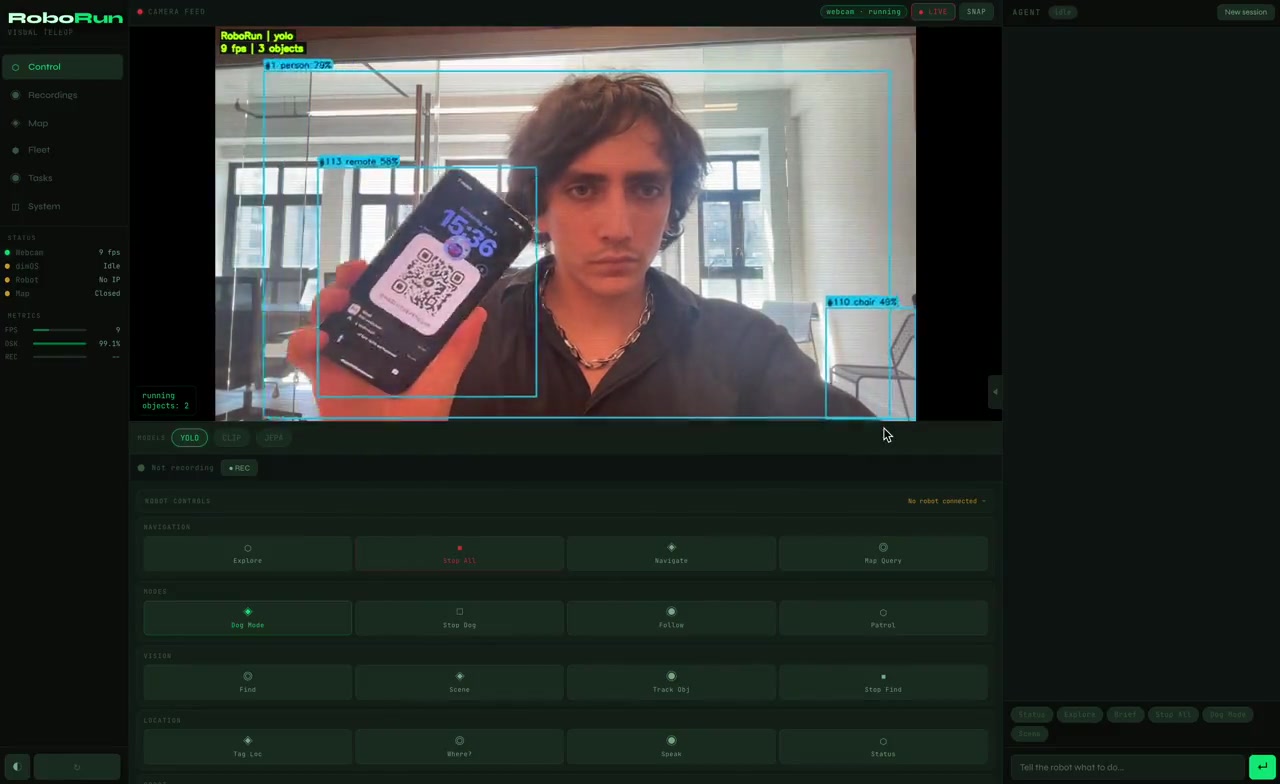
RoboRun: Write a Robot Behavior Once, Run It on Any ROS 1/2 Robot
The base layer for coding robots: see / move / ask primitives, hot-reload Python behaviors,
the same file from webcam + MuJoCo to real hardware. MCP-native for AI agents, every run flight-recorded.


---
## 60 seconds, no robot required
```bash
pip install ros-agent # the package keeps its PyPI name; the command is roborun
roborun
```
The browser opens live, and a `behaviors/` folder appears with the robot's brain. Open **`/arena`** — a robot dog in a browser sim, body and eyes in the same world (what it does changes what it sees). Nothing else to install; the base package is three small dependencies, no torch. The robot's brain:
```python
# behaviors/follow_person.py (already running)
from roborun.behaviors import behavior
@behavior(hz=10)
def follow_person(robot):
people = robot.see("person")
if not people:
return robot.stop()
robot.move(
forward=0.3 if people[0].h < 0.6 else 0.0, # stop when close
turn=-1.2 * (people[0].cx - 0.5), # steer toward center
)
```
Change `0.3` to `0.6`. Save. The robot speeds up **while it's running**. No restart, no build, no launch files, no framework to learn. That's the whole loop: see, think, move, in a file you can read in ten seconds.
Want real eyes instead of the sim? `pip install 'ros-agent[vision]'` (YOLO + CLIP, pulls torch) and the **same file** runs against your webcam — point it at your room and `robot.see("person")` is you.
## The robot handle
| Call | Does |
|---|---|
| `robot.see("person")` | live detections, normalized `.cx .cy .w .h .label .conf` |
| `robot.move(forward, strafe, turn)` | drives the sim or a real robot, always safety-clamped |
| `robot.ask("is the door open?", image=True)` | LLM with the camera frame — Anthropic/OpenAI/Gemini/**local Ollama**, `model="fast"` or `"smart"` |
| `robot.say(...)` / `robot.log(...)` | speak into the event timeline |
| `robot.think("…")` / `robot.thought()` | **async** LLM — fire at 10 Hz, collect when ready, loop never blocks |
| `robot.delegate("fix my search pattern")` | async LLM **with tools** — it can call any MCP tool, including rewriting the running policy (hot reload applies it live) |
| `robot.tool("navigate", x=2, y=3)` | call any MCP tool from inside the policy |
| `robot.lidar()` | 360° ranges in meters, `[0]` = straight ahead |
| `robot.remember(k, v)` / `robot.recall(k)` | memory that survives restarts |
| `robot.state` | dict that survives across loop ticks |
`@behavior(hz=10)` for control loops, `@behavior(every=10.0)` for slow ones (LLM narration, patrol logic). Files hot-reload on save. Broken files report into the timeline and never crash the runtime: a behavior that throws keeps its slot and tells you why.
## LLMs, local or online
`robot.ask()` is provider-agnostic and tiered. **Anthropic, OpenAI, Gemini, local Ollama**, or any OpenAI-compatible endpoint (vLLM, LM Studio, Groq — set `OPENAI_BASE_URL`); the provider is whichever API key you set, falling back to local Ollama, no SDKs required. Calls declare a *tier*, not a vendor — `robot.ask(..., model="fast")` for frequent cheap calls, `model="smart"` for reasoning — and you map tiers to whatever wins for you:
```bash
export ROBORUN_MODEL_FAST=ollama:llama3.2 # frequent checks stay local & free
export ROBORUN_MODEL_SMART=anthropic:claude-opus-4-8 # or openai:…, gemini:…
```
There's no always-on narration burning tokens. Instead there's a **heartbeat**: write a `HEARTBEAT.md` (in the project or `~/.roborun/`) with your own supervision prompt and an optional `every: 600` first line, and the shipped `heartbeat.py` behavior runs it on your schedule against live system status — behavior states, recording state — and reports into the timeline. No file, no LLM calls, zero cost.
The whole robot is also an MCP server. With `roborun` running, point any agent at the live endpoint:
```bash
claude mcp add --transport http roborun http://localhost:8765/mcp # Claude Code
codex mcp add roborun -- npx -y mcp-remote http://localhost:8765/mcp # Codex
```
(There's also a standalone stdio server, `roborun-mcp`, for driving robots without the deck — but the live HTTP endpoint is the one that sees the arena, the camera, and your behaviors. The arena page has a **⚡ CONNECT AGENT** button with all the copy-paste configs.)
## The black box
Press `M` in the flight deck (or `POST /api/run/record/start`) and everything — camera keyframes, YOLO detections, CLIP embeddings, agent events, pose — records into **one MCAP file**, the same container Foxglove Studio replays natively. As the file is written, every flushed chunk is hashed into a chain in a live sidecar, so the recording is tamper-evident **while it's being written**, not just after. Stopping seals it: an O(1) seal (a Merkle root over chunk hashes, signed Ed25519) whose root is **anchored to an RFC 3161 trusted timestamp authority** — the same mechanism behind code signing — so the proof references an external clock, not our word:
```bash
python -m roborun.recorder verify ~/.roborun/runs/local/run_20260610_120000.mcap
# VERIFIED + ANCHORED: unchanged since trusted timestamp 2026-06-10T12:01:07Z (RFC 3161)
python -m roborun.recorder clip
# cuts a window + a signed proof binding those exact frames to the sealed run
```
One flipped byte is caught instantly, with the exact chunk and byte range named. Hash chain + SHA-256 Merkle tree + Ed25519 + a trusted timestamp: the same primitives as Git, Certificate Transparency, and code signing. The merkle root is 64 characters — share it anywhere (an email, a ticket, a printout) and anyone holding it can later prove the run wasn't quietly edited and resealed. No cloud required, works offline (verify is three-state: `verified + anchored`, `internally consistent (unanchored)` for a robot that was offline — it anchors when connectivity returns — or `broken`). When your robot does something weird at 3am, you **replay the run** and you can prove nobody edited it.
Tap mode (the `telemetry_stream` MCP tool) records ROS topics into the run at full rate with no LLM in the loop, over DDS direct (common message families, vendored in `roborun.transport`) or rosbridge.
On run close, the MCAP is extracted into a local SQLite index (indexed label search, CLIP cosine, spatial queries) and optionally exported as Parquet to R2, where **embedded DuckDB queries the whole fleet** — `search_clip("red mug")` across every robot — and robots share Ed25519-signed beacons through the same bucket. Local files and R2 only: no brokers, no database servers, nothing to operate. This is **machine identity** without a platform: each robot is its keypair, and its résumé is its sealed runs — any robot's claim about what it saw or did is checkable against proofs anyone can verify offline.
What this proves: the recorded run — images, detections, and decisions included — hasn't been altered since a moment an external clock witnessed. What it doesn't prove: that the robot's sensors observed reality correctly. We're precise about this distinction on purpose.
The UI at `http://localhost:8765` is the flight deck itself: live camera with YOLO boxes, the black box streaming, the live anchor badge, a command bar, and director keys. `M` record/seal · `V` verify · `T` tamper · `R` runs/replay · `C` sources.
## Connect a real robot
```bash
roborun connect 192.168.1.42 # finds rosbridge, classifies the robot, remembers it
roborun connect 192.168.1.42 --move # proves it: clamped 0.5s nudge, then stop
roborun connect --scan # DDS discovery — nothing to install on the robot
```
If rosbridge isn't running on the robot yet, the command prints the exact two lines to run there — that's the whole setup. **No ROS install on your machine.** Once connected, plain `roborun` drives that robot and the same `behaviors/*.py` files now move real hardware: Unitree Go2/G1, TurtleBot, arms, drones, NVIDIA Isaac Sim, Gazebo. `robot.move()` goes to the sim if it's running, otherwise to the connected robot, always through the same safety clamps.
Optional extras: `pip install ros-agent[vision]` (YOLO + CLIP), `[sim]` (MuJoCo), `[ros]` (direct DDS), `[crypto]` (Ed25519 signing), `[anchor]` (RFC 3161 timestamping), `[fleet]` (R2 + DuckDB cross-robot), `[all]`.
## Skills — fork, vibecode, install from GitHub
A skill packages tools and autonomous behaviors for reuse. There's no registry to publish to — **a skill is a GitHub repo**:
```bash
roborun skill add someuser/their-skill # clone, validate, pin the commit SHA
roborun skill add ./my-skill # dev mode: symlink a local checkout
roborun skill list # installed skills + pin state
```
Install validates the skill **without executing it** (AST check of the required exports and the `REQUIRES` version range) and pins the exact commit in `~/.roborun/skills.lock`. If the installed tree ever drifts from the pinned SHA, it is refused at load — vibecoded on the way in, set in stone once installed.
To write one: fork [roborun-skill-template](https://github.com/publu/roborun-skill-template), open it in Claude Code or Cursor, and describe what you want — the template's `AGENTS.md`/`CLAUDE.md` teach the agent the whole skill API. `roborun skill validate .`, push, done.
## Text with your robot — OpenClaw-ready
MCP drives the robot; the [OpenClaw bridge](docs/OPENCLAW.md) lets the robot reach *you*. Point `OPENCLAW_HOOKS_URL` at an [OpenClaw](https://openclaw.ai) gateway and `robot.notify("person spotted near waypoint 4")` lands on your phone over WhatsApp/Telegram — then you reply "stop the patrol" and the bundled OpenClaw skill (`integrations/openclaw/`) drives the robot back over HTTP. From the same chat you can onboard a new robot ("set up roborun on 192.168.1.42") or install behaviors from GitHub — the skill drives the same CLI you would. `behaviors/sentry.py` is the demo: a patrol that texts you when it sees someone and after each quiet lap. Every notification also lands in the sealed run, so "the robot texted me" is a verifiable claim — one env var makes your robot [OpenClaw-ready](docs/OPENCLAW.md), no SDK, no platform account.
## Configuration
| Variable | Default | |
|----------|---------|---|
| `ROBORUN_PORT` | `8765` | Server port |
| `OPENCLAW_HOOKS_URL` | unset | OpenClaw gateway hooks URL — enables `robot.notify()` push ([docs](docs/OPENCLAW.md)) |
| `ROBOT_IP` | unset | Robot IP (or set in UI) |
| `ANTHROPIC_API_KEY` | unset | `robot.ask()` + built-in Claude agent |
| `OLLAMA_MODEL` | `llama3.2` | Local model for `robot.ask()` |
| `ROBORUN_BEHAVIOR_PATHS` | unset | Extra behavior directories (comma-separated) |
| `ROBORUN_AUTOSTART` | `1` | Autostart camera/sim on boot |
| `ROBORUN_MAX_LINEAR_VEL` | `1.0` | Safety clamp, m/s |
| `ROBORUN_MAX_ANGULAR_VEL` | `1.5` | Safety clamp, rad/s |
## Why this instead of a robot framework
Robot frameworks make you learn their world first: module systems, typed streams, blueprints, launch graphs, all before the robot does anything. roborun inverts it. The robot is already running, and you change its mind by saving a file. Python you already know, hot-reloaded, with vision, an LLM, and motion in one handle, plus a cryptographic record of everything it did.
It's not a chat-controlled robot: behaviors run at 10 Hz with **no LLM in the loop**, and MCP, the REST API, and `robot.*` are the same functions — MCP exists so Claude/Cursor/Codex attach with one line, not because chat is the control plane. If you live in RViz and RQT, those stay better at deep introspection of a system you built; roborun is for driving a robot (or a sim, or a webcam) with short Python and AI agents **without** the ROS toolchain on your laptop — plus the one thing the classic stack doesn't do: a tamper-evident, externally-timestamped record of what the robot saw and did.
And it won't rot in six months: CI runs the suite (100+ tests) on every push, releases are tagged and published to PyPI automatically, skills pin exact commit SHAs and refuse to load on drift, and DDS message definitions are vendored — no system ROS install to version-skew against.
## Contributing
```bash
git clone https://github.com/publu/RoboRun.git && cd RoboRun
pip install -e ".[all]"
python -m roborun.server
pytest tests/
```
MIT. Built by Manifest Intelligence, Inc.