
Capture and download HTTP Live Streams (HLS) straight from your browser.
Free • Open Source • MIT Licensed

 Google Chrome | Experimental MV3 build available from source (see Development section). |
|
Google Chrome | Experimental MV3 build available from source (see Development section). |
|  Firefox | [Get it on Firefox Add-ons](https://addons.mozilla.org/en-US/firefox/addon/hls-downloader/) or [use manual installation](#-firefox)|
|
Firefox | [Get it on Firefox Add-ons](https://addons.mozilla.org/en-US/firefox/addon/hls-downloader/) or [use manual installation](#-firefox)|
|  Microsoft Edge | [Get it from Edge Add-ons](https://microsoftedge.microsoft.com/addons/detail/hls-downloader/ldehhnlpcedapncohebgmghanffggffc) |
|
Microsoft Edge | [Get it from Edge Add-ons](https://microsoftedge.microsoft.com/addons/detail/hls-downloader/ldehhnlpcedapncohebgmghanffggffc) |
|  Brave | [Use manual installation](#-brave) |
|
Brave | [Use manual installation](#-brave) |
|  Arc | [Use manual installation](#-arc) |
|
Arc | [Use manual installation](#-arc) |
|  Opera | [Use manual installation](#-opera) |
*For Brave/Arc/etc. download the ZIP from the [latest release](https://github.com/puemos/hls-downloader/releases) and follow the manual-install steps below.
---
## 🛠️ Installation
> **Newer versions (≥ 4.1.2)** ship only a ZIP archive.
> Older versions can still be installed from the CRX (see the collapsible notes).
Chrome
1. Download `extension-mv3-chrome.zip` from the [latest release](https://github.com/puemos/hls-downloader/releases).
2. Extract the ZIP to a convenient folder.
3. Open `chrome://extensions/` and enable **Developer mode**.
4. Click **Load unpacked** and select the **extracted folder** (the one that contains `manifest.json`).
5. Enjoy 🎉
### Brave
1. Download `extension-mv3-chrome.zip` from the [latest release](https://github.com/puemos/hls-downloader/releases).
2. Extract the ZIP to a convenient folder.
3. Open `brave://extensions/` and enable **Developer mode**.
4. Click **Load unpacked** and select the **extracted folder** (the one that contains `manifest.json`).
5. Enjoy 🎉
### Arc
1. Download `extension-mv3-chrome.zip` from the [latest release](https://github.com/puemos/hls-downloader/releases).
2. Extract the ZIP to a convenient folder.
3. Open **Arc Menu → Extensions → Manage Extensions** (or press **Command+T** or **Ctrl+T** and type **Manage Extensions**), then enable **Developer mode**.
4. Click **Load unpacked** and select the **extracted folder** (the one that contains `manifest.json`).
5. Enjoy 🎉
### Opera
1. Download `extension-mv3-chrome.zip` from the [latest release](https://github.com/puemos/hls-downloader/releases).
2. Extract the ZIP to a convenient folder.
3. Open `opera://extensions/` and enable **Developer mode**.
4. Click **Load unpacked** and select the **extracted folder** (the one that contains `manifest.json`).
5. Enjoy 🎉
### Firefox
1. Opem `about:debugging#/runtime/this-firefox`.
2. Click **Load Temporary Add-on...** and pick the XPI.
[For Dear Testers](./FOR-DEAR-TESTERS.md) – concise build/install steps for Firefox & Chromium reviewers.
---
## 🎬 Usage
1. Browse to a page that plays an HLS video and start playback.
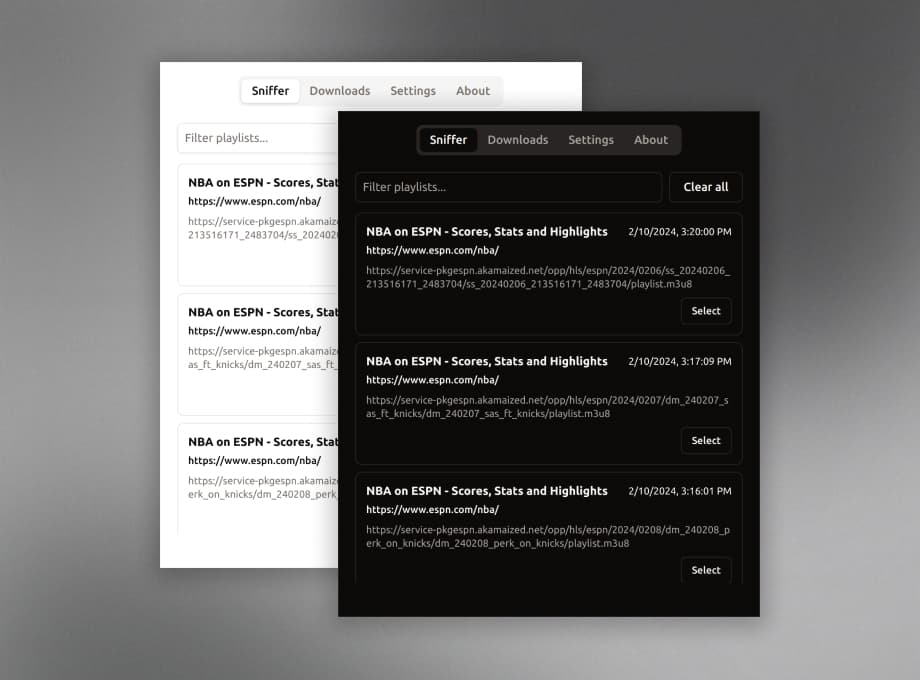
2. Click the **HLS Downloader** icon – detected playlists appear in the **Sniffer** tab.
3. Choose **Select** next to a playlist.
4. Pick your video & audio streams, then press **Download**.
5. Grab a coffee ☕ – `ffmpeg.wasm` merges everything and your browser prompts you to save the MP4 when done.
---
## 🧑💻 Development
### Clone & Build
Requires Node.js 20+ (includes [Corepack](https://nodejs.org/api/corepack.html)) and the `zip` command.
```bash
git clone https://github.com/puemos/hls-downloader.git
cd hls-downloader
# install the pinned pnpm version
corepack enable
corepack prepare pnpm@10.11.0 --activate
pnpm install --frozen-lockfile
pnpm run build # outputs → ./dist/, extension-chrome.zip, extension-firefox.xpi
# verify build artifacts then clean up
pnpm run clean
```
**MV2 vs MV3 builds**
The default build targets Manifest V2 (Firefox and legacy Chromium workflows). To produce a Manifest V3 bundle for Chromium-based browsers (Firefox does not fully support MV3 background service workers yet):
```bash
MV_TARGET=mv3 pnpm run build # writes manifest v3 + offscreen page to dist/
pnpm run clean # optional: remove artifacts after testing
```
You can generate both flavors at once with pre-named artifacts:
```bash
pnpm run build:all # outputs dist/mv2 + dist/mv3
# zips: extension-mv2-chrome.zip / extension-mv2-firefox.xpi (MV2 contents at archive root)
# extension-mv3-chrome.zip (MV3 contents at archive root; Chromium only)
```
For Firefox Add-ons source review, use the exact reproduction steps in
[AMO_SOURCE_REVIEW.md](./AMO_SOURCE_REVIEW.md). Do not upload a stale local
`source-code.zip`; `pnpm run publish:firefox` creates a fresh source archive from
the committed release revision.
> Tip: If pnpm is missing, run `corepack enable && corepack prepare pnpm@10.11.0 --activate` to match the locked toolchain.
Run tests & generate coverage badge:
```bash
pnpm test # unit tests
pnpm test:coverage # combined coverage + badge
```
### Live Development
```bash
pnpm dev # watches & rebuilds into dist/
pnpm storybook # preview popup & design-system components
```
### Project Structure
```text
src/
├─ assets/ # extension manifest & icons
├─ background/ # background scripts
├─ core/ # shared logic & Redux store
├─ design-system/ # UI component library
└─ popup/ # React popup UI
```
---
## 🤝 Contributing
We ♥ PRs! See the [contributing guide](./CONTRIBUTING.md) and [automation guide](./AGENTS.md).
```bash
git checkout -b feature/my-awesome-idea
# ...code...
git commit -am "feat: add awesome idea"
git push origin feature/my-awesome-idea
# open PR 🎉
```
---
## 📜 Code of Conduct
**TLDR: Be kind**
This project follows the [Contributor Covenant](./CODE_OF_CONDUCT.md).
---
## 🚧 Build Variants
HLS Downloader is available in multiple build variants to accommodate different distribution requirements:
### Store Builds (Firefox Add-ons / Edge Add-ons)
Official store releases include a blocklist that respects copyright holder opt-out requests. This version complies with distribution platform policies and content owner preferences.
### Independent Builds
Alternative builds are available for advanced users who prefer complete local control. These "experimental" variants contain no blocklist and allow unrestricted operation:
```bash
# MV2 without blocklist (Firefox/Edge manual install)
pnpm run build:mv2:no-blocklist
# MV3 without blocklist (Chrome/Brave/Arc manual install)
pnpm run build:mv3:no-blocklist
# Build all variants at once
pnpm run build:all-variants
```
Non-blocklist builds are named "experimental unstable nightly beta alpha hls-downloader" and are intended for personal use only—not for redistribution on official stores.
---
## 🤚 Disclaimer
This extension is designed for downloading video content that you own or have authorization to access. **It is prohibited to use this tool for downloading copyrighted content without permission.** Users are solely responsible for their actions, and the developer assumes no liability for user behavior. This tool is provided "as-is" without warranty of any kind.
---
## 🚫 Copyright Protection and Opt-Out Policy
We respect the intellectual property rights and legitimate interests of all websites and content operators.
If you do not wish this tool to operate on your website, you may submit an opt-out request. We will add verified domains to the project's blocklist in subsequent releases.
### How to Submit an Opt-Out Request
1. Create a new **[Issue](https://github.com/puemos/hls-downloader/issues/new?template=opt-out-request.yml)** using the "Opt-Out Request" template
2. Use the title format: `[Opt-Out Request] YourDomain.com`
3. Provide the following information for verification:
- **Website Domain** (e.g., `example.com`)
- **Contact Email** (for identity verification if necessary)
We commit to honoring legitimate requests and will include verified domains in the blocklist for store-distributed versions. Please note that as an open-source project, update cycles may vary. Thank you for your understanding and cooperation.
---
## 📝 License
Opera | [Use manual installation](#-opera) |
*For Brave/Arc/etc. download the ZIP from the [latest release](https://github.com/puemos/hls-downloader/releases) and follow the manual-install steps below.
---
## 🛠️ Installation
> **Newer versions (≥ 4.1.2)** ship only a ZIP archive.
> Older versions can still be installed from the CRX (see the collapsible notes).
Chrome
1. Download `extension-mv3-chrome.zip` from the [latest release](https://github.com/puemos/hls-downloader/releases).
2. Extract the ZIP to a convenient folder.
3. Open `chrome://extensions/` and enable **Developer mode**.
4. Click **Load unpacked** and select the **extracted folder** (the one that contains `manifest.json`).
5. Enjoy 🎉
### Brave
1. Download `extension-mv3-chrome.zip` from the [latest release](https://github.com/puemos/hls-downloader/releases).
2. Extract the ZIP to a convenient folder.
3. Open `brave://extensions/` and enable **Developer mode**.
4. Click **Load unpacked** and select the **extracted folder** (the one that contains `manifest.json`).
5. Enjoy 🎉
### Arc
1. Download `extension-mv3-chrome.zip` from the [latest release](https://github.com/puemos/hls-downloader/releases).
2. Extract the ZIP to a convenient folder.
3. Open **Arc Menu → Extensions → Manage Extensions** (or press **Command+T** or **Ctrl+T** and type **Manage Extensions**), then enable **Developer mode**.
4. Click **Load unpacked** and select the **extracted folder** (the one that contains `manifest.json`).
5. Enjoy 🎉
### Opera
1. Download `extension-mv3-chrome.zip` from the [latest release](https://github.com/puemos/hls-downloader/releases).
2. Extract the ZIP to a convenient folder.
3. Open `opera://extensions/` and enable **Developer mode**.
4. Click **Load unpacked** and select the **extracted folder** (the one that contains `manifest.json`).
5. Enjoy 🎉
### Firefox
1. Opem `about:debugging#/runtime/this-firefox`.
2. Click **Load Temporary Add-on...** and pick the XPI.
[For Dear Testers](./FOR-DEAR-TESTERS.md) – concise build/install steps for Firefox & Chromium reviewers.
---
## 🎬 Usage
1. Browse to a page that plays an HLS video and start playback.
2. Click the **HLS Downloader** icon – detected playlists appear in the **Sniffer** tab.
3. Choose **Select** next to a playlist.
4. Pick your video & audio streams, then press **Download**.
5. Grab a coffee ☕ – `ffmpeg.wasm` merges everything and your browser prompts you to save the MP4 when done.
---
## 🧑💻 Development
### Clone & Build
Requires Node.js 20+ (includes [Corepack](https://nodejs.org/api/corepack.html)) and the `zip` command.
```bash
git clone https://github.com/puemos/hls-downloader.git
cd hls-downloader
# install the pinned pnpm version
corepack enable
corepack prepare pnpm@10.11.0 --activate
pnpm install --frozen-lockfile
pnpm run build # outputs → ./dist/, extension-chrome.zip, extension-firefox.xpi
# verify build artifacts then clean up
pnpm run clean
```
**MV2 vs MV3 builds**
The default build targets Manifest V2 (Firefox and legacy Chromium workflows). To produce a Manifest V3 bundle for Chromium-based browsers (Firefox does not fully support MV3 background service workers yet):
```bash
MV_TARGET=mv3 pnpm run build # writes manifest v3 + offscreen page to dist/
pnpm run clean # optional: remove artifacts after testing
```
You can generate both flavors at once with pre-named artifacts:
```bash
pnpm run build:all # outputs dist/mv2 + dist/mv3
# zips: extension-mv2-chrome.zip / extension-mv2-firefox.xpi (MV2 contents at archive root)
# extension-mv3-chrome.zip (MV3 contents at archive root; Chromium only)
```
For Firefox Add-ons source review, use the exact reproduction steps in
[AMO_SOURCE_REVIEW.md](./AMO_SOURCE_REVIEW.md). Do not upload a stale local
`source-code.zip`; `pnpm run publish:firefox` creates a fresh source archive from
the committed release revision.
> Tip: If pnpm is missing, run `corepack enable && corepack prepare pnpm@10.11.0 --activate` to match the locked toolchain.
Run tests & generate coverage badge:
```bash
pnpm test # unit tests
pnpm test:coverage # combined coverage + badge
```
### Live Development
```bash
pnpm dev # watches & rebuilds into dist/
pnpm storybook # preview popup & design-system components
```
### Project Structure
```text
src/
├─ assets/ # extension manifest & icons
├─ background/ # background scripts
├─ core/ # shared logic & Redux store
├─ design-system/ # UI component library
└─ popup/ # React popup UI
```
---
## 🤝 Contributing
We ♥ PRs! See the [contributing guide](./CONTRIBUTING.md) and [automation guide](./AGENTS.md).
```bash
git checkout -b feature/my-awesome-idea
# ...code...
git commit -am "feat: add awesome idea"
git push origin feature/my-awesome-idea
# open PR 🎉
```
---
## 📜 Code of Conduct
**TLDR: Be kind**
This project follows the [Contributor Covenant](./CODE_OF_CONDUCT.md).
---
## 🚧 Build Variants
HLS Downloader is available in multiple build variants to accommodate different distribution requirements:
### Store Builds (Firefox Add-ons / Edge Add-ons)
Official store releases include a blocklist that respects copyright holder opt-out requests. This version complies with distribution platform policies and content owner preferences.
### Independent Builds
Alternative builds are available for advanced users who prefer complete local control. These "experimental" variants contain no blocklist and allow unrestricted operation:
```bash
# MV2 without blocklist (Firefox/Edge manual install)
pnpm run build:mv2:no-blocklist
# MV3 without blocklist (Chrome/Brave/Arc manual install)
pnpm run build:mv3:no-blocklist
# Build all variants at once
pnpm run build:all-variants
```
Non-blocklist builds are named "experimental unstable nightly beta alpha hls-downloader" and are intended for personal use only—not for redistribution on official stores.
---
## 🤚 Disclaimer
This extension is designed for downloading video content that you own or have authorization to access. **It is prohibited to use this tool for downloading copyrighted content without permission.** Users are solely responsible for their actions, and the developer assumes no liability for user behavior. This tool is provided "as-is" without warranty of any kind.
---
## 🚫 Copyright Protection and Opt-Out Policy
We respect the intellectual property rights and legitimate interests of all websites and content operators.
If you do not wish this tool to operate on your website, you may submit an opt-out request. We will add verified domains to the project's blocklist in subsequent releases.
### How to Submit an Opt-Out Request
1. Create a new **[Issue](https://github.com/puemos/hls-downloader/issues/new?template=opt-out-request.yml)** using the "Opt-Out Request" template
2. Use the title format: `[Opt-Out Request] YourDomain.com`
3. Provide the following information for verification:
- **Website Domain** (e.g., `example.com`)
- **Contact Email** (for identity verification if necessary)
We commit to honoring legitimate requests and will include verified domains in the blocklist for store-distributed versions. Please note that as an open-source project, update cycles may vary. Thank you for your understanding and cooperation.
---
## 📝 License
Made with ♥ by puemos