
La Review
The Code Review Workbench.


[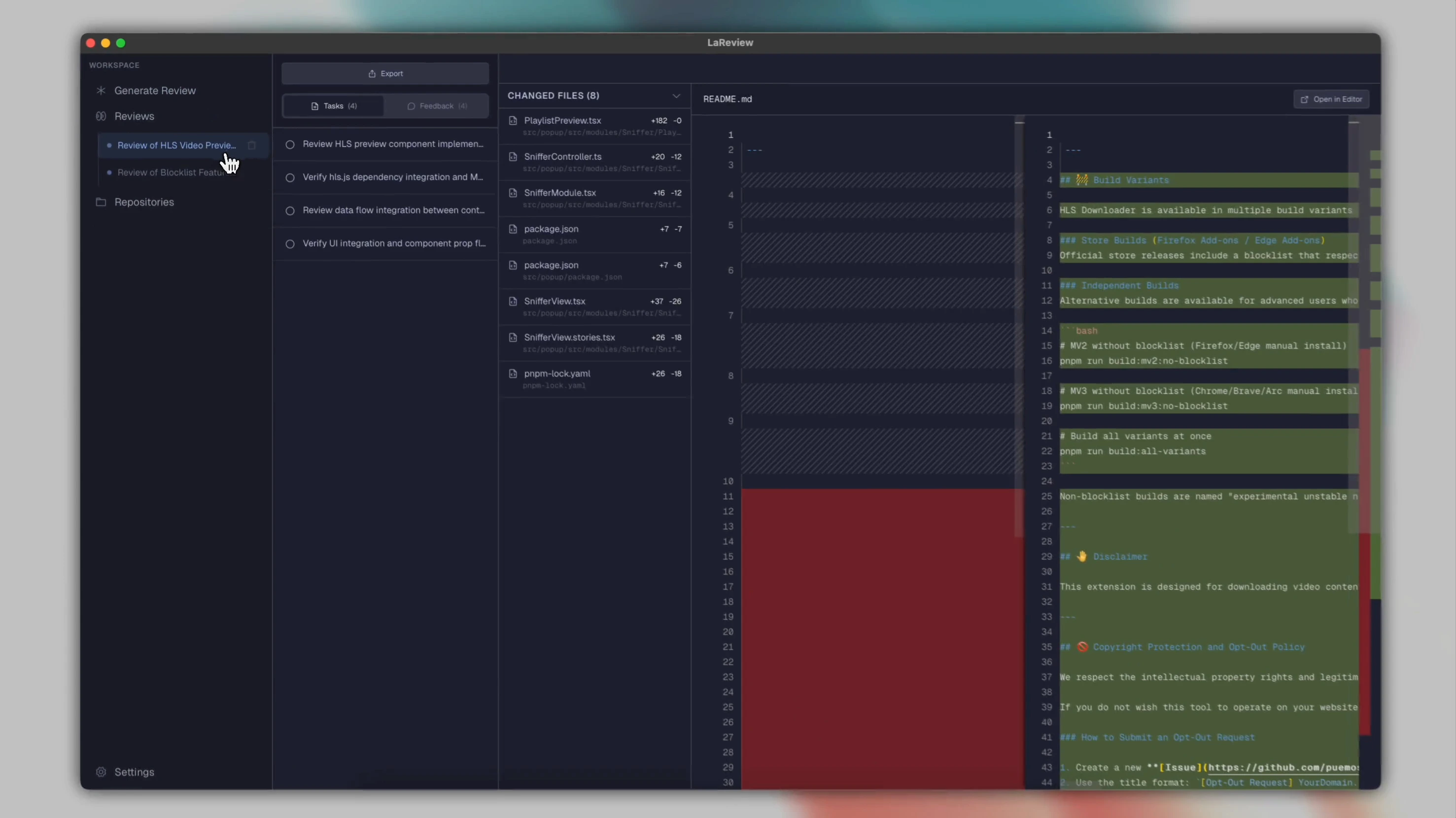](https://github.com/user-attachments/assets/28abaf1e-9100-4484-b6a5-18d8dfec427e)
---
LaReview is a **dev-first code review workbench** for complex changes. It turns a PR or diff into a structured review plan, grouped by flows and ordered by risk, so you can review with depth and understanding.
Unlike auto-review bots that post comment spam, LaReview is a local-first tool that works with your existing AI coding agent to help you ship high-signal feedback.
## Example review
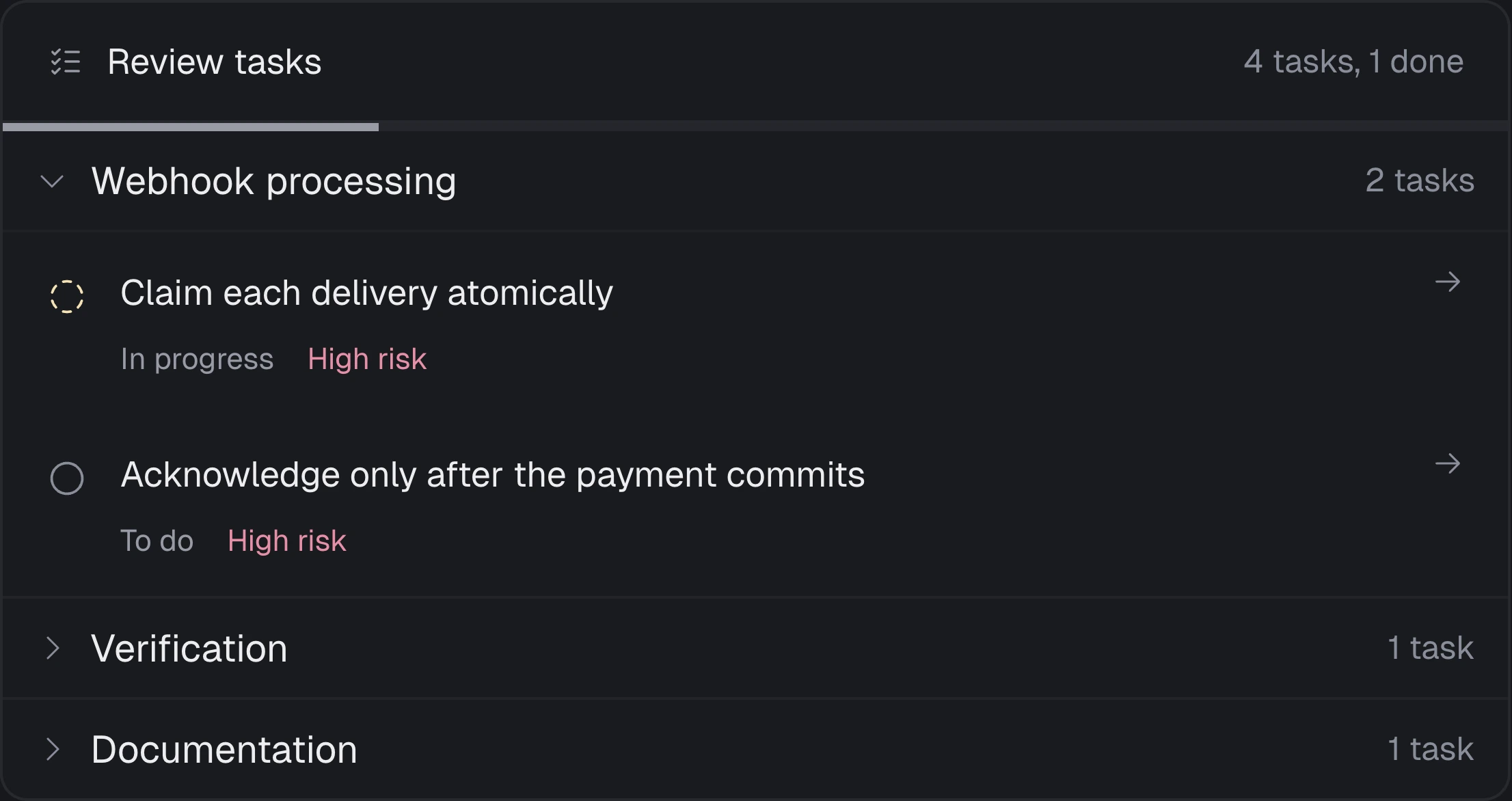
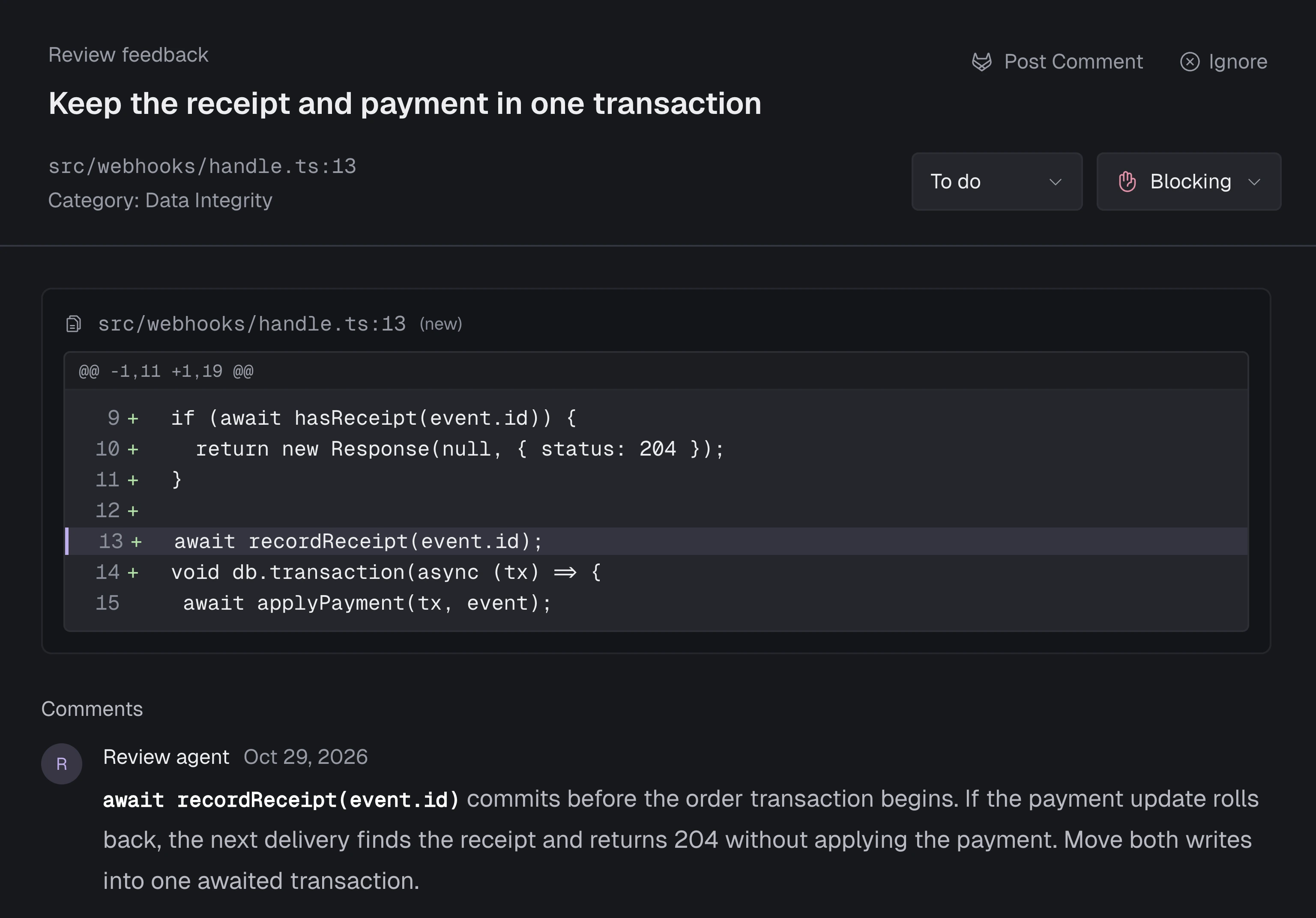
The feature screenshots follow an illustrative payment-webhook review: six changed files, four tasks, and two blockers. [See the example scenario](docs/SCREENSHOTS.md).
## Key Features
LaReview is designed for a local-first, secure, and focused review experience.
| Feature | Workflow |
| :--- | :--- |
| **AI-Powered Planning** | Load a GitHub or GitLab pull request, compare local Git refs, or paste a diff. LaReview acts as a staff engineer, looking for flows (e.g. auth, api) and risks to build a structured review plan. |
| **Review Tasks** | Follow the review plan by flow, track progress, and focus on the highest-risk concerns first. |
| **Task Analysis** | Work through a focused verification plan for each logical concern. Mark tasks as **To Do**, **In Progress**, or **Done**. Attach contextual notes to specific tasks or lines of code to keep track of your thoughts. |
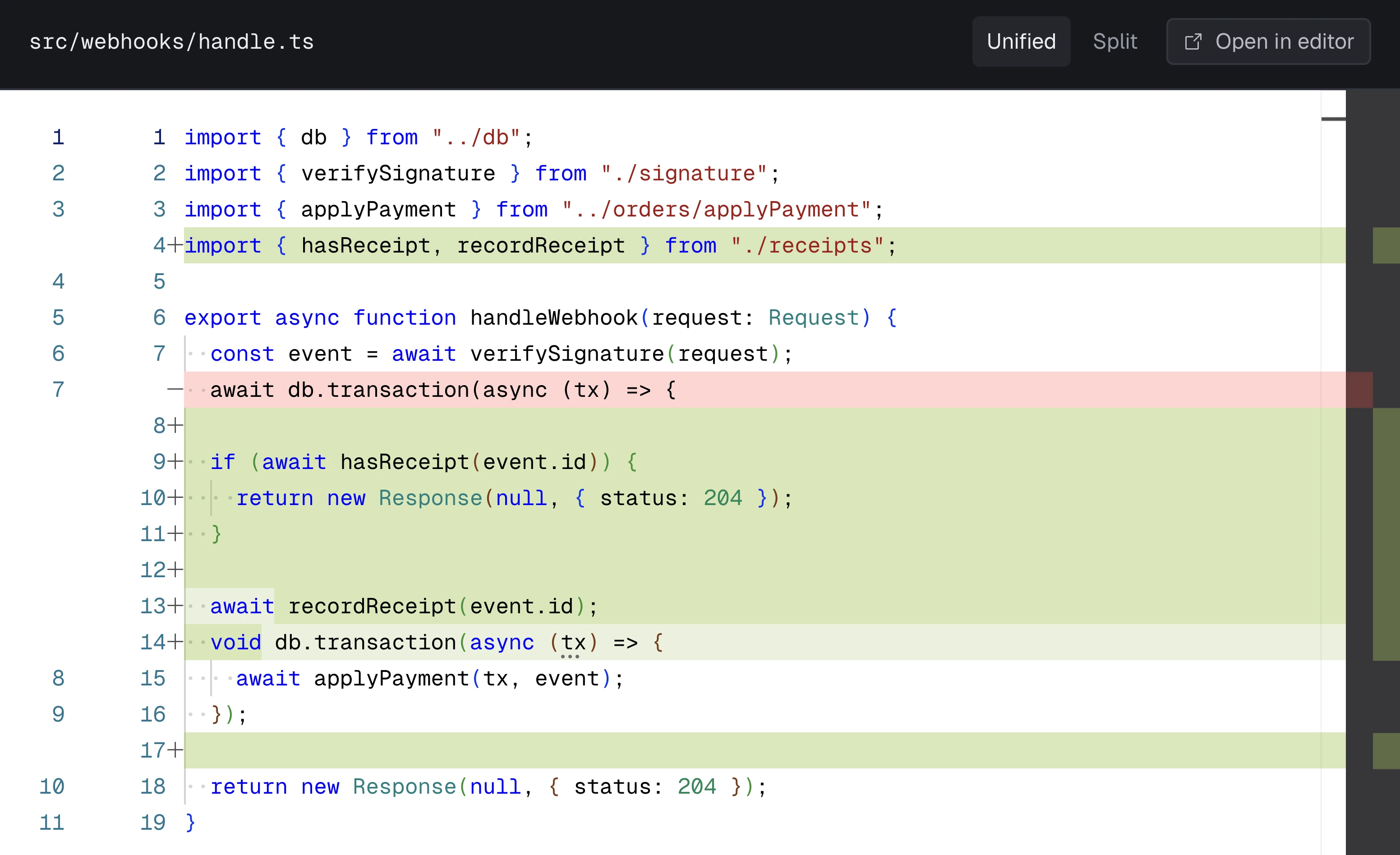
| **Task-Focused Diffs** | Review one logical concern at a time. The workbench isolates relevant code hunks for each task, eliminating noise. |
| **High-Signal Framework** | The AI proactively identifies bugs and authenticates them against your rules. No comment spam—just focused feedback threads anchored to specific lines. |
| **Local Context** | Link local Git repos to give the agent full access to search your codebase. Works with your existing AI coding agent using context from your local checkout. |
| **Visual Diagrams** | Visualize the flow. Automatically generate diagrams to see architectural changes before you read a single line of code. Rendered with Mermaid. |
| **Team Rules** | Define rules like "DB queries must have timeouts" or "API changes need a migration note" to enforce standards automatically. |
| **Learning Patterns** | The AI learns from rejected feedback. Mark suggestions as "ignored" during reviews, then analyze rejections to discover patterns that calibrate future reviews—fewer nitpicks, more signal. |
| **Git Host Sync** | Submit your review feedback directly to GitHub or GitLab PRs with automatic summary generation. |
| **Export & Share** | Export your review summary to Markdown with diagrams and code insights. Copy the selected tasks and feedback to your clipboard. |
| **CLI Support** | Launch reviews from the terminal: `lareview`, `lareview pr owner/repo#123`, `git diff | lareview`, or `lareview --agent claude`. |
## Inside the workbench
### A focused review plan
### A finding with its code and evidence
### The task’s relevant code changes
## How it works
1. **Input**
- Run `lareview` from terminal (opens GUI with current repo linked), or
- Paste a unified diff, or
- Paste a code review link from GitHub or GitLab, or a PR URL
2. **Fetch (for PRs)**
- LaReview fetches the change locally and prepares the review workspace. No intermediate servers.
3. **Generate a review plan**
- Starting creates the review immediately and opens its live Activity page while the selected AI agent works in the background.
- You can return to Generate and start another review; two generations can run concurrently and additional reviews wait in a visible queue.
- When generation finishes, the same review page automatically becomes the full review workbench.
4. **Review**
- Review task by task with your AI coding agent.
- Ship focused feedback that authors can act on, without comment spam.
## Terminal Workflow
LaReview includes a CLI that integrates naturally into your developer workflow:
```bash
# Open GUI with current repository linked
lareview
# Review changes between branches
lareview main feature
# Pipe a diff directly to the GUI
git diff HEAD | lareview
# Review a GitHub/GitLab PR
lareview pr owner/repo#123
# Specify an agent
lareview --agent claude
```
The CLI launches the GUI in the background and passes your diff/repo info seamlessly.
## On-prem and other Git hosts
Clone your repository using your usual Git credentials, then link the local folder in
**Repositories**. In **Generate Review**, select that repository, choose **Local Git**,
enter a base and head branch, tag, or commit, and click **Compare changes**. Inspect the diff,
then click **Start Review** with your chosen agent.
Comparison uses the two commit snapshots (`git diff BASE HEAD`) already present locally.
Fetch remote branches with Git first. LaReview does not change your checkout or staged
changes. The review records both resolved commit IDs and can use the head commit through
the existing snapshot permission flow. This works with on-prem Git, Bitbucket, Gitea,
Azure DevOps, GitHub Enterprise, and repositories without a remote. Host-specific PR
metadata, inbox, and posting comments remain available through the GitHub/GitLab integrations.
The terminal workflow also works from any local clone: `lareview main feature` or
`git diff main feature | lareview`.
## Supported Agents
LaReview launches compatible harnesses through commands already available on your `PATH`, or an executable override configured in Settings. It does not provide an in-app harness installer.
| Agent | Launch command |
| --- | --- |
| Claude | `npx -y @agentclientprotocol/claude-agent-acp@0.65.0` |
| Codex | `npx -y @agentclientprotocol/codex-acp@1.1.9` |
| GitHub Copilot | `copilot --acp --stdio` |
| Gemini | `gemini --acp` |
| Grok | `grok --no-auto-update agent stdio` |
| Kimi | `kimi acp` |
| Mistral | `vibe-acp` |
| OpenCode | `opencode acp` |
| Qwen | `qwen --acp --experimental-skills` |
General ACP support is not sufficient: the harness must forward LaReview's client-provided MCP server and call its tools. `pi-acp` is intentionally unsupported because it does not provide that required MCP behavior.
## Requirements
- **Rust 1.99.1** (installed automatically by rustup from `rust-toolchain.toml`; MSRV 1.91)
- **Node.js 24.22.2** and **pnpm 11.28.9** for frontend development
- **GitHub CLI** (optional):
- Install: `brew install gh` (or your OS package manager)
- Auth: `gh auth login`
- **GitLab CLI** (optional):
- Install: `brew install glab` (or your OS package manager)
- Auth: `glab auth login`
- **AI agent** configured on your machine
- Learn more: https://agentclientprotocol.com/overview/introduction
> [!NOTE]
> LaReview does not require a custom LaReview server. Your PR data is fetched locally via `gh` or `glab`, and plan generation runs via your chosen AI agent.
### GitHub Copilot setup
Install the [GitHub Copilot CLI](https://docs.github.com/en/copilot/how-tos/set-up/install-copilot-cli)
and sign in by running `copilot` and using `/login`. Restart LaReview, then select
**GitHub Copilot** in the Agent picker. If the executable is outside your `PATH`, set its
path in Settings. LaReview uses Copilot's native [ACP stdio server](https://docs.github.com/en/copilot/reference/copilot-cli-reference/acp-server);
no additional adapter or `gh copilot` extension is needed. Models and session options are
discovered from the installed CLI, and require an authenticated Copilot account or a
configured bring-your-own-key provider.
For each review, LaReview supplies its local task server through Copilot's
`--additional-mcp-config` launch option, because Copilot's ACP session API accepts
only HTTP/SSE MCP entries. This uses the same local stdio task server as the other agents.
## Installation
### Option A: Homebrew (Recommended)
Install LaReview via Homebrew with a single command:
#### macOS
```bash
# First, tap the repository
brew tap puemos/tap
# Then install
brew install --cask lareview
```
#### Linux
```bash
brew install puemos/tap/lareview
```
### Option B: Download a release
1. Go to the [Releases page](https://github.com/puemos/lareview/releases) and download the latest binary for your operating system.
2. Follow the instructions for your OS below.
#### macOS
1. Download `LaReview__aarch64.dmg` for Apple silicon or `LaReview__x64.dmg` for Intel.
2. Open the disk image and drag `LaReview.app` into `/Applications`.
3. If macOS blocks it on first run, open **System Settings → Privacy & Security** and allow it.
4. To use from terminal, add to PATH (or use the **CLI Installation** button in Settings):
```bash
echo 'export PATH="$PATH:/Applications/LaReview.app/Contents/MacOS"' >> ~/.zshrc
```
#### Linux
1. Install required dependencies:
```sh
# Debian/Ubuntu
sudo apt-get update
sudo apt-get install -y \
libwebkit2gtk-4.1-0 \
libappindicator3-1 \
librsvg2-2 \
libxdo3
# For other distros, install equivalent WebKit2GTK 4.1 packages
```
2. Download the `lareview-linux.tar.gz` file and extract it.
```sh
tar -xzvf lareview-linux.tar.gz
```
3. Make the binary executable and move it to your path.
```sh
chmod +x ./lareview
sudo mv ./lareview /usr/local/bin/lareview
```
#### WSL (Windows Subsystem for Linux)
LaReview runs natively inside WSL2 as a Linux app. Follow the Linux installation steps above (including dependency installation).
**Optional:** For better Windows integration (opening URLs in your Windows browser), install the [wslu](https://github.com/wslutilities/wslu) package:
```bash
# Ubuntu/Debian
sudo apt install wslu
# Other distros: see https://wslutiliti.es/wslu/install.html
```
If `wslu` is not installed, LaReview will fall back to using `cmd.exe` for opening URLs.
### Option C: One-click CLI installation
Launch LaReview and go to **Settings → CLI Installation** for a one-click setup to add `lareview` to your PATH.
### Option D: Run from source
```bash
cargo run
```
### Option E: Build a local macOS .app (dev)
```bash
scripts/build_macos_app.sh
```
#### Linux dependencies
```bash
# Debian/Ubuntu
sudo apt-get update
sudo apt-get install -y libxkbcommon-dev libxkbcommon-x11-dev
```
## Quickstart
1. Start the app:
```bash
lareview # From terminal with repo linked
# OR
cargo run # From source
```
2. Open **GENERATE**
- Paste a unified diff, or a GitHub/GitLab PR like `owner/repo#123` (or a PR URL)
- Or use the terminal: `lareview pr owner/repo#123`
3. Pick an agent and click generate
4. Switch to **REVIEW**
- Work through tasks, add notes, and track status
> [!TIP]
> If PR loading fails, run `gh auth status` or `glab auth status` and then login.
## Usage examples
### Review a GitHub/GitLab PR
Input:
- `owner/repo#123`
- `https://github.com/owner/repo/pull/123`
- `https://gitlab.com/owner/repo/-/merge_requests/123`
### Review a unified diff
Paste a unified diff directly:
```diff
diff --git a/src/lib.rs b/src/lib.rs
index 123..456 100644
--- a/src/lib.rs
+++ b/src/lib.rs
@@ -1,3 +1,8 @@
+pub fn example() {
+ // ...
+}
```
## Data, paths, and privacy
LaReview stores review state locally.
- macOS DB: `~/Library/Application Support/LaReview/db.sqlite`
- Linux DB: `$XDG_DATA_HOME/lareview/db.sqlite` or `~/.local/share/lareview/db.sqlite`
- Override DB path:
```bash
LAREVIEW_DB_PATH=/path/to/db.sqlite
```
Executable discovery (GUI apps can start with a minimal PATH):
- LaReview hydrates PATH from your login shell when launched outside a terminal (macOS/Linux). Restart after shell PATH changes.
- You can override individual agent executables in **Settings → Agent Settings**.
Wipe local state:
- Delete the DB file listed above.
## Development
- Toolchain: Rust 1.99.1 with `rustfmt` and `clippy` components (edition 2024; MSRV 1.91)
- Run the app: `cargo run`
- Reset/seed sample data:
If you need more advanced control, use the CLI.
### CLI Reference
- Checks:
- `cargo fmt -- --check`
- `cargo clippy --all-targets --all-features -- -D warnings`
- `cargo test`
- Logging:
- LaReview uses the `log` crate with `env_logger`.
- Set `RUST_LOG` to control log levels:
- `RUST_LOG=debug cargo run` - Full debug output
- `RUST_LOG=acp=debug cargo run` - ACP agent debug output only
- `RUST_LOG=error cargo run` - Errors only
- Logs appear in the terminal when running from source.
- Tests:
- Unit tests: Located alongside modules in `src/` (usually as `tests.rs`)
- Integration tests: Located in the root `tests/` directory
- Run all tests: `cargo test`
- Supply chain:
- `cargo deny check` (used in scheduled CI)
## Docs
- Docs index: [docs/README.md](docs/README.md)
- Architecture overview: [docs/ARCHITECTURE.md](docs/ARCHITECTURE.md)
- Development guide: [docs/DEVELOPMENT.md](docs/DEVELOPMENT.md)
## Contributing
Please read [CONTRIBUTING.md](CONTRIBUTING.md) before submitting a PR.
## Security
See [SECURITY.md](SECURITY.md) for reporting vulnerabilities.
## License
Licensed under either of:
- Apache License, Version 2.0 ([LICENSE-APACHE](LICENSE-APACHE))
- MIT license ([LICENSE-MIT](LICENSE-MIT))
At your option.