Polpo

Multi-agent orchestrator for AI coding CLIs — Claude Code, Codex, Gemini, OpenCode, Pi, Goose — with mobile-first remote control.
Polpo runs, watches, and coordinates terminal AI coding agents. Drive them from your phone over VPN, Wi-Fi, LAN, or a public tunnel; let the in-process **Alien Mind** decompose goals into parallel arms; or let external software drive polpo through the **/v1 gateway** as a remote agent execution platform. One host, many agents, three access surfaces.
> **Help us test!** Claude Code support is stable and battle-tested. Support for **Codex**, **Gemini**, **OpenCode**, **Pi**, and **Goose** is functional but still being stabilized — edge cases in multi-turn, auto-discovery, and session resume may exist. If you use any of these agents, we'd love your feedback: open an issue with reproduction steps and we'll fix it fast.
## Why
AI coding sessions can run for minutes while reading files, writing code, and running tests. During that time, developers are tethered to their terminal waiting to approve tool calls, review output, or send the next prompt.
Polpo frees you from the keyboard. Grab a coffee, kick off a refactor while waiting for a train, or review tool calls from an airport lounge — your phone becomes a full remote control for Claude Code, Codex, Gemini, OpenCode, Pi, and Goose. You see every tool call as it happens, approve or reject actions with a tap, send follow-up prompts, and abort tasks when something goes wrong. All in real time, from any network.
Polpo also goes beyond a single-agent dashboard: the optional **Alien Mind** plans a goal into a DAG of one-shot agent tasks, fans them out across arms, brokers context between them, and asks you for approval at the right moments. The **/v1 gateway** exposes the same one-shot lifecycle as a programmatic API so external orchestrators, CI runners, and chatbots can delegate work to your machine.
## Architecture
Polpo has three layers, all running on the same host:
- **Mobile-first dashboard** — your phone (or any browser) connects to a single web UI to drive every agent installed on the host. Real-time tool-call streaming, approvals, prompt sending, file attachments, agent-produced file outbox, mid-session model switching.
- **Alien Mind** (opt-in, `POLPO_MIND=1`) — a meta-agent that decomposes user goals into a DAG of one-shot tasks, dispatches each as an isolated agent run via the shared `OneShotAgentRunner`, brokers predecessor output into successor prompts, and gates dispatch on user approval (with `/approve` / `/tweak` / `/abandon` inline buttons). Escalates on stuck arms (`/retry ` / `/skip` / `/abandon`).
- **/v1 gateway** (opt-in, `--gateway`) — programmatic surface that lets external software run one-shot agent tasks, push input files, capture output artifacts, browse the session catalogue, submit mind goals, and request the Builder Profile. Bearer-auth, per-token rate limiting, sealed-artifact pattern.
Supported agent CLIs: **Claude Code**, **OpenAI Codex**, **Google Gemini**, **OpenCode**, **Pi**, **Goose**. Integration modes per agent:
- **Session** — spawns `claude`, `codex exec --json`, `gemini --output-format stream-json`, `opencode run --format json`, `pi --mode rpc`, or `goose acp` with full bidirectional control from phone, including MCP-based tool approval
- **Auto-Discovery** — watches `~/.claude/projects/`, `~/.codex/sessions/`, `~/.gemini/tmp/`, `~/.local/share/opencode/opencode.db`, `~/.pi/agent/sessions/`, and `~/.config/goose/sessions.db` for active sessions, auto-registers them on the dashboard — no setup needed
- **Hooks** — taps into existing terminal sessions via Claude Code hooks for terminal prompt forwarding and phone-based tool approval
- **Session Browser** — discovers and displays past sessions from Claude Code, Codex, Gemini, OpenCode, Pi, and Goose, with the ability to resume them
### Single-user, by design
Polpo is a **single-user application**. One operator per polpo instance, period. The on-disk state (`~/.config/polpo/`), the spawned-agent processes, the gateway key, the Alien Mind, and the dashboard auth all assume one human is in charge of this host.
**Do NOT run two polpo servers on the same machine.** Even on different ports, they silently share state and will step on each other's:
- `~/.config/polpo/mind-active-goals.json` — atomic rewrites mean in-flight goals from one instance will overwrite the other's on next snapshot
- `~/.config/polpo/mind-memory.jsonl` — both append; the file becomes an indistinguishable mix of both instances' goal history
- `/polpo-gateway-uploads/` and `polpo-gateway-artifacts/` — shared TTL timers mean one instance can GC files the other is mid-stream serving to a caller
- `~/.config/polpo/gateway.json` — both instances accept the same Bearer key; gateway calls authenticate against either, confusing audit
- Session resume on the same `claude --resume ` — the second instance loses the race because Claude holds a file lock
If you need polpo on different ports for different agent sets, run them in **separate user accounts** (one polpo per UID). Each operator gets their own `~/.config/polpo/`, their own agent home dirs, their own process tree, their own tunnel. That's the supported multi-instance pattern. Multi-tenant single-host is out of scope for v1.x.
The Alien Mind and the gateway both consume this single-user assumption. Don't share a polpo host between humans even casually — give each developer their own polpo on their own machine, connected via a tunnel if they need remote access.
## Requirements
- **Node.js** 22+
- **Claude Code** CLI installed and authenticated, **and/or** **Codex CLI** installed and authenticated, **and/or** **Gemini CLI** installed and authenticated, **and/or** **OpenCode** installed and configured, **and/or** **Pi** installed and configured, **and/or** **Goose** installed and configured
- **macOS** or **Linux** (Windows is not currently supported)
### macOS Notes
Polpo works natively on macOS - no extra setup needed. For tunnel providers:
```bash
# cloudflared (recommended)
brew install cloudflare/cloudflare/cloudflared
# ngrok (optional)
brew install ngrok
```
## Quick Start
### 1. Install
```bash
cd polpo && npm install
```
### 2. Start the Hub
```bash
node bin/polpo.js server
```
### 3. Start a Session
```bash
# New Claude Code session
node bin/polpo.js session --cwd /path/to/project --name "Backend API"
# New Codex session
node bin/polpo.js session --agent codex --cwd /path/to/project --name "Codex Task"
# New Gemini session
node bin/polpo.js session --agent gemini --cwd /path/to/project --name "Gemini Task"
# New Pi session
node bin/polpo.js session --agent pi --cwd /path/to/project --name "Pi Task"
# New Goose session
node bin/polpo.js session --agent goose --cwd /path/to/project --name "Goose Task"
# Resume an existing session
node bin/polpo.js session --resume
```
### 4. Open on Your Phone
By default polpo listens on this machine only (`127.0.0.1`). Reach it from your phone through a tunnel (`--tunnel`), or start it on your VPN or LAN address with auth and open that address:
```bash
node bin/polpo.js server --host --auth pin
# then open http://:7890 on the phone
```
The dashboard shows active sessions, past session history, and lets you send prompts, watch tool calls, approve or reject actions, and abort tasks.
> **Security**: anyone who can reach polpo can run commands on your machine through its agents. Use `--tunnel` with auth for internet access, or `--host` with auth for a VPN. Read the [Security](#security) section before exposing Polpo to any network.
## Features
| Feature | Description |
|---------|-------------|
| Full Remote Control | Send prompts and see responses from your phone |
| Real-time Streaming | Tool calls, results, and text stream as they happen |
| Phone-based Approval | Approve or reject tool use from your phone (MCP for sessions, hooks for VS Code) |
| Plan Review | Review proposed plans with full markdown rendering before approving |
| Question Answers | Answer multi-choice questions from your phone when Claude asks |
| Auto-approve | Tap "Approve All" to auto-approve tool calls (plans and questions always require review) |
| File Attachments | Send any file from your phone - images, PDFs, code, documents, etc. |
| Multi-Agent | Full support for Claude Code, OpenAI Codex CLI, Google Gemini CLI, OpenCode, Pi, and Goose |
| Session Browser | Browse past sessions from Claude Code, Codex, Gemini, OpenCode, Pi, and Goose with conversation history |
| Session Resume | Resume any past session directly from the phone dashboard |
| Auto-Discovery | Active sessions detected automatically via filesystem watching — no hooks required |
| Live History Sync | Terminal/VS Code conversations synced to phone in real-time via JSONL watcher |
| Phone Takeover | Take over a terminal session from your phone to send prompts |
| Instance Dashboard | See all active sessions at a glance with live status (busy/idle derived from JSONL) |
| Tool Call Cards | Bash commands, file edits, and searches rendered as mobile-native cards |
| Abort | Stop any running task with a tap |
| Multi-Instance | Run and monitor unlimited parallel sessions |
| Cost Tracking | Per-turn API costs displayed inline |
| New Session from Phone | Create fresh sessions of any agent type directly from the dashboard |
| Conversation Search | Search past conversations across all agents (Claude, Codex, Gemini, Pi) with clickable results |
| Skills Management | Browse, search, install, and remove [skills.sh](https://skills.sh) skills from Claude instance detail view |
| Mobile-First UI | Dark OLED theme, touch-optimized, safe-area support, responsive layout |
| Tunnel Access | Expose the hub over the internet with `--tunnel` (cloudflared, localtunnel, ngrok, SSH) |
> **Note**: Polpo streaming is **near real-time**, not strictly real-time. Auto-discovery relies on filesystem events (`fs.watch`) which have inherent OS-level latency; JSONL/JSON watchers debounce file changes; agents using one-shot process invocation (Codex, Gemini) accumulate deltas before flushing; and when `fs.watch` is unavailable (e.g. inotify limit exhaustion), the system falls back to periodic polling. In practice, latency is typically under one second, but it is not zero.
## Security
Polpo gives your phone full control over coding agents running on your machine: sending prompts, approving tool calls, reading conversation output. Securing this access is critical.
### Recommended Setup
**Option A: Tunnel + Auth (internet access from anywhere)**
Use `--tunnel` with an auth mode. This exposes Polpo via a public URL with authentication enabled. Best when you need access from cellular, a different network, or when you don't control the network.
```bash
# Token-only (single-use URL, auto-generated)
polpo server --tunnel
# Token + 4-digit PIN (displayed in terminal)
polpo server --tunnel --auth pin
# Token + TOTP via authenticator app (highest security)
polpo server --tunnel --auth paranoid
```
**Option B: VPN to your machine (no public exposure)**
Connect your phone to your machine over a VPN (WireGuard, Tailscale, ZeroTier, etc.), start polpo on the machine's **VPN address** with auth, and open `http://:7890` on the phone. No tunnel, no public URL.
```bash
# Listen on the VPN address only (for example the Tailscale IP), with auth
polpo server --host 100.64.0.5 --auth pin
# Opening it by its MagicDNS name? Allow that name too
polpo server --host 100.64.0.5 --auth pin --allowed-hosts mybox.tail1234.ts.net
```
Prefer the VPN address over `--host 0.0.0.0`: `0.0.0.0` listens on every network the machine joins, including café, hotel and event Wi-Fi. When `--host` names one address, polpo also listens on `127.0.0.1`, where its own sessions and hooks connect.
### What Polpo Refuses
- **No auth on a network address.** By default polpo listens on `127.0.0.1` only. With `--host` set to a LAN, VPN or wildcard address it refuses to start without `--auth`, because anyone who reaches the port could create a session, turn on auto-approve and run commands. `--auth none` starts it anyway, with a warning.
- **Unknown host names (DNS rebinding).** A malicious page can make its own domain resolve to `127.0.0.1` or to your LAN address, so the browser treats polpo as the same origin as the page. Polpo answers `421` to any `Host` header that is not a loopback name, an IP address, the `--host` name, a name in `--allowed-hosts` / `POLPO_ALLOWED_HOSTS`, or the current tunnel's name. This applies to every route and to the WebSocket upgrade. Opening polpo by this machine's name (`mybox` or `mybox.local`) needs that name in `--allowed-hosts`: on a shared network, mDNS and LLMNR answers can be spoofed.
- **Cross-origin requests.** Origin header validation on WebSocket and API connections: a page on another origin is refused even when it targets an IP address directly.
### `--trust-localhost`
`--trust-localhost` lets a browser on this machine open the dashboard at `http://localhost:7890` without logging in, while tunnel and network clients still authenticate. A request counts as local only when it comes from a loopback address, carries no `X-Forwarded-For`, and names a loopback host (`localhost`, `127.0.0.1`, `[::1]`). Tunnel traffic never counts: every tunnel provider connects to a separate loopback listener whose connections always have to authenticate, whether or not the provider adds `X-Forwarded-For` (ssh and localtunnel forward raw bytes).
It trusts **every program and every account on this machine**: a script, a container with host networking or another user can drive your agents without auth. Use it only on a single-user machine you control.
### Auth Modes
| Mode | Flag | Token | MFA | Use Case |
|------|------|-------|-----|----------|
| **token** | `--auth token` | Single-use URL token | No | Quick tunnel access (default for `--tunnel`) |
| **pin** | `--auth pin` | URL token + 4-digit PIN | Yes | Shared networks, added protection |
| **paranoid** | `--auth paranoid` | URL token + TOTP (6-digit) | Yes | Long-lived tunnels, highest security |
Auth is **auto-enabled** when using `--tunnel`. For LAN or VPN deployments, you can enable it manually with `--auth `.
### How It Works
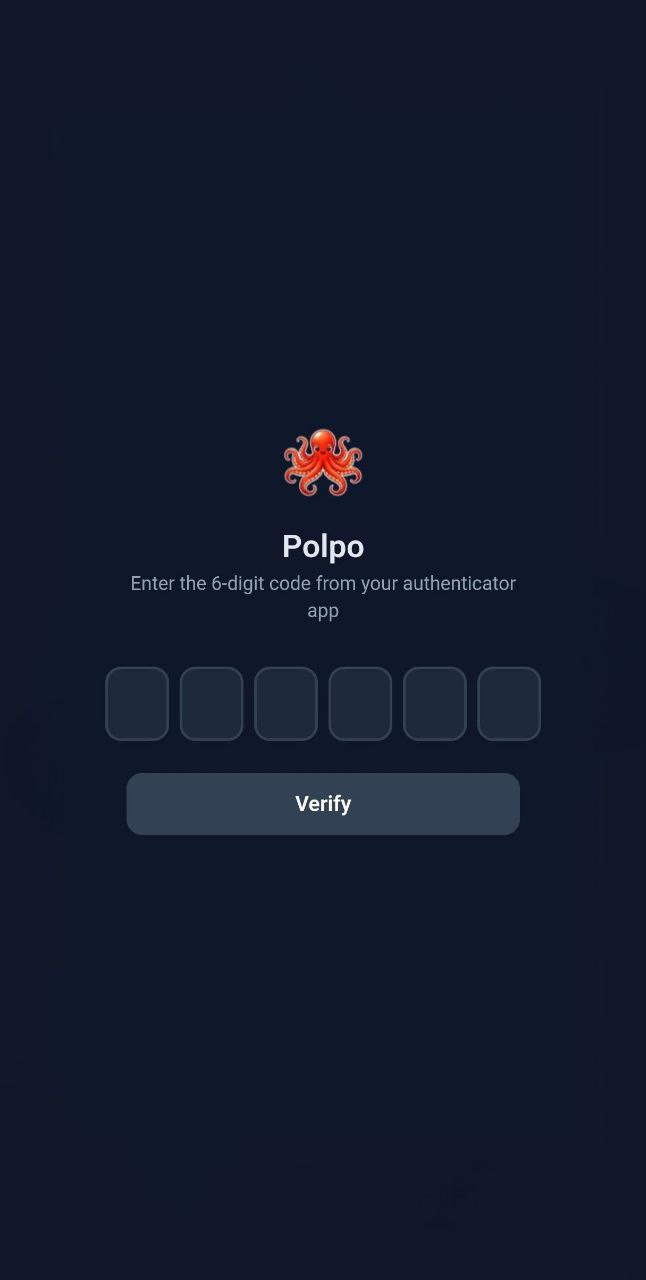
- **Login token**: a `crypto.randomBytes(32)` base64url token in the QR code and phone links. It only opens the dashboard page, once: after the first scan it is burned. With PIN or TOTP on, it only leads to that second step. The API and the WebSocket never accept it.
- **PIN**: A 4-digit PIN is displayed in the terminal. After scanning the QR code, the phone must enter the PIN. After 3 failed attempts, a new PIN is generated.
- **TOTP**: Uses RFC 6238 TOTP with a persistent secret stored in `~/.config/polpo/totp.json`. On first run, the secret and `otpauth://` URI are displayed. Add it to any authenticator app.
- **Sessions**: After authentication, a session cookie (`polpo_session`, HttpOnly, SameSite) is set. Subsequent requests use the cookie.
- **Agent token**: a separate token, printed as "Agent token" and written to `~/.config/polpo/server.json` (mode 0600) for bridges. Agents and hooks send it as an `Authorization: Bearer` header, on HTTP and on the WebSocket; polpo refuses it in a URL. It never appears in a link, so a leaked QR code does not give the API.
### Built-in Protections
The threat model behind these is in [docs/security.md](docs/security.md). To report a vulnerability, see [SECURITY.md](SECURITY.md).
- **CSRF (Cross-Site Request Forgery)**: Origin header validation on WebSocket and API endpoints. Cross-origin requests from malicious pages are rejected.
- **DNS rebinding**: a `Host` allow-list on every route and on the WebSocket upgrade (see [What Polpo Refuses](#what-polpo-refuses)).
- **Command injection**: All CLI invocations use `execFile` (not `exec`). Arguments are passed as arrays, never shell-concatenated.
- **Path traversal**: File access endpoints validate resolved paths stay within expected directories. Search skips symbolic links and validates `realpath` against expected base directories.
- **XSS (Cross-Site Scripting)**: All user and agent content is escaped via `escapeHtml()` before rendering. SVG uploads are force-downloaded, not served inline.
- **Rate limiting**: Auth verification (10/min), session creation (10/min), file uploads (30/min), and conversation search (1 concurrent) are rate-limited.
- **Timing-safe comparison**: Token and TOTP verification use `crypto.timingSafeEqual` to prevent timing attacks.
### Usage
```bash
# Tunnel with default auth (token-only, auto-generated)
polpo server --tunnel
# Tunnel with PIN
polpo server --tunnel --auth pin
# Tunnel with TOTP
polpo server --tunnel --auth paranoid
# LAN/VPN: listen on the VPN address, with auth
polpo server --host 100.64.0.5 --auth token
# Agents pass the token
polpo session --server ws://host:7890 --token
```
The token is printed in the terminal output for connecting agents and bridges.
### Environment Variables
| Variable | Description |
|----------|-------------|
| `POLPO_TOKEN` | Auth token for agents/bridges (alternative to `--token` flag) |
## Tunnel Access (No VPN Required)
Add `--tunnel` to expose the hub over the internet. A public URL and QR code are printed for your phone to scan - no VPN or same-network requirement.
```bash
# Auto-detect best available provider
node bin/polpo.js server --tunnel
# Use a specific provider
node bin/polpo.js server --tunnel cloudflared
node bin/polpo.js server --tunnel localtunnel
node bin/polpo.js server --tunnel ngrok
# SSH reverse tunnel to your own server
node bin/polpo.js server --tunnel ssh --tunnel-host user@myserver.com
node bin/polpo.js server --tunnel ssh --tunnel-host user@myserver.com --tunnel-port 8080
```
### Provider Comparison
| Provider | Install | Signup | Auto-detect | Notes |
|----------|---------|--------|-------------|-------|
| **cloudflared** | [Download](https://developers.cloudflare.com/cloudflare-one/connections/connect-networks/downloads/) | No | Yes (1st) | Best reliability, free quick tunnels |
| **localtunnel** | Bundled | No | Yes (2nd) | Always available fallback (npm dep). Note: localtunnel bundles an outdated version of axios with known vulnerabilities (CSRF, SSRF, DoS). Consider using cloudflared or ngrok for production use. |
| **ngrok** | [Download](https://ngrok.com/download) | Yes | No | Requires auth token, stable URLs available |
| **ssh** | Built-in | No | No | Requires `--tunnel-host`, uses your own server |
Auto-detect tries cloudflared first, then falls back to localtunnel. ngrok and SSH require explicit `--tunnel ` since they need configuration.
If the tunnel fails, the server keeps running on the addresses it listens on (this machine only, unless `--host` says otherwise) and retries the tunnel in the background.
A tunnel that fails to start is retried in the background with backoff, and the URL and QR code are printed as soon as it comes up. The same applies if a running tunnel dies later. The log line says why an attempt failed, taken from the provider's own output, for example:
```
[tunnel 2026-09-24 13:22:26.769209] Tunnel failed: cloudflared exited with code 1: failed to request quick Tunnel: Post "https://api.trycloudflare.com/tunnel": context deadline exceeded
```
A timeout reaching `api.trycloudflare.com` like this one usually means something on the network path is blocking it, such as a VPN. After ten attempts within an hour polpo stops retrying and names the last error; restart it once the network is fixed.
A cloudflared tunnel is also restarted when its process is still running but the tunnel is no longer connected. Cloudflare can drop a quick tunnel at any time: when it does, cloudflared keeps running and retrying while the hostname stops resolving, so watching the process alone is not enough. polpo asks cloudflared every minute how many live connections it has, and after three minutes with none it replaces the tunnel, announces the new URL, and stops showing the old QR code in the meantime (`POLPO_TUNNEL_HEALTH_INTERVAL_MS`, `POLPO_TUNNEL_UNHEALTHY_AFTER_MS`).
Quick tunnels are meant for testing. Cloudflare gives them no uptime guarantee, caps them at 200 in-flight requests, and does not support Server-Sent Events over them, which affects the gateway's `/stream` endpoints. For an always-on setup, especially one serving external agents through the gateway, use a named Cloudflare tunnel or another provider.
## Remote Sessions (Full Control)
The `session` command spawns a CLI process with JSON streaming and gives your phone full bidirectional control. Use `--agent` to select the agent type.
```bash
# Claude Code (default)
node bin/polpo.js session --cwd /path/to/project --name "My Task"
# OpenAI Codex
node bin/polpo.js session --agent codex --cwd /path/to/project --name "Codex Task"
# Google Gemini
node bin/polpo.js session --agent gemini --cwd /path/to/project --name "Gemini Task"
# Pi (75+ model providers)
node bin/polpo.js session --agent pi --cwd /path/to/project --name "Pi Task"
# Goose (any LLM via ACP)
node bin/polpo.js session --agent goose --cwd /path/to/project --name "Goose Task"
```
### Tool Approval
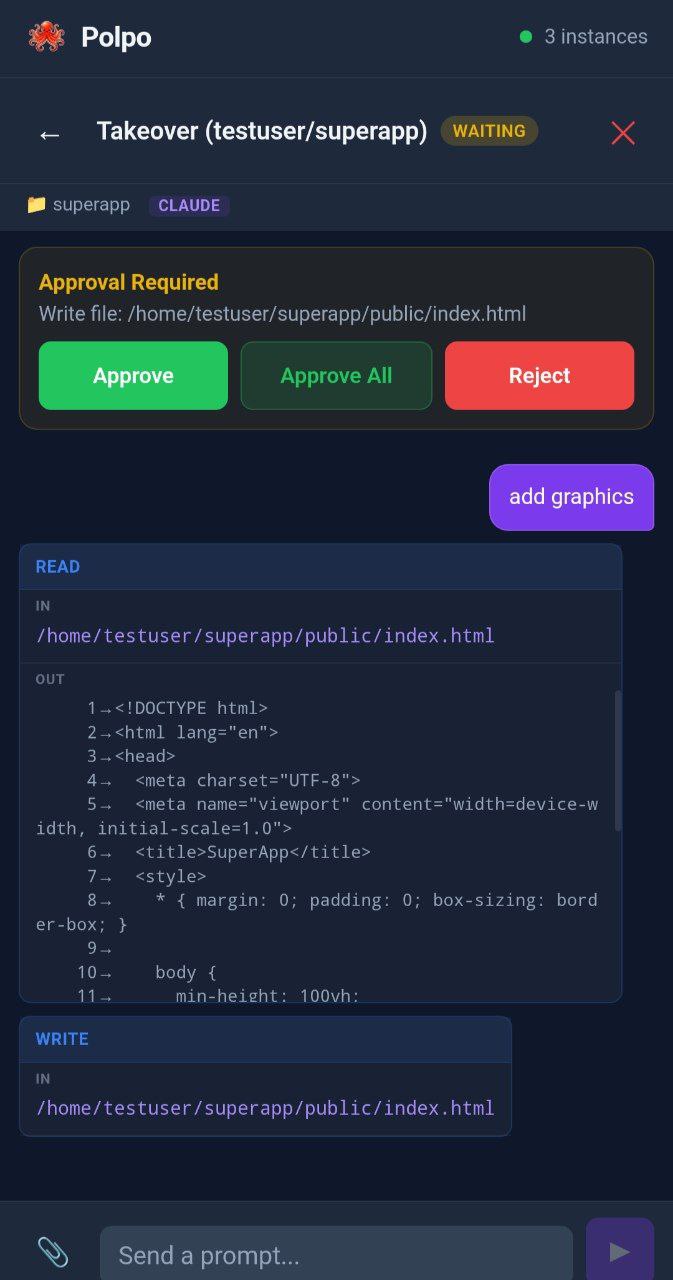
When a session runs in `default` permission mode, an MCP permission server handles tool approval. When Claude needs to run a tool that requires permission, the request appears on your phone as a banner with three options:
- **Approve** - allow this single tool use
- **Approve All** - enable auto-approve for the rest of the session (all future tool calls are approved instantly without involving the phone)
- **Reject** - deny this tool use
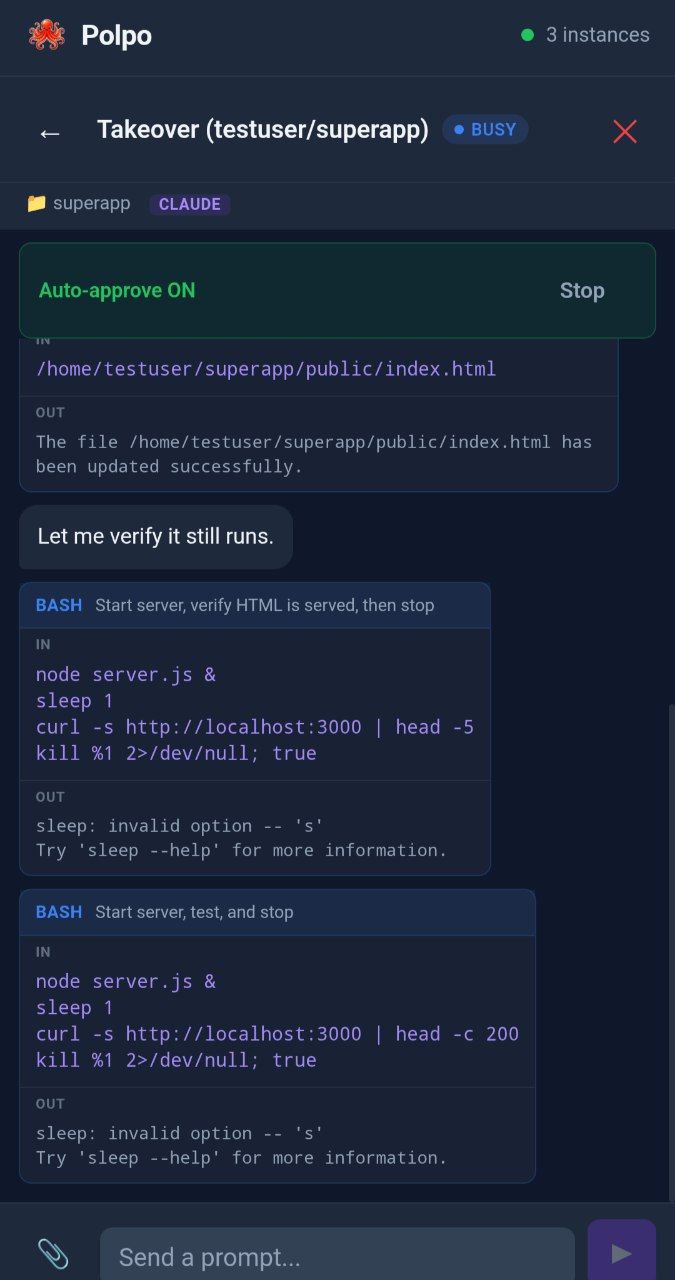
When auto-approve is active, a green "Auto-approve ON" indicator appears with a "Stop" button to disable it.
**Plans and questions always require review**, even when auto-approve is on. When Claude proposes a plan (`ExitPlanMode`), the full plan content is rendered with markdown (headings, tables, code blocks, lists) in a collapsible panel. When Claude asks questions (`AskUserQuestion`), the options appear as tappable radio buttons or checkboxes with a free-text "Other" fallback.
To skip approval entirely (use with caution):
```bash
node bin/polpo.js session --cwd /path/to/project --permissions bypass
```
### Options
| Flag | Description |
|------|-------------|
| `--name ` | Display name for this session |
| `--cwd ` | Project directory (default: current) |
| `--resume ` | Resume an existing session |
| `--model ` | Model to use (e.g. opus, sonnet for Claude; gpt-5-codex for Codex; flash, pro for Gemini; any provider model for OpenCode/Pi; provider/model for Goose) |
| `--permissions ` | `default` (phone approval via MCP) or `bypass` (skip all) |
| `--agent ` | Agent type: `claude` (default), `codex`, `gemini`, `opencode`, `pi`, or `goose` |
| `--server ` | Hub WebSocket URL (default: `ws://127.0.0.1:7890`) |
| `--token ` | Auth token (or set `POLPO_TOKEN` env var) |
## Session Browser
The dashboard automatically discovers past sessions from `~/.claude/projects/` (Claude Code), `~/.codex/sessions/` (Codex), `~/.gemini/tmp/` (Gemini), `~/.local/share/opencode/opencode.db` (OpenCode), `~/.pi/agent/sessions/` (Pi), and `~/.config/goose/sessions.db` (Goose) and displays them as cards with the session's first prompt as the title. Each card shows an agent type badge (Claude, Codex, Gemini, OpenCode, Pi, or Goose). Tap a session to view its full conversation history, or resume it to continue working from your phone.
Sessions are loaded from JSONL/JSON files (or SQLite for OpenCode and Goose) and deduplicated to show clean conversation threads. Use the `?source=claude|codex|gemini|opencode|pi|all` query parameter on the `/api/sessions` endpoint to filter by agent type.
## Auto-Discovery
The Polpo server automatically discovers active sessions from Claude Code, Codex, Gemini, OpenCode, Pi, and Goose by watching their respective session directories:
- **Claude Code**: `~/.claude/projects//*.jsonl`
- **Codex CLI**: `~/.codex/sessions/*.jsonl`
- **Gemini CLI**: `~/.gemini/tmp//chats/session-*.json`
- **OpenCode**: `~/.local/share/opencode/opencode.db` (SQLite, polled every 5s)
- **Pi**: `~/.pi/agent/sessions/----/*.jsonl`
- **Goose**: `~/.config/goose/sessions.db` (SQLite, polled every 5s)
Claude, Codex, Gemini, and Pi use event-driven `fs.watch()`. OpenCode and Goose use SQLite polling via `sqlite3` CLI (requires `sqlite3` to be installed).
When a session is detected:
1. An instance appears on the phone dashboard with the appropriate agent type badge
2. A JSONL watcher starts streaming the full conversation in real-time (using the correct adapter for each agent's JSONL format)
3. Status (busy/idle) is derived from the JSONL content — user messages set busy, turn completions set idle
Auto-discovery works with any interface that writes JSONL/JSON session files (terminal CLI, VS Code extension, web).
## Codex CLI Support
Polpo supports OpenAI Codex CLI with full parity:
- **Session spawning** — `polpo session --agent codex` spawns `codex exec --json` processes
- **Multi-turn** — each prompt spawns a new process using `codex exec resume --json "prompt"`, keeping the conversation context
- **Auto-discovery** — watches `~/.codex/sessions/` for active JSONL files
- **Session browser** — lists past Codex sessions alongside Claude Code sessions
- **Takeover** — take over a terminal Codex session from your phone
- **Event translation** — Codex's event format (`thread.started`, `item.*`, `turn.*`) is translated to Polpo's uniform message format
### Codex-Specific Notes
- Codex uses one-shot process invocation (`codex exec`) rather than stdin streaming. Multi-turn requires killing and respawning with `resume`, which adds ~1-2s between prompts.
- Permission handling: default mode uses `--full-auto` (sandboxed workspace-write execution) and bypass mode uses
`--dangerously-bypass-approvals-and-sandbox`. `codex exec` has no `-a/--ask-for-approval` flag, since it is
non-interactive and there is nobody to answer a prompt.
- Resuming uses `codex exec resume `, which accepts a narrower flag set than `codex exec`. Notably it rejects
`--cd`, so the working root is set on the spawned process instead.
- Images are attached via `--image ` flag; other files are referenced in the prompt text.
- The dashboard shows a green "Codex" badge on Codex instances, and a purple "Claude" badge on Claude instances.
## Gemini CLI Support
Polpo supports Google Gemini CLI with full parity:
- **Session spawning** — `polpo session --agent gemini` spawns `gemini -p "..." --output-format stream-json` processes
- **Multi-turn** — each prompt spawns a new process using `gemini --resume -p "..." --output-format stream-json`, keeping the conversation context
- **Auto-discovery** — watches `~/.gemini/tmp//chats/` for active JSON session files
- **Session browser** — lists past Gemini sessions alongside Claude Code and Codex sessions
- **Takeover** — take over a terminal Gemini session from your phone
- **Event translation** — Gemini's stream-json format (`init`, `message`, `tool_use`, `tool_result`, `error`, `result`) is translated to Polpo's uniform message format
### Gemini-Specific Notes
- Gemini uses one-shot process invocation (like Codex) rather than stdin streaming. Multi-turn requires killing and respawning with `--resume`, which adds ~1-2s between prompts.
- Permission handling uses `--approval-mode=yolo` for bypass mode (Gemini does not support MCP).
- Images and files are attached via `@` syntax appended to the prompt text.
- Session files are JSON (not JSONL) — the adapter re-reads the full JSON on file changes and diffs message counts.
- The dashboard shows a blue "Gemini" badge on Gemini instances.
### Requirements
```bash
npm install -g @google/gemini-cli
```
Gemini CLI must be authenticated (run `gemini` once to set up API key or Google account auth).
## OpenCode Support
Polpo supports [OpenCode](https://github.com/opencode-ai/opencode), a Go-based open-source coding agent with 75+ model providers (including Ollama for local models):
- **Session spawning** — `polpo session --agent opencode` spawns `opencode run -p "..." --format json -q` processes
- **Multi-turn** — each prompt spawns a new process using `opencode run --session -p "..." --format json -q`
- **Auto-discovery** — polls `~/.local/share/opencode/opencode.db` for active sessions via `sqlite3` CLI
- **Session browser** — lists past OpenCode sessions alongside other agent types
- **Takeover** — take over a terminal OpenCode session from your phone
- **Model selection** — pass any provider model via `--model` (e.g. `ollama/llama3`, `openai/gpt-4o`, `anthropic/claude-sonnet`)
### OpenCode-Specific Notes
- OpenCode uses one-shot process invocation (like Codex/Gemini). Multi-turn requires `--session` flag.
- No MCP support — OpenCode does not use permission prompts.
- Sessions are stored in SQLite (not JSONL files) — auto-discovery polls the DB every 5 seconds.
- File attachments use `--file ` flag.
- The dashboard shows an orange "OpenCode" badge on OpenCode instances.
### Requirements
```bash
go install github.com/opencode-ai/opencode@latest
```
OpenCode must be configured with at least one provider (run `opencode` once to set up).
Auto-discovery requires `sqlite3` CLI (`apt install sqlite3` / `brew install sqlite3`).
## Pi Support
Polpo supports [Pi](https://github.com/mariozechner/pi-coding-agent), a coding agent with 75+ model providers that uses a long-running RPC mode:
- **Session spawning** — `polpo session --agent pi` spawns `pi --mode rpc` with persistent stdin/stdout JSON streaming (same pattern as Claude Code)
- **Multi-turn** — the Pi process stays alive across prompts (no respawning needed)
- **Auto-discovery** — watches `~/.pi/agent/sessions/` for active JSONL files
- **Session browser** — lists past Pi sessions alongside other agent types
- **Takeover** — take over a terminal Pi session from your phone
- **Model selection** — pass any provider model via `--model` (e.g. `openai/gpt-4o`, `anthropic/claude-sonnet`, `ollama/llama3`)
### Pi-Specific Notes
- Pi uses long-running RPC mode (`pi --mode rpc`) — the process stays alive and accepts prompts via stdin JSON, similar to Claude Code's stream-json mode.
- Abort sends `{"type":"abort"}` via stdin first, then escalates to SIGINT/SIGKILL.
- No MCP support — Pi handles permissions internally.
- Images are attached via the `images` array in the prompt JSON; files use `@` syntax.
- Session files use a tree structure (entries have `id`/`parentId` fields) at `~/.pi/agent/sessions/----/_.jsonl`.
- The dashboard shows a pink "Pi" badge on Pi instances.
### Requirements
```bash
npm install -g @mariozechner/pi-coding-agent
```
Pi must be configured with at least one provider (run `pi` once to set up).
## Goose Support
Polpo supports [Goose](https://github.com/block/goose), Block's open-source AI agent that works with any LLM provider:
- **Session spawning** -- `polpo session --agent goose` starts `goose acp` in ACP (Agent Communication Protocol) mode
- **Multi-turn** -- persistent process with JSON-RPC 2.0 over stdin/stdout, no respawning needed
- **Auto-discovery** -- polls `~/.config/goose/sessions.db` for active sessions
- **Session browser** -- lists past Goose sessions alongside other agent types
- **Takeover** -- take over a terminal Goose session from your phone
- **Permission requests** -- Goose's `requestPermission` events map to polpo's approval flow (Approve / Reject)
- **Multi-provider** -- supports OpenAI, Anthropic, Google, Bedrock, Ollama, and 1,700+ models via Goose's canonical model registry
### Goose-Specific Notes
- Goose uses ACP mode (`goose acp`) with JSON-RPC 2.0 over stdin/stdout, similar to Pi's RPC mode.
- The agent stays alive across prompts (long-running process). Sessions are created via `session/new` and resumed via `session/load`.
- Streaming events: `agentMessageChunk` (text), `toolCall` (pending), `toolCallUpdate` (completed/failed).
- Model selection via `--model provider/model` flag (e.g., `--model anthropic/claude-sonnet-4-20250514`) or `GOOSE_PROVIDER`/`GOOSE_MODEL` environment variables.
- Sessions stored in SQLite (`~/.config/goose/sessions.db`), not JSONL files. Auto-discovery polls every 5 seconds.
- The dashboard shows a green "Goose" badge on Goose instances.
### Requirements
```bash
curl -fsSL https://github.com/aaif-goose/goose/releases/download/stable/download_cli.sh | bash
```
Goose must be configured with a provider (run `goose configure` to set up).
Auto-discovery requires `sqlite3` CLI (`apt install sqlite3` / `brew install sqlite3`).
## Alien Mind (Multi-Agent Coordination) — Experimental
> ⚠️ **Experimental and still stabilizing.** The Alien Mind is fully functional but its planning quality, re-planning behaviour, and autonomous watcher actions can surprise you. Keep an eye on the dashboard, treat outputs as drafts, and report rough edges. The mind is opt-in (`POLPO_MIND=1`) and never interferes with the standard dashboard workflow.
The Alien Mind is an optional meta-agent that orchestrates multiple agents simultaneously. Inspired by the octopus's distributed brain, it decomposes complex goals into tasks, assigns them to the right agents, handles dependencies, and runs independent work in parallel.
```bash
# Enable the mind
POLPO_MIND=1 node bin/polpo.js server
```
The mind appears as a purple "Mind" instance in the dashboard. Send it a goal like "Refactor the auth module and update the tests" and it will:
1. Plan the work by decomposing it into tasks with dependencies
2. Dispatch each task as an isolated **one-shot agent** (fresh spawn, single prompt, captured result, terminate)
3. Run independent tasks in parallel, sequential tasks in order
4. Share findings between dependent arms automatically (inter-arm context)
5. Re-plan failed tasks (retry / split / abandon) before giving up
6. Remember past goals to bias future planning (long-term memory)
7. Recover gracefully across server restarts (in-flight goal persistence)
8. Optionally cancel stuck tasks autonomously (policy-gated watcher)
The mind supports DAG-based task plans: parallel, sequential, and diamond dependency patterns. Each arm is **stateless**: spawned for one task, terminated when the task finishes. The coordinator holds all the durable state (world-model, dependency graph, memory, goal store) and injects predecessor task output into successor prompts so dependent arms see what came before. This is the same one-shot lifecycle the HTTP gateway exposes to external apps — the mind is effectively a planner that calls polpo's own gateway internally. Each mind-spawned arm appears in the dashboard with `source: 'mind:'`.
See [docs/alien-mind.md](docs/alien-mind.md) for full documentation, architecture, commands, and configuration.
## Gateway Mode (Programmatic API)
Polpo can also act as a **remote intelligent worker** for external software. The gateway exposes a stable REST + SSE API at `/v1/*` so machines (CI runners, bots, scripts, other AI orchestrators) can delegate one-shot agent tasks, push input files, and pull output files back.
```bash
# Hub + dashboard + gateway, on the same port
polpo server --gateway
# Or headless gateway-only
polpo gateway
```
On first start polpo prints an API key once and persists it to `~/.config/polpo/gateway.json` (mode 0o600). Every `/v1/*` request must carry `Authorization: Bearer ` — distinct from the dashboard token.
Typical use case: your laptop reaches a home PC over VPN, and an external orchestrator on the laptop delegates concrete work to the agents installed on the PC (read this PDF, generate that report, refactor this file). Files flow in both directions:
```
POST /v1/uploads caller → host (base64 JSON, ≤ 25 MB)
POST /v1/tasks body: { agentType, cwd, prompt, attachments?, captureArtifacts? }
GET /v1/tasks/:id/stream SSE: chunk → artifacts → done | error
GET /v1/tasks/:id/artifacts/:name host → caller (sealed, signed-attachment, nosniff)
```
Gateway-spawned agents register in the dashboard with `source: 'gateway:'`, so you can watch what the remote caller is doing from your phone and intervene if needed.
The gateway can also follow the sessions running right now (`GET /v1/instances`, `GET /v1/instances/:id/conversation`), for example so a personal assistant on Telegram can tell you what your coding agent is doing. With `POLPO_GATEWAY_SESSION_CONTROL=1` it can also take over an idle session and continue it, under the same one-writer rule as the dashboard (see [Phone Takeover](#phone-takeover)). Secrets are removed from the session content the gateway returns (`POLPO_GATEWAY_REDACT=0` turns that off), and a session taken over through the gateway keeps its own permission mode only with `POLPO_GATEWAY_INHERIT_PERMISSION_MODE=1`.
Security: separate Bearer key, per-token rate limits, path-traversal defense at every fs touchpoint, sealed-artifact pattern that defeats TOCTOU, tasks in Claude's `auto` mode with anything it still asks about failing the task (`POLPO_GATEWAY_TASK_PERMISSION_MODE` selects `auto`, `default` or `bypass`), and no new dependencies. Full reference: [docs/gateway.md](docs/gateway.md). Building an AI agent that calls the gateway? See [docs/gateway-for-ai-agents.md](docs/gateway-for-ai-agents.md), a compact, agent-oriented guide.
## Terminal Sync (Hooks)
Hooks are **optional** — auto-discovery handles session detection and conversation sync without them. Hooks add two capabilities:
- **Terminal prompt forwarding** — see what the terminal user types in real-time (via `UserPromptSubmit` hook)
- **Phone-based tool approval** — approve or reject tool calls from your phone (via `PreToolUse` hook with `POLPO_APPROVE=1`)
### Setup
```bash
# Print the hook config JSON
node bin/polpo.js hooks
```
Add the output to `~/.claude/settings.json`. The bridge daemon auto-discovers the server token from `~/.config/polpo/server.json` — no manual token passing needed.
> **Note**: Shell hooks from `settings.json` work with the `claude` CLI. The VS Code extension uses its own internal hook mechanism and does not execute shell hooks. For VS Code sessions, auto-discovery provides full conversation sync without hooks.
### Phone Takeover
Auto-discovered and hook instances are **read-only** — they mirror conversations from session files on disk, but have no backing agent process to accept prompts. Tap **Take Over** to spawn a real agent process (`claude --resume`, `codex exec resume`, `gemini --resume`, `pi --session`, or `goose acp` with `session/load`) that resumes the session with full prompt capability. The existing conversation history is preserved in the new instance. This is the same resume mechanism used by the Claude Code VS Code extension when selecting a previous conversation — there is no long-lived process to reconnect to; the CLI replays context from transcript files on each resume.
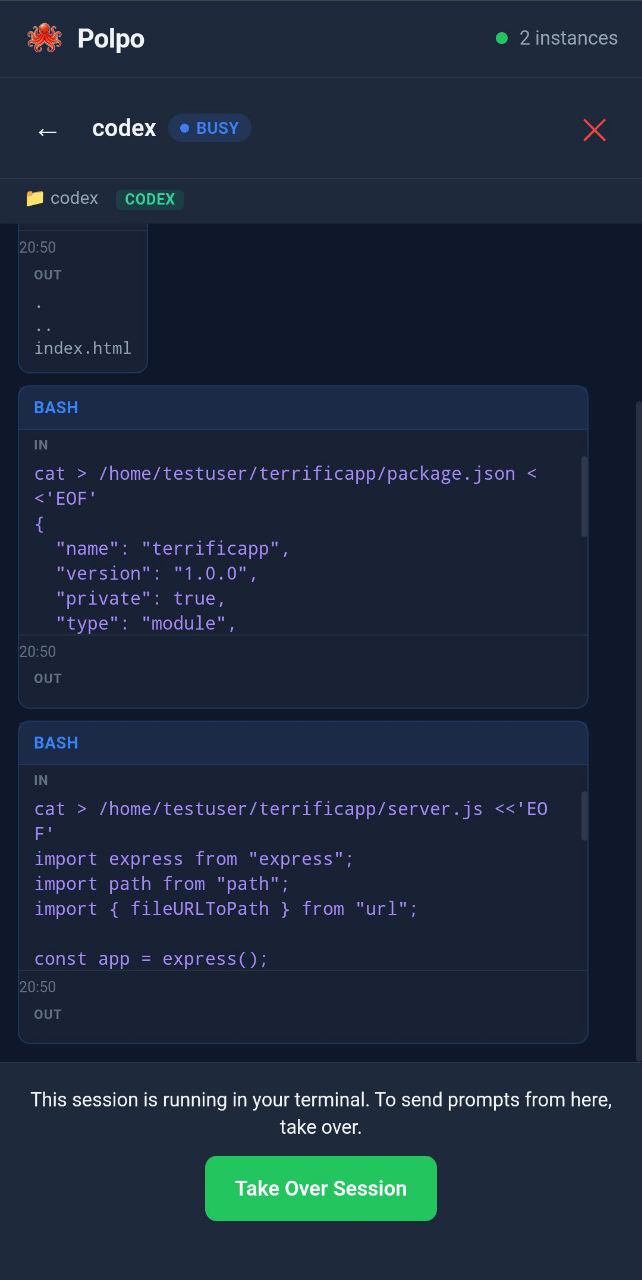
A session has one writer at a time. While the agent is busy, polpo only lets you read the session; once the turn has ended you can take it over. If you then pick the session up again in VS Code or a terminal, polpo notices the new entries in the transcript, stops driving it, and tells you so on the dashboard. Take it over again once it is idle. For Claude, "idle" comes from the transcript: the last turn ended, or nothing has been written for 10 minutes (`POLPO_SESSION_STALE_MS`). A takeover from the dashboard keeps the permission mode the session had at the desk (`auto`, say), so it does not stop to ask your phone about every command; `bypassPermissions` is never carried over.
When you return to your terminal, run `claude --continue` (Claude) or start a new session (Codex/Gemini) to reload the conversation. In VS Code, reload the window (`Ctrl+Shift+P` → "Reload Window") to pick up messages sent from Polpo — the VS Code extension caches conversations in memory and only re-reads session files on reload.
### Approval Mode
To enable phone-based tool approval for hook instances, set `POLPO_APPROVE=1`:
```json
{
"matcher": "",
"command": "POLPO_APPROVE=1 node /path/to/polpo/src/hooks/pre-tool-use.js"
}
```
## File Attachments
Tap the paperclip icon to attach files from your phone. Supported types:
- **Images** - sent as base64 to Claude's vision (multimodal)
- **PDFs** - sent as native document content blocks
- **Text/code files** - small files (up to 100KB) are inlined directly in the prompt; larger files are saved to disk and Claude reads them with the Read tool
- **Any other file** - saved to disk and referenced by path for Claude to read
## Session Outbox (agent → phone files)
The reverse direction. When you ask an agent to produce something downloadable (a report, a CSV, a packed zip, a generated image), tap the **📂 OUTBOX** pill in the session header to switch it on. From that turn forward polpo prepends a `` directive to every prompt sent in this session, telling the agent which directory to drop output files into. When the agent goes idle, any new files appear as download chips on the assistant's response bubble — tap a chip to download.
```
You: Generate a CSV summary of yesterday's commits.
Polpo: [outbox on — directive prepended automatically]
Claude: I've written commits.csv with 14 rows...
⬇ commits.csv (3.2 KB) ← tap to download
```
- **Per-session dir**, mode 0700, under `/polpo-session-outbox//`
- **Size caps**: 100 MB aggregate, 100 files max
- **Filename safety**: only `[A-Za-z0-9._-]{1,200}` is exposed; subdirs and symlinks are ignored
- **Lifecycle**: dir is destroyed on session disconnect or when you tap the toggle off
- **Download safety**: every read enforces the per-instance prefix-check, sends `X-Content-Type-Options: nosniff`, and serves non-image files with `Content-Disposition: attachment` to defeat MIME sniffing attacks
The mechanism is the dashboard-side mirror of the gateway's sealed-artifact pattern (``), tuned for long-lived dashboard sessions instead of one-shot tasks. Full reference: [docs/outbox.md](docs/outbox.md) (lifecycle, security, API).
## Conversation Search
Search past conversations across all supported agents directly from the dashboard. Type a query and tap the search button (or press Enter) to find matching messages.
- **Multi-agent** — searches Claude (`~/.claude/projects/`), Codex (`~/.codex/sessions/`), Gemini (`~/.gemini/tmp/`), Pi (`~/.pi/agent/sessions/`), and Goose (`~/.config/goose/sessions.db`) session files
- **Clickable results** — tap a result to navigate to the active instance, resume a past session, or fetch and resume from history
- **Performance** — subagent directories are skipped and files are sorted by modification time (newest first) to return results quickly even with large session histories
- **Security** — symbolic links are skipped and file paths are validated via `realpath` to prevent path traversal; concurrent searches are rate-limited
### API
| Method | Path | Description |
|--------|------|-------------|
| GET | `/api/search?q=` | Search conversations across all agents (max 50 results, 10s deadline) |
## Builder Profile
A "how you work with AI agents" report computed entirely on your machine, inspired by YC's Paxel experiment but with Polpo's privacy posture: no LLM calls, no telemetry, no data egress. The analyzer reads the session transcripts polpo already has on disk and derives statistics: archetype, five dimension scores (steering / execution / engineering / product instinct / planning), activity patterns, tool usage, shell habits.
Three ways to see it:
```bash
# CLI
polpo profile # last 90 days, all agents
polpo profile --days 30 --agent claude
polpo profile --json # raw JSON
# Dashboard
# Open the dashboard — the "Builder Profile" card appears in the sidebar
# with a radar chart, archetype, and headline stats.
# Gateway (for external agents)
curl -H "Authorization: Bearer $POLPO_GATEWAY_KEY" \
"http://localhost:7890/v1/profile?days=90"
```
The profile object contains statistics only, never raw conversation text. See [docs/profile.md](docs/profile.md) for the full reference, the heuristics behind each dimension, and the privacy model.
## Skills Management
Skills are a Claude Code-specific feature. The skills manager is accessible from the detail view of any Claude instance — tap the gear icon in the header to open it.
- **Browse installed** — see all installed skills with name, description, tags, and rule file counts
- **Search registry** — search the skills.sh catalog from the [skills.sh](https://skills.sh) ecosystem
- **Install** — install any skill with a tap (runs `npx skills add -g -y` on the server)
- **Remove** — remove installed skills with confirmation
- **Detail view** — tap any skill to see its full SKILL.md content rendered as markdown
Skills are stored at `~/.agents/skills/` and symlinked into `~/.claude/skills/` for use by Claude Code.
### API
| Method | Path | Description |
|--------|------|-------------|
| GET | `/api/skills` | List installed skills (parsed from SKILL.md frontmatter) |
| GET | `/api/skills/search?q=` | Search skills.sh registry (60s cache) |
| POST | `/api/skills/install` | Install a skill (`{ "package": "owner/repo@skill" }`) |
| DELETE | `/api/skills/:name` | Remove an installed skill |
| GET | `/api/skills/:name/content` | Get SKILL.md content for detail view |
## Mobile UI
- Dark theme optimized for OLED screens
- Full markdown rendering — headers, bold, italic, code blocks (with language labels), inline code, bullet/numbered lists, tables, blockquotes, links, horizontal rules, strikethrough
- Tool calls rendered as cards (Bash commands, file paths, search patterns)
- Tool results shown as collapsible code blocks
- Per-turn cost displayed inline
- Touch-friendly with 44px minimum touch targets
- Safe-area support for notched/island phones
- Responsive layout with breakpoints for small phones, landscape, and tablets
- Virtual keyboard handling (no content jump on iOS/Android)
## API
### REST Endpoints
| Method | Path | Description |
|--------|------|-------------|
| GET | `/api/sessions` | List discovered sessions (`?source=claude\|codex\|gemini\|opencode\|pi\|goose\|all`) |
| GET | `/api/sessions/:id/history` | Get conversation history from JSONL |
| POST | `/api/sessions/:id/resume` | Resume a session (spawns wrapped agent) |
| POST | `/api/sessions/new` | Create a new session (`{ agentType, cwd, name?, model? }`) |
| GET | `/api/instances` | List all active instances |
| GET | `/api/instances/:id` | Get instance details |
| GET | `/api/instances/:id/conversation` | Get conversation history |
| POST | `/api/instances` | Register a new instance |
| DELETE | `/api/instances/:id` | Unregister an instance |
| POST | `/api/instances/:id/prompt` | Send a prompt |
| POST | `/api/instances/:id/approve` | Approve pending tool use |
| POST | `/api/instances/:id/reject` | Reject pending tool use |
| POST | `/api/instances/:id/auto-approve` | Toggle auto-approve for an instance |
| POST | `/api/instances/:id/answer` | Submit answers to pending questions |
| POST | `/api/instances/:id/takeover` | Take over a hook instance (spawns wrapped agent) |
| POST | `/api/instances/:id/abort` | Abort current task |
| POST | `/api/upload` | Upload a file attachment (base64) |
| GET | `/api/search?q=` | Search past conversations across all agents |
| POST | `/api/permission-request` | MCP permission server long-poll |
| GET | `/api/skills` | List installed skills |
| GET | `/api/skills/search?q=` | Search skills.sh registry |
| POST | `/api/skills/install` | Install a skill |
| DELETE | `/api/skills/:name` | Remove a skill |
| GET | `/api/skills/:name/content` | Get skill SKILL.md content |
| GET | `/health` | Health check: `{"status":"ok"}` only, no auth |
| GET | `/api/version` | Polpo version (behind auth) |
#### Gateway (`/v1/*`, opt-in via `--gateway`, Bearer auth)
Stable, machine-facing API. See [docs/gateway.md](docs/gateway.md) for the full reference.
| Method | Path | Description |
|--------|------|-------------|
| GET | `/v1/health` | Gateway health + active task count |
| POST | `/v1/uploads` | Push a file (JSON + base64). Returns `uploadId`, `sha256`, `expiresAt` |
| POST | `/v1/tasks` | Create a one-shot task (`{agentType, cwd, prompt, attachments?, captureArtifacts?}`) |
| GET | `/v1/tasks/:id/stream` | SSE: `chunk` → `artifacts` → `done` / `error` |
| GET | `/v1/tasks/:id` | Task snapshot |
| DELETE | `/v1/tasks/:id` | Abort + mark cancelled |
| GET | `/v1/tasks/:id/artifacts` | List sealed artifacts |
| GET | `/v1/tasks/:id/artifacts/:name` | Stream a sealed artifact (forced attachment, nosniff) |
### WebSocket
Connect to `ws://:?role=dashboard` for real-time updates.
Connect to `ws://:?role=agent&instanceId=` as an agent, sending the agent token as an `Authorization: Bearer ` header. A token in the URL is refused.
## Configuration
| Variable | Default | Description |
|----------|---------|-------------|
| `POLPO_PORT` | `7890` | Server port |
| `POLPO_HOST` | `127.0.0.1` | Server bind address. A non-loopback address needs `--auth` |
| `POLPO_ALLOWED_HOSTS` | (none) | Extra host names the dashboard may be opened under, comma-separated (`--allowed-hosts`) |
| `POLPO_SERVER` | `ws://127.0.0.1:7890` | Hub URL (used by session, agent, bridge) |
| `POLPO_TOKEN` | (none) | Auth token for agents/bridges |
| `POLPO_NAME` | auto from directory | Display name for the instance |
| `POLPO_APPROVE` | `0` | Set to `1` for phone approval (hooks only) |
| `POLPO_TIMEOUT` | `300000` | Approval timeout in ms (default 5 min) |
| `POLPO_MIND` | `0` | Set to `1` to enable the Alien Mind (experimental) |
| `POLPO_MIND_POLICY` | `balanced` | Mind autonomy level: `conservative` \| `balanced` \| `autonomous` |
| `POLPO_MIND_TASK_TIMEOUT_MS` | from the policy | Deadline for each task a goal runs (policy default: 15 / 30 / 45 min) |
| `POLPO_GATEWAY_KEY` | persisted file | Override the gateway API key |
| `POLPO_GATEWAY_MAX_CONCURRENT` | `4` | Max in-flight gateway tasks |
| `POLPO_GATEWAY_DEFAULT_TIMEOUT_MS` | `1800000` | Timeout for a task that sends no `timeoutMs` (30 min) |
| `POLPO_GATEWAY_MAX_TIMEOUT_MS` | `3600000` | Hard cap on per-task timeout (60 min) |
| `POLPO_GATEWAY_MAX_UPLOAD_SIZE` | `26214400` | Per-upload byte cap (25 MB decoded) |
## Testing
```bash
npm test
```
Runs unit tests with Node's built-in test runner. Tests cover authentication (token, PIN, TOTP, sessions, middleware), instance manager, tunnel provider logic, session JSONL/JSON parsing, JSONL/JSON file watcher (messages, status events, dedup), session scanner (Claude/Codex/Gemini/Pi auto-discovery, idle detection, project watching), Codex agent (event translation, hub messages, multi-turn), OpenCode agent (event translation, delta accumulation), Pi agent (RPC event handling, delta accumulation, tool call streaming), Codex scanner (Codex session discovery), Pi scanner (Pi session discovery, slug parsing), agent factory (agent type routing), skills API (frontmatter parsing, search output parsing, input validation), and Goose agent (ACP JSON-RPC, streaming, tool calls, session management, factory routing).
## System Overview
```mermaid
graph TD
Phone["Phone (any network)"]
Tunnel["Tunnel (optional)
cloudflared / localtunnel / ngrok / SSH"]
Hub["Polpo Hub :7890
Express + WebSocket"]
Factory["Agent Factory"]
Scanner["Session Scanner
(Claude + Codex + Gemini + Pi)"]
Hooks["Hook Bridge
(optional)"]
Browser["Session Browser"]
Claude["claude CLI
(stream-json)"]
Codex["codex exec --json"]
Gemini["gemini -p ...
(stream-json)"]
Pi["pi --mode rpc
(stdin/stdout JSON)"]
Goose["goose acp
(JSON-RPC 2.0)"]
VSCode["Claude Code / Codex / Gemini / Pi / Goose
(VS Code / terminal)"]
MCP["MCP Permission
Server"]
ClaudeJSONL["~/.claude/projects/
JSONL files"]
CodexJSONL["~/.codex/sessions/
JSONL files"]
GeminiJSON["~/.gemini/tmp/
JSON files"]
PiJSONL["~/.pi/agent/sessions/
JSONL files"]
GooseDB["~/.config/goose/
sessions.db"]
Phone -->|"cellular / internet"| Tunnel
Phone -->|"VPN / LAN"| Hub
Tunnel --> Hub
Hub --> Factory
Hub --> Scanner
Hub --> Hooks
Hub --> Browser
Factory -->|"claude agent"| Claude
Factory -->|"codex agent"| Codex
Factory -->|"gemini agent"| Gemini
Factory -->|"pi agent"| Pi
Factory -->|"goose agent"| Goose
Scanner -->|"auto-discover"| ClaudeJSONL
Scanner -->|"auto-discover"| CodexJSONL
Scanner -->|"auto-discover"| GeminiJSON
Scanner -->|"auto-discover"| PiJSONL
Scanner -->|"auto-discover"| GooseDB
Hooks -->|"approvals + prompts"| VSCode
VSCode -->|"writes"| ClaudeJSONL
VSCode -->|"writes"| CodexJSONL
VSCode -->|"writes"| GeminiJSON
VSCode -->|"writes"| PiJSONL
VSCode -->|"writes"| GooseDB
Hub -->|"JSONL watcher"| ClaudeJSONL
Hub -->|"Codex adapter"| CodexJSONL
Hub -->|"Gemini adapter"| GeminiJSON
Hub -->|"Pi adapter"| PiJSONL
Hub -->|"Goose scanner"| GooseDB
Claude --> MCP
MCP -->|"phone approval"| Hub
Browser -->|"reads"| ClaudeJSONL
Browser -->|"reads"| CodexJSONL
Browser -->|"reads"| GeminiJSON
Browser -->|"reads"| PiJSONL
Browser -->|"reads"| GooseDB
```
See [docs/diagrams.md](docs/diagrams.md) for auth, tunnel, session, auto-discovery, takeover, hook, gateway, and Alien Mind flow diagrams. See [docs/alien-mind.md](docs/alien-mind.md) for Alien Mind coordination documentation, [docs/outbox.md](docs/outbox.md) for the agent → phone file transfer reference, [docs/gateway.md](docs/gateway.md) for the programmatic gateway API reference, and [docs/gateway-for-ai-agents.md](docs/gateway-for-ai-agents.md) for instructions an AI agent can use to drive polpo over HTTP.
## Disclaimer
THIS SOFTWARE IS PROVIDED "AS IS", WITHOUT WARRANTY OF ANY KIND, EXPRESS OR IMPLIED, INCLUDING BUT NOT LIMITED TO THE WARRANTIES OF MERCHANTABILITY, FITNESS FOR A PARTICULAR PURPOSE AND NONINFRINGEMENT. IN NO EVENT SHALL THE AUTHORS, COPYRIGHT HOLDERS, MARCO PENNELLI, OR PUGLIATECHS APS BE LIABLE FOR ANY CLAIM, DAMAGES OR OTHER LIABILITY, WHETHER IN AN ACTION OF CONTRACT, TORT OR OTHERWISE, ARISING FROM, OUT OF OR IN CONNECTION WITH THE SOFTWARE OR THE USE OR OTHER DEALINGS IN THE SOFTWARE.
Use this software at your own risk. The author and the organization assume no responsibility for any damages, data loss, security incidents, or other consequences resulting from the use or misuse of this software.
## Author
**Marco Pennelli** | [PugliaTechs APS](https://www.pugliatechs.com)
## License
MIT