
Mora, the all-remembering eye # Mora **Search your mail, messages, calendars, files, and GitHub issues from one place on your computer.** [![CI](https://github.com/pyranthus-hq/mora/actions/workflows/ci.yml/badge.svg)](https://github.com/pyranthus-hq/mora/actions/workflows/ci.yml) [![Release](https://img.shields.io/github/v/release/pyranthus-hq/mora?color=2fbf9a)](https://github.com/pyranthus-hq/mora/releases) [![License](https://img.shields.io/badge/license-Apache--2.0-blue)](LICENSE) [![Go](https://img.shields.io/badge/pure%20Go-no%20CGO-00ADD8)](go.mod) [![Corpus](https://img.shields.io/badge/corpus-local%20by%20default-0a3d33)](#privacy-boundary)

> [!WARNING] > Mora is alpha software. We use it every day, and its main paths have tests. > It has not been tested on many other people's real data. Read the cited source > before you act on a result. A failed or old sync can make the local copy stale. Mora reads the sources you choose and saves copies as Markdown files on your computer. You can search them yourself or let an AI agent search them through MCP (a way for an agent to call local tools). Mora supports: - Gmail - Google Calendar - iMessage on macOS - WhatsApp Desktop on macOS - Apple Calendar on macOS - folders and files that you choose - GitHub Issues from repositories that you choose The source connectors do not change the original mail, messages, events, or issues. Mora builds a SQLite index on your computer so searches are fast. Claude Code, Codex, and other MCP clients can use the same saved data. Mora does not call an AI model by default. It finds source records and builds briefs that link back to them. Your agent can then write an answer from that evidence. If you want, a local Ollama model can improve search. **Jump to:** [Install](#start-on-macos) · [Add a source](#add-your-first-source) · [Connect an agent](#connect-an-ai-agent) · [Update](#keep-mora-up-to-date) · [Privacy](#privacy-boundary)
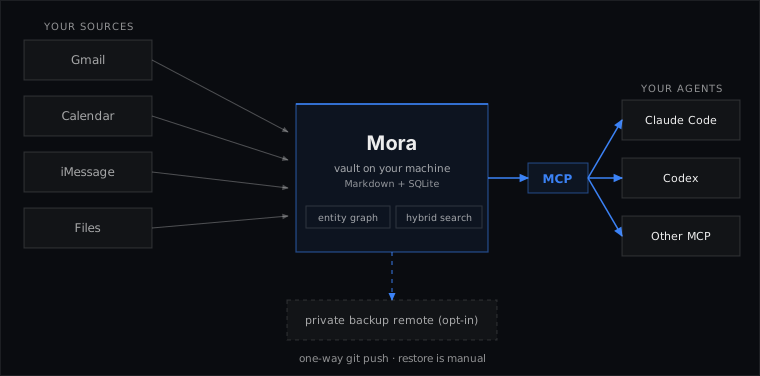
Read-only sources flow into a local Markdown vault and SQLite index, then into any MCP client. Backup and sharing are optional network paths.

## Start on macOS You need macOS and [Homebrew](https://brew.sh/) for this route. The Cask installs the signed `Mora.app` and adds the `mora` command: ```sh brew tap pyranthus-hq/tap brew install --cask pyranthus-hq/tap/mora mora version ``` This app contains the memory CLI. It does **not** include the separate desktop companion. If Mora is already installed, read the [migration steps](docs/homebrew.md#installation-and-updates) before using Brew. If you do not use Homebrew, install the same signed app directly in `~/Applications/Mora.app`: ```bash ( set -e mora_installer="$(mktemp -t mora-install)" trap '/bin/rm -f "$mora_installer"' EXIT curl -fsSLo "$mora_installer" https://raw.githubusercontent.com/pyranthus-hq/mora/main/install-app.sh sh "$mora_installer" ) ``` The direct installer checks the release and links `mora` to the app. Neither install method sets up connectors or a daily update job. See [Keep Mora up to date](#keep-mora-up-to-date) when you are ready. ### Other systems Linux and older standalone installs can use: ```bash curl -fsSL https://raw.githubusercontent.com/pyranthus-hq/mora/main/install.sh | sh ``` Windows users should see the [Windows guide](docs/windows.md). To build from source with Go 1.25 or later: ```bash go install github.com/pyranthus-hq/mora/cmd/mora@latest ``` Source builds report version `dev`. They do not update themselves. Google also needs your own OAuth client when you build from source. ## Add your first source A folder is the quickest way to check that Mora works. It needs no account login. Replace `~/Documents/notes` with a folder you choose: ```bash mora init mora connect filesystem ~/Documents/notes mora search "a project or person" ``` After you connect a source, try searching for a decision or asking your agent “What is on my calendar next week?” Search reads saved data. Writing a new memory is a separate action controlled by your [MCP write policy](#control-writes-from-mcp). Then add only the sources you want: ```bash mora connect google # Gmail and Google Calendar mora connect github --repo owner/repository # GitHub Issues mora connect imessage # macOS; needs Full Disk Access mora connectors enable whatsapp # macOS; local read-only store mora ingest run --source whatsapp ``` For Apple Calendar: ```bash mora connectors enable applecalendar mora ingest run --source applecalendar ``` Setup commands do different jobs: | Command | What it does | | --- | --- | | `connect` | Sets up a source, enables it, and gets its first data. | | `connectors enable` | Gives Mora permission to use a connector. It does not promise a data pull. | | `ingest run` | Reads enabled sources and writes their current data into the vault. Use it for a first load or a backfill. | | `sync` | Refreshes a source that is already set up. | ## Connect an AI agent ```bash claude mcp add mora -s user -- mora mcp serve codex mcp add mora -- mora mcp serve ``` Other MCP clients can start the same command: ```json { "mcpServers": { "mora": { "command": "mora", "args": ["mcp", "serve"] } } } ``` MCP tools cover search, reading, writing, briefs, meetings, and people. The command line also handles setup and maintenance. Mora also publishes an experimental [Agent Plugins 1.0 package](plugins/mora/README.md) that bundles the stdio MCP declaration with portable Agent Skills. It does not install Mora, grant source permissions, or sandbox the client. Enabling it may auto-start the local MCP server, so review the client's data policy before first use. Unless you set a policy, Mora runs in `propose`, so agent writes wait for your approval. That holds however the server starts, including a client that auto-starts `mora mcp serve` before you ever run `mora init`. ## Check health and add a schedule ```bash mora doctor mora schedule install ingest-hourly mora schedule install pulse-daily mora schedule list ``` On macOS, jobs from a signed app launch through `Mora.app`. This lets macOS use the app's Full Disk Access identity. Mora records its own sync result because the macOS app launcher does not return the inner command's exit code. ## Full Disk Access on macOS iMessage, WhatsApp, and Apple Calendar are local, but macOS still protects their files. Mora cannot grant this permission for you. 1. Install the signed `Mora.app` first. 2. Open **System Settings**. 3. Open **Privacy & Security**, then **Full Disk Access**. 4. Press **+** and choose `/Applications/Mora.app` for a Homebrew install, or `~/Applications/Mora.app` for a direct install. Press Command-Shift-G to enter the path if needed. 5. Turn Mora on. If macOS asks, quit and reopen the app or terminal. 6. Run `mora doctor`. 7. Run `mora sync imessage`, `mora sync whatsapp`, or `mora sync applecalendar`. If an old Mora entry is present, keep it until the new app passes `mora doctor` and a protected sync. Then remove the old entry yourself. After an update, repeat those checks and grant access again if macOS asks. Never replace only the executable inside `Mora.app`; that breaks its signature. The [guide](docs/guide.md#full-disk-access-on-macos) covers older installations. ## Ask an agent to set it up Copy this prompt into an agent that can run local shell commands: ```text Install Mora from the official pyranthus-hq/mora repository and set up a small, safe first run. On macOS, use the signed Mora.app Homebrew Cask, or the direct signed-app installer if I do not use Homebrew. Verify `mora version` and run `mora doctor`. Ask me before any Google OAuth approval, GitHub token use, Full Disk Access change, backup, sharing, or schedule install. Do not say you clicked or approved a system screen. I will do those steps myself. Start with one folder that I choose, connect it, run a test search, then offer to wire `mora mcp serve` into my agent. Report every command, what it changed, and any check that did not pass. ``` ## Use Mora every day ```bash mora brief # what changed and what matters mora search "What is open with Sam?" # direct recall mora think "What did we decide about pricing?" # evidence plus gaps for an agent mora write --scope project:acme --type decision \ --title "OAuth" --text "Use PKCE." # save a decision mora brief --event-id calendar_event/abc # cited meeting prep mora tasks list # open local tasks mora doctor # source and index health ``` Useful flows: - Start a work session with `mora brief`. - Search for a person, project, issue, or decision with `mora search`. - Use `mora think` when the answer needs several pieces of evidence. - Save a note, fact, decision, or insight that you want agents to remember with `mora write`. - Use `mora brief --event-id ` before a meeting. - Capture and close small local tasks with `mora tasks add`, `list`, and `done`. - Run `mora doctor` when results look old or incomplete. Mora can install Claude Code hooks too: ```bash mora hook install mora hook status ``` The `SessionStart` hook adds the brief. The `UserPromptSubmit` hook adds a small set of related memories for each prompt. Mora keeps existing valid Claude hooks. It refuses to rewrite a settings file that it cannot parse. ## Correct or remove memory Mora can propose that two addresses belong to the same person. It never accepts the match on its own. ```bash mora teach identity list mora teach identity confirm --handle --email
--yes mora teach identity reject --handle --email
``` You can correct a cited commitment or a note that you wrote: ```bash mora teach commitment wrong-direction --memory-id --direction owed_by_self --yes mora teach commitment already-closed --memory-id --yes mora teach memory correct --id --title "Correct title" --text "Correct text" --yes mora teach history --memory-id mora teach undo ``` `mora delete` removes one memory now. A later source sync can restore connector data. Use `mora forget` when the removal must remain after sync: ```bash mora forget --chat --dry-run mora forget --chat --yes mora forget list mora unforget --yes ``` Forget changes only Mora's local copy. It never deletes the source message, event, or issue. ## Backup and sharing are separate choices Mora offers three different paths: | Path | Leaves this computer? | Encryption added by Mora? | Use | | --- | --- | --- | --- | | `mora backup` | No | No | Make a local `.tar.gz` copy in Mora's state directory. | | `mora sync git` | Yes, if the remote is off-device | No | Push the plaintext vault to a private git remote you control. | | `mora share` | Yes | Yes, with age | Send only authored memories from one scope through private git or your S3/R2 bucket. | The vault contains plaintext. A private git remote is private by access rules, not by Mora encryption. `mora share` encrypts before upload, but the remote can still reveal file sizes and update timing. A person who already downloaded a share keeps that copy. See the [guide](docs/guide.md#backup-and-sharing) before you enable a network path. ## Browser access on this computer An agent that cannot start a local process can use Mora's loopback HTTP server: ```bash mora serve http # or keep it running as a user service mora serve http install mora serve http status ``` It binds only to `127.0.0.1`, uses a bearer token, and does not enable CORS. Loopback means this computer only. It is still a local security boundary: any process that gets the token can call the allowed routes. The generic HTTP call route does not expose `delete_memory`. ## Control writes from MCP ```bash mora config mcp-write-policy open mora config mcp-write-policy propose mora config mcp-write-policy readonly ``` - `open` lets the connected agent write and delete. - `propose` stores write proposals for local approval. It refuses deletes. This is the default: it applies whenever `config.toml` has no `mcp_write_policy` line, however Mora was started. - `readonly` refuses writes and deletes. A policy you set explicitly is always kept. Installs created before this default changed that never set a policy have no `mcp_write_policy` line, so after upgrading they also run in `propose`. To keep the old behavior, run `mora config mcp-write-policy open`. `mora config` shows the policy in force. Review proposals with `mora mcp proposals list`, `approve`, and `reject`. ## Durable loops Long-running automation can record a lease and a result. This prevents two workers from doing the same scheduled work at once. ```bash mora loop register daily-report --cadence daily --command "my-report-command" mora loop begin daily-report mora loop heartbeat daily-report --run mora loop done daily-report --run --ok mora loop status daily-report mora loop list ``` The built-in daily brief uses this system. A crash can leave a run marked uncertain. Inspect it before you repeat an outside action. ## Keep Mora up to date Choose the command for your install method. A new release must be published before either route can install it. | Installed with | Update command | | --- | --- | | Homebrew Cask | `brew update` then `brew upgrade --cask pyranthus-hq/tap/mora` | | Direct signed-app installer | `mora upgrade` | | Go source build | Run `go install` again. Source builds do not self-update. | Installing the app does **not** set up automatic checks. To enable Mora's daily update job for a signed app, run: ```bash mora upgrade --policy auto mora schedule install update-daily mora schedule list mora upgrade --status ``` The first command saves the policy; the second installs the job. `notify` checks for releases and reminds you instead of installing them. `off` stops scheduled checks. A Brew-managed app may need a manual `brew upgrade` if Mora cannot replace its app bundle. The [update guide](docs/guide.md#update) explains the checks, rollback, and recovery path. After any update, run `mora version` and `mora doctor`. If you use iMessage, WhatsApp, or Apple Calendar, also run a sync for that source to check that macOS still lets Mora read it. ## Uninstall ```bash mora schedule list mora schedule uninstall mora hook uninstall mora serve http uninstall ``` Remove the jobs shown by `mora schedule list` before you uninstall the app. Then use `brew uninstall --cask pyranthus-hq/tap/mora` for a Brew install, or the checked `uninstall-app.sh` command in the [guide](docs/guide.md#uninstall) for a direct install. Both leave your saved data in place; neither removes scheduled jobs for you. ## Data layout | Path | Holds | Can Mora rebuild it? | | --- | --- | --- | | `~/vault/mora` | Markdown memories | No. Back it up. | | `~/.local/share/mora` | SQLite index and received shares | Yes, except received share data must be pulled again. | | `~/.local/state/mora` | Sync state, local usage log, local backups | Usually. | | `~/.config/mora` | Settings, OAuth tokens, share keys | No. Reconnect or restore it. | Run `mora config` to see the active paths. `MORA_VAULT` can select another absolute vault path for one process. It does not change `config.toml`. ## Privacy boundary - Source access is read-only. Google uses `gmail.readonly` and `calendar.readonly`. iMessage uses `mode=ro`. Apple Calendar uses `mode=ro` plus SQLite `query_only(1)` so it can read the live write-ahead log safely. - The vault, index, tokens, sync state, and usage log stay local by default. - Mora uses the network for source APIs, GitHub release checks, and any backup or share target that you choose. - Optional Ollama embeddings are allowed only on a loopback address. - Mora's local usage log leaves out query text by default. Turn it off with `mora usage off` or `DO_NOT_TRACK=1`. - A cloud agent is a separate boundary. After it reads a Mora result, its model provider and data rules apply. - Files are plaintext on disk. Use FileVault, BitLocker, or other disk encryption. Do not put the vault in an unencrypted remote. ## Search and proof With the default static embedder, Mora searches parent memories and bounded Gmail/iMessage message segments with full-text search. With an active semantic Ollama embedder, it combines full-text, vector, person-graph, and message-segment results with Reciprocal Rank Fusion. That name means it joins ranked lists by position instead of comparing unrelated raw scores. Mora's frozen test corpora start from a written answer key. Tests render mail, messages, and events from that key, pin every byte, run the real brief and meeting code, and check citations and commitment fields. Mutation tests also break each important gate on purpose and require a test to fail. This is strong proof against known regressions. It is not proof that every real inbox or calendar will work. The fixtures and scores are in [`internal/mora/eval/`](internal/mora/eval/). The method is in [evaluation and testing](docs/architecture/09-eval-and-testing.md). Source receipts include the observation and attempt times, last success, next expected run, duration, freshness budget, consecutive failures, and a correlation ID. A source cannot report `fresh` unless its observation and last success both fall inside that budget. Search evidence manifests carry the ingest correlation ID for each cited memory plus a deterministic query ID; sanitized stage events live only in Mora's state directory under `observability/traces.jsonl`. Doctor uses the same ID as its diagnostic evidence link. Trace events never contain source content or local paths. ## More - [Guide](docs/guide.md) — commands, connectors, and upkeep. - [Architecture](docs/architecture/00-overview.md) — current design and code map. - [Contributing](CONTRIBUTING.md) — build and review rules. - [Security](SECURITY.md) — report a problem privately. Never paste vault data or credentials into a public issue. ---
Named for Hermaeus Mora, keeper of knowledge and memory.

