KuroCat

KuroCat

Free Open-Source 3D / 2D Transparent Desktop Typing Cat & AI Coding Companion
Built with Rust + Tauri v2 ยท 6 Cats + BigFish Whale-Girl ยท Password Privacy Guard ยท OBS Alpha Overlay ยท Built-in MCP Studio

๐Ÿ‡จ๐Ÿ‡ณ ็ฎ€ไฝ“ไธญๆ–‡  ยท  ๐Ÿ‡บ๐Ÿ‡ธ English  ยท  ๐Ÿ‡ฏ๐Ÿ‡ต ๆ—ฅๆœฌ่ชž  ยท  ๐Ÿ‡ฐ๐Ÿ‡ท ํ•œ๊ตญ์–ด

Official Website Latest Release MIT License Cross Platform

๐ŸŒ Official Website & 3D Playground  ยท  ๐Ÿ“ฅ Downloads & SHA-256  ยท  โšก vs Bongo Cat  ยท  ๐ŸŽฅ OBS Overlay  ยท  ๐Ÿค– AI / MCP  ยท  ๐Ÿบ Homebrew

๐Ÿ”’ Official Channels Only: kurocat.org (Official Website) ยท GitHub ยท Homebrew Tap ยท Security Advisory
> [!CAUTION] > **Official Website Notice & Active Malware Impersonation Warning (`kurocat.net`)** > > **The ONLY official website for KuroCat is [`https://kurocat.org/`](https://kurocat.org/en/)** and the only official repository is `github.com/qianyiai/KuroCat`. > > An unaffiliated impersonation domain (**`kurocat.net`**) is distributing an unauthorized **`64.25 MB` `KuroCat.v5.1.0.zip`** (SHA-256: `19ad10c48a7448584f1d00aa086f52b38231bacd659f04e83d3cefc60209796d`) containing an unknown `35.92 MB KuroCat.exe` plus `50 MiB` of uncompressed padding (`bin/resources.pak` / `bin/versions.dat`) โ€” a textbook scanner-evasion trojan/infostealer pattern. Official Windows 10/11 installers are only **`~2.4 MB`**. **Do NOT download or run anything from `kurocat.net`!** See our [**Official Security Advisory**](https://kurocat.org/en/security/) and [`SECURITY.md`](./SECURITY.md).
## ๐ŸŽฌ Live Demos
KuroCat 3D Black Cat Demo: Sleep, Wake-Up Anger, and Head-Pat Purring
๐Ÿˆโ€โฌ› Try the Live 3D Web Playground (type & pet) โ†’
Sleep โ†’ Wake-up grump โ†’ Head-pat purr ยท 9s MP4 with Audio
KuroCat BigFish Whale-Girl 14s Demo
๐Ÿณ Watch 1080P 60fps BigFish Video โ†’
Mouse + typing + whale-tail patting ยท blush smile ยท password cover ยท Direct MP4
--- ## ๐Ÿ“ฅ Quick Download (`v5.1.3`) > โœจ **New in v5.1.3**: **20%โ€“100% pet opacity** across all platforms, **KuroCat Live chroma-key capture window**, **22-field 2D/3D/MCP facial sculpting**, **real cat purr & typing sounds**, **Edge-Peek & new idle/petting animations**, **Android v5.1.3 feature parity**, plus major fixes for Win admin restart, dragging, fintech password guard, RDP topmost yielding, macOS keyboard monitoring, and viewer-mode mouse orientation (#98, #80, #87, #40, #63, #92). See full notes in [Releases](https://github.com/qianyiai/KuroCat/releases). | Platform | Recommended Build | Size | Download | | --- | --- | :---: | --- | | **๐ŸชŸ Windows 10 / 11** | x64 Installer (built-in 65% & 108-key) | 2.40 MB | [**GitHub**](https://github.com/qianyiai/KuroCat/releases/download/v5.1.3/KuroCat-5.1.3-x64-setup.exe) ยท [**Fast CDN**](https://kurocat.org/en/#download) | | **๐ŸŽ macOS 10.15+** | Apple Silicon (M1โ€“M4) & Intel Universal DMG | 6.57 MB | [**GitHub**](https://github.com/qianyiai/KuroCat/releases/download/v5.1.3/KuroCat-v5.1.3-macos-universal.dmg) ยท [**Fast CDN**](https://kurocat.org/releases/v5.1.3/KuroCat-v5.1.3-macos-universal.dmg) | | **๐Ÿง Linux (x86_64)** | Ubuntu 22.04+ / Debian 12+ / KylinOS V11+ | 2.66 MB | [**`.deb`**](https://github.com/qianyiai/KuroCat/releases/download/v5.1.3/KuroCat-v5.1.3-linux-amd64.deb) ยท [**`.AppImage`**](https://github.com/qianyiai/KuroCat/releases/download/v5.1.3/KuroCat-v5.1.3-linux-amd64.AppImage) ยท [**Fast CDN**](https://kurocat.org/en/#linux-download) | | **๐Ÿง Linux (ARM64)** | ARM64 / Raspberry Pi / KylinOS V11+ | 2.62 MB | [**`.deb`**](https://github.com/qianyiai/KuroCat/releases/download/v5.1.3/KuroCat-v5.1.3-linux-arm64.deb) ยท [**`.AppImage`**](https://github.com/qianyiai/KuroCat/releases/download/v5.1.3/KuroCat-v5.1.3-linux-arm64.AppImage) ยท [**Fast CDN**](https://kurocat.org/en/#linux-download) | | **๐Ÿ–ฅ๏ธ Windows 7 SP1** | x64 Portable (bundled offline WebView2 109) | 179.3 MB | [**GitHub**](https://github.com/qianyiai/KuroCat/releases/download/v5.1.3/KuroCat-v5.1.3-win7-x64-portable.zip) ยท [**Fast CDN**](https://kurocat.org/releases/v5.1.3/KuroCat-v5.1.3-win7-x64-portable.zip) | | **๐Ÿค– Android** | Android APK | 5.17 MB | [**GitHub**](https://github.com/qianyiai/KuroCat/releases/download/v5.1.3/KuroCat-v5.1.3-android.apk) ยท [**Fast CDN**](https://kurocat.org/releases/v5.1.3/KuroCat-v5.1.3-android.apk) | **๐Ÿบ macOS Homebrew One-Line Install** (recommended โ€” clears quarantine automatically, no manual `xattr`): ```bash brew install --cask qianyiai/tap/kurocat ```
๐ŸชŸ Windows Notes: SmartScreen / Browser Download Warning ยท Missing WebView2
- **Browser `.exe` warning** (open-source build without a commercial EV code-signing certificate; full source is public): - **Edge**: Hover the download โ†’ click `ยทยทยท` โ†’ **Keep** โ†’ click the arrow `โ–พ` next to Delete โ†’ **Keep anyway**. - **Chrome**: Press `Ctrl + J` โ†’ **Keep dangerous file** โ†’ **Keep anyway**. - **Windows SmartScreen**: Click **More info** โ†’ **Run anyway**. - **Missing WebView2 on older Win10 / LTSC**: Install Microsoft's 1.8 MB bootstrapper [`MicrosoftEdgeWebview2Setup.exe`](https://go.microsoft.com/fwlink/p/?LinkId=2124703) as Administrator. - **Win7 SP1 Portable**: Extract all files and keep `KuroCat.exe` alongside `WebView2Runtime` (native per-pixel alpha transparency with or without Aero).
๐ŸŽ macOS First-Run & Permissions: Quarantine Clear ยท Accessibility & Input Monitoring
- **Manual `.dmg` install shows "unverified developer" or "damaged"**: Run once in Terminal (Homebrew handles this automatically): ```bash xattr -cr /Applications/KuroCat.app && open /Applications/KuroCat.app ``` - **Global keyboard & mouse reactions**: Enable `KuroCat` under **System Settings โ†’ Privacy & Security** in both **Accessibility** and **Input Monitoring** (compatible with Karabiner-Elements; if permissions stall after an overwrite update, remove with `-` and re-add with `+`). - **macOS Stdio MCP binary**: `/Applications/KuroCat.app/Contents/MacOS/KuroCat` with arg `--mcp`.
๐ŸŽฎ Fullscreen Games ยท OBS Transparent Overlay ยท Anti-Cheat Safe Mode
- **Fullscreen games**: Persistent non-focus-stealing topmost guard works under Win10/11 FSO & Borderless Windowed (enable **Click-Through Lock**, hold `Alt` to drag). For elevated games, right-click tray โ†’ **Restart as Administrator**. - **OBS Transparent Browser Source**: Right-click pet or tray โ†’ **Copy OBS Overlay URL** (`http://127.0.0.1:27421/obs`) for native Alpha transparency without chroma key, with **OBS-Only Mode** and synced password privacy masking. - **Kernel Anti-Cheat games** (Valorant, Delta Force, etc.): Right-click tray โ†’ **Pause & Hide (Anti-Cheat Safe Mode)** to fully unload input hooks before launching.
๐Ÿง Linux System Requirements
- Built on Ubuntu 22.04 baseline; requires **`glibc >= 2.34`** (Ubuntu 22.04+, Debian 12+, KylinOS V11+). - `.deb` requires `libwebkit2gtk-4.1-0` and `libayatana-appindicator3-1`; `.AppImage` runs without root. - Dynamically loads X11 `XRecord` (rootless global hooks) with automatic Wayland `evdev` fallback.
--- ## โœจ Highlights
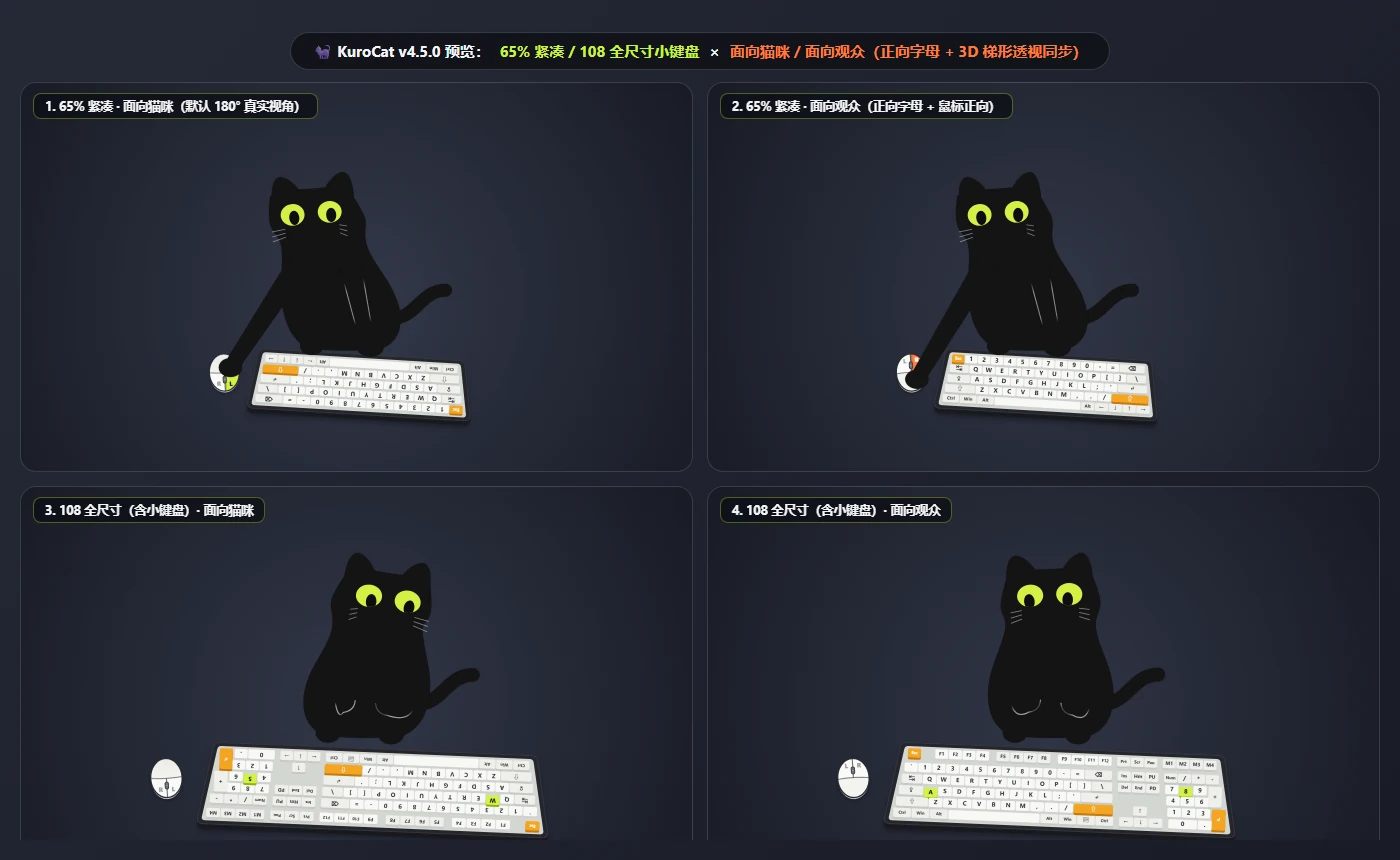
65% Compact and 108-Key Full-Size Dual Perspective
65% Compact / 108-Key Full-Size ร— Cat View & Viewer View
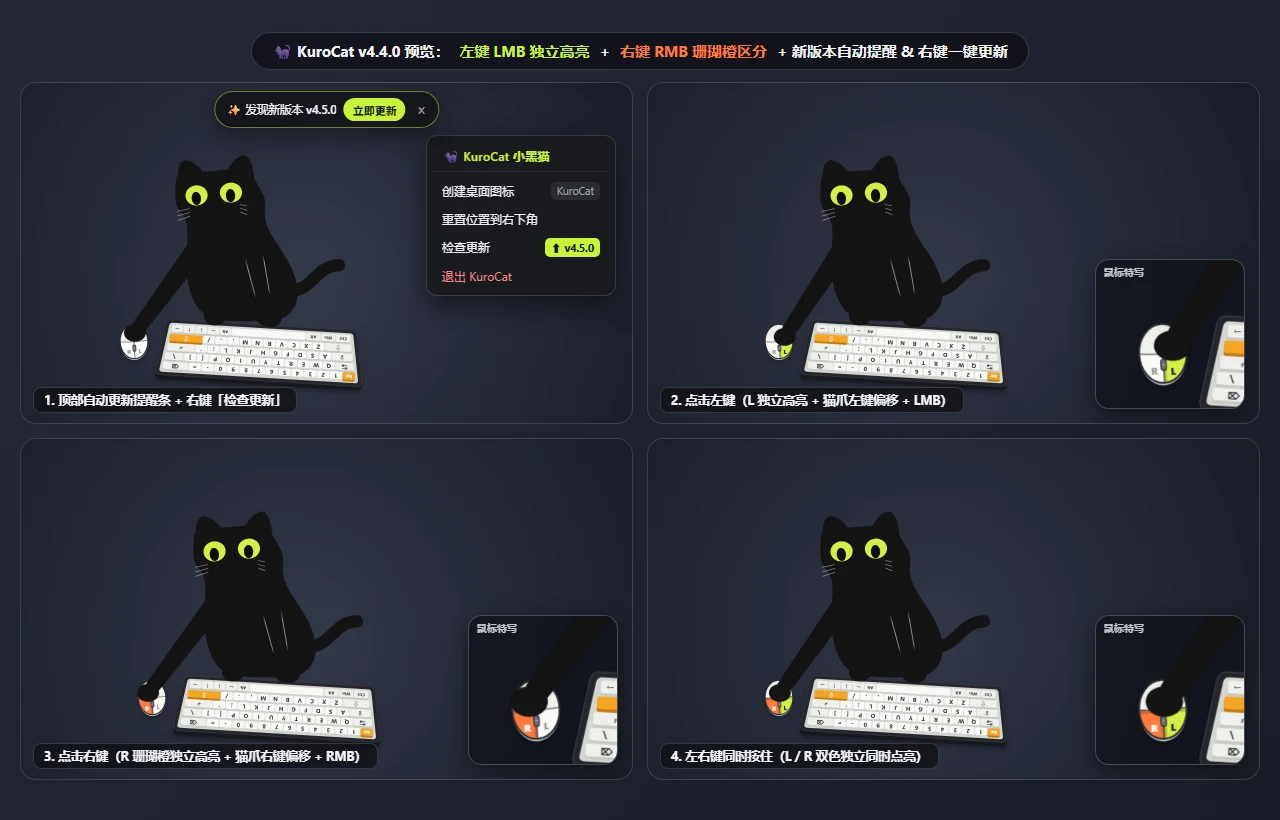
Independent L/R Mouse Highlights and Auto-Updater
Independent L / R Mouse Highlights + In-App Auto-Updater
- **โœจ 3D Figurine / 2D Classic Dual Engine**: GPU-instanced keycaps, automatic 30 FPS power-saving during games, 20%โ€“150% smooth scaling, 3D collar bell & auto-gaming headphones. - **๐Ÿค– AI Coding Companion**: Real-time reactions for **Claude Code, Codex, DeepSeek, Doubao, WorkBuddy, Cursor & Antigravity** โ€” auto-typing, tail-Enter on commands, and status notifications. - **๐ŸŽจ 7 Built-in Skins + MCP AI Studio**: 6 hand-crafted cats + **๐Ÿณ BigFish (whale-girl)** with head-petting and synthesized 24.5Hz Web Audio purring. - **โŒจ๏ธ 65% / 108-Key & Independent Mouse**: Instant layout & perspective flip, customizable tail-key patting, distinct Left/Right/Middle click colors, and floating 3D key bubbles. - **๐Ÿ™ˆ OS-Level Password Privacy Guard**: Automatically detects Windows & macOS password fields, blocks keystroke forwarding at the hook level, and makes the cat close its eyes (BigFish covers both eyes). - **๐ŸŽฅ OBS Alpha Source & Silent Upgrades**: Native transparent overlay, multi-monitor pinning, macOS fullscreen Space support, and SHA-256 verified auto-updates. --- ## ๐Ÿค– AI Companion & MCP Cat Studio KuroCat ships a zero-dependency **Stdio** and local **Streamable HTTP (`127.0.0.1:27420`)** MCP Server inside the single binary: 1. Launch KuroCat, right-click the pet โ†’ enable **MCP Extension** โ†’ click **Copy MCP Config** (or **Send to AI Auto-Setup**). 2. Paste into **Claude Desktop / Cursor / Antigravity / Windsurf / Cline** and prompt in natural language: > ๐Ÿ’ฌ *"Look at this photo of my calico cat โ€” use KuroCat MCP to sculpt a matching 3D desktop pet with its ear shape and spots, then switch to it!"* > ๐Ÿ’ฌ *"Scale KuroCat to 85%, switch to the 108-key viewer perspective, and hide floating key bubbles."*
๐Ÿ“‹ Show Stdio / HTTP JSON Config & All 10 Built-in MCP Tools
**Option A: Stdio (universal MCP client support)** ```json { "mcpServers": { "kurocat": { "command": "C:\\Users\\\\AppData\\Local\\KuroCat\\KuroCat.exe", "args": ["--mcp"] } } } ``` **Option B: Local Streamable HTTP (while KuroCat is running)** ```json { "mcpServers": { "kurocat": { "url": "http://127.0.0.1:27420/mcp" } } } ``` | Tool | Description | | --- | --- | | `list_cats` | List all built-in and custom skins plus the active character | | `get_cat_schema` | Fetch full fur patterns, 16-spot coordinates & 7 2D/3D contour parameters | | `upsert_cat` | Create or overwrite a custom cat with 0.4s live hot-reload | | `patch_cat` | Fine-tune an existing or built-in cat partially | | `switch_cat` | Immediately switch the active desktop pet by ID | | `delete_cat` | Remove a custom cat (or reset an overridden built-in skin) | | `get_settings` / `update_settings` | Read or update scale, keyboard layout, bubbles, purring, click-through & autostart | | `set_agent_status` | Sync AI coding agent state (thinking, coding, running command, waiting, error, done) | | `trigger_action` | Trigger interactive desktop animations (pet, happy, cross, sleep) | Custom skins are stored in `%APPDATA%\kuro-cat-pet\cats.json` (Windows) or `~/Library/Application Support/kuro-cat-pet/cats.json` (macOS) with live hot-reload.
--- ## ๐Ÿ“ˆ Live Growth KuroCat Live Downloads and GitHub Stars Growth Chart

๐Ÿ“ก Live cumulative downloads & GitHub Stars ยท Explore interactive chart on website โ†’

---
๐Ÿ› ๏ธ Developer Guide: Build from Source & macOS Release Signing
Prerequisites: Windows 10/11 or macOS 11+, Node.js 18+, Rust (`cargo`). ```bash git clone https://github.com/qianyiai/KuroCat.git cd kurocat npm install npm run tauri:dev # Local hot-reload dev npm run tauri:build # Production release bundle ``` **macOS Release Signing (optional โ€” preserves Accessibility permissions across updates)**: ```bash scripts/macos-codesign.sh create-cert /path/outside/repo/kurocat-signing gh secret set MACOS_SIGNING_CERT_P12_BASE64 < /path/outside/repo/kurocat-signing/kurocat-signing.p12.base64 gh secret set MACOS_SIGNING_CERT_PASSWORD < /path/outside/repo/kurocat-signing/kurocat-signing.password ```
## ๐Ÿ“„ License & Credits Released under the [MIT License](LICENSE). Completely free and open source โ€” if KuroCat brightens your coding or streaming setup, a โญ Star means a lot! - **๐Ÿณ BigFish (Whale-Girl)** runtime assets are adapted from the MIT-licensed project [PC2005-cloud/dsh-pet](https://github.com/PC2005-cloud/dsh-pet) (derived from [QCYTSN/dsh-dafeiyu](https://github.com/QCYTSN/dsh-dafeiyu)); see `src/assets/dafeiyu/LICENSE-MIT.txt`. - **Contributors**: Special thanks to [@XYZliang](https://github.com/XYZliang), [@CandySunPlus](https://github.com/CandySunPlus) (#51), [@Jack-GPT](https://github.com/Jack-GPT) (#47, #64), [@Mangome](https://github.com/Mangome) (#67, #68), [@Zyred9](https://github.com/Zyred9) (#48), [@bj-wangxiaoxiao](https://github.com/bj-wangxiaoxiao) (#65), [@hacksmo](https://github.com/hacksmo) (#45), and [@LiMuhua](https://github.com/LiMuhua) (#75).