> 🌐 **Official Website, Live Web Playground & Fast Downloads**: [**https://qianyi.one/kurocat/**](https://qianyi.one/kurocat/) ([English UI](https://qianyi.one/kurocat/?lang=en))
A lightweight, transparent, always-on-top desktop typing & mouse companion for **Windows (Win11/10 & Win7 SP1) / macOS (10.15+ Apple Silicon & Intel) / Linux (Ubuntu / Debian / KylinOS / UOS)** — built with **Tauri v2 (native Rust global hooks + built-in MCP server + Three.js 3D / HTML5 Canvas 2D dual engine)**. Zero external runtime dependencies, ~24 MB RAM footprint. Defaults to **✨ 3D Volumetric Figurine Mode** with one-click switching to **🎨 2D Classic Hand-Drawn**, and ships out of the box with **6 hand-crafted cat skins + 🐳 BigFish (whale-girl)** (Classic Black Cat, Ragdoll, Orange Tabby, Calico, Tuxedo, Siamese, and BigFish), **optional 3D collar bells & gaming headset (auto-equips in PC games, both off by default)**, **system-level password privacy guard**, **4 customizable tail-key patting modes**, **native OBS transparent Browser Source**, and a **built-in MCP server** so AI can create your own cat from a photo in one sentence (with 1:1 `spots[]` markings synced across 3D & 2D)!
## 🎬 Live Web Playground & 14s BigFish Demo Video
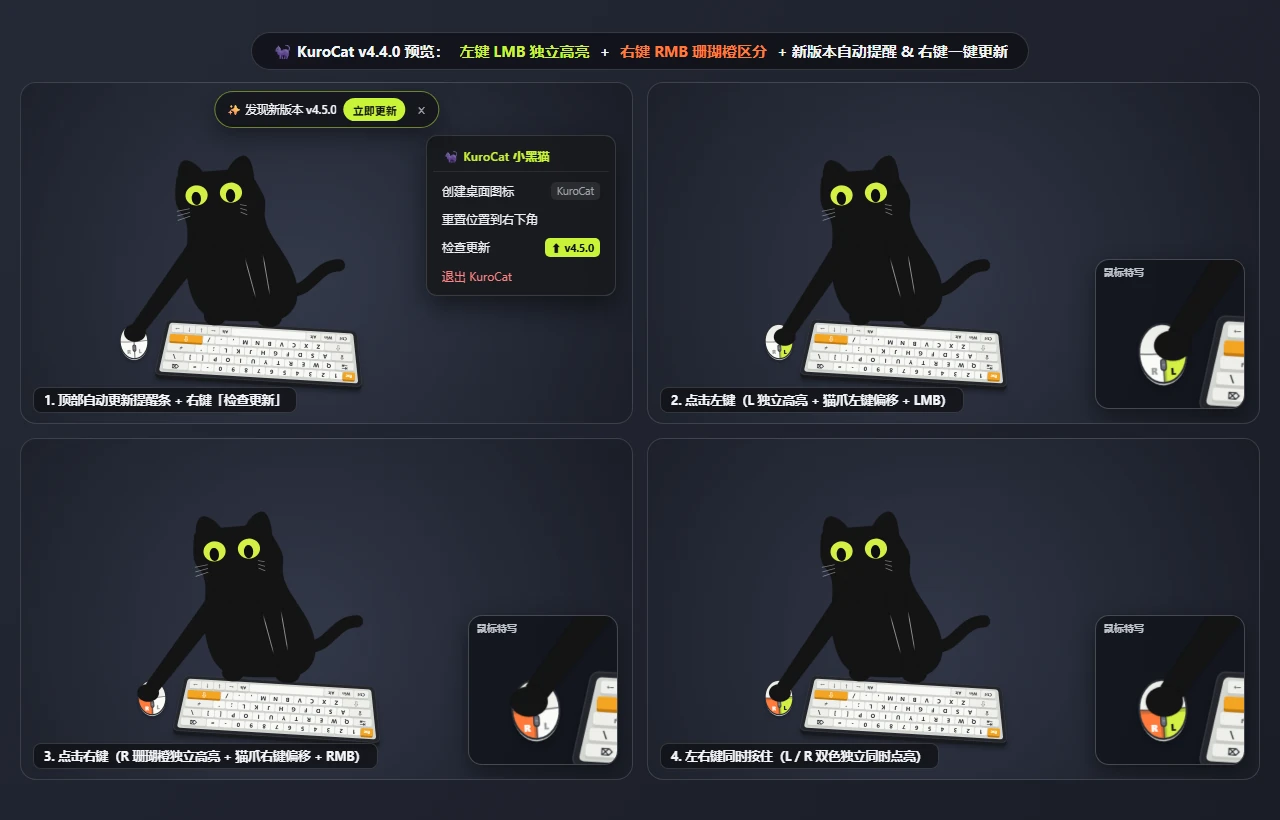
Independent L/R Mouse Button Highlights + In-App Auto Updater
- **✨ 3D Volumetric Figurine & 🎨 2D Classic Dual Engine + Optional Accessories**:
- Defaults to **3D Volumetric Figurine Mode** powered by Three.js with soft rim lighting, plush arm proportions, and smooth fur blending; switch to **2D Classic Hand-Drawn** anytime in one click via the right-click menu or system tray.
- **Optional 3D Collar Bells & Gaming Headset (both off by default)**: Pick from 4 collar colors (red, blue, pink, green) with a jingling bell, or enable the gaming headset with automatic PC game detection that puts it on and takes it off silently.
- **7 Built-in Skins (6 Cats + 🐳 BigFish Whale-Girl) + Unlimited AI Custom Skins via MCP**:
- **🐈⬛ Black Cat** / **🐱 Ragdoll** / **🍊 Orange Tabby** / **🌸 Calico** / **🐄 Tuxedo** / **🤎 Siamese** / **🐳 BigFish (Whale-Girl)** (3-limb simultaneous mouse + typing + splashing whale-tail slaps, Live2D eye gaze tracking, typing-speed blush & joyful laugh). Switch seamlessly in 0.1s.
- **🐾 4 Customizable Tail-Patting Modes & On-Keyboard Picker**: Choose **Smart 3rd Hand** (paws handle normal typing; tail jumps in when both hands are busy or on fast Enter), **Custom Keys** (click any keycap right on the pet's keyboard or press physical keys to toggle, with non-clipping far-key arcs & presets), **Edge Only** (protects `WASD`), or **Wag Only**.
- **🙈 System-Level Password Privacy Guard**: Automatically detects password fields on Windows (UI Automation `CurrentIsPassword` + Win32 `ES_PASSWORD`) and macOS (`IsSecureEventInputEnabled` + `AXSecureTextField`). Real keystrokes are intercepted in Rust without forwarding — cats gently close their eyes, BigFish covers her eyes with both hands, and the keyboard & bubbles are masked.
- **🎥 Native OBS Transparent Browser Source**: Zero-overhead loopback server (`http://127.0.0.1:27421/obs`, off by default) for crystal-clear Alpha-channel streaming in OBS Studio without chroma-key, complete with **OBS-Only Mode** and synced password masking.
- **🤖 Built-in MCP Server (Create Your Cat with AI)**: No Node.js or Python needed. Share a photo of your real cat with **Claude Desktop / Cursor / Antigravity / Windsurf / Cline**, and AI creates a custom breed with markings, eye colors, and accent theme — hot-reloading onto your desktop in **0.4 seconds**!
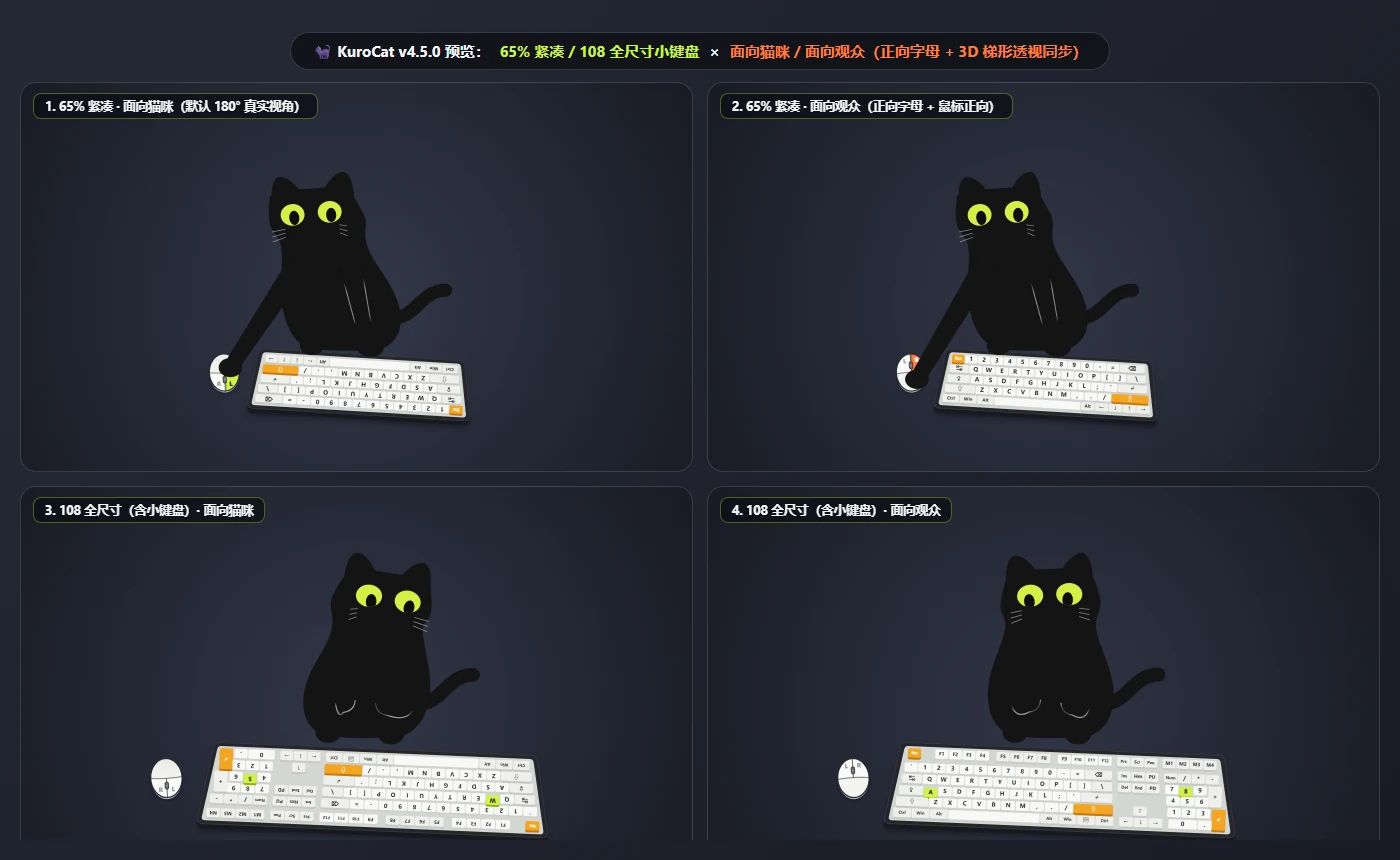
- **65% / 108-Key Layouts + Dual Perspective + Independent L/R/M Mouse**:
- Switch between **65% compact** and **108-key full-size** (full F1–F12, nav cluster, media keys, numpad with 2U `+` & `Num↵`) and between **Cat-Facing (180°)** and **Viewer-Facing (upright legends)** with synchronized mouse button orientation.
- Independent `L`, `R`, and middle/scroll highlights with contrasting colors, 3D press shadows, and `LMB`/`RMB` badges — supports holding both buttons simultaneously.
- **240Hz Spring Alive-Cat Micro-Emotions & Petting Purr**:
- Staggered spring physics (eyes → ears → head → spine), fast-cursor **Curious wide pupils**, key-mash **Grumpy airplane ears + 3-beat tail desk-thump**, idle **Sleepy loaf with floating Zzz**, and back-and-forth head petting with real-time Web Audio purring.
- **In-App Auto-Updater, Click-Through Lock & Multi-Display Pinning**:
- Silent GitHub Releases check with SHA-256 verification and one-click upgrade; smart click-through lock (`Alt` temporary unlock); per-monitor pinning on Windows & macOS plus macOS 13+ fullscreen space overlay.
## 🤖 MCP Integration Guide (Design Your Cat with AI)
KuroCat `v4.0.0+` ships with native **Stdio** and **Local Streamable HTTP (`127.0.0.1:27420`)** MCP servers built right into the single binary!
### Quick Setup
1. Launch `KuroCat`, right-click the pet → ensure **Enable MCP Server** is checked → click **Copy MCP Config**.
2. Paste into your MCP client config (Claude Desktop / Cursor / Antigravity / Windsurf / Cline):
**Option A: Stdio Mode (Recommended — supported by all MCP clients)**
```json
{
"mcpServers": {
"kurocat": {
"command": "C:\\Users\\\\AppData\\Local\\KuroCat\\KuroCat.exe",
"args": ["--mcp"]
}
}
}
```
**Option B: Local Streamable HTTP Mode (connect while KuroCat is running)**
```json
{
"mcpServers": {
"kurocat": {
"url": "http://127.0.0.1:27420/mcp"
}
}
}
```
### Example Prompts
- *"Use KuroCat MCP to create a British Shorthair blue cat with amber eyes and ice-blue keycaps, and switch to it right away."*
- *"Look at this photo of my calico cat and design a custom KuroCat pet matching its fur patches and eye color!"*
- *"Scale KuroCat to 85%, switch to the 108-key viewer-facing layout, and set tail keys to Enter and Space."*
### Built-in MCP Tools
| Tool | Description |
| --- | --- |
| `list_cats` | List all built-in and custom skins plus the active skin ID |
| `get_cat_schema` | Inspect full skin schema, 6 patterns (`solid`/`bicolor`/`tuxedo`/`tabby`/`calico`/`siamese`), spot coordinates & presets |
| `upsert_cat` | Create or update any custom cat skin with instant live hot-reload |
| `switch_cat` | Switch active desktop pet by ID |
| `delete_cat` | Delete a custom skin (or restore a built-in skin) |
| `get_settings` / `update_settings` | Read or live-update scale, layout, orientation, tail-key mode/keys, bubbles, purr sound, always-on-top, click-through lock, OBS source & autostart |
Custom skins are stored at:
- **Windows**: `%APPDATA%\kuro-cat-pet\cats.json`
- **macOS**: `~/Library/Application Support/kuro-cat-pet/cats.json`
## 🛠️ Build from Source
Prerequisites: Windows 10/11 or macOS 11+, Node.js 18+, Rust toolchain (`cargo`).
```bash
git clone https://github.com/qianyiai/kurocat.git
cd kurocat
npm install
npm run tauri:dev # Live hot-reload development
npm run tauri:build # Production release bundle & installer
```
## 📈 Live Growth
> 📡 Live-synced cumulative downloads and GitHub Stars (auto-adapts to GitHub dark/light themes). [Explore the interactive dual-axis chart on the website →](https://qianyi.one/kurocat/?lang=en#growth)
## ☕ Support & Donate
KuroCat is completely free and open-source under the MIT License. If this tiny desktop cat has brightened your coding, work, or streams, consider starring the repo ⭐ or buying the author a coffee:
- **ETH / BNB / USDT / USDC (EVM Address)**
Supported networks: `Ethereum (ERC-20)` · `BNB Smart Chain (BEP-20)` · `Base` · `Arbitrum`
```text
0x40995b4c9ad8cd4356417a34ab94fa20d5844617
```
## 📄 License & Credits
Released under the [MIT License](LICENSE).
- The built-in **🐳 BigFish (whale-girl)** skin uses runtime sprite assets derived from the MIT-licensed project [PC2005-cloud/dsh-pet](https://github.com/PC2005-cloud/dsh-pet) (with reference to [QCYTSN/dsh-dafeiyu](https://github.com/QCYTSN/dsh-dafeiyu)). See `src/assets/dafeiyu/LICENSE-MIT.txt` for full license details.