# DSH Remote Workspace & Deployment Agent ### `dsh-ssh-files-sidebar` **A complete Remote SSH workspace for DeepSeek Harness: files, terminal, remote editing, zero-to-one deployment, runbooks, automation, and closed-loop delivery.** [![build](https://github.com/qigelunbiya/dsh-ssh-files-sidebar/actions/workflows/build.yml/badge.svg)](https://github.com/qigelunbiya/dsh-ssh-files-sidebar/actions/workflows/build.yml) [![release](https://img.shields.io/github/v/release/qigelunbiya/dsh-ssh-files-sidebar?display_name=tag)](https://github.com/qigelunbiya/dsh-ssh-files-sidebar/releases/latest) [![license](https://img.shields.io/github/license/qigelunbiya/dsh-ssh-files-sidebar)](./LICENSE) [![DSH Plugin](https://img.shields.io/badge/DeepSeek%20Harness-plugin-5b5bd6)](https://github.com/topics/dsh-plugin) [简体中文](./README.md) · **English** DSH Remote Workspace & Deployment Agent

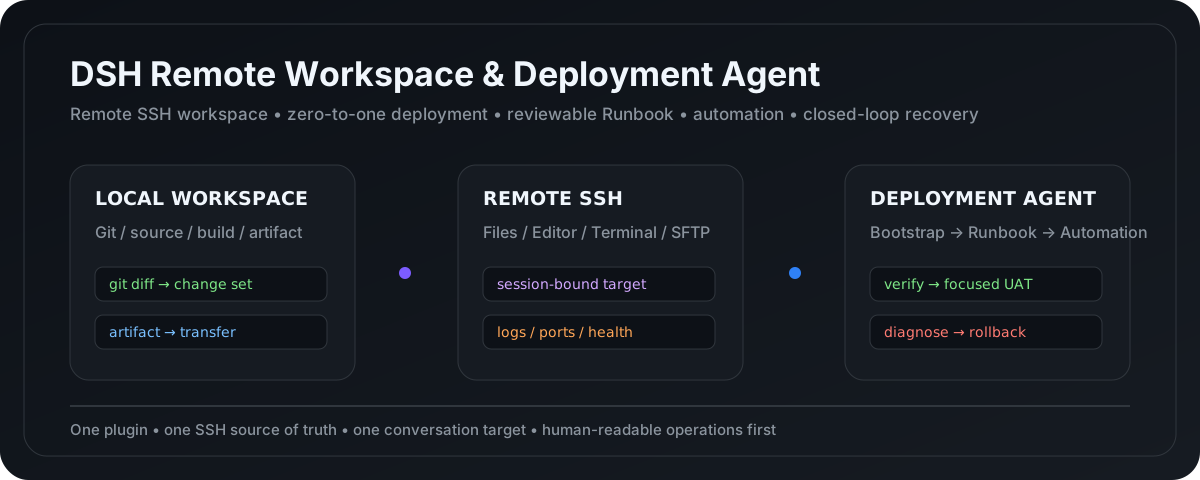
--- ## Understand it in 30 seconds Use this plugin when your DeepSeek Harness workflow involves: - Linux / SSH servers; - remote file browsing, editing, upload, and download; - local source code with remote service startup, logs, and port checks; - an unfamiliar project whose deployment procedure is not known yet; - capturing a working procedure into `DEPLOYMENT.md`; - graduating a validated Runbook into one-click automation and eventually agent-operated delivery, verification, diagnosis, and recovery. The goal is to keep all of that inside **one conversation, one SSH safety boundary, and one deployment maturity path**. ### More than an SSH file sidebar | Capability | `dsh-ssh-files-sidebar` | | --- | --- | | SSH Files / SFTP / Terminal | ✅ | | Remote Workspace | ✅ | | Local source + session-bound Linked SSH | ✅ | | Remote Vision / system OCR | ✅ | | Zero-to-one deployment of unfamiliar projects | ✅ | | `DEPLOYMENT.md` Runbook | ✅ | | Automation boundary based on real user habits | ✅ | | One-click scripts | ✅, only after Runbook validation | | Agent-operated deploy + health/log verification | ✅ | | UAT-driven diagnosis / fix / rollback loop | ✅ | > Core principle: **discover the real environment and workflow first, document it second, automate it only after validation, and let the Agent operate the loop only after that automation is proven.** --- ## One-minute install ### Recommended: prebuilt GitHub Release With an installed `dsh` CLI: ```powershell dsh plugin --profile web add https://github.com/qigelunbiya/dsh-ssh-files-sidebar/releases/latest/download/dsh-ssh-files-sidebar.tgz ``` From a DeepSeek Harness source checkout: ```powershell pnpm dsh plugin --profile web add https://github.com/qigelunbiya/dsh-ssh-files-sidebar/releases/latest/download/dsh-ssh-files-sidebar.tgz ``` Then start or restart the Web profile: ```powershell dsh web ``` or, from source: ```powershell pnpm dsh web ``` The release tarball already contains `lib/`, so normal users do **not** need to clone the repository, install dependencies, build the package, or grant install-time build permission. > DeepSeek Harness also supports direct GitHub source installs. With pnpm 10, however, a git dependency's `prepare` script must be explicitly allowlisted. That is why this project recommends the prebuilt release tarball for normal users. ### GitHub source install (development / debugging) ```powershell dsh plugin --profile web add github:qigelunbiya/dsh-ssh-files-sidebar ``` This repository provides `prepare`, so a git install can build its runtime bundle. If pnpm 10 blocks the script, follow the DSH / pnpm message and add `dsh-ssh-files-sidebar: true` under the profile's `pnpm-workspace.yaml -> allowBuilds`, then retry. --- ## Product capabilities ### 1. Remote SSH Workspace One top-level plugin composes: - `dsh-better-sidebar` - `@linxin666/dsh-ssh` - `dsh-rw` - this project's SSH Files / Linked SSH / Deployment Layer Hosts and credentials have one source of truth: ```text ~/.dsh/dsh-ssh.json ``` One conversation binds one SSH target. The Agent does not get a free multi-host surface for host enumeration or switching. ### 2. SSH Files + Editor + Terminal SSH Files includes: - remote directory tree; - CodeMirror edit / save; - image, PDF, HTML, and archive preview; - multi-select; - upload / download; - inline rename; - directory creation / delete; - per-session expansion memory. Shortcuts: | Action | Shortcut | | --- | --- | | Toggle selection | `Ctrl/Cmd + Click` | | Range select | `Shift + Click` | | Select visible items | `Ctrl/Cmd + A` | | Inline rename | `F2` | | Delete | `Delete` | | Save | `Ctrl/Cmd + S` | | Search / replace | `Ctrl/Cmd + F` | ### 3. Local Workspace + Linked SSH Recommended development / deployment model: ```text LOCAL Workspace (real source) + Conversation Linked SSH (single target) + Project-root DEPLOYMENT.md ``` Git, builds, and artifact checks stay local. Uploads, service management, logs, and health checks stay locked to the current conversation's server. ### 4. Remote Vision / OCR The Agent can inspect images directly from the current SSH target. Text-only flows can use supported system OCR paths without manually copying a server screenshot into the local Workspace first. --- ## From "I don't know how to deploy this" to a closed loop Two entry paths converge on the same mature workflow. ```mermaid flowchart TD A1["Known deployment experience
commands / docs / procedure"] --> B1["Reconcile LOCAL + REMOTE"] B1 --> R["DEPLOYMENT.md
reviewable Runbook"] A2["Unfamiliar project
only source + target server"] --> L["Discover LOCAL
structure / runtime / artifact / dependencies"] L --> S["Discover REMOTE
OS / runtime / path / ports / permissions"] S --> Q["Progressively confirm real user requirements"] Q --> P["Bootstrap Plan"] P --> T["Attempt deployment / startup"] T --> X{"Technical verification passes?"} X -->|No| D["stderr / logs / process / port diagnosis"] D --> C{"Safe to fix?"} C -->|Yes| F["Smallest correction and retry"] F --> T C -->|No| STOP["State that this target cannot be deployed safely"] X -->|Yes| BASE["Summarize the path that actually worked"] BASE --> R R --> V["User uses and validates the Runbook"] V --> H["Interview real operating habits
define automation boundary"] H --> O["Generate and validate one-click automation"] O --> E["Agent operates the release"] E --> K["Process / port / health / log verification"] K --> G["Analyze Change Set
suggest focused tests"] G --> U{"User acceptance testing"} U -->|Healthy| DONE["Done"] U -->|Issue| Z["Diagnosis"] Z --> RISK{"Fix or recover?"} RISK -->|Fix| FIX["Smallest fix"] RISK -->|Higher risk| RB["Rollback"] FIX --> RE["Verify again"] RB --> RE RE --> U ``` ### Zero-to-One Bootstrap: prove it before documenting it For a project with no trustworthy deployment history, the Agent does not invent a polished `DEPLOYMENT.md` first. It: 1. inspects the local project for stack, runtime, entry point, artifacts, configuration, external services, ports, and persistence; 2. infers the runtime payload instead of blindly copying the whole repository; 3. inspects the bound server for OS, architecture, runtimes, writable paths, occupied ports, service managers, permissions, and disk space; 4. discovers facts itself and asks the user only for unresolved preferences or business decisions; 5. works through a provisional **Bootstrap Plan**; 6. diagnoses failures from stderr, logs, process state, and ports, then applies the smallest evidence-backed correction; 7. explicitly states when the target cannot safely run the project instead of escalating server-wide changes just to avoid failure; 8. captures the **actual successful path** into `DEPLOYMENT.md` only after the first deployment is technically stable. See [Project Deployment Runbook](./docs/deployment-runbook.md) for the full model. --- ## Runbook → automation, not a black box first `DEPLOYMENT.md` is the complete human-readable operational knowledge base. A documented command does **not** imply that the user wants it automated. Before generating a script, the Agent maps each step to: ```text AUTOMATE → include in the script KEEP MANUAL → keep as an operator step EXTERNAL / HAND-OFF → handled by another tool / process NOT IN NORMAL RUN → keep in the Runbook, omit from the normal one-click path ``` A final script may automate only 30% of the Runbook if that is what matches the operator's real workflow. --- ## Closed-loop delivery Once the Runbook, automation boundary, and script have all been validated in real use, the Agent moves from command generator to release operator: ```text Resolve this release ↓ Run validated automation ↓ Independently verify process / port / health / logs ↓ Summarize evidence-backed changed areas ↓ Tell the user what business behavior to test ↓ User acceptance ↙ ↘ healthy issue ↓ ↓ done diagnose / fix / rollback ↓ verify again ``` A zero exit code is not deployment success; a successful rollback command is not recovery. Both require independent verification. --- ## Architecture ```text One top-level install: dsh-ssh-files-sidebar │ ├─ dsh-better-sidebar │ └─ workbench / Files / Editor / Terminal / Browser │ ├─ @linxin666/dsh-ssh │ └─ SSH Host / Web Terminal / SFTP / Tunnel / Engine │ ├─ dsh-rw │ └─ Local / Remote Workspace + Read/Write/Edit/Glob/Grep/Bash shim │ ├─ SSH Files + Linked SSH │ ├─ remote tree / editor / preview / transfer │ ├─ session-bound SSH tools │ ├─ remote vision │ └─ OCR fallback │ └─ Deployment Layer ├─ zero-to-one Bootstrap discovery ├─ Bootstrap Plan ├─ DEPLOYMENT.md Runbook ├─ automation coverage interview ├─ one-click automation └─ autonomous deploy → verify → UAT → diagnose / rollback ``` --- ## Safety boundaries - one conversation operates one SSH target; - Remote Workspace takes precedence, otherwise Linked SSH is used; - `DEPLOYMENT.md` `target-ssh` must match the current session lock; - high-risk actions still use Harness-native approvals; - database restore/migration, recursive deletion, system packages, firewall, disk, and host reboot do not become implicitly authorized by a Runbook; - unfamiliar-project Bootstrap does not silently change global runtimes, firewall, reverse proxy, databases, or unrelated services just to make a deployment succeed; - production incidents do not silently auto-rollback unless the user has explicitly approved that policy and its triggers. --- ## Developer install ```powershell git clone https://github.com/qigelunbiya/dsh-ssh-files-sidebar.git cd dsh-ssh-files-sidebar pnpm install pnpm build ``` From a Harness source checkout: ```powershell pnpm dsh plugin --profile web add link:E:/path/to/dsh-ssh-files-sidebar pnpm dsh web ``` Only one top-level `dsh-ssh-files-sidebar` loader row is required. Do not mount standalone `dsh-better-sidebar`, `@linxin666/dsh-ssh`, or `dsh-rw` rows beside it. --- ## Updating Release users can reinstall the newest prebuilt package: ```powershell dsh plugin --profile web remove dsh-ssh-files-sidebar dsh plugin --profile web add https://github.com/qigelunbiya/dsh-ssh-files-sidebar/releases/latest/download/dsh-ssh-files-sidebar.tgz ``` Source developers: ```powershell git pull pnpm install pnpm build ``` --- ## Documentation - [Deployment Runbook: zero-to-one → Runbook → automation → closed loop](./docs/deployment-runbook.md) - [Deployment Agent design draft (Chinese)](./docs/deployment-agent-design.zh.md) - [Distribution / discoverability checklist](./docs/distribution.md) ## Upstream projects and acknowledgements - [`dsh-better-sidebar`](https://github.com/omdsh-dev/DSH-better-sidebar) — MIT - [`@linxin666/dsh-ssh`](https://github.com/DamonKoy/dsh-web-ui) — Apache-2.0 - [`dsh-rw`](https://github.com/MDR-EX1000/dsh-rw) — MIT See [NOTICE](./NOTICE) for attribution details. ## License [MIT](./LICENSE)
