# mindlm-mcp
Turn text, web pages and PDFs into interactive mind maps — an MCP server *and* a command-line
tool, with no API key required.
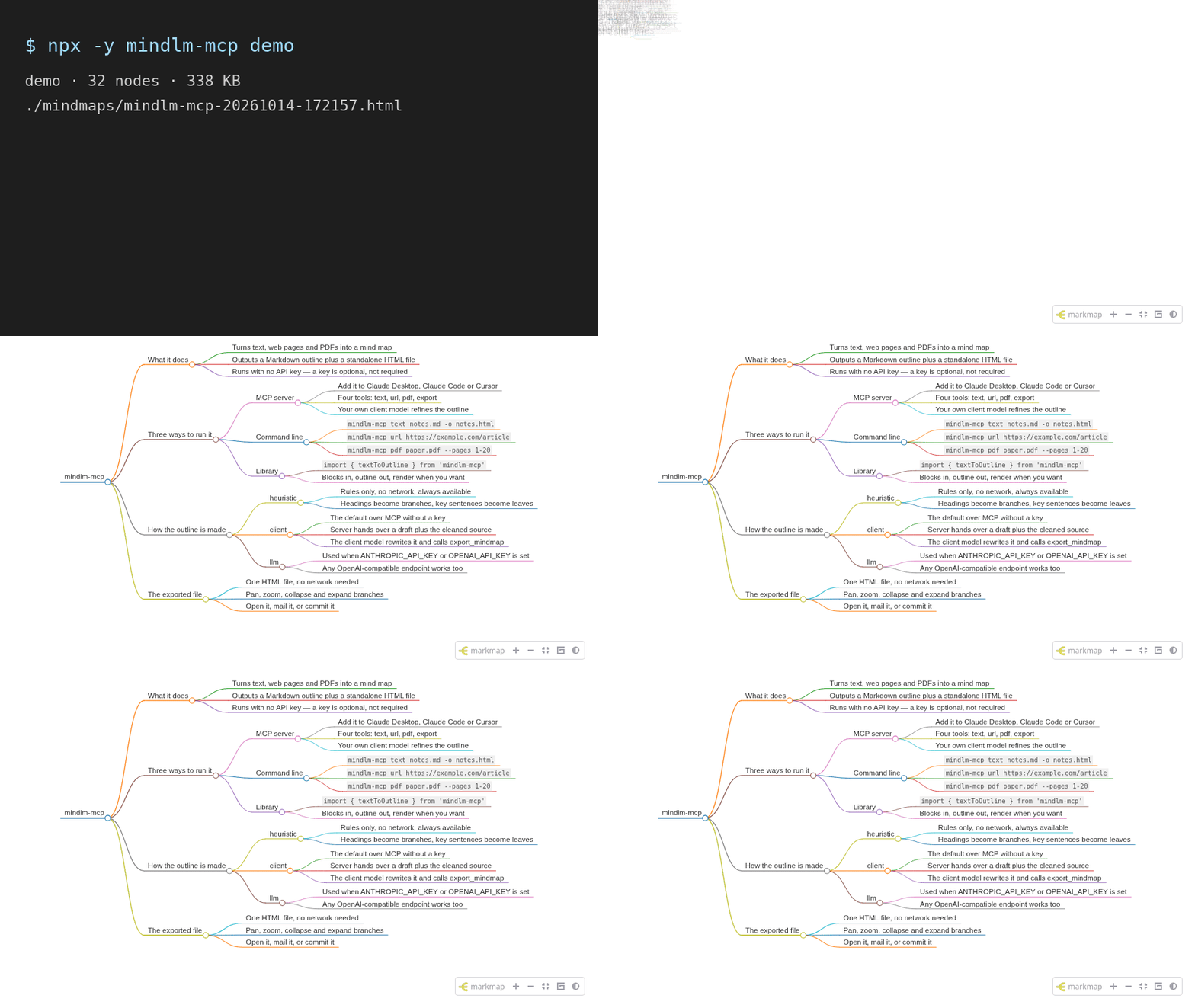
```bash
npx -y mindlm-mcp demo
```
That renders a built-in example and opens it. One HTML file, no build step, no account, no key.
- **Three inputs.** Plain text or Markdown, an http(s) page, or a local PDF.
- **Two outputs.** A Markdown outline you can edit, and a standalone HTML mind map
([markmap](https://markmap.js.org/)) that works offline — every script is inlined.
- **Zero keys.** Over MCP the server hands your own model a draft plus the cleaned source text and
lets it write the final outline. Set your own API key only if you want the server to call a model
itself. See [How the outline gets written](#how-the-outline-gets-written).
Docs and a live demo: ·
Source:
---
## Quick start
Every client runs the same command — `npx -y mindlm-mcp serve` — and needs no environment
variables. `MINDMAP_OUTPUT_DIR` below is optional; it just decides where exported files land.
### Claude Code
```bash
claude mcp add mindlm -- npx -y mindlm-mcp serve
```
Scope it to one project with `--scope project`, and pass environment variables with `-e`:
```bash
claude mcp add mindlm -e MINDMAP_OUTPUT_DIR=~/Documents/mindmaps -- npx -y mindlm-mcp serve
```
Check it with `claude mcp list`, or `/mcp` inside a session.
### Claude Desktop
Add this to `claude_desktop_config.json`, then restart the app:
```json
{
"mcpServers": {
"mindlm": {
"command": "npx",
"args": ["-y", "mindlm-mcp", "serve"],
"env": {
"MINDMAP_OUTPUT_DIR": "~/Documents/mindmaps"
}
}
}
}
```
- macOS: `~/Library/Application Support/Claude/claude_desktop_config.json`
- Windows: `%APPDATA%\Claude\claude_desktop_config.json`
### Cursor
The same block goes in `~/.cursor/mcp.json` (all projects) or `.cursor/mcp.json` (one project):
```json
{
"mcpServers": {
"mindlm": {
"command": "npx",
"args": ["-y", "mindlm-mcp", "serve"]
}
}
}
```
Ready-to-copy versions of all three live in [`examples/configs/`](examples/configs/).
Then ask for a mind map in plain language — *"make a mind map of this PDF"*, *"map out
https://example.com/article"* — and the client picks the right tool.
---
## Tools
Four tools, always advertised in this order. The three `*_to_mindmap` tools return a Markdown
outline; `export_mindmap` turns an outline into an HTML file. Every result carries both a readable
text block and `structuredContent`.
### `text_to_mindmap`
Outline text or Markdown you already have — a draft, notes, a transcript, a pasted chapter.
| Field | Type | Notes |
|---|---|---|
| `text` | string, required | The content to map. Capped by `MINDMAP_MAX_INPUT_CHARS`. |
| `mode` | `auto` \| `client` \| `llm` \| `heuristic` | Default `auto`. |
| `title` | string | Root node title. Derived from the source if omitted. |
| `maxDepth` | int 2–6 | Levels including the root. Default 4. |
| `maxChildren` | int 3–15 | Children kept per node. Default 8. |
| `language` | string | e.g. `"English"`, `"中文"`. Defaults to the source language. |
| `export` | boolean | Also render an HTML file and return its path. |
| `outputPath` | string | Where that file goes. |
Input:
```json
{
"text": "# Tides\n\nSpring tides are the largest of the month.\n\n## Neap\n\nNeap tides are the smallest.\n"
}
```
`structuredContent` (default `auto` mode with no API key, i.e. `client` mode):
```json
{
"title": "Tides",
"markdown": "# Tides\n\n## Spring tides are the largest of the month.\n\n### Neap\n- Neap tides are the smallest.\n",
"mode": "client",
"stats": { "inputChars": 79, "nodes": 4, "depth": 4, "truncated": false },
"sourceText": "# Tides\n\nSpring tides are the largest of the month.\n\n## Neap\n\nNeap tides are the smallest.",
"instructions": "This is a DRAFT outline produced by a rule-based algorithm. …"
}
```
With `"mode": "heuristic"` (or when an API key makes it `"llm"`) the result is the same minus
`sourceText` and `instructions` — the outline is final and ready to export.
### `url_to_mindmap`
Fetch a page and outline its main content. Article text is extracted with
[Readability](https://github.com/mozilla/readability); navigation, footers and boilerplate are
dropped. Page furniture goes too: reference markers (`[1]`), "[edit]" links, notes above the
article, image captions, navigation boxes, and the trailing *See also* / *References* / *Notes* /
*Further reading* / *External links* / *Bibliography* sections, which are link lists rather than
content. A URL that serves a PDF is handed to the PDF pipeline automatically.
| Field | Type | Notes |
|---|---|---|
| `url` | string, required | http(s) only. Private and loopback addresses are refused. |
| … | | plus every option from `text_to_mindmap` |
Input:
```json
{ "url": "https://example.com/tide-tables", "mode": "heuristic" }
```
`structuredContent` adds a `source` block describing where the text came from:
```json
{
"title": "Tide tables",
"markdown": "# Tide tables\n\n## Spring tides …\n\n## Neap tides …\n",
"mode": "heuristic",
"stats": { "inputChars": 1042, "nodes": 9, "depth": 3, "truncated": false },
"source": {
"url": "https://example.com/tide-tables",
"finalUrl": "https://example.com/tide-tables",
"title": "Tide tables",
"siteName": "Example",
"fetchedAt": "2026-09-27T10:21:04.512Z",
"contentType": "text/html"
}
}
```
### `pdf_to_mindmap`
Read a local PDF, using its bookmarks as the skeleton when it has them. A PDF stores positioned
lines rather than paragraphs, so the soft-wrapped lines of one paragraph are rejoined before
sentences are split — otherwise a browser's "print to PDF" would yield nodes like "releases
oxygen." instead of whole sentences.
| Field | Type | Notes |
|---|---|---|
| `path` | string, required | Path to a local PDF. `~` is expanded. |
| `pages` | string | 1-based selection: `"1-20"`, `"3"`, `"1-5,9"`. All pages by default. |
| … | | plus every option from `text_to_mindmap` |
Input:
```json
{ "path": "~/papers/attention.pdf", "pages": "1-12", "mode": "heuristic" }
```
`structuredContent`:
```json
{
"title": "mindlm-mcp PDF fixture",
"markdown": "# mindlm-mcp PDF fixture\n\n## 1. Introduction\n\n### Mind maps turn a wall of prose into something you can scan…\n",
"mode": "heuristic",
"stats": { "inputChars": 769, "nodes": 12, "depth": 4, "truncated": false },
"source": { "path": "/home/you/papers/attention.pdf", "totalPages": 3, "hasOutline": true }
}
```
### `export_mindmap`
Render a Markdown outline into a standalone HTML mind map. Call this after you (or your model)
have written the outline. It will not overwrite an existing file unless you ask.
| Field | Type | Notes |
|---|---|---|
| `markdown` | string, required | One `# ` root, then `##`/`###` and `-` bullets. |
| `title` | string | Page title. Defaults to the outline root. |
| `outputPath` | string | File, or a directory to generate a name in. |
| `offline` | boolean | Inline every script. Default `true`. |
| `toolbar` | boolean | Zoom / fit / expand toolbar. Default `true`. |
| `initialExpandLevel` | int −1–6 | Levels expanded on open; `-1` expands everything. |
| `colorFreezeLevel` | int 0–6 | Stop changing branch colour below this level. |
| `maxWidth` | int 0–2000 | Maximum node width in pixels; `0` is unlimited. |
| `overwrite` | boolean | Replace the file if it exists. Default `false`. |
| `returnHtml` | boolean | Include the whole document in the result. Default `false`. |
| `branding` | boolean | Add a small "Made with mindlm-mcp" footer link. Default `false`. |
Input:
```json
{
"markdown": "# Tides\n\n## Spring\n\n- Sun and moon in line\n\n## Neap\n\n- At right angles\n"
}
```
`structuredContent`:
```json
{
"path": "/home/you/mindmaps/tides-20260927-183322.html",
"fileUrl": "file:///home/you/mindmaps/tides-20260927-183322.html",
"bytes": 344349,
"nodes": 5,
"offline": true
}
```
### Prompt
The server also exposes one prompt, `mindmap_outline`, which returns the outline rules
(optionally in a given `language`) followed by an instruction to call `export_mindmap`.
---
## Command line
The same pipeline without a client. With no arguments and no terminal attached, `mindlm-mcp`
starts the MCP server — which is what an MCP client wants.
```bash
mindlm-mcp demo # render a built-in example and open it
mindlm-mcp text notes.md -o notes.html # a file, or "-" to read stdin
mindlm-mcp url https://example.com/article --open
mindlm-mcp pdf paper.pdf --pages 1-20
mindlm-mcp export outline.md -o map.html # an outline you wrote yourself
mindlm-mcp serve # MCP server on stdio
mindlm-mcp doctor # runtime, LLM config, output directory
```
| Command | What it does |
|---|---|
| `serve` | Start the MCP server on stdio. |
| `demo` | Render the built-in example (`--no-open` to skip the browser). |
| `text ` | Outline a `.txt`/`.md` file, or `-` for stdin. |
| `url ` | Fetch a page and outline its main content. |
| `pdf ` | Outline a local PDF. |
| `export ` | Render an existing Markdown outline. |
| `doctor` | Report what is configured and where files will be written. |
Options on the conversion commands:
| Option | Meaning |
|---|---|
| `-o, --output ` | Write here. A `.md` path writes the outline, `.html` the mind map. |
| `--title ` | Root node title and page title. |
| `--md` | Print the Markdown outline to stdout. |
| `--mode <auto\|llm\|heuristic>` | How the outline is written. |
| `--depth <n>` / `--max-children <n>` | Shape of the tree. |
| `--lang <language>` | Language for the node labels. |
| `--provider <anthropic\|openai>` / `--model <name>` | Override the LLM configuration. |
| `--no-offline` | Link CDN assets instead of inlining them. |
| `--no-toolbar` | Hide the mind map toolbar. |
| `--open` | Open the result in a browser. |
| `--overwrite` | Replace the output file if it exists. |
| `--branding` | Add the "Made with mindlm-mcp" footer link. |
| `-q, --quiet` | Only print results, no progress. |
| `--env-file <path>` | Load environment variables from a file first. |
Results a script might consume (a file path, an outline) go to stdout; progress and diagnostics go
to stderr. Exit codes: `0` ok, `1` usage error, `2` input error, `3` LLM error.
There is also a small programmatic API — `textToOutline`, `urlToOutline`, `pdfToOutline`,
`renderMindmapHtml`, `exportMindmap` — exported from the package root.
---
## How the outline gets written
Deciding what belongs in the tree is the hard part, and there are three ways to do it. You never
have to supply a key for any of this to work.
| Mode | When it is used | What happens |
|---|---|---|
| `client` | **MCP default** with no key | The server returns a rule-based draft, the cleaned source text and instructions. Your client's model — the one you are already talking to — rewrites the outline and calls `export_mindmap`. Nothing leaves your machine except what the client already sees. |
| `heuristic` | **CLI default** with no key | Rules only, no network: headings become branches, ranked sentences become leaves. Fast, deterministic, offline. |
| `llm` | Whenever `ANTHROPIC_API_KEY` or `OPENAI_API_KEY` is set | The server calls that model itself, over plain `fetch`, using **your** key and **your** endpoint. Falls back to the heuristic draft if the call fails. |
`mode: "auto"` (the default everywhere) picks the row that applies. You can always force one with
`mode` over MCP or `--mode` on the CLI. Run `mindlm-mcp doctor` to see which one `auto` resolves to
right now.
There is no hosted service behind any of this: no telemetry, no update check, no call home.
## Configuration
Every variable is optional. Copy [`.env.example`](.env.example) to `.env` and pass it explicitly
with `--env-file .env` — nothing is loaded automatically — or set the variables in your MCP
client's `env` block.
| Variable | Default | Meaning |
|---|---|---|
| `MINDMAP_OUTPUT_DIR` | `./mindmaps` | Where exported HTML files go. `~` is expanded. |
| `MINDMAP_LLM_PROVIDER` | auto-detected | `anthropic` or `openai`. Inferred from whichever key is set. |
| `ANTHROPIC_API_KEY` | — | Switches `auto` to `llm` mode. |
| `OPENAI_API_KEY` | — | Same, for any OpenAI-compatible endpoint. |
| `OPENAI_BASE_URL` | `https://api.openai.com/v1` | The endpoint used with `OPENAI_API_KEY`. |
| `MINDMAP_LLM_MODEL` | `claude-sonnet-5-5` for Anthropic | Model name. **Required** for OpenAI-compatible endpoints, where no name is portable. |
| `MINDMAP_ALLOW_PRIVATE_HOSTS` | `false` | Let `url_to_mindmap` reach localhost and private networks. |
| `MINDMAP_MAX_INPUT_CHARS` | `200000` | Hard cap on characters read from any one input. |
| `MINDMAP_CLIENT_MAX_CHARS` | `60000` | Cap on the source text returned in `client` mode. |
## The exported HTML
One file, openable with a double click. By default every script and stylesheet — d3, markmap-view,
the toolbar — is inlined, so the map keeps working with no network, on a locked-down machine, or
five years from now when a CDN has moved on. That costs about 340 KB per file; pass
`offline: false` (`--no-offline`) if you would rather link the CDN copies.
The KaTeX and highlight.js markmap plugins are deliberately disabled: both pull stylesheets from a
CDN, which would quietly break an "offline" export. Raw HTML in the outline is not rendered
(`markdown-it` runs with `html: false`), so text extracted from a hostile page cannot inject
script into the file you open.
Exports carry **no attribution by default**. `--branding` / `branding: true` adds one small footer
line if you want it.
## Limitations
- **JavaScript-only pages.** `url_to_mindmap` reads the HTML the server sends. A single-page app
that renders its content client-side will come back empty or nearly so — copy the text and use
`text_to_mindmap` instead. There is no headless browser.
- **Scanned PDFs.** A PDF needs a real text layer. Scans and image-only exports are rejected with a
clear error; there is no OCR.
- **Long documents are truncated**, not chunked, at `MINDMAP_MAX_INPUT_CHARS`. Use `pages` on a
long PDF, or map it a section at a time.
- **The heuristic is a draft.** It ranks sentences by position and term frequency. It is stable and
fast, and it will sometimes pick the wrong sentence. That is exactly why `client` mode exists.
- **Paywalls, logins and robots.** The fetcher sends no cookies and does not log in.
## Security
- **SSRF guard.** `url_to_mindmap` resolves the host first and refuses loopback, private, link-local
(including the `169.254.169.254` cloud metadata address), CGNAT and multicast ranges unless you
set `MINDMAP_ALLOW_PRIVATE_HOSTS=true`. Only `http:` and `https:` are accepted.
- **Limits.** 5 MB per fetched response, a 15 s timeout, at most 5 redirects, 50 MB / 300 pages per
PDF, and a character cap on every input.
- **No telemetry, no update check, no hosted backend.** The only network calls are the URL you ask
for and — if *you* configured a key — your own LLM endpoint.
- **No raw HTML in exports**, and inlined JSON has `</script>` escaped.
- Reporting a vulnerability, and the known DNS-rebinding caveat: [SECURITY.md](SECURITY.md).
---
<!-- PLACEHOLDER: launch materials and MCP directory listings — owned by the outreach lead. -->
<!-- Do not fill this in here. Drafts, checklists and submission status live in docs/launch.md. -->
## Launch materials and directory listings
*This section is a placeholder owned by the outreach lead.* Announcement copy, awesome-list entries
and MCP directory submissions (mcp.so, Glama, Smithery, PulseMCP, the official MCP Registry) are
tracked in [`docs/launch.md`](docs/launch.md) and are intentionally empty here.
## Contributing
Issues and pull requests are welcome — see [CONTRIBUTING.md](CONTRIBUTING.md). Requires Node
≥ 22.12.
```bash
npm ci && npm run lint && npm run typecheck && npm test && npm run build
```
## Want a full editor?
mindlm-mcp is deliberately small: outline in, one HTML file out. If you want to keep editing the
map afterwards — drag nodes around, restyle branches, collaborate, keep a library of maps — that
is what [mindlm.io](https://mindlm.io/en?utm_source=github&utm_medium=readme&utm_campaign=mindlm-mcp)
is for. This package works completely on its own and never talks to it.
## License
[MIT](LICENSE) © 2026 青澈君