DSCODE # ❄ DSCODE **Write code in your terminal. Plug scripts into a live session. Hand tasks between agents.** ![Watch the 90-second DSCODE demo](assets/demo.gif) ![macOS 14+](https://img.shields.io/badge/macOS-14%2B-111827?logo=apple&logoColor=white) ![Linux glibc](https://img.shields.io/badge/Linux-glibc%20x64%20%7C%20arm64-111827?logo=linux&logoColor=white) ![Bundled Node.js](https://img.shields.io/badge/Node.js-bundled-43853D?logo=node.js&logoColor=white) ![DSH](https://img.shields.io/badge/DSH-0.2.1--rc.2-2563EB) ![License](https://img.shields.io/badge/license-MIT-green) [![Release](https://img.shields.io/github/v/release/qiz029/dscode?color=111827&label=release)](https://github.com/qiz029/dscode/releases) [![Stars](https://img.shields.io/github/stars/qiz029/dscode?color=111827)](https://github.com/qiz029/dscode/stargazers) [![Discussions](https://img.shields.io/github/discussions/qiz029/dscode?color=111827&label=discussions)](https://github.com/qiz029/dscode/discussions) [English](README.md) · [简体中文](README.zh-CN.md) [Core features](#-core-features) · [What's new](#-whats-new) · [Quick start](#-quick-start) · [Commands](#-commands) · [Changelog](docs/CHANGELOG.md) · [Docs](#-documentation)
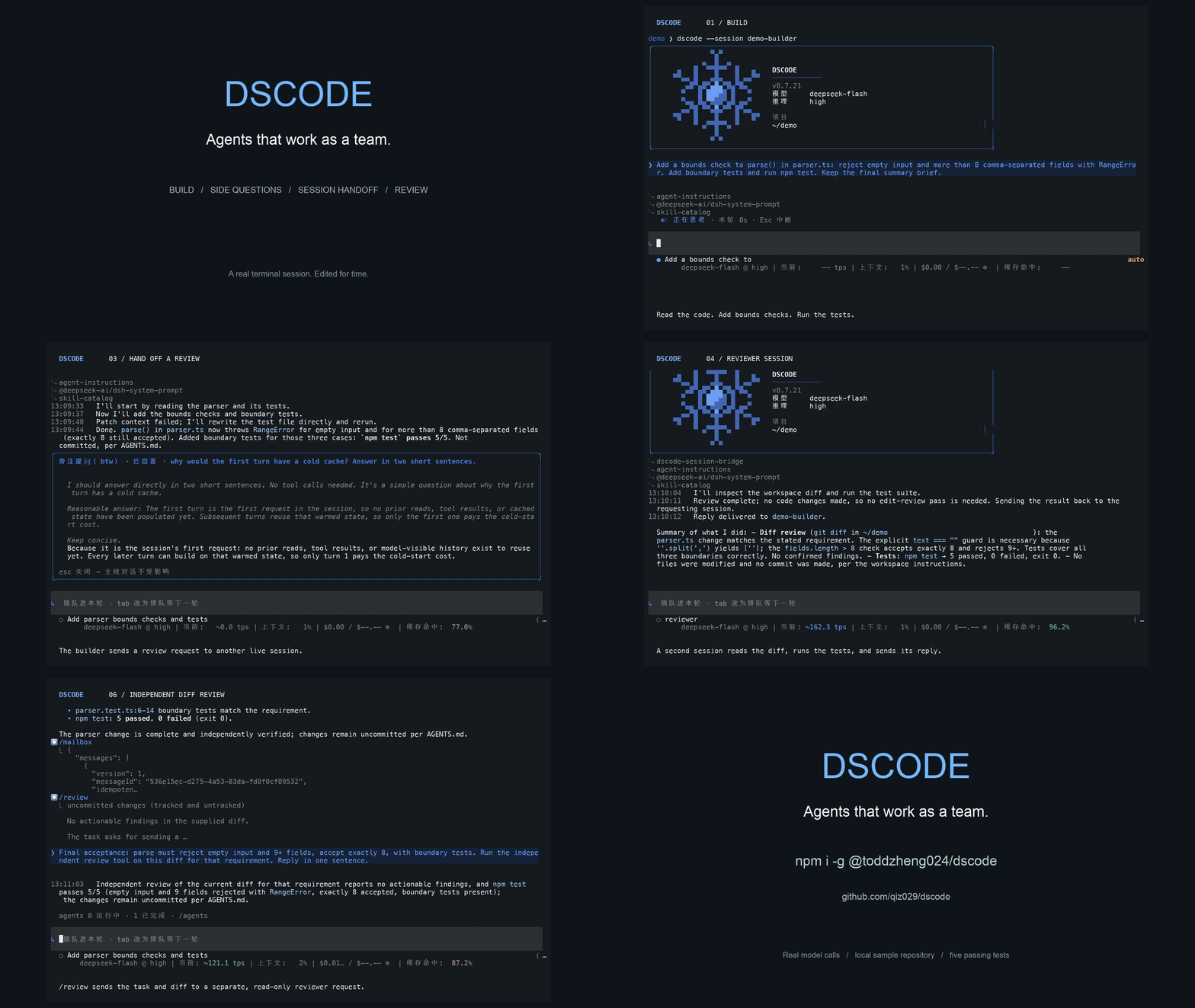

DSCODE is a terminal coding agent for macOS and Linux, built on [DeepSeek Harness](https://github.com/deepseek-ai/deepseek-harness). Dedicated file tools read and edit code with file-version checks; a persistent shell handles searches, builds and tests. The TUI, the CLI and your scripts all share one session runtime instead of each starting their own. It installs as a pinned, reproducible harness—DSH dependencies, TUI and plugins are versioned and verified together. Most coding agents work alone. DSCODE is built on the opposite assumption: sessions on your machine are **visible to each other**, so one can hand a task over, another can review the diff, and an independent reviewer decides approvals from **your instruction** rather than from a rule table. **See it in 60 seconds.** Three things most coding agents cannot do, and where to look: | In one terminal | What it shows | |---|---| | `/btw why is the cache cold on the first turn?` | A side question runs in its own read-only child session and answers in a panel; the exchange never enters the main conversation. | | `dscode send --steer "review the change in parser.ts and reply"` | Work handed to another session on this machine; it can read your transcript, answer, and hand the result back. | | `/permission auto-review` · `/review-usage` | Approvals decided by an independent reviewer from your instruction, with what it allowed and what it cost. | The [demo guide](docs/demo.md) summarizes DSCODE features, outlines a five-minute Desktop walkthrough, and retains the 90-second terminal shot list and recording commands. ## 🧭 Core features | Feature | What you get | |---|---| | **[Agentic coding loop](docs/dscode-ultra.md)** | Bounded, cached file reads, single-file batch edits and atomic writes with stale-version protection and diff metadata. Persistent Bash saves large captured results for later reads. Project instructions, skills, plan, goal and hooks are wired in. | | **[Background host](docs/host.md)** | The terminal and the agent runtime run as separate processes: the first `dscode` starts a local background host that owns sessions, and each terminal attaches to it. Work survives closing a terminal, several terminals can share a session, and a crashed terminal reattaches. `dscode host status/stop` manages it; `--in-process` keeps one process. | | **[Remote runtime](docs/remote-runtime.md)** | Run the runtime on a server with `dscode server --port 8080` and the terminal on your machine: `dscode config --runtime host:8080 --token … --alias devbox --set-default`, then `dscode` or `dscode runtime devbox`. For unattended use, `dscode server install --port 8080`, then `dscode server start`; manage status and logs with `dscode server status/logs`. Compatible protocol contracts allow different app versions. Inspect it with `dscode runtime status devbox` or `dscode runtime doctor devbox` (both accept `--json`). Update individual connection fields with `dscode config --alias devbox`. The footer identifies the remote machine and connection state; network drops reconnect, while token or version failures require correction. Session writes restore after server restart; request IDs protect delivery retries, interrupts target the observed turn, and deletion checks storage ownership. Tools, files and credentials stay on the server. Token-authenticated but unencrypted, so use a VPN, LAN or SSH tunnel. Add `--yolo` to `server` or `server install` for unrestricted file, shell, browser and desktop tool access with automatic approval across all server sessions; OS permissions still apply. Restart without it to restore ordinary policies. | | **[Session bridge](docs/session-bridge.md)** | Start a task in the TUI, then add requirements, read output or subscribe to progress from another terminal (`dscode sessions`, `send`, `read`, `watch`). Every source enters the same runtime and context, and readers never take the session write lock. | | **[Agent-to-agent tasks](docs/session-communication.md)** | The agent finds, reads and messages other sessions with `list_sessions`, `read_session`, `send_session` and `reply_session`, choosing `queue`, `steer` or `defer`. A persisted mailbox, retry de-duplication and a finite budget bound message loss, double processing and wake-up loops. | | **[Session cards](docs/session-cards.md)** | Each session advertises its project, workspace and the topics of its last five user requests—enough to pick the right collaborator without reading its transcript. Cards describe what the user asked for, not conclusions. | | **[Cross-session memory](docs/memory.md)** | Reusable experience is extracted in the background and retrieved together with its workspace and source messages. Memory can be disabled per session or globally, and its model usage is tracked separately. | | **[Effort and sub-agents](docs/dscode-ultra.md)** | Ultra uses the model's `max` reasoning and decides how far to investigate, delegate and verify; below Ultra the agent can still delegate, but only when a task clearly warrants it. Parents pick a separate effort per child, and children that edit can work in isolated Git worktrees created from a clean `HEAD`. | | **[Independent review](docs/tui-commands.md)** | After a code change passes its relevant checks, the agent sends the Git diff—or, outside a repository, the changes since a snapshot taken when the task began—to a separate read-only model and fixes concrete findings before ending the turn. `/review` runs the same reviewer by hand, scoped to the staging area, a base branch, a commit or a path. | | **[Non-interactive runs](docs/exec.md)** | `dscode exec "prompt"`, or `git diff \| dscode exec "review this"`, runs a full turn in scripts and CI: the reply streams to stdout, tool activity and the session id go to stderr, and the exit code reflects the turn. `--json` and `--resume` are supported. | | **[Terminal UX](docs/session-metrics.md)** | Six interface languages, select-and-copy text, scrollback through history, visible tool failures and file-change summaries, expandable diffs, an input area pinned to the bottom, a sub-agent overview, and footer TPS / context / cost / cache figures. A bordered welcome card and full-height layout keep input at the bottom from startup. Default themes use aligned prose and restrained colours; Prismatic and Rainbow add decorative animation. The activity line shows the current target and tool time; verbose mode reveals thinking and calls. Cached balances retain currency and distinguish account funds from key limits. | | **[Guardrails](docs/auto-review.md)** | A `workspace-write` sandbox by default and Auto permission review by an independent model, switchable to human approval. Ultra grants no extra permissions and Computer Use keeps human authorisation. | | **[Agent email](docs/email.md)** | A local `[ToAgent]` inbox shared by all sessions: Enter steers a message into the live session as user-selected context, and with Gmail configured the agent can send mail through the same approval flow. | ## 🆕 What's new **0.7.54** — Fixes message submission in projects with prompt hooks and IPv6 server readiness checks that could terminate a healthy Host after 90 seconds. See the [release notes](docs/releases/0.7.54.md). **0.7.51** — The terminal moves to Harness `0.2.1-rc.3`, adds batched edits, bounded cached reads and saved large Bash output. `server --yolo` supports unattended operation; Linux gains scoped desktop observation, verified actions, control leases and private server desktops. Wayland stream control remains experimental. See the [release notes](docs/releases/0.7.51.md). **0.7.50** — Remote servers can run as a managed macOS or Linux user service, with authenticated readiness checks and safe pause/resume during updates. Remote status, diagnosis and connection identity are easier to inspect. Session writes recover after a server restart, delivery request IDs prevent duplicate retries, interrupts can target an observed turn, and deletion respects storage ownership. Both ends must use the same protocol revision and pinned Harness version. See the [release notes](docs/releases/0.7.50.md). **0.7.49** — The terminal moves to Harness `0.2.1-rc.2`, which DeepSeek recommends for DeepSeek-V4.1-Flash-1017; the Desktop package stays on `0.2.0-rc.2`. Child agents now always start in the background and report back when they settle. On OpenRouter and OpenCode Go, `deepseek-flash` switches to V4.1 Flash instead of the retired V4 Flash. Background memory no longer fails on its own output limit. See the [release notes](docs/releases/0.7.49.md). **0.7.48** — [Remote runtime](docs/remote-runtime.md): `dscode server --port PORT` serves a machine's runtime over TCP with a token, and `dscode config --runtime` / `dscode runtime ` attach a terminal on another machine to it. Pasted files are uploaded, `/diff`, `/review` and `/export` work in the server's folder, and terminals reconnect after a dropped connection. The connection is not encrypted. `/reload` applies MCP and configuration edits, ancestor skills and instructions without restarting the runtime. See the [release notes](docs/releases/0.7.48.md). **0.7.47** — The terminal and the agent runtime now run as separate processes: `dscode` starts a local [background host](docs/host.md) that owns sessions, and terminals attach to it over an owner-only socket. Closing or crashing a terminal leaves running work on the host, several terminals can attach to one session, and each session keeps its own folder's instructions. `--in-process` restores the single-process mode. See the [release notes](docs/releases/0.7.47.md). **0.7.46** — Self-contained packages for 64-bit glibc Linux (x64 and arm64). The same `curl` installer, `dscode update` and direct downloads now work on Linux; install bubblewrap for command sandboxing. See the [release notes](docs/releases/0.7.46.md). **0.7.45** — The Antigravity provider recognises Gemini 4 Argon and selects its low/medium/high reasoning with the model's `thinkingLevel` instead of a token budget, which Argon rejects. Access is limited by Google to eligible accounts and live Argon generation is not yet verified. See the [release notes](docs/releases/0.7.45.md). **0.7.44** — Adds native OpenAI/ChatGPT and community Antigravity Gemini providers, file-version-checked read/edit/write tools, a clearer full-height terminal layout and reliable non-interactive persistent Bash commands. OpenAI speed selection reports the server's actual tier; Antigravity account access still needs live verification. See the [release notes](docs/releases/0.7.44.md). **0.7.42** — Fixes whole-package updates exceeding the archive-listing buffer. If you installed 0.7.41, rerun the `curl` installer below once; subsequent releases use `dscode update` normally. See the [release notes](docs/releases/0.7.42.md). **0.7.41** — One self-contained terminal package includes its own runtime and native dependencies. Installation and updates no longer depend on npm or Hub; user data is separate, and an existing DSH installation stays independent. See the [release notes](docs/releases/0.7.41.md). **0.7.40** — Clears cached balances when credentials change or are removed, preserves currency and account/key-limit labels, and adds fresh `/status` queries in the TUI and ACP. ACP also filters configured model choices and reports failed turns with retry guidance. See the [release notes](docs/releases/0.7.40.md). **0.7.39** — Fixes DeepSeek provider startup in the published bundle. Upgrades the terminal to Harness `0.2.0-rc.2` and Computer Use `0.3.3`, restores native reminder delivery and the `/schedule` catalog, and adds opt-in Atomic Mail MCP setup. Unconfigured or disabled Atomic Mail adds no tools or server instructions to model context. See the [release notes](docs/releases/0.7.39.md). **0.7.36** — `dscode acp` connects ACP clients to the DSCODE agent preset, configured providers and client tool approvals. Install the npm `latest` launcher and configure your client with command `dscode` and arguments `["acp"]`. See the [ACP guide](docs/acp.md) for inherited protocol limits and the [release notes](docs/releases/0.7.36.md). **0.7.35** — Removes bundled Hub functionality, scopes Desktop browser tools to DSCODE sessions, and aligns settings and activation guidance with Harness. Existing Desktop models/accounts remain usable; TUI Browser Use is retained. See the [release notes](docs/releases/0.7.35.md). **0.7.32** — OpenCode Go now signs in only with an OpenCode account: `/opencode login` shows a code, opens the console and signs in in the background. The login renews itself and sends requests to the inference endpoint the console names for your organisation. The console API key from 0.7.31 is no longer read, so run `/opencode login` once. The footer shows the subscription's usage of its five-hour, weekly and monthly caps, and when an exhausted one lifts. The consent page names the OpenCode CLI, whose login client DSCODE uses. **0.7.31** — OpenCode Go joins `/provider`: `/provider opencode-go` stores the key from the OpenCode console and serves Go's chat-completions models — DeepSeek, GLM, Kimi, MiMo, LongCat, Hy and Space Bunny — with the reasoning efforts each one accepted on the live gateway, the session id Go asks for, and reasoning passed back across tool calls. A Go session searches the web through Exa, as OpenCode does, with no extra key. Qwen, MiniMax and Go's Grok and GPT models use other protocols and are not offered yet. **0.7.30** — `/delegate ` turns the main agent into a coordinator: it plans the task on a board with priorities and dependencies, runs ready parts as child agents in isolated Git worktrees, verifies each result and merges the accepted ones in dependency order, staged and uncommitted. `/delegate-dashboard` shows the board as a colour-coded kanban — pending, running, verifying, complete. Parents now run up to five children at once below Ultra and twenty at Ultra, and the welcome snowflake is redrawn. **0.7.29** — `/account` signs the DeepSeek route in with a DeepSeek account through the system browser: the grant is stored on this machine, a signed-in machine needs no `DEEPSEEK_API_KEY`, and the command also reads the account identity, recharge and bonus balances, and signs out. The profile composes a loopback callback server for it, which carries a route only while a sign-in runs; `DSCODE_ACCOUNT_LOGIN=0` removes it. Two composition fixes came with it: the host-plane workflow engine is disabled again after an upstream rename silently voided the patch that disabled it, and the redundant PTC runtime row is gone now that the base composition ships one. **0.7.28** — The DSH runtime moves from `0.1.5-rc.2` to `0.1.7-alpha.2`, bringing sandbox escalation with justification on the retry shell, durable image offload, MCP resource tools, subagent permission inheritance and compaction retry recovery. **The reviewed permission preset is renamed `auto` → `auto-review`**, because DSH now reserves `auto` for its own integration: use `/permission auto-review`, `dscode exec --permission auto-review` and `permission: auto-review`. Computer Use keeps live activation and its native helper, but a resumed session regains its execution tools only once the `computer-use` skill is loaded again. **0.7.27** — Fixes fresh Hub installation failing after Harness composition generates its empty `cordis.yml`. The launcher carries a narrowly patched Hub CLI, and release verification now checks the native locked installer, launcher first start and Hub doctor. **0.7.26** — Triggers now support fresh or persistent sessions, durable cron and delay jobs, and supervised script sources. Manage them from `/trigger`, the CLI or agent tools with the same workspace and approval boundaries. The TUI stays in DSCODE mode and model switches reset unsupported effort values to the target default. TPS uses API-reported tokens with request-count exponential smoothing; runtime metrics and skills sit on the left, while cost, DeepSeek balance, peak/off-peak and cache align right or move together onto a third row. OpenRouter content-policy rejections now explain why the turn stopped. **0.7.25** — Running the installer again now keeps a tar installation current instead of refusing: an older one is updated through its own `dscode update` (state migrated, the old tree kept as `.dscode-backup-`), an equal or newer one is reported and left alone, and anything the installer did not create is still refused with the path it found. A Homebrew formula joins the install paths — `brew tap qiz029/tap && brew trust qiz029/tap && brew install dscode` installs the same launcher, and there `dscode update` moves only the Hub profile because `brew upgrade dscode` owns the launcher. **0.7.24** — An event can start a session unattended: trigger definitions live in `/triggers/` and `/.dsh/triggers/`, an event carries only data under a required `eventId`, and `dscode trigger` / `/triggers` run and inspect them, with `trigger install` writing a launchd LaunchAgent — a failed run notifies nobody yet. `/goal[20]` sets or re-caps the goal's round cap from the command plane. On OpenRouter, MiMo V2.6 (pro, flash and ultraspeed) joins the models that pass thinking back, and `/model` now offers a curated 28-model list — the five tuned labs plus the flagship line of Anthropic, OpenAI, Google and xAI — instead of all 373 tool-calling models, while a session already on a trimmed model keeps running. Every release is listed in the **[changelog](docs/CHANGELOG.md)**; the [0.7.29 notes](docs/releases/0.7.29.md) have the long version. ## 🚀 Quick start Requires **macOS 14+** or **64-bit Linux with glibc** (x64 or arm64; musl distributions such as Alpine are not supported). On Linux, install bubblewrap (`apt install bubblewrap`, `dnf install bubblewrap`) so commands run sandboxed; without it DSCODE falls back to Landlock and refuses sandboxed commands when neither is usable. Browser tasks also need Google Chrome, and repository/patch operations use Git. **No system Node, npm, pnpm or DSH installation is required.** **Install with one command:** ```sh curl -fsSL https://raw.githubusercontent.com/qiz029/dscode/main/install.sh | sh ``` The installer detects macOS or Linux and the processor architecture, downloads the latest self-contained release and verifies its SHA-256 checksum. It installs the complete application into `~/.local/share/dscode-app` and links `~/.local/bin/dscode`. Then run `dscode` in your project directory. If `~/.local/bin` is not on PATH, add this line to your shell configuration and run it in the current terminal: ```sh export PATH="$HOME/.local/bin:$PATH" ``` The package includes pinned Node, Harness, TUI, plugins and native dependencies. First launch never installs its runtime from npm or Hub. Your existing `dsh` command and `~/.dsh` stay untouched; DSCODE keeps its data separately in `~/.local/share/dscode-state`. **Update directly:** ```sh dscode update # upgrade to the latest self-contained release dscode update 0.7.47 # install an exact self-contained release ``` Exit running DSCODE sessions and schedulers first. The updater verifies and replaces the whole application, preserving settings, credentials and sessions; a failed replacement restores the old program. In the TUI, `/update` schedules the same updater after you exit. Re-running the installer also updates an installation it owns. **Coming from an older installation?** Legacy npm/Hub versions need a one-time migration; their old `dscode update` does not switch to this distribution. The installer refuses to overwrite a `dscode` command owned by another installation. Homebrew-managed packages use `brew upgrade dscode`; the maintained tap installs the same self-contained release archives. See [Distribution](docs/distribution.md) for migration steps. The commands above require a published self-contained release and do not fall back to legacy packages. **Prefer a direct download?** Get one package from [Releases](https://github.com/qiz029/dscode/releases): `darwin-arm64` for Apple Silicon, `darwin-x64` for Intel Macs, or `linux-x64` / `linux-arm64` for Linux. For example: ```sh mkdir dscode-app tar -xzf dscode-0.7.47-darwin-arm64-standalone.tar.gz -C dscode-app ./dscode-app/dscode ``` Keep the extracted directory together: `dscode` uses the private runtime and libraries beside it. Enter `/login` and paste your DeepSeek API key into the hidden input: it is stored locally in `~/.local/share/dscode-state/credentials.yaml` with `0600` permissions, shared across projects and installed versions, and never sent to the agent. A `DEEPSEEK_API_KEY` environment variable takes precedence. To use OpenRouter, enter `/provider openrouter`: DSCODE asks for your OpenRouter key (stored the same way, or taken from `OPENROUTER_API_KEY`) and switches the session to the DeepSeek model you were on; `/model` then lists a curated set instead of the whole catalogue—the current flagship models from DeepSeek, GLM, Kimi, Qwen and MiMo, plus the flagship line of Anthropic, OpenAI, Google and xAI—and typing searches it. Those five are tuned and tested; the Western flagships work on a best-effort basis. A model outside the list still runs when a session is already on it. `/provider deepseek` switches back, and `/login openrouter` replaces the key. An [OpenCode Go](docs/opencode-go.md) subscription works the same way: `/opencode login` signs in with your OpenCode account, then `/provider opencode-go` offers Go's DeepSeek, GLM, Kimi, MiMo, LongCat, Hy and Space Bunny models. Use `/model` to pick a model or another provider, and `/effort` to adjust reasoning effort; the default route is `deepseek-official/deepseek-flash`. The TUI checks GitHub for a newer release at startup and `/update` upgrades the whole installation after you exit. Use [Antigravity](docs/antigravity.md) with `/antigravity login`, then `/provider antigravity`, to call Gemini through your Google account while keeping DSCODE's tools and permissions. This community integration uses the model backend directly; account access and quotas are determined by Google. Use [OpenAI / ChatGPT](docs/openai.md) with `/openai login` and `/provider openai`, or select API-key billing with `/openai api-key`. Choose reasoning with `/effort` and speed with `/speed standard|fast|ultrafast`. OpenAI conversations compact at 272,000 estimated input tokens, earlier for smaller models. Use [Anthropic](docs/anthropic.md) with `/login anthropic` (or `ANTHROPIC_API_KEY`), then `/provider anthropic`. Choose Claude Opus 5.5, Sonnet 5.5 or Fable 5.1 with `/model`, and set reasoning with `/effort`. This route calls the Anthropic API directly using API billing. Automatic compaction defaults to 50% of the usable input window (436,000 tokens after reserving the output budget). Use `/provider custom` to add a self-hosted or private API with Chat Completions, Responses or Anthropic Messages. Configure the endpoint and optional key, discover or enter models, set their context windows, and test streaming tool calls. For a model that supports vision, enable **Input → Text and images** to send screenshots and image attachments; the default is text only. Saved services appear by name in `/provider`; Enter switches to their model. See [Custom model providers](docs/custom-providers.md). **Six interface languages, English by default.** `/language` opens the picker and `/language ja` switches straight to a locale; 中文, 日本語 and 한국어 are accepted as names too. The set is English, 简体中文, 繁體中文, 日本語, 한국어 and Español. The choice is stored per machine in `$DSCODE_HOME/tui/language.json` (under `~/.local/share/dscode-state` by default), and `DSCODE_LANGUAGE=es` overrides it for one run. ```sh dscode --continue # continue the last session dscode --resume SESSION_ID # resume a specific session (it runs in the folder it was created in) dscode --cwd /another/project # work in another directory dscode trigger list # event-driven runs defined in this project (run|fire|install|log) dscode doctor # analyse recent logs and session traces dscode --version # print the DSCODE version ``` The self-contained package uses its own pinned runtime and does not reuse or modify an existing DSH installation. Browser tools load on demand: ask the agent to use the browser, or run `/browser start`. CSS rule inspection uses snapshot element IDs and requires global and per-site Developer grants. Dedicated persistent profiles, existing-Chrome connections, experimental extension sharing of selected tabs, tab retention and the experimental Desktop sidebar preview with point annotations and site permission controls are described in [Browser use](docs/browser-use.md). While visible and idle, the sidebar synchronizes permission changes made elsewhere, clears affected previews and keeps annotation drafts. The preview has been verified in the shared Web client and the official macOS Electron application using an isolated local fixture. Desktop tools load progressively through a skill; screenshot understanding needs an image-capable model. The MCP bridge supports tools and resources. Linux Computer Use adds scoped AT-SPI reads, verified actions, shared desktop control, X11/Wayland input and private server desktops; `/computer status` reports capabilities. OS permissions and Wayland Portal consent remain separate. See [Computer Use](docs/computer-use.md#linux-terminal-and-server) for supported paths. Add other MCP servers in `config/mcp.local.yml`. An experimental combined Desktop package adds the DSCODE preset, custom-model and account settings, browser preview, durable session communication, cross-session memory and opt-in scheduling to the official application. **Settings → DSCODE → Schedules** manages tasks and enables delivery while Desktop stays open. Build and local installation instructions are in [Browser use](docs/browser-use.md#install-the-experimental-combined-desktop-package). Native installation, upgrade, removal and reinstallation with scheduling enabled, plus rendered account and scheduling controls, were checked on macOS Desktop 0.2.0-rc.2; qualification limits are covered in [Triggers](docs/triggers.md#experimental-desktop-scheduling). The package also includes an experimental [native Computer Use adapter](docs/computer-use.md); window observation and input still await qualification with macOS Accessibility permission. Durable [time context](docs/session-communication.md#time-context-for-delayed-work) gives DSCODE agents arrival times, relay waits and previous turn endings while keeping ordinary chat clear. Namespaced [Desktop diagnostics](docs/tui-commands.md#experimental-desktop-diagnostics) inspect the selected session, skills and Host MCP entries; matching user guides ship with the package. The [Desktop email inbox](docs/email.md#experimental-desktop-inbox) previews shared local mail, connects IMAP or Gmail OAuth, and adds a selected message to a DSCODE session. Background sync is opt-in; outgoing mail keeps the existing approval and receipt rules. The [Session usage sidebar](docs/session-metrics.md#experimental-desktop-usage) shows DSCODE cost, context, cache, request speed and per-turn estimates. The [Delegation board sidebar](docs/tui-commands.md#experimental-desktop-delegation-board) follows the selected main session’s tasks, dependencies, worktrees and verification evidence. The Desktop plugin is distributed separately from the terminal packages; terminal popups and terminal-only commands keep their existing UI. The Desktop plugin uses the package name `@toddzheng024/dscode-desktop`. Version 0.7.35 removes bundled [Plugin Hub](docs/plugin-hub.md) UI, discovery tools and runtime dependencies; DSCODE remains listed in the Hub catalog. It targets Harness runtime 0.2.0-rc.2. In official **Plugins → Add plugin**, enter `@toddzheng024/dscode-desktop@0.7.47`, install, then choose **Enable now**. Fully quit and reopen Desktop after updating. Both `preview` and the default `latest` channel receive this verified preview release. **Settings → DSCODE** groups setup, Models, Accounts and Schedules at the same level; **Plugins → DSCODE · Community** opens the same page. DSCODE browser tools are scoped to DSCODE sessions. Existing Desktop models/accounts work through the normal picker; optional provider settings use the native credential store. Enable **Show coding view** and **Agent presets**, then choose DSCODE for a new session after fully restarting.
Updates, data directories and source development `dscode update [exact-version]` downloads and verifies the complete release, checks its bundled modules, then replaces the application as a unit. Exit running sessions first. A failure preserves or restores the old application; successful updates retain a sibling backup. There is no npm fallback. Packages installed with the new Homebrew formula use `brew upgrade dscode` to replace the same complete package. Sessions, credentials and local configuration live outside the application at `~/.local/share/dscode-state`, overridable with an absolute `DSCODE_HOME`. Startup isolates inherited DSH configuration and Node injection options; it does not replace the existing `dsh` command or `~/.dsh`. Migration from an old installation is explicit; see [Distribution](docs/distribution.md). Source development still uses Node and npm: ```sh git clone https://github.com/qiz029/dscode.git cd dscode npm ci --ignore-scripts npm run setup npm start ```
## ⌨️ Commands | Command | What it does | |---|---| | `/login` | Paste the DeepSeek API key into a hidden input; saved under `$DSCODE_HOME/credentials.yaml` and loaded at startup | | `/account` | Sign in to a DeepSeek account in the browser instead of pasting a key; also its identity, balance and sign-out | | `/status` | Current provider, model and credential balance; DeepSeek and OpenRouter supported, also available in [ACP](docs/acp.md#current-credential-balance) | | `/model`, `/effort` | Choose a model (type to search) or configure other credentials; models with four levels use a horizontal effort bar | | `/new` | Start a fresh session; the TUI is fixed to the `dscode` preset, including resumed conversations | | `/status`, `/doctor` | Session state and runtime diagnostics | | `/memories` | Global memory state, background usage, switches and cleanup | | `/session` | Current session id, its card, and the external access entry point | | `/permission auto-review`, `/permission ask` | Switch between automatic review and human approval | | `/review-usage` | Extra tokens and time spent on automatic review | | `/shell`, `/shell reset` | Inspect or reset the persistent terminal | | `/browser` | Browser sessions, profiles, extension pairing, site permissions, Developer mode, WebMCP, handoff and tab retention | | `/mcp`, `/skills`, `/hooks` | Manage MCP, inspect skill sources, view or reload hooks | | `/reload` | Apply edits to MCP servers and config overlays, and remount this session's instructions, ancestor skill folders and hooks, without restarting the runtime | | `/plan`, `/goal` | Plans and long-running objectives | | `/agents` | Sub-agent tasks, status and current activity | | `/delegate ` | The main agent plans the task on a board with priorities and dependencies, dispatches ready tasks in priority order to child agents in isolated Git worktrees as child slots free up, answers their questions, verifies each result and finally stages what it merges | | `/delegate-dashboard` | Kanban popup of the delegated tasks: pending, running, verifying, complete | | `/btw` | Ask a side question in a child session; the answer shows in its own panel and never enters the main conversation | | `/mailbox` | Session messages and deferred notes | | `/email` | Press `i` to configure IMAP and an app password; browse `[ToAgent]` mail and press Enter to steer it into the session | | `/compact` | Compact the conversation context | | `/diff`, `/review` | Inspect edits; `/review` asks an independent, read-only model to review a Git diff | | `/clear` | Start a new session with empty context; the old session stays resumable | | `/resume`, `/fork` | Resume or fork a session | `Shift+Enter` inserts a newline, `!command` runs a local shell command, `Ctrl+L` clears only the screen, and `Esc` interrupts the current operation. The TUI's `/help` is the authoritative list, and [commands and hooks](docs/tui-commands.md) covers the rest. ## 🔧 Permissions & configuration The default is a `workspace-write` sandbox with **Auto** permission review, where applicable approval requests go to an independent model; `/permission ask` hands them back to you. Ultra adds no permissions. [Scope, cost and limits of auto review →](docs/auto-review.md) | Install method | Sessions, credentials and stats | Local configuration | |---|---|---| | Self-contained package | `~/.local/share/dscode-state`, overridable with `DSCODE_HOME` | `.env` and `config/` in the data directory | | Legacy npm / Hub | `~/.local/share/dscode-hub`, overridable with `DSCODE_HOME` | `.env` and `config/` in the data directory | | Source | repository `.runtime/` | repository `.env` and `config/` | | Legacy tar | `.runtime/` inside the install directory | `.env` and `config/` in the install directory | `config/hooks.local.json`, `config/mcp.local.yml` and `config/harness.local.yml` are supported. Local configs, secrets and sessions never enter a release package. Skills are discovered in the target project's `.agents/skills` and `.dsh/skills`, plus an isolated user skill directory; `/skills conflicts` diagnoses same-name overrides. A project's `.codex/hooks.json`, `.dsh/hooks.json` and `.claude/settings.json` are layered on top of `config/hooks.local.json` by default; set `DSCODE_PROJECT_HOOKS=0` to load the installation file alone. Skills come from the project's `.dsh/skills` and `.agents/skills` plus the user roots, and by default `.dsh/skills`, `.agents/skills` and `.claude/skills` are also read from every directory between the working directory and home, nearest first; `DSCODE_SKILL_ANCESTORS=0` keeps discovery to the project and user roots alone. `AGENTS.md`/`CLAUDE.md` in those ancestor directories is folded into the workspace instructions. Skills added to the project and user roots are picked up while a session runs; after editing `config/mcp.local.yml` or `config/harness.local.yml`, adding an ancestor skill folder or changing an ancestor `AGENTS.md`, run `/reload`. ## 🧩 Development ```sh npm test # unit and contract tests (upstream dependencies isolated) npm run check # coverage, integration, TUI and packaging checks npm run doctor # deterministic local agent integration check npm run dist # build self-contained packages with private Node node scripts/verify-standalone.mjs # qualify the package for this machine ``` `make release` runs version validation, the full checks, package builds, local installation verification and candidate archiving. CI also qualifies the x64 package on an Intel runner. `make publish` attaches terminal packages to the GitHub Release; Desktop retains independent build, verification and publication. `node scripts/homebrew-formula.mjs` generates a formula from the same archives and SHA-256 hashes; the formula still needs synchronization to the tap. DSH is pinned to `0.2.1-rc.3` (the Desktop package stays on `0.2.0-rc.2`, the official Desktop app's runtime), bundled Node to `24.21.0`, the TUI is based on `dsh-code@1.2.0`, and Computer Use is `0.3.6`. Runtime patches are applied during the build. See [Distribution](docs/distribution.md) for the current flow and [Legacy Hub distribution](docs/hub-distribution.md) for retained npm/Hub tooling. Compaction evaluation lives under [`eval/`](eval/README.md). ## 📚 Documentation | Document | Contents | |---|---| | [Changelog](docs/CHANGELOG.md) | Every release, newest first | | [Non-interactive runs](docs/exec.md) | `dscode exec`, JSON output, resume and effort/model/permission flags | | [ACP clients](docs/acp.md) | `dscode acp`, configured-provider model filtering, custom providers, client approval and protocol limits | | [Triggers](docs/triggers.md) | Event-driven runs with fresh or persistent sessions: cron, delay jobs, supervised script loops, `/trigger` TUI management, agent tools, the run log | | [Background host](docs/host.md) | The separate runtime process, `dscode host` commands, idle exit, single-process mode and updates | | [Remote runtime](docs/remote-runtime.md) | `dscode server`, `dscode config --runtime` and `dscode runtime`: the runtime on a server, the terminal on your machine | | [Session bridge](docs/session-bridge.md) | `dscode sessions`, `send`, `read`, `watch` against a live session | | [Session communication](docs/session-communication.md) | Agent-side messaging, delivery modes, budgets and de-duplication | | [Session cards](docs/session-cards.md) | Project, workspace and topic fields, and how they are derived | | [Memory](docs/memory.md) | Global cross-session memory, background usage and switches | | [Persistent shell and Ultra](docs/dscode-ultra.md) | Presets, reasoning effort, per-child effort and worktree isolation | | [Computer Use](docs/computer-use.md) | Linux scoped AT-SPI, X11/Wayland input, private server desktops, macOS Desktop adapter, grants and qualification limits | | [Browser use](docs/browser-use.md) | Browser setup, profiles, site permissions, Developer mode, WebMCP and task evaluation with DeepSeek or custom models | | [Plugin Hub](docs/plugin-hub.md) | DSCODE/Hub separation and behavior of earlier published packages | | [Account login](docs/account-login.md) | Signing the DeepSeek route in with a browser account instead of an API key: the flow, the loopback callback, the limits | | [Antigravity](docs/antigravity.md) | Google account sign-in, Gemini models, conversation replay and connection limits | | [OpenAI / ChatGPT](docs/openai.md) | ChatGPT login, API keys, Fast/Ultrafast speed and 272k compaction | | [Anthropic](docs/anthropic.md) | API keys, Claude Opus 5.5, Sonnet 5.5, Fable 5.1 and thinking replay | | [OpenCode Go](docs/opencode-go.md) | Running a session on an OpenCode Go subscription: the account login, footer usage, the models and their reasoning efforts, what is not supported yet | | [Custom model providers](docs/custom-providers.md) | Connect self-hosted and private APIs: protocols, model discovery, context windows, credentials and tool-call testing | | [Auto review](docs/auto-review.md) | Scope, cost and limits of independent permission review | | [Email](docs/email.md) | IMAP setup, the inbox panel, `send_email`, aliases and opt-in Atomic Mail MCP (no context loaded until enabled) | | [Skills and workspace instructions](docs/skills.md) | Discovery scopes, the ancestor mode and instruction files | | [TUI commands](docs/tui-commands.md) | Command reference and hooks | | [Session metrics](docs/session-metrics.md) | Definition of the footer TPS, context, cost and cache figures | | [Demo guide](docs/demo.md) | Desktop feature summary and walkthrough draft; 90-second terminal shot list and recording commands | | [npm + Hub distribution](docs/hub-distribution.md) | Bundle, Hub release and launcher pipeline | | [Package distribution](docs/distribution.md) | Self-contained packages, updates, isolation and migration | | [Verification](docs/verification.md) | What the maintained checks cover | Design records do not repeat the guides above: | Document | Contents | |---|---| | [Session messaging design](docs/session-messaging-design.md) | Rationale, boundaries and fixed limits behind agent-to-agent tasks | | [Cloud web app host](docs/cloud-webapp-host.md) | Design baseline and trust model for browser access; not implemented | | [Runtime and client separation](docs/runtime-client-design.md) | Decisions, P0 evidence and plan for driving the runtime from separate clients over the upstream protocol | | [Client and runtime protocol](docs/runtime-protocol.md) | How a client talks to the Host: socket, envelopes, streams, session lifecycle, approvals and the DSCODE operation catalog | | [Triggers](docs/triggers-design.md) | Why the trigger mechanism is shaped this way: the ingress, the supervised scheduler, the run log as a contract | | [Verification](docs/verification.md) | What the maintained checks cover, and what cannot run inside a session | | [Maintainability](docs/maintainability.md) | What checks the forked terminal, and what stays unverified | | [Upgrading the vendored terminal](docs/vendored-tui-upgrade.md) | Taking a new upstream dsh-code release: the merge procedure, and what only a smoke test catches | | [Releases](docs/releases/) | Long-form notes for every release, newest first | | [Context handoff](docs/CONTEXT-HANDOFF.md) | Development checkpoint for a fresh session; not user documentation | ## 🤝 Contributing Issues and pull requests are welcome. Run `npm run check` before sending a change, and keep self-contained package verification separate from legacy npm/Hub tooling. ## 📄 License [MIT](LICENSE) © 2026 Todd Zheng --- Built on [DeepSeek Harness](https://github.com/deepseek-ai/deepseek-harness), [DSH-Code](https://github.com/unlinearity/dsh-code) and [DSH Plugin Hub](https://dshpluginhub.ai). An independent community project, not an official DeepSeek product.