# QKSliderView
[](https://travis-ci.org/qkzhu/QKSliderView)
[](https://cocoapods.org/pods/QKSliderView)
[](https://cocoapods.org/pods/QKSliderView)
[](https://cocoapods.org/pods/QKSliderView)
## 预览
 ## 运行范例
先在 `Example` 目录下运行 `pod install`,然后在运行范例。
## 安装
`QKSliderView` 支持 [CocoaPods](https://cocoapods.org). 把一下复制到 `Podfile`里:
```ruby
pod 'QKSliderView'
```
## 使用方法(或者参考范例)
### 用storyboard创建
1. 拖一个 `UICollectionView` 进storyboard。
2. 把 class 换成 `QKSliderView`。
## 运行范例
先在 `Example` 目录下运行 `pod install`,然后在运行范例。
## 安装
`QKSliderView` 支持 [CocoaPods](https://cocoapods.org). 把一下复制到 `Podfile`里:
```ruby
pod 'QKSliderView'
```
## 使用方法(或者参考范例)
### 用storyboard创建
1. 拖一个 `UICollectionView` 进storyboard。
2. 把 class 换成 `QKSliderView`。
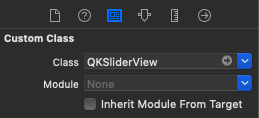 3. 输入水平间距,垂直间距,行数,列数等信息。
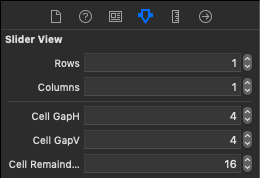 ### 用代码创建
```Swift
let sliderView = QKSliderView(rows: 2, columns: 2, cellGapH: 8, cellGapV: 4, cellRemainWidth: 8)
sliderView.dataSource = self //UICollectionViewDataSource
self.view.addSubview(sliderView)
// 然后加constraints或者调整frame
```
### 变量参考图
### 用代码创建
```Swift
let sliderView = QKSliderView(rows: 2, columns: 2, cellGapH: 8, cellGapV: 4, cellRemainWidth: 8)
sliderView.dataSource = self //UICollectionViewDataSource
self.view.addSubview(sliderView)
// 然后加constraints或者调整frame
```
### 变量参考图
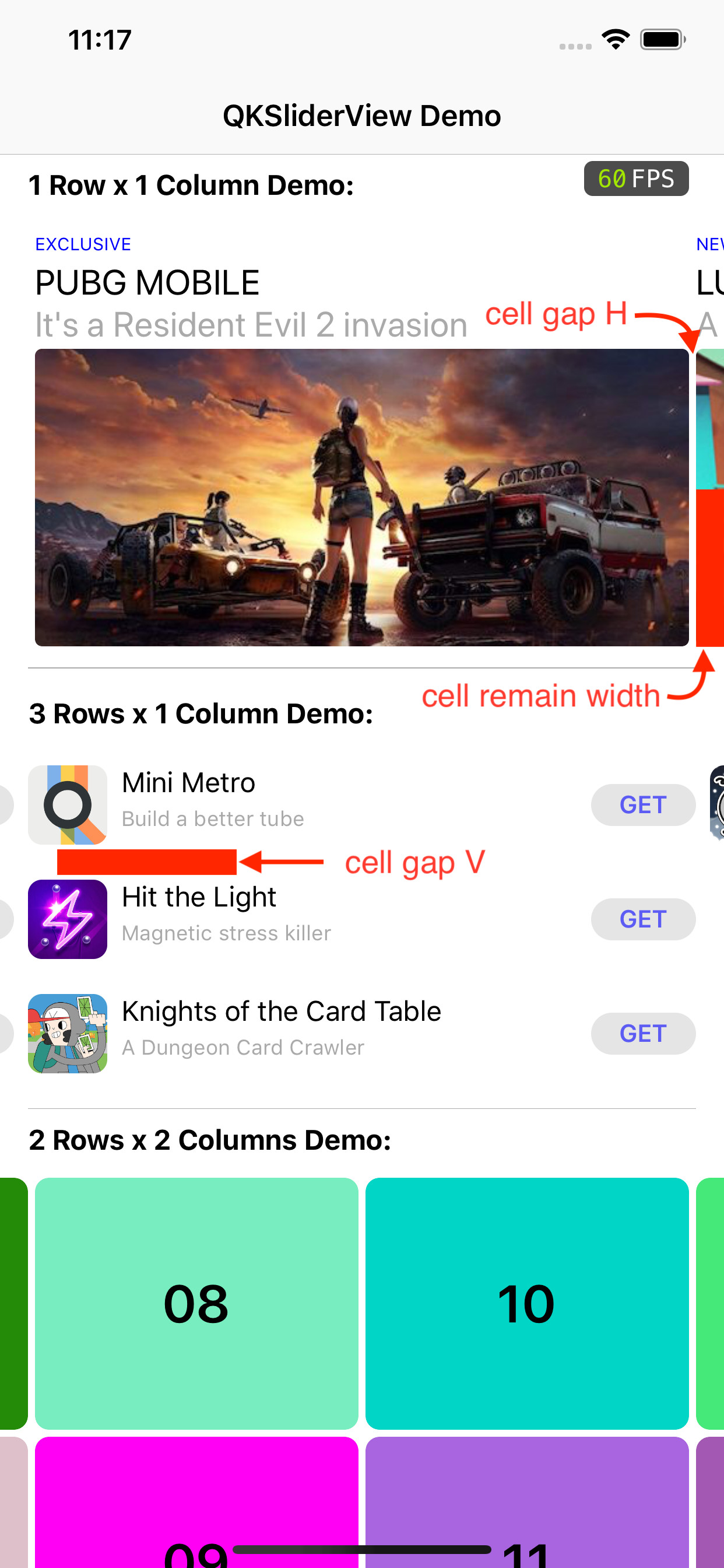 ## 作者
[qiankun](lastencent@gmail.com)
## 版权
QKSliderView is available under the MIT license. See the LICENSE file for more info.
## 作者
[qiankun](lastencent@gmail.com)
## 版权
QKSliderView is available under the MIT license. See the LICENSE file for more info.