DropDownMenuKit
===============
[](https://travis-ci.org/qmathe/DropDownMenuKit)
[](http://www.apple.com)
[](https://swift.org)
[](https://github.com/qmathe/DropDownMenuKit/LICENSE)
DropDownMenuKit is a custom UIKit control to show a menu attached to the navigation bar or toolbar. The menu appears with a sliding animation and can be deeply customized. For example, with icons, embedded controls, or a checkmark to denote a selected row among multiple menu cells.
The control is made up of three parts:
- DropDownMenu: the menu itself, a UIView subclass that contains a UITableView presenting one or more DropDownMenuCell(s)
- DropDownMenuCell: a menu entry, implemented as a UITableViewCell subclass
- DropDownMenuTitleView: an optional title view to toggle the menu, which is usually put in the navigation bar and acts as a disclosure indicator
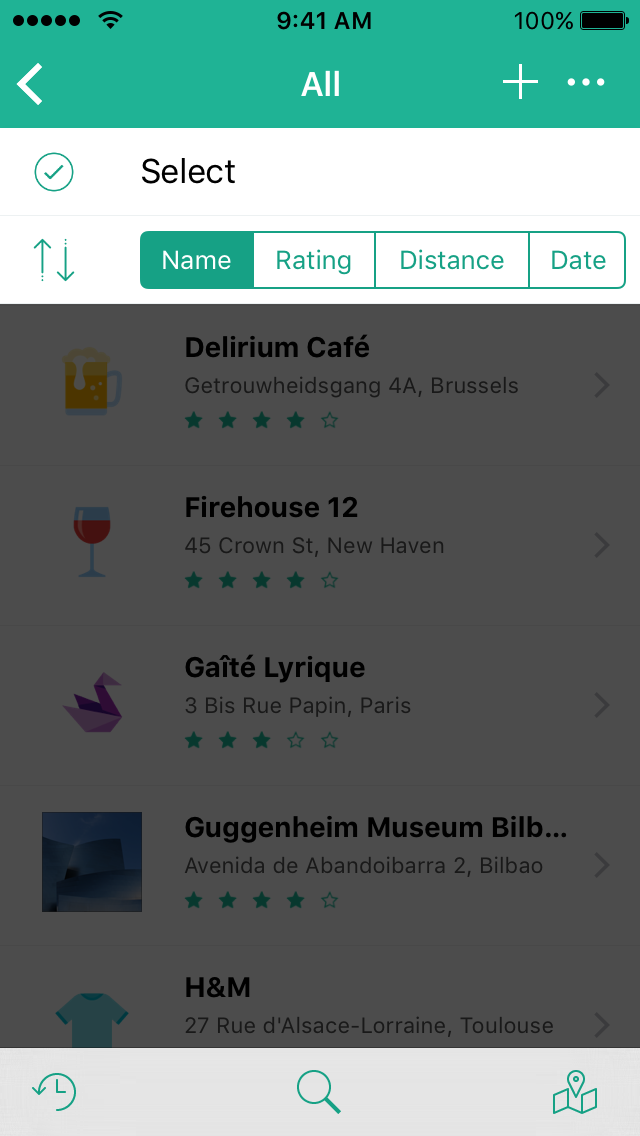
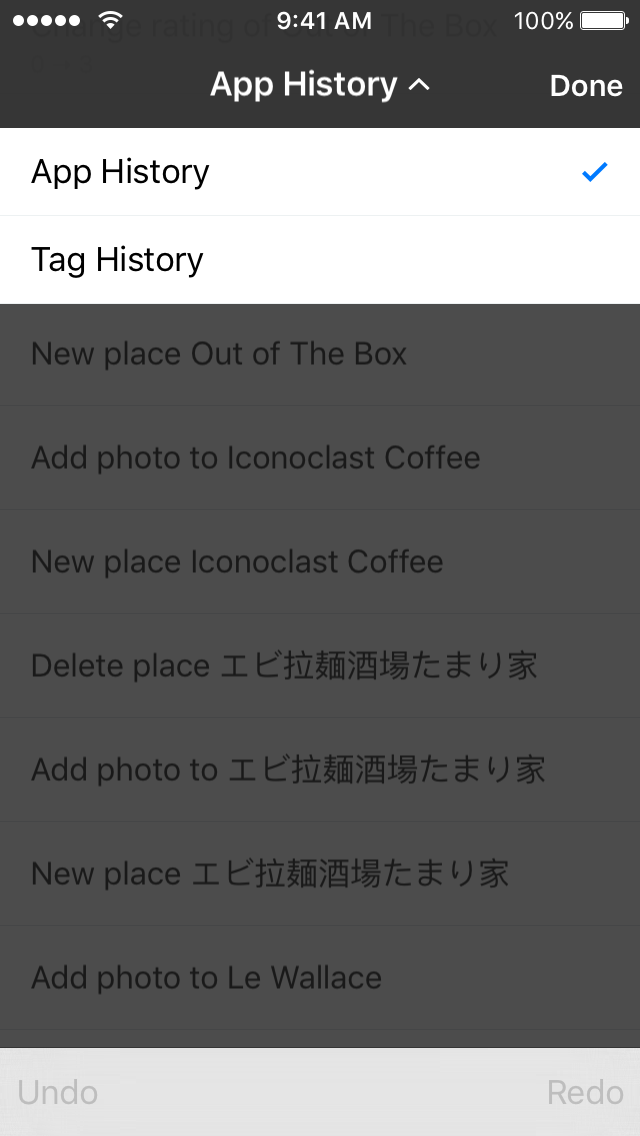 To see in action, take a look at the very beginning of [Placeboard](http://www.placeboardapp.com) demo video.
Compatibility
-------------
DropDownMenuKit requires at least Xcode 10.2 (introducing Swift 5) and supports iOS 11 and higher.
For versions compatible with Swift 3 and 4, see branches named _swift-3/4.x_.
For now, the code base remains compatible with older iOS versions (8 or higher), but these older
versions are not supported anymore.
Installation
------------
### Carthage
Add the following line to your Cartfile, run `carthage update` to build the framework and drag the built DropDownMenuKit.framework into your Xcode project.
github "qmathe/DropDownMenuKit"
### CocoaPods
Add the following lines to your Podfile and run `pod install` with CocoaPods 1.9 or newer.
pod "DropDownMenuKit"
### Manually
If you don't use Carthage or CocoaPods, it's possible to drag the built framework or embed the source files into your project.
#### Framework
Build DropDownMenuKit framework and drop it into your Xcode project.
#### Files
Drop DropDownMenu.swift, DropDownMenuCell.swift, DropDownTitleView.swift and DropDownMenuKit.xcassets into your Xcode project.
App Extension Usage
-------------------------
### Build Settings
Add **-DAPP_EXTENSION** to _DropDownMenuKit > Build Settings > Other Swift Flags_.
### Restrictions
- `DropDownMenuCell.menuAction` must take a single argument
- `DropDownMenuCell.menuTarget` must not be nil
To see in action, take a look at the very beginning of [Placeboard](http://www.placeboardapp.com) demo video.
Compatibility
-------------
DropDownMenuKit requires at least Xcode 10.2 (introducing Swift 5) and supports iOS 11 and higher.
For versions compatible with Swift 3 and 4, see branches named _swift-3/4.x_.
For now, the code base remains compatible with older iOS versions (8 or higher), but these older
versions are not supported anymore.
Installation
------------
### Carthage
Add the following line to your Cartfile, run `carthage update` to build the framework and drag the built DropDownMenuKit.framework into your Xcode project.
github "qmathe/DropDownMenuKit"
### CocoaPods
Add the following lines to your Podfile and run `pod install` with CocoaPods 1.9 or newer.
pod "DropDownMenuKit"
### Manually
If you don't use Carthage or CocoaPods, it's possible to drag the built framework or embed the source files into your project.
#### Framework
Build DropDownMenuKit framework and drop it into your Xcode project.
#### Files
Drop DropDownMenu.swift, DropDownMenuCell.swift, DropDownTitleView.swift and DropDownMenuKit.xcassets into your Xcode project.
App Extension Usage
-------------------------
### Build Settings
Add **-DAPP_EXTENSION** to _DropDownMenuKit > Build Settings > Other Swift Flags_.
### Restrictions
- `DropDownMenuCell.menuAction` must take a single argument
- `DropDownMenuCell.menuTarget` must not be nil