# log-record
**README:** [简体中文](README.md) · **English** · [日本語](README-JA.md) · [Português (Brasil)](README-PT-BR.md)
[](https://github.com/qqxx6661/log-record/actions/workflows/ci.yml)
[](https://codecov.io/gh/qqxx6661/log-record/branch/master)
[](https://central.sonatype.com/artifact/cn.monitor4all/log-record-starter)
[](https://www.apache.org/licenses/LICENSE-2.0.html)
[](https://github.com/qqxx6661/log-record/stargazers)
[](https://github.com/qqxx6661/log-record/issues)
[](https://github.com/qqxx6661/log-record/issues?q=is%3Aissue+is%3Aclosed)
[](https://github.com/qqxx6661/log-record/pulls)
[](https://github.com/qqxx6661/log-record/pulls?q=is%3Apr+is%3Aclosed)
> **Note**
> This repository was originally inspired by the [Meituan Tech Blog article on operation logs](https://tech.meituan.com/2021/09/16/operational-logbook.html). If you are looking for the source code written by that article's author, see [mzt-biz-log](https://github.com/mouzt/mzt-biz-log/). This project independently implements most of the ideas described in the article and has continued to evolve based on production experience and community feedback.
`log-record` lets you record operation logs elegantly with Java annotations. It supports SpEL expressions, custom context variables, custom functions, object diffs, and more. Generated logs can be handled in your application or sent to a preconfigured message queue. Spring Boot 1, 2, and 3 are supported across JDK 8 through JDK 21.
With the Spring Boot Starter, one dependency and one annotation are all you need. Your business logic stays focused on the business itself:
```java
@OperationLog(
bizType = "'followerChange'",
bizId = "#request.orderId",
msg = "'User ' + #queryUserName(#request.userId)"
+ " + ' changed the order follower from '"
+ " + #queryOldFollower(#request.orderId)"
+ " + ' to ' + #request.newFollower"
)
public Response function(Request request) {
// Business logic
}
```
For Spring Boot 1 or 2 (JDK 8+), add:
```xml
cn.monitor4all
log-record-starter
{latest-version}
```
For Spring Boot 3 (JDK 17+), add:
```xml
cn.monitor4all
log-record-springboot3-starter
{latest-version}
```
See [Maven Central](https://central.sonatype.com/artifact/cn.monitor4all/log-record-starter) for the latest version.
## Background
You have probably seen operation logs like these:
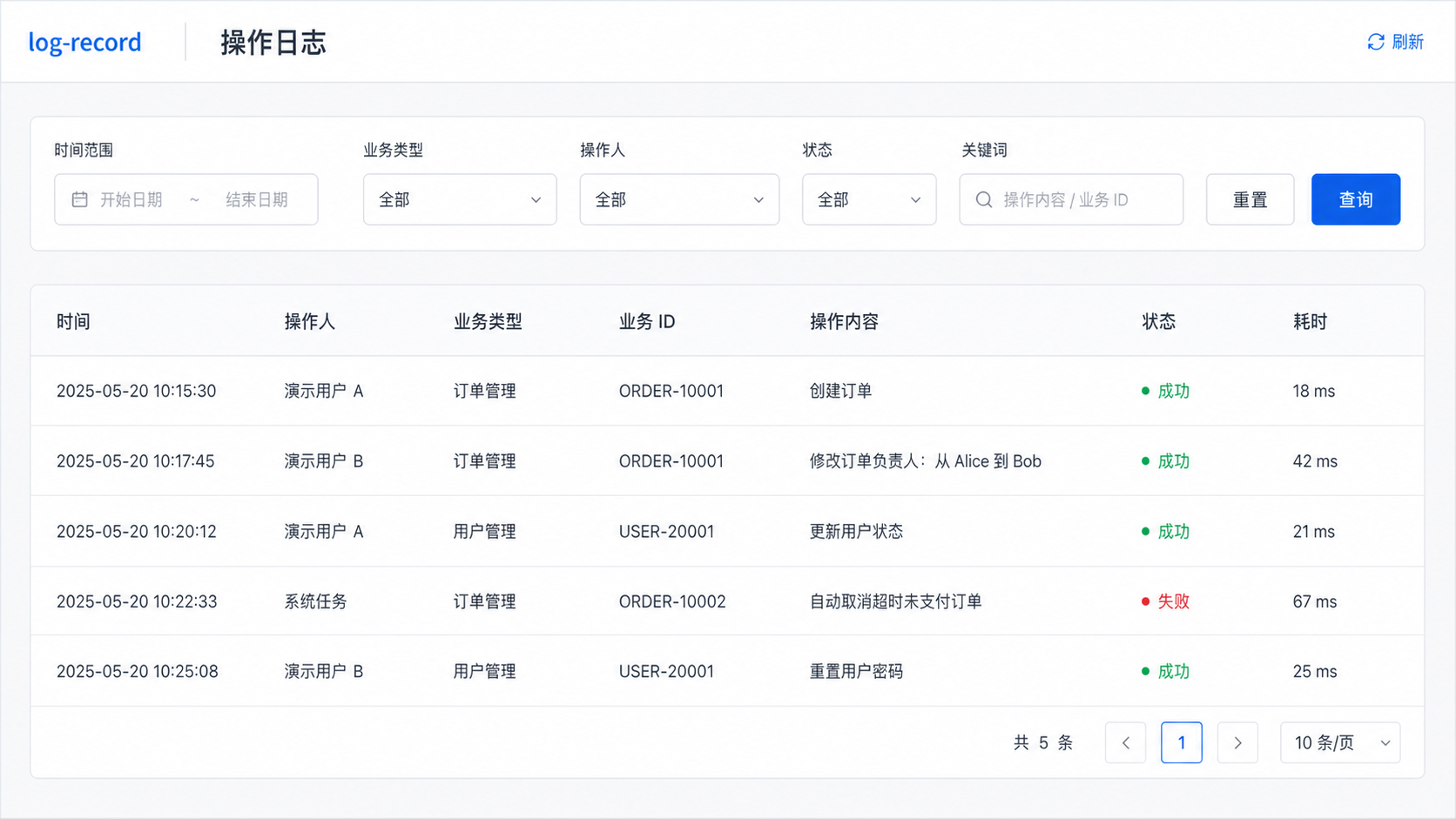
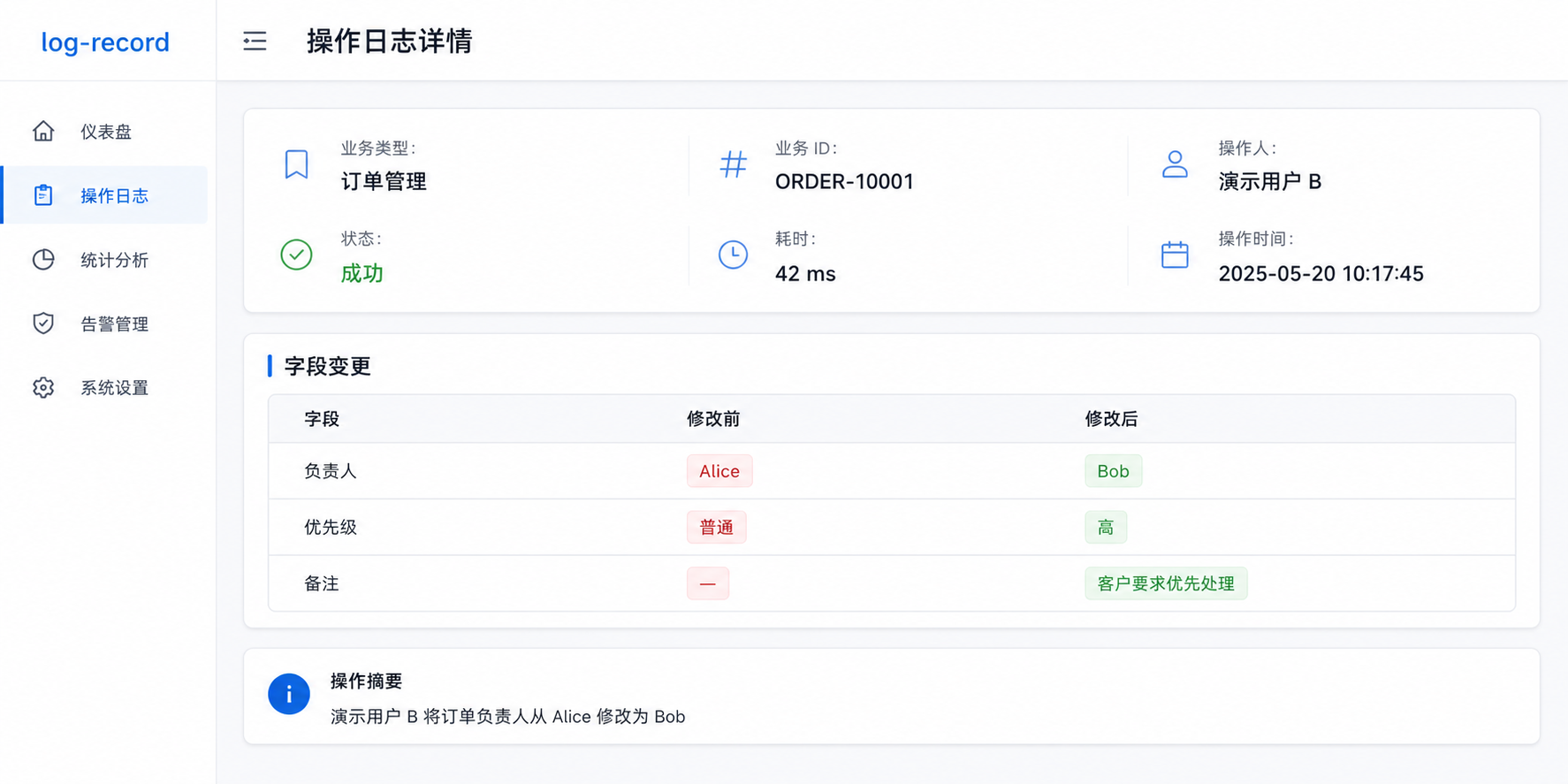
How can we record these logs cleanly in code?
The most direct approach is to wrap the logging operation in a helper:
```java
String template = "User %s changed the order follower from %s to %s";
LogUtil.log(orderNo, String.format(template, "Alice", "Bob", "Carol"), "Alice");
```
This mixes logging details into business code and quickly hurts readability and maintainability.
Moving the log definition into an annotation is a better start:
```java
@OperationLog(
bizType = "'followerChange'",
bizId = "'20211102001'",
msg = "'User Alice changed the order follower from Bob to Carol'"
)
public Response function(Request request) {
// Business logic
}
```
The log definition is now separate from the method body, but the values are hard-coded. We still need to pass the order ID, user information, old database value, and new request value to the annotation.
[Spring Expression Language (SpEL)](https://docs.spring.io/spring-framework/reference/core/expressions.html) lets the annotation read method arguments:
- Order ID: `#request.orderId`
- New follower: `#request.newFollower`
```java
@OperationLog(
bizType = "'followerChange'",
bizId = "#request.orderId",
msg = "'User Alice changed the order follower from Bob to ' + #request.newFollower"
)
public Response function(Request request) {
// Business logic
}
```
Values such as the current user and the old follower usually have to be queried inside the method and are not part of its arguments. `LogRecordContext` can expose values computed by business code to SpEL:
```java
@OperationLog(
bizType = "'followerChange'",
bizId = "#request.orderId",
msg = "'User ' + #userName + ' changed the order follower from '"
+ " + #oldFollower + ' to ' + #request.newFollower"
)
public Response function(Request request) {
// Business logic
LogRecordContext.putVariable("userName", queryUserName(request.getUserId()));
LogRecordContext.putVariable("oldFollower", queryOldFollower(request.getOrderId()));
}
```
This is convenient, but it still adds logging-related code to the method. Custom SpEL functions remove that last bit of intrusion. Register `queryUserName` and `queryOldFollower` with the SpEL evaluator, and the expressions will invoke them when the log is created:
```java
@OperationLog(
bizType = "'followerChange'",
bizId = "#request.orderId",
msg = "'User ' + #queryUserName(#request.userId)"
+ " + ' changed the order follower from '"
+ " + #queryOldFollower(#request.orderId)"
+ " + ' to ' + #request.newFollower"
)
public Response function(Request request) {
// Business logic
}
```
The resulting log reads:
> User Alice changed the order follower from Bob to Carol
That is the core idea behind this library.
## Project overview
`log-record` uses annotations to record operation logs without coupling the logging implementation to business logic.
### Features
- **Quick integration:** add a Spring Boot Starter dependency to `pom.xml`.
- **Non-intrusive:** logging is annotation-based, and failures in the logging aspect do not affect the original method.
- **SpEL support:** build dynamic log fields with SpEL expressions.
- **Object diff:** compare objects of the same or even different classes.
- **Conditional logging:** use a SpEL `condition` to decide whether to create a log.
- **Custom context:** expose arbitrary key-value pairs to SpEL.
- **Custom functions:** register functions that SpEL can invoke.
- **Global operator ID:** provide a project-wide strategy for resolving the current operator.
- **Pluggable data pipeline:** store logs in a database, send them to TLog, or implement any other handling strategy.
- **Repeatable annotations:** place multiple operation-log annotations on one method.
- **Retry and fallback:** configure retries and an SPI fallback for permanent failures.
- **Configurable aspect timing:** evaluate expressions before or after method execution.
- **Custom success evaluation:** decide whether a business operation succeeded.
- **Manual logging:** create logs without annotations when necessary.
- **Custom message thread pool:** provide your own asynchronous executor.
### Log data
`LogDTO` contains the following fields:
```text
logId: generated UUID
bizId: unique business ID
bizType: business type
exception: exception information when the method fails
operateDate: operation time
success: whether the operation succeeded
msg: log message
tag: custom tag
returnStr: method return value, serialized as a string or JSON
executionTime: method execution time in milliseconds
extra: additional information
operatorId: operator ID
diffDTOList: object-diff details, including field names, values, and class names
```
Example:
```json
{
"bizId": "1",
"bizType": "testObjectDiff",
"executionTime": 0,
"extra": "[Employee ID] changed from [1] to [2]; [name] changed from [Alice] to [Bob]",
"logId": "38f7f417-2cc3-40ed-8c98-2fe3ee057518",
"msg": "[Employee ID] changed from [1] to [2]; [name] changed from [Alice] to [Bob]",
"operateDate": 1651116932299,
"operatorId": "operator",
"returnStr": "{\"id\":1,\"name\":\"Alice\"}",
"success": true,
"exception": null,
"tag": "operation",
"diffDTOList": [
{
"diffFieldDTOList": [
{
"fieldName": "id",
"newFieldAlias": "Employee ID",
"newValue": 2,
"oldFieldAlias": "Employee ID",
"oldValue": 1
},
{
"fieldName": "name",
"newValue": "Bob",
"oldValue": "Alice"
}
],
"newClassAlias": "User",
"newClassName": "cn.monitor4all.logRecord.test.bean.TestUser",
"oldClassAlias": "User",
"oldClassName": "cn.monitor4all.logRecord.test.bean.TestUser"
}
]
}
```
## Usage
Only three steps are required.
### Step 1: Add the dependency
For Spring Boot 1 or 2 (JDK 8+):
```xml
cn.monitor4all
log-record-starter
{latest-version}
```
For Spring Boot 3 (JDK 17+):
```xml
cn.monitor4all
log-record-springboot3-starter
{latest-version}
```
Find the latest version on [Maven Central](https://central.sonatype.com/artifact/cn.monitor4all/log-record-starter). Version 1.6.x or later is recommended.
### Step 2: Choose how logs are handled
The following options are supported:
1. Handle logs in your application.
2. Send logs directly to RabbitMQ.
3. Send logs directly to RocketMQ.
4. Send logs through Spring Cloud Stream.
#### Handle logs in your application
Implement `IOperationLogGetService` when logs only need to be processed inside the same application:
```java
@Component
public class CustomOperationLogGetService implements IOperationLogGetService {
@Override
public boolean createLog(LogDTO logDTO) {
log.info("logDTO: [{}]", JSON.toJSONString(logDTO));
return true;
}
}
```
#### RabbitMQ
```properties
log-record.data-pipeline=rabbitMq
log-record.rabbit-mq-properties.host=localhost
log-record.rabbit-mq-properties.port=5672
log-record.rabbit-mq-properties.username=admin
log-record.rabbit-mq-properties.password=xxxxxx
log-record.rabbit-mq-properties.queue-name=logRecord
log-record.rabbit-mq-properties.routing-key=
log-record.rabbit-mq-properties.exchange-name=logRecord
```
#### RocketMQ
```properties
log-record.data-pipeline=rocketMq
log-record.rocket-mq-properties.topic=logRecord
log-record.rocket-mq-properties.tag=
log-record.rocket-mq-properties.group-name=logRecord
log-record.rocket-mq-properties.namesrv-addr=localhost:9876
```
#### Spring Cloud Stream
```properties
log-record.data-pipeline=stream
log-record.stream.destination=logRecord
log-record.stream.group=logRecord
# When empty, use the binder configured by spring.cloud.stream.default-binder.
log-record.stream.binder=
# Example: RocketMQ binder
spring.cloud.stream.rocketmq.binder.name-server=127.0.0.1:9876
spring.cloud.stream.rocketmq.binder.enable-msg-trace=false
```
### Step 3: Annotate the operation
```java
@OperationLog(
bizType = "'followerChange'",
bizId = "#request.orderId",
msg = "'User Alice changed the order follower from Bob to ' + #request.newFollower"
)
public Response function(Request request) {
// Business logic
}
```
## Advanced features
- [Using SpEL](#using-spel)
- [Controlling when SpEL is evaluated](#controlling-when-spel-is-evaluated)
- [Built-in parameters and functions](#built-in-parameters-and-functions)
- [Conditional logging](#conditional-logging)
- [Global operator information](#global-operator-information)
- [Custom context](#custom-context)
- [Custom functions](#custom-functions)
- [Custom success evaluation](#custom-success-evaluation)
- [Object diff](#object-diff)
- [Retries and fallback handling](#retries-and-fallback-handling)
- [Repeatable annotations](#repeatable-annotations)
- [Custom message thread pool](#custom-message-thread-pool)
- [Return-value recording](#return-value-recording)
- [Manual logging](#manual-logging)
- [Recommended database schema](#recommended-database-schema)
- [SpEL completion in IntelliJ IDEA](#spel-completion-in-intellij-idea)
### Using SpEL
SpEL is Spring's standard expression language. See the [Spring Framework documentation](https://docs.spring.io/spring-framework/reference/core/expressions.html) for an introduction.
Except for the boolean attributes `executeBeforeFunc` and `recordReturnValue`, every `@OperationLog` attribute must be a valid SpEL expression.
For example, business types often use constants such as `orderCreate` and `orderModify`. Writing `bizType = "orderCreate"` fails because SpEL interprets the bare text as a property or method name. Use a quoted string literal instead:
```java
@OperationLog(bizType = "'orderCreate'")
```
Enums and constants can also be referenced directly:
```java
@Getter
@AllArgsConstructor
public enum TestEnum {
TYPE1("type1", "Type 1"),
TYPE2("type2", "Type 2");
private final String key;
private final String name;
}
```
```java
public class TestConstant {
public static final String TYPE1 = "type1";
public static final String TYPE2 = "type2";
}
```
```java
@OperationLog(bizId = "'1'", bizType = "T(cn.monitor4all.logRecord.test.bean.TestConstant).TYPE1")
@OperationLog(bizId = "'2'", bizType = "T(cn.monitor4all.logRecord.test.bean.TestEnum).TYPE1")
@OperationLog(bizId = "'3'", bizType = "T(cn.monitor4all.logRecord.test.bean.TestEnum).TYPE1.key")
@OperationLog(bizId = "'4'", bizType = "T(cn.monitor4all.logRecord.test.bean.TestEnum).TYPE1.name")
```
> `bizType` and `tag` have required valid SpEL since version 1.2.0. In version 1.1.x and earlier, they are plain strings and do not support SpEL.
### Controlling when SpEL is evaluated
By default, the logging aspect runs after the annotated method. If the method mutates one of its arguments, SpEL therefore sees the new value. `LogRecordContext` can preserve the old value, but it requires an explicit write in business code.
Set `executeBeforeFunc = true` to evaluate SpEL before the method runs. The tradeoff is that values created inside the method, including custom-context values, are not yet available.
```java
@OperationLog(bizId = "#keyInBiz", bizType = "'before1'", executeBeforeFunc = true)
@OperationLog(bizId = "#keyInBiz", bizType = "'after'")
@OperationLog(bizId = "#keyInBiz", bizType = "'before2'", executeBeforeFunc = true)
public void testExecuteBeforeFunc() {
LogRecordContext.putVariable("keyInBiz", "valueInBiz");
}
```
The two `before` logs have a `null` `bizId`; the `after` log has `bizId = "valueInBiz"`.
### Built-in parameters and functions
The following parameters are available without registration:
- `_return`: return value of the original method.
- `_errorMsg`: exception message from the original method (`throwable.getMessage()`).
```java
@OperationLog(bizId = "'1'", bizType = "'testDefaultParamReturn'", msg = "#_return")
```
Both values are populated after method execution. They are therefore `null` when `executeBeforeFunc = true`.
The built-in `_DIFF` function is described in [Object diff](#object-diff).
### Conditional logging
Use the `condition` attribute to decide whether a log is created:
```java
@OperationLog(bizId = "'1'", bizType = "'notNull'", condition = "#testUser != null")
@OperationLog(bizId = "'2'", bizType = "'idIs1'", condition = "#testUser.id == 1")
@OperationLog(bizId = "'3'", bizType = "'idIs2'", condition = "#testUser.id == 2")
public void testCondition(TestUser testUser) {
}
```
Calling the method with `new TestUser(1, "Alice")` creates only the first two logs.
### Global operator information
The operator ID is often resolved from an internal identity service, a remote API, or a database rather than passed to every method. Implement `IOperatorIdGetService` to provide it globally:
```java
@Component
public class OperatorIdGetServiceImpl implements IOperatorIdGetService {
@Override
public String getOperatorId() {
return queryCurrentOperatorId();
}
}
```
An operator ID explicitly supplied by an annotation takes precedence over the global value.
### Custom context
Add arbitrary values to `LogRecordContext` and reference them from SpEL:
```java
@OperationLog(
bizType = "'followerChange'",
bizId = "#request.orderId",
msg = "'User ' + #userName + ' changed the order follower from '"
+ " + #oldFollower + ' to ' + #request.newFollower"
)
public Response function(Request request) {
LogRecordContext.putVariable("userName", queryUserName(request.getUserId()));
LogRecordContext.putVariable("oldFollower", queryOldFollower(request.getOrderId()));
}
```
Internally, `LogRecordContext` uses `TransmittableThreadLocal` to propagate context from the main thread.
### Custom functions
Annotate both the class and the methods to be registered with `@LogRecordFunc`. The annotation's `value` supplies an optional alias. Only static custom methods are supported in version 1.6.x and later.
```java
@LogRecordFunc("CustomFunction")
public class CustomFunction {
@LogRecordFunc("withAlias")
public static String methodWithAlias() {
return "withAlias";
}
@LogRecordFunc
public static String methodWithoutAlias() {
return "withoutAlias";
}
}
```
The registered names are `CustomFunction_withAlias` and `CustomFunction_methodWithoutAlias`. Registered functions are listed in the application startup logs.
Use them in an annotation like this:
```java
@OperationLog(
bizId = "#CustomFunction_withAlias()",
bizType = "'testCustomFunction'"
)
public void testCustomFunction() {
}
```
Older 1.5.x releases supported some non-static functions through reflection-based adaptation. That implementation was removed in 1.6.x because it was fragile, especially under the stricter reflection rules in JDK 11 and later.
### Custom success evaluation
The `success` attribute can derive the log's success state from a return value or another business-specific condition. Without a custom expression, success means that the method returned without throwing an exception.
```java
@OperationLog(
success = "#isSuccess",
bizId = "#request.trade.id",
bizType = "'createOrder'"
)
@Override
public Result createOrder(Request request) {
try {
Response response = tradeCreateService.create(request);
LogRecordContext.putVariable("isSuccess", response.getIsSuccess());
return Result.ofSuccess();
} catch (Exception e) {
return Result.ofSysError();
}
}
```
### Object diff
Objects of the same or different classes can be compared.
- `@LogRecordDiffField`: annotate a field and optionally set `alias` or `ignored = true`.
- `@LogRecordDiffObject`: annotate a class and optionally set `alias`. All fields participate by default; set `enableAllFields` to disable that behavior and opt fields in individually.
Annotate a class:
```java
@LogRecordDiffObject(alias = "User")
public class TestUser {
private Integer id;
private String name;
private String job;
}
```
Or annotate individual fields:
```java
public class TestUser {
@LogRecordDiffField(alias = "Employee ID")
private Integer id;
@LogRecordDiffField(alias = "Name", ignored = true)
private String name;
}
```
Call the built-in `_DIFF` function with the old and new objects:
```java
@OperationLog(
bizId = "'1'",
bizType = "'testObjectDiff'",
msg = "#_DIFF(#oldObject, #testUser)",
extra = "#_DIFF(#oldObject, #testUser)"
)
public void testObjectDiff(TestUser testUser) {
LogRecordContext.putVariable("oldObject", new TestUser(1, "Alice"));
}
```
Calling `testObjectDiff(new TestUser(2, "Bob"))` places the comparison result in `diffDTOList` and formats it into `msg` and `extra`.
Null-valued fields can be ignored independently for the new and old objects:
```properties
# Defaults to false
log-record.diff-ignore-new-object-null-value=true
log-record.diff-ignore-old-object-null-value=true
```
The standard diff message and its separator are configurable:
```properties
# Default: 【${_fieldName}】从【${_oldValue}】变成了【${_newValue}】
log-record.diff-msg-format=[${_fieldName}] changed from [${_oldValue}] to [${_newValue}]
# Default: one space
log-record.diff-msg-separator=;
```
`_DIFF` may be called more than once in the same annotation:
```java
@OperationLog(
bizId = "'1'",
bizType = "'testMultipleDiff'",
msg = "'First diff: ' + #_DIFF(#oldObject1, #testUser)"
+ " + '; second diff: ' + #_DIFF(#oldObject2, #testUser)"
)
public void testMultipleDiff(TestUser testUser) {
LogRecordContext.putVariable("oldObject1", new TestUser(1, "Alice"));
LogRecordContext.putVariable("oldObject2", new TestUser(3, "Carol"));
}
```
For fields with the same name, primitive and simple values are compared with `equals`. Complex values are converted to Fastjson `JSONObject` instances and compared as maps. This also allows diffs between completely different classes.
### Retries and fallback handling
Local handlers and message pipelines can both fail. Configure the number of retries as follows:
```properties
# Default: 0 retries, so the handler runs once in total.
log-record.retry.retry-times=5
```
When all attempts fail, implement `cn.monitor4all.logRecord.service.LogRecordErrorHandlerService` to provide fallback behavior. Local-handler failures and pipeline failures have separate callbacks:
```java
@Component
public class LogRecordErrorHandlerServiceImpl implements LogRecordErrorHandlerService {
@Override
public void operationLogGetErrorHandler() {
log.error("The local log handler exceeded the maximum retry count");
}
@Override
public void dataPipelineErrorHandler() {
log.error("The data pipeline exceeded the maximum retry count");
}
}
```
### Repeatable annotations
```java
@OperationLog(bizId = "#testClass.testId", bizType = "'type1'", msg = "#testFunc(#testClass.testId)")
@OperationLog(bizId = "#testClass.testId", bizType = "'type2'", msg = "#testFunc(#testClass.testId)")
@OperationLog(bizId = "#testClass.testId", bizType = "'type3'", msg = "'Changed ' + #old + ' to ' + #testClass.testStr")
```
Multiple `@OperationLog` annotations can be placed on one method. Logs are emitted in top-to-bottom annotation order.
### Custom message thread pool
The starter exposes these settings:
```properties
# Core pool size; default: 4
log-record.thread-pool.pool-size=4
# Enabled by default. When false, the business thread handles and sends messages.
log-record.thread-pool.enabled=true
```
After a `LogDTO` is assembled, the framework normally uses this executor to invoke the local listener or message-queue sender. The `LogDTO` itself is assembled by the aspect on the original method's thread.
The default executor is equivalent to:
```java
return new ThreadPoolExecutor(
poolSize,
poolSize,
0L,
TimeUnit.SECONDS,
new LinkedBlockingQueue<>(1024),
THREAD_FACTORY,
new ThreadPoolExecutor.AbortPolicy()
);
```
To provide a custom executor, implement `cn.monitor4all.logRecord.thread.ThreadPoolProvider`:
```java
public class CustomThreadPoolProvider implements ThreadPoolProvider {
private static final ThreadFactory THREAD_FACTORY =
new CustomizableThreadFactory("custom-log-record-");
private static final ThreadPoolExecutor EXECUTOR = new ThreadPoolExecutor(
3,
3,
0L,
TimeUnit.SECONDS,
new LinkedBlockingQueue<>(100),
THREAD_FACTORY,
new ThreadPoolExecutor.AbortPolicy()
);
@Override
public ThreadPoolExecutor buildLogRecordThreadPool() {
return EXECUTOR;
}
}
```
### Return-value recording
`@OperationLog.recordReturnValue()` controls whether the method's return value is recorded. It is disabled by default to avoid the serialization cost of unexpectedly large response objects.
### Manual logging
Annotations are not a good fit for every business case. Use `cn.monitor4all.logRecord.util.OperationLogUtil` to record a log directly:
```java
LogRequest logRequest = LogRequest.builder()
.bizId("testBizId")
.bizType("testBuildLogRequest")
.success(true)
.msg("testMsg")
.tag("testTag")
.returnStr("testReturnStr")
.extra("testExtra")
// Other fields
.build();
OperationLogUtil.log(logRequest);
```
Annotation-specific features such as SpEL expressions and custom functions are not available with manual logging.
### Recommended database schema
The following MySQL schema is a starting point and can be adapted to your application:
```sql
CREATE TABLE `operation_log` (
`id` bigint(20) unsigned NOT NULL AUTO_INCREMENT COMMENT 'Primary key',
`gmt_create` datetime NOT NULL COMMENT 'Creation time',
`gmt_modified` datetime NOT NULL ON UPDATE CURRENT_TIMESTAMP COMMENT 'Last modification time',
`biz_id` varchar(128) NOT NULL COMMENT 'Business ID',
`biz_type` varchar(64) DEFAULT NULL COMMENT 'Business type',
`tag` varchar(64) DEFAULT NULL COMMENT 'Tag',
`operation_date` datetime DEFAULT NULL COMMENT 'Operation time',
`msg` varchar(512) DEFAULT NULL COMMENT 'Operation details',
`extra` varchar(512) DEFAULT NULL COMMENT 'Additional information',
`operation_status` tinyint(4) DEFAULT NULL COMMENT 'Operation status',
`operation_time` int(11) DEFAULT NULL COMMENT 'Execution time',
`content_return` varchar(512) COMMENT 'Method return value',
`content_exception` varchar(512) COMMENT 'Method exception',
`operator_id` varchar(32) DEFAULT NULL COMMENT 'Operator ID',
`operator_name` varchar(32) DEFAULT NULL COMMENT 'Operator name',
PRIMARY KEY (`id`),
KEY `idx_biz_id` (`biz_id`)
) ENGINE=InnoDB DEFAULT CHARSET=utf8mb4 COMMENT='Operation log';
```
### SpEL completion in IntelliJ IDEA
Completion for annotations such as `@Cacheable` is provided by the IDE. Add this library's annotation to IntelliJ IDEA's SpEL annotation settings to enable completion and expression validation.
## Differences in Spring Boot 3 (JDK 17+)
The framework aims to offer the same behavior across Spring Boot versions, but JDK reflection restrictions create one important difference.
### Method parameter names
In the Spring Boot 3 module, use positional names such as `p0` and `p1` in SpEL expressions instead of Java parameter names.
Spring Boot 1 and 2:
```java
@OperationLog(bizId = "#bizId", bizType = "'testBizIdWithSpEL'")
public void testBizIdWithSpEL(String bizId) {
}
```
Spring Boot 3:
```java
@OperationLog(bizId = "#p0", bizType = "'testBizIdWithSpEL'")
public void testBizIdWithSpEL(String bizId) {
}
```
## Use cases
### Operation logs
For example, after a user edits a record in a CRM system, capture the changed values and store a human-readable audit log.
### System logs
The same annotations can capture method execution time, arguments, return values, and other system-level information.
### Backend analytics events
Record user actions as backend events in much the same way as system logs.
### Notifications
Applications can notify one another by publishing log messages for important operations.
## Demo
The unit tests contain detailed examples for most features.
Complete Spring Boot 2 and 3 demo projects are available in [qqxx6661/systemLog](https://github.com/qqxx6661/systemLog).
## Release notes
See [GitHub Releases](https://github.com/qqxx6661/log-record/releases).
## Appendix
### Building the project
Because the project is split into parent and child modules, rebuild `log-record-core` under the target JDK before building the corresponding `log-record-starter`. Otherwise, compilation or unit tests may fail.
### Publishing a release
Publish `log-record-core`, `log-record-starter`, and `log-record-springboot3-starter` to Maven Central together.
### Related articles
- [How to record operation logs elegantly with annotations](https://mp.weixin.qq.com/s/q2qmffH8t-ou2apOa6BiPQ) (Chinese)
- [How to publish your project to Maven Central](https://mp.weixin.qq.com/s/B9LA6be_cPAKACbZot_Nrg) (Chinese)
### Follow the author
- WeChat public account: 后端技术漫谈
- Blog name: 蛮三刀酱
If this project helps you, please consider giving it a star. Thank you!
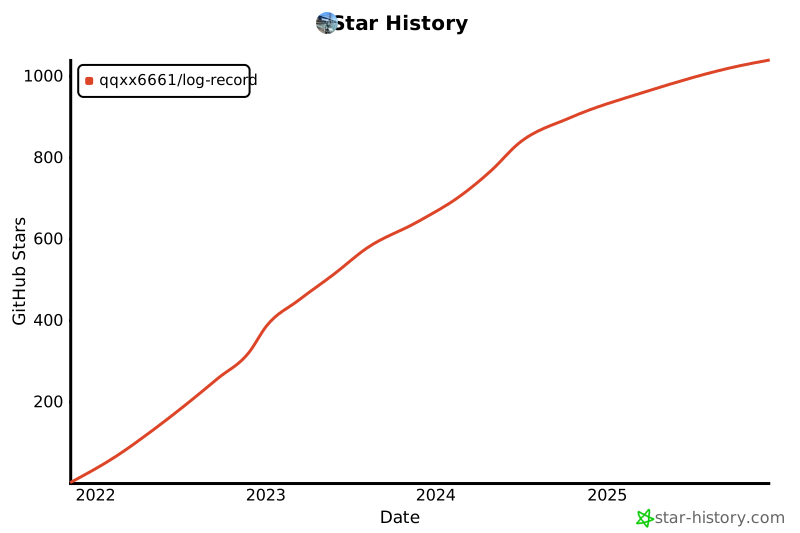
### Star history
[](https://star-history.com/#qqxx6661/log-record&Date)