> [r.uby.dev](https://r.uby.dev/llm) project.
Welcome to the canonical llm.rb repository.
llm.rb is a runtime for building agentic AI applications
on CRuby. It has zero runtime dependencies by default, supports
concurrent and parallel tool execution and has a single coherent API
that spans 15+ providers.
The README covers a lot of ground and the
[changelog](CHANGELOG.md)
tracks what has changed between releases.
## Install
##### v17
The v17 series requires Ruby 3.4 or later.
```bash
gem install llm.rb
```
##### v18
The v18 series is available as a prerelease.
It requires Ruby 4.0.0 or later. Ruby 4.1.0+ is recommended.
```bash
gem install llm.rb --pre
```
## Quick start
### Agents
The
[`LLM::Agent`](https://r.uby.dev/api-docs/llm.rb/LLM/Agent.html)
class is the default high-level interface,
and it is recommended for most use-cases. It manages the tool loop
and provides configurable features on top of it. For example you can
manage the tool loop with a retry budget and a tool call budget -
alongside other features.
The runtime is designed to keep the tool loop alive and it will
rescue exceptions. When an exception is encountered in a tool it
is reported back to the model as an in-band error that allows the
model to change course or retry with different parameters.
A tool call requires a tool return (or response), and the lack of
one can corrupt the conversation and lead to API-level errors from
a provider. But sometimes it is unavoidable (for example, via an
interrupt or power loss) so the runtime automatically closes
tool calls that fall into that category by telling the model
the tool call(s) were cancelled.
##### helloworld.rb
A classic "hello world" example. The environment variable
`$DEEPSEEK_API_KEY` is assumed to have been set and reference
a valid DeepSeek API key, otherwise you can provide a key explicitly
(eg: `LLM.deepseek(key: ENV["MYKEY"])`) and you could swap
deepseek for any of the other 14 providers as well
(eg: `llm = LLM.openai`):
```ruby
require "llm"
class GetTime < LLM::Tool
name "get-time"
description "returns the current time"
def call
{now: Time.now}
end
end
llm = LLM.deepseek
tracer = LLM::Tracer.pretty(llm)
tools = [GetTime]
stream = StringIO.new
##
# requires v18+
# use `:thread` on <=v17
concurrency = :ractor
agent = LLM::Agent.new(llm, tools:, tracer:, stream:, concurrency:)
agent.talk "hello world"
agent.talk "what time is it?"
puts stream.string
```
##### interrupt.rb
The
[`LLM.interrupt`](https://r.uby.dev/api-docs/llm.rb/LLM.html#interrupt-class_method)
method has access to a process-wide
registry that contains every active instance of
[`LLM::Agent`](https://r.uby.dev/api-docs/llm.rb/LLM/Agent.html),
and that includes Sequel and ActiveRecord agents, too. An
agent enters the registry when it starts a turn, and it
exits the registry afterwards. The method returns the
agent it interrupted, and otherwise it returns false.
There is often a window between when an agent is queued
and when it runs, so a poll approach lets you eventually
interrupt the agent, or give up trying:
```ruby
require "llm"
require "llm/tools"
llm = LLM.deepseek
agent = LLM::Agent.new(llm)
Thread.new do
LLM.interrupt(
id: agent.id,
attempts: 50,
interval: 0.1
)
end
begin
stream = $stdout
tools = [LLM::Tool::ReadFile]
concurrency = LLM::VERSION.start_with?("18.") ? :ractor : :thread
agent.talk("summarize README.md", concurrency:, stream:, tools:)
rescue LLM::Interrupt
puts "!! interrupted !!"
end
```
##### mcp.rb
The MCP example uses the HTTP transport to connect to
GitHub's MCP server. The example uses a Personal Access
Token (get yours [here](https://github.com/settings/apps))
although it could also use a token that was obtained
through OAuth and belongs to a user other than you:
```ruby
require "llm"
llm = LLM.deepseek
mcp = LLM::MCP.http(
url: "https://api.githubcopilot.com/mcp/",
headers: {"Authorization" => "Bearer #{ENV['GITHUB_PAT']}"},
transport: :net_http_persistent
)
agent = LLM::Agent.new(llm, stream: $stdout, tools: mcp.tools)
agent.talk "Find me an interesting Ruby project on GitHub"
```
#### Essentials
Stream
A stream can be a simple IO object (eg `$stdout`)
or it can be a subclass of [`LLM::Stream`](https://r.uby.dev/api-docs/llm.rb/LLM/Stream.html).
An IO object can receive content but it cannot
receive the other callbacks that are available
to subclasses of [`LLM::Stream`](https://r.uby.dev/api-docs/llm.rb/LLM/Stream.html).
It is generally a good idea to return as
quickly as possible from all of these methods,
but especially for the `on_content` and
`on_reasoning_content` methods: they run
inline with the request.
A subclass of [`LLM::Stream`](https://r.uby.dev/api-docs/llm.rb/LLM/Stream.html)
can implement callbacks that the runtime will call
throughout an agent's lifetime. All callbacks are
optional. The callbacks provide for content, reasoning,
tool calls, tool returns, steps in a turn, retries,
compaction and more:
```ruby
class Stream < LLM::Stream
##
# @param [String] content
# A chunk of text
def on_content(content)
print content
end
##
# @param [String] content
# A chunk of text
def on_reasoning_content(content)
warn content
end
##
# @param [LLM::Function] tool
# The tool being called
def on_tool_call(tool)
nil
end
##
# @param [LLM::Function] tool
# The tool that returned
# @param [LLM::Function::Return] result
# The return from the tool call
def on_tool_return(tool, result)
nil
end
##
# @note
# This method is called _before_ a transformer runs
# @param [LLM::Transformer] transformer
# A transformer
def on_transform(transformer)
nil
end
##
# @note
# This method is called _after_ a transformer runs
# @param [LLM::Transformer] transformer
# A transformer
def on_transform_finish(transformer)
nil
end
##
# @note
# This method is called _before_ a compactor runs
# @param [LLM::Compactor] compactor
# A compactor
def on_compaction(compactor)
nil
end
##
# @note
# This method is called _after_ a compactor runs
# @param [LLM::Compactor] compactor
# A compactor
def on_compaction_finish(compactor)
nil
end
##
# @note
# This method is called once per request
# in a turn (which can contain multiple
# requests)
# @param [LLM::Context] ctx
# The context
# @param [LLM::Response] res
# The response
def on_step(ctx, res)
nil
end
##
# @note
# This method is called when a request is
# rate limited and retried.
# @param [LLM::RateLimitError] error
# @param [Integer] attempt
def on_retry(error, attempt)
nil
end
##
# @note
# This method is called _before_ a skill runs
# @param [LLM::Skill] skill
# A skill
def on_skill_call(skill)
nil
end
##
# @note
# This method is called _after_ a skill runs
# @param [LLM::Agent] agent
# The agent who ran the skill
# @param [LLM::Skill] skill
# @param [LLM::Response] res
def on_skill_return(agent, skill, res)
nil
end
end
llm = LLM.deepseek
agent = LLM::Agent.new(llm, stream: Stream.new)
agent.talk "Explain Ruby fibers."
```
Tools
An agent requires one or more tools to be
able to interact with the "outside" world.
At a high-level a tool is how a model can
access your filesystem, search the internet,
post a comment on your behalf and anything
else that your own code could do.
The runtime represents a tool as a subclass
of [`LLM::Tool`](https://r.uby.dev/api-docs/llm.rb/LLM/Tool.html)
that provides a name, a description, an optional
set of parameters and a method that the runtime
will call on the model's behalf. A tool is implemented
on top of
an [`LLM::Function`](https://r.uby.dev/api-docs/llm.rb/LLM/Function.html)
object, and you might come across it in stream and
tracer callbacks. The model decides when and how a
tool is called:
```ruby
class ReadFile < LLM::Tool
name "read-file"
description "Read a file"
parameter :path, String, "The filename or path"
required %i[path]
def call(path:)
{contents: File.read(path)}
end
end
llm = LLM.deepseek
agent = LLM::Agent.new(llm, tools: [ReadFile], stream: $stdout)
agent.talk "summarize README.md"
```
Schema
The
[`LLM::Schema`](https://r.uby.dev/api-docs/llm.rb/LLM/Schema.html)
class describes an object that has properties
of different types, and it can also reference
other objects, or schemas. The object describes
the shape of a JSON object that the model will
return in place of the usual free-form text that
a model replies with.
This feature is implemented with
[JSONSchema](https://json-schema.org/)
under the hood and a large portion
of the spec is supported: objects, enums,
arrays, nested objects, strings, integers,
and so on.
[`LLM::Schema`](https://r.uby.dev/api-docs/llm.rb/LLM/Schema.html)
also provides the parameter definitions
available to
[`LLM::Tool`](https://r.uby.dev/api-docs/llm.rb/LLM/Tool.html)
subclasses and the same range of types are
supported.
The
[`LLM::DeepSeek`](https://r.uby.dev/api-docs/llm.rb/LLM/DeepSeek.html)
provider does not support structured outputs
officially but the runtime implements structured
outputs on top of the `json_object` API and it
works the same as all other providers who do
support structured outputs:
```ruby
class Forecast < LLM::Schema
property :city, String, "The city name"
property :temperature, Number, "Current temperature"
property :conditions, String, "Weather conditions"
required %i[city temperature conditions]
end
llm = LLM.deepseek
agent = LLM::Agent.new(llm)
res = agent.talk "Weather in Paris?", schema: Forecast
res.content! # => {city: "Paris", temperature: 15.0, conditions: "Cloudy"}
```
Serialization
Both [`LLM::Context`](https://r.uby.dev/api-docs/llm.rb/LLM/Context.html)
and
[`LLM::Agent`](https://r.uby.dev/api-docs/llm.rb/LLM/Agent.html)
can be serialized to JSON and written to disk.
This feature is what supports the ActiveRecord
and Sequel integrations too but rather than
store the agent directly on disk it is stored
in a database column instead.
An agent can be configured to read from and
write to a file automatically with the `path`
option. When the file already exists, the agent
is restored from the file and continues where
he left off. After each turn the agent flushes
its state to the file. The text file can be shared
like any other text file and it can be used to
restore the agent in another process or machine:
```ruby
require "llm"
path = File.join(Dir.home, ".agents", "myagent.json")
llm = LLM.deepseek
agent = LLM::Agent.new(llm, path:)
agent.talk "remember my name is robert"
##
# Resume the conversation where the agent left off
agent = LLM::Agent.new(llm, path:)
agent.talk "what's my name?"
```
Tracer
An agent can have its own tracer that observes runtime
events throughout its lifetime. A tracer is local to an
agent and the tracer runs on the same thread as the agent.
There are three builtin tracers, and a fourth tracer that
lets you combine multiple tracers into a single tracer -
so you can log to a file, and export to OpenTelemetry
at the same time.
All tracers protect themselves and the agent being traced
from a crash through a rescue that dumps a tracer error
to standard error (`$stderr`). Beyond the default tracers,
it is not unusual to write your own. A tracer can let you
export runtime state to your own database, an external
service, or any other medium you might have in your stack.
A new tracer can be created through a subclass of
[`LLM::Tracer`](https://r.uby.dev/api-docs/llm.rb/LLM/Tracer.html)
that implements the expected callback methods. This feature
also works for ActiveRecord and Sequel models.
The builtin tracers:
* [`LLM::Tracer.pretty`](https://r.uby.dev/api-docs/llm.rb/LLM/Tracer.html#pretty_logger-class_method): human-readable single-line logs to stderr, ideal during development.
* [`LLM::Tracer.telemetry`](https://r.uby.dev/api-docs/llm.rb/LLM/Tracer.html#telemetry-class_method):
exports spans via OTLP for OpenTelemetry in production.
* [`LLM::Tracer.logger`](https://r.uby.dev/api-docs/llm.rb/LLM/Tracer.html#logger-class_method):
structured JSON to stdout or a file.
* [`LLM::Tracer.multi`](https://r.uby.dev/api-docs/llm.rb/LLM/Tracer.html#multi-class_method):
fans out every callback to multiple tracers.
A simple example:
```ruby
llm = LLM.deepseek
tracer = LLM::Tracer.pretty(llm)
agent = LLM::Agent.new(llm, tracer:)
agent.talk "Hello"
```
A multi-tracer example:
```ruby
llm = LLM.deepseek
tracer = LLM::Tracer.multi(
llm,
LLM::Tracer::Logger,
LLM::Tracer::Telemetry,
LLM::Tracer::Foobar.new(llm, {option1: "foo", option2: "bar"})
)
agent = LLM::Agent.new(llm, tracer:)
agent.talk "Hello"
```
MCP
The runtime can communicate with MCP servers via HTTP(S)
and stdio. The stdio transport spawns a local process that
uses its standard input and output streams for communication.
The runtime provides a full-featured MCP client and the tools
that an MCP server has announced are available as
[`LLM::Tool`](https://r.uby.dev/api-docs/llm.rb/LLM/Tool.html)
subclasses that can be used like any other subclass
of
[`LLM::Tool`](https://r.uby.dev/api-docs/llm.rb/LLM/Tool.html).
The first example uses the HTTP transport to connect to
GitHub's MCP server. The example uses a Personal Access
Token (get yours [here](https://github.com/settings/apps))
although it could also use a token that was obtained
through OAuth and belongs to a user other than you:
```ruby
require "llm"
llm = LLM.deepseek
mcp = LLM::MCP.http(
url: "https://api.githubcopilot.com/mcp/",
headers: {"Authorization" => "Bearer #{ENV['GITHUB_PAT']}"},
transport: :net_http_persistent
)
agent = LLM::Agent.new(llm, stream: $stdout, tools: mcp.tools)
agent.talk "Find me an interesting Ruby project on GitHub"
```
The second example focuses on the second transport.
It is recommended (but not required) to launch a
stdio MCP server with a session so that the process
is kept alive for as long as you use it, otherwise
the process can be launched multiple times and it
can add latency to your requests.
The example uses a local stdio MCP server from the
[sem](https://github.com/Ataraxy-Labs/sem)
project. It works on top of git and parses your code
with tree-sitter:
```ruby
require "llm"
mcp = LLM::MCP.stdio(
argv: ["sem", "mcp"],
env: {'SEM_REPO' => Dir.getwd},
cwd: Dir.getwd,
)
##
# 'mcp.session' is optional, but recommended.
# It can be dropped but then the process may
# be launched once per-request.
mcp.session do
llm = LLM.deepseek
tracer = LLM::Tracer.pretty(llm)
tools = mcp.tools.select { _1.name == "sem_log" }
stream = $stdout
agent = LLM::Agent.new(llm, tracer:, stream:, tools:)
agent.talk "summarize recent git activity"
end
```
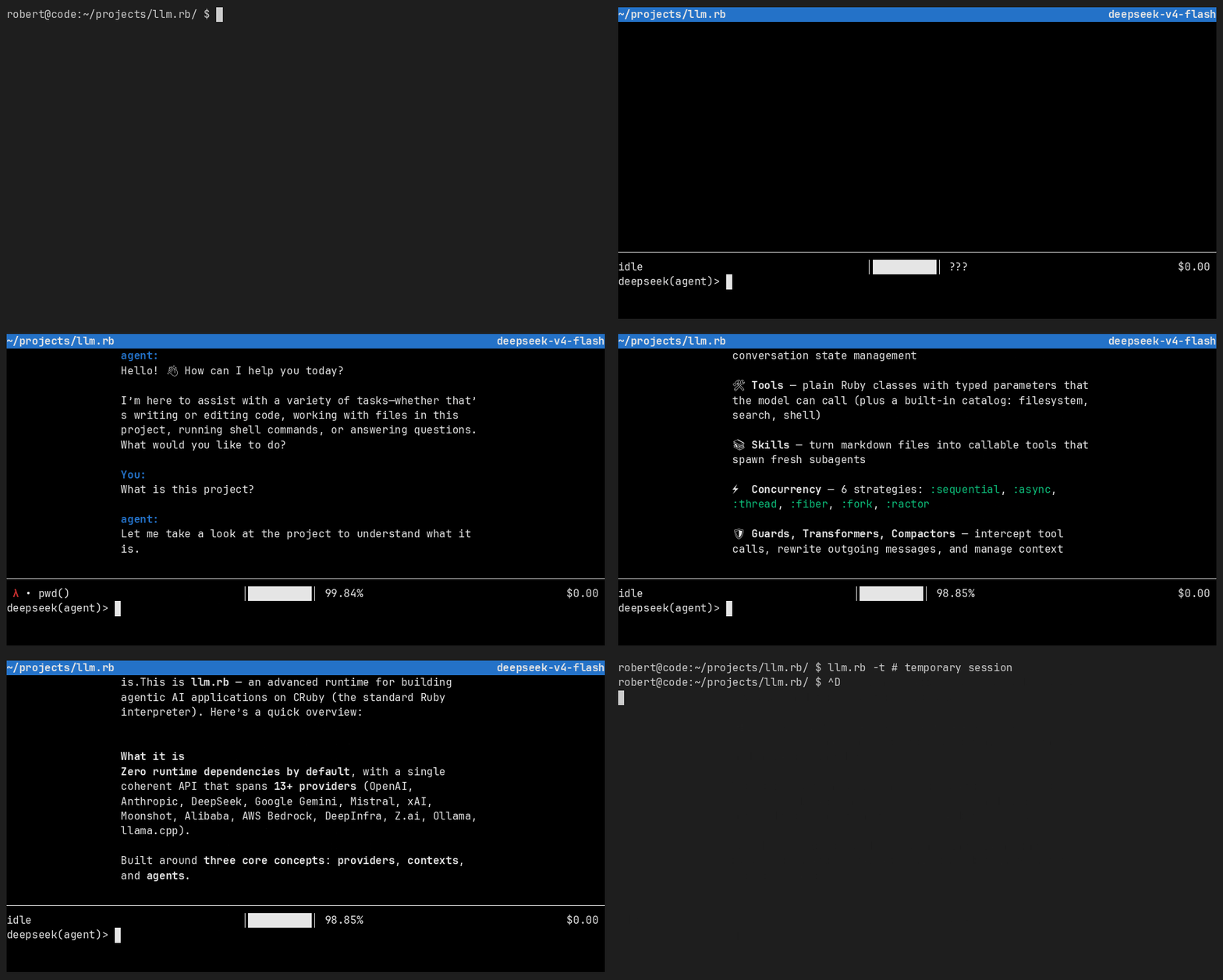
Console
The [LLM::Agent#console](https://r.uby.dev/api-docs/llm.rb/LLM/Agent.html#console-instance_method)
method drops you into an interactive console that is built on
top of (n)curses. The `llm.rb` executable packaged with the gem
is another way to access the console and ActiveRecord models who
have called `acts_as_agent` can access the console as well
(via `agent.console`).
A console for an ActiveRecord model does not write back to the
database. The `llm.rb` executable automatically associates a
session with the current working directory and it can be resumed
by calling `llm.rb` in the same directory at a later point.
The console is not intended to compete with Claude, Codex and
friends. It is much more limited, serves an entirely different
purpose and is more like a debugger for your agents. The
dependencies required by the console are not installed
by default, and the easiest way to grab them is via
`gem install llm-shell`.
##### Demo
Budgets
An agent has a retry budget, and a tool call
budget. The retry budget is enabled by default,
and it determines how many times we will retry
when a request raises an error. The errors
that are retried are returned by
[`LLM::Provider#retry_errors`](https://r.uby.dev/api-docs/llm.rb/LLM/Provider.html#retry_errors-instance_method)
and can vary by provider but typically cover
rate limits, and time outs. Between retries
we will sleep, and each retry sleeps a little
longer (`sleep 2.0 * attempts`) than the last.
The default retry budget is usually 5 but
it can also vary by provider and it is determined by the
[`LLM::Provider#retry_budget`](https://r.uby.dev/api-docs/llm.rb/LLM/Provider.html#retry_budget-instance_method)
method. When the budget is spent but the an
exception continues to raise we will give up
and let the exception bubble up to the caller.
The budget can be disabled by setting
`retry_budget` to zero:
```ruby
require "llm"
llm = LLM.deepseek
agent = LLM::Agent.new(llm, retry_budget: 0)
```
The second budget describes how many tool calls
are allowed in a single turn, and it is disabled
by default. When the limit is reached or breached
the agent will reply with an in-band error that
tells the model it has spent its tool call budget,
and that it should stop requesting tool calls for
this turn. This exchange repeats until the model
stops requesting tool calls.
The budget is restored after a turn completes and the
model will normally provide a response from the tool
calls made before the budget was spent:
```ruby
require "llm"
require "llm/tools"
llm = LLM.deepseek
tools = LLM::Tool.subclasses
agent = LLM::Agent.new(llm, tools:, tool_budget: 25)
agent.talk "fix every FIXME in this repository"
```
Usage|Cost
An agent knows how many tokens it has spent,
and how much those tokens cost. The runtime
embeds the [models.dev](https://models.dev)
registry (only the parts it uses, and on-demand)
that gives it access to model information that
includes costs and limits.
The `token_usage` method sums the whole conversation as a
[LLM::Usage](https://r.uby.dev/api-docs/llm.rb/LLM/Usage.html)
object and [LLM::Cost](https://r.uby.dev/api-docs/llm.rb/LLM/Cost.html)
combines it with the model registry to determine how much money
has been spent. These numbers should not be taken as gospel though.
They're a best-guess estimate, and your provider's dashboard
might disagree:
```ruby
require "llm"
llm = LLM.deepseek
agent = LLM::Agent.new(llm)
agent.talk "Hello"
agent.token_usage # => LLM::Usage for the whole conversation
agent.cost # => LLM::Cost, priced from the registry
```
The `context_*` methods can tell you about the model's context
window: its total capacity, and how much of it have we already
spent:
```ruby
agent.context_used # => tokens in the latest turn
agent.context_window # => the model's limit, or nil when unknown
agent.context_usage # => Rational, eg Rational(100, 10_000)
```
class Agent < LLM::Agent
The examples so far have focused on
[LLM::Agent](https://r.uby.dev/api-docs/llm.rb/LLM/Agent.html)
as an object but you can create a subclass that inherits from
[LLM::Agent](https://r.uby.dev/api-docs/llm.rb/LLM/Agent.html)
too. Both support the same features and accept the same options
but a subclass can be configured with the `set` method, implement
its own methods, inherit from other modules and create multiple
instances of itself.
The
[`LLM::Agent.set`](https://r.uby.dev/api-docs/llm.rb/LLM/Agent.html#set-class_method)
method can be used to configure your agent, and
it accepts all the same options that an instance
of [LLM::Agent](https://r.uby.dev/api-docs/llm.rb/LLM/Agent.html)
accepts. An option can be resolved lazily via
a Proc or a Symbol that represents a method
on your class, and all options are optional -
you can set many or none, and your subclass
will still work. For example:
```ruby
require "llm"
require "llm/tools"
class Agent < LLM::Agent
set name: "sysadmin",
description: "performs system administration tasks",
instructions: proc { File.read("prompt.md") },
concurrency: :fork,
tools: :mytools
private
def mytools
[LLM::Tool::Exec]
end
end
llm = LLM.deepseek
agent = Agent.new(llm)
agent.talk "What's our uptime?", stream: $stdout
```
#### Database
ActiveRecord
Both
[`LLM::Context`](https://r.uby.dev/api-docs/llm.rb/LLM/Context.html) and
[`LLM::Agent`](https://r.uby.dev/api-docs/llm.rb/LLM/Agent.html)
can be serialized to JSON and stored in a database column. The `jsonb`
column type from PostgreSQL is recommended but it can also be stored as
a string on other databases. ActiveRecord support is optimized
for the `jsonb` column type and PostgreSQL.
The column captures everything an agent has done up to that point,
it includes tool calls and returns, exchanged messages, and other
metadata that carries runtime state. Each agent is an ActiveRecord
model that calls `acts_as_agent` and each row represents an instance
of that agent. It can be used with new and existing models alike.
The column should have the name `data` but this can be
changed when the `acts_as_agent` method is called (eg
`acts_as_agent(data_column: :my_column)`). The column
is updated after every request that an agent makes rather
than every turn, so an unexpected interrupt can be resumed
from from the last request and no progress (or spent tokens)
are lost:
```ruby
require "active_record"
require "llm"
require "llm/active_record"
class Octocat < ActiveRecord::Base
acts_as_agent(format: :jsonb) do |agent|
agent.set name: "octocat",
description: "performs actions on GitHub",
instructions: proc { File.read("prompt.md") },
tools: :toolset,
tracer: proc { SQLTracer.new(llm, agent: self) }
end
##
# @return [Array]
def toolset
github.tools
end
private
##
# @return [LLM::MCP]
def github
@github ||= LLM::MCP.http(
url: "https://api.githubcopilot.com/mcp/",
headers: {"Authorization" => "Bearer #{ENV['GITHUB_RUBYDEV_PAT']}"},
transport: :net_http_persistent
)
end
##
# @note
# All models who call 'acts_as_agent' must implement
# this method. It returns the provider that the agent
# will use. It can be determined dynamically.
# @return [LLM::Provider]
def set_provider
LLM.deepseek
end
end
agent = Octocat.create!
##
# Every call to `talk` automatically persists
# to the database.
agent.talk "what's new on the llm.rb repository?"
##
# The conversation was persisted to database. A
# fresh instance restores it and continues where
# we left off
agent = Octocat.find(agent.id).talk "and what about roda?"
##
# Start an agent console.
# Query agent's state, debug, etc.
# The console does not persist back to the database.
agent.console
```
SQL optimizations
In a database environment the runtime optimizes for
the PostgreSQL database and its builtin support for
the `jsonb` column type. An agent fits in a single
column, on a single row, and that column carries
everything it has done: messages, tool calls,
context usage, and so on. It works well in practice
and means you can store an agent almost anywhere.
For scenarios where performance matters most the runtime
ships with virtual ActiveRecord classes that never materialize
in your database but provide a SQL view into the column where
an agent stores its runtime state. They return
[`ActiveRecord::Relation`](https://api.rubyonrails.org/classes/ActiveRecord/Relation.html)
objects, so the filtering happens in the database.
```ruby
class Agent < ActiveRecord::Base
acts_as_agent(format: :jsonb) do |agent|
agent.set name: "activerecord agent"
end
end
##
# Find an instance of your agent
agent = Agent.find_by(id: 1)
##
# Returns a relation over the agent's messages.
# It is scoped to the agent, and it yields one
# instance of LLM::ActiveRecord::Message per
# message the agent has produced.
messages = LLM::ActiveRecord::Message.for(agent:)
##
# The relation chains like any other
messages.where(role: "assistant")
.order(position: :desc)
.limit(10)
##
# Count, too
messages.count
```
**Schema**
Each row carries a message, flattened into columns:
| column | contents |
| --- | --- |
| `agent_id` | the agent a message belongs to |
| `id` | the message id |
| `role` | the message role |
| `content` | the message content |
| `tools` | the tool calls a message carries |
| `position` | the position of a message in the conversation |
| `data` | the whole message, as the runtime stores it |
**Indexes**
The queries the view runs are already covered. They expand
one agent, found by primary key, so they are index scans.
There is nothing to add for
`LLM::ActiveRecord::Message.for(agent:)`.
The queries you write on top of it are not. Once a question
is asked of every agent, the column is expanded row by row
and no index helps the view itself. Index the column for
those questions instead:
```sql
CREATE INDEX index_agents_on_data
ON agents USING gin (data jsonb_path_ops);
CREATE INDEX index_agents_on_context_used
ON agents (((data ->> 'context_used')::int));
```
The first serves containment (`@>`) and path queries over
the state as a whole. The second serves a scalar key, and
the runtime already writes `context_used` and
`context_window` at the top level, so "sessions over 80%
full" becomes cheap. Both assume `format: :jsonb`.
**However:** an agent's whole conversation lives in one
value, so every save rewrites it, and a GIN index is
maintained with it. Prefer an index on a key or two over
the whole column.
#### Concurrency
Strategies
There are six different concurrency strategies
to choose from. A tool can be spawned on its own
process, on its own ractor, on its own thread,
on a thread that manages an `Async::Reactor`,
on its own fiber, or on the same thread as the
agent (sequential execution).
Each strategy is built around an abstraction that
makes them interchangeable - you can switch between
processes, threads, ractors, async fibers, or a ruby
fiber by changing a single line of code. **All** subclasses
of [`LLM::Tool`](https://r.uby.dev/api-docs/llm.rb/LLM/Tool.html)
are supported, so you can launch MCP tools concurrently
or in parallel as well.
The strategy that you choose depends on the workload
and the requirements of your application, as well as
what the strategy offers. The `:fork` and `:ractor`
strategies provide true parallelism, and the other
strategies - especially `:thread`, and `:async` -
can be great for IO-bound tools.
The following example configures an agent to use
all builtin tools (`LLM::Tool.subclasses`) and it
spawns each tool in its own process
(`concurrency: :fork`). It could be changed to use
async instead with `concurrency: :async`, or with
threads via `concurrency: :thread`, and so on. The
default concurrency strategy is `:sequential`, and
it runs tools sequentially on a single thread.
```ruby
require "llm"
require "llm/tools"
llm = LLM.deepseek
tools = LLM::Tool.subclasses
agent = LLM::Agent.new(llm, tools:, concurrency: :fork)
agent.talk "implement the feature described in todo.txt"
```
Cancellation
It is possible to interrupt a running agent who
is between requests or tool calls as long as the
cancel request is sent from another thread or fiber
running in the same process as the agent. A cancel
request can be sent with the
[`LLM::Agent#interrupt!`](https://r.uby.dev/api-docs/llm.rb/LLM/Agent.html#interrupt!-instance_method)
method.
An interrupted tool call is made aware of the interrupt
and it can both rescue `LLM::Interrupt` and/or implement
the `on_interrupt` callback on the tool class. The option to
cancel on [r.uby.dev](https://r.uby.dev) is built on top of
this feature, and it has a single background process
with 24 threads. Each thread can run an agent request that
can be interrupted via another thread in the same process.
It is solid and reliable but r.uby.dev had to meet this
feature halfway, so expect to build your own infrastructure
around it. See
[cancellation chapter](docs/deepdive/advanced/cancellation.md)
to learn more.
```ruby
class Search < LLM::Tool
name "search"
description "Search many files"
parameter :pattern, String, "The pattern to search for"
required %i[pattern]
##
# A raise is delivered here; `on_interrupt` is a notification, and it
# runs on every strategy - `:sequential` included.
def call(pattern:)
search(pattern)
rescue LLM::Interrupt
##
# A tool can return a value from here, and the turn carries on with
# it, or re-raise and the fiber that made the request is raised
# into as well.
cleanup
raise
end
##
# Told on the thread or fiber the call runs on, before the raise on
# `:fork` and `:ractor` and after the rescue above on the other three.
def on_interrupt
cleanup
end
private
def cleanup
# Release a file, a socket, or a lock here.
end
end
llm = LLM.deepseek
agent = LLM::Agent.new(llm, tools: [Search], concurrency: :async)
queue = Queue.new
Thread.new { [sleep(queue.pop), agent.interrupt!] }
begin
queue.push(3)
agent.talk "find every TODO in the repository", stream: $stdout
rescue LLM::Interrupt
puts
puts "!! interrupted !!"
end
```
Cancel by record ID
A common deployment setup is to run your agents in a
background process that a web frontend can communicate
with (usually via a database). The background process
would have one thread per agent, and it could run as
many agents as it has threads. This is how the
[r.uby.dev](https://r.uby.dev) website is configured,
and it is the configuration that the
[`LLM.interrupt`](https://r.uby.dev/api-docs/llm.rb/LLM.html#interrupt-class_method)
method is optimized for: a single process with each agent
running in its own thread.
The
[`LLM.interrupt`](https://r.uby.dev/api-docs/llm.rb/LLM.html#interrupt-class_method)
method has access to a process-wide
registry that contains every active instance of
[`LLM::Agent`](https://r.uby.dev/api-docs/llm.rb/LLM/Agent.html),
and that includes Sequel and ActiveRecord agents, too. An
agent enters the registry when it starts a turn, and it
exits the registry afterwards. The method returns the
agent it interrupted, and otherwise it returns false.
There is often a window between when an agent is queued
and when it runs, so a poll approach lets you eventually
interrupt the agent, or give up trying:
```ruby
require "llm"
require "llm/tools"
llm = LLM.deepseek
agent = LLM::Agent.new(llm)
Thread.new do
LLM.interrupt(
id: agent.id,
attempts: 50,
interval: 0.1
)
end
begin
stream = $stdout
tools = [LLM::Tool::ReadFile]
concurrency = LLM::VERSION.start_with?("18.") ? :ractor : :thread
agent.talk("summarize README.md", concurrency:, stream:, tools:)
rescue LLM::Interrupt
puts "!! interrupted !!"
end
```
#### Hooks
Intercepts
When a model requests a tool call, the
runtime represents it as a [`LLM::Function`](https://r.uby.dev/api-docs/llm.rb/LLM/Function.html)
object that a subclass of [`LLM::Intercept`](https://r.uby.dev/api-docs/llm.rb/LLM/Intercept.html)
can see _before_ it is called. An intercept
can return a
[`LLM::Function::Return`]((https://r.uby.dev/api-docs/llm.rb/LLM/Function.html))
object on behalf of the tool call, and so the tool
call is never made. Or it can return any other
value to let the tool continue as normal.
Maybe best of all, an intercept can modify
the arguments given to a [`LLM::Function`](https://r.uby.dev/api-docs/llm.rb/LLM/Function.html)
in-place, before the tool call is made. This
allows an intercept to modify what the model
wanted to send to a function, and then let
the function be called as normal.
This also works for MCP tools - so you might
be able to imagine an intercept that wrapped
a comment body at 80 columns, or parsed a
markdown post into HTML, before the tool
call is made.
A simple example:
```ruby
require "llm"
require "llm/tools"
class Sandbox < LLM::Intercept
def call(function:)
if function.name == "exec"
function.return(error: true, type: "permission_error", message: "exec is disabled")
end
end
end
llm = LLM.deepseek
tools = [LLM::Tool::Exec, LLM::Tool::ReadFile]
agent = LLM::Agent.new(llm, tools:, intercept: Sandbox)
agent.talk "run 'rm -rf myapp/' right now", stream: $stdout
```
A multi-intercept example.
Each intercept is called in order they're given
and the first one that returns an
[`LLM::Function::Return`](https://r.uby.dev/api-docs/llm.rb/LLM/Function/Return.html)
stops the tool call from being made. This feature
lets you combine multiple intercepts into a single
intercept that calls out to all of them:
```ruby
require "llm"
llm = LLM.deepseek
mcp = LLM::MCP.stdio(argv: ["bundle", "exec", "slack-mcp"])
intercept = LLM::Intercept.multi(llm, WrapComment, BlockBadLanguage)
agent = LLM::Agent.new(llm, tools: [mcp.tools], intercept:)
agent.talk "Tell slack channel I'm AFK", stream: $stdout
```
Transformers
It is possible to rewrite outgoing messages before they reach the provider with
[`LLM::Transformer`](https://r.uby.dev/api-docs/llm.rb/LLM/Transformer.html). Create a subclass and implement `call(message:)` to scrub sensitive data,
inject context, or normalize content. The transform runs automatically
on every turn, so you never have to change your prompt code.
```ruby
class RedactEmails < LLM::Transformer
def call(message:)
content = message.content.to_s.gsub(/[\w.+-]+@[\w-]+\.[\w.]+/, "[EMAIL]")
LLM::Message.new(message.role, content, message.extra)
end
end
llm = LLM.deepseek
agent = LLM::Agent.new(llm, transformer: RedactEmails)
agent.talk "Contact support@example.com for help"
```
Compactors
Every model has a context window: the finite number of tokens it can
consider in a single request. Generally a compactor will drop or
summarize older messages to keep the conversation within that window,
and it runs automatically before every turn. By default it is disabled
so it is a feature you must opt into.
[`LLM::Compactor::Truncate`](https://r.uby.dev/api-docs/llm.rb/LLM/Compactor/Truncate.html)
keeps the most recent messages via an integer count or a percentage like
`"80%"`. It preserves tool call and return pairs so the conversation
never contains an orphaned result. It is also possible to subclass
[`LLM::Compactor`](https://r.uby.dev/api-docs/llm.rb/LLM/Compactor.html)
to implement your own compactor with its own logic. Streams can observe the
process through the
[`LLM::Stream#on_compaction`](https://r.uby.dev/api-docs/llm.rb/LLM/Stream.html#on_compaction-instance_method)
and
[`LLM::Stream#on_compaction_finish`](https://r.uby.dev/api-docs/llm.rb/LLM/Stream.html#on_compaction_finish-instance_method)
callbacks.
```ruby
llm = LLM.deepseek
agent = LLM::Agent.new(
llm,
compactor: LLM::Compactor::Truncate,
compactor_options: {keep: 64}
)
agent.talk "Hello"
```
#### Everything else
A2A
The Agent 2 Agent (A2A) protocol has first-class support
in llm.rb. The http and jsonrpc transports work out of the
box. A2A skills are translated into subclasses of
[`LLM::Tool`](https://r.uby.dev/api-docs/llm.rb/LLM/Tool.html) that can be
used with
[`LLM::Context`](https://r.uby.dev/api-docs/llm.rb/LLM/Context.html) or
[`LLM::Agent`](https://r.uby.dev/api-docs/llm.rb/LLM/Agent.html).
```ruby
require "llm"
llm = LLM.deepseek
a2a = LLM::A2A.rest(url: "https://remote-agent.example.com")
agent = LLM::Agent.new(llm, stream: $stdout, tools: a2a.skills)
agent.talk "Run the skill"
```
Skills
A skill turns a markdown file into a callable tool. When the model
calls it, the runtime spawns a subagent with the skill's instructions
as its system prompt and the skill's own tool set. The subagent runs
one turn and returns the result, then is discarded. Each call
is fresh and stateless.
A [LLM::Stream](https://r.uby.dev/api-docs/llm.rb/LLM/Stream.html)
can be notified as a skill starts and when it returns. The `on_skill_return`
callback hands back the subagent that ran the skill, so you can inspect
its conversation, measure its usage, track costs or add a verification
step (eg `subagent.talk("verify your work")`).
##### summary.md
```markdown
---
name: summary
description: Reads recent git history and writes a summary
tools: all
---
Collect the recent git log, analyze each commit,
and write a summary to summary.txt.
```
##### agent.rb
```ruby
require "llm"
llm = LLM.deepseek
agent = LLM::Agent.new(llm, skills: ["summary.md"])
agent.talk "Summarize the last week of work"
```
### Providers
Each provider is constructed with a class-level factory method on
`LLM`, and the resulting instance is passed to
[`LLM::Context`](https://r.uby.dev/api-docs/llm.rb/LLM/Context.html)
or
[`LLM::Agent`](https://r.uby.dev/api-docs/llm.rb/LLM/Agent.html). The
same API drives every one of them, so switching providers is a one-line
change. One default differs: an OpenAI context speaks the Responses API
(`mode: :responses`) unless it is built with `mode: :completions`, while
every other provider defaults to chat completions.
#### What providers does llm.rb support?
* **Anthropic** (`LLM.anthropic`)
* **Google** (`LLM.google`)
* **OpenAI** (`LLM.openai`)
* **DeepSeek** (`LLM.deepseek`)
* **DeepInfra** (`LLM.deepinfra`)
* **xAI** (`LLM.xai`)
* **Z.ai** (`LLM.zai`)
* **Moonshot (Kimi)** (`LLM.moonshot`)
* **Hanzo** (`LLM.hanzo`)
* **OpenRouter** (`LLM.openrouter`)
* **Alibaba (Qwen3)** (`LLM.alibaba`, also `LLM.aliyun`)
* **Mistral** (`LLM.mistral`)
* **AWS Bedrock** (`LLM.bedrock`)
* **Ollama** (`LLM.ollama`)
* **llama.cpp** (`LLM.llamacpp`)
Implicit
Cloud providers can infer their API key automatically
from a set of common defaults that are defined by
the [models.dev](https://models.dev) registry that
is also distributed with llm.rb.
```ruby
llm = LLM.openai
llm = LLM.anthropic
llm = LLM.google
llm = LLM.deepseek
llm = LLM.hanzo
llm = LLM.deepinfra
llm = LLM.xai
llm = LLM.zai
llm = LLM.moonshot
llm = LLM.openrouter
llm = LLM.alibaba # also: LLM.aliyun
llm = LLM.mistral
llm = LLM.bedrock
```
Explicit
The `key` option can also be providied explicitly, and certain
providers (eg ollama, llamacpp) usually do not require an API
key at all.
```ruby
llm = LLM.openai(key: ENV["OPENAI_API_KEY"])
llm = LLM.anthropic(key: ENV["ANTHROPIC_API_KEY"])
llm = LLM.google(key: ENV["GOOGLE_API_KEY"])
llm = LLM.deepseek(key: ENV["DEEPSEEK_API_KEY"])
llm = LLM.hanzo(key: ENV["HANZO_API_KEY"])
llm = LLM.deepinfra(key: ENV["DEEPINFRA_API_KEY"])
llm = LLM.xai(key: ENV["XAI_API_KEY"])
llm = LLM.zai(key: ENV["ZHIPU_API_KEY"])
llm = LLM.moonshot(key: ENV["MOONSHOT_API_KEY"])
llm = LLM.openrouter(key: ENV["OPENROUTER_API_KEY"])
llm = LLM.alibaba(key: ENV["DASHSCOPE_API_KEY"]) # also: LLM.aliyun
llm = LLM.mistral(key: ENV["MISTRAL_API_KEY"])
llm = LLM.bedrock(
access_key_id: ENV["AWS_ACCESS_KEY_ID"],
secret_access_key: ENV["AWS_SECRET_ACCESS_KEY"],
region: ENV["AWS_REGION"]
)
```
Registry
The runtime ships with the [models.dev](https://models.dev)
registry. The registry is a moving target and each new release
of llm.rb includes an updated copy of it. The registry is loaded
per-provider, on-demand and it provides information about the limits,
costs, and capabilities of a model. The runtime uses the registry
to implement methods like
[LLM::Agent#cost](https://r.uby.dev/api-docs/llm.rb/LLM/Agent.html#cost-instance_method)
and the registry can be accessed through the
[LLM::Provider#registry](https://r.uby.dev/api-docs/llm.rb/LLM/Registry.html#registry-instance_method)
method as well:
```ruby
require "llm"
llm = LLM.openai
registry = llm.registry # => LLM::Provider#registry
cheapest = registry.models.sort.first # => LLM::Registry::Model
cheapest.id # => "text-embedding-3-small"
cheapest.context_window # => 8191
cheapest.structured_output? # => false
```
Transports
The `transport:` option selects which HTTP library a provider uses for
network communication. Two backends ship out of the box: `net/http`
is always available and the default, and `net/http/persistent` pools
connections for many requests to the same host. They share one
interface, so switching is a one-word change.
```ruby
llm = LLM.deepseek(
transport: :net_http_persistent
)
```
Timeouts
Providers accept two timeouts:
* `connect_timeout` - opening the connection. Defaults to 5 seconds.
* `read_timeout` - waiting for a response on an idle connection.
Defaults to 240 seconds (4 minutes).
A timeout is retriable, so it is often better to fail early and open a
new session than to hold a connection open for a response that never
comes. This is especially true for `read_timeout`. Both timeouts can
be given as a custom value that is higher or lower than the default.
A request that times out is retried automatically. The
[`LLM::Agent`](https://r.uby.dev/api-docs/llm.rb/LLM/Agent.html)
class retries a timed out request up to its
[`retry_budget`](https://r.uby.dev/api-docs/llm.rb/LLM/Agent.html#retry_budget-class_method)
(five by default), so a dropped connection or a slow first token
is often something we can recover from.
```ruby
llm = LLM.deepseek(
connect_timeout: 5, # opening the connection
read_timeout: 600 # raise it when a model needs longer
)
```
Headers
Providers can accept a custom set of headers with
the [`LLM::Provider#with`](https://r.uby.dev/api-docs/llm.rb/LLM/Provider.html#with-instance_method) method.
For example, you could set a custom User-Agent header,
or provide headers that carry special meaning to
certain providers (eg OpenAI, OpenRouter).
```ruby
llm = LLM.openrouter
llm = llm.with("HTTP-Referer" => "https://example.com")
llm = llm.with("X-OpenRouter-Title" => "Example App")
```
### RAG
Most providers offer an embedding model that can be
used for semantic search, or similarity search. An
embedding model can generate embeddings that can then
be stored in a database that is optimized for storing
and querying vectors, such as SQLite's [sqlite-vec](https://github.com/asg017/sqlite-vec)
or PostgreSQL's [pg-vector](https://github.com/pgvector/pgvector).
llm.rb also includes support for OpenAI's vector store API. It
provides a vector database as a HTTP service but we won't cover
that here.
```ruby
require "llm"
llm = LLM.openai
body = "llm.rb is Ruby's capable AI runtime."
embedding = llm.embed([body]).embeddings.first
# Document is your ActiveRecord or Sequel model
# with a vector column (e.g. sqlite-vec or pgvector)
Document.create!(
title: "llm.rb",
body:,
embedding:,
)
```
### Images
A handful of providers can generate images from a text prompt.
OpenAI, Google, xAI, and DeepInfra all support it. The API is
the same across providers:
```ruby
require "llm"
llm = LLM.openai
res = llm.images.create(prompt: "a dog on a rocket to the moon")
IO.copy_stream res.images[0], "rocket.png"
```
##### DeepSeek
DeepSeek does not have a dedicated image model, but the runtime
generates SVG vector graphics through its text model. Each
generation produces a valid SVG document that can be converted
to PNG with tools like `rsvg-convert`. Pass an existing agent
to maintain a session across generations:
```ruby
require "llm"
llm = LLM.deepseek
##
# First generation
res = llm.images.create(prompt: "a rocket on the moon")
IO.copy_stream res.images[0], "rocket.svg"
##
# Refine with follow-up prompts (shares context)
res = llm.images.create(prompt: "add a dog next to the rocket",
agent: res.agent)
IO.copy_stream res.images[0], "rocket-with-dog.svg"
```
## Docs
The [deepdive](docs/deepdive.md) is the reference for everything below
the quick start. Each chapter is a topic of its own:
- **Fundamentals**:
[Providers](docs/deepdive/fundamentals/providers.md),
[Agents](docs/deepdive/fundamentals/agents.md),
[Tools](docs/deepdive/fundamentals/tools.md),
[Stream](docs/deepdive/fundamentals/stream.md),
[Schema](docs/deepdive/fundamentals/schema.md),
[Skills](docs/deepdive/fundamentals/skills.md)
- **Features**:
[Built-in tools](docs/deepdive/features/builtin_tools.md),
[Concurrency](docs/deepdive/features/concurrency.md),
[Embeddings](docs/deepdive/features/embeddings.md),
[Files](docs/deepdive/features/files.md),
[Moderations](docs/deepdive/features/moderations.md),
[Responses](docs/deepdive/features/responses.md),
[Database](docs/deepdive/features/database.md),
[Console](docs/deepdive/features/console.md)
- **Advanced**:
[Context](docs/deepdive/advanced/context.md),
[Compaction](docs/deepdive/advanced/compaction.md),
[Cancellation](docs/deepdive/advanced/cancellation.md),
[Intercept](docs/deepdive/advanced/intercept.md),
[Transformer](docs/deepdive/advanced/transformer.md),
[Transports](docs/deepdive/advanced/transports.md)
- **Media**:
[Images](docs/deepdive/media/images.md),
[Audio](docs/deepdive/media/audio.md),
[OCR](docs/deepdive/media/ocr.md)
- **Protocols**:
[MCP](docs/deepdive/protocols/mcp.md),
[A2A](docs/deepdive/protocols/a2a.md)
- **Reference**:
[LLM::Response](docs/deepdive/reference/response.md),
[LLM::Object](docs/deepdive/reference/object.md),
[LLM::Cost](docs/deepdive/reference/cost.md),
[Tracer](docs/deepdive/reference/tracer.md),
[Model registry](docs/deepdive/reference/model_registry.md)
## FAQ
Does it work on Windows?
I think so. Our Windows build is green on CI.
That's the only signal I have to go by.
But I know support is a little more limited compared
to other platforms. The `fork` strategy is not
available because Windows does not implement it
And the `curses` gem that the console requires has
to be compiled from source, and this can be a
challenge on Windows without a compiler toolchain.
By default the console does not work but it might
work if you are able to install the `curses` gem.
The `ractor` concurrency strategy **does work**
on Windows **but requires llm.rb v18+ and Ruby v4.1.0+**.
Both are available as preleases. So overall everything
mostly works as long as you avoid the parts that don't
work. Pull requests that improve Windows support are
very welcome.
Where can I see llm.rb in action?
The [r.uby.dev](https://r.uby.dev) website.
What about local LLM support?
The following providers can be run used with models that
are running on your own hardware.
* Ollama
* Llamacpp
I have a limited budget. What should I do?
If you're on a budget, [DeepSeek](https://platform.deepseek.com)
is hard to beat and it works really well with llm.rb.
Who maintains llm.rb?
The llm.rb project was started more than three
years ago by
[@altruby](https://github.com/altruby) and
[@antaz](https://github.com/altruby). The primary
maintainer is [@altruby](https://github.com/altruby).
There have been multiple other contributors over the
last three years and new contributors are always
welcome.
How well tested is llm.rb?
It is battle tested daily.
It powers the [r.uby.dev](https://r.uby.dev)
website and I'm aware of at least one production
Rails deployment at a large-ish company.
## License
This software is released under the terms of the MIT license.
See LICENSE for details.