---
## Features
- **Invite-only multi-tenancy** — invite links carry CPU/RAM/disk quotas; a per-VM firewall keeps tenants off your LAN, your other guests, and the host **once the Proxmox cluster firewall is enabled** (ProxMate walks you through that in-app)
- **VMs & LXC containers** — create from an ISO, the Template Store, or 20 curated cloud images (16 x86-64 + 4 ARM64); resize, rebuild, rename, snapshots, power schedules, tags & bulk actions
- **Projects** — group your VMs with a `project:` tag (set it on the VM page or with *Move to project…* on the VM list) and see each project's VM and running counts, allocated vCPU/RAM/disk, average CPU/RAM use, and start/stop/restart for the whole project
- **Share a VM** — hand another tenant access at one of three preset levels (Viewer / Operator / Manager), even before they've signed up; no share level can delete, rebuild, migrate, or re-share
- **In-browser consoles** — graphical (noVNC) *and* a text console with clickable links, real copy/paste, and scrollback — no SSH, no open ports
- **ProxMate IDE (beta)** — a per-VM **browser IDE** (VS Code / code-server) opened inside the tenant's own VM (owner-only), with an **in-guest AI coding agent** (OpenCode) wired to admin-controlled models; reuses your tenant-isolation firewall — [docs](docs/proxmate-ide.md)
- **Serious auth** — TOTP 2FA, passkeys (WebAuthn), bring-your-own OIDC SSO, SMTP password resets, optional invite-enforced 2FA
- **Time-boxed access** — invites can grant a fixed term (or never expire); when a window closes ProxMate **suspends, never deletes** — VMs stop, sign-in is refused, nothing is destroyed
- **MateStates backups** — scheduled backups with rolling retention, one-click in-place restore, per-VM policies, quick snapshots — plus nightly backups of **ProxMate's own database** to a host directory
- **Cluster operations** — automatic VM placement, live migration, DRS-style memory balancer, maintenance node-drain, GPU/PCI passthrough requests
- **Operator visibility** — live admin monitor (1 Hz sparklines), monitoring-only rack-panel kiosk, audit log, Prometheus `/metrics`
- **In-app updates** — check the latest GitHub release and one-click rebuild onto it
Full feature matrix — the feature set, one table
| Feature | Description |
|---|---|
| **Invite-Only Registration** | Admin-generated invite links with CPU/RAM/Storage quotas, with optional **enforced 2FA** on registration |
| **Multi-Factor Auth (MFA/2FA)** | Secure accounts via TOTP (authenticator apps) with recovery codes, or passwordless **Passkeys (WebAuthn)** using biometric keys |
| **Single Sign-On (OIDC SSO)** | Bring-your-own SSO (Keycloak, Authentik, etc.) with custom group-to-admin mapping and optional JIT user provisioning |
| **SMTP & Password Recovery** | Email-based secure password resets, with a database-backed "contact admin" request queue if SMTP is disabled |
| **VM Lifecycle Management** | Create, start, stop, restart, **rename**, and delete VMs — each VM page has editable **notes**, an **activity timeline**, and **CPU/memory history charts**. The create wizard offers one-click **size presets** (Small → X-Large) |
| **LXC Containers** | Spin up lightweight **LXC containers** alongside full VMs — create from an OS template, start/stop/restart, in-browser console, tenant isolation, quotas, cpu/RAM/rootfs resize, and MateStates backups. Shares the host kernel, boots in seconds |
| **Cloud-Init Deploys** | One-click cloud images (20 curated distros — 16 x86-64 and 4 ARM64 — plus custom URLs), imported entirely through the Proxmox API — paste an SSH key for a ready-to-SSH box in ~60s. Admin-curated first-boot **extras** (Docker, Tailscale, Superfile, Cockpit, Netdata, Caddy, code-server, …) plus an **always-on base** (fail2ban / unattended-upgrades / btop) installed on every VM. ProxMate can **write the cloud-init snippet on demand** to a shared storage at deploy time (no per-node file placement). **Save SSH keys** to your profile and pick them on deploy |
| **Add an SSH key to a running VM** | Drop one of your saved (or pasted) public keys onto an existing VM's user — appended to `authorized_keys` **via the QEMU guest agent**, no rebuild or reboot. Idempotent, permission-safe, and validated (no shell-injection surface) |
| **Template Store** | Publish Proxmox templates as one-click OS builds — cloned and autoscaled on deploy, with OS-matched (or custom-uploaded) icons and admin-authored login notes |
| **Automatic VM Placement** | Tenants never pick a node — the scheduler auto-places each VM on a node that has the chosen image, with the most free capacity |
| **Live VM Migration** | Admins move a VM to another cluster node with **no downtime** — live for running guests (incl. those on node-local storage), offline for stopped ones — and the VM's owner gets an emailed heads-up. Architecture-guardrailed (never x86↔ARM), and the picker only offers nodes the guest can actually reach (storage-aware) |
| **Cluster Balancer & Maintenance** | DRS-style **memory-load balancing** (recommend-only or auto) that live-migrates guests off the busiest node, plus one-click **maintenance node-drain** to evacuate a host before downtime — with anti-affinity (`aa:` tags), pinning, and **storage-migratability** guardrails (it never proposes a move a guest can't make) |
| **GPU / PCI Passthrough** | Tenants request a GPU or other PCI device; admins review and attach an available device — with a **pre-flight host-readiness check** (device present, IOMMU on, boot mode) that refuses to attach/boot on an unprepared host, plus balancer/migration guardrails once attached |
| **In-Browser Console** | A **graphical (noVNC)** console *and* an **xterm.js text console** with **Ctrl/Cmd-clickable links**, real copy/paste, and scrollback — both proxied securely through the backend, no SSH or open ports |
| **MateStates Backups** | Scheduled weekly backups + one-click in-place restore, with rolling retention |
| **Quick Snapshots** | Instant Proxmox snapshots — take / roll back / delete, with optional RAM-state capture — for "before I change something" restore points (distinct from durable MateStates backups) |
| **Power Schedule** | Auto start/stop any VM on a weekly schedule — handy for dev boxes that don't need to run overnight |
| **In-App Updates** | Admins check the latest GitHub release, see what's new, and (opt-in) one-click rebuild + restart onto the new version |
| **Live Admin Monitor** | Per-VM CPU / memory / network sparklines at 1 Hz, with power controls, grouped by owner |
| **Kiosk Mode** | A full-screen, touch-friendly wall panel for a rack-mounted display — cluster gauges, quorum tile, per-node strip, activity feed. **Monitoring only**: no VM power controls and no links off the panel, so an unattended screen can't be used to act on a tenant's VM or slip past the passkey/PIN exit gate |
| **Compute Access Windows** | Time-box a tenant's access — invites can grant a fixed term (or never expire), with an admin per-user override. Expiry **suspends, never deletes**: VMs stop and sign-in is refused across every auth path, but nothing is destroyed. 7-day and 1-day warning emails, plus an admin notification when a window closes |
| **App-Database Backups** | ProxMate backs up **itself** on a nightly schedule (`VACUUM INTO`, consistent on a live DB) with rolling retention, written to a host directory you choose via `PROXMATE_BACKUP_DIR`. Pair it with an off-host copy of `ENCRYPTION_KEY` — a snapshot without the key restores nothing |
| **Tenant Network Isolation** | Per-VM Proxmox firewall — MAC filtering, RFC1918 drop rules, and a configurable DNS allow-list — keeps guests off your LAN, your other VMs, and the host. **Requires the Proxmox cluster firewall to be enabled**; ProxMate turns it on for you from the admin UI, adding management allow-rules first so you can't lock yourself out |
| **Share a VM** | Grant another tenant access to a guest at one of three preset levels — **Viewer** (see the VM and its status, view-only console), **Operator** (+ power actions and interactive console), **Manager** (+ config, resize, backups). No share level can delete, rebuild, migrate, re-share, or touch passthrough — those stay owner/admin only, and the ProxMate IDE opens only for the owner |
| **Admin Deploy-for-Tenant** | Admins create a VM directly inside a chosen tenant's account, optionally pinning the node and optionally as a **quota-exempt** grant. Admin-provisioned VMs are resize- and rebuild-locked to admins (the VM page says so with an **Admin-managed** badge), the tenant is emailed that it was set up for them, and a Manager-share resize bills the VM **owner's** quota, not the caller's |
| **Personal API Tokens & REST API** | Per-user `pm_…` Bearer tokens for the public REST API (OpenAPI spec included) — only the token hash is stored, and public token lookups are separately throttled. Routes that change how an account signs in or is secured need a browser session, and a password reset revokes the account's tokens |
| **Notifications & Digests** | Admin event alerts to a webhook (Discord / Slack / Mattermost / JSON), **ntfy**, **Telegram** and email; tenants are emailed when a VM is set up for them or shared with them, and can opt in to a **weekly usage digest** of their own machines and quota |
| **Audit Log** | Who created / deleted / restored / started which VM, plus sign-ins — an admin-viewable activity trail |
| **Rate Limiting** | Built-in brute-force protection on the login / register / invite endpoints, plus per-account lockout with admin alerts and dedicated throttling on public token lookups |
| **Outbound & Secret Hardening** | Admin-configured webhooks and cloud-image URLs are **SSRF-guarded** (private/loopback/metadata blocked; opt-in for LAN targets); secrets are AES-256-GCM at rest with a **fail-closed** key requirement; `/metrics` is token-gated in production |
| **Resource Quotas** | Users can only provision resources within their assigned limits — with a built-in quota-increase request workflow |
| **Guest Ownership Tags** | Every guest ProxMate manages carries a Proxmox tag naming its machine, and every action checks it, so a stale or reused VMID never points at someone else's guest. Machines that can't be matched are listed for an admin to adopt or remove |
| **First-Time Setup Wizard** | Guided OOBE to configure admin credentials and the Proxmox connection (Linux bridges, Open vSwitch bridges and SDN VNets are discovered) |
| **Docker + CI** | Multi-stage production images, plus GitHub Actions CI (typecheck, tests, image builds) and an automated test suite |
Tech stack
| Layer | Technology |
|---|---|
| **Frontend** | Next.js 16 (App Router), TailwindCSS v4, Shadcn/UI (Base UI), react-icons |
| **Backend** | Node.js, Express 5, `ws` (WebSocket relay), `express-rate-limit`, `node-cron`, `nodemailer` |
| **Database** | SQLite via Prisma ORM (migrations); PostgreSQL supported for scale-out |
| **Auth** | JWT + bcrypt, OIDC SSO (`openid-client`), Passkeys (`@simplewebauthn/server`), TOTP 2FA (`otplib`), SMTP |
| **Proxmox** | REST API with API Token authentication |
| **Console** | noVNC (graphical) + xterm.js (text) over a WebSocket proxy |
| **Testing / CI** | Vitest, Playwright, GitHub Actions (CodeQL, Trivy, SBOM) |
---
## Screenshots
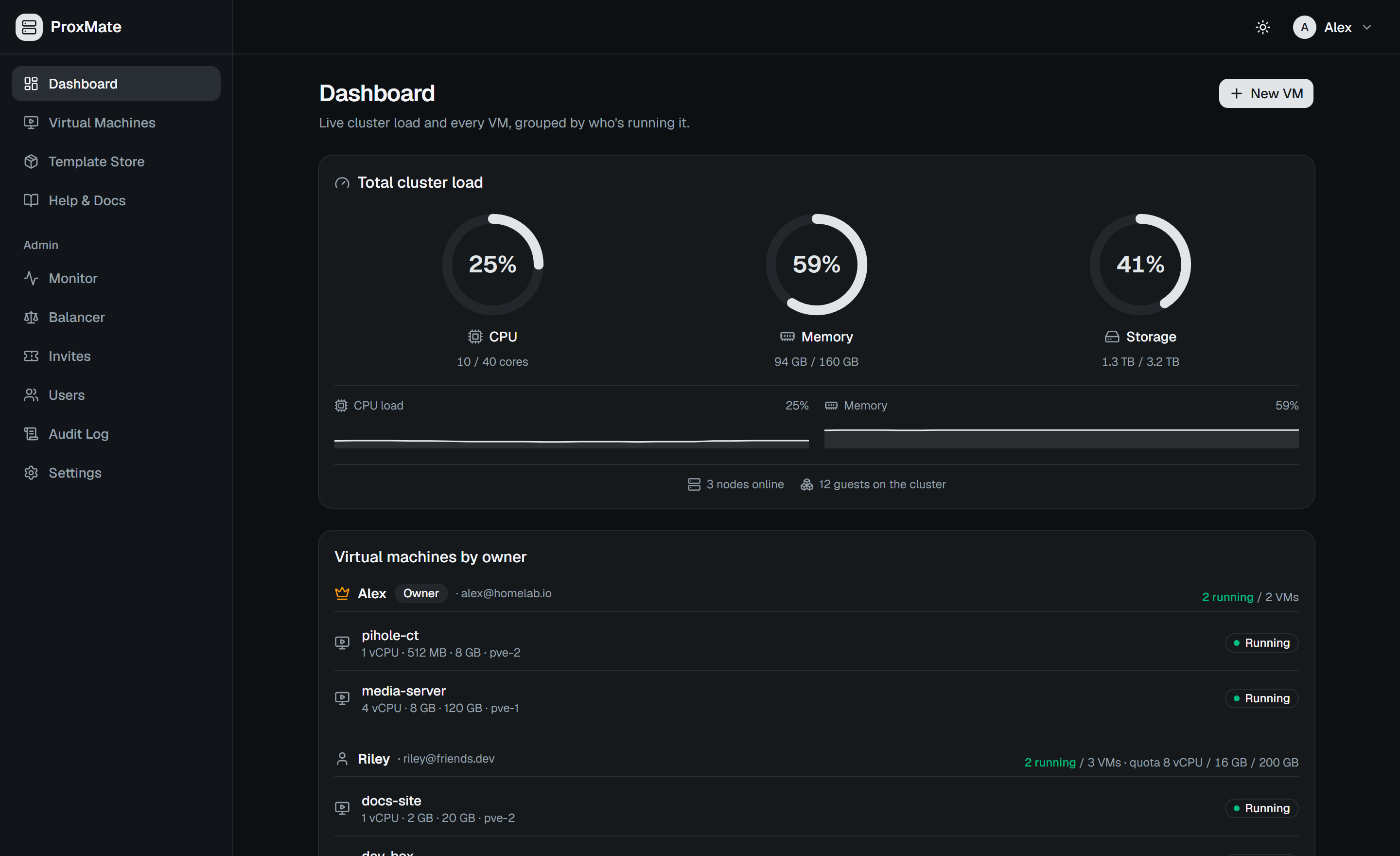
*Live cluster capacity and every virtual machine at a glance*
More screenshots — create wizard, Template Store, console, live monitor, setup (5)
### Create a VM
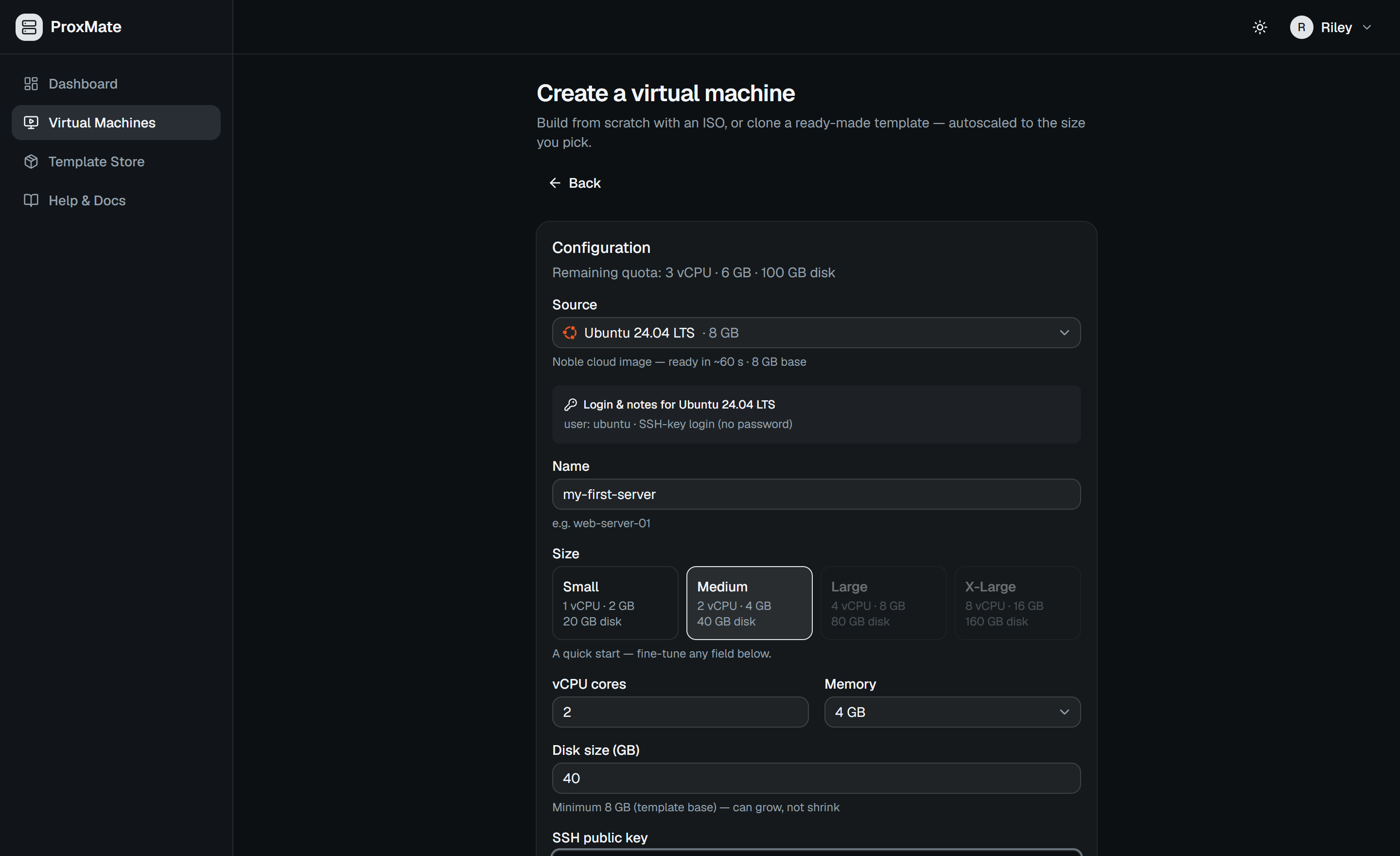
*One wizard for custom (ISO), template, and cloud-init deploys — paste an SSH key and tenants are auto-placed on the best node*
### Template Store
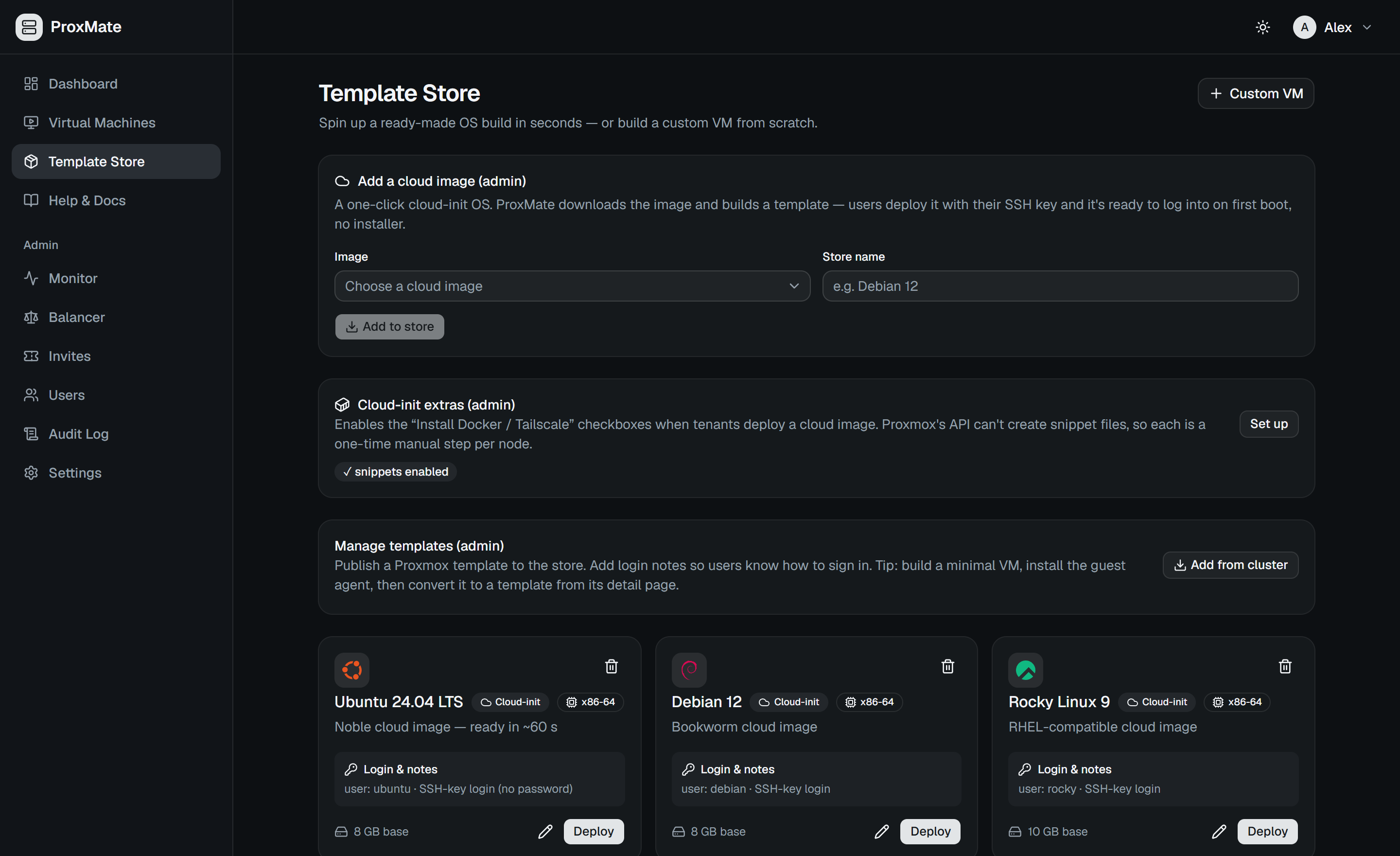
*Add cloud images in one click and publish ready-made OS builds — OS-matched icons, login notes, deploy in seconds*
### In-Browser Console
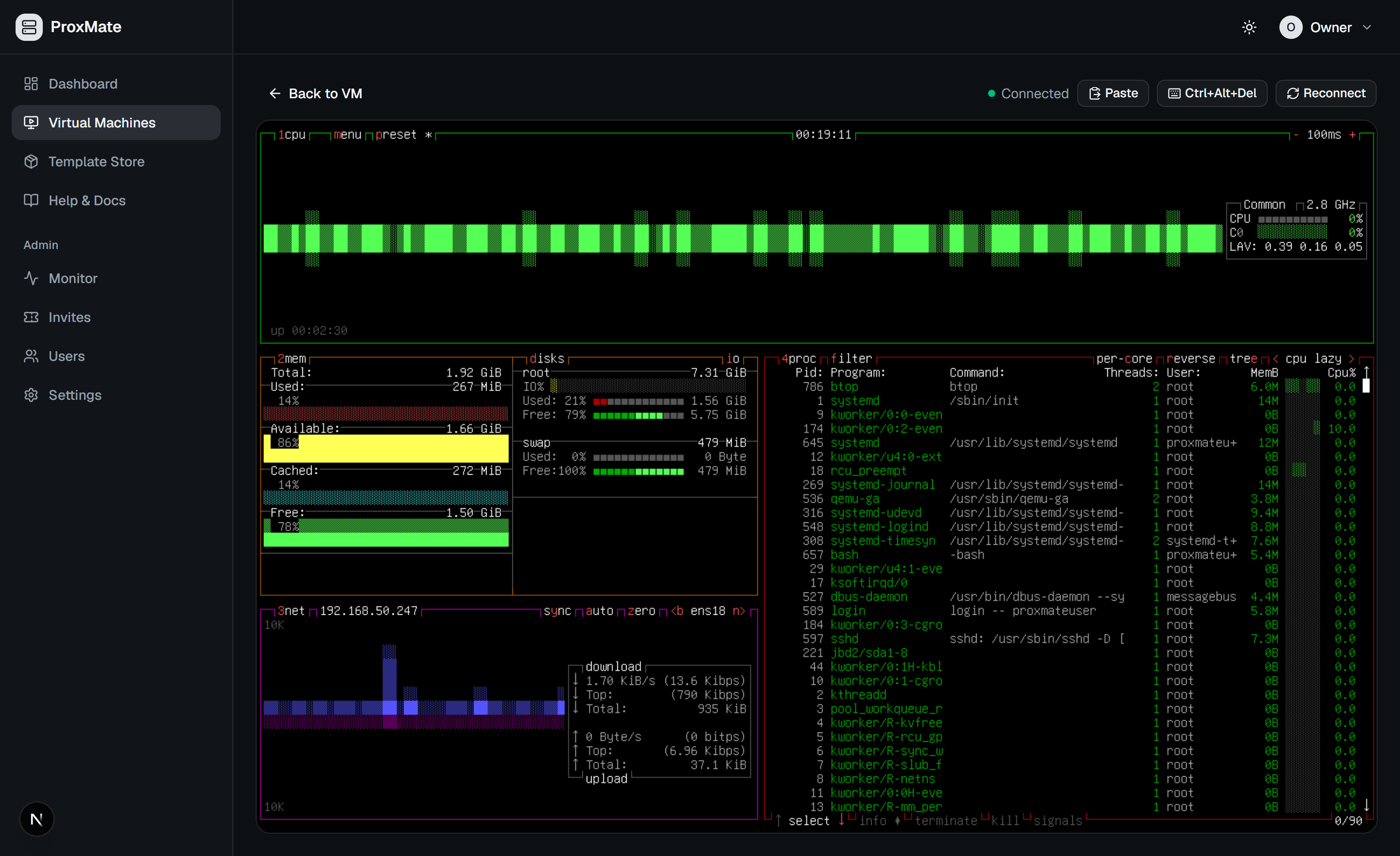
*A live, interactive noVNC session on your VM — copy/paste and Ctrl+Alt+Del, no SSH or open ports needed*
### Live Monitor
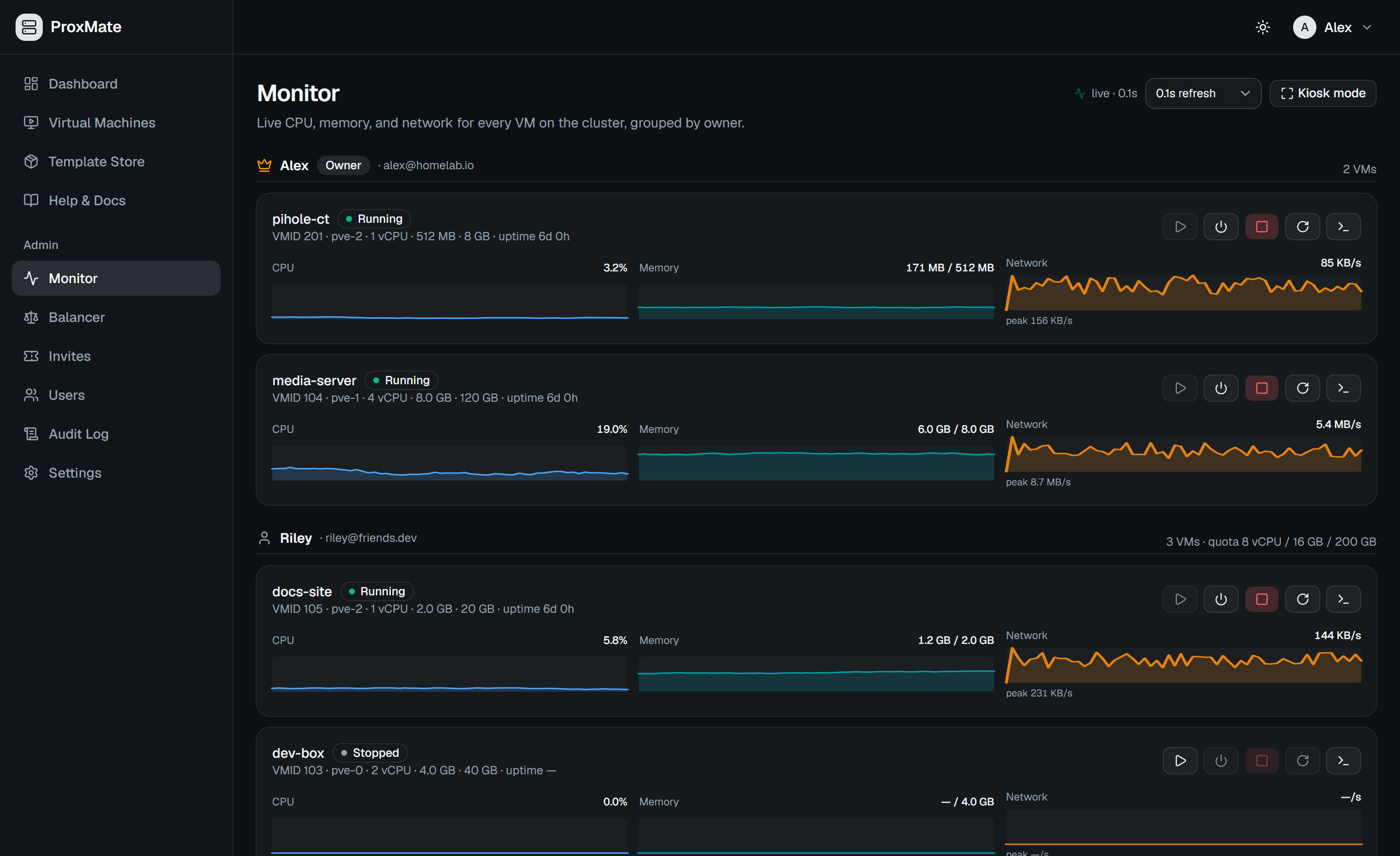
*Per-VM CPU / memory / network sparklines at 1 Hz, with power controls*
### First-Time Setup
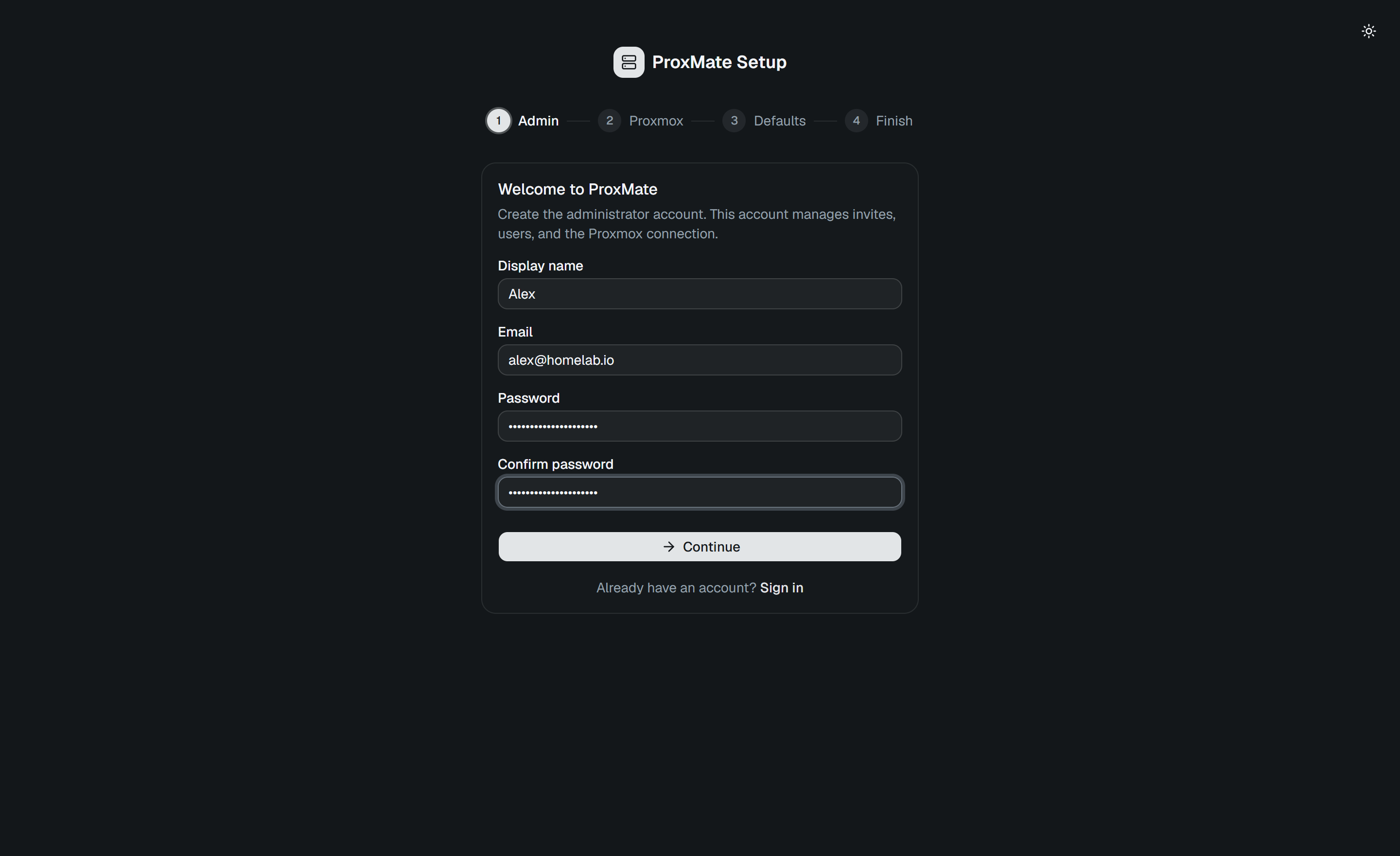
*Guided wizard to create the admin account and connect your Proxmox cluster*
---
## Install
One command, from a clean Linux machine to the setup wizard in about six minutes:
```bash
curl -fsSLO https://raw.githubusercontent.com/r0073d-l053r/ProxMate/main/install.sh
less install.sh
bash install.sh
```
That middle line is not decoration. This is deliberately **not** a `curl | sudo bash`
one-liner: ProxMate ends up holding a Proxmox API token that is effectively root on
your cluster, so read the script before you run it.
The installer checks what your machine is missing — Docker, Compose v2, git, curl,
openssl — and offers to install it. It generates your `ENCRYPTION_KEY`, writes a
correct `.env` for either an HTTP trial or an HTTPS domain, builds the stack, and
stops at the browser wizard, because that is where the Proxmox token is entered
rather than on a command line where it would land in your shell history.
| | |
|---|---|
| **Needs** | A Linux host and **sudo rights** — installing Docker and packages requires them, so you will be asked for your password. |
| **Docker** | Not required up front. If it is missing you are asked before anything is installed, and declining changes nothing on the machine. |
| **Resources** | Roughly 4 GB RAM and 5 GB disk for the build; less is warned about rather than discovered halfway through. |
| **Distributions** | Debian, Ubuntu, Fedora, RHEL, CentOS, Rocky, openSUSE and Alpine. On Arch it prints the two commands to run rather than upgrading your system unasked. |
Common flags: `--local` for an HTTP trial on your LAN address, `--domain ` for a
single HTTPS origin behind your own reverse proxy, `--dir` to install elsewhere,
`--ref` to pin a version, `--no-start` to write the configuration without building.
Run `bash install.sh --help` for the rest.
**Prefer an agent to walk it with you?** [`DEPLOY_WITH_CLAUDE.md`](./DEPLOY_WITH_CLAUDE.md)
is a runbook written as executable instructions for a coding agent. It is a supported
alternative, not a legacy path — point your agent at it and it handles the same deploy
conversationally.
---
## Quick start (development)
For working on ProxMate itself rather than running it.
**Prerequisites:** Node.js 22, a Proxmox VE cluster (tested on PVE 9.2), and a
[Proxmox API token](https://pve.proxmox.com/wiki/User_Management#pveum_tokens).
> **The #1 setup pitfall:** Proxmox creates API tokens with *Privilege Separation*
> enabled, which leaves the token with an **empty permission set** (even for `root`) —
> the connection test passes but storage lists come back empty and VM creation 403s.
> Uncheck it, or grant the token a role — see the
> [admin guide §1.1](./docs/admin-guide.md#11-create-the-api-token). The token must
> also be able to set guest tags (`VM.Config.Options`) and, on Proxmox VE 8+, hold
> `SDN.Use` (plus `SDN.Audit` to list SDN VNets); a privsep-off token has all of them.
```bash
git clone https://github.com/r0073d-l053r/ProxMate.git
cd ProxMate
# Backend (Express API on :4000)
cd backend
npm install
cp ../.env.example .env # edit if needed
npx prisma migrate deploy
npm run dev
# Frontend (Next.js on :3000) — second terminal
cd frontend
npm install
npm run dev
```
Open `http://localhost:3000` — the **setup wizard** walks you through creating the
admin account, connecting Proxmox, and picking storage/network defaults. Then generate
invite links for your users from **Admin → Invites**.
---
## Production deployment
```bash
cp .env.docker.example .env
openssl rand -hex 32 # → paste into ENCRYPTION_KEY in .env
nano .env # ← do not skip: see the note below
docker compose up -d --build
```
> **Editing `.env` is not optional.** The file ships with its **PRODUCTION** block
> active and pointing at `proxmate.example.com`, bound to `127.0.0.1`. Either replace
> that domain throughout, or comment the PRODUCTION block out and uncomment the LOCAL
> one. Skipping this gets you a frontend bundle that calls a domain you don't own, on
> ports only reachable from the machine itself — `NEXT_PUBLIC_API_URL` is baked in at
> **build time**, so fixing it later means rebuilding the frontend image.
> **`ENCRYPTION_KEY` must stay constant** across restarts — it decrypts your stored
> Proxmox token, JWT secret, SMTP password, and TOTP secrets. **Keep one copy off the
> host** (a password manager is enough — it never changes): every database backup is
> encrypted under this key, so a snapshot without it restores nothing useful. Losing
> the machine and the key together loses the secrets even if the backups survived.
> `NEXT_PUBLIC_API_URL` is baked into the frontend at **build time**, so rebuild the
> frontend image if it changes.
Upgrades run from a **release tag**, not `main`, and database migrations apply
automatically when the backend container starts — never run them by hand:
```bash
./deploy/update.sh # newest vX.Y.Z tag, rebuild + restart
./deploy/update.sh v1.3.5 # or pin a specific tag
```
Keep local compose changes (extra mounts) in `docker-compose.override.yml`, not in
`docker-compose.yml`: the updater refuses to run over local edits to tracked files.
**Coming from 1.0.x?** Read [DEPLOYMENT.md §14.4](./DEPLOYMENT.md#144-upgrading-from-10x-and-earlier)
and the [release notes](./RELEASE_NOTES.md) before updating.
For a real public deployment, serve ProxMate from a **single HTTPS origin** (passkeys,
`Secure` cookies, and OIDC SSO require it) behind Caddy / nginx / Traefik or a
Cloudflare Tunnel. The complete runbook — reverse-proxy topology, env reference,
tenant isolation, Keycloak SSO, SMTP, and the 2FA test matrix — is in
**[DEPLOYMENT.md](./DEPLOYMENT.md)**; the hardening guide is
**[SECURITY.md](./SECURITY.md)**.
---
## Testing & CI
The backend ships a Vitest suite (1,800+ tests) covering the security-critical logic —
quotas, guest ownership tags, the per-VM firewall builder, placement, retention, ownership and share
permissions, compute access windows, balancer/drain planning, cloud-init snippet
generation, guest-agent SSH-key injection, migration migratability, and the
outbound-URL/SSRF guard — against a mocked Proxmox API (no live cluster needed):
```bash
cd backend && npm test
```
Every push and PR runs [GitHub Actions](.github/workflows/ci.yml): backend typecheck +
tests, frontend lint + build, Playwright, and Docker builds of both images, plus a
separate [security workflow](.github/workflows/security.yml) (CodeQL, Trivy, SBOM).
---
## Android app
[`android/`](./android) holds a native Android app (Kotlin, Android 8.0+) for an existing
ProxMate server. You enter the server address, sign in natively (email and password, plus
a TOTP or recovery code when 2FA is on), and the app opens the full web UI, consoles
included, already signed in. Passkeys and SSO use the web sign-in page inside the app.
Servers with a self-signed certificate can be trusted after you confirm the certificate's
SHA-256 fingerprint. It needs no server changes.
The [Android workflow](.github/workflows/android.yml) builds a debug APK on every change
under `android/` (artifact `proxmate-android-debug`), plus a signed release APK on `main` and
version tags when the signing secrets are set. Build, install and signing steps are in
[android/README.md](./android/README.md).
---
## Documentation
The three tenant guides are surfaced in-app under **Help & Docs**, along with the admin
and security guides for admins.
| Guide | Audience | What's inside |
|---|---|---|
| [Production runbook](./DEPLOYMENT.md) | Owners | HTTPS origin, Caddy/Cloudflare Tunnel, Keycloak SSO, SMTP, 2FA matrix, kiosk autostart |
| [Security guide](./SECURITY.md) | Owners | Tenant isolation model, cluster firewall step, least-privilege tokens, hardening checklist |
| [Admin guide](./docs/admin-guide.md) | Owners | Cluster prep, API tokens, isolation enforcement, cloud images, auth settings, troubleshooting |
| [External access overview](./docs/external-access.md) | Tenants | The "no port forwarding" rule and which tool fits each use case |
| [Tailscale for SSH](./docs/tailscale-ssh.md) | Tenants | SSH into your VM from anywhere, no public IP |
| [Cloudflare Tunnels](./docs/cloudflare-tunnels.md) | Tenants | Publish a public website from your VM without opening ports |
| [REST API & scaling](./docs/api.md) | Developers | Personal `pm_…` tokens, OpenAPI spec, `/metrics`, PostgreSQL |
| [Roadmap](./ROADMAP.md) | Everyone | Shipped, planned, and proposed features |
| [Architecture spec](./project-architecture.md) | Contributors | The original Phase-1 design spec (historical); `okf/` describes the current system |
---
## Community
Questions, ideas, or a homelab to show off? Join the
[Discussions](https://github.com/r0073d-l053r/ProxMate/discussions):
[Q&A](https://github.com/r0073d-l053r/ProxMate/discussions/categories/q-a) ·
[Ideas](https://github.com/r0073d-l053r/ProxMate/discussions/categories/ideas) ·
[Show & Tell](https://github.com/r0073d-l053r/ProxMate/discussions/categories/show-and-tell) ·
[General](https://github.com/r0073d-l053r/ProxMate/discussions/categories/general)
— and see the [Contributing Guide](CONTRIBUTING.md) for how to get involved.
---
## License
Copyright © 2026 Jewell Net LLC.
ProxMate is **open core**:
- **Community Edition** (this repository) — free and open source under the **GNU Affero
General Public License v3.0 (AGPLv3)**; see [LICENSE](./LICENSE).
- **EDU Edition** — organization-scale features for schools and institutions, offered
under a separate [commercial license](./COMMERCIAL-LICENSE.md).
See [LICENSING.md](./LICENSING.md) for the full picture, including dual-licensing
options for businesses. "ProxMate" is a trademark of Jewell Net LLC.
---
Built by the ProxMate team.




