# LazyTail - Terminal-Based Log Viewer
A fast, universal terminal-based log viewer with live filtering, follow mode, and **AI assistant integration via MCP**.
## Installation
```bash
curl -fsSL https://raw.githubusercontent.com/raaymax/lazytail/master/install.sh | bash
# or
wget -qO- https://raw.githubusercontent.com/raaymax/lazytail/master/install.sh | bash
```
That's it! The script auto-detects your OS and architecture, downloads the latest release, and installs to `~/.local/bin`.
Alternative installation methods
### Custom install directory
```bash
curl -fsSL https://raw.githubusercontent.com/raaymax/lazytail/master/install.sh | INSTALL_DIR=/usr/local/bin bash
```
### Arch Linux (AUR)
```bash
yay -S lazytail
```
### Build from source
Requires Rust 1.70+:
```bash
git clone https://github.com/raaymax/lazytail.git
cd lazytail
cargo install --path .
```
## AI Assistant Integration (MCP)
LazyTail works as an [MCP (Model Context Protocol)](https://modelcontextprotocol.io/) server, letting AI assistants like **Claude**, **Codex**, and **Gemini** search and analyze your log files.
Claude Code Setup
```bash
claude mcp add lazytail -- lazytail --mcp
```
Or with scope for all projects:
```bash
claude mcp add lazytail --scope user -- lazytail --mcp
```
Verify with `claude mcp list` or `/mcp` command inside Claude Code.
OpenAI Codex Setup
Add to `~/.codex/config.toml`:
```toml
[mcp_servers.lazytail]
command = ["lazytail", "--mcp"]
```
Verify with `codex mcp` or `/mcp` command inside Codex.
Gemini CLI Setup
```bash
gemini mcp add lazytail -- lazytail --mcp
```
Or add to `~/.gemini/settings.json`:
```json
{
"mcpServers": {
"lazytail": {
"command": "lazytail",
"args": ["--mcp"]
}
}
}
```
Verify with `/mcp` command inside Gemini CLI.
### Available MCP Tools
| Tool | Description |
|------|-------------|
| `list_sources` | Discover available logs from `~/.config/lazytail/data/` |
| `search` | Find patterns (plain text, regex, or structured query) with optional context lines |
| `get_tail` | Get the last N lines from a log file |
| `get_lines` | Read lines from a specific position |
| `get_context` | Get lines surrounding a specific line number |
| `get_stats` | Index metadata, severity breakdown, and ingestion rate |
The `search` tool supports structured queries for field-based filtering on JSON and logfmt logs via the `query` parameter. Operators: `eq`, `ne`, `regex`, `not_regex`, `contains`, `gt`, `lt`, `gte`, `lte`. Supports nested fields (`user.id`) and exclusion patterns.
### What You Can Ask Your AI
Once configured, ask your AI assistant:
- *"What errors are in the API logs?"*
- *"Find all requests with status >= 500"*
- *"Search for 'connection refused' in all logs"*
- *"Show me the last 100 lines of the worker log"*
- *"What happened around line 1234?"*
### Capture Logs for AI Analysis
```bash
# Capture your application logs
kubectl logs -f my-pod | lazytail -n "MyApp"
# Now your AI can discover and search "MyApp" logs via MCP
```
## Features
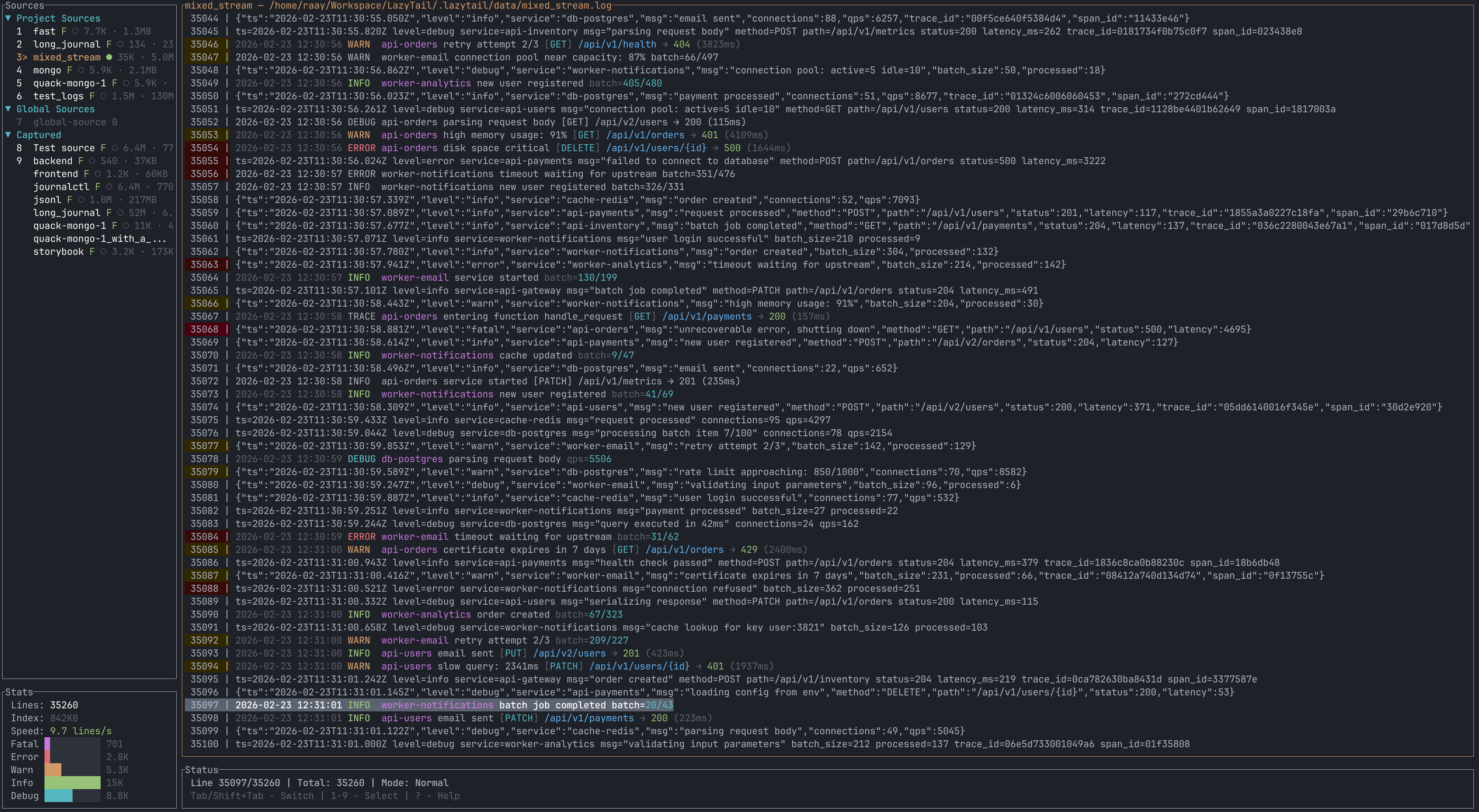
- **Multi-tab support** — Open multiple log files in tabs with side panel navigation
- **Stdin support** — Pipe logs directly with auto-detection (`cmd | lazytail`)
- **Lazy file reading** — Efficiently handles large log files using indexed line positions
- **TUI interface** — Clean terminal UI with ratatui, mouse support
- **Live filtering** — See results instantly as you type with regex or plain text
- **Filter history** — Navigate and reuse previous filter patterns
- **Background filtering** — Non-blocking filtering keeps UI responsive
- **File watching** — Auto-reload when log file is modified (using inotify on Linux)
- **Follow mode** — Auto-scroll to show latest logs as they arrive (like `tail -f`)
- **ANSI color support** — Parses and renders ANSI escape codes in full color
- **Line expansion** — Expand long lines for better readability
- **Copy to clipboard** — Copy current line with `y`
- **Memory efficient** — Viewport-based rendering keeps RAM usage low
- **Vim-style navigation** — Familiar keybindings for efficient navigation
- **Severity detection** — Automatic log level coloring (ERROR/WARN/INFO/DEBUG) with severity histogram
- **Columnar index** — Per-line metadata index built during capture for instant severity stats and accelerated filtering
- **Config system** — Project-scoped `lazytail.yaml` config with source definitions
- **Query language** — Structured field filtering (`json | level == "error"`) with aggregation (`count by (field)`)
- **Rendering presets** — Configurable structured log formatting via YAML for custom log layouts
- **Theme support** — Color schemes with import from Windows Terminal, Alacritty, Ghostty, iTerm2
- **Session persistence** — Remembers last-opened source per project
- **Combined view** — Merge multiple sources chronologically using index timestamps
- **Benchmark tool** — Filter performance benchmarking (`lazytail bench`)
- **Web UI mode** — Browser interface with virtualized source/log lists (`lazytail web`)
Press `?` in the app to see all keyboard shortcuts.
## Usage
Run LazyTail with a log file:
```bash
lazytail /path/to/your/logfile.log
```
Open multiple files in tabs:
```bash
lazytail app.log error.log access.log
```
Start the browser UI (single embedded HTML app):
```bash
lazytail web
lazytail web app.log worker.log
```
Pipe logs from other commands (auto-detected):
```bash
kubectl logs pod-name | lazytail
docker logs -f container | lazytail
journalctl -f | lazytail
```
Combine sources - stdin, files, and process substitution:
```bash
app_logs | lazytail error.log <(kubectl logs pod-name)
```
### Command Line Options
```bash
lazytail [OPTIONS] [FILE]... [COMMAND]
Commands:
init Initialize a new lazytail.yaml config file
web Start browser-based web UI
bench Benchmark filter performance
config Config file commands (validate, show)
theme Theme management commands (import, list)
help Print help for a command
Options:
-n, --name Capture stdin to ~/.config/lazytail/data/.log
--raw Output raw lines without rendering (only with -n)
--no-watch Disable file watching
--mcp Run as MCP server for AI assistants
-v, --verbose Verbose output (show config discovery paths)
-h, --help Print help
-V, --version Print version
```
### Configuration
Create a `lazytail.yaml` in your project root to define log sources:
```yaml
sources:
- name: API
path: /var/log/myapp/api.log
- name: Worker
path: ./logs/worker.log # Relative to project root
```
Initialize a config file interactively:
```bash
lazytail init
```
Config is discovered by walking parent directories from CWD. Use `lazytail config show` to see the effective configuration, or `lazytail config validate` to check for errors.
### Source Discovery Mode
Run `lazytail` with no arguments to auto-discover log sources:
```bash
lazytail # Opens sources from lazytail.yaml and ~/.config/lazytail/data/
```
### Capture Mode
Capture logs from any command to a named source (tee-like behavior):
```bash
# Terminal 1: Capture API logs
kubectl logs -f api-pod | lazytail -n "API"
# Terminal 2: Capture worker logs
docker logs -f worker | lazytail -n "Worker"
# Terminal 3: View all sources
lazytail # Shows tabs: [API] [Worker] with live status
```
Captured sources show active (●) or ended (○) status in the UI.
Use `--raw` to output raw lines without rendering presets:
```bash
kubectl logs -f api-pod | lazytail -n "API" --raw
```
### Themes
LazyTail supports color schemes for customizing the UI appearance.
```bash
# List available themes
lazytail theme list
# Import from Windows Terminal, Alacritty, Ghostty, or iTerm2
lazytail theme import my-scheme.json
lazytail theme import --name "My Theme" alacritty.toml
```
Set the active theme in `lazytail.yaml`:
```yaml
theme: my-scheme
```
### Benchmarking
Measure filter performance on your log files:
```bash
# Benchmark a plain text filter
lazytail bench "error" app.log
# Benchmark regex filter
lazytail bench --regex "level=(error|warn)" app.log
# Benchmark structured query
lazytail bench --query "json | level == \"error\"" app.log
# Case-sensitive matching
lazytail bench --case-sensitive "Error" app.log
# Compare indexed vs non-indexed performance
lazytail bench --compare "error" app.log
# Custom number of trials (default: 5)
lazytail bench --trials 10 "error" app.log
# Output JSON results
lazytail bench --json "error" app.log
```
### Use Cases
LazyTail works with any text-based log files:
**Application Logs:**
```bash
lazytail /var/log/myapp/application.log
lazytail ~/.pm2/logs/app-out.log
```
**System Logs:**
```bash
lazytail /var/log/syslog
lazytail /var/log/auth.log
```
**Container Logs:**
```bash
kubectl logs pod-name | lazytail
docker logs -f container | lazytail
```
**Web Server Logs:**
```bash
lazytail /var/log/nginx/access.log
lazytail /var/log/apache2/error.log
```
Any plain text log file works - from development logs to production system logs, with or without ANSI colors.
## Contributing
Contributions are welcome! Please see [CONTRIBUTING.md](CONTRIBUTING.md) for:
- Development setup and guidelines
- Commit message conventions
- CI/CD workflow documentation
- Release process
- Pull request guidelines
## License
LazyTail is licensed under the [MIT License](LICENSE).