




Chat • Changelog • Prerequisites • Getting started • Creating a new bot • Generating Xcode project • API overview • Debugging notes • Examples • Documentation • Support • License
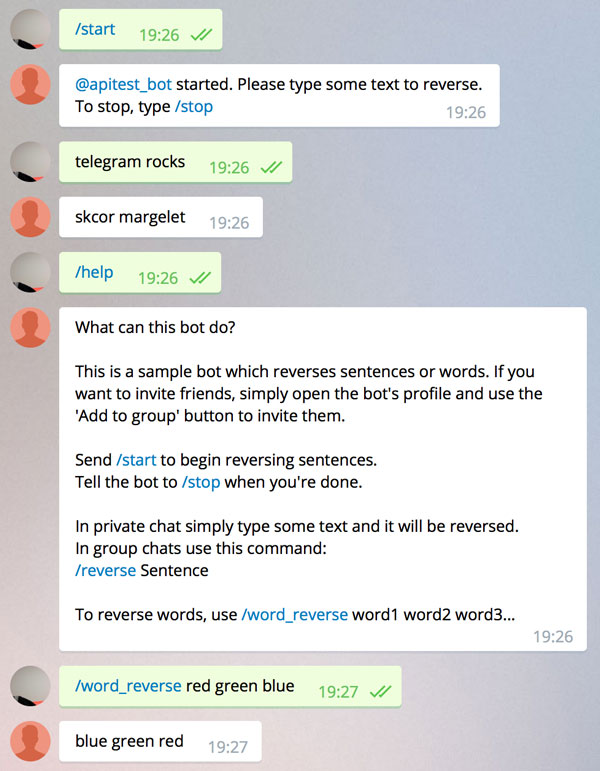
# SDK for creating Telegram Bots in Swift. *Sample projects:* Shopping list bot.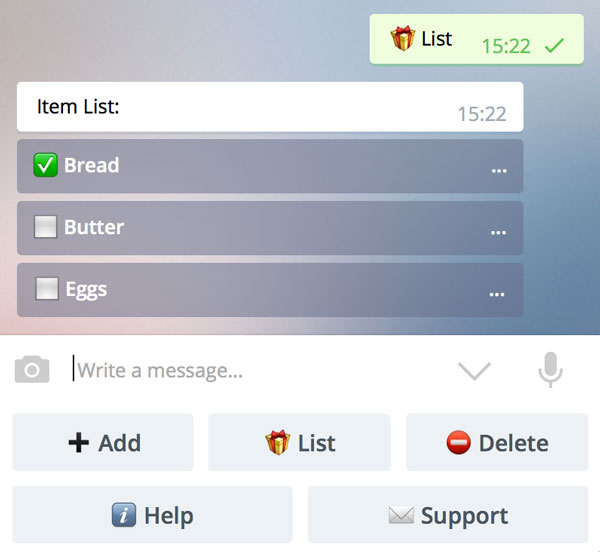 Word reverse bot.
 Trivial bot:
```swift
import TelegramBotSDK
let bot = TelegramBot(token: "my token")
let router = Router(bot: bot)
router["greet"] = { context in
guard let from = context.message?.from else { return false }
context.respondAsync("Hello, \(from.firstName)!")
return true
}
router[.newChatMembers] = { context in
guard let users = context.message?.newChatMembers else { return false }
for user in users {
guard user.id != bot.user.id else { continue }
context.respondAsync("Welcome, \(user.firstName)!")
}
return true
}
while let update = bot.nextUpdateSync() {
try router.process(update: update)
}
fatalError("Server stopped due to error: \(bot.lastError)")
```
## Telegram chat
Join our chat in Telegram: [swiftsdkchat](https://telegram.me/swiftsdkchat).
## What's new
[Release notes](https://github.com/zmeyc/telegram-bot-swift/blob/master/CHANGELOG.md) contain the significant changes in each release with migration notes.
## Prerequisites
On OS X, use the latest Xcode 9 release.
On Linux, install `Swift 4.2` or newer and `libcurl4-openssl-dev` package. Note that `shopster-bot` example won't build on Linux because GRDB doesn't support Linux yet, but otherwise the library should be functional.
## Getting started
Please get familiar with the documentation on Telegram website:
* [Bots: An introduction for developers](https://core.telegram.org/bots)
* [Telegram Bot API](https://core.telegram.org/bots/api)
## Creating a new bot
In Telegram, add `BotFather`. Send him these commands:
```
/newbot
BotName
username_of_my_bot
```
BotFather will return a token.
Create a project for your bot:
```
mkdir hello-bot
cd hello-bot
swift package init --type executable
```
Create `Package.swift`:
```swift
// swift-tools-version:5.1
import PackageDescription
let package = Package(
name: "hello-bot",
products: [
// Products define the executables and libraries produced by a package, and make them visible to other packages.
.executable(
name: "hello-bot",
targets: ["hello-bot"]
),
],
dependencies: [
// Dependencies declare other packages that this package depends on.
// .package(url: /* package url */, from: "1.0.0"),
.package(name: "TelegramBotSDK", url: "https://github.com/zmeyc/telegram-bot-swift.git", from: "2.0.0"),
],
targets: [
// Targets are the basic building blocks of a package. A target can define a module or a test suite.
// Targets can depend on other targets in this package, and on products in packages which this package depends on.
.target(
name: "hello-bot",
dependencies: ["TelegramBotSDK"]),
]
)
```
Create `Sources/main.swift`:
```swift
import Foundation
import TelegramBotSDK
let token = readToken(from: "HELLO_BOT_TOKEN")
let bot = TelegramBot(token: token)
while let update = bot.nextUpdateSync() {
if let message = update.message, let from = message.from, let text = message.text {
bot.sendMessageAsync(chatId: .chat(from.id),
text: "Hi \(from.firstName)! You said: \(text).\n")
}
}
fatalError("Server stopped due to error: \(String(describing: bot.lastError))")
```
> Do not commit your token to git!
`readToken` reads token from environment variable or from a file. So, either create an environment variable:
```
export HELLO_BOT_TOKEN='token'
```
Or save the token to a file and add the file to .gitignore:
```
echo token > HELLO_BOT_TOKEN
```
Build your bot:
```
swift build
```
And run it:
```
./.build/x86_64-apple-macosx10.10/debug/hello-bot
```
More details are available on Wiki: [New Bot](https://github.com/zmeyc/telegram-bot-swift/wiki/New-Bot).
## Generating Xcode project
It's easy:
```
swift package generate-xcodeproj
```
Open generated `hello-bot.xcodeproj` and switch the active scheme to the bottom one:
Trivial bot:
```swift
import TelegramBotSDK
let bot = TelegramBot(token: "my token")
let router = Router(bot: bot)
router["greet"] = { context in
guard let from = context.message?.from else { return false }
context.respondAsync("Hello, \(from.firstName)!")
return true
}
router[.newChatMembers] = { context in
guard let users = context.message?.newChatMembers else { return false }
for user in users {
guard user.id != bot.user.id else { continue }
context.respondAsync("Welcome, \(user.firstName)!")
}
return true
}
while let update = bot.nextUpdateSync() {
try router.process(update: update)
}
fatalError("Server stopped due to error: \(bot.lastError)")
```
## Telegram chat
Join our chat in Telegram: [swiftsdkchat](https://telegram.me/swiftsdkchat).
## What's new
[Release notes](https://github.com/zmeyc/telegram-bot-swift/blob/master/CHANGELOG.md) contain the significant changes in each release with migration notes.
## Prerequisites
On OS X, use the latest Xcode 9 release.
On Linux, install `Swift 4.2` or newer and `libcurl4-openssl-dev` package. Note that `shopster-bot` example won't build on Linux because GRDB doesn't support Linux yet, but otherwise the library should be functional.
## Getting started
Please get familiar with the documentation on Telegram website:
* [Bots: An introduction for developers](https://core.telegram.org/bots)
* [Telegram Bot API](https://core.telegram.org/bots/api)
## Creating a new bot
In Telegram, add `BotFather`. Send him these commands:
```
/newbot
BotName
username_of_my_bot
```
BotFather will return a token.
Create a project for your bot:
```
mkdir hello-bot
cd hello-bot
swift package init --type executable
```
Create `Package.swift`:
```swift
// swift-tools-version:5.1
import PackageDescription
let package = Package(
name: "hello-bot",
products: [
// Products define the executables and libraries produced by a package, and make them visible to other packages.
.executable(
name: "hello-bot",
targets: ["hello-bot"]
),
],
dependencies: [
// Dependencies declare other packages that this package depends on.
// .package(url: /* package url */, from: "1.0.0"),
.package(name: "TelegramBotSDK", url: "https://github.com/zmeyc/telegram-bot-swift.git", from: "2.0.0"),
],
targets: [
// Targets are the basic building blocks of a package. A target can define a module or a test suite.
// Targets can depend on other targets in this package, and on products in packages which this package depends on.
.target(
name: "hello-bot",
dependencies: ["TelegramBotSDK"]),
]
)
```
Create `Sources/main.swift`:
```swift
import Foundation
import TelegramBotSDK
let token = readToken(from: "HELLO_BOT_TOKEN")
let bot = TelegramBot(token: token)
while let update = bot.nextUpdateSync() {
if let message = update.message, let from = message.from, let text = message.text {
bot.sendMessageAsync(chatId: .chat(from.id),
text: "Hi \(from.firstName)! You said: \(text).\n")
}
}
fatalError("Server stopped due to error: \(String(describing: bot.lastError))")
```
> Do not commit your token to git!
`readToken` reads token from environment variable or from a file. So, either create an environment variable:
```
export HELLO_BOT_TOKEN='token'
```
Or save the token to a file and add the file to .gitignore:
```
echo token > HELLO_BOT_TOKEN
```
Build your bot:
```
swift build
```
And run it:
```
./.build/x86_64-apple-macosx10.10/debug/hello-bot
```
More details are available on Wiki: [New Bot](https://github.com/zmeyc/telegram-bot-swift/wiki/New-Bot).
## Generating Xcode project
It's easy:
```
swift package generate-xcodeproj
```
Open generated `hello-bot.xcodeproj` and switch the active scheme to the bottom one:
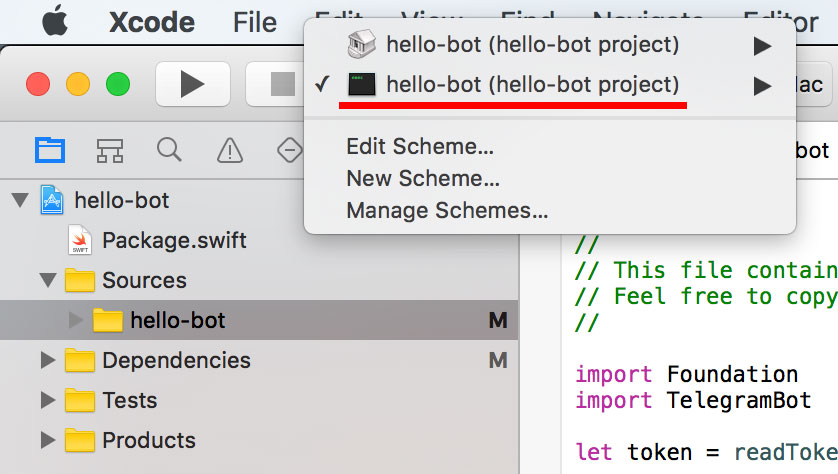 Don't forget to add your token to environment variables in Xcode (Scheme settings -> Run).
Press CMD-R to start the bot.
## API overview
### Type and request names
SDK type and request names closely mirror [original Telegram ones](https://core.telegram.org/bots/api).
Swift types and enums were added where appropriate:
```swift
if entity.type == .botCommand { ... }
```
In most cases raw methods accepting strings are also available. They can be used as fallbacks if required enum case is not added yet:
```swift
if entity.typeString == "bot_command" { ... }
```
To allow accessing fields which are still missing in SDK, every data type has `json` member with original json structure:
```swift
if entity.json["type"].stringValue == "bot_command" { ... }
```
All types conform to `JsonConvertible` protocol and can be created from json or serialized back to json. Use `debugDescription` method for human-readable json or `description` for json which can be sent to server.
### Requests
**Sync and Async**
Request names closely mirror Telegram ones, but have two versions: `synchronous` and `asynchronous` with method suffixes `Sync` and `Async` correspondingly.
* Synchronous methods block until the operation is completed.
```swift
let fromId: ChatId = .chat(12345678) // your user id
bot.sendMessageSync(fromId, "Hello!") // blocks until the message is sent
bot.sendMessageSync(fromId, "Bye.")
```
These methods return a server response or `nil` in case of error. If `nil` is returned, details can be obtained by querying `bot.lastError`.
```swift
guard let sentMessage = bot.sendMessageSync(fromId, "Hello") else {
fatalError("Unable to send message: \(bot.lastError.unwrapOptional)")
}
```
Do not use synchronous methods in real apps because they're slow. Use them when debugging or for experimenting in `REPL`. More details: [Using Swift REPL for calling API methods](https://github.com/zmeyc/telegram-bot-swift/wiki/Using-Swift-REPL-for-calling-API-methods)
* Asynchronous methods accept an optional completion handler which will be called when operation is completed.
Completion handler is called on main thread by default.
```swift
bot.sendMessageAsync(fromId, "Hello!") { result, error in
// message sent!
bot.sendMessageAsync(fromId, "Bye.")
}
// execution continues immediately
```
In completion handler `result` contains the server response or `nil` in case of error. Details can be obtained by querying `error`.
For simplicity, it's possible to synchronously process messages, but respond asynchronously to avoid blocking the processing of the next message. So, a typical bot's main loop can look like this:
```swift
while let update = bot.nextUpdateSync() {
// process the message and call Async methods
}
```
**Request parameters**
Parameter names should be specified explicitly in most cases:
```swift
bot.sendLocationAsync(chat_id: chatId, latitude: 50.4501, longitude: 30.5234)
```
Exception to this are `sendMessageSync/Async` and `respondSync/Async` functions which are used very often. Parameter names can be omitted in them:
```swift
bot.sendMessageAsync(chatId: chatId, text: "Text")
bot.sendMessageAsync(chatId, "Text") // will also work
```
`Optional` parameters can also be passed:
```swift
let markup = ForceReply()
bot.sendMessageAsync(chatId: chatId, text: "Force reply",
reply_markup: markup, disable_notification: true)
```
If you ever encounter a situation when parameter hasn't been added to method signature yet, you can pass a dictionary with any parameters at the end of parameter list:
```swift
let markup = ForceReply()
bot.sendMessageAsync(chatId: chatId, text: "Force reply",
["reply_markup": markup, "disable_notification": true])
```
It's also possible to set default parameter values for a request:
```swift
bot.defaultParameters["sendMessage"] = ["disable_notification": true]
```
In dictionaries `nil` values will be treated as `no value` and won't be sent to Telegram server.
**Available requests**
Check `TelegramBot/Requests` subdirectory for a list of available requests.
If you find a missing request, please create a ticket and it will be added. Until then, an arbitrary unsupported endpoint can be called like this:
```swift
let user: User? = requestSync("sendMessage", ["chat_id": chatId, "text": text])
```
Or async version:
```swift
requestAsync("sendMessage", ["chat_id": chatId, "text": text]) { (result: User?, error: DataTaskError?) -> () in
...
}
```
These methods automatically deserialize the json response.
Explicitly specifying result type is important. Result type should conform to `JsonConvertible` protocol. `Bool` and `Int` already conform to `JsonConvertible`.
JSON class itself also conforms to `JsonConvertible`, so you can request a raw json if needed:
```swift
let user: JSON? = requestSync("sendMessage", ["chat_id": chatId, "text": text])
```
### Routing
Router maps text commands and other events to their handler functions and helps parsing command arguments.
```swift
let router = Router(bot)
router["command1"] = handler1
router["command2"] = handler2
router[.event] = handler3
...
router.process(update: update)
```
Multiple commands can be specified in a single rule:
```swift
router["Full Command Name", "command"] = handler
```
Multiword commands are also supported:
```swift
router["list add"] = onListAdd
router["list remove"] = onListRemove
```
Routers can be chained. This helps creating a context-sensitive routers with fallback to a global router.
```swift
router1.unmatched = router2.handler
```
**Handlers**
Handlers take `Context` argument and return `Bool`.
* If handler returns `true`, command matching stops.
* If handler returns `false`, other paths will be matched.
So, in handler check preconditions and return false if they aren't satisfied:
```swift
router["reboot"] = { context in
guard let fromId = context.fromId where isAdmin(fromId) else { return false }
context.respondAsync("I will now reboot the PC.") { _ in
reboot()
}
return true
}
```
Handler functions can be marked as `throws` and throw exceptions. Router won't process them and will simply pass the exceptions to caller.
`Context` is a request context, it contains:
* `bot` - a reference to the bot.
* `update` - current `Update` structure.
* `message` - convenience method for accessing `update.message`. If `update.message` is nil, fallbacks to `update.edited_message`, then to `update.callback_query?.message`.
* `command` - command without slash.
* `slash` - true, if command was prefixed with a slash. Useful if you want to skip commands not starting with slash in group chats.
* `args` - command arguments scanner.
* `properties` - context sensitive properties. Pass them to `process` method:
```swift
var properties = [String: AnyObject]()
properties["myField"] = myValue
try router.process(update: update, properties: properties)
```
And use them in handlers:
```swift
func myHandler(context: Context) -> Bool {
let myValue = context.properties["myField"] as? MyValueType
// ...
}
```
Or make a `Context` category for easier access to your properties, for example:
```swift
extension Context {
var session: Session { return properties["session"] as! Session }
}
```
`Context` also contains a few helper methods and variables:
* `privateChat` - true, if this is a private chat with bot, false for all group chat types.
* `chatId` - shortcut for message?.chat.id. If message is nil, tries to retrieve chatId from other `Update` fields.
* `fromId` - shortcut for message?.from?.id. If message is nil, tries to retrieve fromId from other `Update` fields.
* `respondAsync`, `respondSync` - works as `sendMessage(chatId, ...)`
* `respondPrivatelyAsync/Sync("text", groupText: "text")` - respond to user privately, sending a short message to the group if this was a group chat. For example:
```swift
context.respondPrivatelyAsync("Command list: ...",
groupText: "Please find a list of commands in a private message.")
```
* `reportErrorAsync/Sync(text: "User text", errorDescription: "Detailed error description for administrator")` - sends a short message to user and prints detailed error description to a console. `text` parameter can be omitted, in which case user will receive a generic error message.
**Text commands**
Router can match text commands:
```swift
router["start"] = onStart
```
Command name is processed differently in private and group chats:
* In private chats slash is optional. `start` matches `/start` as well as `start`.
* It group chats 'start' only matches `/start`.
This can be overridden. The following line will require slash even in private chats:
```swift
router["start", .slashRequired] = onStart
```
Router is case-insensitive by default. To make it case-sensitive, pass `.caseSensitive` option:
```swift
router["command", .caseSensitive] = handler
```
Multiple options can be passed:
```swift
router["command", [.slashRequired, .caseSensitive]] = handler
```
In Telegram group chats, user can append bot name to a command, for example: `/greet@hello_bot`. Router takes care of removing the `@hello_bot` part from command name automatically.
**Text commands with arguments**
Words can be captured and then processed by using `scanWord` method.
```swift
router["two_words"] = { context in
let word1 = context.args.scanWord()
let word2 = context.args.scanWord()
}
```
Array of words can be captured using `scanWords`:
```swift
router["words"] = { context in
let words = context.args.scanWords() // returns [String] array
}
```
Numbers can be captured using `scanInt`, `scanInt64` and `scanDouble`. `restOfString` captures the remainder as a single string.
```swift
router["command"] = { context in
let value1 = context.args.scanInt()
let value2 = context.args.scanDouble()
let text = context.args.scanRestOfString()
}
```
It's also possible to directly access `NSScanner` used for scanning arguments: `context.args.scanner`.
Handler is expected to read all the arguments, otherwise user will see a warning: _Part of your input was ignored: text_
So, for example, if there's a command `swap` which expects two arguments but user types: `/swap aaa bbb ccc`, he will see:
```
bbb aaa
Part of your input was ignored: ccc
```
A possible way to avoid the warning is to skip unneeded arguments by calling `context.args.skipRestOfString()`.
Also, the warning can be overridden:
```swift
router.partialMatch = { context in
context.respondAsync("Part of your input was ignored: \(context.args.scanRestOfString())")
return true
}
```
**Other events**
Router can handle other event types as well. For example, when new user joins the chat, `.new_chat_member` path will be triggered:
```swift
router[.new_chat_member] = { context in
guard let users = context.message?.newChatMembers else { return false }
for user in users {
guard user.id != bot.user.id else { return false }
context.respondAsync("Welcome, \(user.firstName)!")
}
return true
}
```
Check `TelegramBot/Router/ContentType.swift` file for a complete list of events supported by Router.
**Handling unmatched paths**
If no paths were matched, router will call it's `unmatched` handler, which will print "Command not found" by default.
This can be overridden by setting an explicit handler:
```swift
router.unmatched = { context in
// Do something else with context.args
return true
}
```
### Debugging notes
In debugger you may want to dump the contents of a json structure, but `debugDescription` loses it's formatting.
`prettyPrint` helper function allows printing any `JsonConvertible` with indentation:
```swift
let user: User
user.prettyPrint()
bot.sendMessageSync(fromId, "Hello!")?.prettyPrint()
```
## Examples
There are 3 example projects available:
* `Examples/hello-bot` - a trivial bot which responds to `/greet` command and greets users who join the chat.
* `Examples/word-reverse-bot` - demonstrates how to handle start and stop requests, keep session state and parse command arguments. Behaves differently in private and group chats. Uses a router and a controller.
* `Examples/shopster-bot` - maintains a shopping list using sqlite3 database. Allows creating shared shopping lists in group chats. [GRDB library](https://github.com/groue/GRDB.swift) is used for working with database.
Details on compiling and running the bots are available on Wiki: [Building and running the example projects](https://github.com/zmeyc/telegram-bot-swift/wiki).
## Documentation
Additional documentation is available on [Telegram Bot Swift SDK Wiki](https://github.com/zmeyc/telegram-bot-swift/wiki).
Check `Examples/` for sample bot projects.
This SDK is a work in progress, expect the API to change very often.
## Need help?
Please [submit an issue](https://github.com/zmeyc/telegram-bot-swift/issues) on Github.
If you miss a specific feature, please create an issue and it will be prioritized. Pull Requests are also welcome.
Talk with other developers in our Telegram chat: [swiftsdkchat](https://telegram.me/swiftsdkchat).
Happy coding!
## License
Apache License Version 2.0 with Runtime Library Exception. Please see LICENSE.txt for more information.
Don't forget to add your token to environment variables in Xcode (Scheme settings -> Run).
Press CMD-R to start the bot.
## API overview
### Type and request names
SDK type and request names closely mirror [original Telegram ones](https://core.telegram.org/bots/api).
Swift types and enums were added where appropriate:
```swift
if entity.type == .botCommand { ... }
```
In most cases raw methods accepting strings are also available. They can be used as fallbacks if required enum case is not added yet:
```swift
if entity.typeString == "bot_command" { ... }
```
To allow accessing fields which are still missing in SDK, every data type has `json` member with original json structure:
```swift
if entity.json["type"].stringValue == "bot_command" { ... }
```
All types conform to `JsonConvertible` protocol and can be created from json or serialized back to json. Use `debugDescription` method for human-readable json or `description` for json which can be sent to server.
### Requests
**Sync and Async**
Request names closely mirror Telegram ones, but have two versions: `synchronous` and `asynchronous` with method suffixes `Sync` and `Async` correspondingly.
* Synchronous methods block until the operation is completed.
```swift
let fromId: ChatId = .chat(12345678) // your user id
bot.sendMessageSync(fromId, "Hello!") // blocks until the message is sent
bot.sendMessageSync(fromId, "Bye.")
```
These methods return a server response or `nil` in case of error. If `nil` is returned, details can be obtained by querying `bot.lastError`.
```swift
guard let sentMessage = bot.sendMessageSync(fromId, "Hello") else {
fatalError("Unable to send message: \(bot.lastError.unwrapOptional)")
}
```
Do not use synchronous methods in real apps because they're slow. Use them when debugging or for experimenting in `REPL`. More details: [Using Swift REPL for calling API methods](https://github.com/zmeyc/telegram-bot-swift/wiki/Using-Swift-REPL-for-calling-API-methods)
* Asynchronous methods accept an optional completion handler which will be called when operation is completed.
Completion handler is called on main thread by default.
```swift
bot.sendMessageAsync(fromId, "Hello!") { result, error in
// message sent!
bot.sendMessageAsync(fromId, "Bye.")
}
// execution continues immediately
```
In completion handler `result` contains the server response or `nil` in case of error. Details can be obtained by querying `error`.
For simplicity, it's possible to synchronously process messages, but respond asynchronously to avoid blocking the processing of the next message. So, a typical bot's main loop can look like this:
```swift
while let update = bot.nextUpdateSync() {
// process the message and call Async methods
}
```
**Request parameters**
Parameter names should be specified explicitly in most cases:
```swift
bot.sendLocationAsync(chat_id: chatId, latitude: 50.4501, longitude: 30.5234)
```
Exception to this are `sendMessageSync/Async` and `respondSync/Async` functions which are used very often. Parameter names can be omitted in them:
```swift
bot.sendMessageAsync(chatId: chatId, text: "Text")
bot.sendMessageAsync(chatId, "Text") // will also work
```
`Optional` parameters can also be passed:
```swift
let markup = ForceReply()
bot.sendMessageAsync(chatId: chatId, text: "Force reply",
reply_markup: markup, disable_notification: true)
```
If you ever encounter a situation when parameter hasn't been added to method signature yet, you can pass a dictionary with any parameters at the end of parameter list:
```swift
let markup = ForceReply()
bot.sendMessageAsync(chatId: chatId, text: "Force reply",
["reply_markup": markup, "disable_notification": true])
```
It's also possible to set default parameter values for a request:
```swift
bot.defaultParameters["sendMessage"] = ["disable_notification": true]
```
In dictionaries `nil` values will be treated as `no value` and won't be sent to Telegram server.
**Available requests**
Check `TelegramBot/Requests` subdirectory for a list of available requests.
If you find a missing request, please create a ticket and it will be added. Until then, an arbitrary unsupported endpoint can be called like this:
```swift
let user: User? = requestSync("sendMessage", ["chat_id": chatId, "text": text])
```
Or async version:
```swift
requestAsync("sendMessage", ["chat_id": chatId, "text": text]) { (result: User?, error: DataTaskError?) -> () in
...
}
```
These methods automatically deserialize the json response.
Explicitly specifying result type is important. Result type should conform to `JsonConvertible` protocol. `Bool` and `Int` already conform to `JsonConvertible`.
JSON class itself also conforms to `JsonConvertible`, so you can request a raw json if needed:
```swift
let user: JSON? = requestSync("sendMessage", ["chat_id": chatId, "text": text])
```
### Routing
Router maps text commands and other events to their handler functions and helps parsing command arguments.
```swift
let router = Router(bot)
router["command1"] = handler1
router["command2"] = handler2
router[.event] = handler3
...
router.process(update: update)
```
Multiple commands can be specified in a single rule:
```swift
router["Full Command Name", "command"] = handler
```
Multiword commands are also supported:
```swift
router["list add"] = onListAdd
router["list remove"] = onListRemove
```
Routers can be chained. This helps creating a context-sensitive routers with fallback to a global router.
```swift
router1.unmatched = router2.handler
```
**Handlers**
Handlers take `Context` argument and return `Bool`.
* If handler returns `true`, command matching stops.
* If handler returns `false`, other paths will be matched.
So, in handler check preconditions and return false if they aren't satisfied:
```swift
router["reboot"] = { context in
guard let fromId = context.fromId where isAdmin(fromId) else { return false }
context.respondAsync("I will now reboot the PC.") { _ in
reboot()
}
return true
}
```
Handler functions can be marked as `throws` and throw exceptions. Router won't process them and will simply pass the exceptions to caller.
`Context` is a request context, it contains:
* `bot` - a reference to the bot.
* `update` - current `Update` structure.
* `message` - convenience method for accessing `update.message`. If `update.message` is nil, fallbacks to `update.edited_message`, then to `update.callback_query?.message`.
* `command` - command without slash.
* `slash` - true, if command was prefixed with a slash. Useful if you want to skip commands not starting with slash in group chats.
* `args` - command arguments scanner.
* `properties` - context sensitive properties. Pass them to `process` method:
```swift
var properties = [String: AnyObject]()
properties["myField"] = myValue
try router.process(update: update, properties: properties)
```
And use them in handlers:
```swift
func myHandler(context: Context) -> Bool {
let myValue = context.properties["myField"] as? MyValueType
// ...
}
```
Or make a `Context` category for easier access to your properties, for example:
```swift
extension Context {
var session: Session { return properties["session"] as! Session }
}
```
`Context` also contains a few helper methods and variables:
* `privateChat` - true, if this is a private chat with bot, false for all group chat types.
* `chatId` - shortcut for message?.chat.id. If message is nil, tries to retrieve chatId from other `Update` fields.
* `fromId` - shortcut for message?.from?.id. If message is nil, tries to retrieve fromId from other `Update` fields.
* `respondAsync`, `respondSync` - works as `sendMessage(chatId, ...)`
* `respondPrivatelyAsync/Sync("text", groupText: "text")` - respond to user privately, sending a short message to the group if this was a group chat. For example:
```swift
context.respondPrivatelyAsync("Command list: ...",
groupText: "Please find a list of commands in a private message.")
```
* `reportErrorAsync/Sync(text: "User text", errorDescription: "Detailed error description for administrator")` - sends a short message to user and prints detailed error description to a console. `text` parameter can be omitted, in which case user will receive a generic error message.
**Text commands**
Router can match text commands:
```swift
router["start"] = onStart
```
Command name is processed differently in private and group chats:
* In private chats slash is optional. `start` matches `/start` as well as `start`.
* It group chats 'start' only matches `/start`.
This can be overridden. The following line will require slash even in private chats:
```swift
router["start", .slashRequired] = onStart
```
Router is case-insensitive by default. To make it case-sensitive, pass `.caseSensitive` option:
```swift
router["command", .caseSensitive] = handler
```
Multiple options can be passed:
```swift
router["command", [.slashRequired, .caseSensitive]] = handler
```
In Telegram group chats, user can append bot name to a command, for example: `/greet@hello_bot`. Router takes care of removing the `@hello_bot` part from command name automatically.
**Text commands with arguments**
Words can be captured and then processed by using `scanWord` method.
```swift
router["two_words"] = { context in
let word1 = context.args.scanWord()
let word2 = context.args.scanWord()
}
```
Array of words can be captured using `scanWords`:
```swift
router["words"] = { context in
let words = context.args.scanWords() // returns [String] array
}
```
Numbers can be captured using `scanInt`, `scanInt64` and `scanDouble`. `restOfString` captures the remainder as a single string.
```swift
router["command"] = { context in
let value1 = context.args.scanInt()
let value2 = context.args.scanDouble()
let text = context.args.scanRestOfString()
}
```
It's also possible to directly access `NSScanner` used for scanning arguments: `context.args.scanner`.
Handler is expected to read all the arguments, otherwise user will see a warning: _Part of your input was ignored: text_
So, for example, if there's a command `swap` which expects two arguments but user types: `/swap aaa bbb ccc`, he will see:
```
bbb aaa
Part of your input was ignored: ccc
```
A possible way to avoid the warning is to skip unneeded arguments by calling `context.args.skipRestOfString()`.
Also, the warning can be overridden:
```swift
router.partialMatch = { context in
context.respondAsync("Part of your input was ignored: \(context.args.scanRestOfString())")
return true
}
```
**Other events**
Router can handle other event types as well. For example, when new user joins the chat, `.new_chat_member` path will be triggered:
```swift
router[.new_chat_member] = { context in
guard let users = context.message?.newChatMembers else { return false }
for user in users {
guard user.id != bot.user.id else { return false }
context.respondAsync("Welcome, \(user.firstName)!")
}
return true
}
```
Check `TelegramBot/Router/ContentType.swift` file for a complete list of events supported by Router.
**Handling unmatched paths**
If no paths were matched, router will call it's `unmatched` handler, which will print "Command not found" by default.
This can be overridden by setting an explicit handler:
```swift
router.unmatched = { context in
// Do something else with context.args
return true
}
```
### Debugging notes
In debugger you may want to dump the contents of a json structure, but `debugDescription` loses it's formatting.
`prettyPrint` helper function allows printing any `JsonConvertible` with indentation:
```swift
let user: User
user.prettyPrint()
bot.sendMessageSync(fromId, "Hello!")?.prettyPrint()
```
## Examples
There are 3 example projects available:
* `Examples/hello-bot` - a trivial bot which responds to `/greet` command and greets users who join the chat.
* `Examples/word-reverse-bot` - demonstrates how to handle start and stop requests, keep session state and parse command arguments. Behaves differently in private and group chats. Uses a router and a controller.
* `Examples/shopster-bot` - maintains a shopping list using sqlite3 database. Allows creating shared shopping lists in group chats. [GRDB library](https://github.com/groue/GRDB.swift) is used for working with database.
Details on compiling and running the bots are available on Wiki: [Building and running the example projects](https://github.com/zmeyc/telegram-bot-swift/wiki).
## Documentation
Additional documentation is available on [Telegram Bot Swift SDK Wiki](https://github.com/zmeyc/telegram-bot-swift/wiki).
Check `Examples/` for sample bot projects.
This SDK is a work in progress, expect the API to change very often.
## Need help?
Please [submit an issue](https://github.com/zmeyc/telegram-bot-swift/issues) on Github.
If you miss a specific feature, please create an issue and it will be prioritized. Pull Requests are also welcome.
Talk with other developers in our Telegram chat: [swiftsdkchat](https://telegram.me/swiftsdkchat).
Happy coding!
## License
Apache License Version 2.0 with Runtime Library Exception. Please see LICENSE.txt for more information.