ARK

Connect any Kafka topic to any HTTP app.
No Kafka client code. Nothing lost.

CI Go 1.26 Apache 2.0 MCP ready

Quick start · How it works · Features · First pipeline · Reference · Website

Messages flow from a Kafka topic through ARK to your app; results land in a result topic, bad data in a reject topic, failures in a dead-letter topic

ARK sits between Kafka and an HTTP endpoint your app already has. It consumes each message, checks it, calls your app, and produces the answer to another topic. When one path isn't enough, draw a flow: conditions, several apps, webhooks and topics, and a line of its own for every reject and failure. Retries, ordering, dead letters, a circuit breaker, scaling and an AI assistant come built in. One Go binary, one YAML file. Your app stays a plain web service. It never sees a consumer group, an offset or a rebalance. ## Why ARK - **Every team writes the same Kafka glue.** Consume, retry, dead-letter, commit offsets carefully, survive rebalances, add metrics. ARK is that glue, done once and tested against a real broker. - **Small on purpose.** ARK does one job: *get Kafka messages to the apps that act on them, and the answers back*. Flows add branches and fan-out when you need them, but it is not a general orchestrator like Kafka Connect, NiFi or Camel: there are no connectors to install, no framework to learn and no extra cluster to run. - **Safe by default.** At-least-once delivery, in-order commits, a stable correlation ID for idempotency, and every failure must have somewhere to go (a dead-letter topic or a line you draw), so a message always ends up somewhere you can see it. - **Easy to operate.** Ask it questions in plain language over MCP, browse and retry dead letters from the API, and scale by adding nodes that coordinate through Kafka itself. ## Quick start You need Docker. This starts Kafka, ARK, and a tiny demo app that echoes what it receives. ```bash git clone https://github.com/raven-clown/ark.git && cd ark docker compose up -d --build ``` The demo pipeline (`bridge-engine/config.demo.yaml`) reads `orders.raw`, calls the demo app, and writes the answer to `orders.processed`. It also has a data rule: `order_id` must be a string and `amount` a number of at least 0. **1. Send three orders:** a good one, one that breaks the rule, and one the app fails on. ```bash printf '%s\n' \ '{"order_id":"A1","amount":10}' \ '{"order_id":"A2","amount":-5}' \ '{"order_id":"A3","amount":7,"fail":true}' \ | docker compose exec -T kafka /opt/kafka/bin/kafka-console-producer.sh \ --bootstrap-server localhost:9092 --topic orders.raw ``` **2. See where each one went.** ```bash topic() { docker compose exec -T kafka /opt/kafka/bin/kafka-console-consumer.sh \ --bootstrap-server localhost:9092 --from-beginning --timeout-ms 5000 \ --property print.headers=true --topic "$1" 2>/dev/null; } topic orders.processed # A1, with the app's answer topic orders.rejected # A2, X-Ark-Reason: data rules: amount is -5, below the minimum 0 topic orders.dlq # A3, X-Ark-Reason: callback failed 3 time(s) ... answered status 500 ``` **3. Ask ARK about it.** ```bash curl -s localhost:8080/api/v1/pipelines -H 'Authorization: Bearer demo-admin-token' curl -s localhost:8080/api/v1/pipelines/orders/dlq -H 'Authorization: Bearer demo-admin-token' ``` **4. Or ask in plain language.** Connect any MCP client to `http://localhost:8080/mcp` with the token `demo-mcp-token`. For example, with Claude Code: ```bash claude mcp add --transport http ark http://localhost:8080/mcp \ --header "Authorization: Bearer demo-mcp-token" ``` Then ask *"how is the orders pipeline doing?"* or *"is there any weird data in orders?"* in English, Thai, or Chinese. ARK answers with what is happening, why, and what to do. **5. Open the console.** Go to [http://localhost:8080](http://localhost:8080) and sign in with `demo-admin-token`. You'll see the pipeline with data flowing through it; click it to see its health, tail it live, browse dead letters, or change its rules. > The demo tokens are for trying ARK on your machine. Set your own with > `ARK_API_ADMIN_TOKENS` and `ARK_MCP_ADMIN_TOKENS` before running it > anywhere else, and point `ARK_CONFIG` at your own config file. ### Run it with docker run One image serves the console, the REST API, MCP and HTTP sources on one port. No reverse proxy or config file is needed; everything can be set with environment variables. ```bash docker run -d --name ark -p 8080:8080 -v ark-data:/data \ -e ARK_BROKERS=kafka:9092 \ -e ARK_ADMIN_USER=admin -e ARK_ADMIN_PASSWORD='change-me-please' \ ghcr.io/raven-clown/ark:0.12 ``` Open http://localhost:8080 and sign in. Pipelines, projects and accounts you create in the console are kept in `/data/config.yaml`, so keep the volume. To try it without signing in at all, use `-e ARK_AUTH_ANONYMOUS=admin` instead of the two admin variables. | Variable | Default | What it does | |---|---|---| | `ARK_BROKERS` | | Kafka brokers, comma-separated (needed when there's no config file) | | `ARK_PORT` / `ARK_LISTEN` | `8080` | Port, or a full address such as `127.0.0.1:9000` | | `ARK_CONFIG_FILE` | `/data/config.yaml` | Config file; created on the first change if missing | | `ARK_PUBLIC_URL` | the request's host | Address browsers use, for sign-in redirects behind a load balancer | | `ARK_TIMEZONE` | `UTC` | Display timezone | | `ARK_REPLICATION_FACTOR` | `3` | For topics ARK creates (use `1` on a single broker) | | `ARK_TLS_CERT`, `ARK_TLS_KEY` | | Serve HTTPS with this certificate | | `ARK_TLS_DOMAINS`, `ARK_TLS_EMAIL` | | Serve HTTPS with a Let's Encrypt certificate for these domains | Every sign-in method below has variables of its own. Each release is published for amd64 and arm64 as `ghcr.io/raven-clown/ark` (tagged `0.12.0`, `0.12` and `latest`), plus the engine and console on their own as `ark-bridge` and `ark-console`. The image also holds `demo-echo` (`--entrypoint demo-echo`). ## ARK Console One place to see and run everything, with no Grafana or Kafka tooling on the side.

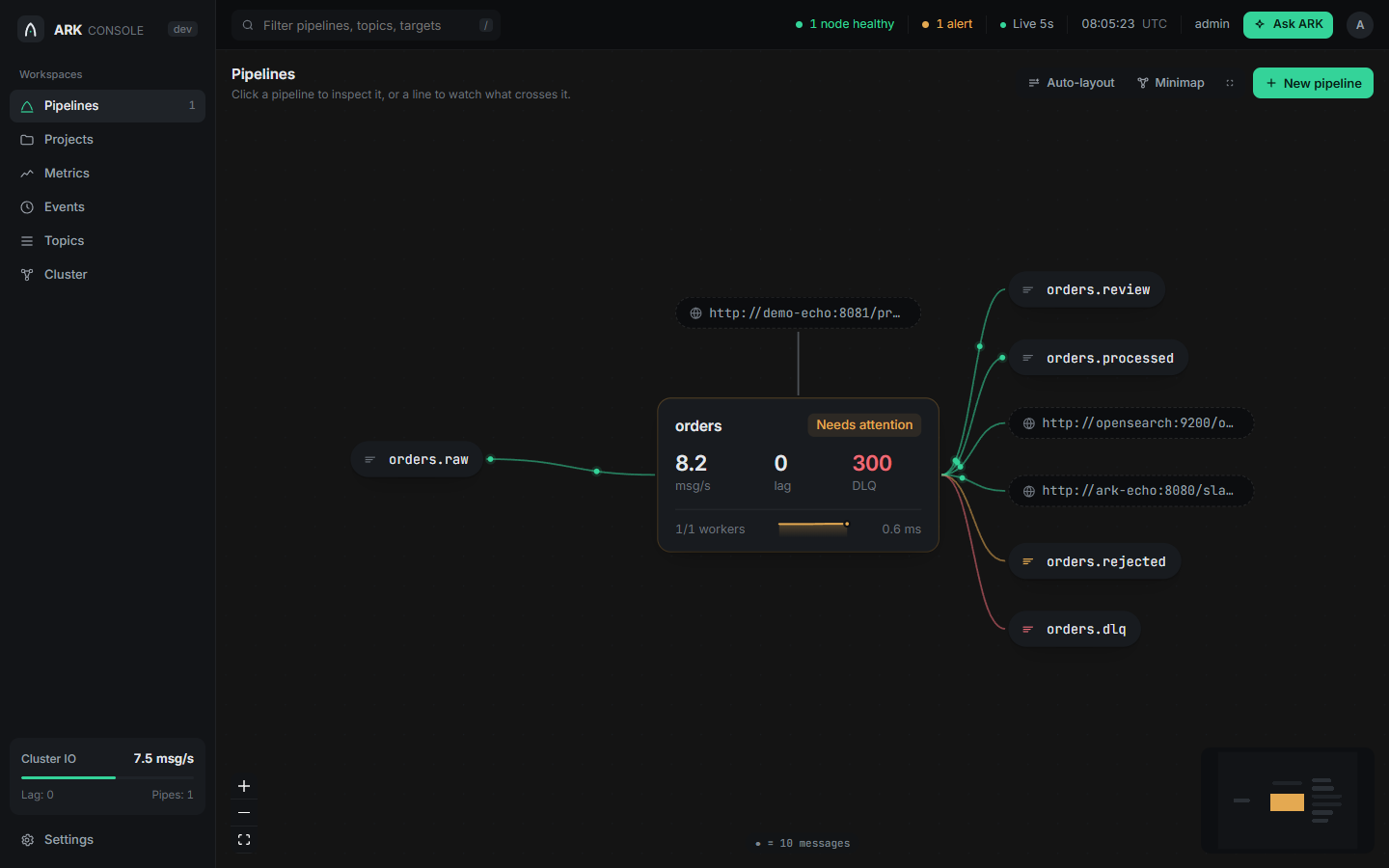
The pipeline canvas: topics, pipelines and targets connected by lines with data flowing along them

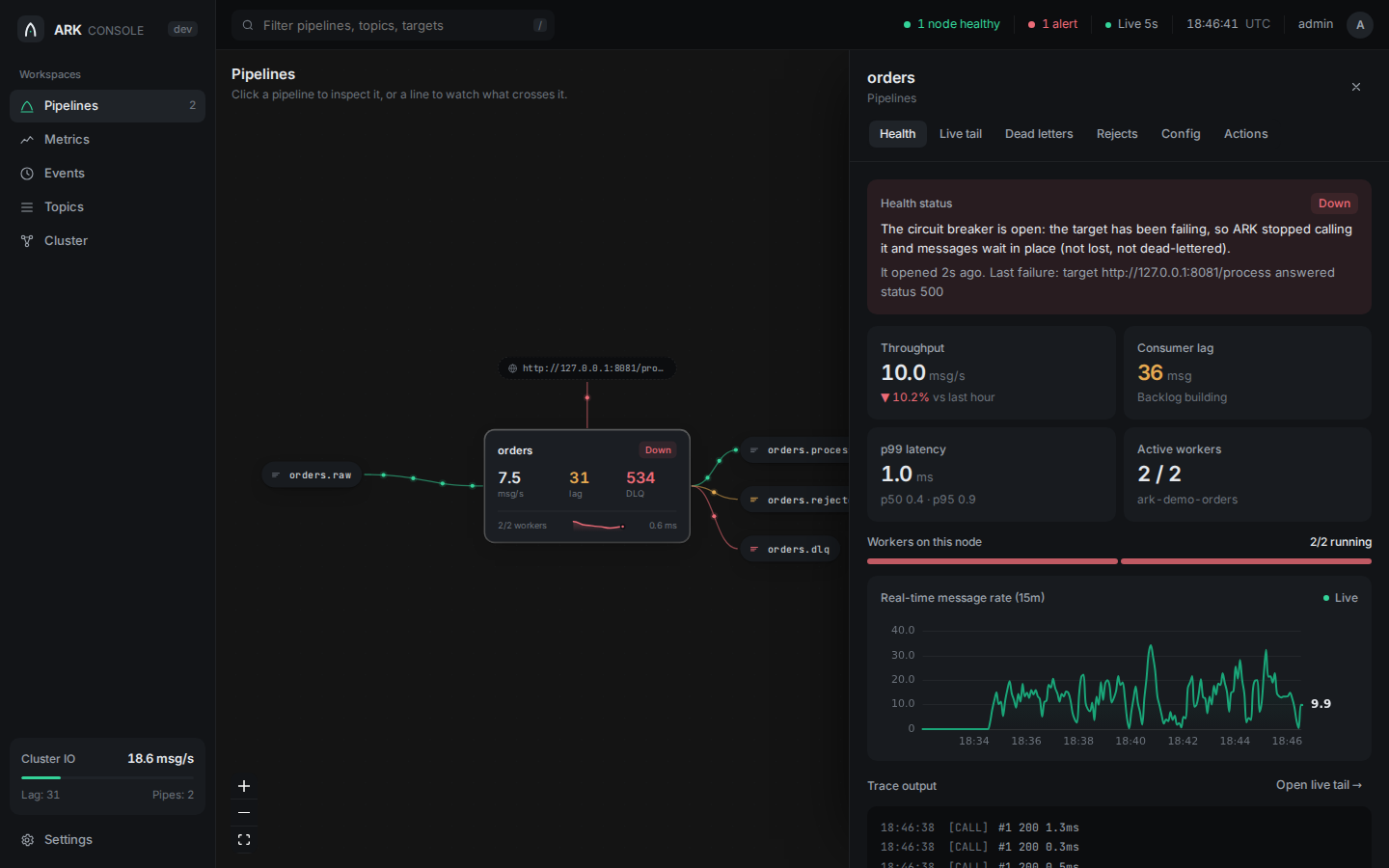
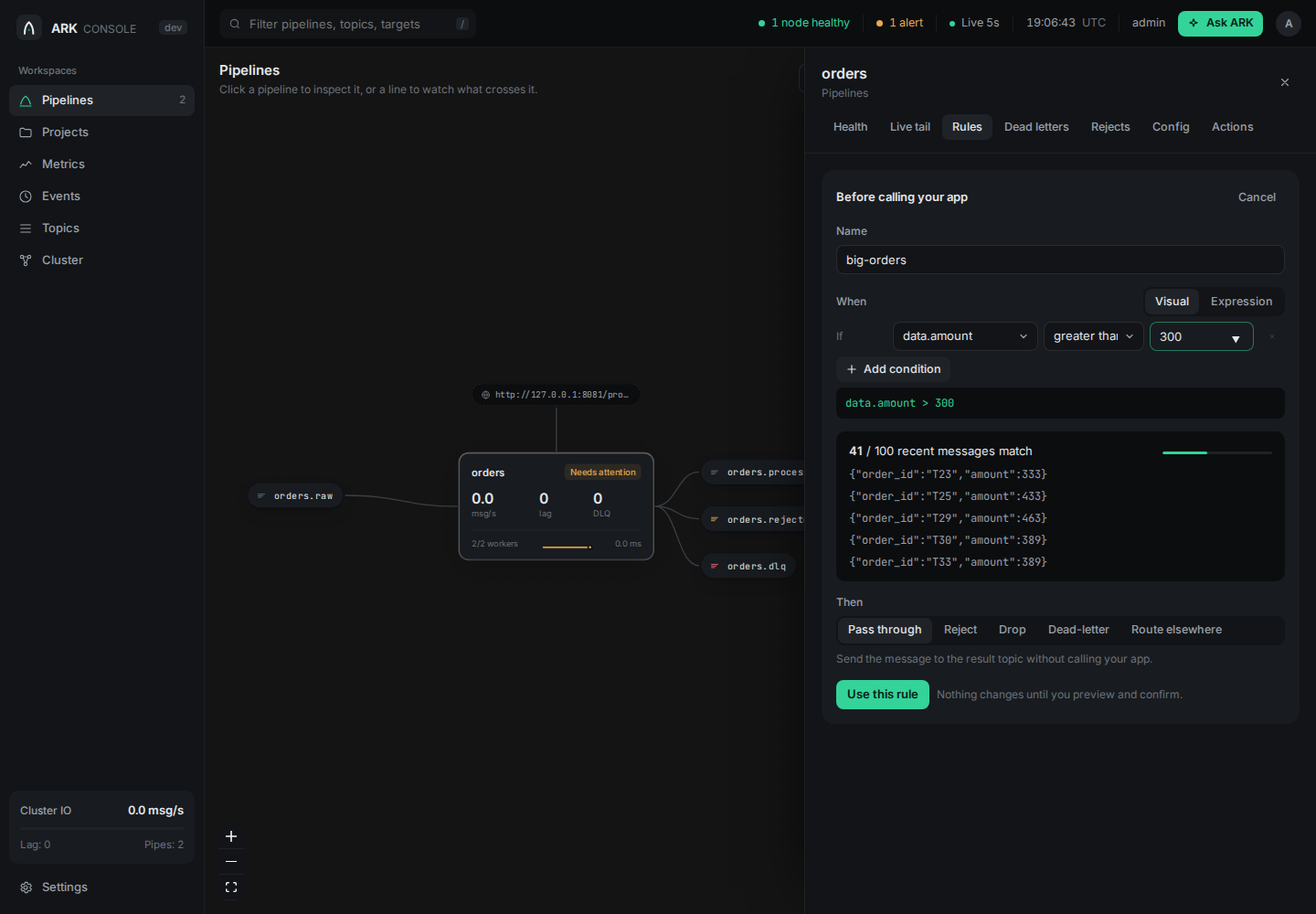
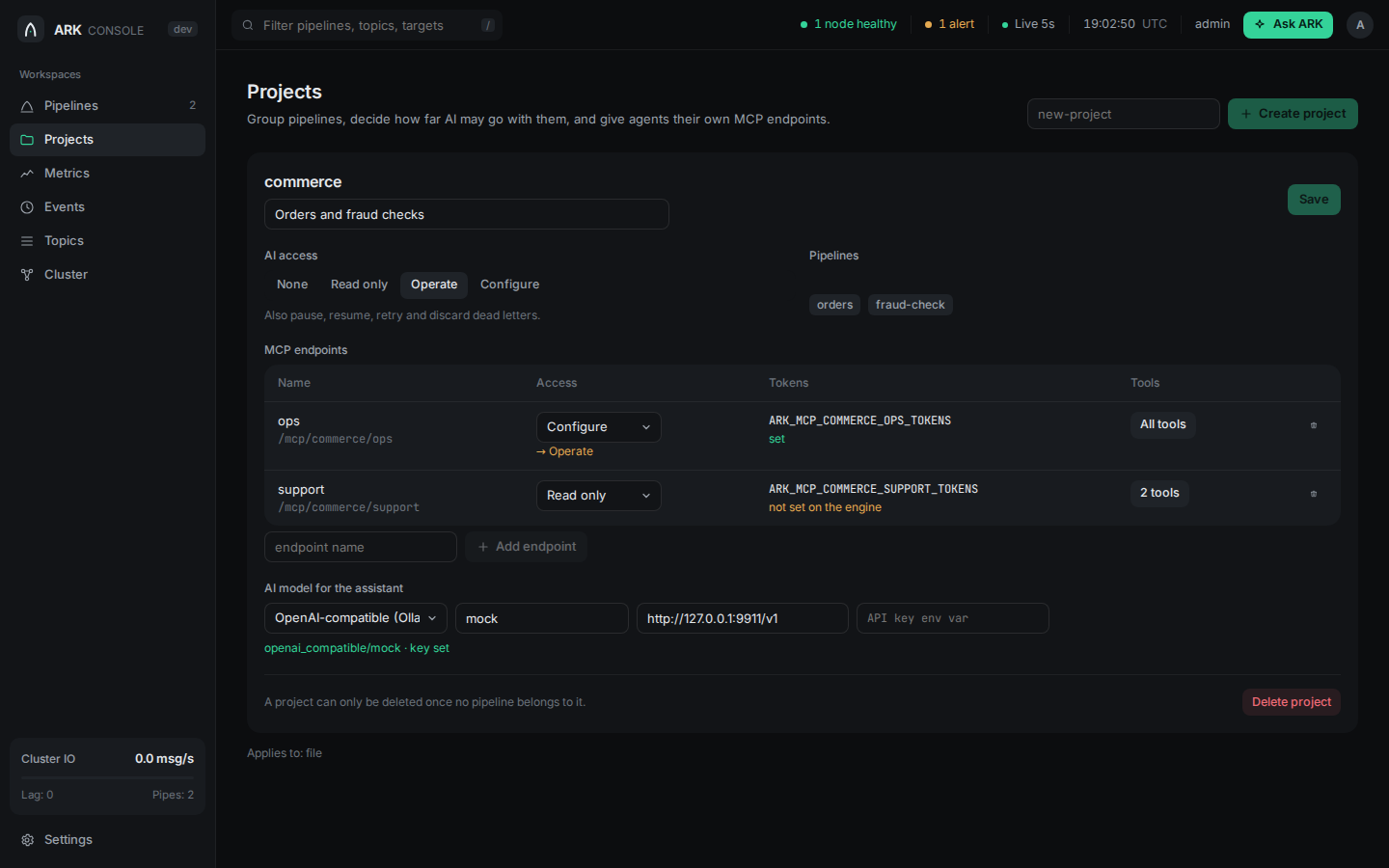
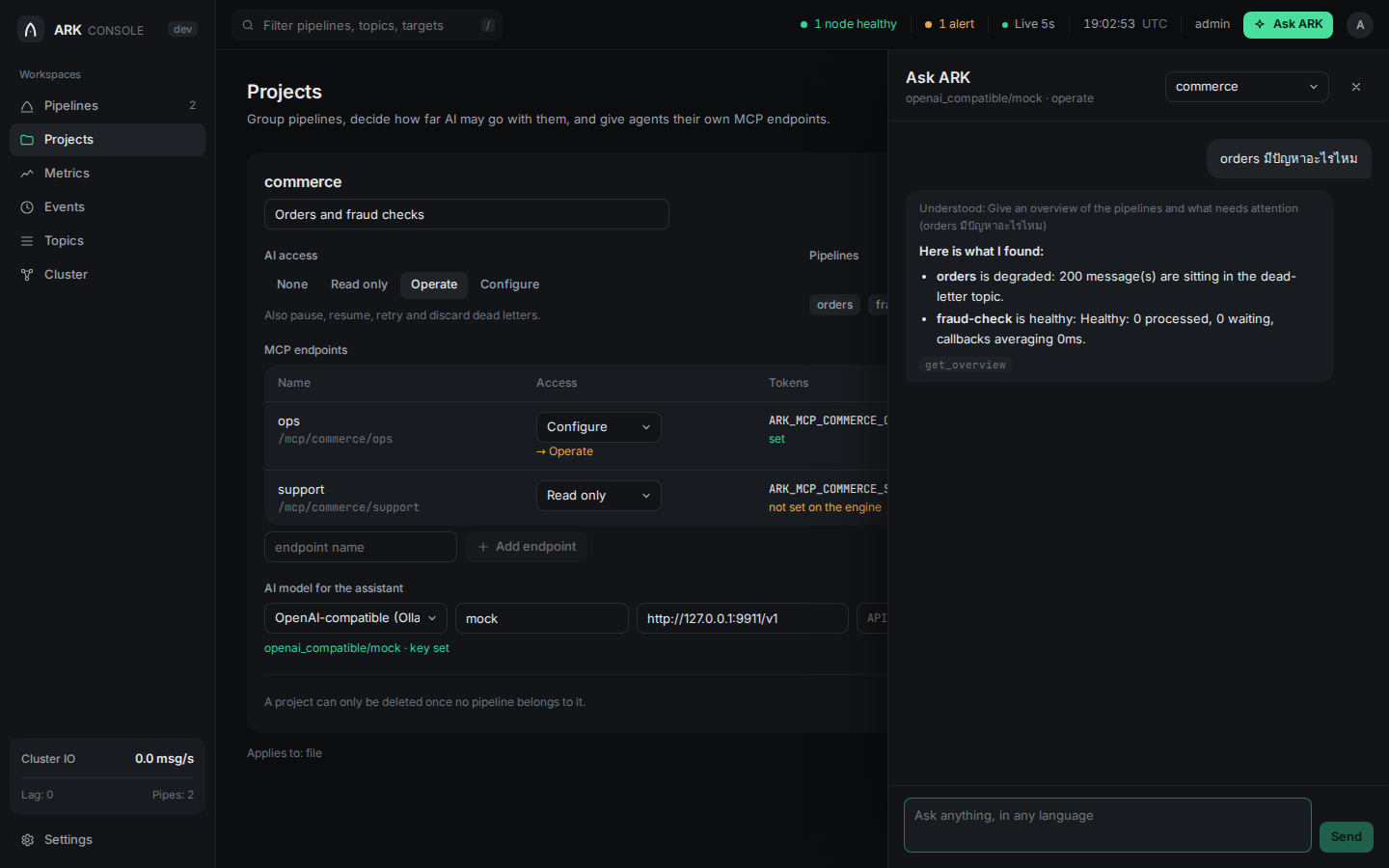
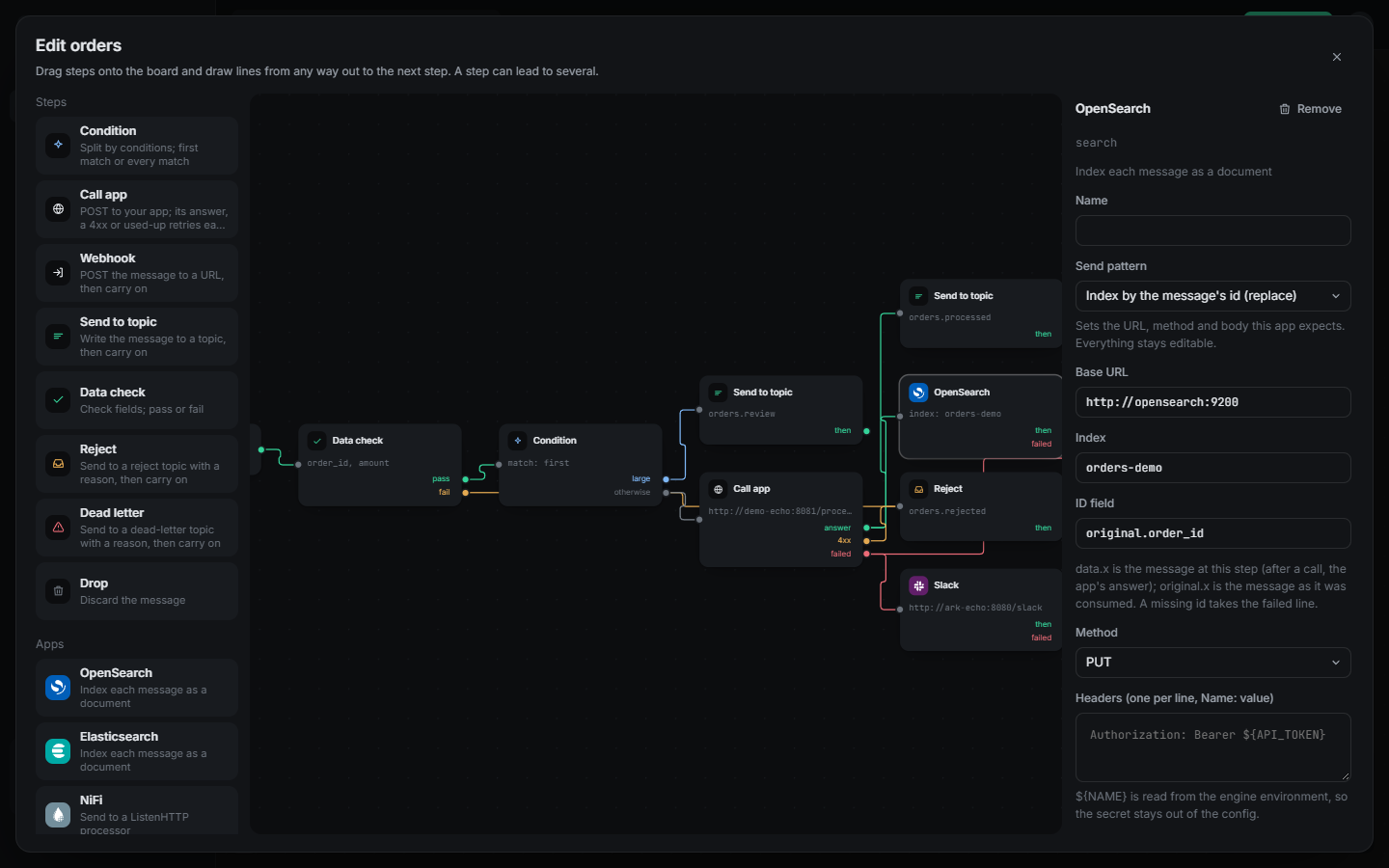
- **Pipeline canvas.** Every pipeline, topic and target, chained pipelines joined through their shared topic. Each dot on a line is 10 real messages (more on busy lines, shown under the canvas); click a line to watch what crosses it, or right-click a pipeline for everything you can do with it. In cluster mode the numbers cover every node. - **Everything about one pipeline.** Health with the reason and next step, throughput against the last hour, p99 latency, a live tail of every message (in, each callback attempt, where it went and why), dead letters and rejects with retry and discard, the config, and pause, restart, scale and delete. - **Flow designer.** Drag steps onto a board (call your app, condition, webhook, send to topic, data check, reject, dead letter, drop) and draw lines from any way out to the next step, n8n style: a condition splits a message down several branches, a call has its own lines for the answer, a 4xx and used-up retries. Ready-made app steps send to OpenSearch, Elasticsearch, NiFi, another Kafka cluster, Slack, Discord, Microsoft Teams or any HTTP API, each with its own logo and send patterns: index, index by id or update in OpenSearch and Elasticsearch, a Block Kit card, embed or Adaptive Card for chat, PUT or PATCH by id for an API. Topic and consumer group fields offer what the cluster already has, and the fallback dead-letter and reject topics can be switched off once every step has its own lines. Review the generated config before it is applied. Right-click a running pipeline to open it in the designer; a fixed-path pipeline opens as the flow that does the same. - **Visual rule builder.** Pick a field from real messages, an operator and a value, and see how many recent messages would match before you save. - **Metrics.** Throughput, lag and callback latency percentiles from the last 5 minutes to the last 24 hours, per pipeline or summed per tenant, lag and traffic per source partition, plus the node's own resources. - **Projects.** Group pipelines, decide how far AI may go with them, give agents their own MCP endpoints, and choose each project's AI model. - **Ask ARK.** Chat with an assistant backed by the model you choose. It works out what you mean first, asks back only when the tools can't find the answer, and uses the same tools as any MCP agent, within your permissions. It answers in the language you write in, or always in the console's language if you choose that in Settings. - **Settings.** Console language, Ask ARK's reply language, timezone, default AI model and every engine tuning value. - In English, Thai, and simplified and traditional Chinese.
A pipeline's health, KPIs, live rate and trace Building a rule and seeing how many recent messages match
Projects with AI access, MCP endpoints and model Asking ARK a question in Thai
The flow designer: a data check, a condition splitting orders, an app call and an OpenSearch step, each with its own lines for results, rejects and failures
The console is its own small service (`bridge-ui`): it serves the web app and forwards `/api/v1/` to an ARK engine, so the browser never talks to Kafka. Sign in with any `ARK_API_*` token; what you can do follows its scope. ## How it works Every message takes the same path, and each step has one clear outcome: ```mermaid flowchart LR K[(source topic)] --> D{data rules} D -- breaks a rule --> R[(reject topic)] D -- ok --> F{fast path rules} F -- matched --> O F -- no match --> C[call your app] C -- 2xx --> P{post callback rules} P --> O[(destination topic)] C -- 4xx --> R C -- 5xx, timeout --> X{retries left?} X -- yes --> C X -- no --> Q[(dead letter topic)] ``` 1. **Consume.** Each pipeline is a Kafka consumer group. `workers` members share the source topic's partitions. 2. **Check.** `data_rules` validate the message (types, ranges, formats, required fields, key and headers) before anything else runs. 3. **Route early.** `fast_path_rules` can pass, reject, drop or dead-letter a message on a condition, without calling your app. 4. **Call back.** ARK POSTs the message to your app with a stable `X-Correlation-ID`, keeping order per key while different keys run in parallel. 5. **Route late.** `post_callback_rules` look at your app's answer and can send it to a different topic or webhook. 6. **Produce and commit.** The answer goes to the destination topic, and only then is the offset committed, in order. That fixed path covers most pipelines. For anything else, a pipeline can run a [flow](#reference) instead: the same steps joined in any shape, where a condition can split a message down several branches, one step can feed several apps, webhooks and topics at once, and a reject or failure can lead anywhere, not only to a topic. ### What happens when... | Situation | What ARK does | |---|---| | Your app answers 2xx | The answer is produced to `destination_topic` | | Your app answers 4xx | The message is bad, not the app: it goes to `reject_topic` with the reason, no retry | | Your app answers 408, 425 or 429 | "Come back later": ARK waits (honoring `Retry-After`) and tries again without using a retry | | Your app answers 5xx or times out | Retried with backoff, then dead-lettered with the reason | | Your app is down | The circuit breaker opens, messages wait in Kafka, and ARK resumes the moment the health check passes | | A message breaks a data rule | Rejected, dead-lettered, or tagged and let through, your choice | | ARK crashes mid-message | Nothing was committed past it, so it is delivered again with the same correlation ID | | A node joins or leaves the cluster | Workers move to the live nodes in place, without restarting pipelines | | A step in a flow rejects or fails | The message follows that step's own line (a webhook, another app, a topic, or all of them); the offset commits once every path is done | ## Features
**Delivery you can trust**
At-least-once with in-order commits. A message that can't finish is retried in place, never skipped. Stable correlation IDs make your app idempotent in one line.
**Data rules**
Declare what a valid message looks like: required fields, types, ranges, lengths, patterns, enums, formats (email, uuid, date-time, url, ipv4), size, unknown fields, key and headers.
**Rules without code**
Route before or after the callback with [expr](https://expr-lang.org) conditions: auto-approve small orders, dead-letter obvious fraud, send big orders to another topic.
**Dead letters you can act on**
Browse, retry or discard DLQ and reject entries over the API, each with its reason and time. Redrive them on a schedule with a limit. What was handled stays handled across restarts.
**Built-in AI assistant (MCP)**
Any MCP client can ask what is happening and why, explain an error, find weird data, suggest tuning, and draft a pipeline that is applied only after you confirm a preview.
**Cluster without a new dependency**
Run more nodes and they act as one: shared config, cluster-wide pause, a leader that places workers by label, fast failover. Coordination runs on Kafka itself. No etcd, no ZooKeeper.
**Protects your app**
Per-pipeline concurrency limits, a circuit breaker with health probes, backpressure on 429, and load balancing over several backends (round robin, least in flight, sticky partition).
**Secure and observable**
Viewer, operator and admin tokens for the API and separately for MCP, per-pipeline AI access, audit logs. Prometheus metrics for throughput, latency, lag, oldest uncommitted age, breaker state and rule matches.
**Flows like a workflow**
Draw steps on a board, n8n style: conditions anywhere, fan-out to several apps, webhooks and topics, and a line for every answer, reject and failure. Loops are refused, and a message still commits exactly once.
**Talks to the rest of your stack**
Ready-made steps for OpenSearch, Elasticsearch, NiFi, another Kafka cluster, Slack, Discord, Microsoft Teams and any HTTP API, each with send patterns that fit the product (index by id, cards, PUT by id), url and body templates, and secrets read from the environment.
## Your first pipeline Point ARK at your own topic and endpoint. This is a complete, working config: ```yaml brokers: [kafka:9092] timezone: Asia/Bangkok # every time ARK shows you is ISO 8601 in this zone pipelines: - name: order-processor source_topic: orders.raw destination_topic: orders.processed dead_letter_topic: orders.dlq # required: failures always land somewhere visible reject_topic: orders.rejected # optional: bad data goes here instead of the DLQ consumer_group: order-processor workers: 3 # 3 consumers sharing the topic's partitions target: url: http://order-app:8080/process health_check_url: http://order-app:8080/health retry: max_attempts: 3 backoff_ms: 1000 data_rules: on_violation: reject # or dead_letter, or tag fields: - {path: order_id, required: true, type: string} - {path: amount, required: true, type: number, min: 0} - {path: email, format: email} fast_path_rules: - name: auto-approve-small condition: "data.amount < 100" action: pass_through ``` Run it: ```bash docker run -v $PWD/config.yaml:/etc/bridge/config.yaml -p 8080:8080 \ -e ARK_API_ADMIN_TOKENS=change-me ark # built from bridge-engine/Dockerfile # or: cd bridge-engine && go run ./cmd/bridge -config config.yaml ``` ARK creates the source, dead-letter and reject topics if they are missing, hot-reloads the file when you call `POST /api/v1/config/reload`, and refuses an invalid config before it touches a running pipeline. Every option is documented in [`config.example.yaml`](bridge-engine/config.example.yaml). Your app receives a normal HTTP POST: ```http POST /process HTTP/1.1 Content-Type: application/json X-Correlation-ID: 30176dd15e71f315051f562780bb548d {"order_id":"A1","amount":10} ``` Whatever it returns with a 2xx becomes the message on `destination_topic`. Need branches, more than one destination, or your own path for rejects and failures? Open the pipeline in the console's flow designer, or write a `flow:` by hand (see *Flows* under [Reference](#reference)). ## Reference
Delivery guarantees in detail - **Offsets commit only after the result is produced**, and in order. A message that can't be completed blocks the commits behind it on its partition until it is, so a crash can never skip it. Killing ARK mid-message means it is delivered again. - **`X-Correlation-ID`** is derived from topic, partition and offset, so a retry or a redelivery after a crash carries the same ID. Delivery is at-least-once; use the ID as an idempotency key. - **Ordering.** `ordering: per_key` (default) sends messages with the same key one at a time and in order, while different keys run in parallel. `per_partition` and `none` are also available. - **Status codes.** 4xx means the message is the problem: it goes to `reject_topic` (or the DLQ without one) with no retry. 408, 425 and 429 mean "later": ARK waits, honoring `Retry-After`, without spending a retry. `target.reject_statuses` overrides which codes are rejects. - **When the app is down,** the circuit breaker opens after `circuit_breaker.failure_threshold` different messages fail in a row and messages wait in Kafka instead of flooding the DLQ. Retries of a message that already failed don't count again, so a few messages your app always fails on can't hold up the rest. With `health_check_url` set, ARK resumes as soon as the app answers. - **`on_exhausted: block`** keeps retrying forever instead of dead-lettering, for pipelines where order matters more than progress. - Every routed message carries `X-Ark-Reason`, `X-Ark-Pipeline` and `X-Ark-Failed-At` headers so you can see why it ended up there.
Batched calls For an app with a cost per request (a database round trip, a slow upstream), `target.batch_size` sends several messages in one POST. It is off unless you set it, and works on flow call steps too. ```yaml target: url: http://order-app:8080/batch batch_size: 50 # 2 to 1000 batch_linger_ms: 5 # longest wait for a batch to fill (default 5) ``` ARK posts, with an `X-Ark-Batch-Size` header: ```json {"items": [{"id": "30176dd1...", "key": "A1", "value": {"order_id": "A1", "amount": 10}}]} ``` `id` is the message's correlation ID and `value` is the message (as a string when it isn't JSON). The app answers with a 2xx: ```json {"results": [{"id": "30176dd1...", "status": 200, "body": {"ok": true}}]} ``` Each message is then handled exactly as if it had been sent alone: a 2xx `status` (the default) sends `body` to `destination_topic`, a reject status sends it to `reject_topic`, 408, 425 and 429 wait, and a 5xx or a missing result is a failed attempt for that message only. A non-2xx for the whole request applies to every message in it. Retries, rules, ordering and commits stay per message. A batch fills only when enough messages are waiting, so keep `workers x max_in_flight` at least `batch_size`; config review warns when it isn't. Measured on the compose stack against an app that takes 20 ms per request and handles 8 at a time (4 workers, `max_in_flight: 50`, 20,000 messages): 386 msg/s one message per call, 3,118 msg/s with `batch_size: 50`.
Data rules ```yaml data_rules: on_violation: tag # reject (default) | dead_letter | tag allow_unknown_fields: false # flag top-level fields no rule mentions max_bytes: 65536 key: {required: true, pattern: "^[A-Z]{2}-\\d+$"} headers: - {name: source, enum: [web, mobile, pos]} fields: - {path: order_id, required: true, type: string, max_length: 32} - {path: amount, type: number, min: 0, max: 1000000} - {path: currency, enum: [THB, USD, EUR]} - {path: customer.email, format: email} - {path: created_at, format: date-time} ``` Types: `string`, `number`, `integer`, `boolean`, `object`, `array`, `null`. Formats: `email`, `uuid`, `date-time`, `date`, `url`, `ipv4`. With `on_violation: tag` the message goes through with an `X-Ark-Violations` header, a safe way to start. Not sure what to write? Ask the assistant to `check_data` on a pipeline: it samples real messages, reports odd fields, mixed types, outliers and bad keys, and drafts the rules for you.
Fast path and post-callback rules ```yaml fast_path_rules: # before the callback - name: auto-approve-small-orders condition: "data.amount < 1000 && data.risk_score < 0.3" action: pass_through # pass_through | reject | drop | dead_letter - name: obvious-fraud condition: "data.risk_score > 0.9" action: dead_letter post_callback_rules: # after the callback, on its answer - name: high-value-order-alert condition: "response.status == 200 && response.body.amount > 10000" action: transform_route destination_override: orders.high-value # or webhook_override: http://... ``` Conditions use [expr](https://expr-lang.org) syntax (`nil`, not `null`).
Flows: steps joined in any shape When a fixed path isn't enough, give a pipeline a `flow:` instead of a target and rules. Every step can lead to several others, conditions can split a message anywhere, and an app's answer, a reject status and used-up retries each go their own way: ```yaml flow: start: [check] steps: - {id: check, type: data_check, rules: {fields: [{path: order_id, required: true}]}, next: [route], on_fail: [bad]} - id: route type: condition match: all # or first branches: - {when: "data.amount > 1000", next: [vip-topic, crm]} otherwise: [app] - {id: vip-topic, type: topic, topic: orders.vip, next: [app]} - {id: crm, type: webhook, url: "http://crm:8080/notify"} - {id: app, type: call, target: {url: "http://order-app:8080/process"}, next: [after], on_reject: [bad], on_failure: [later]} - id: after type: condition branches: - {when: "response.body.total > 10000", next: [big]} otherwise: [done] - {id: big, type: topic, topic: orders.big} - {id: done, type: topic, topic: orders.processed} - {id: later, type: topic, topic: orders.retry} - {id: bad, type: reject} ``` Steps: `call`, `condition`, `data_check`, `topic`, `webhook`, `database`, `reject`, `dead_letter`, `drop`. Conditions read `data` (the message at that step), `original`, `response` (`status` and `body` of the last call), `reason`, `key` and `headers`. Every step but `drop` can lead on to more steps, reject and dead letter included, so a reject can also go to a webhook or another app. Call and webhook steps take `headers`, where `${NAME}` is read from the environment so secrets stay out of the file; a webhook can set `method` (`POST`, `PUT`, `PATCH`), a `body` template, or a chat `message` template (sent as `{"text": ...}`, or `message_field: content` for Discord). Templates are Go templates over the same values, with `json` to quote one safely: `{"id": {{json .data.order_id}}}`. The `url` can be a template too, after `http(s)://host/`, so the host never comes from a message: `http://opensearch:9200/orders/_doc/{{path .original.order_id}}` (`path` escapes the value, and a missing one takes the failed line). A topic step can set `brokers` to write to another Kafka cluster. `app:` (`opensearch`, `elasticsearch`, `nifi`, `kafka`, `slack`, `discord`, `teams`, `http`) only changes how the console draws a step. The pipeline's `dead_letter_topic` and `reject_topic` are optional for a flow, as long as every step that can fail or reject has its own line for it; when set, they catch the steps that don't. Call steps take the same `target`, `retry` and `circuit_breaker` options as the fixed path. Loops are refused; to go around again, send to a topic a pipeline reads. A message is committed once every path it took is done, and counted once. A `database` step writes the message as a row in PostgreSQL: ```yaml - id: save type: database database: driver: postgres dsn_env: ARK_ORDERS_DB # env var with the connection string table: public.orders columns: id: "{{.data.order_id}}" amount: "{{.data.amount}}" raw: "{{json .data}}" upsert_on: [id] # needs a unique index on id on_failure: [dead] ``` Each value is a template sent as a query parameter (an empty one is NULL), and table and column names must be plain names, so a message can never change the SQL. With `upsert_on`, a message delivered twice updates its row instead of adding another. A write retries `retry.max_attempts` times, then takes `on_failure` (or the dead-letter topic). If `dsn_env` isn't set on the server, the step's writes fail that way too; the rest of ARK keeps running.
HTTP sources An app that can only POST (a payment provider's webhooks, a form, a script) can send straight into Kafka through ARK: ```yaml sources: - name: shop type: http topic: shop.orders token_env: ARK_SOURCE_SHOP_TOKEN # env var with the bearer token key: order_id # optional: JSON path used as the Kafka key max_body_bytes: 1048576 partitions: 3 # used when ARK creates the topic data_rules: # optional fields: - {path: order_id, required: true, type: string} ``` ``` POST /ingest/shop Authorization: Bearer {"order_id": "A1", "amount": 10} ``` ARK answers once Kafka has the message: | Status | Meaning | |---|---| | 202 | On the topic. Any pipeline reading it takes it from there. | | 401 | Missing or wrong token. | | 413 | Over `max_body_bytes`. | | 400 | Not a JSON object, when `key` or `data_rules` needs one. | | 422 | Broke a data rule; the body lists each violation. Nothing was written. | | 503 | Kafka didn't take it; send it again after `Retry-After`. | An `X-Correlation-ID` on the request is kept on the message, and `X-Ark-Source` says which source it came from. Sources show on the console canvas beside their topic. `ark_source_requests_total` counts requests by source and outcome.
Dead letters and redrive - `GET /api/v1/pipelines/{name}/dlq` lists recent entries with reason, time, correlation ID and redrive count. - `POST .../dlq/{id}/retry` sends the message through the pipeline again (rules and all); `POST .../dlq/{id}/discard` removes it from the list. - The same routes exist under `.../reject`. - What was retried or discarded is recorded in Kafka, so it stays handled after a restart and can't be retried twice. - `dead_letter_redrive: {after_seconds: 3600, max_times: 3}` retries dead letters on a schedule and leaves the rest for a human.
Several backends for one pipeline ```yaml target: mode: multi_url urls: - http://order-app-1:8080/process - http://order-app-2:8080/process health_check_urls: - http://order-app-1:8080/health - http://order-app-2:8080/health strategy: round_robin # or least_inflight, sticky_partition ``` Each URL is probed on its own and only healthy ones get traffic. If every URL is down, messages wait in Kafka. `sticky_partition` keeps a partition on the same backend while it stays healthy.
AI assistant over MCP Set `ARK_MCP_VIEWER_TOKENS`, `ARK_MCP_OPERATOR_TOKENS` or `ARK_MCP_ADMIN_TOKENS` (comma-separated) and ARK serves MCP at `/mcp` on the API port. Any MCP client and any model can use it. | Ask | Tool the assistant uses | |---|---| | "Hi, what can you do?" | `get_help`, `get_overview` | | "Why is orders slow?" | `diagnose_pipeline`: what, why, what to do | | "What does this error mean?" | `explain_error`: where it comes from and the fix | | "What happened at 3am?" | `get_recent_events` | | "How busy was tenant acme since 9am?" | `get_metrics`: a pipeline or a tenant over a time range | | "Any weird data coming in?" | `check_data`, `test_message` | | "How do I handle 2000 msg/s?" | `recommend_tuning` | | "Create a pipeline from A to B" | `get_pipeline_schema`, `validate_pipeline_config`, `create_pipeline` | | "Send big orders to OpenSearch too, and ping Slack when the app fails" | `get_pipeline_schema` (its `flow_example_yaml`), `validate_pipeline_config`, `apply_pipeline_config` | Every conversation starts with `interpret_request`, which works out what you mean (Thai, English, simplified and traditional Chinese, plus your own words through `assistant.lexicon`) and which pipeline you are talking about, and asks back when something is unclear. Access is layered. A token's scope is a ceiling: `viewer` reads, `operator` also pauses, resumes, retries and discards, `admin` also creates and changes pipelines. Each pipeline's `mcp_access` (`read_only`, `read_write`, `none`) is a second limit. Config changes are two steps: the first call returns a preview and a diff, and only a second call with the confirm token applies it. Every write is audit-logged.
Projects and AI access ```yaml projects: - name: commerce ai_access: operate # none | read_only | operate | configure mcp_endpoints: - name: ops # served at /mcp/commerce/ops access: operate tokens_env: ARK_MCP_COMMERCE_OPS_TOKENS - name: support access: read_only tokens_env: ARK_MCP_COMMERCE_SUPPORT_TOKENS tools: [get_overview, diagnose_pipeline, explain_error] assistant: {provider: anthropic, model: claude-opus-5, api_key_env: ANTHROPIC_API_KEY} pipelines: - name: orders project: commerce # ... ``` A project's `ai_access` is a ceiling everywhere, the global `/mcp` included: `none` hides its pipelines from agents, `read_only` lets them look but not touch, `operate` adds pause, resume, retry and discard, and `configure` adds creating and changing pipelines (always after a confirmed preview). Each endpoint gets its own tokens from the environment variable it names, never from the file, and only sees its project. Projects can be managed from the console.
The assistant, with any model Set a default model under `assistant.model`, or one per project: | Provider | Example | |---|---| | Anthropic | `{provider: anthropic, model: claude-opus-5}` (key from `ANTHROPIC_API_KEY`) | | OpenAI | `{provider: openai, model: gpt-5}` (key from `OPENAI_API_KEY`) | | Google Gemini | `{provider: gemini, model: gemini-2.5-pro}` (key from `GEMINI_API_KEY`) | | Anything OpenAI-compatible | `{provider: openai_compatible, model: qwen3, base_url: "http://localhost:11434/v1"}` (DeepSeek, Mistral, Groq, OpenRouter, Together, Azure OpenAI, Ollama, vLLM, LM Studio, ...) | `api_key_env` changes which variable holds the key. The console's Ask ARK panel (and `POST /api/v1/assistant/chat`) answers in two passes: first the model restates what you mean, or asks one question back; then it looks things up and acts through ARK's MCP tools. Its permissions are the lower of your API token's scope and the project's `ai_access`. It replies in `reply_language` when the request sets one (`en`, `th`, `zh-Hans`, `zh-Hant`), and otherwise in the language the message is written in, told to the model explicitly because small local models drift into English after reading English tool results; an answer that still comes back in the wrong language is rewritten once. Times are quoted as the tools give them, ISO 8601 in the engine's timezone. A question back to you only goes out when ARK's own parser agrees something is missing that no tool can look up.
Tuning Every internal limit and interval has a default and can be changed under `tuning:` in the config or on the console's Settings page: retry backoff and Retry-After caps, commit and batch timeouts, DLQ browser size, diagnosis thresholds, metric history, event log size, live tail payload size, confirm token and assistant session lifetimes, and cluster catch-up. See [`config.example.yaml`](bridge-engine/config.example.yaml) for the full list with defaults.
Running more than one ARK Without anything special, more copies with the same `consumer_group` already split the work. Turn on cluster mode to make them act as one: ```yaml cluster: enabled: true name: prod # namespaces ARK's internal topics labels: {zone: dmz} # used by placement.node_selector ``` - **One config.** Pipeline config lives in a compacted Kafka topic. A reload on any node reaches every node, and an invalid config is refused before it spreads. - **One control surface.** Pause through any node and the pipeline pauses everywhere. `GET /api/v1/cluster/pipelines` returns cluster-wide numbers with a per-node breakdown, and any node can browse and retry any pipeline's DLQ. - **Placement.** An elected leader spreads each pipeline's workers across live nodes matching `placement.node_selector`, never more than the topic has partitions, and adds or removes workers in place. - **Failover.** A node that stops cleanly hands over in about a second; one that crashes is replaced after `node_timeout_seconds`.
Signing in Every way of signing in is optional, and any mix can be on at once. With none, ARK answers only its own machine. Each one ends with one of three access levels: **viewer** reads, **operator** can also pause, resume, restart, retry and discard, and **admin** can also change config and accounts. The console's sign-in page shows the methods that are on. | Method | Turn it on with | Access from | |---|---|---| | No sign-in | `ARK_AUTH_ANONYMOUS=viewer` (or `operator`, `admin`); `ARK_AUTH_MCP_ANONYMOUS` for MCP | The level you set. The console shows "Open access". | | API tokens | `ARK_API_VIEWER_TOKENS`, `_OPERATOR_TOKENS`, `_ADMIN_TOKENS`; `ARK_MCP_*_TOKENS` for MCP | Which list the token is in | | Accounts | `ARK_ADMIN_USER` and `ARK_ADMIN_PASSWORD` for the first admin, or `ARK_AUTH_ACCOUNTS=true` | Set per account under Settings, Accounts | | LDAP / Active Directory | `ARK_LDAP_URL`, then `ARK_LDAP_USER_DN` (such as `{username}@corp.example.com`) or `ARK_LDAP_BIND_DN`, `ARK_LDAP_BIND_PASSWORD` and `ARK_LDAP_BASE_DN` | `ARK_LDAP_ADMIN_GROUPS`, `_OPERATOR_GROUPS`, `_VIEWER_GROUPS`, from `memberOf` or a search under `ARK_LDAP_GROUP_BASE_DN` | | HTTP Basic | `ARK_AUTH_BASIC=true`, with accounts or LDAP | As above, for scripts | | OpenID Connect | `ARK_OIDC_PRESET`, `ARK_OIDC_ISSUER`, `ARK_OIDC_CLIENT_ID`, `ARK_OIDC_CLIENT_SECRET` | `ARK_OIDC_ADMIN_GROUPS`, `_OPERATOR_GROUPS`, `_VIEWER_GROUPS`, read from `ARK_OIDC_ROLES_CLAIM` | | SAML 2.0 | `ARK_SAML_METADATA_URL` (or `_METADATA_FILE`), optional `ARK_SAML_CERT_FILE` and `_KEY_FILE` | `ARK_SAML_ADMIN_GROUPS` and so on, from `ARK_SAML_ROLES_CLAIM` | | GitHub, GitLab, Bitbucket | `ARK_GITHUB_CLIENT_ID` and `ARK_GITHUB_CLIENT_SECRET` (likewise `GITLAB`, `BITBUCKET`) | `ARK_GITHUB_ADMIN_GROUPS` and so on: `org` or `org/team` for GitHub, group paths for GitLab, workspaces for Bitbucket | | Other OAuth 2.0 | `ARK_OAUTH2_NAME`, `_CLIENT_ID`, `_CLIENT_SECRET`, `_AUTH_URL`, `_TOKEN_URL`, `_USERINFO_URL`, optional `_GROUPS_URL` | `ARK_OAUTH2_ADMIN_GROUPS` and so on | | JWT from your own system | `ARK_JWT_JWKS_URL`, `ARK_JWT_PUBLIC_KEY_FILE` or `ARK_JWT_SECRET`, plus `ARK_JWT_ISSUER`, `ARK_JWT_AUDIENCES` | `ARK_JWT_ADMIN_GROUPS` and so on, from `ARK_JWT_ROLES_CLAIM` | | A proxy that already signed people in | `ARK_HEADER_PRESET` (`azure-easy-auth`, `cloudflare-access`, `oauth2-proxy`) or `ARK_HEADER_USER`, and always `ARK_HEADER_TRUSTED_PROXIES` | `ARK_HEADER_ADMIN_GROUPS` and so on | | Client certificates | `ARK_CLIENT_CA`, with HTTPS on | `ARK_CLIENT_CERT_ADMIN_GROUPS` and so on, matched against the certificate's OUs | OpenID Connect presets fill in what each provider needs: | Preset | Issuer | Groups come from | |---|---|---| | `azure` | built from `ARK_OIDC_TENANT` | the `roles` claim (app roles) | | `adfs` | `https:///adfs` | the `group` claim; asks for `allatclaims` | | `google` | `https://accounts.google.com` | `hd`, the Google Workspace domain | | `keycloak` | `https:///realms/` | `groups` | | `okta` | `https://.okta.com` | `groups`; asks for the `groups` scope | | `auth0` | `https://.auth0.com/` | set `ARK_OIDC_ROLES_CLAIM` | | `cognito` | `https://cognito-idp..amazonaws.com/` | `cognito:groups` | Register `https:///auth/oidc/callback` (OIDC), `https:///auth/oauth2//callback` (OAuth 2.0) or `https:///auth/saml/acs` with the provider; ARK's SAML metadata is at `/auth/saml/metadata`. With no `ARK_OIDC_VIEWER_GROUPS` (and the like), anyone the provider signs in gets in as a viewer. Browser sign-ins end in an HttpOnly session cookie (12 hours, or `ARK_SESSION_HOURS`); changes made with it need the console's CSRF header. Set `ARK_SESSION_SECRET` (32+ characters) so sessions survive a restart and work on every node. A session ends as soon as its account is deleted or its access changes. Every method can also be set under `auth:` in the config file, which `config.example.yaml` shows. OIDC, SAML and plain OAuth 2.0 were tested against Keycloak, LDAP against OpenLDAP, and the rest against ARK itself. The Azure, ADFS, Google, Okta, Auth0, Cognito, GitHub, GitLab and Bitbucket presets follow each provider's documentation but haven't been tried against the real service.
REST API Every route except `/healthz`, `/metrics` and `/api/v1/auth/info` needs someone signed in (see *Signing in*). Viewers can read, operators can also pause, resume, restart, retry and discard, and admins can also change config (preview, confirm, scale, reload) and accounts. The `ARK_API_*` tokens are separate from the `ARK_MCP_*` ones. | Route | What it does | |---|---| | `GET /healthz` | Liveness | | `GET /metrics` | Prometheus metrics | | `GET /api/v1/auth/info` | Which sign-in methods are on (public) | | `POST /api/v1/auth/login` | Username and password; answers a session token and cookie | | `GET /auth/oidc/login`, `/auth/saml/login`, `/auth/oauth2//login`, `/auth/logout` | Browser sign-in and sign-out | | `GET`, `PUT`, `DELETE /api/v1/config/users[/]` | Accounts (admin) | | `POST /ingest/` | An HTTP source; its own bearer token, see *HTTP sources* | | `GET /api/v1/pipelines` | Status of every pipeline worker | | `GET /api/v1/pipelines/{name}` | Status of one pipeline | | `POST /api/v1/pipelines/{name}/pause`, `/resume` | Pause or resume | | `GET /api/v1/pipelines/{name}/dlq`, `/reject` | Recent entries | | `GET .../dlq/{id}`, `.../reject/{id}` | One entry | | `POST .../dlq/{id}/retry`, `/discard` | Retry or discard (same under `/reject`) | | `POST /api/v1/config/reload` | Re-read the config | | `GET /api/v1/cluster` | Members, leader, config versions | | `GET /api/v1/cluster/pipelines` | Cluster-wide pipeline numbers | | `GET /api/v1/overview` | Health of every pipeline and what needs attention | | `GET /api/v1/events` | What happened and why (`pipeline`, `since_minutes`, `kinds`, `limit`) | | `GET /api/v1/topology` | How pipelines, topics and targets connect | | `GET /api/v1/topics` | Kafka topics and which pipelines use them | | `GET /api/v1/consumer-groups` | Consumer groups the cluster knows about | | `GET /api/v1/pipelines/{name}/tail` | Live tail as Server-Sent Events (`stage`, `to`, `key`, `correlation_id`, `max_per_sec`) | | `GET /api/v1/pipelines/{name}/diagnosis`, `/tuning`, `/data-check` | What's wrong and why, sizing advice, odd data | | `POST /api/v1/pipelines/{name}/test-message` | What the pipeline would do with a message | | `POST /api/v1/pipelines/{name}/restart` | Restart its workers on this node | | `POST /api/v1/pipelines/{name}/scale` | Change `workers` (admin) | | `GET /api/v1/config/pipelines`, `/config/schema` | Current config as YAML, and the schema | | `POST /api/v1/config/validate` | Check a pipeline without applying it | | `POST /api/v1/config/preview`, `/config/confirm` | Create, change or delete a pipeline in two steps (admin) | | `GET /api/v1/pipelines/{name}/rules`, `POST .../rules/test`, `.../rules/preview` | Read rules, test a condition on recent messages, change rules (admin) | | `GET /api/v1/history?minutes=&pipeline=` or `&tenant=` | Rates, lag, latency percentiles and per-partition lag for a pipeline or a tenant's total; 5s points for the last hour, 1-minute points up to 24 hours | | `GET /api/v1/projects`, `PUT`/`DELETE /api/v1/config/projects/{name}` | Projects, their endpoints and models (changes need admin) | | `POST /api/v1/assistant/chat` | Ask the assistant (acts within your scope; optional `reply_language`) | | `GET`/`PUT /api/v1/config/settings` | Timezone, default model and tuning (changes need admin) |
Metrics `ark_messages_processed_total`, `ark_messages_rejected_total`, `ark_messages_dead_lettered_total`, `ark_messages_failed_total`, `ark_messages_backpressured_total`, `ark_callback_duration_seconds`, `ark_data_rule_violations_total`, `ark_consumer_lag`, `ark_oldest_uncommitted_age_seconds`, `ark_circuit_breaker_open`, `ark_pipeline_paused`, `ark_worker_up`, `ark_last_activity_timestamp_seconds`, `ark_fast_path_rule_matches_total`, `ark_post_callback_rule_matches_total`. All labeled by pipeline and tenant.
## Roadmap - **More sources and sinks,** such as change data capture or other brokers, if there is demand for them. The full plan, with the reasoning behind every decision, is in [PLAN.md](PLAN.md). ## Repository | Path | What's there | |---|---| | [`bridge-engine/`](bridge-engine) | The Go engine: consumer, rules, callback client, producer, REST API, MCP server, cluster | | [`bridge-ui/`](bridge-ui) | The ARK Console: a React app and a small Go server | | [`brand/`](brand) | Logo and colors | | [`docs/`](docs) | The website | ## Contributing Issues and pull requests are welcome. Read [CONTRIBUTING.md](CONTRIBUTING.md) for the dev setup and where ARK's scope is deliberately bounded, which is worth a look before proposing something big. ## License [Apache License 2.0](LICENSE)