# 🏪 Small Business Customer Care MCP Server
[](https://openjdk.java.net/projects/jdk/17/)
[](https://spring.io/projects/spring-boot)
[](https://spring.io/projects/spring-ai)
[](https://modelcontextprotocol.io/)
[](https://mcp.so/server/small-business-customer-care)
A **Spring AI-powered MCP (Model Context Protocol) server** for managing small business customer care operations through AI assistants like Claude Desktop.
🌟 **[Featured on MCP.so](https://mcp.so/server/small-business-customer-care)** - Discover more MCP servers in the community!
## 💬 See It In Action
Here's what you can do with this MCP server through natural conversation with Claude Desktop:
| 👤 **User** | 🤖 **Claude (via MCP)** | 🔧 **What Happened** |
|-------------|-------------------------|----------------------|
| "Show me the list of businesses" | Lists all 5 businesses with their details and categories | Used `list_businesses` tool |
| "Delete green thumb business" | ✅ "Deleted: Green Thumb Landscaping business" | Used `remove_business` with ID "3" |
| "Create new business called Ravi Restaurant that opens at 9AM and closes at 5PM" | ✅ "Created: Ravi Restaurant
• Category: Restaurant
• Hours: 9:00 AM - 5:00 PM daily
• Location: 789 Pine Rd, Springfield" | Used `create_business` with hours in description |
| "Mike's auto repair shop opens at 1PM and closes at 9PM" | ✅ "Updated: Mike's Auto Repair
• Hours: 1:00 PM - 9:00 PM daily
• All other details preserved" | Used `update_business` to add hours |
| "Show me the list of business names" | **Current businesses:**
• Joe's Coffee Shop
• Tech Repair Solutions
• Bella's Boutique
• Mike's Auto Repair (Hours: 1:00 PM - 9:00 PM)
• Ravi Restaurant (Hours: 9:00 AM - 5:00 PM)
**Total: 5 businesses** | Used `list_businesses` and formatted response |
| "Find all restaurants" | Shows Ravi Restaurant and Joe's Coffee Shop with full details | Used `search_businesses` with query "restaurant" |
**🎯 The Power**: Natural language → Structured business operations → Real data management
## ⚡ Claude Desktop Setup
### **Step 1: Download Claude Desktop**
Download and install Claude Desktop from the official website:
- **Official Download**: [https://claude.ai/download](https://claude.ai/download)
- Available for **macOS**, **Windows**, and **Linux**
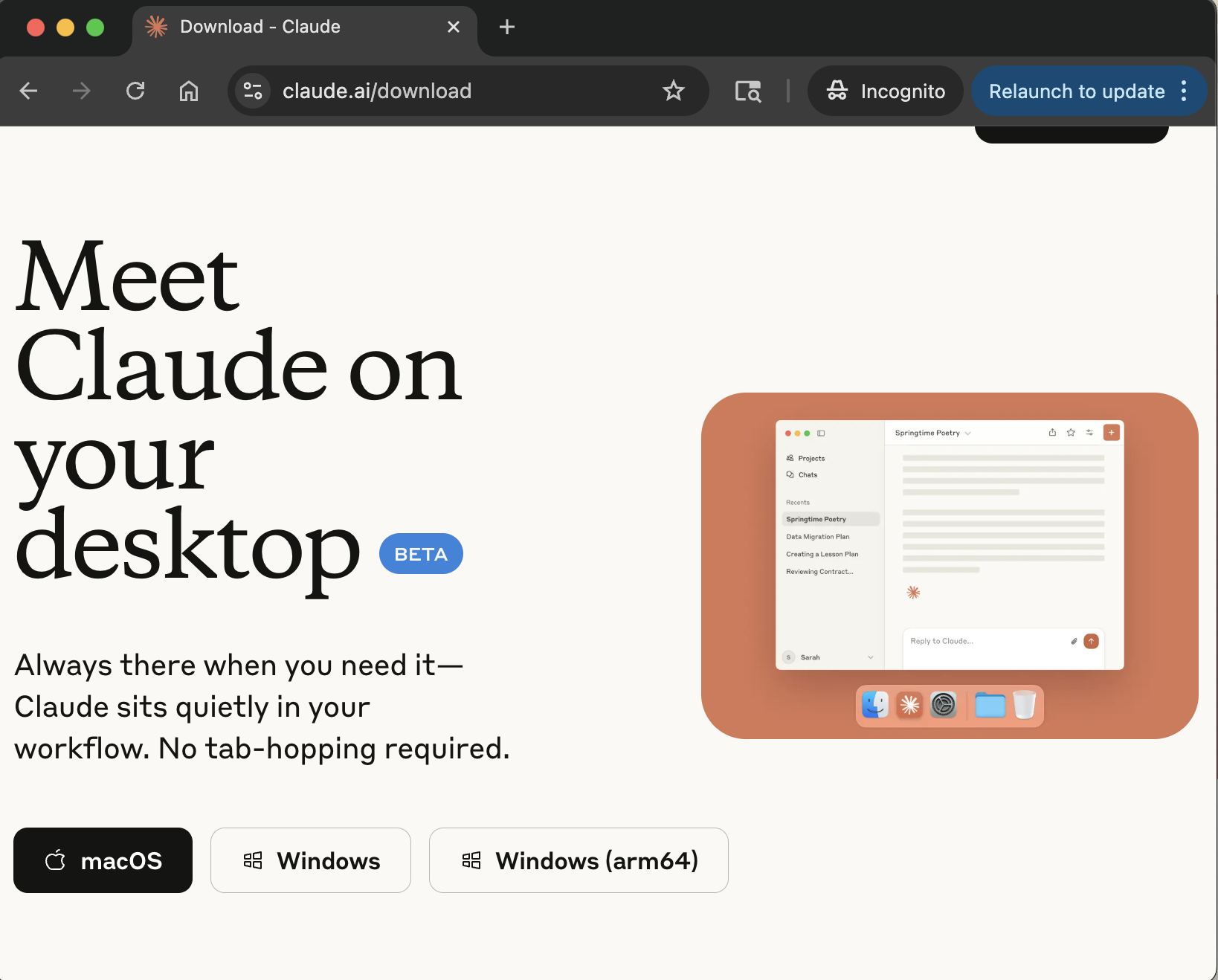 *Download Claude Desktop from the official website*
### **Step 2: Build the MCP Server**
```bash
# Clone and build the project
git clone https://github.com/ravikalla/mcp-small-business-customer-care.git
cd mcp-small-business-customer-care
mvn clean package
# Verify JAR creation
ls -la target/small-business-customer-care-1.0.0.jar
```
### **Step 3: Configure Claude Desktop**
Open the Claude Desktop configuration file:
**📍 Configuration File Locations:**
- **macOS**: `~/Library/Application Support/Claude/claude_desktop_config.json`
- **Windows**: `%APPDATA%\Claude\claude_desktop_config.json`
- **Linux**: `~/.config/Claude/claude_desktop_config.json`
**💡 Tip**: On macOS, you can quickly open the config file:
```bash
open "~/Library/Application Support/Claude/claude_desktop_config.json"
```
**Add this configuration:**
```json
{
"mcpServers": {
"small-business-customer-care": {
"command": "java",
"args": [
"-jar",
"/absolute/path/to/your/mcp-small-business-customer-care/target/small-business-customer-care-1.0.0.jar"
],
"env": {}
}
}
}
```
*Download Claude Desktop from the official website*
### **Step 2: Build the MCP Server**
```bash
# Clone and build the project
git clone https://github.com/ravikalla/mcp-small-business-customer-care.git
cd mcp-small-business-customer-care
mvn clean package
# Verify JAR creation
ls -la target/small-business-customer-care-1.0.0.jar
```
### **Step 3: Configure Claude Desktop**
Open the Claude Desktop configuration file:
**📍 Configuration File Locations:**
- **macOS**: `~/Library/Application Support/Claude/claude_desktop_config.json`
- **Windows**: `%APPDATA%\Claude\claude_desktop_config.json`
- **Linux**: `~/.config/Claude/claude_desktop_config.json`
**💡 Tip**: On macOS, you can quickly open the config file:
```bash
open "~/Library/Application Support/Claude/claude_desktop_config.json"
```
**Add this configuration:**
```json
{
"mcpServers": {
"small-business-customer-care": {
"command": "java",
"args": [
"-jar",
"/absolute/path/to/your/mcp-small-business-customer-care/target/small-business-customer-care-1.0.0.jar"
],
"env": {}
}
}
}
```
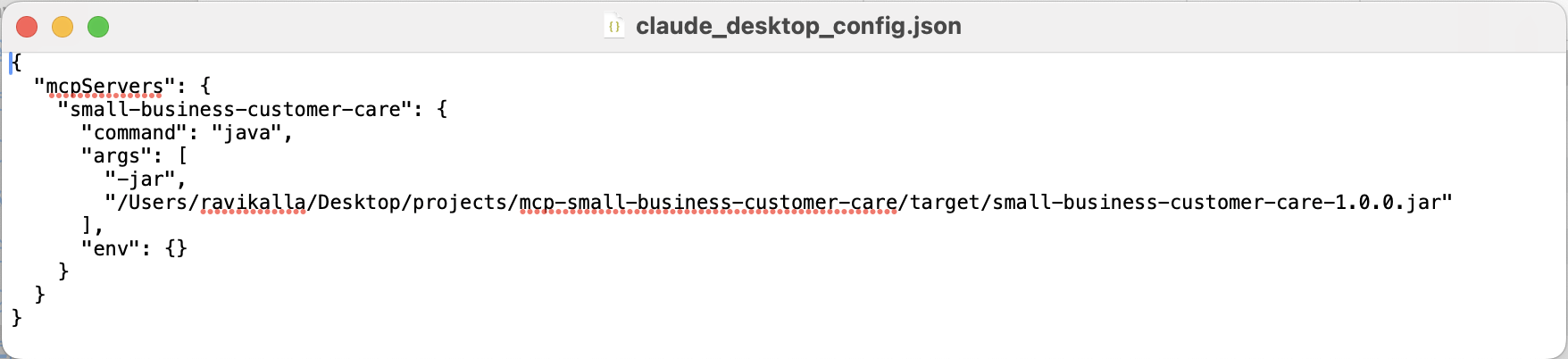 *Example configuration file with MCP server entry*
**⚠️ Important Notes:**
- Replace `/absolute/path/to/your/` with your actual project path
- Use **absolute paths only** (e.g., `/Users/john/projects/mcp-small-business-customer-care/target/...`)
- On Windows, use forward slashes: `C:/Users/john/projects/...`
### **Step 4: Restart Claude Desktop**
**Completely quit and reopen** Claude Desktop after updating the configuration:
- **macOS**: Cmd+Q to quit, then reopen from Applications
- **Windows**: Right-click system tray icon → Exit, then reopen
- **Alternative**: Close all Claude Desktop windows and reopen the application
*Use Cmd+Q to quit Claude Desktop on macOS*
The MCP server should now be available.
### **Step 5: Verify Connection**
1. **Check Developer Settings**: Go to Claude Desktop Settings → Developer tab to see your MCP server running
*Example configuration file with MCP server entry*
**⚠️ Important Notes:**
- Replace `/absolute/path/to/your/` with your actual project path
- Use **absolute paths only** (e.g., `/Users/john/projects/mcp-small-business-customer-care/target/...`)
- On Windows, use forward slashes: `C:/Users/john/projects/...`
### **Step 4: Restart Claude Desktop**
**Completely quit and reopen** Claude Desktop after updating the configuration:
- **macOS**: Cmd+Q to quit, then reopen from Applications
- **Windows**: Right-click system tray icon → Exit, then reopen
- **Alternative**: Close all Claude Desktop windows and reopen the application
*Use Cmd+Q to quit Claude Desktop on macOS*
The MCP server should now be available.
### **Step 5: Verify Connection**
1. **Check Developer Settings**: Go to Claude Desktop Settings → Developer tab to see your MCP server running
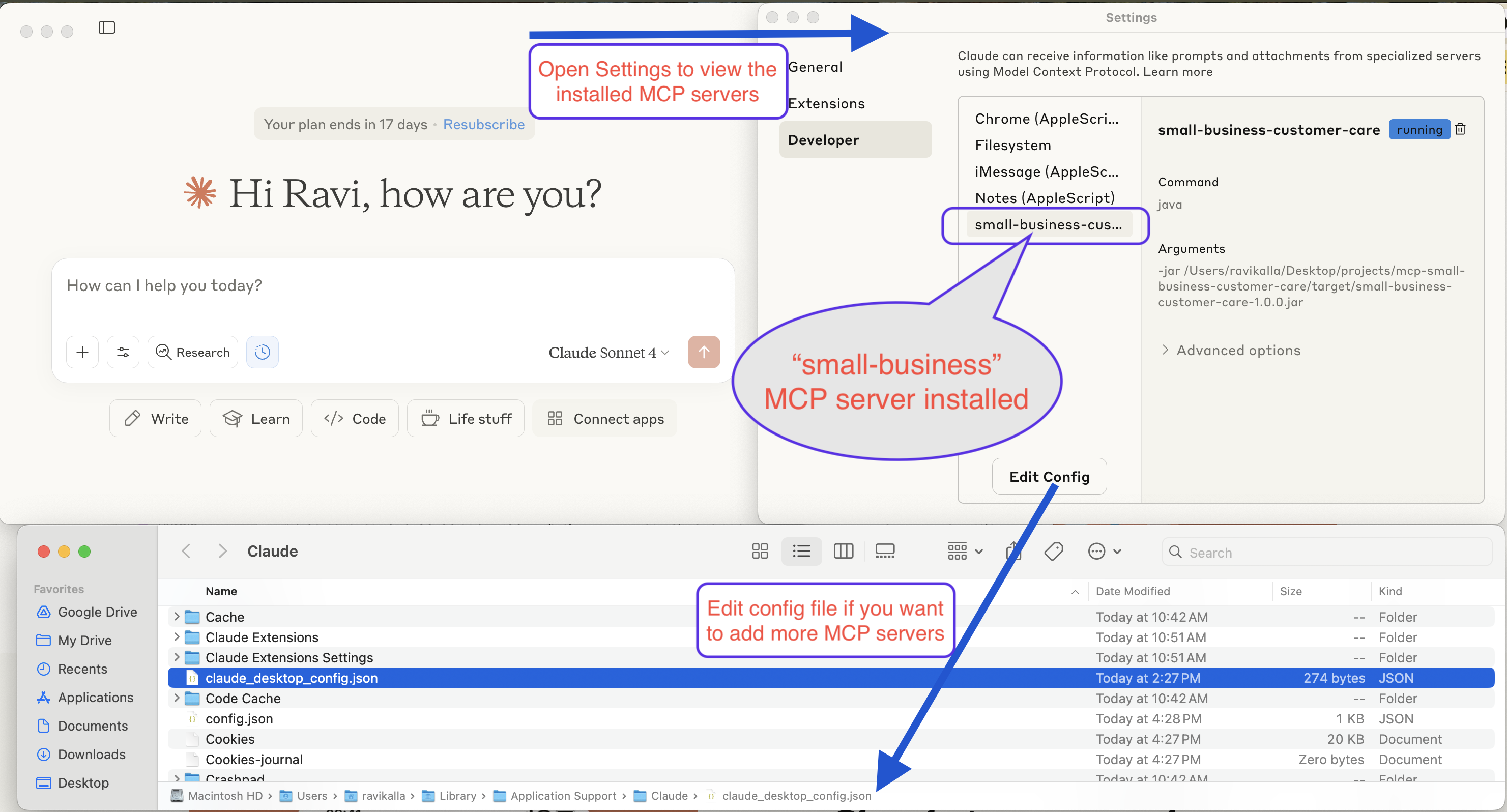 *The MCP server running successfully in Claude Desktop's developer settings*
2. **Test the tools**: Try asking:
- *"Show me all businesses"*
- *"What business tools are available?"*
You should see the business management tools working! 🎉
*The MCP server running successfully in Claude Desktop's developer settings*
2. **Test the tools**: Try asking:
- *"Show me all businesses"*
- *"What business tools are available?"*
You should see the business management tools working! 🎉
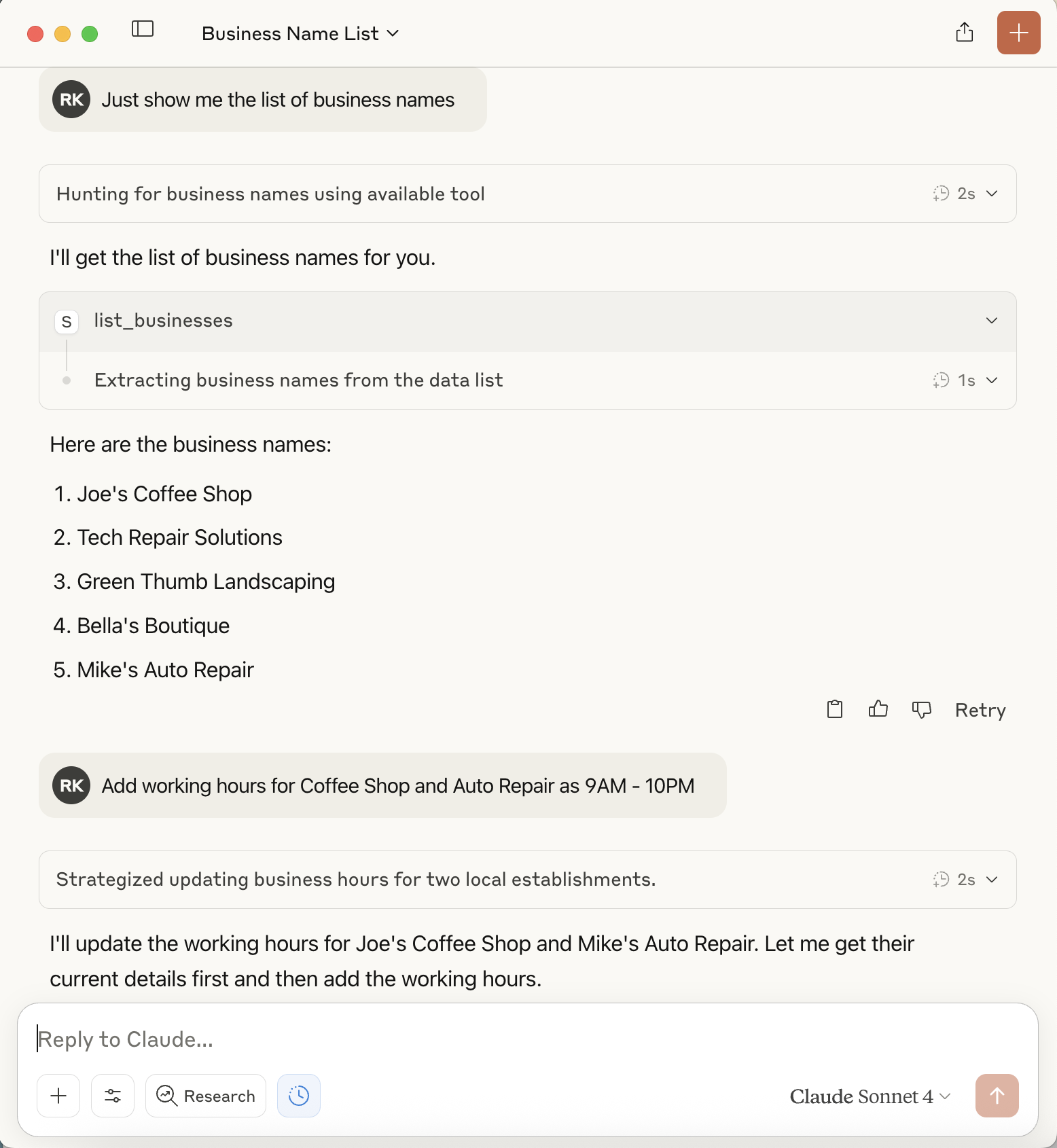 *Example conversation showing the MCP tools in action*
**📚 Additional Resources:**
- [MCP.so Community Platform](https://mcp.so/server/small-business-customer-care) - Our server listing
- [Claude Desktop MCP Documentation](https://modelcontextprotocol.io/clients#claude-desktop)
- [MCP Troubleshooting Guide](https://modelcontextprotocol.io/docs/troubleshooting)
- [Spring AI MCP Documentation](https://docs.spring.io/spring-ai/reference/api/mcp.html)
## 🚀 Quick Start
### **Prerequisites**
- Java 17 or higher
- Maven 3.6 or higher
- Claude Desktop (for AI assistant integration)
### **Installation & Build**
```bash
# Clone the repository
git clone https://github.com/ravikalla/mcp-small-business-customer-care.git
cd mcp-small-business-customer-care
# Build the application
mvn clean package
# Verify the JAR was created
ls -la target/small-business-customer-care-1.0.0.jar
```
### **Testing the Server**
```bash
# Test initialization
echo '{"jsonrpc":"2.0","method":"initialize","params":{"protocolVersion":"2024-11-05"},"id":0}' | java -jar target/small-business-customer-care-1.0.0.jar
# Test business listing
echo '{"jsonrpc":"2.0","method":"tools/call","params":{"name":"list_businesses","arguments":{}},"id":2}' | java -jar target/small-business-customer-care-1.0.0.jar
```
## 🔧 Claude Desktop Integration
Add this configuration to your Claude Desktop config file:
- **macOS**: `~/Library/Application Support/Claude/claude_desktop_config.json`
- **Windows**: `%APPDATA%\Claude\claude_desktop_config.json`
```json
{
"mcpServers": {
"small-business-customer-care": {
"command": "java",
"args": [
"-jar",
"/path/to/your/mcp-small-business-customer-care/target/small-business-customer-care-1.0.0.jar"
],
"env": {}
}
}
}
```
**Important**: Replace `/path/to/your/` with the actual absolute path to your project directory.
**Restart Claude Desktop** completely after updating the configuration.
## 🛠️ Available Business Tools
The server provides 6 MCP tools for complete business management:
| Tool | Purpose | Example Usage |
|------|---------|---------------|
| `list_businesses` | Get all businesses | "Show me all businesses" |
| `search_businesses` | Find by name/category/description | "Find restaurants" |
| `get_business` | Get details by ID | "Show details for business 1" |
| `create_business` | Add new business | "Create Ravi Restaurant..." |
| `update_business` | Modify existing business | "Update business hours for..." |
| `remove_business` | Delete business | "Delete green thumb business" |
### **JSON API Examples**
```json
// Create new business
{
"method": "tools/call",
"params": {
"name": "create_business",
"arguments": {
"name": "Ravi Restaurant",
"category": "Restaurant",
"address": "789 Pine Rd, Springfield",
"phone": "555-0106",
"email": "info@ravirestaurant.com",
"description": "Family-friendly restaurant. Hours: 9:00 AM - 5:00 PM daily",
"rating": 4.5
}
}
}
// Search businesses
{
"method": "tools/call",
"params": {
"name": "search_businesses",
"arguments": { "query": "restaurant" }
}
}
```
## 🏗️ Technical Architecture
Built with **Spring AI MCP Framework**:
- Uses `spring-ai-mcp-server-spring-boot-starter` for robust MCP protocol handling
- Annotation-driven tool definitions with `@Tool`
- Automatic tool discovery via `ToolCallbacks.from()`
- Clean STDIO transport with proper logging configuration
```java
@Service
public class BusinessService {
@Tool(name = "list_businesses", description = "Get a list of all businesses")
public List listBusinesses() { ... }
@Tool(name = "search_businesses", description = "Search businesses by name, category, or description")
public List searchBusinesses(String query) { ... }
// ... other tool methods
}
```
## 🧪 Development & Testing
```bash
# Run all tests
mvn test
# Start in development mode
mvn spring-boot:run
# Build for production
mvn clean package -DskipTests
```
**Sample Data**: The server comes pre-loaded with 5 businesses:
Joe's Coffee Shop, Tech Repair Solutions, Green Thumb Landscaping, Bella's Boutique, Mike's Auto Repair
## 🔧 Troubleshooting
**Server Not Connecting:**
1. Verify Java 17+: `java -version`
2. Check JAR exists: `ls -la target/small-business-customer-care-1.0.0.jar`
3. Test manually with echo commands above
4. Restart Claude Desktop completely
**Build Issues:**
```bash
mvn clean package -DskipTests # Skip tests if failing
mvn clean package -X # Verbose output
```
**Path Issues:**
- Use absolute paths in Claude Desktop configuration
- Escape spaces with quotes: `"/path with spaces/"`
## 📚 Resources
- [Model Context Protocol Specification](https://modelcontextprotocol.io/)
- [Spring AI Documentation](https://spring.io/projects/spring-ai)
- [Claude Desktop MCP Setup](https://claude.ai/docs)
## 📄 License
This project is open source and available under the MIT License.
## 🌐 Community
This MCP server is part of the growing **[MCP.so community](https://mcp.so/server/small-business-customer-care)**!
- ⭐ **Star the project** if you find it useful
- 🐛 **Report issues** on GitHub
- 💡 **Suggest features** for future versions
- 🤝 **Contribute** to make it even better
**Discover more MCP servers**: Browse the [MCP.so directory](https://mcp.so) to find other amazing MCP servers for different use cases.
---
**Ready to use?** Follow the Claude Desktop integration steps above and start managing your business data with AI! 🚀
*Example conversation showing the MCP tools in action*
**📚 Additional Resources:**
- [MCP.so Community Platform](https://mcp.so/server/small-business-customer-care) - Our server listing
- [Claude Desktop MCP Documentation](https://modelcontextprotocol.io/clients#claude-desktop)
- [MCP Troubleshooting Guide](https://modelcontextprotocol.io/docs/troubleshooting)
- [Spring AI MCP Documentation](https://docs.spring.io/spring-ai/reference/api/mcp.html)
## 🚀 Quick Start
### **Prerequisites**
- Java 17 or higher
- Maven 3.6 or higher
- Claude Desktop (for AI assistant integration)
### **Installation & Build**
```bash
# Clone the repository
git clone https://github.com/ravikalla/mcp-small-business-customer-care.git
cd mcp-small-business-customer-care
# Build the application
mvn clean package
# Verify the JAR was created
ls -la target/small-business-customer-care-1.0.0.jar
```
### **Testing the Server**
```bash
# Test initialization
echo '{"jsonrpc":"2.0","method":"initialize","params":{"protocolVersion":"2024-11-05"},"id":0}' | java -jar target/small-business-customer-care-1.0.0.jar
# Test business listing
echo '{"jsonrpc":"2.0","method":"tools/call","params":{"name":"list_businesses","arguments":{}},"id":2}' | java -jar target/small-business-customer-care-1.0.0.jar
```
## 🔧 Claude Desktop Integration
Add this configuration to your Claude Desktop config file:
- **macOS**: `~/Library/Application Support/Claude/claude_desktop_config.json`
- **Windows**: `%APPDATA%\Claude\claude_desktop_config.json`
```json
{
"mcpServers": {
"small-business-customer-care": {
"command": "java",
"args": [
"-jar",
"/path/to/your/mcp-small-business-customer-care/target/small-business-customer-care-1.0.0.jar"
],
"env": {}
}
}
}
```
**Important**: Replace `/path/to/your/` with the actual absolute path to your project directory.
**Restart Claude Desktop** completely after updating the configuration.
## 🛠️ Available Business Tools
The server provides 6 MCP tools for complete business management:
| Tool | Purpose | Example Usage |
|------|---------|---------------|
| `list_businesses` | Get all businesses | "Show me all businesses" |
| `search_businesses` | Find by name/category/description | "Find restaurants" |
| `get_business` | Get details by ID | "Show details for business 1" |
| `create_business` | Add new business | "Create Ravi Restaurant..." |
| `update_business` | Modify existing business | "Update business hours for..." |
| `remove_business` | Delete business | "Delete green thumb business" |
### **JSON API Examples**
```json
// Create new business
{
"method": "tools/call",
"params": {
"name": "create_business",
"arguments": {
"name": "Ravi Restaurant",
"category": "Restaurant",
"address": "789 Pine Rd, Springfield",
"phone": "555-0106",
"email": "info@ravirestaurant.com",
"description": "Family-friendly restaurant. Hours: 9:00 AM - 5:00 PM daily",
"rating": 4.5
}
}
}
// Search businesses
{
"method": "tools/call",
"params": {
"name": "search_businesses",
"arguments": { "query": "restaurant" }
}
}
```
## 🏗️ Technical Architecture
Built with **Spring AI MCP Framework**:
- Uses `spring-ai-mcp-server-spring-boot-starter` for robust MCP protocol handling
- Annotation-driven tool definitions with `@Tool`
- Automatic tool discovery via `ToolCallbacks.from()`
- Clean STDIO transport with proper logging configuration
```java
@Service
public class BusinessService {
@Tool(name = "list_businesses", description = "Get a list of all businesses")
public List listBusinesses() { ... }
@Tool(name = "search_businesses", description = "Search businesses by name, category, or description")
public List searchBusinesses(String query) { ... }
// ... other tool methods
}
```
## 🧪 Development & Testing
```bash
# Run all tests
mvn test
# Start in development mode
mvn spring-boot:run
# Build for production
mvn clean package -DskipTests
```
**Sample Data**: The server comes pre-loaded with 5 businesses:
Joe's Coffee Shop, Tech Repair Solutions, Green Thumb Landscaping, Bella's Boutique, Mike's Auto Repair
## 🔧 Troubleshooting
**Server Not Connecting:**
1. Verify Java 17+: `java -version`
2. Check JAR exists: `ls -la target/small-business-customer-care-1.0.0.jar`
3. Test manually with echo commands above
4. Restart Claude Desktop completely
**Build Issues:**
```bash
mvn clean package -DskipTests # Skip tests if failing
mvn clean package -X # Verbose output
```
**Path Issues:**
- Use absolute paths in Claude Desktop configuration
- Escape spaces with quotes: `"/path with spaces/"`
## 📚 Resources
- [Model Context Protocol Specification](https://modelcontextprotocol.io/)
- [Spring AI Documentation](https://spring.io/projects/spring-ai)
- [Claude Desktop MCP Setup](https://claude.ai/docs)
## 📄 License
This project is open source and available under the MIT License.
## 🌐 Community
This MCP server is part of the growing **[MCP.so community](https://mcp.so/server/small-business-customer-care)**!
- ⭐ **Star the project** if you find it useful
- 🐛 **Report issues** on GitHub
- 💡 **Suggest features** for future versions
- 🤝 **Contribute** to make it even better
**Discover more MCP servers**: Browse the [MCP.so directory](https://mcp.so) to find other amazing MCP servers for different use cases.
---
**Ready to use?** Follow the Claude Desktop integration steps above and start managing your business data with AI! 🚀