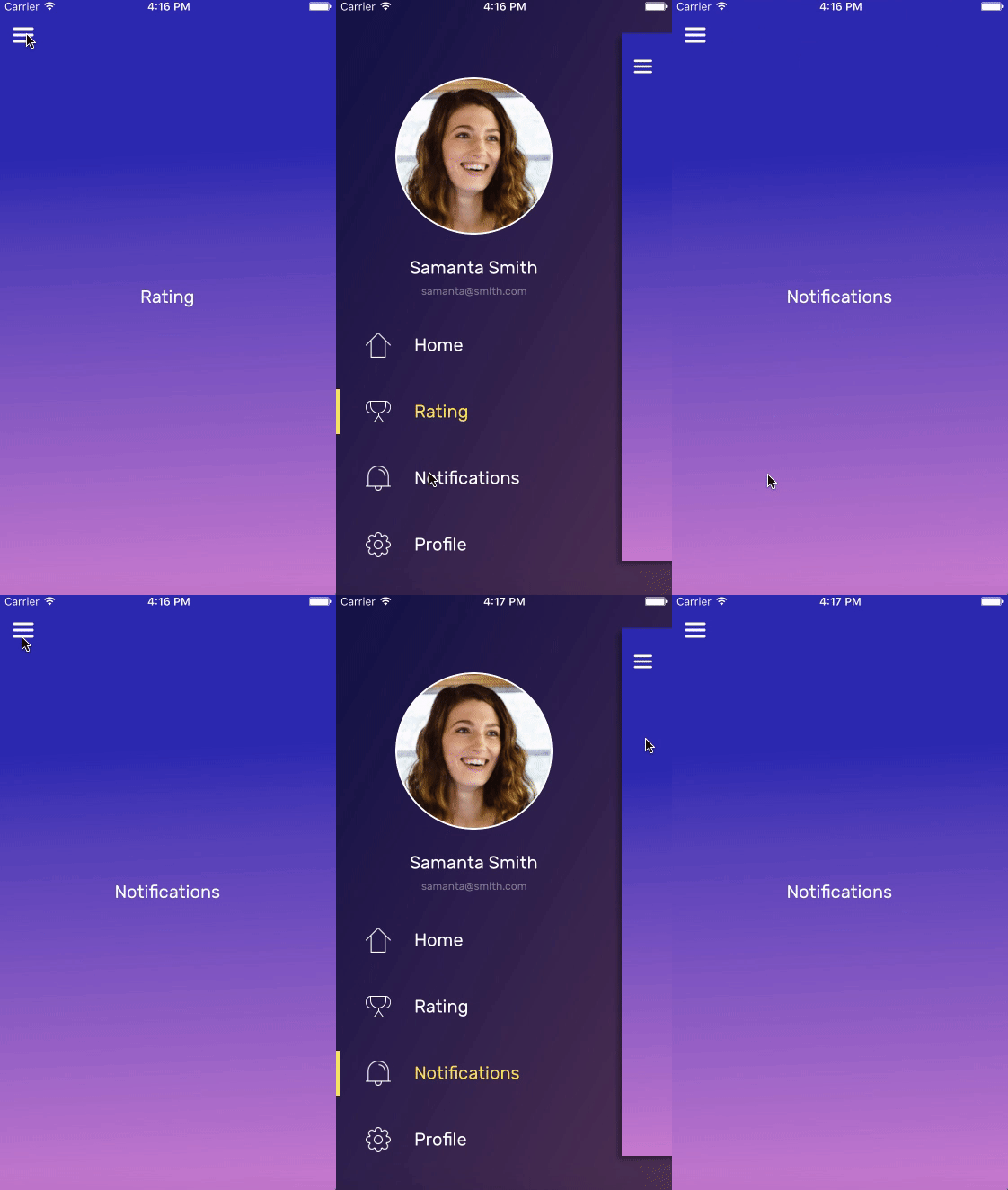




# Interactive Side Menu
A customizable, interactive, auto expanding and collapsing side menu for iOS written in Swift.
Here are some of the ways Interactive Side Menu can be customized:
- Animation duration
- Visible content width
- Content scale
- UIView spring animations
- Animation curves
- Customized animation settings for different orientations
## Communication
- If you **need help or found a bug**, please, open an issue.
- If you **have a feature request**, open an issue.
- If you **are ready to contribute**, submit a pull request.
- If you **like Interactive Side Menu**, please, give it a star.
- If you **use Interactive Side Menu in your application published to AppStore**, [send us a link](https://github.com/raw-materials/InteractiveSideMenu/issues/new) and we'll create the list with applications used our library.
You can find more details into [CONTRIBUTING](./CONTRIBUTING.md) file.
## Installation
### CocoaPods
To install using [CocoaPods](https://cocoapods.org/), add the following line to your Podfile:
```
pod 'InteractiveSideMenu'
```
Please, don't forget to run `pod update` command to update your local specs repository during migration from one version to another.
### Carthage
To install using [Carthage](https://github.com/Carthage/Carthage), add the following line to your Cartfile:
```
github "raw-materials/InteractiveSideMenu"
```
## Usage
To implement your side menu you should subclasses the following view controllers: `MenuContainerViewController` and `MenuViewController`
- `MenuContainerViewController` is the main container that hosts the side menu and content controller
- `MenuViewController` is the container controller for the side menu
To add a new menu item, your view controller needs to conform to the `SideMenuItemContent` protocol.
Setting up the side menu can be done in three steps:
##### For this, Host = `MenuContainerViewController` subclass and Menu = `MenuViewController` subclass
1. Assign Menu to the `menuViewController` property of Host
2. Set the Host's `contentViewControllers` array with an array of `SideMenuItemContent` controllers
3. Call `selectContentViewController(_ selectedContentVC: MenuItemContentViewController)` from Host
```swift
import InteractiveSideMenu
class HostViewController: MenuContainerViewController {
override func viewDidLoad() {
super.viewDidLoad()
menuViewController = self.storyboard!.instantiateViewController(withIdentifier: "NavigationMenu") as! MenuViewController
contentViewControllers = contentControllers()
selectContentViewController(contentViewControllers.first!)
}
private func contentControllers() -> [MenuItemContentViewController] {
var contentList = [MenuItemContentViewController]()
contentList.append(self.storyboard?.instantiateViewController(withIdentifier: "First") as! MenuItemContentViewController)
contentList.append(self.storyboard?.instantiateViewController(withIdentifier: "Second") as! MenuItemContentViewController)
return contentList
}
}
```
## Items content
To show menu, call `showSideMenu()` from any `SideMenuItemContent` controller.
```swift
import InteractiveSideMenu
class KittyViewController: UIViewController, SideMenuItemContent {
@IBAction func openMenu(_ sender: UIButton) {
showSideMenu()
}
}
```
To change the currently visible controller, pass the desired controller to your `MenuContainerViewController`:
```swift
let index = 2 // Second menu item
guard let menuContainerViewController = self.menuContainerViewController else { return }
let contentController = menuContainerViewController.contentViewControllers[index]
menuContainerViewController.selectContentViewController(contentController)
menuContainerViewController.hideSideMenu()
```
### TabBar and Navigation controllers
To use menu with **TabBar** or **NavigationController**, ensure that you indicate UITabBarController or UINavigationController as item content directly, not any corresponding ViewControllers.
```swift
class NavigationViewController: UINavigationController, SideMenuItemContent {
}
class InnerViewController: UIViewController {
@IBAction func openMenu(_ sender: Any) {
if let navigationViewController = self.navigationController as? SideMenuItemContent {
navigationViewController.showSideMenu()
}
}
}
```
Please, find UITabBarController implementation details in [Sample](./Sample).
## Animation Customization
To customize the open and close animations, update the `transitionOptions` property on your `MenuContainerViewColtroller` subclass. The sample project does this in `viewDidLoad()`
```swift
override func viewDidLoad() {
super.viewDidLoad()
let screenSize: CGRect = UIScreen.main.bounds
self.transitionOptions = TransitionOptions(duration: 0.4, visibleContentWidth: screenSize.width / 6)
...
}
```
To customize transition options for different orientations, override `viewWillTransition(to:with:)` and update the `transitionOptions`. This can also be done with trait collections using `traitCollectionDidChange(_:)`
```swift
override func viewWillTransition(to size: CGSize, with coordinator: UIViewControllerTransitionCoordinator) {
super.viewWillTransition(to: size, with: coordinator)
var options = TransitionOptions()
options.duration = size.width < size.height ? 0.4 : 0.6
options.visibleContentWidth = size.width / 6
self.transitionOptions = options
}
```
Check out the [Sample](./Sample) project for more details and usage examples.
# Known Issues
There is [an issue](https://github.com/raw-materials/InteractiveSideMenu/issues/53) associated with the content controller's view not properly having the `safeAreaInsets` set. This causes the view's layout to shift when the side menu is closed. The issue appears to be tied to the transition options `contentScale` setting. Choosing a value in the range 0.87 - 0.91 causes the `safeAreaInsets.top` to be set to `0.0`. The default value of the library is no longer within this range but be mindful if changing that value for your own application.
# Requirements
- iOS 8.0+
- Xcode 8.1+
- Swift 3.0+
# License
InteractiveSideMenu is available under the Apache License, Version 2.0. See the [LICENSE](./LICENSE) file for more info.