
bracco
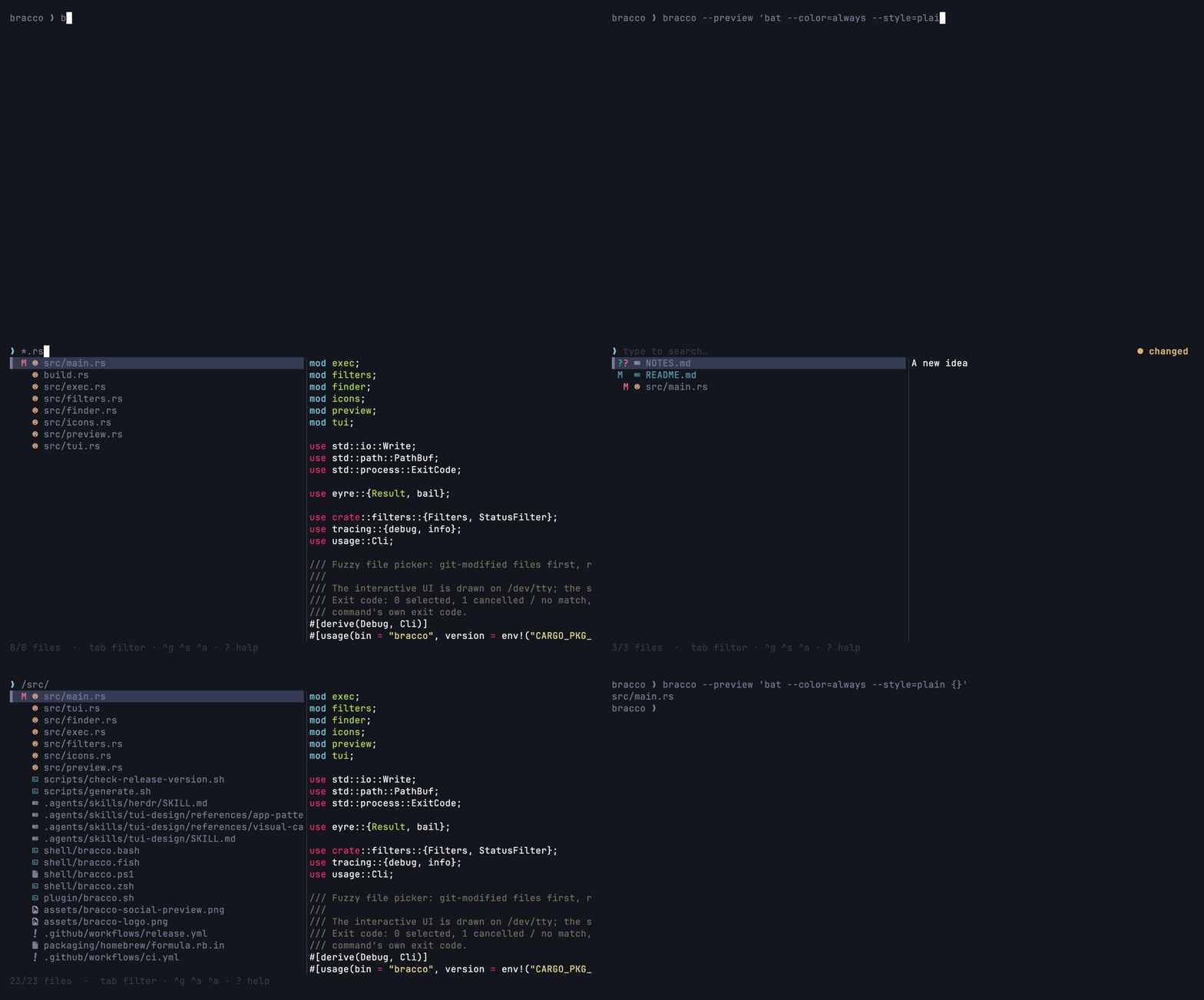
A fast fuzzy file picker for the terminal: git-modified files first, .gitignore respected.
bracco (BRAHK-koh) is the Italian pointer dog: it sniffs out what you changed and points at it.


## Features
- **Git-aware ranking**: modified, staged and untracked files float to the top; filter by status with `tab`.
- **Fast**: built on [fff-search](https://crates.io/crates/fff-search), respects `.gitignore`.
- **Preview pane**: show any command's output (`bat`, `git diff`, ...) next to the list.
- **Vim mode**: `--vim` for modal `j`/`k`/`/` navigation.
- **Composable**: UI on `/dev/tty`, result on stdout. Works with `$EDITOR "$(bracco)"`, pipes and `--list`.
- **[Herdr](https://herdr.dev) plugin** included.
## Install
With [Homebrew](https://brew.sh):
```sh
brew install rawnly/tap/bracco
```
With [mise](https://mise.jdx.dev):
```sh
mise use -g github:rawnly/bracco
```
From [crates.io](https://crates.io/crates/bracco) (needs a [Rust toolchain](https://www.rust-lang.org/tools/install)):
```sh
cargo install bracco --locked
# or the latest main:
cargo install --git https://github.com/rawnly/bracco --locked
```
Or download an archive for your platform from
[Releases](https://github.com/rawnly/bracco/releases). It contains the binary,
man page, usage spec and shell completions.
Verify a download
Every release ships a signed [packslip](https://packslip.dev) bundle
(`packslip.sigstore.json`) covering all archives, signed keylessly by the
release workflow:
```sh
packslip verify packslip.sigstore.json \
--identity-prefix https://github.com/rawnly/bracco/.github/workflows/release.yml@ \
--issuer https://token.actions.githubusercontent.com \
--artifact bracco-aarch64-apple-darwin.tar.xz
```
Build provenance is also attested:
`gh attestation verify bracco-aarch64-apple-darwin.tar.xz --repo rawnly/bracco`.
## Quick start
```sh
bracco # pick a file, print its path
$EDITOR "$(bracco)" # open it in your editor
bracco --edit --keep-open # open in $VISUAL/$EDITOR and come back
bracco -c --preview 'git diff --color=always {}' # changed files with a diff preview
bracco --vim # modal keys
bracco -l -q '*.rs' -n 20 # non-interactive: list matches
```
Press `?` (or `F1`) inside the picker for the full key reference.
## Usage
```
bracco [FLAGS] [DIR]
-q, --query Initial query (interactive) or the query to run (--list)
-l, --list Non-interactive: print matches to stdout and exit
-n, --limit Max results for --list (default: 100)
-a, --absolute Print absolute paths
-0, --print0 Separate output paths with NUL instead of newline
--status all, changed, staged, unstaged, untracked, clean
-c, --changed Shortcut for --status changed
-e, --ext Only files with this extension (repeatable / comma-separated)
-x, --exclude Exclude paths matching this glob (repeatable)
-E, --exec Run CMD on enter instead of printing the path ({} = path)
--edit Shortcut for --exec '$VISUAL / $EDITOR / vi'
--keep-open With --exec / --edit: return to the picker afterwards
--preview Show CMD's output for the highlighted file
--preview-window [right|left|up|down][:N%][:hidden] (default: right:50%)
--vim Vim-style modal keys
--log-file Write logs to FILE (level via RUST_LOG)
```
Run `bracco --help` or `man bracco` for the full reference.
**Exit codes:** `0` selected, `1` cancelled / no match, `2` error. With `--exec`,
the command's own exit code.
### Keys
| Key | Action |
| --- | --- |
| `↑` `↓` `^p` `^n` `^k` `^j` | Move selection |
| `enter` | Select (print path or run `--exec`) |
| `tab` / `shift-tab` | Cycle git status filter |
| `^g` `^s` `^a` `^t` | Toggle changed / staged / unstaged / untracked |
| `^o` | Show / hide preview |
| `^d` `^u` | Scroll preview half a page |
| `^w` `^x` | Delete last word / clear query |
| `esc` `^c` | Cancel |
**Vim mode (`--vim`)** starts in normal mode:
| Key | Action |
| --- | --- |
| `j` `k` | Move selection |
| `g` `G` | Top / bottom |
| `d` `u` | Jump 10 rows |
| `J` `K` | Scroll preview by line (`f` `b` by page) |
| `/` `i` `a` | Start searching (insert mode) |
| `esc` | Insert → normal; normal → cancel |
| `q` | Cancel |
### Query syntax
| Query | Matches |
| --- | --- |
| `text` | Fuzzy match on the path |
| `*.rs` | Only this extension |
| `/src/` | Only inside this directory |
| `!test` | Exclude matches |
| `type:rust` | By file type |
| `status:modified` | Git status (`staged`, `untracked`, ...) |
### Environment
| Variable | Equivalent flag |
| --- | --- |
| `BRACCO_EXEC` | `--exec` |
| `BRACCO_PREVIEW` | `--preview` |
| `BRACCO_VIM` | `--vim` |
| `BRACCO_LOG_FILE` | `--log-file` |
### Shell integration
Source Bracco's shell integration to enable fzf-style fuzzy path completion.
Type `nvim **` and press Tab to choose a file; the selected path is inserted
into the command line. Supported shells: bash, zsh, fish, and PowerShell. In
bash, ordinary Tab falls back to basic file completion; the other integrations
preserve their shell's normal Tab completion.
```sh
# Bash (~/.bashrc)
bracco shell-integration bash >> ~/.bashrc
# Zsh (~/.zshrc)
bracco shell-integration zsh >> ~/.zshrc
# Fish (~/.config/fish/config.fish)
bracco shell-integration fish >> ~/.config/fish/config.fish
# PowerShell ($PROFILE)
bracco shell-integration powershell >> $PROFILE
```
Elvish and Nushell currently have argument completions, but no fuzzy shell
integration. Shell argument completion is available separately:
```sh
bracco completions zsh > ~/.zfunc/_bracco # bash, zsh, fish, elvish, nu, powershell
```
## Herdr plugin
`herdr-plugin.toml` adds a `pick` action that opens a popup with bracco and
then opens the chosen file in your editor (`$BRACCO_EDITOR`, `$VISUAL`,
`$EDITOR`, else `vi`) in an overlay pane.
```sh
herdr plugin link . # or: herdr plugin install rawnly/bracco
herdr plugin action invoke pick --plugin dev.rawnly.bracco
```
Requires `bracco` (and optionally `jq`) in `PATH`; bind the action to a key in
your herdr config.
```toml
[[keys.command]]
key = "prefix+i"
type = "plugin_action"
command = "dev.rawnly.bracco.pick"
description = "Pick file"
```
## Contributing
See [CONTRIBUTING.md](CONTRIBUTING.md) for development setup and the release process.
## License
[MIT](LICENSE) © Federico Vitale