# go.nvim Usage Guide
Detailed usage, demos, and command references for go.nvim features.
For installation, configuration, and quick start, see the main [README](../README.md).
---
## Table of Contents
- [Code Format](#code-format)
- [Auto-fill](#auto-fill)
- [Textobject](#textobject)
- [Go Binaries Install and Update](#go-binaries-install-and-update)
- [Build and Test](#build-and-test)
- [Unit Test with gotests and testify](#unit-test-with-gotests-and-testify)
- [GoCheat](#gocheat)
- [GoDoc](#godoc)
- [GoDocBrowser](#godocbrowser)
- [GoDocAI](#godocai)
- [GoPkgOutline](#gopkgoutline)
- [GoPkgSymbols](#gopkgsymbols)
- [Modifytags](#modifytags)
- [GoFmt](#gofmt)
- [GoImplements](#goimplements)
- [GoImpl](#goimpl)
- [Refactor / Rename](#refactor--rename)
- [Debug](#debug)
- [Debug with dlv](#debug-with-dlv)
- [Debug Commands](#debug-commands)
- [Required DAP Plugins](#required-dap-plugins)
- [Switch between Go and Test File](#switch-between-go-and-test-file)
- [Go Mock](#go-mock)
- [Comments and Doc](#comments-and-doc)
- [GoMod Commands](#gomod-commands)
- [LSP](#lsp)
- [LSP cmp Support](#lsp-cmp-support)
- [LSP CodeLens](#lsp-codelens)
- [LSP CodeActions](#lsp-codeactions)
- [Lint](#lint)
- [Json/Yaml to Go Struct](#jsonyaml-to-go-struct)
- [Load Env File](#load-env-file)
- [Generate Return Value](#generate-return-value)
- [Rename Modules](#rename-modules)
- [govulncheck](#govulncheck)
- [goenum](#goenum)
- [gonew](#gonew)
- [ginkgo](#ginkgo)
- [GoAI](#goai)
- [AI Code Review](#ai-code-review)
- [AI Chat](#ai-chat)
- [AI Documentation](#ai-documentation)
---
## Code Format
The plugin provides code format, by default is gopls
Use following code to format go code
```lua
require("go.format").gofmt() -- gofmt only
require("go.format").goimports() -- goimports + gofmt
```
### Format on save
To config format on save, add one of the following to your init.lua:
#### Run gofmt on save
```lua
-- Run gofmt on save
local format_sync_grp = vim.api.nvim_create_augroup("GoFormat", {})
vim.api.nvim_create_autocmd("BufWritePre", {
pattern = "*.go",
callback = function()
require('go.format').gofmt()
end,
group = format_sync_grp,
})
```
#### Run gofmt + goimports on save
```lua
-- Run gofmt + goimports on save
local format_sync_grp = vim.api.nvim_create_augroup("goimports", {})
vim.api.nvim_create_autocmd("BufWritePre", {
pattern = "*.go",
callback = function()
require('go.format').goimports()
end,
group = format_sync_grp,
})
```
## Auto-fill
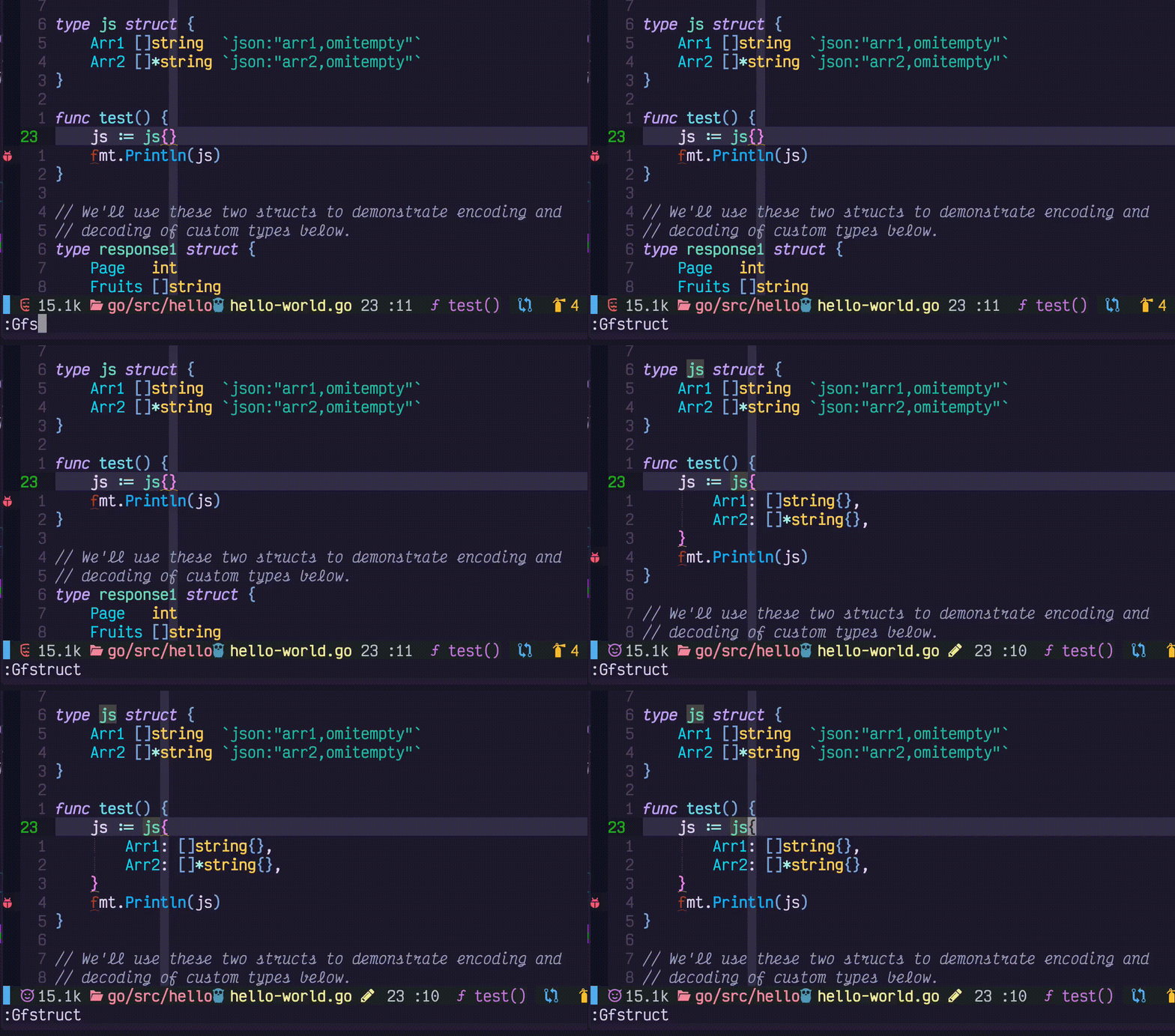
Note: auto-fill struct also supported by gopls lsp-action
| command | Description |
| ------------ | ------------------------------------------------------------- |
| GoFillStruct | auto fill struct |
| GoFillSwitch | fill switch |
| GoIfErr | Add if err |
| GoFixPlurals | change func foo(b int, a int, r int) -> func foo(b, a, r int) |
[GoFixPlurals Youtube video](https://www.youtube.com/watch?v=IP67Gkb5-qA)
```go
package foo
import "io"
func Foo() (io.Reader, error) { // the cursor on this line to add if err statement
}
```
## Textobject
Supported by treesitter. TS provided better parse result compared to regular expression. See the example
[treesitter config file](https://github.com/ray-x/go.nvim#text-object) on how to setup textobjects. Also with
treesitter-objects, you can move, swap the selected blocks of codes, which is fast and accurate. `go.nvim` will load
textobject with treesiteter, with default keybindings, if you what to set it up yourself, you can set `textobject` to
false.
## Go Binaries Install and Update
The following go binaries are used in `go.nvim` (depends on your setup):
- gofumpt
- goimports
- gorename
- gomodifytags
- gotests
- iferr
- impl
- fillstruct
- fillswitch
- dlv
- ginkgo
- gotestsum
- govulncheck
- goenum
If you run `GoFmt` and the configured binary was not installed, the plugin will install it for you. But
the first run of `GoFmt` may fail. Recommended to run `GoInstallBinaries` to install all binaries before using the
plugin.
| command | Description |
| ------------------------------ | -------------------------------------------------------------------------------------------------------------------------- |
| GoInstallBinary go_binary_name | use `go install go_binary_url@latest` to install tool, if installed will skip |
| GoUpdateBinary go_binary_name | use `go install go_binary_url@latest` Will force re-install/update if already installed, otherwise same as GoInstallBinary |
| GoInstallBinaries | use `go install` to install all tools, skip the ones installed |
| GoUpdateBinaries | use `go install` to update all tools to the latest version |
## Build and Test
| command | Description |
| ------------------------------------------- | ------------------------------------------------------------------------------------------------------------- |
| GoMake | async make, use with other commands |
| GoBuild args | go build args (-g: enable debug, %: expand to current file, %:h expand to current package) |
| GoGenerate | |
| GoRun {args} -a {cmd_args} | e.g. GoRun equal to `go run .`; or `GoRun ./cmd` equal to `go run ./cmd, Additional args: -F run in floaterm` |
| GoRun -a {cmd_args} | specify additional arguments pass to your main(), see notes 3 |
| GoStop {job_id} | `stop the job started with GoRun` |
| GoTest | go test ./... |
| GoTestSum {pkgname} {gotestsum arguments} | run gotestsum and show result in side panel |
| GoTestSum -w | run gotestsum in watch mode |
| GoTest -v | go test -v current_file_path |
| GoTest -c | go test -c current_file_path |
| GoTest -n | test nearest, see GoTestFunc |
| GoTest -f | test current file, see GoTestFile |
| GoTest -n 1 | -count=1 flag |
| GoTest -p {pkgname} | test package, see GoTestPkg, test current package if {pkgname} not specified |
| GoTest -parallel {number} | test current package with parallel number |
| GoTest -b {build_flags} | run `go test` with build flags e.g. `-b -gcflags="all-N\ -l"` |
| GoTest -t yourtags | go test ./... -tags=yourtags, see notes |
| GoTest -F ./... \| awk '{$1=$1};1' \| delta | pipe the test output to awk and then delta/diff-so-fancy to show diff output of go test (e.g. testify) |
| GoTest -a your_args | go test ./... -args=yourargs, see notes |
| GoTest package_path -t yourtags | go test packagepath -tags=yourtags |
| GoTest package_path -t yourtags other_args | go test packagepath -tags=yourtags other_args |
| GoLint | golangci-lint |
| GoGet {args} {package_url} | go get {args} package_url and restart gopls. Notes1 |
| GoVet | go vet |
| GoTool | go tool |
| GoWork {run | use} {pkgpath} |
| GoCoverage | go test -coverprofile |
| GoCoverage -p | go test -coverprofile (only tests package for current buffer) |
| GoCoverage -f coverage_file_name | load coverage file |
| GoCoverage {flags} | -t : toggle, -r: remove signs, -R remove sings from all files, -m show metrics |
| GoCoverage {flags} {go test flags} | e.g: GoCoverage -p -coverpkg 'yourpackagename' |
| GoTermClose | `closes the floating term` |
Notes:
1. if package_url not provided, will check current line is a valid package url or not, if it is valid, will fetch
current url
2. tags: if `//+build tags` exist it will be added automatically
3. args: if multiple args is provided, you need toconcatenate it with '\ ', e.g. GoTest -a yourtags\ other_args
4. % will expand to current file path, e.g. GoBuild %
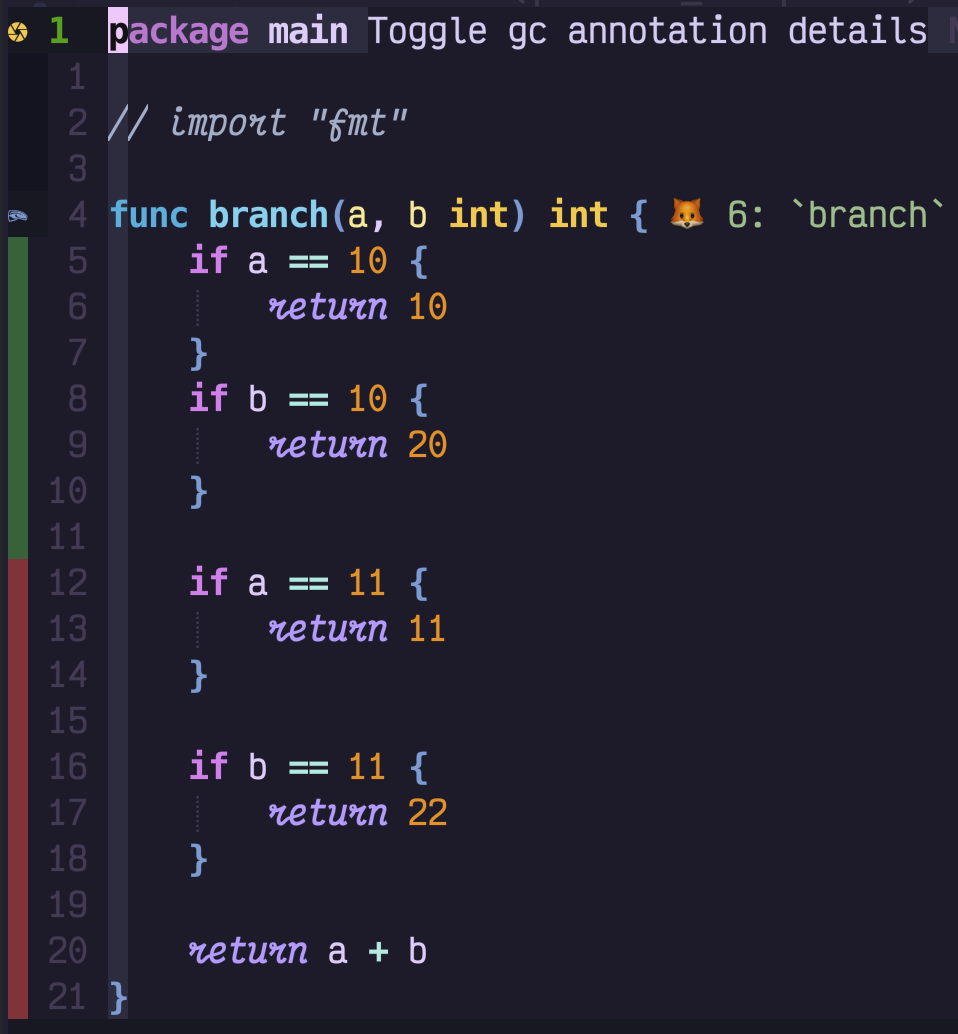
Show test coverage:
 Provided wrapper for gobulild/test etc with async make Also suggest to use
[vim-test](https://github.com/vim-test/vim-test), which can run running tests on different granularities.
## Unit Test with [gotests](https://github.com/cweill/gotests) and testify
Support table based unit test auto generate, parse current function/method name using treesitter
| command | Description |
| ------------------------ | ------------------------------------------------------- |
| GoTestFunc | run test for current func |
| GoTestFunc -s | select the test function you want to run |
| GoTestFunc -tags=yourtag | run test for current func with `-tags yourtag` option |
| GoTestFile | run test for current file |
| GoTestFile -tags=yourtag | run test for current folder with `-tags yourtag` option |
| GoTestPkg | run test for current package/folder |
| GoTestPkg -tags=yourtag | run test for current folder with `-tags yourtag` option |
| GoAddTest [-parallel] | Add test for current func |
| GoAddExpTest [-parallel] | Add tests for exported funcs |
| GoAddAllTest [-parallel] | Add tests for all funcs |
GoTestXXX Arguments
| arguments | Description |
| --------- | ------------- |
| -v | verbose mode |
| -c | compile |
| -C | coverprofile |
| -n | count |
| -t | tags |
| -f | fuzz |
| -bench | bench test |
| -m | metric |
| -s | select |
| -p | package |
| -F | floaterm mode |
| -a | args |
Note: For GoTestXXX
You can add available arguments with long name or character flag e.g.
`GoTest -tags=integration ./internal/web -b=. -count=1 -`
You can also add other unmapped arguments after the `-a` or `-args` flag `GoTest -a mock=true`
## GoCheat
Show [cheat.sh](https://github.com/chubin/cheat.sh) for api in neovim new buffer. e.g. `GoCheat sort`
## GoDoc
Show go doc for api in neovim floating window. e.g. `GoDoc fmt.Println`

If no argument provided, fallback to lsp.hover()
## GoDocBrowser
Similar to GoDoc, but open the browser with the doc link. If no argument provided, open doc for current function/package
## GoDocAI
AI-powered documentation lookup. When you can't remember the exact package or function name, `GoDocAI` finds the
symbol using `go doc` and gopls workspace/symbol, then generates comprehensive documentation via AI.
```vim
:GoDocAI Println
:GoDocAI http.ListenAndServe
:GoDocAI json Marshal
```
If no argument is given, uses the word under the cursor. Results are shown in a floating window.
Requires `ai = { enable = true }` in your go.nvim setup.
## GoPkgOutline
A symbol outline for all symbols (var, const, func, struct, interface etc) inside a package You can still use navigator
or sidebar plugins (e.g. vista, symbols-outline) to check outline within a file. But it is more useful for go to check
the symbols in a package, as those symbols are visuals inside package, also the method can be defined in different
source file.
Command format: GoPkgOutline {options} options: -f: show in floatwing window (default side panel, both require
quihua.lua) -p package_name: the package you want to list. e.g. GoPkgOutline -p json; default package is current file's
package If guihua not installed fallback to loclist
Provided wrapper for gobulild/test etc with async make Also suggest to use
[vim-test](https://github.com/vim-test/vim-test), which can run running tests on different granularities.
## Unit Test with [gotests](https://github.com/cweill/gotests) and testify
Support table based unit test auto generate, parse current function/method name using treesitter
| command | Description |
| ------------------------ | ------------------------------------------------------- |
| GoTestFunc | run test for current func |
| GoTestFunc -s | select the test function you want to run |
| GoTestFunc -tags=yourtag | run test for current func with `-tags yourtag` option |
| GoTestFile | run test for current file |
| GoTestFile -tags=yourtag | run test for current folder with `-tags yourtag` option |
| GoTestPkg | run test for current package/folder |
| GoTestPkg -tags=yourtag | run test for current folder with `-tags yourtag` option |
| GoAddTest [-parallel] | Add test for current func |
| GoAddExpTest [-parallel] | Add tests for exported funcs |
| GoAddAllTest [-parallel] | Add tests for all funcs |
GoTestXXX Arguments
| arguments | Description |
| --------- | ------------- |
| -v | verbose mode |
| -c | compile |
| -C | coverprofile |
| -n | count |
| -t | tags |
| -f | fuzz |
| -bench | bench test |
| -m | metric |
| -s | select |
| -p | package |
| -F | floaterm mode |
| -a | args |
Note: For GoTestXXX
You can add available arguments with long name or character flag e.g.
`GoTest -tags=integration ./internal/web -b=. -count=1 -`
You can also add other unmapped arguments after the `-a` or `-args` flag `GoTest -a mock=true`
## GoCheat
Show [cheat.sh](https://github.com/chubin/cheat.sh) for api in neovim new buffer. e.g. `GoCheat sort`
## GoDoc
Show go doc for api in neovim floating window. e.g. `GoDoc fmt.Println`

If no argument provided, fallback to lsp.hover()
## GoDocBrowser
Similar to GoDoc, but open the browser with the doc link. If no argument provided, open doc for current function/package
## GoDocAI
AI-powered documentation lookup. When you can't remember the exact package or function name, `GoDocAI` finds the
symbol using `go doc` and gopls workspace/symbol, then generates comprehensive documentation via AI.
```vim
:GoDocAI Println
:GoDocAI http.ListenAndServe
:GoDocAI json Marshal
```
If no argument is given, uses the word under the cursor. Results are shown in a floating window.
Requires `ai = { enable = true }` in your go.nvim setup.
## GoPkgOutline
A symbol outline for all symbols (var, const, func, struct, interface etc) inside a package You can still use navigator
or sidebar plugins (e.g. vista, symbols-outline) to check outline within a file. But it is more useful for go to check
the symbols in a package, as those symbols are visuals inside package, also the method can be defined in different
source file.
Command format: GoPkgOutline {options} options: -f: show in floatwing window (default side panel, both require
quihua.lua) -p package_name: the package you want to list. e.g. GoPkgOutline -p json; default package is current file's
package If guihua not installed fallback to loclist
 ## GoPkgSymbols
A symbol outline for all symbols (var, const, func, struct, interface etc) inside current package
## GoPkgSymbols
A symbol outline for all symbols (var, const, func, struct, interface etc) inside current package
 ## Modifytags
Modify struct tags by [`gomodifytags`](https://github.com/fatih/gomodifytags) and treesitter
| command | Description |
| ---------- | ----------- |
| GoAddTag | |
| GoRmTag | |
| GoClearTag | |
Options: -transform/-t: transform the tag -add-options/-a: add options to the tag
## GoFmt
nvim-lsp support goimports by default. The plugin provided a new formatter, goline + gofumpt (stricter version of gofmt)
| command | Description |
| ---------------------- | ------------------------ |
| GoFmt {opts} | default: gofumpt |
| GoImports | default: goimports |
| GoImports package_path | gopls add_import package |
{opts} : `-a` format all buffers
## GoFix
Run `go fix` with args
## GoImplements
nvim-lsp/gopls support implementation by default. The plugin provides this command for people migrate from vim-go
## GoImpl
generate method stubs for implementing an interface
Usage:
```
:GoImpl {receiver} {interface}
```
Also, you can put the cursor on the struct and run
```
:GoImpl {interface}
```
e.g:
```
:GoImpl f *File io.Reader
```
or simply put your cursor in a struct and do
```
:GoImpl io.Reader
```
or simply your cursor on a interface and specify a receiver type
```
:GoImpl MyType
```
## Refactor / Rename
gopls rename
## Debug
| command | Description |
| ------------------ | ------------------------------------------------ |
| GoDebug | start debug session, Note 1 |
| GoDebug -h | show helps info |
| GoDebug -c | compile only |
| GoDebug -t | start debug session for go test file, Note 2 |
| GoDebug -R | restart debug session |
| GoDebug -n | start debug session for nearest go test function |
| GoDebug -p | launch package test and start debug |
| GoDebug -e program | dap exec program |
| GoDebug -a | attach to remote process |
| GoDebug -s | stop debug session and unmap debug keymap |
| GoDebug -A args | debug session with args |
| GoDbgKeys | show debug keymaps in a floating window (guihua) |
| GoBreakToggle | GoDebug -b |
| GoDbgStop | Same as GoDebug -s |
| GoDbgContinue | Continue debug session |
| BreakCondition | conditional break |
Notes:
1. Without any argument, will check if launch.json existed or not, if existed, using launch.json and popup input. If
launch.json not existed, will start debug session for current file, if current file is package main will run main(),
else will start the debug package test
2. with -t option, if the current file is not a test file, will switch to the test file and run test for current
function
3. If the cursor is inside scope of a test function, will debug the current test function, if cursor is inside a test
file, will debug current test file
## Debug with dlv
Setup(adapter) for go included. Need Dap and Dap UI plugin [nvim-dap](https://github.com/mfussenegger/nvim-dap)
[nvim-dap-ui](https://github.com/rcarriga/nvim-dap-ui)
 GDB style
key mapping is used
### Keymaps
| key | Description |
| --- | ---------------------------------------- |
| c | continue |
| n | next |
| s | step |
| o | stepout |
| S | cap S: stop debug |
| u | up |
| D | cap D: down |
| C | cap C: run to cursor |
| b | toggle breakpoint |
| P | cap P: pause |
| p | print, hover value (also in visual mode) |
### Moving from vscode-go debug
Please check [Vscode Launch configurations](https://code.visualstudio.com/docs/editor/debugging#_launch-configurations)
for more info go.nvim support launch debugger from vscode-go .vscode/launch.json configurations If launch.json is valid,
run `GoDebug` will launch from the launch.json configuration.
### Inlay hints
## Modifytags
Modify struct tags by [`gomodifytags`](https://github.com/fatih/gomodifytags) and treesitter
| command | Description |
| ---------- | ----------- |
| GoAddTag | |
| GoRmTag | |
| GoClearTag | |
Options: -transform/-t: transform the tag -add-options/-a: add options to the tag
## GoFmt
nvim-lsp support goimports by default. The plugin provided a new formatter, goline + gofumpt (stricter version of gofmt)
| command | Description |
| ---------------------- | ------------------------ |
| GoFmt {opts} | default: gofumpt |
| GoImports | default: goimports |
| GoImports package_path | gopls add_import package |
{opts} : `-a` format all buffers
## GoFix
Run `go fix` with args
## GoImplements
nvim-lsp/gopls support implementation by default. The plugin provides this command for people migrate from vim-go
## GoImpl
generate method stubs for implementing an interface
Usage:
```
:GoImpl {receiver} {interface}
```
Also, you can put the cursor on the struct and run
```
:GoImpl {interface}
```
e.g:
```
:GoImpl f *File io.Reader
```
or simply put your cursor in a struct and do
```
:GoImpl io.Reader
```
or simply your cursor on a interface and specify a receiver type
```
:GoImpl MyType
```
## Refactor / Rename
gopls rename
## Debug
| command | Description |
| ------------------ | ------------------------------------------------ |
| GoDebug | start debug session, Note 1 |
| GoDebug -h | show helps info |
| GoDebug -c | compile only |
| GoDebug -t | start debug session for go test file, Note 2 |
| GoDebug -R | restart debug session |
| GoDebug -n | start debug session for nearest go test function |
| GoDebug -p | launch package test and start debug |
| GoDebug -e program | dap exec program |
| GoDebug -a | attach to remote process |
| GoDebug -s | stop debug session and unmap debug keymap |
| GoDebug -A args | debug session with args |
| GoDbgKeys | show debug keymaps in a floating window (guihua) |
| GoBreakToggle | GoDebug -b |
| GoDbgStop | Same as GoDebug -s |
| GoDbgContinue | Continue debug session |
| BreakCondition | conditional break |
Notes:
1. Without any argument, will check if launch.json existed or not, if existed, using launch.json and popup input. If
launch.json not existed, will start debug session for current file, if current file is package main will run main(),
else will start the debug package test
2. with -t option, if the current file is not a test file, will switch to the test file and run test for current
function
3. If the cursor is inside scope of a test function, will debug the current test function, if cursor is inside a test
file, will debug current test file
## Debug with dlv
Setup(adapter) for go included. Need Dap and Dap UI plugin [nvim-dap](https://github.com/mfussenegger/nvim-dap)
[nvim-dap-ui](https://github.com/rcarriga/nvim-dap-ui)
 GDB style
key mapping is used
### Keymaps
| key | Description |
| --- | ---------------------------------------- |
| c | continue |
| n | next |
| s | step |
| o | stepout |
| S | cap S: stop debug |
| u | up |
| D | cap D: down |
| C | cap C: run to cursor |
| b | toggle breakpoint |
| P | cap P: pause |
| p | print, hover value (also in visual mode) |
### Moving from vscode-go debug
Please check [Vscode Launch configurations](https://code.visualstudio.com/docs/editor/debugging#_launch-configurations)
for more info go.nvim support launch debugger from vscode-go .vscode/launch.json configurations If launch.json is valid,
run `GoDebug` will launch from the launch.json configuration.
### Inlay hints
 ### Commands
- GoToggleInlay
- GoToggleIferrLessHighlight
#### Note
Please use jsonls/null-ls check your launch.json is valid json file. Following syntax is not supported
- Trailing comma
- Comment
Here is a sample [launch.json](https://github.com/ray-x/go.nvim/blob/master/playground/sampleApp/.vscode/launch.json)
## Debug Commands
| Command | Description |
| -------------- | ----------------------------------------------------------------------------------------------- |
| GoDebug | Start debugger, to debug test, run `GoDebug test`, to add addition args run `GoDebug arg1 arg2` |
| GoDebugConfig | Open launch.json file |
| GoBreakSave | save all breakpoints to project file |
| GoBreakLoad | load all breakpoints from project file |
| GoBreakToggle | toggle break point |
| BreakCondition | conditional break point |
| ReplRun | dap repl run_last |
| ReplToggle | dap repl toggle |
## Required DAP Plugins
The plugin will setup debugger. But you need to install
- dap
- 'mfussenegger/nvim-dap'
- dap ui (optional)
- 'rcarriga/nvim-dap-ui'
- 'nvim-neotest/nvim-nio'
- dap virtual text (optional)
- 'theHamsta/nvim-dap-virtual-text'
Also you can check telescope dap extension : nvim-telescope/telescope-dap.nvim
Sample vimrc for DAP
```viml
Plug 'mfussenegger/nvim-dap'
Plug 'rcarriga/nvim-dap-ui'
Plug 'nvim-neotest/nvim-nio'
Plug 'theHamsta/nvim-dap-virtual-text'
" Plug 'nvim-telescope/telescope-dap.nvim'
```
## Switch between Go and Test File
| command | Description |
| ---------------- | ------------------------------------------------------- |
| GoAlt / GoAlt! | open alternative go file (use ! to create if not exist) |
| GoAltS / GoAltS! | open alternative go file in split |
| GoAltV / GoAltV! | open alternative go file in vertical split |
## Go Mock
| command | Description |
| ------------ | -------------------------------------------------------------------------------- |
| GoMockGen | default: generate mocks for current file |
| GoMockGen -s | source mode(default) |
| GoMockGen -i | interface mode, provide interface name or put the cursor on interface -p package |
| GoMockGen -d | destination directory, default: ./mocks |
## Comments and Doc
Auto doc (to suppress golang-lint warning), generate comments by treesitter parsing result
```go
type GoLintComplaining struct{}
```
And run
```lua
lua.require('go.comment').gen() -- or your favorite key binding and setup placeholder "no more complaint ;P"
```
The code will be:
```go
// GoLintComplaining struct no more complaint ;P
type GoLintComplaining struct{}
```
| command | Description |
| ------- | -------------------------------------------------------------------------------------------------------------- |
| GoCmt | Add comment |
| GoCmtAI | Generate doc comment using AI (Copilot or OpenAI) for declaration at cursor. Requires `ai = { enable = true }` |
## GoMod Commands
| command | Description |
| ----------- | ---------------------------------------- |
| GoModInit | run `go mod init` and restart gopls |
| GoModTidy | run `go mod tidy` and restart gopls |
| GoModVendor | run `go mod vendor` and restart gopls |
| GoModWhy | run `go mod why` for current module |
| GoModDnld | run `go mod download` for current module |
| GoModGraph | run `go mod graph` |
run `go mod tidy` and restart gopls
## LSP
Nvim-lsp is good enough for a gopher. If you looking for a better GUI. You can install
[navigator](https://github.com/ray-x/navigator.lua), or lspsaga, and lsp-utils etc. The goal of go.nvim is more provide
unique functions releated to gopls instead of a general lsp gui client. The lsp config in go.nvim has a none default
setup and contains some improvement and I would suggest you to use.
## LSP cmp Support
The latest version enabled lsp snippets (and other setups) by default. In case you need flowing the setup from cmp
README.md, please use flowing command:
```lua
local capabilities = require('cmp_nvim_lsp').default_capabilities(vim.lsp.protocol.make_client_capabilities())
require('go').setup({
-- other setups ....
lsp_cfg = {
capabilities = capabilities,
-- other setups
},
})
```
## LSP CodeLens
Gopls supports code lens. To run gopls code lens action `GoCodeLenAct` Note: codelens need to be enabled in gopls, check
default config in
## LSP CodeActions
You can use native code action provided by lspconfig. If you installed guihua, you can also use a GUI version of code
action `GoCodeAction`, or with visual selection `:'<,'>GoCodeAction`
## Lint
Supported by LSP, also GoLint command (by calling golangcl-lint) if you need background golangci-lint(v2) check, you can
configure it with ALE
## Json/Yaml to Go Struct
- ["x]GoJson2Struct! Visual select the json/yaml and run `GoJson2Struct youStructName` -bang will put result to register
`g` if ["x] specified, will put get json from clipboard if 'yourStructName' not provided, will use default name `T`
## Load Env File
- GoEnv {filename} By default load .env file in current directory, if you want to load other file, use {filename} option
- Alternatively, you can specify an `dap_enrich_config` function, to modify the selected launch.json configuration on
the fly, as suggested by :
```lua
dap_enrich_config = function(config, on_config)
local final_config = vim.deepcopy(finalConfig)
final_config.env['NEW_ENV_VAR'] = 'env-var-value'
-- load .env file for your project
local workspacefolder = vim.lsp.buf.list_workspace_folders()[1] or vim.fn.getcwd()
local envs_from_file = require('go.env').load_env(workspacefolder .. 'your_project_dot_env_file_name')
final_config = vim.tbl_extend("force", final_config, envs_from_file)
on_config(final_config)
end
```
## Generate Return Value
- GoGenReturn
create return value for current function e.g. if we have
```go
func Foo() (int, error) {
return 1, nil
}
```
and in your code you cursor on Foo
```go
Foo()
```
will generate
```go
i, err := Foo()
if err != nil {
return
}
```
## Rename Modules
- Gomvp Rename module name in under cursor e.g. Gomvp Gomvp old_mod_name Gomvp old_mod_name new_mod_name
## govulncheck
- GoVulnCheck {arguments} Run govulncheck on current project
## goenum
- GoEnum {arguments} Run goenum on current project
## gonew
- GoNew {filename} Create new go file. It will use template file. e.g. `GoNew ./pkg/string.go` will create string.go
with template file GoNew also support using `gonew` command to create new file with template file
[gonew cli](https://go.dev/blog/gonew), e.g `GoNew hello package_name/folder` is same as
`gonew golang.org/x/example/hello package_name/folder` if package_name/folder not provided, a hello project will be
created in current folder
## ginkgo
- Ginkgo {args}
| Arg | Description |
| --------- | ----------- |
| run | |
| watch | |
| build | |
| bootstrap | |
| labels | |
| outline | |
## GoAI
`GoAI` is a natural-language command dispatcher — it translates plain English into the correct go.nvim
command using an LLM (Copilot or OpenAI-compatible). Visual ranges are forwarded to range-capable commands.
| Command | Description |
| ---------------------------------------- | ---------------------------------------------------------------- |
| GoAI 'run unit test for tags test' | Translates to `GoTest -tags=test` |
| GoAI 'add json tags to struct' | Translates to `GoAddTag json` |
| GoAI 'format file with gofumpt' | Translates to `GoFmt gofumpt` |
| :'<,'>GoAI 'convert this json to struct' | Range is forwarded to `GoJson2Struct` |
| GoAI -f '{request}' | Include the full command catalog in the prompt (better accuracy) |
| GoAI | Open an interactive prompt |
The natural language request must be wrapped in single quotes (`'`).
The `-f` flag sends the complete go.nvim command reference to the LLM, which improves accuracy
for less common commands at the cost of more tokens.
A confirmation dialog is shown before executing (configurable via `ai.confirm`).
Tab completion provides common prompts.
Requires `ai = { enable = true }` in your go.nvim setup.
## Prompt Macros
All AI commands (`GoAI`, `GoAIChat`, `GoCodeReview -m`) support context macros in prompts.
Macros are expanded before the request is sent to the LLM.
| Macro | Description |
| ----------- | ----------------------------------------------------------------------------------- |
| `/buffer` | Select a loaded buffer (default: current buffer). Injects buffer contents. |
| `/file` | Select a Go file from the workspace (default: current file). Injects file contents. |
| `/function` | Injects the enclosing function at cursor (detected via treesitter). |
Examples:
```vim
:GoAI 'review /function for concurrency issues'
:GoAIChat 'explain /buffer'
:GoAIChat 'compare /function with /file'
:GoCodeReview -m refactored /function to handle errors
```
For `/buffer` and `/file`, a selector is shown to pick the target (the default is pre-selected).
`/function` expands immediately using the treesitter node at the cursor position.
## AI Code Review
`GoCodeReview` uses an LLM (Copilot or OpenAI-compatible) to review Go code and populate the quickfix list with
actionable findings (errors, warnings, suggestions).
| Command | Description |
| ----------------------- | ------------------------------------------------------------------- |
| GoCodeReview | Review the entire current file |
| :'<,'>GoCodeReview | Review the visual selection only |
| GoCodeReview -d | Review only changes (diff) against the default branch (main/master) |
| GoCodeReview -d develop | Review only changes (diff) against a specific branch |
| GoCodeReview -b | Review with a brief/compact prompt (saves tokens) |
| GoCodeReview -d -b | Diff review with brief prompt |
| GoCodeReview -m {text} | Provide change description for context-aware review |
| GoCodeReview -m | Open interactive editor for multi-line change description |
The `-m` flag lets you describe what the changes are about so the reviewer can give more targeted feedback:
```vim
:GoCodeReview -m add lru cache to search, remove fifo cache
:GoCodeReview -d -m refactor error handling for retries
:GoCodeReview -m " opens a floating editor for multi-line input
```
Literal `\n` in the message text is converted to newlines. When `-m` is used without text, a
floating editor (guihua.textview) opens for multi-line input — submit with ``, cancel with `q`.
Requires `ai = { enable = true }` in your go.nvim setup. Results are loaded into the quickfix list.
## AI Chat
`GoAIChat` lets you ask questions about Go code with AI. It automatically includes code context:
- **Visual selection**: selected code is sent as context
- **Cursor in function**: the enclosing function text and LSP references/callers are included
- **No context**: opens an interactive prompt
| Command | Description |
| ---------------------------------- | ------------------------------------------------- |
| :'<,'>GoAIChat 'explain this code' | Explain visually selected code |
| GoAIChat 'check for bugs' | Check enclosing function for bugs |
| GoAIChat 'refactor this code' | Suggest refactoring for the function under cursor |
| GoAIChat | Open interactive prompt |
| GoAIChat 'create a commit summary' | Summarize git diff as a commit message |
Tab completion provides common prompts: `explain this code`, `refactor this code`,
`check for bugs`, `check concurrency safety`, `suggest improvements`, etc.
## AI Documentation
`GoDocAI` finds a Go symbol by vague/partial name and generates rich AI documentation from its source.
| Command | Description |
| --------------- | -------------------------------------------------------------- |
| GoDocAI {query} | Find symbol and generate AI documentation in a floating window |
| GoDocAI | Use word under cursor as query |
Requires `ai = { enable = true }` in your go.nvim setup.
### Commands
- GoToggleInlay
- GoToggleIferrLessHighlight
#### Note
Please use jsonls/null-ls check your launch.json is valid json file. Following syntax is not supported
- Trailing comma
- Comment
Here is a sample [launch.json](https://github.com/ray-x/go.nvim/blob/master/playground/sampleApp/.vscode/launch.json)
## Debug Commands
| Command | Description |
| -------------- | ----------------------------------------------------------------------------------------------- |
| GoDebug | Start debugger, to debug test, run `GoDebug test`, to add addition args run `GoDebug arg1 arg2` |
| GoDebugConfig | Open launch.json file |
| GoBreakSave | save all breakpoints to project file |
| GoBreakLoad | load all breakpoints from project file |
| GoBreakToggle | toggle break point |
| BreakCondition | conditional break point |
| ReplRun | dap repl run_last |
| ReplToggle | dap repl toggle |
## Required DAP Plugins
The plugin will setup debugger. But you need to install
- dap
- 'mfussenegger/nvim-dap'
- dap ui (optional)
- 'rcarriga/nvim-dap-ui'
- 'nvim-neotest/nvim-nio'
- dap virtual text (optional)
- 'theHamsta/nvim-dap-virtual-text'
Also you can check telescope dap extension : nvim-telescope/telescope-dap.nvim
Sample vimrc for DAP
```viml
Plug 'mfussenegger/nvim-dap'
Plug 'rcarriga/nvim-dap-ui'
Plug 'nvim-neotest/nvim-nio'
Plug 'theHamsta/nvim-dap-virtual-text'
" Plug 'nvim-telescope/telescope-dap.nvim'
```
## Switch between Go and Test File
| command | Description |
| ---------------- | ------------------------------------------------------- |
| GoAlt / GoAlt! | open alternative go file (use ! to create if not exist) |
| GoAltS / GoAltS! | open alternative go file in split |
| GoAltV / GoAltV! | open alternative go file in vertical split |
## Go Mock
| command | Description |
| ------------ | -------------------------------------------------------------------------------- |
| GoMockGen | default: generate mocks for current file |
| GoMockGen -s | source mode(default) |
| GoMockGen -i | interface mode, provide interface name or put the cursor on interface -p package |
| GoMockGen -d | destination directory, default: ./mocks |
## Comments and Doc
Auto doc (to suppress golang-lint warning), generate comments by treesitter parsing result
```go
type GoLintComplaining struct{}
```
And run
```lua
lua.require('go.comment').gen() -- or your favorite key binding and setup placeholder "no more complaint ;P"
```
The code will be:
```go
// GoLintComplaining struct no more complaint ;P
type GoLintComplaining struct{}
```
| command | Description |
| ------- | -------------------------------------------------------------------------------------------------------------- |
| GoCmt | Add comment |
| GoCmtAI | Generate doc comment using AI (Copilot or OpenAI) for declaration at cursor. Requires `ai = { enable = true }` |
## GoMod Commands
| command | Description |
| ----------- | ---------------------------------------- |
| GoModInit | run `go mod init` and restart gopls |
| GoModTidy | run `go mod tidy` and restart gopls |
| GoModVendor | run `go mod vendor` and restart gopls |
| GoModWhy | run `go mod why` for current module |
| GoModDnld | run `go mod download` for current module |
| GoModGraph | run `go mod graph` |
run `go mod tidy` and restart gopls
## LSP
Nvim-lsp is good enough for a gopher. If you looking for a better GUI. You can install
[navigator](https://github.com/ray-x/navigator.lua), or lspsaga, and lsp-utils etc. The goal of go.nvim is more provide
unique functions releated to gopls instead of a general lsp gui client. The lsp config in go.nvim has a none default
setup and contains some improvement and I would suggest you to use.
## LSP cmp Support
The latest version enabled lsp snippets (and other setups) by default. In case you need flowing the setup from cmp
README.md, please use flowing command:
```lua
local capabilities = require('cmp_nvim_lsp').default_capabilities(vim.lsp.protocol.make_client_capabilities())
require('go').setup({
-- other setups ....
lsp_cfg = {
capabilities = capabilities,
-- other setups
},
})
```
## LSP CodeLens
Gopls supports code lens. To run gopls code lens action `GoCodeLenAct` Note: codelens need to be enabled in gopls, check
default config in
## LSP CodeActions
You can use native code action provided by lspconfig. If you installed guihua, you can also use a GUI version of code
action `GoCodeAction`, or with visual selection `:'<,'>GoCodeAction`
## Lint
Supported by LSP, also GoLint command (by calling golangcl-lint) if you need background golangci-lint(v2) check, you can
configure it with ALE
## Json/Yaml to Go Struct
- ["x]GoJson2Struct! Visual select the json/yaml and run `GoJson2Struct youStructName` -bang will put result to register
`g` if ["x] specified, will put get json from clipboard if 'yourStructName' not provided, will use default name `T`
## Load Env File
- GoEnv {filename} By default load .env file in current directory, if you want to load other file, use {filename} option
- Alternatively, you can specify an `dap_enrich_config` function, to modify the selected launch.json configuration on
the fly, as suggested by :
```lua
dap_enrich_config = function(config, on_config)
local final_config = vim.deepcopy(finalConfig)
final_config.env['NEW_ENV_VAR'] = 'env-var-value'
-- load .env file for your project
local workspacefolder = vim.lsp.buf.list_workspace_folders()[1] or vim.fn.getcwd()
local envs_from_file = require('go.env').load_env(workspacefolder .. 'your_project_dot_env_file_name')
final_config = vim.tbl_extend("force", final_config, envs_from_file)
on_config(final_config)
end
```
## Generate Return Value
- GoGenReturn
create return value for current function e.g. if we have
```go
func Foo() (int, error) {
return 1, nil
}
```
and in your code you cursor on Foo
```go
Foo()
```
will generate
```go
i, err := Foo()
if err != nil {
return
}
```
## Rename Modules
- Gomvp Rename module name in under cursor e.g. Gomvp Gomvp old_mod_name Gomvp old_mod_name new_mod_name
## govulncheck
- GoVulnCheck {arguments} Run govulncheck on current project
## goenum
- GoEnum {arguments} Run goenum on current project
## gonew
- GoNew {filename} Create new go file. It will use template file. e.g. `GoNew ./pkg/string.go` will create string.go
with template file GoNew also support using `gonew` command to create new file with template file
[gonew cli](https://go.dev/blog/gonew), e.g `GoNew hello package_name/folder` is same as
`gonew golang.org/x/example/hello package_name/folder` if package_name/folder not provided, a hello project will be
created in current folder
## ginkgo
- Ginkgo {args}
| Arg | Description |
| --------- | ----------- |
| run | |
| watch | |
| build | |
| bootstrap | |
| labels | |
| outline | |
## GoAI
`GoAI` is a natural-language command dispatcher — it translates plain English into the correct go.nvim
command using an LLM (Copilot or OpenAI-compatible). Visual ranges are forwarded to range-capable commands.
| Command | Description |
| ---------------------------------------- | ---------------------------------------------------------------- |
| GoAI 'run unit test for tags test' | Translates to `GoTest -tags=test` |
| GoAI 'add json tags to struct' | Translates to `GoAddTag json` |
| GoAI 'format file with gofumpt' | Translates to `GoFmt gofumpt` |
| :'<,'>GoAI 'convert this json to struct' | Range is forwarded to `GoJson2Struct` |
| GoAI -f '{request}' | Include the full command catalog in the prompt (better accuracy) |
| GoAI | Open an interactive prompt |
The natural language request must be wrapped in single quotes (`'`).
The `-f` flag sends the complete go.nvim command reference to the LLM, which improves accuracy
for less common commands at the cost of more tokens.
A confirmation dialog is shown before executing (configurable via `ai.confirm`).
Tab completion provides common prompts.
Requires `ai = { enable = true }` in your go.nvim setup.
## Prompt Macros
All AI commands (`GoAI`, `GoAIChat`, `GoCodeReview -m`) support context macros in prompts.
Macros are expanded before the request is sent to the LLM.
| Macro | Description |
| ----------- | ----------------------------------------------------------------------------------- |
| `/buffer` | Select a loaded buffer (default: current buffer). Injects buffer contents. |
| `/file` | Select a Go file from the workspace (default: current file). Injects file contents. |
| `/function` | Injects the enclosing function at cursor (detected via treesitter). |
Examples:
```vim
:GoAI 'review /function for concurrency issues'
:GoAIChat 'explain /buffer'
:GoAIChat 'compare /function with /file'
:GoCodeReview -m refactored /function to handle errors
```
For `/buffer` and `/file`, a selector is shown to pick the target (the default is pre-selected).
`/function` expands immediately using the treesitter node at the cursor position.
## AI Code Review
`GoCodeReview` uses an LLM (Copilot or OpenAI-compatible) to review Go code and populate the quickfix list with
actionable findings (errors, warnings, suggestions).
| Command | Description |
| ----------------------- | ------------------------------------------------------------------- |
| GoCodeReview | Review the entire current file |
| :'<,'>GoCodeReview | Review the visual selection only |
| GoCodeReview -d | Review only changes (diff) against the default branch (main/master) |
| GoCodeReview -d develop | Review only changes (diff) against a specific branch |
| GoCodeReview -b | Review with a brief/compact prompt (saves tokens) |
| GoCodeReview -d -b | Diff review with brief prompt |
| GoCodeReview -m {text} | Provide change description for context-aware review |
| GoCodeReview -m | Open interactive editor for multi-line change description |
The `-m` flag lets you describe what the changes are about so the reviewer can give more targeted feedback:
```vim
:GoCodeReview -m add lru cache to search, remove fifo cache
:GoCodeReview -d -m refactor error handling for retries
:GoCodeReview -m " opens a floating editor for multi-line input
```
Literal `\n` in the message text is converted to newlines. When `-m` is used without text, a
floating editor (guihua.textview) opens for multi-line input — submit with ``, cancel with `q`.
Requires `ai = { enable = true }` in your go.nvim setup. Results are loaded into the quickfix list.
## AI Chat
`GoAIChat` lets you ask questions about Go code with AI. It automatically includes code context:
- **Visual selection**: selected code is sent as context
- **Cursor in function**: the enclosing function text and LSP references/callers are included
- **No context**: opens an interactive prompt
| Command | Description |
| ---------------------------------- | ------------------------------------------------- |
| :'<,'>GoAIChat 'explain this code' | Explain visually selected code |
| GoAIChat 'check for bugs' | Check enclosing function for bugs |
| GoAIChat 'refactor this code' | Suggest refactoring for the function under cursor |
| GoAIChat | Open interactive prompt |
| GoAIChat 'create a commit summary' | Summarize git diff as a commit message |
Tab completion provides common prompts: `explain this code`, `refactor this code`,
`check for bugs`, `check concurrency safety`, `suggest improvements`, etc.
## AI Documentation
`GoDocAI` finds a Go symbol by vague/partial name and generates rich AI documentation from its source.
| Command | Description |
| --------------- | -------------------------------------------------------------- |
| GoDocAI {query} | Find symbol and generate AI documentation in a floating window |
| GoDocAI | Use word under cursor as query |
Requires `ai = { enable = true }` in your go.nvim setup.