Offline flight log analysis, built agent-first from day one
One command from raw log to tunable PID/FFT/MagFit parameters — no special flights needed




ArduPilot · Betaflight · PX4
Quick Start ·
For Agents ·
Commands ·
Output Formats ·
Architecture
---
> **Pip-install SmartTune, point it at a flight log, and your agent comes back with exact parameter deltas — validated against real firmware parameter tables.**
> No more guessing: `stune params --validate` checks every recommendation before it reaches the user.
>
> Under the hood: ArduPilot step-response analysis replicates WebTools PIDReview.js via Wiener deconvolution. Betaflight blackbox logs are parsed by a 1000+ line pure-Python decoder (no C extensions, no Node.js). All three platforms output to one `FlightData` dataclass so analyzers work identically across APM/BF/PX4. The 6-layer knowledge base is plain JSON — agents can read rules and propose new ones by editing `~/.smarttune/knowledge/`.
---
## Install
```bash
pip install git+https://github.com/raylanlin/smarttune-cli.git
# With all platform extras
pip install "git+https://github.com/raylanlin/smarttune-cli.git#egg=smarttune[all]"
# Development
git clone https://github.com/raylanlin/smarttune-cli.git
cd smarttune-cli
pip install -e ".[dev,all]"
```
> Requires Python 3.9+
---
## For Agents
SmartTune was designed specifically for **LLM agent tool-calling workflows**. Every aspect of the CLI follows agent-friendly principles:
| Principle | Implementation |
|-----------|---------------|
| **Deterministic output** | No interactive prompts, no TUI, no progress bars when piped to files. Same input → same output. |
| **Structured by default** | JSON on stdout via `--format json` (CLI) or `smarttune_analyze_log` (MCP) — one shared schema. Markdown/HTML via `--report md\|html`. No parsing fragile ANSI-escaped terminal dumps. |
| **Self-describing** | `stune platforms` lists available adapters. Error codes are standardized (E10xx–E50xx). Exit codes are meaningful. |
| **Fail-fast & isolated** | Single-module failure doesn't abort the full analysis. Each module gets its own try/except block. |
| **Config-free** | Zero config files needed. Everything is flags or auto-detected. No env vars required. |
| **Offline-first** | No network calls. No API keys. No rate limits. Safe for isolated/air-gapped environments. |
| **Machine-recommendable** | Tuning suggestions include confidence scores and reasoning, not just parameter values. Agents can weigh multiple recommendations. |
### What agents can learn through SmartTune
SmartTune isn't just a tool agents *call* — it's how agents learn the craft of flight controller tuning:
| Skill | How SmartTune teaches it |
|-------|--------------------------|
| **PID tuning intuition** | Step-response analysis with confidence scores. Agents learn which overshoot/rise-time patterns call for higher Kp vs. damping. |
| **Frequency-domain reasoning** | FFT spectra with peak detection. Agents learn to distinguish vibration sources (prop/ motor/ frame resonance) from the spectrum shape. |
| **Filter design logic** | Notch and low-pass filter recommendations with Bode plots. Agents see the tradeoff between filtering and phase lag. |
| **Platform differences** | ArduPilot vs Betaflight parameter conventions. ParamRef maps between them — agents learn to translate tuning knowledge across platforms. |
| **Safety awareness** | All recommendations are capped at ±25%. Agents learn conservative tuning by default. |
| **Rule-based reasoning** | The 6-layer knowledge base is plain JSON. Agents can read, understand, and even propose rule changes by writing to their user layer. |
### What agents can do with SmartTune
- **Batch analysis** — analyze hundreds of logs with a loop; JSON output per file
- **Auto-tuning** — feed recommendations back into a flight controller via MAVLink or CLI
- **Fleet monitoring** — aggregate vibration/PID metrics across multiple aircraft
- **CI/CD integration** — run `stune analyze` as part of a pre-flight validation pipeline
- **Collaborative diagnosis** — have the agent compare logs from before/after a crash
### MCP Server (Model Context Protocol)
SmartTune includes a **read-only MCP server** that lets LLM agents call analysis tools directly — no shell, no subprocess, no arbitrary file writes.
> **MCP requires Python 3.10+** (the MCP SDK does not support 3.9). The `stune` CLI itself
> still runs on Python 3.9. On 3.9, `pip install ".[mcp]"` silently skips the mcp package and
> `smarttune-mcp` explains why instead of crashing.
**Install with MCP support:**
```bash
pip install -e ".[all,mcp]"
```
**Run the MCP server:**
```bash
smarttune-mcp # stdio transport (for agent frameworks)
# or
python -m smarttune.mcp_server
```
**Available MCP tools (16 total):**
| Tool | Purpose |
|------|---------|
| `smarttune_list_platforms` | List supported platforms, extensions, and capabilities |
| `smarttune_log_quality` | Parse log and return quality score, data availability, validation issues |
| `smarttune_analyze_log` | Full analysis (PID + FFT + Filter + Mag + SysID + Hardware) as JSON/Markdown |
| `smarttune_analyze_pid` | PID step response analysis per axis |
| `smarttune_analyze_fft` | FFT vibration spectrum with peak detection |
| `smarttune_analyze_magfit` | Magnetometer calibration analysis |
| `smarttune_analyze_sysid` | ARX system identification (natural freq, damping ratio) |
| `smarttune_analyze_filter` | Filter transfer function analysis (Bode plot data) |
| `smarttune_analyze_hardware` | Hardware configuration report |
| `smarttune_generate_plot` | Generate analysis chart as base64 PNG |
| `smarttune_list_param_groups` | **NEW v3.2** — Browse a platform's parameter groups (start here) |
| `smarttune_list_params` | List parameters in one group or category — compact rows |
| `smarttune_get_param` | **NEW v3.2** — Full definition of one parameter, incl. what each enum value means |
| `smarttune_search_params` | Ranked keyword search across names, descriptions and enum labels |
| `smarttune_validate_param` | ⚠️ Validate one param name + value (enum membership as well as range) |
| `smarttune_validate_params` | **NEW v3.2.1** — Validate a whole recommendation set in one call |
All tools are annotated `readOnlyHint=True`, `destructiveHint=False`, `idempotentHint=True`.
**Response contract (v3.2)** — one shape for every tool, so clients branch on fields instead of prose:
```json
{ "ok": true, "platform": "ArduPilot", "...": "payload" }
{ "ok": false, "error_code": "E3002", "message": "Insufficient PID data in log",
"hint": "…", "retryable": false }
```
A rejected parameter value is a *successful* call with `valid: false` plus a `verdict` field
(`ok` / `not_found` / `out_of_range` / `not_a_member` / `not_an_integer` / `unverifiable`) —
not a transport error. All six parameter tools accept `fw_version` (e.g. `"copter-4.5"`; unknown versions return `E4011` with the available list). And as of v3.2.1 the analysis tools attach `validated` /
`validation_status` to **every recommendation they return**, so the "always validate before
recommending" rule is enforced by the payload itself; explicit validation is only needed for
values the agent adjusted afterwards.
stdout carries JSON-RPC only: every service call runs with stdout redirected to stderr, so a
stray `print` from a third-party log parser can no longer corrupt the stream.
**⚠️ Parameter validation is mandatory.** Before recommending ANY parameter change, call `smarttune_validate_param(param_name, value, platform)`. It checks **enum membership as well as numeric range**, and returns a `status`: `ok` / `not_found` / `out_of_range` / `not_a_member` / `not_an_integer` / `unverifiable`. `unverifiable` means the table cannot confirm the value — the call did **not** approve it. This prevents agents from suggesting parameters that don't exist in the target firmware — a critical issue because:
- Betaflight 4.5+ renamed many parameters (`d_min_roll` → `d_max_roll`, `gyro_lowpass_hz` → `gyro_lpf1_static_hz`)
- Parameter names differ between firmware versions
- Some parameters have strict value ranges that must be respected
**Security boundary:**
- No shell execution — library calls only
- No arbitrary file writes — results are returned inline
- No parameter mutation — no MAVLink writes, no firmware flashing
- Path validation — allowed roots, extensions (`.bin`, `.log`, `.tlog`, `.bbl`, `.bfl`, `.ulg`), file size limits, symlink resolution
- Configurable via environment variables:
```bash
export SMARTTUNE_MCP_ALLOWED_ROOTS="/path/a:/path/b"
export SMARTTUNE_MCP_MAX_FILE_MB="300"
```
**OpenClaw / Claude Desktop configuration:**
```json
{
"mcp": {
"servers": {
"SmartTune": {
"command": "smarttune-mcp",
"args": [],
"env": {
"SMARTTUNE_MCP_ALLOWED_ROOTS": "/home/user/.openclaw/workspace/files/inbox:/home/user/.openclaw/workspace/files/output:/tmp",
"SMARTTUNE_MCP_MAX_FILE_MB": "300"
}
}
}
}
}
```
---
## Quick Start
```bash
# Full analysis (auto-detect platform)
stune analyze -i flight.bin
# With charts (human-friendly)
stune analyze -i flight.bbl --visual
# Per-module deep dive
stune pid -i flight.bin -a roll --visual
stune fft -i flight.bin --visual
stune magfit -i flight.bin
stune sysid -i flight.bin -a pitch
stune hardware -i flight.bin
# Export to Markdown report
stune analyze -i flight.bin --report md -o report.md
# Export to HTML report
stune analyze -i flight.bin --report html -o report.html
# List supported platforms
stune platforms
# Machine-readable output (same schema as the MCP server)
stune analyze -i flight.bin --format json
# Run a subset of modules / cap recommendations
stune analyze -i flight.bin --modules pid,fft --max-recommendations 10 -f json
```
---
## Output Formats
SmartTune supports multiple output formats, each designed for a specific consumption mode:
| Format | Use Case | Example |
|--------|----------|---------|
| **Terminal** | Human inspection in the shell | `stune analyze -i flight.bin` |
| **JSON** | Agent/script consumption | `stune analyze -i flight.bin --format json` |
| **Markdown** | Reports, READMEs, documentation | `stune analyze -i flight.bin --report md -o report.md` |
| **HTML** | Visual reports with embedded charts | `stune analyze -i flight.bin --report html -o report.html` |
### `--format json` 🆕 v3.1
Every analysis command takes `-f/--format json`. The payload comes from the same services-layer
functions the MCP server calls, so **CLI JSON and MCP JSON are the same schema** — no second
serializer to drift.
```bash
stune analyze -i flight.bin -f json | jq '.modules.pid.axes.roll'
stune pid -i flight.bin -f json -a roll
stune fft -i flight.bin -f json
stune quality -i flight.bin -f json -o quality.json
stune filter -i flight.bin -f json
stune params --search notch -f json
stune platforms -f json
```
Contract:
| Guarantee | Detail |
|-----------|--------|
| **stdout is JSON only** | Progress, hints and error panels go to stderr — `\| jq` never chokes. `-o file.json` writes the payload to a file instead. |
| **Envelope** | `schema_version`, `tool {name, version}`, `command`, `status`, `generated_at`, then the command's own fields. |
| **Errors are JSON too** | `status: "error"` + `error {code, type, message, hint}`, exit code 1. No screen-scraping the failure path. |
| **Strict JSON** | NaN/Infinity are emitted as `null` — safe for strict parsers. |
| **Reproducible** | `SMARTTUNE_DETERMINISTIC=1` omits `generated_at` so runs diff byte-for-byte in CI. |
```json
{
"schema_version": "1.0",
"tool": { "name": "smarttune", "version": "3.1.0" },
"command": "pid",
"status": "error",
"error": {
"code": "E3002",
"type": "InsufficientPIDDataError",
"message": "Insufficient PID data in log",
"hint": ""
}
}
```
### JSON output example
```json
{
"platform": "ArduPilot",
"timestamp": "2026-05-03T22:30:00",
"pid": {
"roll": {
"rating": "GOOD",
"confidence": 0.87,
"kp": {"current": 0.12, "recommended": 0.14, "reason": "Slight oscillation at 8 Hz"},
"ki": {"current": 0.05, "recommended": 0.05, "reason": "No steady-state error"},
"max_overshoot_pct": 8.2,
"rise_time_ms": 85,
"settling_time_ms": 210
}
},
"fft": {
"vibration": {
"level_rms": 2.1,
"grade": "EXCELLENT"
},
"peaks": [
{"freq_hz": 47.5, "magnitude_db": -12.3, "source": "propeller"}
]
}
}
```
---
## Commands
### `stune analyze`
Full-spectrum analysis: PID + FFT + MagFit + hardware — all in one pass.
```bash
stune analyze -i flight.bin # Auto-detect
stune analyze -i flight.bbl --platform betaflight # Force platform
stune analyze -i flight.bin --visual # With charts
stune analyze -i flight.bin --report md -o report.md # Markdown export
stune analyze -i flight.bin --report html -o report.html # HTML export
```
### `stune pid`
PID step-response analysis with per-axis tuning recommendations.
```bash
stune pid -i flight.bin # All axes
stune pid -i flight.bin -a roll # Single axis
stune pid -i flight.bbl --visual # Betaflight
```
### `stune fft`
Frequency-domain vibration analysis with notch filter suggestions.
```bash
stune fft -i flight.bin # Full spectrum
stune fft -i flight.bin --visual # With spectrum plot
```
### `stune magfit`
Magnetometer calibration — hard/soft iron offset, coverage, field strength.
```bash
stune magfit -i flight.bin # ArduPilot only
```
### `stune sysid`
ARX system identification — natural frequency and damping ratio.
```bash
stune sysid -i flight.bin -a roll # Single axis
stune sysid -i flight.bin -a pitch --na 4 --nb 3 # Custom order
```
### `stune hardware`
Full hardware configuration report: firmware version, sensors, battery, parameters.
```bash
stune hardware -i flight.bin
stune hardware -i flight.bbl
```
### `stune filter`
Filter chain analysis with Bode plots.
```bash
stune filter -i flight.bin --gyro-filter 40 --visual
stune filter -i flight.bin --auto # Auto-derive from params
```
### `stune platforms`
List all available platform adapters and their capabilities.
```bash
stune platforms
```
### `stune params` — firmware parameter tables
Browse, look up, search and validate real firmware parameters. Tables are generated from
official firmware metadata by [`tools/build_param_tables.py`](tools/build_param_tables.py) —
see [Parameter tables](#parameter-tables).
```bash
# What's available
stune params # tables, param counts, group counts, firmware
# Browse by parameter group (the firmware's own grouping)
stune params ap --groups # 194 ArduPilot groups
stune params ap --group ATC_ # attitude controller group
stune params bf --group PID_PROFILE # Betaflight PG_PID_PROFILE
stune params px4 --group "Multicopter Rate Control"
# Pick a firmware-version table (default: Copter-4.1 for ArduPilot)
stune params ap --fw-version copter-4.5 --group ATC_
stune params --validate ATC_RAT_RLL_P 0.45 -p ap --fw-version copter-4.5 # 4.5: max 0.5
# Browse by topic
stune params ap -c pid # pid / filter / mag / battery / rate / …
# One parameter: description, range, default, and what each enum value MEANS
stune params BATT_MONITOR
stune params MC_ROLLRATE_P
# Ranked keyword search — names, descriptions and enum labels
stune params --search notch
stune params --search "analog voltage" # finds BATT_MONITOR
# ⚠️ Validate before recommending (exit 0 = valid, 1 = invalid)
stune params --validate BATT_MONITOR 4 -p ap # ✓ 4 = Analog Voltage and Current
stune params --validate BATT_MONITOR 99 -p ap # ✗ not a valid value (lists allowed)
stune params --validate p_roll 999 -p bf # ✗ exceeds max 250
# Validate a whole recommendation set in one call (exit 0 only if all valid)
echo '[{"param":"BATT_MONITOR","value":4},{"param":"p_roll","value":45}]' \
| stune params --validate-batch - -p ap
# Data health (CI gate)
stune params --lint # exit 1 if any table has defects
```
Every subcommand supports `-f json`.
## Supported Platforms
| Platform | Log Format | Parser | Status |
|----------|-----------|--------|--------|
| **ArduPilot** | `.bin` / `.log` (onboard DataFlash) | pymavlink | ✅ Full support |
| **ArduPilot** | `.tlog` (GCS telemetry) 🆕 v3.4 | pymavlink | ⚠️ Screening only — see below |
| **Betaflight** | `.bbl` / `.bfl` (Blackbox) | Pure Python | ✅ Full support |
| **PX4** | `.ulg` (ULog) | pyulog | ✅ PID / FFT / SysID / Quality (v3.0+) |
### Telemetry logs (`.tlog`) 🆕 v3.4
A `.tlog` is what Mission Planner / MAVProxy / QGroundControl records over the radio link —
a fundamentally thinner source than the onboard log, and SmartTune treats it that way:
| | onboard `.bin` | telemetry `.tlog` |
|---|---|---|
| Written by | flight controller (SD card) | ground station (PC) |
| Rate | loop rate, 400 Hz+, lossless | stream rates, 1–50 Hz, lossy |
| Rate controller | `PIDR`/`PIDP`/`PIDY` with P/I/D terms | not streamed at all |
| Gyro | IMU at 400 Hz+ | `RAW_IMU`/`ATTITUDE`, 2–50 Hz |
| Coverage | whole flight | only while the link was up |
```bash
stune quality -i "2026-09-13 10-00-00.tlog" # states every limit up front
stune analyze -i flight.tlog -f json | jq '.telemetry_notes'
```
What SmartTune does with one:
- **PID** is reconstructed from `ATTITUDE_TARGET` (desired body rates) vs `ATTITUDE` (actual).
P/I/D term breakdown does not exist in telemetry, so those series read zero — like the
existing legacy-`RATE` fallback. If the vehicle never streamed `ATTITUDE_TARGET`, PID
analysis is **skipped with a reason**, not faked.
- **FFT** is band-limited by the stream rate: a 10 Hz stream can only show 0–5 Hz, far below
the 40–120 Hz band where prop and frame resonances live. The report says so.
- **Parameters** only exist if the GCS downloaded them during the recording.
- **Radio dropouts**, missing accel stream, and EKF-filtered rate sources are all reported
in `telemetry_notes` (JSON) or the "Telemetry Log Limits" block (terminal).
- A `.tlog` recorded from a **PX4** vehicle is refused with a pointer to the onboard `.ulg`.
Every caveat is scored: telemetry logs cannot reach the top quality bands, and
`quality.advice` points at the onboard log for tuning work.
### Auto-Detection
SmartTune identifies your log format from file headers — no `--platform` flag needed:
| Bytes | Platform |
|-------|----------|
| `0xA3 0x95` | ArduPilot DataFlash |
| 8-byte timestamp + `0xFD`/`0xFE` | ArduPilot MAVLink telemetry (`.tlog`) |
| `H Product:Blackbox` | Betaflight Blackbox |
| ULog magic | PX4 ULog |
---
## Architecture
```
┌─────────────────────────────────────────────┐
│ CLI Layer │
│ stune analyze / pid / fft / ... │
│ --report md / html │
└──────────────────┬──────────────────────────┘
│
┌──────────────────┤ ┌───────────────────────┐
│ │ │ MCP Server (stdio) │
│ │ │ smarttune-mcp │
│ │ │ JSON / Markdown out │
│ │ │ Read-only · No shell │
│ │ └───────────┬───────────┘
│ │ │
│ ┌───────────────▼──────────────▼────────────┐
│ │ Services Layer (shared) │
│ │ services/analysis.py · services/serialize │
│ └───────────────┬──────────────────────────┘
│ │
┌──────────────────▼──────────────────────────┐
│ Platform Adapter Layer │
│ ArduPilot · Betaflight · PX4 │
│ Parsers → FlightData (unified IR) │
└──────────────────┬──────────────────────────┘
│
┌──────────────────▼──────────────────────────┐
│ Analysis Engine (platform-aware) │
│ PID / FFT / SysID / MagFit / Filter / HW │
│ Per-platform modules: │
│ ardupilot/ → WebTools-aligned FFT │
│ betaflight/ → Wiener deconvolution FFT │
│ px4/ → stubs │
│ BF: Feedforward · RPM Filter · D-term │
│ Protocol-based interface constraints │
└──────────────────┬──────────────────────────┘
│ AnalysisResult + ParamRef
┌──────────────────▼──────────────────────────┐
│ Knowledge Base (6-layer deep merge) │
│ common → platform → user → Pro │
│ JSON-based rules — inspectable & editable │
└──────────────────┬──────────────────────────┘
│
┌──────────────────▼──────────────────────────┐
│ Output Layer │
│ Terminal (Rich) / JSON / Markdown / HTML │
│ ParamRef → platform-native parameter names │
└─────────────────────────────────────────────┘
```
---
## Knowledge Base
A 6-layer deep-merge rule engine powers all tuning recommendations. Each layer overrides the previous:
| # | Layer | Location | Editable |
|---|-------|----------|----------|
| 1 | Common physics rules | `smarttune/knowledge/rules/common/` | ❌ Built-in |
| 2 | Platform rules | `smarttune/knowledge/rules/{platform}/` | ❌ Built-in |
| 3 | User common | `~/.smarttune/knowledge/common/` | ✅ |
| 4 | User platform | `~/.smarttune/knowledge/{platform}/` | ✅ |
| 5 | Pro common | `smarttune-knowledge-pro` (optional) | 🔒 |
| 6 | Pro platform | `smarttune-knowledge-pro` (optional) | 🔒 |
Rules are standard JSON files. Add a file, restart the command, and the engine picks it up. No compilation, no database, no setup.
### Parameter tables
`smarttune/knowledge/params/.json` holds the firmware parameter tables behind
`stune params` and the MCP parameter tools. They are **generated, not hand-written**:
| Platform | Parameters | Groups | Upstream source |
|----------|-----------:|-------:|-----------------|
| ArduPilot (default) | 2,839 | 194 | `apm.pdef.json` — Copter-4.1 generated metadata |
| ArduPilot `copter-4.5` | 4,121 | 243 | `Copter-4.5/Parameters.md` — select with `--fw-version copter-4.5` |
| Betaflight | 814 | 82 | `src/main/cli/settings.c` + `fc/parameter_names.h` (no metadata artifact exists) |
| PX4 | 1,908 | 78 | `parameters.json` — PX4's own `px4params` generator |
Each row carries the full firmware name, its group, upstream description, range, unit,
increment, audience level, and — for enum/bitmask parameters — **what each value means**
(`BATT_MONITOR` 4 = "Analog Voltage and Current"). Regenerate:
```bash
python tools/build_param_tables.py ardupilot ../ParameterRepository/Copter-4.1/apm.pdef.json
python tools/build_param_tables.py px4 ../PX4-Autopilot/docs/public/config/failsafe/parameters.json
python tools/build_param_tables.py betaflight ../betaflight
python tools/build_param_tables.py --check # or: stune params --lint
```
`--check` / `--lint` runs the data linter (`smarttune/platform/param_lint.py`), which fails
on the defect classes that shipped in v3.0–v3.1: prefix-stripped names, descriptions offset by
one row, unexpanded `@PREFIX@` placeholders, fabricated constant defaults, and discrete
parameters with no member list (which used to make validation a no-op). Honest gaps are
recorded in the data — `default: null` where upstream publishes no default, `unresolved_ref`
where an enum's member list lives outside the parsed source — instead of being invented.
---
## Development
```bash
# Install with dev dependencies
pip install -e ".[dev,all]"
# Run tests
pytest tests/ -v # 96 tests, 1.5s
pytest tests/test_bbl_parser.py -v # BBL parser only
pytest tests/test_betaflight_analyzers.py -v # BF-specific analyzers
# Lint
ruff check smarttune/
black --check smarttune/
# Parameter-table health + MCP contract smoke test
stune params --lint
python tools/smoke_mcp.py --log /path/to/flight.bin
```
Release verification for v3.2 is scripted step by step in
[`docs/TEST_PLAN_v3.2.md`](docs/TEST_PLAN_v3.2.md) — static checks, data regressions for every
defect this release fixes, the parameter-validation gate, JSON/MCP contracts, wheel contents,
and an "analysis numbers must not change" diff.
### Adding a New Platform
1. **Create adapter** — Subclass `PlatformAdapter`, implement `parse()`, `detect()`, `map_param_to_platform()`
2. **Add knowledge rules** — Drop JSON files in `smarttune/knowledge/rules/{platform}/`
3. **Register** — Use `@register` decorator
```python
@register
class MyPlatform(PlatformAdapter):
name = "myplatform"
...
```
`stune platforms` will auto-discover it.
---
## Agent Stack Integration
SmartTune is designed to work with any LLM agent framework. Here's how it fits:
| Framework | Integration |
|-----------|-------------|
| **OpenClaw** | `smarttune-mcp` as an MCP server — structured JSON output, read-only, no config needed |
| **Claude Code / Codex** | MCP server or shell tool call — `stune analyze -i log.bin --report md` |
| **Hermes Agent** | Deterministic output, safe for agent-in-the-loop tuning workflows |
| **Custom agents** | pip-installable, importable Python API via `smarttune.services.analysis` |
Agents call `stune`, get structured tuning recommendations, and can act on them. No TUI to navigate, no prompts to answer, no fragile screen-scraping.
---
## Examples
### Terminal Output
```text
Platform: Betaflight
╭──────────────────────────────────────────────────────────────────╮
│ PID Step Response Analysis │
╰──────────────────────────────────────────────────────────────────╯
PITCH: MARGINAL (steps: 4)
ROLL: MARGINAL (steps: 1)
YAW: MARGINAL (steps: 1)
Overall: MARGINAL
╭──────────────────────────────────────────────────────────────────╮
│ FFT Vibration Analysis │
╰──────────────────────────────────────────────────────────────────╯
Vibration: MARGINAL (10.0 m/s²)
Freq (Hz) Amplitude (dB) Source
93.7 -46.5 motor
→ gyro_notch1_hz: 93.7
→ gyro_lowpass_hz: 40
→ acc_lpf_hz: 10
✓ Analysis complete!
```
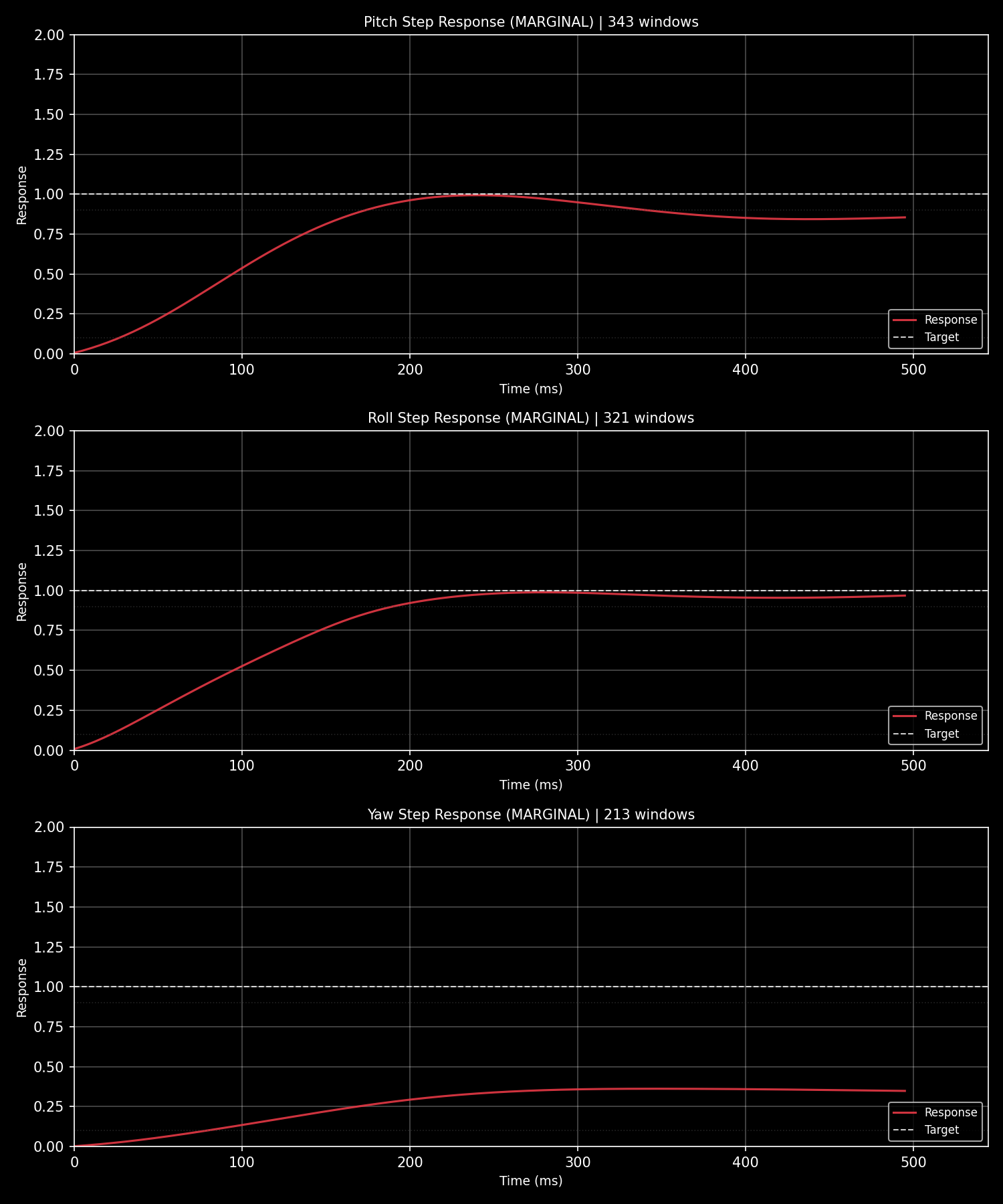
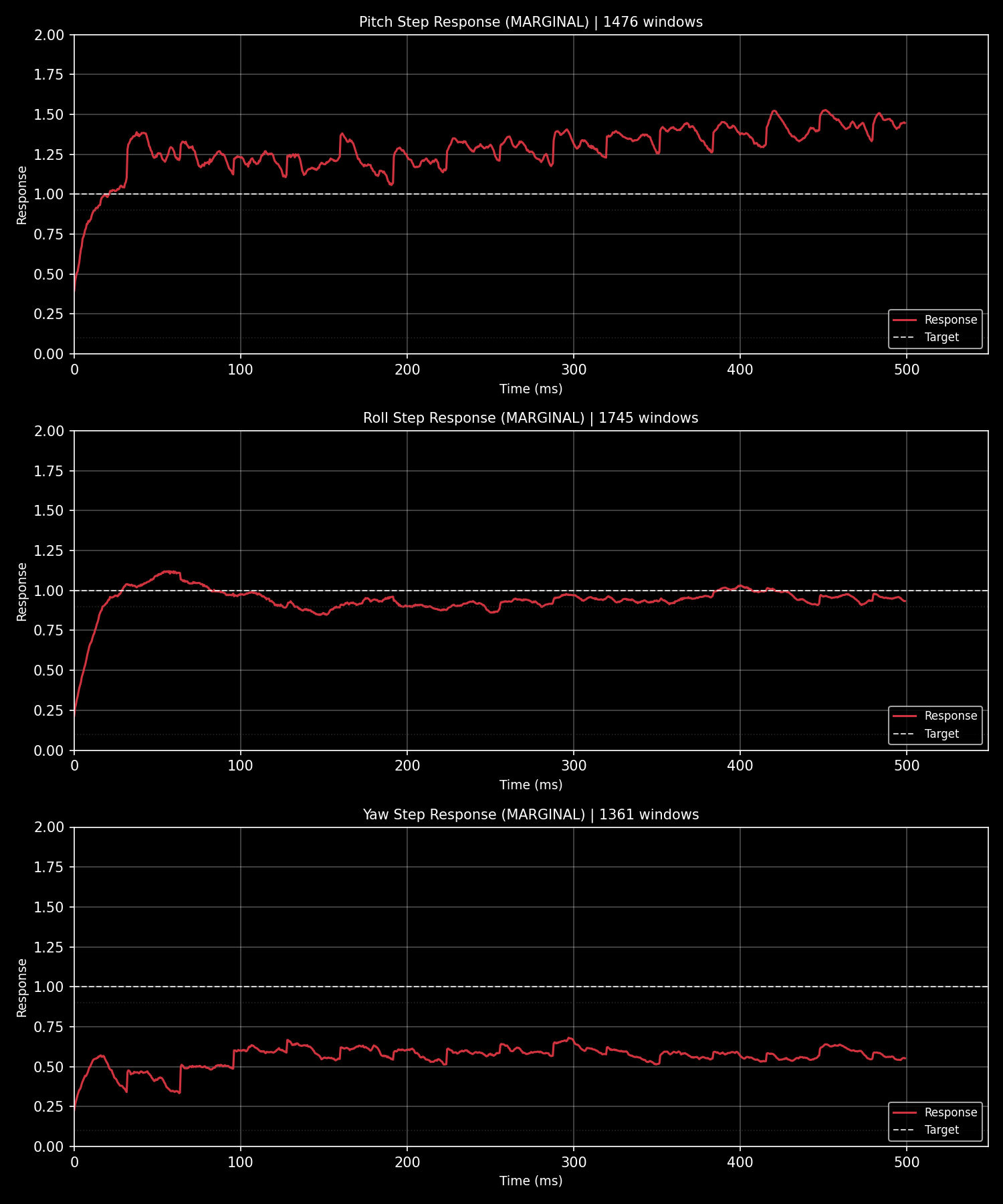
### PID Step Response
**ArduPilot** (DataFlash `.bin` log):
**Betaflight** (Blackbox `.bbl` log):
### Agent Analysis Report
When an AI agent analyzes a flight log through SmartTune, it produces a structured diagnostic report like this:
```text
ArduPilot Flight Log Analysis Report
Log: 2026-04-26 13-46-44.bin | Duration: 995s | Platform: ArduPilot
```
#### 1. PID Step Response Analysis
| Axis | Rating | Rise Time | Overshoot | Settling | Oscillations |
|------|--------|-----------|-----------|----------|-------------|
| Roll | MARGINAL | -1ms | 0.0% | 510ms | 8 |
| Pitch | MARGINAL | -1ms | 0.0% | 510ms | 4 |
| Yaw | MARGINAL | -1ms | -1.0% | -1ms | - |
**Roll Axis Recommendations:**
| Parameter | Current → New | Change | Reason |
|-----------|---------------|--------|--------|
| `ATC_RAT_RLL_D` | 0.0036 → 0.0040 | +10% | Reduce oscillation (8 cycles) |
| `ATC_RAT_RLL_I` | 0.115 → 0.144 | +25% | Eliminate steady-state error (99.8%) |
| `ATC_RAT_RLL_P` | 0.115 → 0.104 | -10% | Reduce oscillation |
**Pitch Axis Recommendations:**
| Parameter | Current → New | Change | Reason |
|-----------|---------------|--------|--------|
| `ATC_RAT_PIT_I` | 0.115 → 0.144 | +25% | Eliminate steady-state error (99.8%) |
| `ATC_RAT_PIT_D` | 0.0036 → 0.0040 | +10% | Reduce oscillation (4 cycles) |
| `ATC_RAT_PIT_P` | 0.115 → 0.104 | -10% | Reduce oscillation |
**Yaw Axis:** No changes needed — parameters already acceptable.
#### 2. FFT Vibration Analysis
**Rating:** EXCELLENT (0.5 m/s²)
**Current filter settings:**
| Parameter | Value |
|-----------|-------|
| `INS_GYRO_FILTER` | 60 Hz |
| `INS_ACCEL_FILTER` | 10 Hz |
| Notch filters | None enabled |
> Vibration levels are excellent. No additional filtering required.
#### 3. Magnetometer Calibration
**Fitness:** 567.98 mGauss — BAD
**Issues detected:**
| Issue | Threshold | Actual |
|-------|-----------|--------|
| Hard iron offset (max \|OFS\|) | 600 | 625 |
| Soft iron anomaly (DIA_X/Y/Z) | — | 0.300 |
| Motor interference (max \|MOT\|) | 100.0 | 200.0 |
| Flight coverage | — | No attitude variation |
**Recommendations:**
- Remove hard iron interference sources (speakers, magnets)
- Optimize soft iron layout (battery/motor placement)
- Recalibrate with proper flight pattern: yaw > 300°, pitch/roll > ±30°
#### Summary
| Module | Status | Action |
|--------|--------|--------|
| Vibration | ✅ Excellent | Hardware is solid |
| PID | ⚠️ Marginal | Increase I and D gains on Roll/Pitch, reduce P slightly |
| Compass | ❌ Bad | Recalibrate before precision flight |
The agent interprets SmartTune's structured JSON output, adds context, and produces a human-readable summary — bridging the gap between raw data and actionable tuning advice.
---
## For Humans
Yes, the terminal output is also beautiful. Rich-powered tables, progress bars, color-coded diagnostics — everything you'd expect from a modern CLI. But the architecture underneath is agent-first.
```bash
# Human-friendly terminal output (default)
stune analyze -i flight.bin
# Machine-parseable
stune analyze -i flight.bin --format json
# ...or the identical payload over MCP:
# smarttune_analyze_log(log_path="flight.bin", response_format="json")
```
---
## Roadmap
| Phase | Content | Status |
|-------|---------|--------|
| v1.x | ArduPilot full support | ✅ |
| v2.0 Phase 1 | Multi-platform architecture | ✅ |
| v2.0 Phase 2 | Betaflight BBL parser + analytics | ✅ |
| v2.1 | Platform-specific analyzers + Protocol constraints | ✅ |
| v2.2 | Full English docs, CLI --help, OpenClaw SKILL.md | ✅ |
| v2.4 | Technical debt cleanup + HTML report parity | ✅ |
| **v3.0** | **Firmware parameter tables + MCP validation tools + knowledge base** | ✅ |
| v3.0.1~v3.0.3 | Architecture audit fixes, PX4 ULog adapter, A1 convergence, cross-module contract fixes, performance vectorization | ✅ |
| v3.1 | `--format json` CLI parity with MCP schema | ✅ |
| **v3.2** | **Parameter tables regenerated from upstream metadata (groups + enum meanings), real enum validation, slim MCP payloads, unified error shape** | ✅ |
| v3.x | Tool-calling manifest, web UI | 🔲 |
---
## Author
**Raylan LIN** — [@raylanlin](https://github.com/raylanlin)
Built and maintained by a pilot who builds ArduPilot firmware (ParallelFC, self-learning PID, STM32H7 custom FC boards) and teaches his AI agent to tune better than he does.
---
## License
MIT — see [LICENSE](LICENSE) for details.
`smarttune-knowledge-pro` is a separate closed-source tuning knowledge base with proprietary tuning rules and industry experience.
For commercial collaboration — custom tuning knowledge bases, fleet-level expertise integration, or enterprise tuning rule development — reach out at [raylanlin@gmail.com](mailto:raylanlin@gmail.com).