` lines” wrapper
- **Navigation utilities** — `Provider`, `Link`, `withNavigationContext`, `withNavigationHandlers`
This README is updated for the current v5 patterns (functional core + CSS variables + optional CSS Modules support).
---
## Preview
[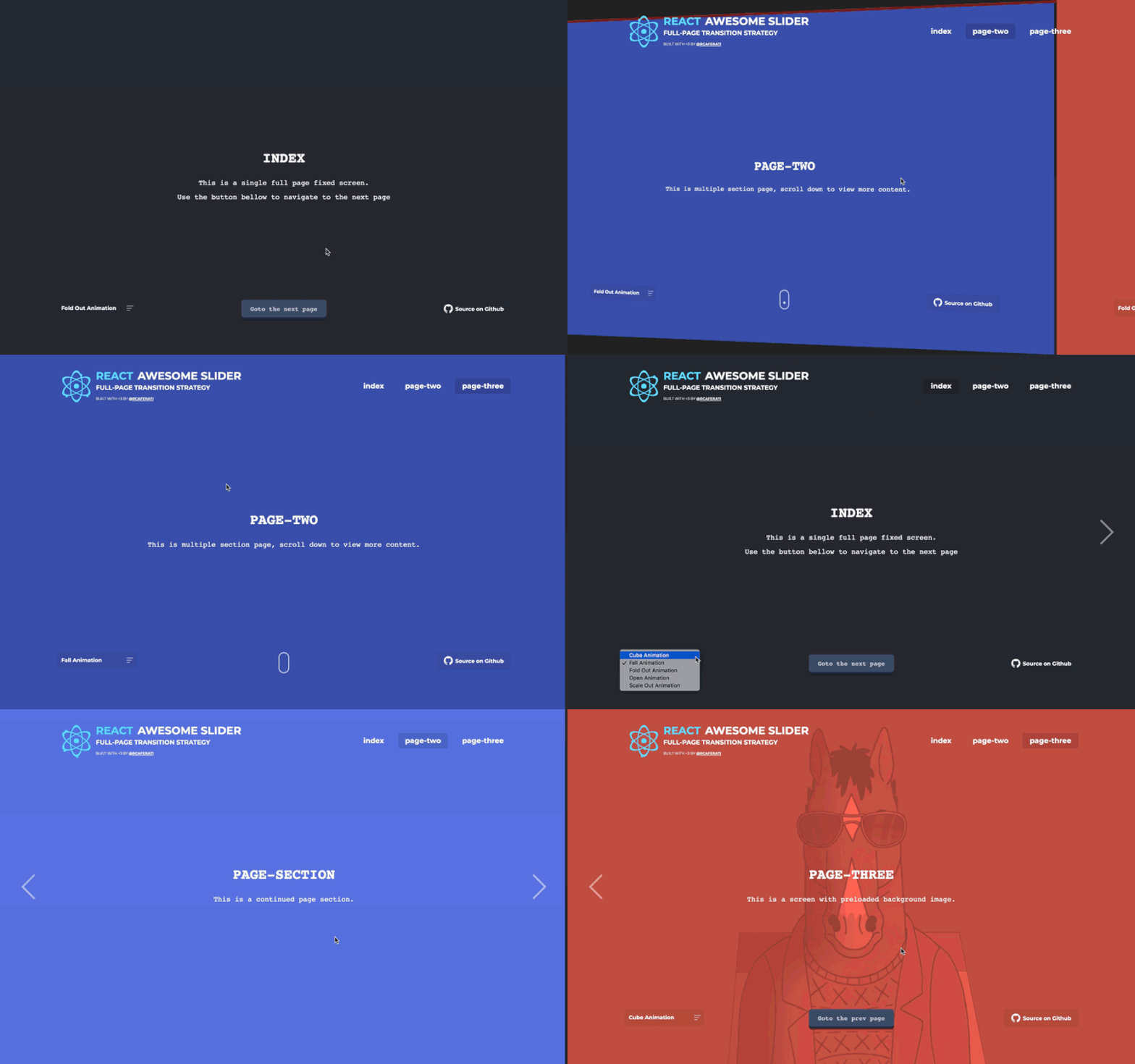](https://caferati.dev/images/ras.gif)
---
## Installation
```bash
npm install @rcaferati/react-awesome-slider
```
Peer dependencies:
- `react >= 18`
- `react-dom >= 18`
---
## Quick Start
### Plain CSS (no CSS Modules)
```jsx
import React from 'react';
import AwesomeSlider from '@rcaferati/react-awesome-slider';
import '@rcaferati/react-awesome-slider/styles.css';
export default function Example() {
return (
);
}
```
### Media prop (recommended for deterministic slides)
```jsx
import React from 'react';
import AwesomeSlider from '@rcaferati/react-awesome-slider';
import '@rcaferati/react-awesome-slider/styles.css';
export default function Example() {
return (
);
}
```
---
## Animations
### Default animation: `sideAnimation`
The default “side” animation ships in the base stylesheet:
```js
import '@rcaferati/react-awesome-slider/styles.css';
```
### Extra animation recipes
Load one of the extra animation stylesheets and set `animation`:
- `cubeAnimation`
- `fallAnimation`
- `foldOutAnimation`
- `openAnimation`
- `scaleOutAnimation`
```jsx
import React from 'react';
import AwesomeSlider from '@rcaferati/react-awesome-slider';
import '@rcaferati/react-awesome-slider/styles.css';
import '@rcaferati/react-awesome-slider/custom-animations/cube-animation.css';
export default function Example() {
return (
);
}
```
> Tip: when using the default side animation, omit the `animation` prop entirely.
### Importing animation module objects
This package also exports animation subpaths such as:
- `@rcaferati/react-awesome-slider/custom-animations/cube-animation`
- `@rcaferati/react-awesome-slider/custom-animations/fall-animation`
Those module exports are useful for `cssModule` setups because they provide the class-name mapping object.
**Important:** in current consumer setups such as Vite, the JS/MJS animation import alone should not be treated as enough to load the stylesheet into the page. You should still import the public CSS file as a side effect.
#### Plain CSS users
Use only the public CSS file:
```js
import '@rcaferati/react-awesome-slider/custom-animations/cube-animation.css';
```
#### `cssModule` users
Import both:
1. the public CSS file so the rules are actually injected
2. the JS module export so you can pass the mapping object into `cssModule`
```jsx
import React from 'react';
import AwesomeSlider from '@rcaferati/react-awesome-slider';
import sliderStylesRaw from '@rcaferati/react-awesome-slider/styles';
import '@rcaferati/react-awesome-slider/styles.css';
import '@rcaferati/react-awesome-slider/custom-animations/cube-animation.css';
import cubeAnimationRaw from '@rcaferati/react-awesome-slider/custom-animations/cube-animation';
const sliderStyles = sliderStylesRaw?.default ?? sliderStylesRaw;
const cubeAnimation = cubeAnimationRaw?.default ?? cubeAnimationRaw;
export default function Example() {
return (
);
}
```
In other words:
- `.css` import → injects the stylesheet
- JS/MJS import → provides the module mapping for `cssModule`
For the widest compatibility, prefer the public CSS files whenever possible.
---
## Styling
### CSS variables (recommended)
The core stylesheet exposes CSS variables on the slider root element (default root key: `awssld`).
You can override them per instance using `style`:
```jsx
import React from 'react';
import AwesomeSlider from '@rcaferati/react-awesome-slider';
import '@rcaferati/react-awesome-slider/styles.css';
export default function Example() {
return (
);
}
```
### CSS Modules (`cssModule`)
If your bundler emits CSS module maps, you can pass module objects via `cssModule`.
The package exports a `styles` entry:
```jsx
import React from 'react';
import AwesomeSlider from '@rcaferati/react-awesome-slider';
import sliderStylesRaw from '@rcaferati/react-awesome-slider/styles';
import '@rcaferati/react-awesome-slider/styles.css';
const styles = sliderStylesRaw?.default ?? sliderStylesRaw;
export default function Example() {
return (
);
}
```
If you are also using a custom animation module export, combine them as an array and still import the corresponding CSS file:
```jsx
import React from 'react';
import AwesomeSlider from '@rcaferati/react-awesome-slider';
import sliderStylesRaw from '@rcaferati/react-awesome-slider/styles';
import '@rcaferati/react-awesome-slider/styles.css';
import '@rcaferati/react-awesome-slider/custom-animations/cube-animation.css';
import cubeAnimationRaw from '@rcaferati/react-awesome-slider/custom-animations/cube-animation';
const core = sliderStylesRaw?.default ?? sliderStylesRaw;
const cube = cubeAnimationRaw?.default ?? cubeAnimationRaw;
export default function Example() {
return (
);
}
```
In most consumer apps, plain CSS imports are simpler and more portable than CSS-module object imports.
---
## `AwesomeSlider`
### Common usage patterns
#### Children mode
```jsx
import React from 'react';
import AwesomeSlider from '@rcaferati/react-awesome-slider';
import '@rcaferati/react-awesome-slider/styles.css';
export default function Example() {
return (
Slide A
Slide B
);
}
```
#### Media mode
```jsx
import React from 'react';
import AwesomeSlider from '@rcaferati/react-awesome-slider';
import '@rcaferati/react-awesome-slider/styles.css';
export default function Example() {
return (
);
}
```
---
## `AwesomeSlider` Props (current)
| Prop | Type | Default | Description |
| --------------------- | ---------------------------- | ------------------ | --------------------------------------------------------------------------------------- |
| `media` | `MediaItem[]` | `[]` | Slides as objects (`{ source, slug, preload? }`). |
| `children` | `ReactNode` | `null` | Slides as React children (supports `data-src` / `data-slug`). |
| `selected` | `number \| string` | `0` | Active slide index (number) or slug (string). |
| `name` | `string` | `'awesome-slider'` | Instance name (useful when multiple sliders are present). |
| `animation` | `string \| null` | `null` | Animation key (`cubeAnimation`, `fallAnimation`, etc). Omit for default side animation. |
| `buttons` | `boolean` | `true` | Show next/prev buttons. |
| `bullets` | `boolean` | `true` | Show bullets. |
| `organicArrows` | `boolean` | `true` | Use the organic arrow shape styling. |
| `infinite` | `boolean` | `true` | Wrap-around navigation. |
| `fillParent` | `boolean` | `false` | Fill parent bounds (fullscreen layouts). |
| `startupScreen` | `ReactNode` | `null` | Optional startup screen shown before first slide. |
| `startup` | `boolean` | `true` | If `startupScreen` is set, whether to auto-start into the first slide. |
| `startupDelay` | `number` | `0` | Delay before auto-start. |
| `transitionDelay` | `number` | `0` | Delay before starting transition animation (ms). |
| `controlsReturnDelay` | `number` | `0` | Delay to remove the “controls active” class after transitions (ms). |
| `mobileTouch` | `boolean` | `true` | Enables touch/swipe navigation. |
| `cssModule` | `object \| object[] \| null` | `null` | CSS module map(s) used to map class names. |
| `className` | `string \| null` | `null` | Extra className(s) added to the root element. |
| `style` | `React.CSSProperties` | `{}` | Inline styles, including CSS variable overrides. |
| `onFirstMount` | `(info) => void` | `null` | Called once after mount with `getInfo()` payload. |
| `onTransitionStart` | `(info) => void` | `null` | Called on transition start. |
| `onTransitionEnd` | `(info) => void` | `null` | Called on transition end. |
| `onTransitionRequest` | `(info) => void` | `null` | Called when the user requests a transition (next/prev/bullet). |
| `onTransitionReject` | `(info) => void` | `null` | Called when a transition is rejected (for example, busy/loading). |
| `onLoadStart` | `(payload) => void` | `null` | Optional custom preload hook. Call `payload.next()` when ready. |
### `getInfo()` payload (high level)
`getInfo()` is used by the event callbacks and includes, best-effort:
- `slides` — slide count
- `currentIndex` — current index
- `currentMedia` — current media item
- `currentSlide` — active slide element (when available)
- `element` — slider root element
---
## HOCs
### Autoplay
```jsx
import React from 'react';
import AwesomeSlider from '@rcaferati/react-awesome-slider';
import withAutoplay from '@rcaferati/react-awesome-slider/autoplay';
import '@rcaferati/react-awesome-slider/styles.css';
const AutoplaySlider = withAutoplay(AwesomeSlider);
export default function Example() {
return (
);
}
```
### Captioned Images
```jsx
import React from 'react';
import AwesomeSlider from '@rcaferati/react-awesome-slider';
import withCaptionedImages from '@rcaferati/react-awesome-slider/captioned';
import '@rcaferati/react-awesome-slider/styles.css';
import '@rcaferati/react-awesome-slider/captioned.css';
const Captioned = withCaptionedImages(AwesomeSlider);
export default function Example() {
return (
);
}
```
### Animated Lettering
```jsx
import React from 'react';
import AwesomeSlider from '@rcaferati/react-awesome-slider';
import withAnimatedLettering from '@rcaferati/react-awesome-slider/lettering';
import '@rcaferati/react-awesome-slider/styles.css';
import '@rcaferati/react-awesome-slider/lettering.css';
const Lettering = withAnimatedLettering(AwesomeSlider);
export default function Example() {
return (
',
],
},
{
backgroundColor: '#f5f5f5',
children: ['Transitions are slide-based', 'Text moves on change'],
},
]}
/>
);
}
```
### Adaptive Controls
Adaptive Controls is currently part of the repository work and Storybook examples, but it is not listed as a public package export in the current package `exports` map.
That means:
- it is available in the source repository
- it is not currently documented here as a stable public import path from the npm package
If and when it becomes a public export, it should be documented with its exact import path.
---
## Fullpage Navigation Utilities
These are designed for SPA / “slides-as-routes” setups.
### `Provider`
```jsx
import React from 'react';
import { Provider } from '@rcaferati/react-awesome-slider/navigation';
export default function App({ children }) {
return (
{children}
);
}
```
### `Link`
```jsx
import React from 'react';
import { Link } from '@rcaferati/react-awesome-slider/navigation';
export default function Nav() {
return (
);
}
```
### `withNavigationHandlers`
Wrap a slider so URL ↔ slider selection stays aligned.
```jsx
import React from 'react';
import AwesomeSlider from '@rcaferati/react-awesome-slider';
import { withNavigationHandlers } from '@rcaferati/react-awesome-slider/navigation';
const SliderWithNav = withNavigationHandlers(AwesomeSlider);
export default function Page() {
return ;
}
```
### `withNavigationContext`
If you need raw navigation state + setter injected into a component:
```jsx
import React from 'react';
import { withNavigationContext } from '@rcaferati/react-awesome-slider/navigation';
function Status(props) {
const { fullpage } = props;
return
{JSON.stringify(fullpage.navigation, null, 2)}
;
}
export default withNavigationContext(Status);
```
---
## Recommended patterns (current)
### ✅ Prefer `media` for stable routing
If you use slugs + navigation handlers, keep `media` entries stable and include `slug`.
### ✅ Keep animations modular
- Always load `styles.css`
- Load one extra animation CSS only when that animation is selected
- If you use animation module objects with `cssModule`, still import the matching `.css` file
### ✅ Customize via CSS variables first
Theme, contrast, and visual polish are usually easiest via the exposed custom properties.
### ✅ Use CSS module exports only when your bundler supports them
For the widest compatibility:
- use `styles.css`
- use `captioned.css`
- use `lettering.css`
- use `custom-animations/*.css`
Use `@rcaferati/react-awesome-slider/styles` or `@rcaferati/react-awesome-slider/custom-animations/*` module exports only when your bundler setup expects JS style-module entries, and pair them with the corresponding CSS file imports.
---
## Author
**Rafael Caferati**
Website: https://caferati.dev
GitHub: https://github.com/rcaferati
---
## License
MIT