
Real-time Proxmox, Docker and Kubernetes monitoring that finds what needs attention.
[](https://github.com/rcourtman/Pulse)
[](https://github.com/rcourtman/Pulse/releases/latest)
[](https://hub.docker.com/r/rcourtman/pulse)
[](LICENSE)
[Live demo](https://demo.pulserelay.pro) · [Documentation](docs/README.md) · [Releases](https://github.com/rcourtman/Pulse/releases) · [Discussions](https://github.com/rcourtman/Pulse/discussions)
Pulse is a self-hosted dashboard and alerting tool for your homelab or
infrastructure. Point it at Proxmox, Docker, Kubernetes, TrueNAS, vSphere or
your own Linux, Windows and macOS machines, and it shows their health in one
place, keeps the history, and tells you when something needs attention: a
failed backup, a filling disk, an unhealthy container, a node that dropped
offline.
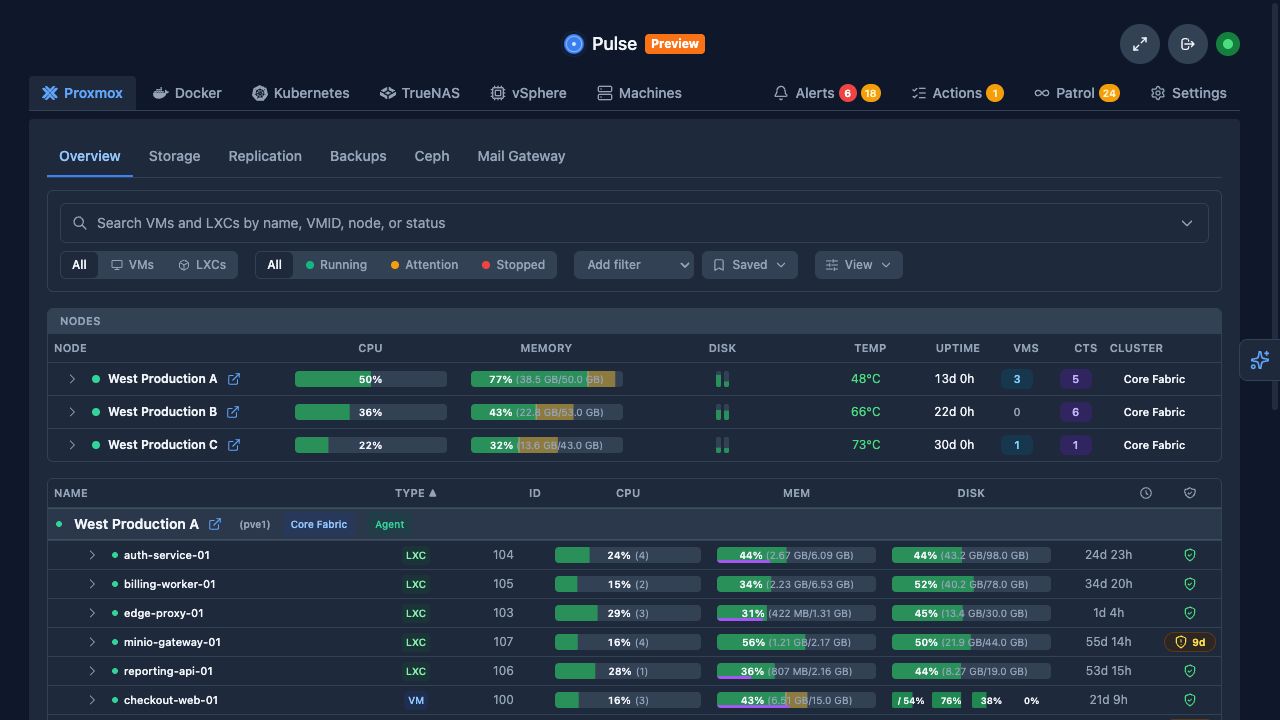
Want to look around first? The [live demo](https://demo.pulserelay.pro) runs on
sample data and signs you in automatically.
## What Pulse does
- **Gives each platform its own page.** Proxmox, Docker, Kubernetes, TrueNAS,
vSphere and machines each get a view that matches how you already think
about them, with storage and backups beside the systems they belong to.
- **Alerts you when it matters.** Set thresholds for CPU, memory, disk,
temperature and more, and get notified by email or through Discord, Slack,
Teams, Telegram, ntfy, Gotify, Pushover, PagerDuty or any webhook.
- **Checks the things that can't run an agent.** Ping, TCP, UDP and HTTP(S)
availability checks cover routers, printers and web services, with
certificate-expiry warnings.
- **Keeps history.** Every guest, container and host has charts: seven days in
Community, ninety in Pro.
- **Optional AI checks.** Connect your own AI provider or a local model and
Pulse Patrol runs scheduled checks for problems a dashboard only shows if
someone is looking.
- **Answers your own AI agent.** Point Claude Code, Codex or OpenCode at Pulse
with [`pulse-mcp`](cmd/pulse-mcp/README.md#quick-start) and [ask what changed
overnight](docs/WHAT_HAPPENED_OVERNIGHT.md), whether a host rebooted, or how
a disk filled up. A read-only token is enough.
- **Stays hands-off by default.** Proxmox is read through a read-only API
token, credentials are encrypted at rest, and agent commands stay off unless
you turn them on.
## Supported platforms
| Platform | What Pulse shows |
|---|---|
| Proxmox VE, PBS and PMG | Nodes, VMs and containers, storage, backups, replication, Ceph and mail gateways |
| Docker and Podman | Hosts, containers, Compose projects, Swarm services, health, images and updates |
| Kubernetes | Clusters, nodes, workloads, pods, services, storage and events |
| TrueNAS SCALE and CORE | Pools, datasets, disks, snapshots, replication tasks, apps and VMs |
| Linux, Windows and macOS | Host health, filesystems, networking, temperatures, RAID and availability |
| VMware vSphere (early access) | Hosts, clusters, VMs, datastores, networks and snapshots; validate against your own vCenter before relying on it |
## Install
Pulse is one container or service listening on port 7655. Pick an exact
version from the [latest release](https://github.com/rcourtman/Pulse/releases/latest)
and use it in place of `vX.Y.Z` below.
### Docker
```bash
docker run -d \
--name pulse \
-p 7655:7655 \
-v pulse_data:/data \
-e PULSE_DEPLOYMENT_METHOD=docker_run \
--restart unless-stopped \
rcourtman/pulse:vX.Y.Z
```
The Pulse container does not need the Docker socket. Docker hosts are
monitored by the agent described below.
### Proxmox LXC or Linux
The installer is signed. This block downloads it, verifies it against the
pinned `pulse-installer` key, and only then runs it:
```bash
export PULSE_VERSION=vX.Y.Z
curl -fsSLO "https://github.com/rcourtman/Pulse/releases/download/${PULSE_VERSION}/install.sh" &&
curl -fsSLO "https://github.com/rcourtman/Pulse/releases/download/${PULSE_VERSION}/install.sh.sshsig" &&
ssh-keygen -Y verify \
-f <(printf '%s\n' 'pulse-installer namespaces="pulse-install" ssh-ed25519 AAAAC3NzaC1lZDI1NTE5AAAAIMZd/DaH+BldzOkq1A8KVTcFk73nAyrE8aJOyf7i00jm pulse-installer') \
-I pulse-installer \
-n pulse-install \
-s install.sh.sshsig < install.sh &&
bash install.sh --version "${PULSE_VERSION}"
```
Paste the whole block. If a download or the signature check fails, it stops;
don't run the last line on its own to get past a failure.
Also available: [Docker Compose](docs/INSTALL.md#docker-compose),
[Kubernetes with Helm](docs/KUBERNETES.md) and the [full install guide](docs/INSTALL.md).
### First run
Open `http://