🎇Features • 🏠Installation • 🚜Usage • 💻CLI • 💡Examples
✅Requirements • 🐳Docker • 🐍Python
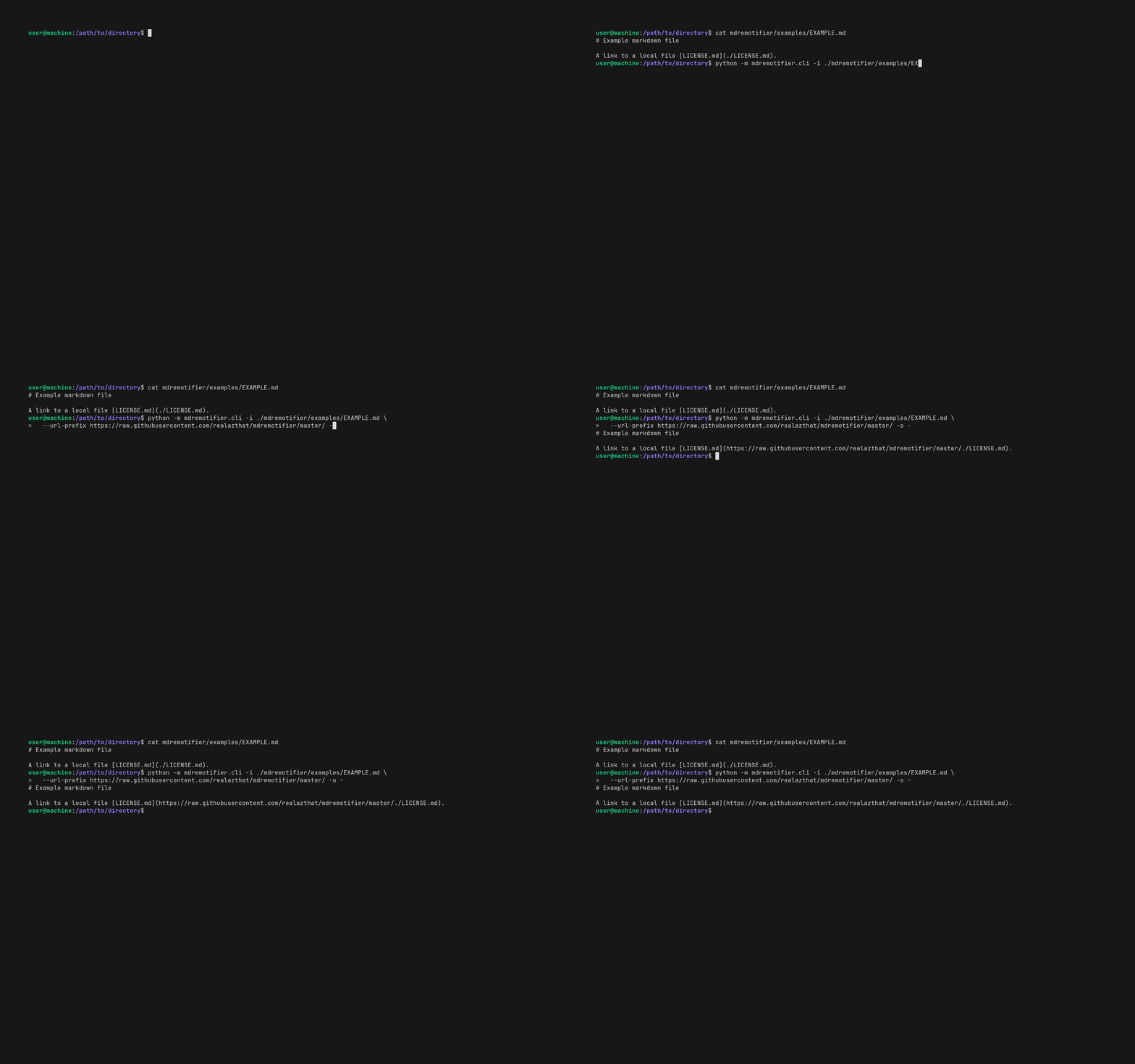
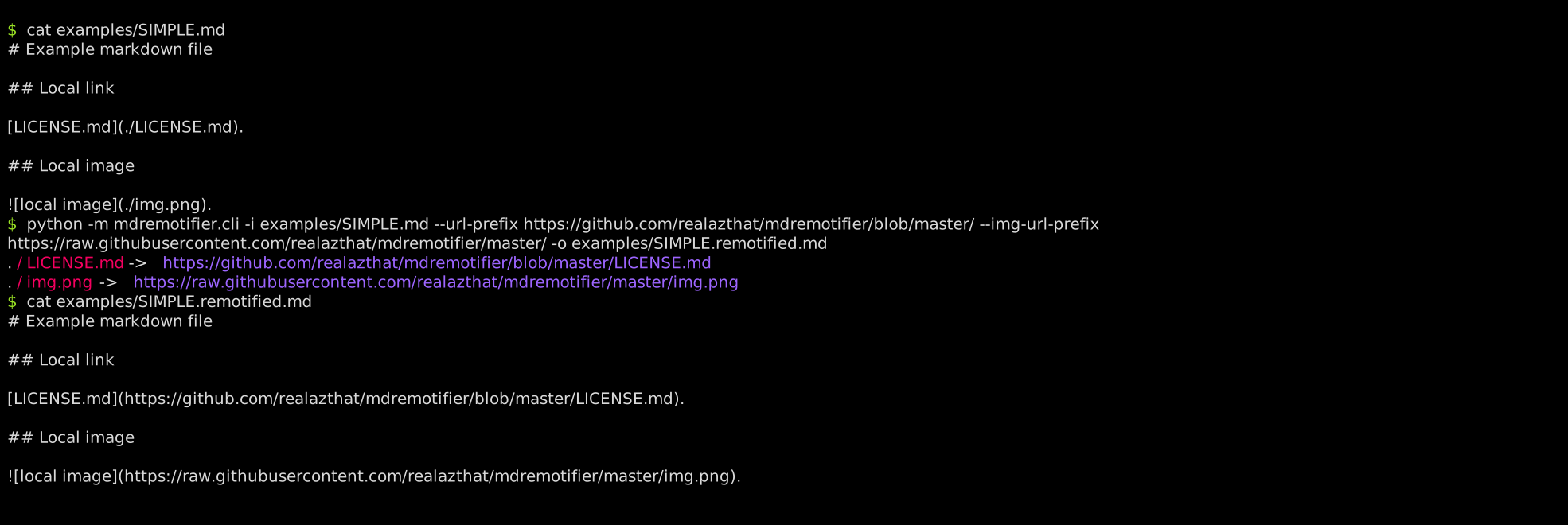 ## 💻 Command Line Options
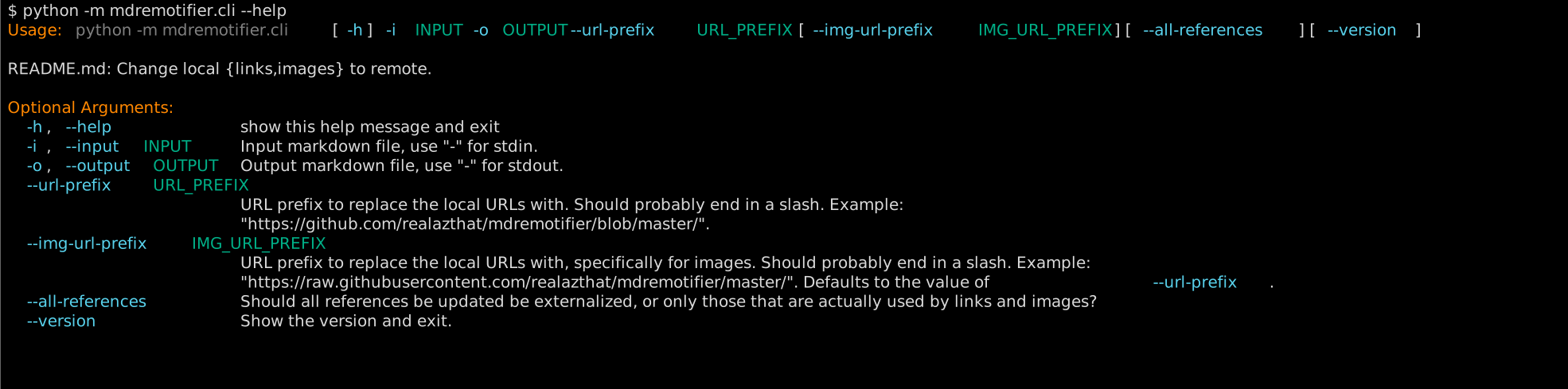 ## 💡 Examples
- mdremotifier's own `README`:
- Original: [./README.md](./README.md).
- Remotified: [./.github/README.remotified.md](./.github/README.remotified.md).
- Generation script: [./scripts/generate-readme.sh](./scripts/generate-readme.sh).
- Example:
- Original: [./examples/SIMPLE.md](./examples/SIMPLE.md).
- Remotified: [./examples/SIMPLE.remotified.md](./examples/SIMPLE.remotified.md).
- Generation script: [./examples/simple_example.sh](./examples/simple_example.sh).
- Projects using mdremotifier:
- [realazthat/snipinator][23].
- README: [snipinator/README.md][24].
- Generation script: [snipinator/scripts/generate-readme.sh#L29][25].
- Remotified: [snipinator/README.md][26].
- [github.com/realazthat/excalidraw-brute-export-cli][27].
- README: [excalidraw-brute-export-cli/README.md][28].
- Generation script:
[excalidraw-brute-export-cli/scripts/generate-readme.sh#L65][29].
- Remotified: [excalidraw-brute-export-cli/README.md][30].
## ✅ Requirements
- Linux-like environment
- Why: Uses pexpect.spawn().
- Python 3.8+
- Why: Some dev dependencies require Python 3.8+.
### Tested Platforms
- WSL2 Ubuntu 20.04, Python `3.8.0`.
- Ubuntu 20.04, Python `3.8.0, 3.9.0, 3.10.0, 3.11.0, 3.12.0`, tested in GitHub Actions
workflow ([build-and-test.yml](./.github/workflows/build-and-test.yml)).
## 🐳 Docker Image
Docker images are published to [ghcr.io/realazthat/mdremotifier][31] at each
tag.
```bash
# View the template file.
cat "examples/SIMPLE.md"
# Use the published images at ghcr.io/realazthat/mdremotifier.
# /data in the docker image is the working directory, so paths are simpler.
docker run --rm --tty \
-v "${PWD}:/data" \
ghcr.io/realazthat/mdremotifier:v1.0.0 \
-i "examples/SIMPLE.md" \
--url-prefix https://github.com/realazthat/mdremotifier/blob/master/ \
--img-url-prefix https://raw.githubusercontent.com/realazthat/mdremotifier/master/ \
-o "examples/SIMPLE.remotified.md"
# View the remotified file.
cat "examples/SIMPLE.remotified.md"
```
If you want to build the image yourself, you can use the Dockerfile in the
repository.
```bash
docker build -t my-mdremotifier-image .
# View the template file.
cat "examples/SIMPLE.md"
# /data in the docker image is the working directory, so paths are simpler.
docker run --rm --tty \
-v "${PWD}:/data" \
my-mdremotifier-image \
-i "examples/SIMPLE.md" \
--url-prefix https://github.com/realazthat/mdremotifier/blob/master/ \
--img-url-prefix https://raw.githubusercontent.com/realazthat/mdremotifier/master/ \
-o "examples/SIMPLE.remotified.md"
# View the remotified file.
cat "examples/SIMPLE.remotified.md"
```
## Python Library
If you want to use mdremotifier as a library, you can do so. Here is
an example:
```py
from rich.console import Console
from mdremotifier.mdremotifier import Render
md = """
# Example markdown file
## Local link
[LICENSE.md](./LICENSE.md).
## Local image
.
"""
url_prefix = 'https://github.com/realazthat/mdremotifier/blob/master/'
img_url_prefix = 'https://raw.githubusercontent.com/realazthat/mdremotifier/master/'
console = Console()
print(
Render(md=md,
url_prefix=url_prefix,
img_url_prefix=img_url_prefix,
all_references=True,
console=console))
```
Here are the API docs:
```py
def Render(*,
md: str,
url_prefix: str,
img_url_prefix: Optional[str] = None,
all_references: bool = False,
console: Optional[Console] = None) -> str:
""" Render the markdown with the given URL prefixes.
Args:
md: The markdown string to render.
url_prefix: The URL prefix to replace the local URLs with. Should probably
end in a slash.
Example: "https://github.com/realazthat/mdremotifier/blob/master".
img_url_prefix: The URL prefix to replace the local URLs with, specifically
for images. Should probably end in a slash.
Example: "https://raw.githubusercontent.com/realazthat/mdremotifier/master".
Defaults to the value of `url_prefix`.
all_references: Should all references be updated be externalized, or only
those that are used by links and images? Defaults to False.
console: The console to print debug information to. Defaults to None.
"""
```
## 🤏 Versioning
We use SemVer for versioning. For the versions available, see the tags on this
repository.
## 🔑 License
This project is licensed under the MIT License - see the
[./LICENSE.md](./LICENSE.md) file for details.
## 🙏 Thanks
Main libraries used in mdremotifier are:
- Markdown AST: [mistletoe](https://github.com/miyuchina/mistletoe).
- Colorful CLI help: [rich-argparse](https://github.com/hamdanal/rich-argparse).
## 🤝 Related Projects
Not complete, and not necessarily up to date. Make a PR
([contributions](#-contributions)) to insert/modify.
| Project | Stars | Last Update | Language | Platform | Similarity X Obviousness |
| ------------------------------------------------- | ----- | ------------ | -------- | -------- | ------------------------ |
| [bdashore3/remark-github-images][32] | 0 | `2022/12/29` | JS | CLI | ⭐⭐⭐⭐⭐ |
| [laobie/WriteMarkdownLazily][33] | 36 | `2024/01/06` | Python | CLI | ⭐⭐⭐⭐ |
| [crh19970307/mdul][34] | 1 | `2020/02/01` | Python | CLI | ⭐⭐⭐⭐ |
| [SkyLee424/Go-MarkDown-Image-Transfer-Helper][35] | 0 | `2024/03/25` | Go | CLI | ⭐⭐⭐⭐ |
| [jen6/imgo][36] | 0 | `2020/03/18` | Pyhon | CLI | ⭐⭐⭐⭐ |
| [chocoluffy/lazy-markdown][37] | 0 | `2016/11/20` | Python | CLI | ⭐⭐⭐⭐ |
| [loheagn/gopic][38] | 0 | `2021/11/24` | Go | CLI | ⭐⭐⭐⭐ |
| [Undertone0809/imarkdown][39] | 57 | `2024/01/06` | Python | Python | ⭐⭐⭐ |
| [ravgeetdhillon/markdown-imgur-upload][40] | 1 | `2022/03/26` | Python | CLI | ⭐⭐⭐ |
## 🫡 Contributions
### Development environment: Linux-like
- For running `pre.sh` (Linux-like environment).
- From [./.github/dependencies.yml](./.github/dependencies.yml), which is used for
the GH Action to do a fresh install of everything:
```yaml
bash: scripts.
findutils: scripts.
grep: tests.
xxd: tests.
git: scripts, tests.
xxhash: scripts (changeguard).
rsync: out-of-directory test.
expect: for `unbuffer`, useful to grab and compare ansi color symbols.
jq: dependency for [yq](https://github.com/kislyuk/yq), which is used to generate
the README; the README generator needs to use `tomlq` (which is a part of `yq`)
to query `pyproject.toml`.
```
- Requires `pyenv`, or an exact matching version of python as in
[./.python-version](./.python-version) (which is currently
`3.8.0
`).
- `jq`, ([installation](https://jqlang.github.io/jq/)) required for
[yq](https://github.com/kislyuk/yq), which is itself required for our
[./README.md](./README.md) generation, which uses `tomlq` (from the
[yq](https://github.com/kislyuk/yq) package) to include version strings from
[./pyproject.toml](./pyproject.toml).
- act (to run the GH Action locally):
- Requires nodejs.
- Requires Go.
- docker.
- Generate animation:
- docker
- docker (for building the docker image).
### Commit Process
1. (Optionally) Fork the `develop` branch.
2. Stage your files: `git add path/to/file.py`.
3. `bash ./scripts/pre.sh`, this will format, lint, and test the code.
4. `git status` check if anything changed (generated
[./README.md](./README.md) for example), if so, `git add` the
changes, and go back to the previous step.
5. `git commit -m "..."`.
6. Make a PR to `develop` (or push to develop if you have the rights).
## 🔄🚀 Release Process
These instructions are for maintainers of the project.
1. In the `develop` branch, run `bash ./scripts/pre.sh` to ensure
everything is in order.
2. In the `develop` branch, bump the version in
[./pyproject.toml](./pyproject.toml), following semantic versioning
principles. Also modify the `last_release` and `last_stable_release` in the
`[tool.mdremotifier-project-metadata]` table as appropriate. Run
`bash ./scripts/pre.sh` to ensure everything is in order.
3. In the `develop` branch, commit these changes with a message like
`"Prepare release X.Y.Z"`. (See the contributions section
[above](#commit-process)).
4. Merge the `develop` branch into the `master` branch:
`git checkout master && git merge develop --no-ff`.
5. `master` branch: Tag the release: Create a git tag for the release with
`git tag -a vX.Y.Z -m "Version X.Y.Z"`.
6. Publish to PyPI: Publish the release to PyPI with
`bash ./scripts/deploy-to-pypi.sh`.
7. Push to GitHub: Push the commit and tags to GitHub with
`git push && git push --tags`.
8. The `--no-ff` option adds a commit to the master branch for the merge, so
refork the develop branch from the master branch:
`git checkout develop && git merge master`.
9. Push the develop branch to GitHub: `git push origin develop`.
[1]: ./.github/logo-exported.svg
[2]:
https://img.shields.io/badge/Audience-Developers-0A1E1E?style=plastic&logo=data:image/svg+xml;base64,PHN2ZyB4bWxucz0iaHR0cDovL3d3dy53My5vcmcvMjAwMC9zdmciIHdpZHRoPSIyNCIgaGVpZ2h0PSIyNCIgdmlld0JveD0iMCAwIDI0IDI0IiBmaWxsPSJub25lIiBzdHJva2U9ImN1cnJlbnRDb2xvciIgc3Ryb2tlLXdpZHRoPSIyIiBzdHJva2UtbGluZWNhcD0icm91bmQiIHN0cm9rZS1saW5lam9pbj0icm91bmQiIGNsYXNzPSJsdWNpZGUgbHVjaWRlLXVzZXJzIj48cGF0aCBkPSJNMTYgMjF2LTJhNCA0IDAgMCAwLTQtNEg2YTQgNCAwIDAgMC00IDR2MiIvPjxjaXJjbGUgY3g9IjkiIGN5PSI3IiByPSI0Ii8+PHBhdGggZD0iTTIyIDIxdi0yYTQgNCAwIDAgMC0zLTMuODciLz48cGF0aCBkPSJNMTYgMy4xM2E0IDQgMCAwIDEgMCA3Ljc1Ii8+PC9zdmc+
[3]:
https://img.shields.io/badge/Platform-Linux-0A1E1E?style=plastic&logo=data:image/svg+xml;base64,PHN2ZyB4bWxucz0iaHR0cDovL3d3dy53My5vcmcvMjAwMC9zdmciIHdpZHRoPSIyNCIgaGVpZ2h0PSIyNCIgdmlld0JveD0iMCAwIDI0IDI0IiBmaWxsPSJub25lIiBzdHJva2U9ImN1cnJlbnRDb2xvciIgc3Ryb2tlLXdpZHRoPSIyIiBzdHJva2UtbGluZWNhcD0icm91bmQiIHN0cm9rZS1saW5lam9pbj0icm91bmQiIGNsYXNzPSJsdWNpZGUgbHVjaWRlLWxhcHRvcC1taW5pbWFsIj48cmVjdCB3aWR0aD0iMTgiIGhlaWdodD0iMTIiIHg9IjMiIHk9IjQiIHJ4PSIyIiByeT0iMiIvPjxsaW5lIHgxPSIyIiB4Mj0iMjIiIHkxPSIyMCIgeTI9IjIwIi8+PC9zdmc+
[4]:
https://img.shields.io/github/languages/top/realazthat/mdremotifier.svg?&cacheSeconds=28800&style=plastic&color=0A1E1E
[5]:
https://img.shields.io/github/license/realazthat/mdremotifier?style=plastic&color=0A1E1E
[6]: ./LICENSE.md
[7]:
https://img.shields.io/pypi/v/mdremotifier?style=plastic&color=0A1E1E
[8]: https://pypi.org/project/mdremotifier/
[9]:
https://img.shields.io/pypi/pyversions/mdremotifier?style=plastic&color=0A1E1E
[10]: https://github.com/realazthat/mdremotifier/tree/master
[11]:
https://img.shields.io/github/actions/workflow/status/realazthat/mdremotifier/build-and-test.yml?branch=master&style=plastic
[12]:
https://github.com/realazthat/mdremotifier/actions/workflows/build-and-test.yml
[13]:
https://img.shields.io/github/commits-since/realazthat/mdremotifier/v1.0.0/master?style=plastic
[14]:
https://github.com/realazthat/mdremotifier/compare/v1.0.0...master
[15]:
https://img.shields.io/github/last-commit/realazthat/mdremotifier/master?style=plastic
[16]: https://github.com/realazthat/mdremotifier/tree/develop
[17]:
https://img.shields.io/github/actions/workflow/status/realazthat/mdremotifier/build-and-test.yml?branch=develop&style=plastic
[18]:
https://img.shields.io/github/commits-since/realazthat/mdremotifier/v1.0.0/develop?style=plastic
[19]:
https://github.com/realazthat/mdremotifier/compare/v1.0.0...develop
[20]:
https://img.shields.io/github/commits-since/realazthat/mdremotifier/v1.0.0/develop?style=plastic
[21]:
https://github.com/realazthat/mdremotifier/compare/v1.0.0...develop
[22]:
https://img.shields.io/github/last-commit/realazthat/mdremotifier/develop?style=plastic
[23]: https://github.com/realazthat/snipinator
[24]:
https://github.com/realazthat/snipinator/blob/33c041210031bb1ef0ab9794f8fc56f3a9adb67b/README.md?plain=1
[25]:
https://github.com/realazthat/snipinator/blob/33c041210031bb1ef0ab9794f8fc56f3a9adb67b/scripts/generate-readme.sh#L29
[26]:
https://github.com/realazthat/snipinator/blob/33c041210031bb1ef0ab9794f8fc56f3a9adb67b/.github/README.remotified.md?plain=1
[27]: https://github.com/realazthat/excalidraw-brute-export-cli
[28]:
https://github.com/realazthat/excalidraw-brute-export-cli/blob/8fa2ab033fb62fb0585b77d0966afe1a4b08d682/README.md?plain=1
[29]:
https://github.com/realazthat/excalidraw-brute-export-cli/blob/8fa2ab033fb62fb0585b77d0966afe1a4b08d682/scripts/generate-readme.sh#L65
[30]:
https://github.com/realazthat/excalidraw-brute-export-cli/blob/8fa2ab033fb62fb0585b77d0966afe1a4b08d682/.github/README.remotified.md?plain=1
[31]: https://ghcr.io/realazthat/mdremotifier
[32]:
https://github.com/bdashore3/remark-github-images
"Documentation is non-existent, but code looks very similar to mdremotifier"
[33]: https://github.com/laobie/WriteMarkdownLazily "Uploads to cloud."
[34]: https://github.com/crh19970307/mdul "Uploads to sm.ms"
[35]:
https://github.com/SkyLee424/Go-MarkDown-Image-Transfer-Helper
"Upload to Qiniu Cloud"
[36]: https://github.com/jen6/imgo "Upload to Google Drive"
[37]:
https://github.com/chocoluffy/lazy-markdown
"Uploads to LeanCloud, readme is a bit unclear"
[38]: https://github.com/loheagn/gopic "Upload to cloud, not clear which cloud"
[39]: https://github.com/Undertone0809/imarkdown "Doesn't yet have a CLI."
[40]:
https://github.com/ravgeetdhillon/markdown-imgur-upload
"Upload to imgur, a bit annoying because it requires you to put the images into a particular directory"
## 💡 Examples
- mdremotifier's own `README`:
- Original: [./README.md](./README.md).
- Remotified: [./.github/README.remotified.md](./.github/README.remotified.md).
- Generation script: [./scripts/generate-readme.sh](./scripts/generate-readme.sh).
- Example:
- Original: [./examples/SIMPLE.md](./examples/SIMPLE.md).
- Remotified: [./examples/SIMPLE.remotified.md](./examples/SIMPLE.remotified.md).
- Generation script: [./examples/simple_example.sh](./examples/simple_example.sh).
- Projects using mdremotifier:
- [realazthat/snipinator][23].
- README: [snipinator/README.md][24].
- Generation script: [snipinator/scripts/generate-readme.sh#L29][25].
- Remotified: [snipinator/README.md][26].
- [github.com/realazthat/excalidraw-brute-export-cli][27].
- README: [excalidraw-brute-export-cli/README.md][28].
- Generation script:
[excalidraw-brute-export-cli/scripts/generate-readme.sh#L65][29].
- Remotified: [excalidraw-brute-export-cli/README.md][30].
## ✅ Requirements
- Linux-like environment
- Why: Uses pexpect.spawn().
- Python 3.8+
- Why: Some dev dependencies require Python 3.8+.
### Tested Platforms
- WSL2 Ubuntu 20.04, Python `3.8.0`.
- Ubuntu 20.04, Python `3.8.0, 3.9.0, 3.10.0, 3.11.0, 3.12.0`, tested in GitHub Actions
workflow ([build-and-test.yml](./.github/workflows/build-and-test.yml)).
## 🐳 Docker Image
Docker images are published to [ghcr.io/realazthat/mdremotifier][31] at each
tag.
```bash
# View the template file.
cat "examples/SIMPLE.md"
# Use the published images at ghcr.io/realazthat/mdremotifier.
# /data in the docker image is the working directory, so paths are simpler.
docker run --rm --tty \
-v "${PWD}:/data" \
ghcr.io/realazthat/mdremotifier:v1.0.0 \
-i "examples/SIMPLE.md" \
--url-prefix https://github.com/realazthat/mdremotifier/blob/master/ \
--img-url-prefix https://raw.githubusercontent.com/realazthat/mdremotifier/master/ \
-o "examples/SIMPLE.remotified.md"
# View the remotified file.
cat "examples/SIMPLE.remotified.md"
```
If you want to build the image yourself, you can use the Dockerfile in the
repository.
```bash
docker build -t my-mdremotifier-image .
# View the template file.
cat "examples/SIMPLE.md"
# /data in the docker image is the working directory, so paths are simpler.
docker run --rm --tty \
-v "${PWD}:/data" \
my-mdremotifier-image \
-i "examples/SIMPLE.md" \
--url-prefix https://github.com/realazthat/mdremotifier/blob/master/ \
--img-url-prefix https://raw.githubusercontent.com/realazthat/mdremotifier/master/ \
-o "examples/SIMPLE.remotified.md"
# View the remotified file.
cat "examples/SIMPLE.remotified.md"
```
## Python Library
If you want to use mdremotifier as a library, you can do so. Here is
an example:
```py
from rich.console import Console
from mdremotifier.mdremotifier import Render
md = """
# Example markdown file
## Local link
[LICENSE.md](./LICENSE.md).
## Local image
.
"""
url_prefix = 'https://github.com/realazthat/mdremotifier/blob/master/'
img_url_prefix = 'https://raw.githubusercontent.com/realazthat/mdremotifier/master/'
console = Console()
print(
Render(md=md,
url_prefix=url_prefix,
img_url_prefix=img_url_prefix,
all_references=True,
console=console))
```
Here are the API docs:
```py
def Render(*,
md: str,
url_prefix: str,
img_url_prefix: Optional[str] = None,
all_references: bool = False,
console: Optional[Console] = None) -> str:
""" Render the markdown with the given URL prefixes.
Args:
md: The markdown string to render.
url_prefix: The URL prefix to replace the local URLs with. Should probably
end in a slash.
Example: "https://github.com/realazthat/mdremotifier/blob/master".
img_url_prefix: The URL prefix to replace the local URLs with, specifically
for images. Should probably end in a slash.
Example: "https://raw.githubusercontent.com/realazthat/mdremotifier/master".
Defaults to the value of `url_prefix`.
all_references: Should all references be updated be externalized, or only
those that are used by links and images? Defaults to False.
console: The console to print debug information to. Defaults to None.
"""
```
## 🤏 Versioning
We use SemVer for versioning. For the versions available, see the tags on this
repository.
## 🔑 License
This project is licensed under the MIT License - see the
[./LICENSE.md](./LICENSE.md) file for details.
## 🙏 Thanks
Main libraries used in mdremotifier are:
- Markdown AST: [mistletoe](https://github.com/miyuchina/mistletoe).
- Colorful CLI help: [rich-argparse](https://github.com/hamdanal/rich-argparse).
## 🤝 Related Projects
Not complete, and not necessarily up to date. Make a PR
([contributions](#-contributions)) to insert/modify.
| Project | Stars | Last Update | Language | Platform | Similarity X Obviousness |
| ------------------------------------------------- | ----- | ------------ | -------- | -------- | ------------------------ |
| [bdashore3/remark-github-images][32] | 0 | `2022/12/29` | JS | CLI | ⭐⭐⭐⭐⭐ |
| [laobie/WriteMarkdownLazily][33] | 36 | `2024/01/06` | Python | CLI | ⭐⭐⭐⭐ |
| [crh19970307/mdul][34] | 1 | `2020/02/01` | Python | CLI | ⭐⭐⭐⭐ |
| [SkyLee424/Go-MarkDown-Image-Transfer-Helper][35] | 0 | `2024/03/25` | Go | CLI | ⭐⭐⭐⭐ |
| [jen6/imgo][36] | 0 | `2020/03/18` | Pyhon | CLI | ⭐⭐⭐⭐ |
| [chocoluffy/lazy-markdown][37] | 0 | `2016/11/20` | Python | CLI | ⭐⭐⭐⭐ |
| [loheagn/gopic][38] | 0 | `2021/11/24` | Go | CLI | ⭐⭐⭐⭐ |
| [Undertone0809/imarkdown][39] | 57 | `2024/01/06` | Python | Python | ⭐⭐⭐ |
| [ravgeetdhillon/markdown-imgur-upload][40] | 1 | `2022/03/26` | Python | CLI | ⭐⭐⭐ |
## 🫡 Contributions
### Development environment: Linux-like
- For running `pre.sh` (Linux-like environment).
- From [./.github/dependencies.yml](./.github/dependencies.yml), which is used for
the GH Action to do a fresh install of everything:
```yaml
bash: scripts.
findutils: scripts.
grep: tests.
xxd: tests.
git: scripts, tests.
xxhash: scripts (changeguard).
rsync: out-of-directory test.
expect: for `unbuffer`, useful to grab and compare ansi color symbols.
jq: dependency for [yq](https://github.com/kislyuk/yq), which is used to generate
the README; the README generator needs to use `tomlq` (which is a part of `yq`)
to query `pyproject.toml`.
```
- Requires `pyenv`, or an exact matching version of python as in
[./.python-version](./.python-version) (which is currently
`3.8.0
`).
- `jq`, ([installation](https://jqlang.github.io/jq/)) required for
[yq](https://github.com/kislyuk/yq), which is itself required for our
[./README.md](./README.md) generation, which uses `tomlq` (from the
[yq](https://github.com/kislyuk/yq) package) to include version strings from
[./pyproject.toml](./pyproject.toml).
- act (to run the GH Action locally):
- Requires nodejs.
- Requires Go.
- docker.
- Generate animation:
- docker
- docker (for building the docker image).
### Commit Process
1. (Optionally) Fork the `develop` branch.
2. Stage your files: `git add path/to/file.py`.
3. `bash ./scripts/pre.sh`, this will format, lint, and test the code.
4. `git status` check if anything changed (generated
[./README.md](./README.md) for example), if so, `git add` the
changes, and go back to the previous step.
5. `git commit -m "..."`.
6. Make a PR to `develop` (or push to develop if you have the rights).
## 🔄🚀 Release Process
These instructions are for maintainers of the project.
1. In the `develop` branch, run `bash ./scripts/pre.sh` to ensure
everything is in order.
2. In the `develop` branch, bump the version in
[./pyproject.toml](./pyproject.toml), following semantic versioning
principles. Also modify the `last_release` and `last_stable_release` in the
`[tool.mdremotifier-project-metadata]` table as appropriate. Run
`bash ./scripts/pre.sh` to ensure everything is in order.
3. In the `develop` branch, commit these changes with a message like
`"Prepare release X.Y.Z"`. (See the contributions section
[above](#commit-process)).
4. Merge the `develop` branch into the `master` branch:
`git checkout master && git merge develop --no-ff`.
5. `master` branch: Tag the release: Create a git tag for the release with
`git tag -a vX.Y.Z -m "Version X.Y.Z"`.
6. Publish to PyPI: Publish the release to PyPI with
`bash ./scripts/deploy-to-pypi.sh`.
7. Push to GitHub: Push the commit and tags to GitHub with
`git push && git push --tags`.
8. The `--no-ff` option adds a commit to the master branch for the merge, so
refork the develop branch from the master branch:
`git checkout develop && git merge master`.
9. Push the develop branch to GitHub: `git push origin develop`.
[1]: ./.github/logo-exported.svg
[2]:
https://img.shields.io/badge/Audience-Developers-0A1E1E?style=plastic&logo=data:image/svg+xml;base64,PHN2ZyB4bWxucz0iaHR0cDovL3d3dy53My5vcmcvMjAwMC9zdmciIHdpZHRoPSIyNCIgaGVpZ2h0PSIyNCIgdmlld0JveD0iMCAwIDI0IDI0IiBmaWxsPSJub25lIiBzdHJva2U9ImN1cnJlbnRDb2xvciIgc3Ryb2tlLXdpZHRoPSIyIiBzdHJva2UtbGluZWNhcD0icm91bmQiIHN0cm9rZS1saW5lam9pbj0icm91bmQiIGNsYXNzPSJsdWNpZGUgbHVjaWRlLXVzZXJzIj48cGF0aCBkPSJNMTYgMjF2LTJhNCA0IDAgMCAwLTQtNEg2YTQgNCAwIDAgMC00IDR2MiIvPjxjaXJjbGUgY3g9IjkiIGN5PSI3IiByPSI0Ii8+PHBhdGggZD0iTTIyIDIxdi0yYTQgNCAwIDAgMC0zLTMuODciLz48cGF0aCBkPSJNMTYgMy4xM2E0IDQgMCAwIDEgMCA3Ljc1Ii8+PC9zdmc+
[3]:
https://img.shields.io/badge/Platform-Linux-0A1E1E?style=plastic&logo=data:image/svg+xml;base64,PHN2ZyB4bWxucz0iaHR0cDovL3d3dy53My5vcmcvMjAwMC9zdmciIHdpZHRoPSIyNCIgaGVpZ2h0PSIyNCIgdmlld0JveD0iMCAwIDI0IDI0IiBmaWxsPSJub25lIiBzdHJva2U9ImN1cnJlbnRDb2xvciIgc3Ryb2tlLXdpZHRoPSIyIiBzdHJva2UtbGluZWNhcD0icm91bmQiIHN0cm9rZS1saW5lam9pbj0icm91bmQiIGNsYXNzPSJsdWNpZGUgbHVjaWRlLWxhcHRvcC1taW5pbWFsIj48cmVjdCB3aWR0aD0iMTgiIGhlaWdodD0iMTIiIHg9IjMiIHk9IjQiIHJ4PSIyIiByeT0iMiIvPjxsaW5lIHgxPSIyIiB4Mj0iMjIiIHkxPSIyMCIgeTI9IjIwIi8+PC9zdmc+
[4]:
https://img.shields.io/github/languages/top/realazthat/mdremotifier.svg?&cacheSeconds=28800&style=plastic&color=0A1E1E
[5]:
https://img.shields.io/github/license/realazthat/mdremotifier?style=plastic&color=0A1E1E
[6]: ./LICENSE.md
[7]:
https://img.shields.io/pypi/v/mdremotifier?style=plastic&color=0A1E1E
[8]: https://pypi.org/project/mdremotifier/
[9]:
https://img.shields.io/pypi/pyversions/mdremotifier?style=plastic&color=0A1E1E
[10]: https://github.com/realazthat/mdremotifier/tree/master
[11]:
https://img.shields.io/github/actions/workflow/status/realazthat/mdremotifier/build-and-test.yml?branch=master&style=plastic
[12]:
https://github.com/realazthat/mdremotifier/actions/workflows/build-and-test.yml
[13]:
https://img.shields.io/github/commits-since/realazthat/mdremotifier/v1.0.0/master?style=plastic
[14]:
https://github.com/realazthat/mdremotifier/compare/v1.0.0...master
[15]:
https://img.shields.io/github/last-commit/realazthat/mdremotifier/master?style=plastic
[16]: https://github.com/realazthat/mdremotifier/tree/develop
[17]:
https://img.shields.io/github/actions/workflow/status/realazthat/mdremotifier/build-and-test.yml?branch=develop&style=plastic
[18]:
https://img.shields.io/github/commits-since/realazthat/mdremotifier/v1.0.0/develop?style=plastic
[19]:
https://github.com/realazthat/mdremotifier/compare/v1.0.0...develop
[20]:
https://img.shields.io/github/commits-since/realazthat/mdremotifier/v1.0.0/develop?style=plastic
[21]:
https://github.com/realazthat/mdremotifier/compare/v1.0.0...develop
[22]:
https://img.shields.io/github/last-commit/realazthat/mdremotifier/develop?style=plastic
[23]: https://github.com/realazthat/snipinator
[24]:
https://github.com/realazthat/snipinator/blob/33c041210031bb1ef0ab9794f8fc56f3a9adb67b/README.md?plain=1
[25]:
https://github.com/realazthat/snipinator/blob/33c041210031bb1ef0ab9794f8fc56f3a9adb67b/scripts/generate-readme.sh#L29
[26]:
https://github.com/realazthat/snipinator/blob/33c041210031bb1ef0ab9794f8fc56f3a9adb67b/.github/README.remotified.md?plain=1
[27]: https://github.com/realazthat/excalidraw-brute-export-cli
[28]:
https://github.com/realazthat/excalidraw-brute-export-cli/blob/8fa2ab033fb62fb0585b77d0966afe1a4b08d682/README.md?plain=1
[29]:
https://github.com/realazthat/excalidraw-brute-export-cli/blob/8fa2ab033fb62fb0585b77d0966afe1a4b08d682/scripts/generate-readme.sh#L65
[30]:
https://github.com/realazthat/excalidraw-brute-export-cli/blob/8fa2ab033fb62fb0585b77d0966afe1a4b08d682/.github/README.remotified.md?plain=1
[31]: https://ghcr.io/realazthat/mdremotifier
[32]:
https://github.com/bdashore3/remark-github-images
"Documentation is non-existent, but code looks very similar to mdremotifier"
[33]: https://github.com/laobie/WriteMarkdownLazily "Uploads to cloud."
[34]: https://github.com/crh19970307/mdul "Uploads to sm.ms"
[35]:
https://github.com/SkyLee424/Go-MarkDown-Image-Transfer-Helper
"Upload to Qiniu Cloud"
[36]: https://github.com/jen6/imgo "Upload to Google Drive"
[37]:
https://github.com/chocoluffy/lazy-markdown
"Uploads to LeanCloud, readme is a bit unclear"
[38]: https://github.com/loheagn/gopic "Upload to cloud, not clear which cloud"
[39]: https://github.com/Undertone0809/imarkdown "Doesn't yet have a CLI."
[40]:
https://github.com/ravgeetdhillon/markdown-imgur-upload
"Upload to imgur, a bit annoying because it requires you to put the images into a particular directory"