# Bilibili Accelerator
[中文](./README.md) · [Greasy Fork](https://greasyfork.org/en/scripts/582026-bilibili-accelerator) · v0.3.0
Watching Bilibili from outside mainland China, popular videos are usually fine. Everything else tends to stutter — smooth one moment, buffering the next.
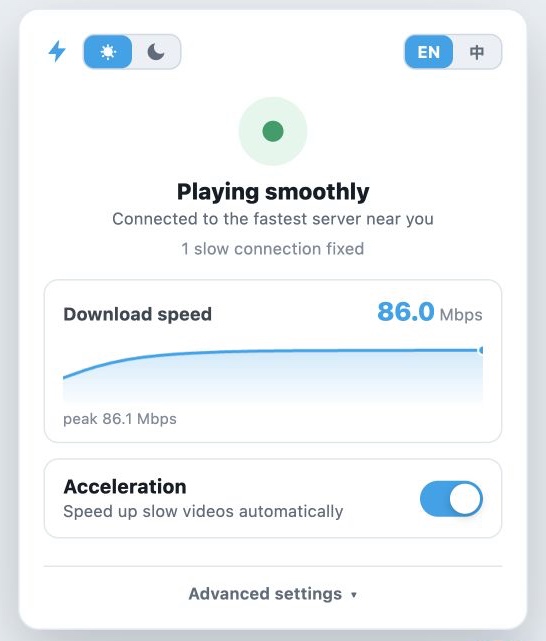
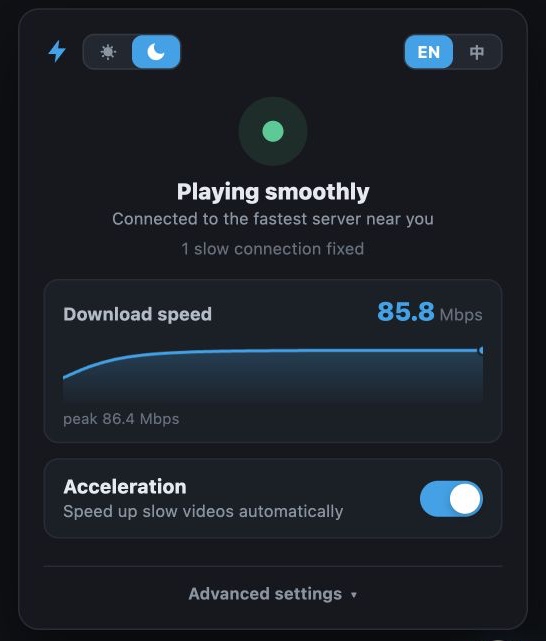
This userscript is meant to smooth that out. It watches playback in the browser, adjusts automatically when a connection is clearly unstable, and shows your live download speed in a panel. When playback is fine, it stays out of the way.
| ☀️ Light | 🌙 Dark |
| :---: | :---: |
|  |
|  |
## Install
On Chrome, Edge, or Firefox, install [Tampermonkey](https://www.tampermonkey.net/) or [Violentmonkey](https://violentmonkey.github.io/) first, then grab the script from any of these:
- [Greasy Fork](https://greasyfork.org/en/scripts/582026-bilibili-accelerator) — recommended, auto-updates
- [Direct `.user.js`](https://update.greasyfork.org/scripts/582026/Bilibili%20Accelerator.user.js)
- [GitHub Raw fallback](https://raw.githubusercontent.com/realzza/bilibili-accelerator/main/dist/bilibili-accelerator.user.js)
- [GitHub Releases](https://github.com/realzza/bilibili-accelerator/releases/latest)
Reload any Bilibili tab you already had open. The ⚡ badge in the lower-right corner means it's running.
### Safari
Safari has no Tampermonkey, so use the [Userscripts](https://apps.apple.com/us/app/userscripts/id1463298887) extension:
1. Install Userscripts from the App Store.
2. Enable it in Safari Settings and allow access to `bilibili.com`.
3. Install the script from Greasy Fork or the GitHub Raw URL above.
4. Reload any open Bilibili tabs.
### Unpacked extension (Chrome / Edge)
If you'd rather not use a script manager, the repo also builds a Manifest V3 extension:
```sh
npm run build
```
Open `chrome://extensions`, turn on Developer mode, and load `dist/extension`.
## Panel and settings
- The top of the panel shows current status; below it is a live download-speed graph. When speed data isn't available, it falls back to how many seconds are buffered ahead.
- Appearance follows the system theme. Once you pick the sun or moon in the header, that choice sticks.
- Advanced settings has seven accents: Bilibili Blue, Teal, Emerald, Violet, Pink, Sunset, and Graphite.
- **Still buffering? Boost harder** switches to a more aggressive mode and reloads the page.
- The bandwidth guard is off by default. Turning it on limits the page's use of your upload bandwidth; reload the page afterwards.
- In web fullscreen the ⚡ badge fades out. Move the pointer to the lower-right corner to bring it back.
## Releases
Full notes live in [Releases](https://github.com/realzza/bilibili-accelerator/releases).
| Version | What changed |
| --- | --- |
| [v0.3.0](https://github.com/realzza/bilibili-accelerator/releases/tag/v0.3.0) | Light/dark panel and seven accent themes; header theme and language share one sliding control. Core behavior untouched |
| [v0.2.3](https://github.com/realzza/bilibili-accelerator/releases/tag/v0.2.3) | Stability fixes for live playback, more accurate probing, and stall recovery that keeps retrying |
| [v0.2.2](https://github.com/realzza/bilibili-accelerator/releases/tag/v0.2.2) | Speed measured over the time data is actually flowing, so a full buffer no longer reads as 0 Mbps |
| [v0.2.1](https://github.com/realzza/bilibili-accelerator/releases/tag/v0.2.1) | Live download-speed graph in the panel, with a buffer-health fallback |
| [v0.2.0](https://github.com/realzza/bilibili-accelerator/releases/tag/v0.2.0) | Big one: automatic connection tuning, stall recovery, EN/中 panel, optional bandwidth guard |
| [v0.1.3](https://github.com/realzza/bilibili-accelerator/releases/tag/v0.1.3) | Lightning-only badge, auto-hide in web fullscreen, stops covering the fullscreen button |
| [v0.1.2](https://github.com/realzza/bilibili-accelerator/releases/tag/v0.1.2) | Rebuilt the floating control and settings panel |
| [v0.1.1](https://github.com/realzza/bilibili-accelerator/releases/tag/v0.1.1) | First installable userscript release |
## Troubleshooting
Check for the ⚡ badge first. Tabs that were open during install or an update have to be reloaded.
If it still stalls, open Advanced settings, hit **Copy report**, and file an [issue](https://github.com/realzza/bilibili-accelerator/issues) with the video URL, your region, and what you saw. The report contains only what's needed to diagnose the problem — no signed media addresses or query tokens.
## Limits
- Browser player only. Apple TV and the native mobile apps are out of scope.
- Network conditions vary by region and ISP. This helps in some situations, but it can't fix regional licensing, a broken source file, or your local network.
- For why router-level proxying mostly doesn't help (and the certificate pinning problem on native apps), see [docs/router-proxy.md](docs/router-proxy.md).
## Development
```sh
npm test
npm run build
```
Build outputs:
```text
dist/bilibili-accelerator.user.js
dist/extension/
```
The version lives in `package.json` and nowhere else; the build stamps it into the userscript header and the extension manifest. `dist/` is committed, and CI checks it against `src/`, so rebuild before you commit.
## License
[MIT](./LICENSE)
|
## Install
On Chrome, Edge, or Firefox, install [Tampermonkey](https://www.tampermonkey.net/) or [Violentmonkey](https://violentmonkey.github.io/) first, then grab the script from any of these:
- [Greasy Fork](https://greasyfork.org/en/scripts/582026-bilibili-accelerator) — recommended, auto-updates
- [Direct `.user.js`](https://update.greasyfork.org/scripts/582026/Bilibili%20Accelerator.user.js)
- [GitHub Raw fallback](https://raw.githubusercontent.com/realzza/bilibili-accelerator/main/dist/bilibili-accelerator.user.js)
- [GitHub Releases](https://github.com/realzza/bilibili-accelerator/releases/latest)
Reload any Bilibili tab you already had open. The ⚡ badge in the lower-right corner means it's running.
### Safari
Safari has no Tampermonkey, so use the [Userscripts](https://apps.apple.com/us/app/userscripts/id1463298887) extension:
1. Install Userscripts from the App Store.
2. Enable it in Safari Settings and allow access to `bilibili.com`.
3. Install the script from Greasy Fork or the GitHub Raw URL above.
4. Reload any open Bilibili tabs.
### Unpacked extension (Chrome / Edge)
If you'd rather not use a script manager, the repo also builds a Manifest V3 extension:
```sh
npm run build
```
Open `chrome://extensions`, turn on Developer mode, and load `dist/extension`.
## Panel and settings
- The top of the panel shows current status; below it is a live download-speed graph. When speed data isn't available, it falls back to how many seconds are buffered ahead.
- Appearance follows the system theme. Once you pick the sun or moon in the header, that choice sticks.
- Advanced settings has seven accents: Bilibili Blue, Teal, Emerald, Violet, Pink, Sunset, and Graphite.
- **Still buffering? Boost harder** switches to a more aggressive mode and reloads the page.
- The bandwidth guard is off by default. Turning it on limits the page's use of your upload bandwidth; reload the page afterwards.
- In web fullscreen the ⚡ badge fades out. Move the pointer to the lower-right corner to bring it back.
## Releases
Full notes live in [Releases](https://github.com/realzza/bilibili-accelerator/releases).
| Version | What changed |
| --- | --- |
| [v0.3.0](https://github.com/realzza/bilibili-accelerator/releases/tag/v0.3.0) | Light/dark panel and seven accent themes; header theme and language share one sliding control. Core behavior untouched |
| [v0.2.3](https://github.com/realzza/bilibili-accelerator/releases/tag/v0.2.3) | Stability fixes for live playback, more accurate probing, and stall recovery that keeps retrying |
| [v0.2.2](https://github.com/realzza/bilibili-accelerator/releases/tag/v0.2.2) | Speed measured over the time data is actually flowing, so a full buffer no longer reads as 0 Mbps |
| [v0.2.1](https://github.com/realzza/bilibili-accelerator/releases/tag/v0.2.1) | Live download-speed graph in the panel, with a buffer-health fallback |
| [v0.2.0](https://github.com/realzza/bilibili-accelerator/releases/tag/v0.2.0) | Big one: automatic connection tuning, stall recovery, EN/中 panel, optional bandwidth guard |
| [v0.1.3](https://github.com/realzza/bilibili-accelerator/releases/tag/v0.1.3) | Lightning-only badge, auto-hide in web fullscreen, stops covering the fullscreen button |
| [v0.1.2](https://github.com/realzza/bilibili-accelerator/releases/tag/v0.1.2) | Rebuilt the floating control and settings panel |
| [v0.1.1](https://github.com/realzza/bilibili-accelerator/releases/tag/v0.1.1) | First installable userscript release |
## Troubleshooting
Check for the ⚡ badge first. Tabs that were open during install or an update have to be reloaded.
If it still stalls, open Advanced settings, hit **Copy report**, and file an [issue](https://github.com/realzza/bilibili-accelerator/issues) with the video URL, your region, and what you saw. The report contains only what's needed to diagnose the problem — no signed media addresses or query tokens.
## Limits
- Browser player only. Apple TV and the native mobile apps are out of scope.
- Network conditions vary by region and ISP. This helps in some situations, but it can't fix regional licensing, a broken source file, or your local network.
- For why router-level proxying mostly doesn't help (and the certificate pinning problem on native apps), see [docs/router-proxy.md](docs/router-proxy.md).
## Development
```sh
npm test
npm run build
```
Build outputs:
```text
dist/bilibili-accelerator.user.js
dist/extension/
```
The version lives in `package.json` and nowhere else; the build stamps it into the userscript header and the extension manifest. `dist/` is committed, and CI checks it against `src/`, so rebuild before you commit.
## License
[MIT](./LICENSE)