# MulmoTerminal
**English** · [日本語](README.ja.md) · [简体中文](README.zh.md) · [繁體中文](README.zh-TW.md) · [한국어](README.ko.md)
**Run multiple coding-agent sessions in parallel — and see which one needs you.**
A **browser terminal** for **parallel AI coding agents**: several sessions side by side, each in
its own cell, with the one that needs you marked in colour. **Claude Code** is the default and six
more CLIs are first-class — Codex, Antigravity, Grok, Muse, GitHub Copilot CLI and Cursor CLI. Vibe
coding with a single agent needs nothing but a shell — this is for when you run several and lose
track of which is waiting. Sessions survive a reload (tmux), work isolates in **git worktrees**,
and a **phone push** reaches you when a turn finishes.
**Every cell is a real pty.** `htop`, `lazygit`, a dev server and Claude Code are the same kind
of object here — which is why the one-session-per-worktree limit applies to **agents only**, and
a shell or a `yarn dev` launcher can sit in the same worktree an agent is working in.
## Demo
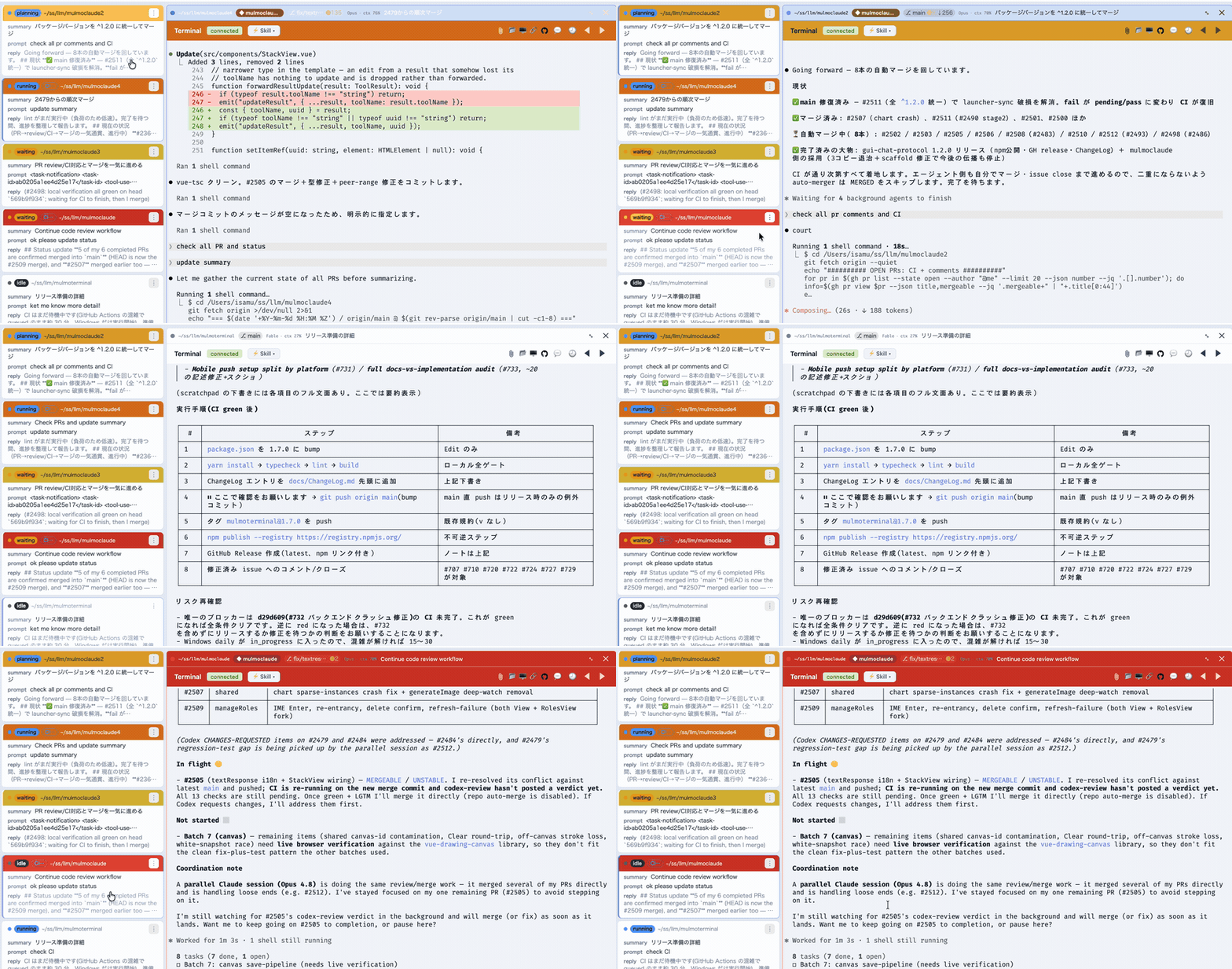
*The grid, live — each cell coloured **working**, **done** or **needs you**.*
https://github.com/user-attachments/assets/0b8dd582-6c0d-4be3-b0b4-3740ad0bdba6
*90 seconds, with sound: one agent, then a grid of them. Zoom into one and the roster still holds what every other session asked, answered and did, so you go to whichever is lit and lose nothing catching up.*
Transcript of the narration
When you ran one coding agent, the slowest thing in the room was the agent.
Now that you run five, the slowest thing in the room is probably you.
One of them is always stopped. A permission prompt. A question. Until you notice, it does nothing at all.
MulmoTerminal puts every session on one screen. Blue is working. Green is done. Amber is waiting on you.
You stop hunting. You go where the light is.
The other kind of slow is: what did I even ask this one? The roster keeps one line per session — what you asked, and what came back. Nothing left to remember.
When one is done, you don't go looking for its window. Click its row — the next order goes in right there.
Then you pick the next one from whatever is lit. Click, answer, move on. You never go looking — the roster tells you.
We built MulmoTerminal for exactly that: not to watch agents, but to triage them.
That is the whole install.
[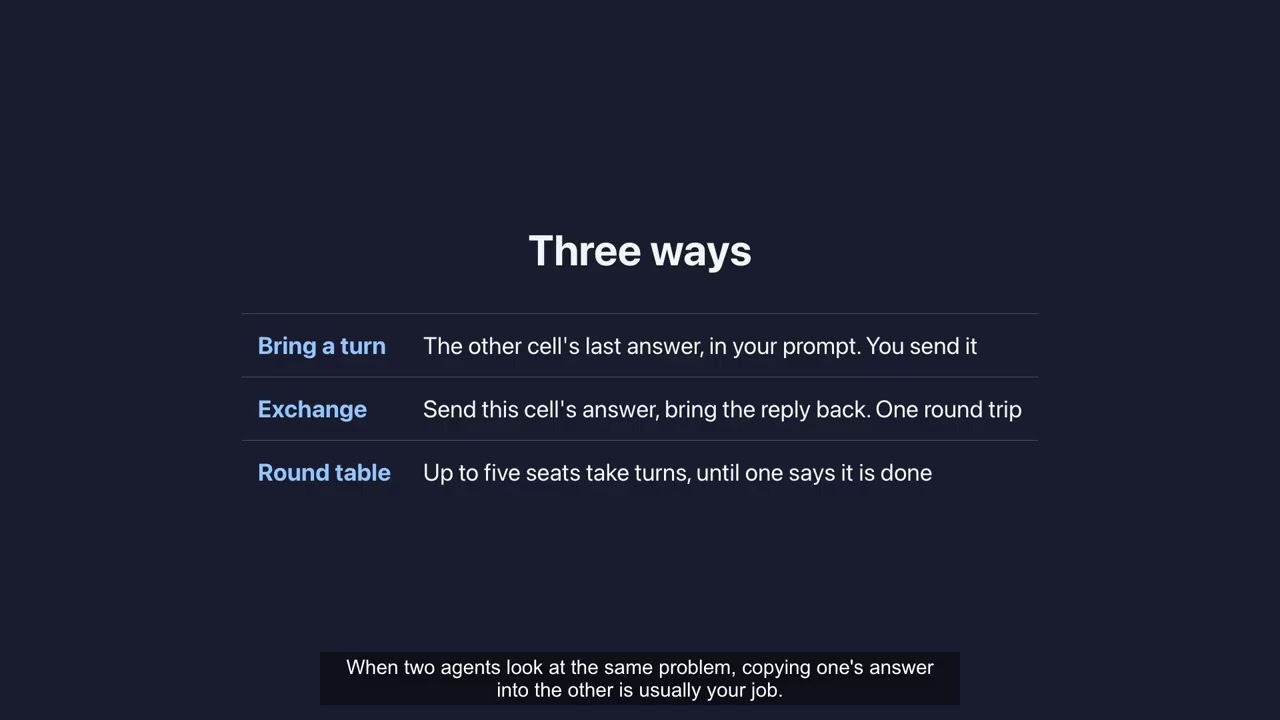](https://www.youtube.com/watch?v=Ce8XvlLRpQ4)
*The complete guide, Parts 1-5 — getting started, making it your workspace, agents that hand you
a screen, power features (seven agents at once, several subscriptions, shortcuts), and going
further into cells that talk to each other, git worktrees and the command palette. Chaptered, so
you can jump to the part you need.*
MulmoTerminal turns [Claude Code](https://claude.com/claude-code) — and six other agent CLIs —
into a parallel, observable workspace: many agent sessions at once in a grid, each one
color-coded so you see at a glance which are **working**, which **need you**, and which are
**done** — plus rich GUI output, git worktrees with one-click PRs, cost readouts, and a
ping to your phone when a task finishes. One `npx` command, no Electron, no config.
```bash
npx mulmoterminal@latest # starts on http://localhost:34567 and opens your browser
```
Requires **Node ≥ 24.15**, and by default the [`claude`](https://claude.com/claude-code) CLI —
on your `PATH` or named by `CLAUDE_BIN`, already logged in. Declare a different default agent
(`--agent codex`, or `"defaultAgent"` in `~/.mulmoterminal/config.json`) and start-up checks that
one instead. `npx mulmoterminal@latest init` reports what it can't find. On an older Node it stops
before starting the server, with a banner and the upgrade commands for however that Node was
installed.
### Why not tmux + iTerm panes?
Running agents in parallel was never the hard part — tmux does that fine. What gets lost
is **which** of them is waiting for you. A pane is opaque: working, finished and
blocked-on-a-permission all look the same until you read it. Here every cell reports its
state back to one grid — working (blue), done (green), **needs you** (amber) — with a chime
when one goes amber off-screen, and a [cockpit roster](#why-youll-want-it) of one line per
session so you can answer one without losing your place in the other four. It runs *on*
tmux when you have it, for [persistence across restarts](#session-persistence-tmux).
Built by **[receptron](https://github.com/receptron)** — **[Satoshi Nakajima](https://x.com/snakajima)**,
software architect for **Windows 95** at Microsoft, and **[Isamu Arimoto](https://github.com/isamu)**;
the same two behind **[GraphAI](https://github.com/receptron/graphai)**. [More ↓](#who-builds-this)
## Why you'll want it
- **See every agent at once.** A grid of live sessions, each cell color-coded by state —
**working** (blue), **blocked / needs a permission** (amber), **done, unreviewed** (blue),
**idle** — with an attention chime and a toolbar tally, so an off-screen agent that's stuck
never slips past you. Stop babysitting one terminal; supervise ten. Zoom into one and the
**cockpit roster** keeps everyone else in view — one text row per session with its AI
summary, last prompt, latest reply, and the branch's **PR phase** (draft / CI fail /
ready / merged).
- **A GUI for your agents, not just a terminal.** Beside the terminal, a **Canvas** panel
renders what an agent produces over MCP — **documents, forms, charts, generated images,
HTML, collection cards** — each drawn by its own plugin. The agent doesn't just print
text; it hands you an interface.
- **Get pulled back from anywhere.** A finished — or input-waiting — task sends a **Web Push
to your phone**, and the **RemoteHost** companion lets you watch sessions and answer with a
tap (**yes / no / continue**) from the phone itself — walk away, get pinged, jump back in.
- **Nothing is lost on a restart.** With `tmux`, every session survives a server crash,
restart, or `node --watch` reload — a mid-turn agent, a long build, a dev server all keep
running and reattach when you come back. A crashed server is restarted for you, so the
tab you left open finds it again.
- **Ship without leaving the grid.** Each repo cell shows a **git branch chip**, isolates
work in a one-click **git worktree**, opens a **diff** panel, and does **commit / push /
open PR** — so several agents can work the same repo without colliding.
- **Know what it's costing.** Per-session **context %**, **token**, and **estimated $**
readouts, an **activity timeline** of tool calls, and **AI-summarized** cell titles and
command-output explanations — so a wall of parallel agents stays legible.
- **Make it yours.** Per-directory **themes, colors, and name badges** (`prod` in red,
`staging` in amber), a configurable header (buttons + info chips), custom attention sounds,
and Run / Skill / Mulmo menus to launch a project's scripts, `.claude/skills` and decks right
inside a cell.
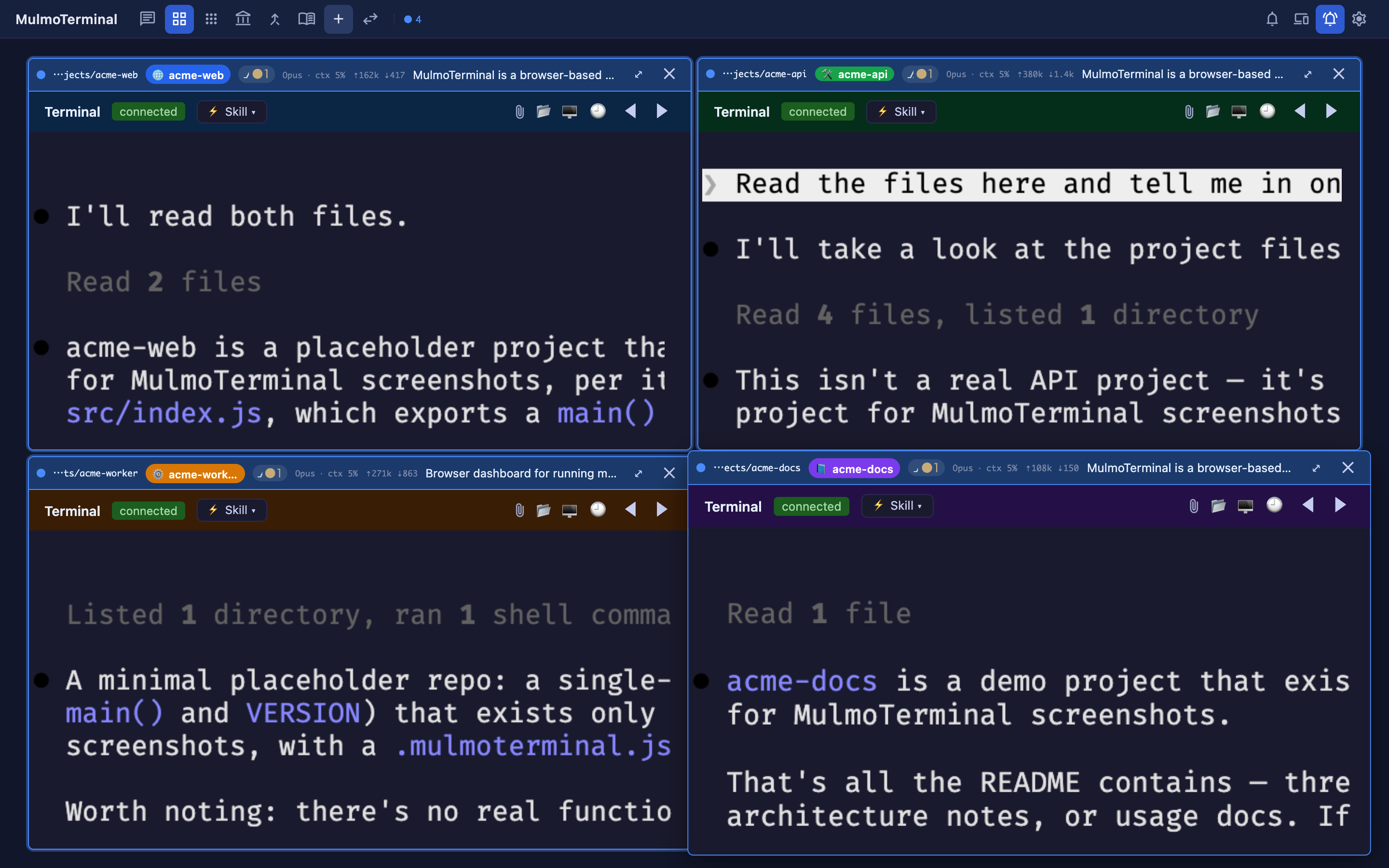
*The grid is a **cockpit for parallel agents** — here, four live Claude sessions, each in its own color-coded project. Every cell's header carries what you need to triage at a glance: **model · context %**, **token counts** (`⇡in ⇣out`), the **git branch / changes** chip, and an AI summary of what the agent is doing. A cell's **border color signals state** — working (blue), done (green), needs-you (amber — e.g. waiting on a permission), idle — with an attention chime so a stuck cell off-screen still pulls you back. Supervise many; only step in where you're called.*
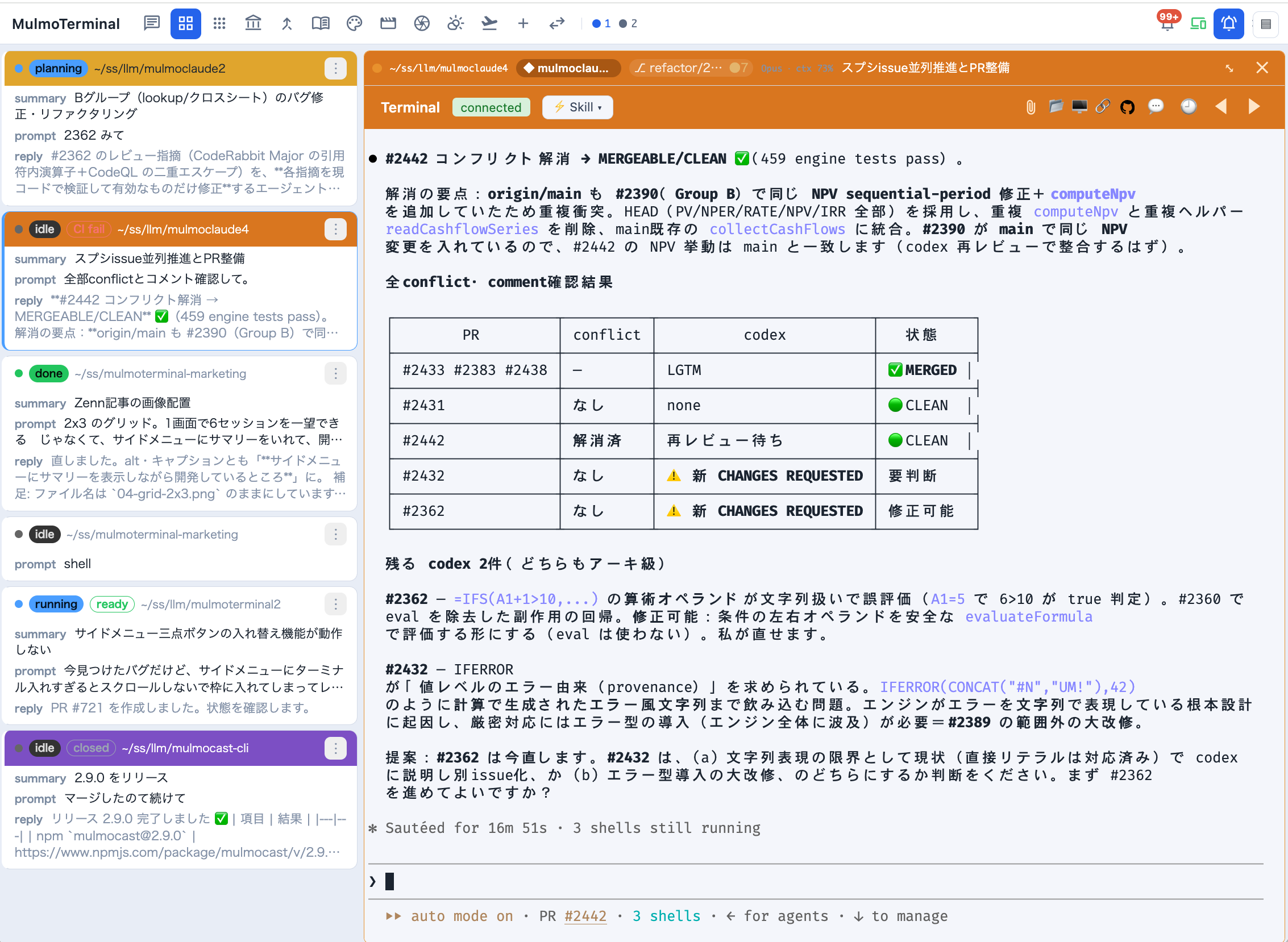
*Zoomed in, the **cockpit roster** replaces thumbnails with information: every session as a
text row — directory, AI summary, your last prompt, the agent's latest reply, a status word,
and the branch's **PR phase** badge. A row whose agent is **waiting on you** rings amber and
blinks; one that has merely **finished** rings green and stays still (Settings → Waiting rows
turns the movement off). Click a row to swap the enlarged terminal.*
### What it is, under the hood
Each session runs as a real PTY on the server (the agent CLI in a pseudo-terminal) and is
streamed to an [xterm.js](https://xtermjs.org/) terminal in the browser over a WebSocket. The
**cockpit roster** lists every session and reflects, in real time, which are **working**
(the agent is thinking, a spinner), which are **waiting on you** (a permission prompt or a
question — an amber dot; nothing proceeds until you answer) and which are **finished with output
you haven't seen** (a green dot) — driven by the activity each agent reports; claude's hooks are injected per
spawn. The horizontal tab bar carries the same two dots.
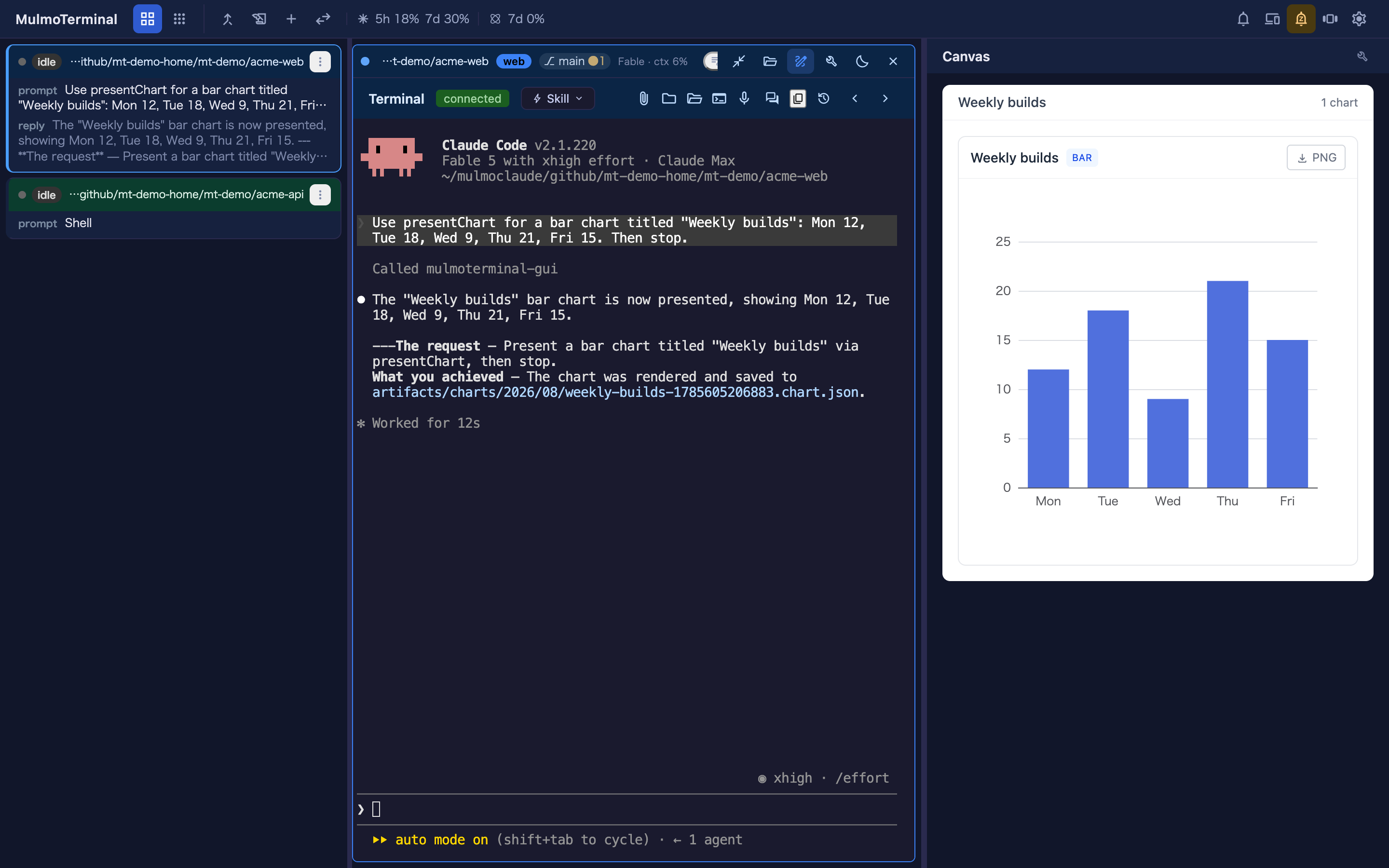
*To focus on one agent, **zoom its cell**: it takes the window, and the **GUI panel** ("Canvas") opens beside it, where that agent's tool calls render as documents, forms, charts, images, and HTML rather than printed text. **The app opens on the grid** (`/`, settling on `/terminals`), which is the only view; 3.x had a separate single view at `/chat` and 4.0.0 removed it, so that URL now lands on the grid like any other.*
**Inserting a file path** — like a native terminal, you can put a file's absolute path into
the prompt: **drag a file** onto the terminal, or click the **file button** in the terminal
header, which asks the local server to open the OS file dialog and inserts the chosen path. The
path is inserted at the cursor — it is not submitted, so you can review it first.
A drag inserts the file's **own** path where the browser exposes one via `file://`
(Firefox/Safari), so editing it afterwards edits the file you dropped. Where the browser
withholds it — **Chrome**, and every browser when MulmoTerminal is open **from another
machine**, where a local path would name nothing on the host — the file's bytes are sent
instead, saved to a private per-session directory under the OS temp dir, and *that* path is
inserted. The session is granted that directory at launch (Claude Code's `--add-dir`), so the agent reads it without a permission prompt.
Claude Code 2.1.326 and later also ask at startup to trust any folder added that way, so
MulmoTerminal marks the parent of these directories trusted in Claude Code's config
(`projects[].hasTrustDialogAccepted` in `~/.claude.json`, or in the account's own
`CLAUDE_CONFIG_DIR`) before the first one is granted. The copies are removed
when the session ends, and any left by a crash are swept at the next start. Up to 110 MiB per
file — the same ceiling as a phone attachment. **A session already running when you upgrade
was launched without that grant**, so drops into it still prompt; new sessions don't.
**Pasting a screenshot** — take a screenshot and paste it straight into the terminal
(`Cmd`/`Ctrl`+`V`). The image is saved to the session's own drop directory — the same place a
dropped file goes, with the same grant, the same 110 MiB ceiling and the same cleanup when the
session ends — and its **absolute path** is inserted at the cursor, so the agent can read it.
Unlike a drop, this does not need the browser to expose a path — the bytes are on the
clipboard — so it also covers Chrome, where dropping a file cannot insert a path. It works
wherever the browser puts the image on the clipboard as `image/png`, `image/jpeg`,
`image/gif`, or `image/webp`. Anything else is left to the terminal's own paste handling,
exactly as before — including a paste that carries **plain text** next to the image, which
copying from a web page usually does, so that pasting text keeps working.
**Clicking a file path** — the other direction. A path an agent *prints* becomes a link (in a
Windows session that includes `\`-separated ones such as `.claude\notes\a.md` and `C:\work\a.ts`; a path
holding a space in a folder name is linked whole when it sits inside `"…"`, `'…'`, a backtick pair,
`(…)`, `(…)` or `「…」`, as in `Read(/Users/me/My Docs/a.md)`), and
**what it opens is chosen by its extension**, so each kind arrives as the thing it is rather
than as bytes:
| A clicked … | opens as |
|---|---|
| `.md` `.markdown` | **rendered** markdown in a new tab — the same sandboxed `…/md` HTML the Files preview renders, with a **toolbar** at the top that switches between the preview and the file's **source** and has a copy button for each (the source as it is; the preview as text and as HTML, so a rich editor keeps the headings). That toolbar is the one script the tab runs, admitted by a per-response nonce the way the pane's scroll reporter is, and nothing in the file runs; the two scripts the preview needs are still absent (the one that reports where you are reading, and the one that draws mermaid diagrams — so a mermaid fence stays a code block here). It follows your system light/dark setting and your browser's language, since under the sandbox it can't ask the app which theme or language is on |
| `.json` | **indented** in a new tab (Chrome and Safari otherwise show one long line), with the same toolbar: switch to the file as it is, copy either |
| `.csv` `.tsv` | a **table** in a new tab, with a sticky header that scrolls inside its own box, and the same toolbar: switch to the file as it is, copy either |
| source, config, logs, and `.txt` — 46 extensions | the app's own **Files** view (`/files?path=`), where CodeMirror highlights it, the tree is right there, and it can be edited |
| `.html` `.htm` | the **rendered page** in a new tab, under the same sandboxed policy as the Files pane's Preview: its scripts run at an opaque origin with no fetch or XHR (so they cannot reach the app or its API), and an image beside it loads by its relative path (a relative stylesheet or script does not). The raw route answers `.html` as plain text, so opening one there showed its source |
| images, PDF, SVG, video, audio | raw bytes in a new tab, which the browser renders better than an editor would |
| everything else — `.xlsx`, `.docx`, `.zip`, a `Makefile` | the app's own **Files** view. A tab cannot display these, so opening one there is not a view — it is a download starting with no warning. The pane names the file and offers **Open in OS**, which hands it to the application that owns it (Excel for an `.xlsx`) |
The same tab is one button away from the Files pane: on a Markdown, JSON or CSV/TSV file, the header's
open-in-new button opens that document, toolbar included, in a tab of its own.
**A path outside the session's working directory opens too** — absolute, `~/…`, or `../` climbing out.
Markdown, JSON, tables and source open **in the Files pane on their own**: the tree stays on the cell's
directory and the file has no row in it, an arrow mark before its name says it is outside (hover for the
path), and it is read, previewed and saved against its own directory with the same conditional save as
any other file. History and Changes are not offered for it, and a link in its Preview is not followed.
With no pane to take the click, they open against the file's own directory in a tab or the Files view
as before. An HTML page, an image, a PDF,
an SVG, a video or an audio file opens in a new tab through a **one-file link**: the app asks the server
for it with a same-origin POST, and only that file is served under it — not its directory, and not the
image an HTML page links beside itself. The link lasts until the server restarts (or until many newer links push it out); seeking a video works.
A file that is not there says so in the tab.
**A line after the path is followed.** `src/a.ts:42`, `src/a.ts:42:7` (gcc, clang, `eslint -f unix`,
stack traces) and `src/a.ts(12,5)` (tsc) are one link. In the pane, and in the Files view, the file
opens as text with the caret on that line and column — an HTML page, an SVG or a table included, and a
tab reading in Preview switches to Edit. An image, a PDF, a video or an audio file has no line to go
to and simply opens as itself. A route that renders the file in a new tab (`.md`, `.json`,
`.csv`, `.html` with no pane to take it) ignores the line. When the pane takes the click, the
keyboard stays in the terminal; the full-screen Files view, with no terminal beside it,
puts it in the editor. (ESLint's default output puts the path on a line of its own, with no line number to follow.)
**A right-click on the path opens a menu** instead of the browser's: open it in the pane (what a plain click does), open it in a **new tab** (the rendered document for Markdown, JSON and tables, the Files page for source, the one-file link for a picture or a PDF outside the cell), open it in the **Files view**, or **copy the path** as an absolute path, ready for a prompt or an issue. A right-click only opens the menu; it no longer also opens the file the way a click does (it used to, under the browser's menu). Off a link the right-click is the browser's as before. Cmd/Ctrl+click still opens a new Files tab.
**The [Files pane](#files-view-browse--edit) beside the terminal takes the click first** — beside an enlarged cell, and on the tiled grid too, where the pane opens beside the tile that printed the path, or moves to it, the way that tile's menu would open it (`fileLinkOpensPane`, on by default; `false` keeps a tiled-grid click on the routes above unless a pane is already beside that tile) — every
row above, since the pane is the same editor with a Preview for Markdown, HTML and SVG, shows an
image as a picture and a PDF in a frame, and plays a video or an audio file with the browser's own
controls (seeking included, whatever the file's size). The file opens *beside* the terminal
that printed it, and the pane opens itself if it was closed. It declines, leaving the routing
above untouched, when `fileLinkOpensPane` is off on the tiled grid and no pane is beside the tiles, or when the path is not
under the directory of the cell the pane belongs to (the pane cannot walk above its root). A file too large to edit as text still offers **Open in OS**.
Highlighting in the Files view covers the JS/TS family, JSON and Markdown (the modes
`cmEditor.ts` bundles); other languages open as plain text.
This set is **deliberately asymmetric** with the set the server serves as viewable text —
`.md` goes to the rendered viewer rather than the Files view, `.txt` does the opposite, and
dotfiles are server-only. The 45 extensions both sides agree on live in
`common/sourceExtensions.ts`, each side adds its own extras, and
`test/common/sourceExtensions.spec.ts` pins the asymmetry so it isn't "fixed" into symmetry.
> **Changing this?** The routing table is `ROUTE_BY_EXTENSION` / `IN_APP_EXTENSIONS` in
> `src/composables/terminalFilePathLinkProvider.ts`. Update this section, the
> `docs/guide/{en,ja}/features.md` row, and the link table in `docs/terminal-notes.md`
> together — all three went stale once already (#834).
---
## What people say after switching
> These are experiences reported by users who moved over from an IDE or a split terminal —
> not benchmarks, and not claims we measured. Your setup may differ.
### "It stopped eating my memory"
Keeping several agents apart by opening several IDE windows is expensive: each one brings its own
editor, language server, extensions and file watchers. One user reported a **64 GB machine
stuttering** under that load, and running smoothly after moving over — here the agents are PTYs on
a server and the UI is browser tabs.
### "I stopped answering the wrong agent"
Six panes of scrolling text look identical. Users have described **typing a reply into another
agent's terminal**, and losing track of what they had asked in the first place. As one put it, the
windows all look the same, so switching between them costs time just to work out what you are
looking at.
The problem isn't attention — it's that N identical panes means holding N contexts in your head.
Colour-coded state, a name badge and a per-directory colour move that onto the screen instead.
### "Watching many and reading one stopped being a trade-off"
Splitting a terminal six ways leaves every pane too small to read a long answer without constant
scrolling and resizing — one user described exactly that with a 4,000-character reply. So you
quietly accept worse reading every time you add an agent.
**Grid ↔ enlarge removes that.** Watch all of them, then blow one up and read it properly — the
cockpit roster keeps the rest in view as text while you do.
### "My existing sessions came with me"
Sessions resume as-is — same `claude --resume`, same transcripts. Point it at a directory you
already work in and your history is there. Nothing to migrate, nothing to redo. One user said this
alone made the switch worth it, having previously lost context to killed sessions.
---
**You don't need ten agents for this to pay off.** Users have reported the switch being worth it at
**one to three** parallel sessions. The wins above are about not losing track, not about running
more.
---
### 📖 Documentation — **[receptron.github.io/mulmoterminal](https://receptron.github.io/mulmoterminal/)**
- **User guide:** [English](https://receptron.github.io/mulmoterminal/guide/en/) — the grid
view, everyday workflows, the full feature list, configuration, and mobile push notifications.
- **ユーザーガイド:** [日本語](https://receptron.github.io/mulmoterminal/guide/ja/) —
グリッドの使い方・日々のワークフロー・機能一覧・設定・スマホ通知の設定はこちら。
- **Updates / アップデート情報:** new releases and features are announced on X —
in English on [@mulmocast](https://x.com/mulmocast), in Japanese on
[Singularity Society (@SingularitySoci)](https://x.com/SingularitySoci)。
新バージョンや新機能のお知らせは X で。
---
## Install & run
Needs **Node ≥ 24.15**, plus these CLIs — on your `PATH`, or named by the matching `_BIN`:
> **Never installed any of this before?** The guide walks it end to end, macOS and Windows,
> assuming no command-line experience:
> [Getting started](https://receptron.github.io/mulmoterminal/guide/en/getting-started.html) ·
> [はじめに — 起動するまで](https://receptron.github.io/mulmoterminal/guide/ja/getting-started.html)
| | Tool | What it gives you | Install |
| --- | --- | --- | --- |
| **Required** *(unless you declare another)* | [`claude`](https://claude.com/claude-code) | every Claude session — this app is a cockpit for it. Start-up requires it **by default**; declare a default agent and it checks that one instead — `npx mulmoterminal --agent codex`, or `"defaultAgent": "codex"` in `~/.mulmoterminal/config.json` (#2082). `CLAUDE_BIN` is honoured, so an install off `PATH` counts | `npm i -g @anthropic-ai/claude-code`, then run `claude` once to log in |
| **Required** | `git` | [worktree isolation](#git-worktrees--pull-requests), each cell's branch / unsaved-dot / diff readout, the PR footer | `brew install git` · `sudo apt install git` · `sudo dnf install git` · Windows: [git-scm.com](https://git-scm.com/download/win) |
| **Required** | `gh` | the cross-repo **PRs & Issues** view and one-click PR creation — it uses your `gh` login, so no token is stored | [cli.github.com](https://cli.github.com), then `gh auth login` |
| Optional | `glab` | the same for **GitLab** projects (#981) — gitlab.com, and a self-hosted instance you declare in `gitlabHosts` (#1332). Same arrangement: the CLI holds the credentials, this app stores no token | `brew install glab`, then `glab auth login` (self-hosted: `glab auth login --hostname gitlab.example.com`) |
| Recommended | `tmux` — the **latest release** (3.8 as of 2026-10-10); older ones are not supported | [session persistence](#session-persistence-tmux) — terminals survive a server restart | `brew install tmux` · `sudo apt install tmux` · `sudo dnf install tmux` · Windows: `winget install -e --id marlocarlo.psmux` (3.4.0+, see [psmux on Windows](#psmux-on-windows)) |
| Optional | any other agent CLI | a cell can run **Codex**, **Antigravity** (`agy`), **Grok**, **Muse**, **GitHub Copilot CLI** or **Cursor CLI** instead of Claude — install only the ones you use, and a missing one simply fails to start that cell. What each can do is [the capability matrix](docs/agent-capability-matrix.md); how to install and pick one is the [agents guide](https://receptron.github.io/mulmoterminal/guide/en/agents.html) | e.g. `npm i -g @openai/codex` |
| Optional | `ffmpeg` | video rendering from the [mulmo-script panel](#wiki-collections--the-gui-panel) (its plugin ships enabled) | `brew install ffmpeg` · `sudo apt install ffmpeg` · `sudo dnf install ffmpeg` |
| Optional | `remotion` packages | MulmoCast's `remotion` beats, where Claude Code writes each scene as a Remotion component (mulmocast 2.13.0). Not a dependency of this app: install them yourself, into your home directory so an `npx` upgrade does not lose them — `init` reports whether mulmocast can see them | [Remotion scenes](https://receptron.github.io/mulmoterminal/guide/en/mulmocast.html#remotion) · [日本語](https://receptron.github.io/mulmoterminal/guide/ja/mulmocast.html#remotion) |
| Optional | `ollama` | [`claude-ollama`](https://receptron.github.io/mulmoterminal/guide/en/claude-ollama.html) — Claude Code against a fully local model | [ollama.com/download](https://ollama.com/download) |
| Linux only | a file dialog | the launcher's **Choose a folder** button and the path menu's **Insert a file path**, which open an OS dialog on the machine the server runs on. macOS and Windows have one built in; **WSL** uses the Windows one over interop and needs nothing installed. A Linux desktop needs one of these — without any, they say so and you type the path instead (#1447) | `sudo apt install zenity` · `sudo dnf install zenity` · `kdialog`, `qarma` and `yad` also work |
The server starts without any of the non-required rows; you just lose that row's feature,
and the header/panel for it says so. `git` and `gh` are marked required because losing them
costs whole views rather than one button. `claude` is required only until you name a different
default agent — see
[Starting without Claude Code](https://receptron.github.io/mulmoterminal/guide/en/agents.html#default-agent)
· [日本語](https://receptron.github.io/mulmoterminal/guide/ja/agents.html#default-agent). `npx mulmoterminal@latest init` (below) reports which of
these it can find.
```bash
npx mulmoterminal@latest # start on http://localhost:34567 and open the browser
# or install globally:
npm install -g mulmoterminal
mulmoterminal
```
**Stopping it.** `Ctrl+C` in the terminal that started it — or, if you can no longer find that
terminal, **Settings → Quit MulmoTerminal** in the browser, or **`npx mulmoterminal@latest stop`**
from any terminal (installed globally, just `mulmoterminal stop`; it stops every server running on
this machine, and `--port ` stops only that one). All three run the same shutdown:
with `tmux` installed the agent sessions survive and come back under **Settings → Sessions that
survived a restart**; without it they end with the server.
**First-run setup (optional).** `npx mulmoterminal@latest init` checks your environment (Node ≥ 24.15
and every CLI in the table above), says how to update when Node is behind the latest LTS of its line
or Claude Code is behind its `stable` release, seeds the launcher's **directory
presets** from the projects in your Claude Code history, and writes `~/.mulmoterminal/config.json`.
It's **idempotent** — re-run it any time to refresh the presets; it overwrites the managed parts
and keeps your other settings. When `claude` is installed it can hand off to the
`/mulmoterminal-config` skill for interactive tweaks — it routes to the one that owns what you
want to change. Once the app is up you can also reach them from **Settings**: each section that a
skill can write ends in a button that starts that skill in a new session, which is how the settings
with no UI (a theme of your own, `keymap`) get written without hand-editing JSON.
**Google account (optional).** Link a Google account to enable the chat's `google` tool and the
phone's `google.calendar.*` commands: read/create events on any calendar (not just your primary),
list the calendars you've subscribed to, and read the colour palettes. Sign in from
**Settings → Google account**, or run `npx mulmoterminal@latest google login` — the CLI is the fallback
for when you're driving MulmoTerminal from another machine, since consent finishes on a loopback
listener and needs a browser **on the host**. Either way it needs a Desktop OAuth client JSON saved
as `~/.secrets/client_secret_*.json`; the refresh token lands in `~/.config/mulmo/google-token.json`
and is **shared with MulmoClaude**, so one link per machine covers both apps.
**Local models (optional).** The package also ships `claude-ollama` — a one-command launcher that
runs Claude Code **fully locally against an [Ollama](https://ollama.com) model** (no cloud, no API
key). It starts a large-context Ollama server and launches `claude` with a minimal system prompt so
small models aren't drowned:
```bash
ollama pull qwen3:4b
npx -p mulmoterminal claude-ollama qwen3:4b # or, if installed globally: claude-ollama qwen3:4b
```
See [Local models with claude-ollama](https://receptron.github.io/mulmoterminal/guide/en/claude-ollama.html)
for the details and model notes.
> **Already linked before the calendar-list / colour features?** They need a read scope your existing
> link doesn't have, so `listCalendars` (and, in practice, `colors`) fail with an insufficient-scope
> 403 until you re-authorize: **Settings → Google account → Unlink**, then sign in again (or re-run
> `google login`). Reading/creating events on your primary calendar keeps working without re-linking.
A global install isn't auto-updated, so on startup MulmoTerminal checks npm and
prints a one-line notice when a newer version is available — and the web toolbar shows a
clickable **update badge** with the exact command for your install (`npm i -g mulmoterminal`,
or `git pull origin main && yarn install && yarn build` for a clone, then restart — a pull alone
updates the server's code but leaves the dependencies and the browser's build as they were). The server repeats that check every few hours, so a release that
ships while it is running still reaches the badge; the startup console notice is printed once
and is not repeated. Disable with `MULMOTERMINAL_NO_UPDATE_CHECK=1` (or `NO_UPDATE_NOTIFIER=1`).
Options: `--cwd ` (working directory — relative paths allowed; defaults to the
directory you run the command from), `--port ` (default 34567; the
`PORT` environment variable is used when the flag is absent), `--no-open`,
`--version`, `--help`.
```bash
npx mulmoterminal@latest --cwd ./my-project # work in a specific directory
```
The published package ships the server (run via `tsx`) plus the pre-built web UI;
`npx mulmoterminal@latest` checks for the `claude` CLI — or for whichever agent you set as the
default — picks a free port, starts the server, and opens the browser. For local development from a clone, see
[Running](#running).
**Won't start with `ERR_MODULE_NOT_FOUND`?** If a first `npx` run was interrupted, a half-unpacked `~/.npm/_npx/` cache can remain and a later run fails at startup — a corrupted npx cache, not a bug in the published package.
The launcher detects it and prints the exact, OS-appropriate removal command; run that, then `npx mulmoterminal@latest` again.
> **Something looks wrong?** Type `/mulmoterminal-bug-report` in any MulmoTerminal session. The
> bundled skill hears the symptom out, checks your **real** config, schema and version to see
> whether the behaviour is configuration or by design, searches the existing issues — and only
> helps you file one if none of that explains it, with the environment collected and secrets
> masked. Getting you unstuck is the goal; an issue is what is left when the first three steps
> fail.
> **Have a question instead?** Press the **help** icon in the toolbar (next to the gear), or type
> `/mulmoterminal-help` in any session. The bundled skill answers questions about MulmoTerminal — what
> it can do, how a feature or a part of the screen works, how to set something up, what is new in
> your version and in the latest one — from the shipped guide, changelog and source, and names where
> each fact was checked. It changes nothing.
---
## Contents
- [Architecture](#architecture)
- [Why a PTY?](#why-a-pty)
- [Agents](#agents-claude-codex-antigravity-grok-muse-copilot--cursor)
- [Session persistence (tmux)](#session-persistence-tmux)
- [Tech stack](#tech-stack)
- [Configuration](#configuration)
- [Running](#running)
- [Scripts (Run menu)](#scripts-run-menu)
- [Skills (Skill menu)](#skills-skill-menu)
- [Decks (Mulmo menu)](#decks-mulmo-menu)
- [Files view (browse & edit)](#files-view-browse--edit)
- [Git worktrees & pull requests](#git-worktrees--pull-requests)
- [Cost & token usage](#cost--token-usage)
- [Wiki, Collections & the GUI panel](#wiki-collections--the-gui-panel)
- [More features](#more-features)
- [Server API specification](#server-api-specification)
- [HTTP: `GET /api/sessions`](#http-get-apisessions)
- [HTTP: `GET /api/scripts`](#http-get-apiscripts)
- [HTTP: `POST /api/command/summarize`](#http-post-apicommandsummarize)
- [HTTP: `POST /api/hook`](#http-post-apihook)
- [More HTTP endpoints](#more-http-endpoints)
- [WebSocket: `/ws` (terminal)](#websocket-ws-terminal)
- [More WebSocket endpoints](#more-websocket-endpoints)
- [WebSocket: `/ws/run` (command terminal)](#websocket-wsrun-command-terminal)
- [Socket.IO: `/ws/pubsub` (activity pub/sub)](#socketio-wspubsub-activity-pubsub)
- [Session model](#session-model)
- [Session lifecycle](#session-lifecycle)
- [Claude hook injection](#claude-hook-injection)
- [Closing summary](#closing-summary)
- [Session discovery & titles](#session-discovery--titles)
- [Project structure](#project-structure)
- [Testing](#testing)
- [Contributing](#contributing)
---
## Architecture
```
┌──────────────────────────────────────┐ ┌─────────────────────────────────────────────┐
│ Browser (Vue 3 + xterm.js) │ │ Server (Express + Node) │
│ │ │ │
│ App.vue ──────subscribe("sessions")──┼──SIO───►│ socket.io /ws/pubsub ── publish ──┐ │
│ ▲ refetch on any push (favicon) │ │ │ │
│ └──── GET /api/sessions ─────────┼──HTTP──►│ Express /api/sessions │ │
│ │ │ /api/hook ◄──curl── hooks │ │
│ Terminal.vue ── ws JSON msgs ────────┼──WS────►│ ws /ws ──► node-pty ─► `claude`──hooks┘
│ (input / resize / output) │ │ (one PTY per session) │
└──────────────────────────────────────┘ └─────────────────────────────────────────────┘
```
- **Terminal I/O** flows over a raw WebSocket (`/ws`), one PTY per session.
- **Session list** is fetched over HTTP (`/api/sessions`) — by `App.vue` for the tab favicon,
and by an empty cell's launch form (`?cwd=`) for its resume rows.
- **Live activity** is pushed over a Socket.IO pub/sub channel (`/ws/pubsub`);
the server learns of activity from **hooks** that POST to `/api/hook`.
- **Other terminals** run on their own raw WebSockets — one per agent (`/ws/codex`,
`/ws/antigravity`, `/ws/grok`, `/ws/muse`, `/ws/copilot`, `/ws/cursor`), persistent
**launch commands** on `/ws/launch`, and one-off **script commands** (`yarn dev`, tests, …)
on `/ws/run`. **Three agents reach `/api/hook`** — Claude directly, Copilot and Cursor through
a translation of their own vocabularies; Codex is read from its rollout instead, and agy, grok
and muse report no activity at all. Which agent does what is the matrix in
[`docs/agent-capability-matrix.md`](docs/agent-capability-matrix.md); see also
[Scripts (Run menu)](#scripts-run-menu).
- In dev (`yarn dev`) the Vite dev server runs on its own port (`CLIENT_PORT`,
default `6856`) and proxies `/ws` (a prefix covering `/ws/codex`, `/ws/launch`, and
`/ws/run`), `/ws/pubsub`, `/api`, `/artifacts`, and `/htmlfile` to the backend
(`PORT`, default `34567`) — so you open the Vite port (e.g. `http://localhost:6856`).
In production the backend serves the built client from `dist/` on `PORT`, and you open
that.
---
## Why a PTY?
Claude Code's interactive mode renders its UI with [Ink](https://github.com/vadimdemedes/ink)
(a React-based TUI framework), which requires a real **TTY** to be attached. A
plain `child_process.spawn()` provides no TTY, so interactive Claude won't start
(it stays silent). [node-pty](https://github.com/microsoft/node-pty) allocates a
real **pseudo-terminal** at the OS level, so from Claude's point of view it's
running in an ordinary terminal — full TUI rendering, cursor movement, colors,
and tool-approval prompts all work. We don't use `-p`/headless mode or the Agent
SDK; we drive the real interactive CLI and relay its TTY over the WebSocket.
> **macOS note:** node-pty's bundled `spawn-helper` binary ships without the
> execute bit (mode 644), which causes a `posix_spawnp failed` error. The
> `postinstall` script (`server/fix-pty-perms.js`) fixes it to 755 automatically.
---
## Agents: Claude, Codex, Antigravity, Grok, Muse, Copilot & Cursor
MulmoTerminal drives **interactive coding-agent CLIs**, not just Claude. An
`AgentAdapter` seam abstracts the per-agent bits (which binary to spawn, how it resumes)
so the PTY, grid, persistence, and GUI-panel plumbing stay shared. Seven adapters ship
today — **Claude Code** (the default), **Codex**, **Antigravity** (`agy`), **Grok**, **Muse**,
**GitHub Copilot CLI**, and **Cursor CLI**.
Which capabilities each one actually has — status dots, notifications, resume, cost, GUI tools —
is the matrix in [`docs/agent-capability-matrix.md`](docs/agent-capability-matrix.md).
- **Claude** — spawned as `claude` (override with `CLAUDE_BIN`). The server passes
`--session-id `, so it knows the live session's id even before its transcript
file exists, and injects activity hooks per spawn (see
[Claude hook injection](#claude-hook-injection)) plus the
[closing summary](#closing-summary) instruction.
The **whole** GUI MCP (`--mcp-config`, on one all-tools URL) goes only to a session that is not a grid cell, or to a grid cell whose cwd IS the workspace — `claimFullGuiMcp` in `server/session/registry.ts`, which is what gives a workspace cell the tools the single view had before 4.0.0 removed it. That equivalence is about what the session *carries*: a workspace cell is still a grid cell in every other respect. A cell in a project directory attaches none of ours, so its GUI tools come from whichever [Canvas switches](#wiki-collections--the-gui-panel) are registered for it. **Either way, Claude Code loads your own MCP servers normally** — the directory's local scope, any `.mcp.json` up the tree, your global ones and your claude.ai connectors. It did not always: `--strict-mcp-config` used to ride along with `--mcp-config`, which hid all of that from the very sessions meant to be the most capable ([#1338](https://github.com/receptron/mulmoterminal/issues/1338), [#1385](https://github.com/receptron/mulmoterminal/issues/1385)).
- **Codex** — spawned as `codex` (override with `CODEX_BIN`; `CODEX_MODEL` sets
`--model`). Codex runs on its own WebSocket (`/ws/codex`) and its sessions appear in the
cockpit roster next to Claude's. Because Codex only mints its rollout id **after** the first
turn, the server watches `~/.codex/sessions/**/rollout-*.jsonl` (home overridable via
`CODEX_HOME`) and maps the new rollout to the session — attributed only when it's
unambiguous, never by "newest wins". That mapping is appended to
`~/.mulmoterminal/codex-rollouts.jsonl`, so a conversation is still resumable after the server
restarts — without it a session whose tmux is also gone came back as a fresh codex. Resume
reattaches a live PTY, adopts a surviving tmux session, or cold-resumes the rollout id.
- **Antigravity** — spawned as `agy` (override with `ANTIGRAVITY_BIN`; `ANTIGRAVITY_MODEL` sets
`--model`). Antigravity runs on its own WebSocket (`/ws/antigravity`). Like Codex it mints its
own conversation id, so the server watches `~/.gemini/antigravity-cli/brain/` (home overridable
via `ANTIGRAVITY_HOME`) for the directory the new conversation creates — attributed only when
unambiguous — and cold-resumes it with `--conversation `. That mapping is appended to
`~/.mulmoterminal/antigravity-conversations.jsonl`, so a conversation is still resumable after
the server restarts — the same log Codex keeps, in the same format.
Its **GUI tools work differently — in the workspace too**, because `agy` takes no MCP flag: it
reads its servers from `.agents/mcp_config.json` in the working directory. So it never gets the
workspace's "every tool automatically"; register what it needs with the Canvas switches, wherever
it runs (see [MCP server ids](#mcp-server-ids-why-a-workspace-cell-and-a-project-cell-disagree)). MulmoTerminal writes that file from the
directory's [Canvas switches](#wiki-collections--the-gui-panel) — the same switches Claude's cells read — so
one switch serves every agent, and rewrites it whenever a switch flips or an agy session starts.
Servers in it that MulmoTerminal did not write are left alone, the file is removed once no group
is on, and it is kept out of your `git status` through `.git/info/exclude` — a local switch on a
local machine, so it never reaches a diff or your team. The entry runs `server/mcp/bridge.mjs`, a stdio-to-HTTP shim onto the same in-process
GUI MCP server the other agents call. The **session id is never written into that file** — it is
per directory and shared by every session running there — and reaches the bridge through the agy
process's own environment instead.
- **Grok** — spawned as `grok` (override with `GROK_BIN`; `GROK_MODEL` sets `--model`), on its own
WebSocket (`/ws/grok`). It resumes the way **Claude** does rather than the way Codex and
Antigravity do: `grok --session-id ` starts a conversation under an id MulmoTerminal minted,
so there is no watcher, no attribution guess, and no mapping log — the id the browser holds is
grok's own. A reconnect passes `--resume ` instead, but only once a conversation by that name
exists on disk: grok writes one under `~/.grok/sessions///` (home overridable
via `GROK_HOME`) after the first turn, and re-using a `--session-id` that already exists is a hard
error, which is why the two flags are never sent together.
Its **GUI tools work like Antigravity's — in the workspace too** and for the same reason: `grok`
takes no MCP flag, so it never gets the workspace's "every tool automatically" either, and
MulmoTerminal registers the bridge in `.grok/config.toml` (grok's project-scope config) from the
directory's [Canvas switches](#wiki-collections--the-gui-panel), wherever it runs (see
[MCP server ids](#mcp-server-ids-why-a-workspace-cell-and-a-project-cell-disagree)). That file is TOML and yours, so —
unlike agy's JSON — MulmoTerminal never rewrites it directly: it drives `grok mcp add -s project` /
`grok mcp remove -s project`, and only for the server ids it wrote itself. Nothing else in the file
is touched, a directory already in the right state runs no command at all, and the file is added to
`.git/info/exclude` only when MulmoTerminal created it. As with agy, the **session id is never
written into that file** — it reaches the bridge through the grok process's own environment.
- **Muse** — spawned as `muse` (override with `MUSE_BIN`; `MUSE_MODEL` sets `--model`), on its own
WebSocket (`/ws/muse`). It is codex-shaped on the id axis — it mints its own session id as a row
in `session-index.db`, so a fresh spawn is watched for the new row and a reconnect resumes it with
`muse resume `. That resume also carries `--workspace `: the flag is what registers the
policy-gated workspace tools, so a resumed session without it comes back with the conversation and
without the tools. Sessions run under `--yolo`, because an unattended grid cell needs an
approval-free mode — it has no way to answer a modal prompt in a TUI nobody is watching. (Codex
is the exception that proves it: it is passed no such mode, so it can still block on its own
approval prompt.) Its GUI tools reach
it a third way, through an installed **plugin** rather than a flag or a directory file; see
[MCP server ids](#mcp-server-ids-why-a-workspace-cell-and-a-project-cell-disagree).
- **GitHub Copilot CLI** — spawned as `copilot` (override with `COPILOT_BIN`; `COPILOT_MODEL` sets
`--model`), on its own WebSocket (`/ws/copilot`). It is the **simplest** adapter here, because one
flag does what the others split in two: `--session-id ` sets the UUID for a NEW session *and*
resumes that same session later, so MulmoTerminal mints the id and there is no watcher, no
attribution guess and no mapping log. Sessions land in `~/.copilot/session-state//` with a
machine-wide index at `~/.copilot/session-store.db` (home overridable via `COPILOT_HOME`), which is
what `/api/copilot/sessions` queries by working directory.
**Its status dots, attention sound and tool history come from copilot's own hooks**, the way
Claude's do — but registered **once per machine**, not per spawn: MulmoTerminal writes
`/hooks/mulmoterminal.json`, and every hook payload carries the `sessionId` that is
already ours. Copilot has no `--settings` equivalent, and its documented per-directory hook files
do not load. Three things follow. A copilot session **you** start in a plain terminal also posts
to MulmoTerminal (its id is unknown, so the server ignores it — and the hook is written to fail
silently and quickly). **Two MulmoTerminal instances on different ports share that one file**, so
the last one to start wins and the other's copilot cells run without status until their next
spawn — an accepted limitation, logged when it happens, not something that can be fixed without
either refusing a second instance or adding a machine-wide daemon. And the file is **removed when
the server exits**, with a stale one left by a crash reaped at the next startup: it names a bare
`127.0.0.1:`, so a leftover would point copilot's prompts at whatever took that port next.
`--allow-all-tools` is passed for the reason every agent here needs one: a grid cell cannot answer
a modal prompt. The **whole GUI MCP** reaches a workspace cell through `--additional-mcp-config`,
the same per-spawn shape Claude's `--mcp-config` has; a project cell gets the groups its directory
registered. What it does **not** do yet: report being blocked on input (`permissionRequest` fires
on every tool call, not only when someone is asked), token/context badges, or `$` cost — see
[`docs/agent-capability-matrix.md`](docs/agent-capability-matrix.md) for what each would take.
- **Cursor CLI** — spawned as `cursor-agent` (override with `CURSOR_BIN`; `CURSOR_MODEL` sets
`--model`), on its own WebSocket (`/ws/cursor`). Identity works exactly as copilot's does: one
flag, `--resume `, both starts a chat under an id MulmoTerminal invented and returns to it
later, so there is no watcher, no attribution guess and no mapping log. `--trust` is passed as well
as `--force`, because a directory Cursor has not seen before otherwise blocks on a Workspace Trust
prompt nobody is watching. Chats land under `~/.cursor/projects//agent-transcripts//`,
where `` is a truncated-and-hashed form of the directory that cannot be reconstructed — so
`/api/cursor/sessions` reads each project directory's own `.workspace-trusted` to learn which
directory it stands for, and omits any that does not say.
**Its status dots and tool history come from cursor's own hooks**, registered **once per machine**
in `~/.cursor/hooks.json` — cursor has no `--settings` equivalent, and `--plugin-dir`, which would
have been one, does not deliver hooks to the interactive TUI. That file is a FIXED path, so a user
who already keeps their own hooks there is left alone (with a line in the log) rather than merged
into. It is removed when the server exits, and a stale one left by a crash is rewritten at the next
startup. Two MulmoTerminal instances share it with the same accepted limitation copilot's has.
Cursor is the only agent besides Claude that drives **both** status halves — `beforeSubmitPrompt`
starts the turn and `stop` ends it. What it does **not** do: report being blocked on input (every
event that fires before an approval prompt also fires when nothing is asked), the GUI MCP (cursor
reads MCP from a file and no writer ships yet), token/context badges (the `stop` payload carries
the counts, unread), or `$` cost — see
[`docs/agent-capability-matrix.md`](docs/agent-capability-matrix.md) for what each would take.
**Choosing an agent.** Each grid cell's launch form carries the **Agent Picker** — a
**Claude / Codex / Antigravity / Grok / Muse / Copilot / Cursor / Shell** toggle — and the Collections
browser a **Claude / Codex / Antigravity / Grok / Muse / Copilot / Cursor** one (your choice is
remembered).
**Shell** is not an agent: it runs your OS default shell (`$SHELL`, or `/bin/sh`) in the
chosen directory, with nothing to install and nothing to configure. It starts a launcher
cell, so it has no model, no MCP registration, and no worktree — those rows disappear
while it is picked.
**Other models.**
Claude Code can run against any **Anthropic-compatible** backend (OpenRouter, Moonshot, a
LiteLLM gateway). Backends are listed in `~/.mulmoterminal/config.json` under `providers`,
and their **keys are read from the server's environment** — never from a file the app
serves. A directory sets its default in `.mulmoterminal.json` (`provider` / `model`), and
each grid cell's launch form has a **MODEL** select that overrides it for one session,
listing ~27 curated models with the measured pass rate of a real tool-using task beside
each. A provider whose token can't be resolved **refuses to start** rather than falling
back to Anthropic. Full walkthrough — setup, the measured model list, adding your own models, troubleshooting:
[Using another model via OpenRouter](https://receptron.github.io/mulmoterminal/guide/en/providers.html).
**Skills for Codex.** Codex has no `/` slash commands, so on session setup
MulmoTerminal **mirrors the workspace's `.claude/skills` into `~/.codex/skills`** (each
mirrored directory carries a `.mt-mirror` marker so a re-sync overwrites what MulmoTerminal
owns and never clobbers Codex's own skills), and rewrites a collection's `/ …` seed
into a plain `Use the "" skill.` instruction. The same skills Claude uses then show
up for Codex, loaded by description.
---
## Running the server on another machine
The server can live on a Linux box, a VPS or a container while your browser stays on your laptop:
start it there over SSH (`npx mulmoterminal`), and reach it through an SSH tunnel
(`ssh -N -L 34567:127.0.0.1:34567 you@server`, then open `http://localhost:34567`). Started over
SSH, the launcher opens no browser on the server and prints that command. It still listens on
loopback only — nothing is opened to the network. Logging the agents in on the server, Docker, and
the few actions that act on the server's machine: [Run the server on another machine](https://receptron.github.io/mulmoterminal/guide/en/remote.html).
---
## Session persistence (tmux)
If **`tmux` is installed**, MulmoTerminal runs each Claude session and launcher inside
a tmux session, so **a server crash or restart doesn't kill your terminals** — the
processes keep running and reattach when the server comes back (like `screen`/`tmux`).
A long build, a dev server, or a mid-turn Claude session all survive `node --watch`
reloads and crashes. It uses its **own** tmux server (`-L mulmoterminal`) and config, so
it never touches your personal tmux sessions or keybindings. A server started with `HOME`
pointed somewhere else gets a tmux server of its own (`mulmoterminal-`), so it never
sweeps or reconfigures the sessions of the one running on your real home.
**And the server comes back by itself.** `npx mulmoterminal` supervises the server it
started: a crash is restarted with a short backoff, so the browser tab reconnects to the
sessions tmux kept rather than to a dead port — which matters most from a phone, where
there is no terminal to start it again in. A stop you asked for is still a stop:
`mulmoterminal stop`, the Stop button, Ctrl+C and `kill` all end it. A server that never
managed to bind is not restarted either — the reason it printed is the answer, and
retrying would bury it. Repeated failures give up rather than respawn forever.
**Not on Windows**, where it is not yet possible: Node has no real signals there, so a
`taskkill` (or a `stop` the server did not answer) terminates it outright, and the launcher
cannot tell that from a crash. Windows keeps the old behaviour — the launcher ends when its
server does.
**No tmux? No problem** — terminals fall back to plain (non-persistent) PTYs, exactly as
before. An explicit close (a cell's ✕) ends the tmux session; a machine reboot does not
survive (tmux itself is gone). Command-cell scripts are ephemeral and not persisted.
**Scrolling back can put a pane in tmux's copy-mode.** A program that does not handle the mouse
itself — a shell, or Codex's normal screen — scrolls through tmux: a wheel-up or a drag enters
copy-mode, where keys move through the history instead of reaching the program. While a pane is
in it, the cell shows a **"Viewing history" banner** with a **Back to input** button; `q` works
too. Leaving sends nothing to the program, and keys typed right after the button are not lost.
**Installing tmux** (optional):
```bash
brew install tmux # macOS (Homebrew)
sudo apt install tmux # Debian / Ubuntu
sudo dnf install tmux # Fedora
```
Use the **latest tmux release** (3.8 as of 2026-10-10); older versions are not supported. Some
things MulmoTerminal asks tmux for, such as restoring bracketed paste after a reload, need 3.7 or
newer. A distribution's package is often older, so check `tmux -V` and take a newer build from
[tmux releases](https://github.com/tmux/tmux/releases) when it is.
Nothing else is required: MulmoTerminal detects `tmux` on `PATH` at startup and uses it
automatically when present.
#### psmux on Windows
Windows has no native tmux. [psmux](https://github.com/psmux/psmux), a native Windows
tmux, gives the same persistence — sessions survive a server restart, a crash and **Quit**, and
come back on the next start:
```powershell
winget install -e --id marlocarlo.psmux # installs itself as tmux.exe
tmux -V # second line: psmux 3.4.0 or newer
```
Then restart MulmoTerminal; the server log says `[tmux] running on psmux `. Use **psmux
3.4.0 or newer**: older releases drop an auto-run prompt's Enter into the paste (the prompt is
typed but never sent) and lose a double Esc, and the server warns at startup when it finds one.
What MulmoTerminal does differently behind psmux, and only there:
- starts each psmux client with `PSMUX_VT_INPUT=1`, so a paste keeps its markers and the Enter
after it is not taken into it. `PSMUX_VT_INPUT=0` in the server's environment turns this off;
- counts emoji two cells wide in the browser (Unicode 11), as Claude Code and psmux do — otherwise
each emoji shifts the rest of its row by one column;
- keeps Volta's `_VOLTA_TOOL_RECURSION` out of every cell's environment (psmux and real tmux alike), so
`node` in a cell resolves through Volta's shim again;
- turns psmux's warm pool off (`set -g warm off`, psmux 3.3.1+), in new servers and in the ones
already running. Every cell starts with `-e`, which never claims a spare shell, so the spares
only held memory and were restarted on every resize;
- starts an agent installed from npm (`codex.cmd`, `claude.cmd` — a batch shim, no `.exe`) through
`cmd.exe`, as a cell without psmux does. psmux 3.4.0 hands the pane's program to Windows as it is,
which cannot run a batch file, so the cell ended at once with `psmux: can't find session`;
- leaves the `terminal-features` declaration out of psmux's conf. psmux has no such option and
printed the rejection (`unknown option 'terminal-features'`) into every new cell; it forwards OSC 8
hyperlinks to its client without being told to.
psmux imitates tmux 3.4, so the few things that need tmux 3.7+ (such as restoring bracketed paste
after a reload) are not available on it. A Windows restart still ends every session, as a reboot
does with tmux. Without psmux nothing changes: sessions use the non-persistent fallback, or run the
server under **WSL**.
---
## Tech stack
| Layer | Technology |
| -------- | ---------- |
| Frontend | Vue 3 (`