# RPG Maker MZ MCP Server
[](https://github.com/Redseb/rpgmaker-mz-mcp/actions/workflows/ci.yml)
[](#available-tools)
[](https://modelcontextprotocol.io/)
[](tsconfig.json)
[](package.json)
[](#license)
**128 tools** that let an AI assistant read and write an RPG Maker MZ project directly — actors, classes, skills, items, equipment, states, enemies, troops, common events, maps, tiles, tilesets, events, and system settings — instead of hand-editing everything in the editor.
_"Add a town under the world map, paint it with grass, and drop in a shopkeeper who sells potions"_ → done, in-project, no editor clicks.
## Quick start
**Claude Code (recommended)** — installs the server *and* the authoring skills as one plugin:
```bash
claude plugin marketplace add Redseb/rpgmaker-mz-mcp
claude plugin install rpgmaker-mz@rpgmaker-mz-mcp
```
You'll be prompted for your RPG Maker MZ project directory (optional — you can also just ask Claude to `set_project` later).
**Any other MCP client** — the server is on npm; no clone or build needed:
```json
{
"mcpServers": {
"rpgmaker-mz": {
"command": "npx",
"args": ["-y", "rpgmaker-mz-mcp@latest"],
"env": { "RPGMAKER_PROJECT_PATH": "/path/to/your/rpgmaker/project" }
}
}
}
```
**Claude Desktop** — either the JSON config above, or download the one-click `rpgmaker-mz-mcp.mcpb` bundle from [Releases](https://github.com/Redseb/rpgmaker-mz-mcp/releases) and open it with Claude Desktop.
New here? Read [SETUP.md](SETUP.md) for the full walkthrough and [EXAMPLES.md](EXAMPLES.md) for end-to-end recipes.
## Contents
- [Quick start](#quick-start)
- [Capabilities](#capabilities)
- [How it fits together](#how-it-fits-together)
- [Installation](#installation)
- [Configuration](#configuration)
- [Usage](#usage)
- [Available tools](#available-tools)
- [Input validation](#input-validation)
- [Event validation (throw-by-default)](#event-validation-throw-by-default)
- [Reference linting](#reference-linting)
- [Dry-run preview](#dry-run-preview)
- [Custom-tileset catalog skill](#custom-tileset-catalog-skill)
- [Example prompts](#example-prompts)
- [Development](#development)
- [Project structure](#project-structure)
- [Safety and best practices](#safety-and-best-practices)
- [Limitations](#limitations)
## Capabilities
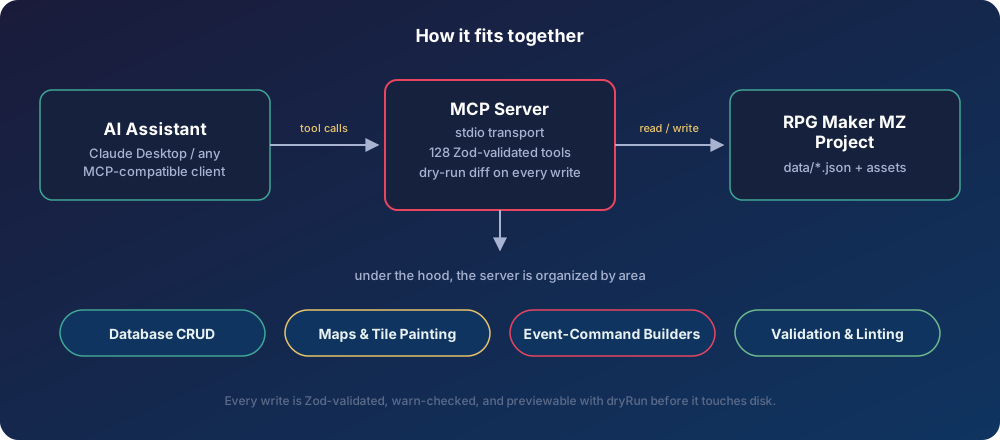
- **Database CRUD** — actors, classes (with learnings & param curves), skills (full-control + simplified damage/heal/buff/state helpers), items, weapons, armors, states, enemies, and troops. Only a `name` is required to create; everything else falls back to the editor's true "New X" template.
- **Maps & the map tree** — create/delete maps, batch-reparent/reorder/rename with a cycle guard, and edit map properties. New maps register in `MapInfos.json` exactly as the editor expects.
- **Tile painting (with automatic autotiling)** — `paint_tiles`/`fill_area` set tiles on any of the six map layers and recompute autotile shapes (and their neighbours') from same-kind adjacency, so a filled region borders itself correctly. `paint_blueprint` paints a whole area from ASCII rows + a legend in one call (multi-layer cells, catalog names, A4 wall faces derived automatically) and returns a passability overview. `place_object` stamps multi-tile B/C objects (houses, trees) and reports their passability footprint.
- **Semantic tile catalog** — `find_tile "grass"` → a paintable tile id. Built-in catalogs for every default tileset (Overworld, Outside, Inside, Dungeon, SF), sourced from RPG Maker's own English name sidecars. A bundled vision-bootstrap skill catalogs **custom** tilesets.
- **Passability & terrain** — read a tile's flags or a map cell's layered passability (`get_tile_flags`/`check_passability`), and **edit** passability/terrain-tag/behaviour flags (`set_tile_flags`).
- **Event-command builders** — high-level, read-only builders that emit the exact `EventCommand` sequences the editor writes (including tricky recursive branch blocks and continuation rows), landed on a page via `insert_event_commands`. Covers dialogue & flow, game-state changes, presentation/transitions, and scene processing.
- **Event & NPC ergonomics** — `create_npc` places a complete talking NPC in one call; `set_event_page` merges a page's graphic + behavior in place.
- **Asset awareness** — `list_assets` enumerates valid character/face/tileset/audio names so events never reference a missing file.
- **See and play the build** — `render_map` screenshots a map exactly as the engine draws it (whole map or a game-screen view) and `run_playtest` drives a scripted headless session (load a state, trigger events, read dialogue, pick choices, walk, auto-battle, screenshot), both reporting console errors and missing assets. Validators prove structure; these show what the player sees.
- **Correctness layer** — Zod-validated inputs, throw-by-default event validation (a structurally invalid write is refused, not saved-and-warned-about), a cross-file reference linter (`validate_references`), and a dry-run/diff preview on every write.
## How it fits together