[](https://github.com/hacs/integration)
# Lovelace Horizon Card
A [Home Assistant Dashboard Card](https://www.home-assistant.io/dashboards/) available through the [Home Assistant Community Store](https://hacs.xyz) and inspired by Google Weather (pre 2024 version).
Lovelace Horizon Card is a fork of the original [home-assistant-sun-card](https://github.com/AitorDB/home-assistant-sun-card) project by [@AitorDB](https://github.com/AitorDB) to continue the great work and distribute the responsibility of supporting and advancing the project among a team of people.
Consider joining us! Click [here to fork](https://github.com/rejuvenate/lovelace-horizon-card/fork)
## Introduction
The Horizon Card tracks the position of the Sun and the Moon over the horizon and shows the times of various Sun and Moon events, as well as their current azimuth and elevation, in a visually appealing and easy-to-read format.
| Light theme default look | Dark theme default look |
| :---------------------------------------------------------------------------------------------------: | :--------------------------------------------------------------------------------------------------: |
| 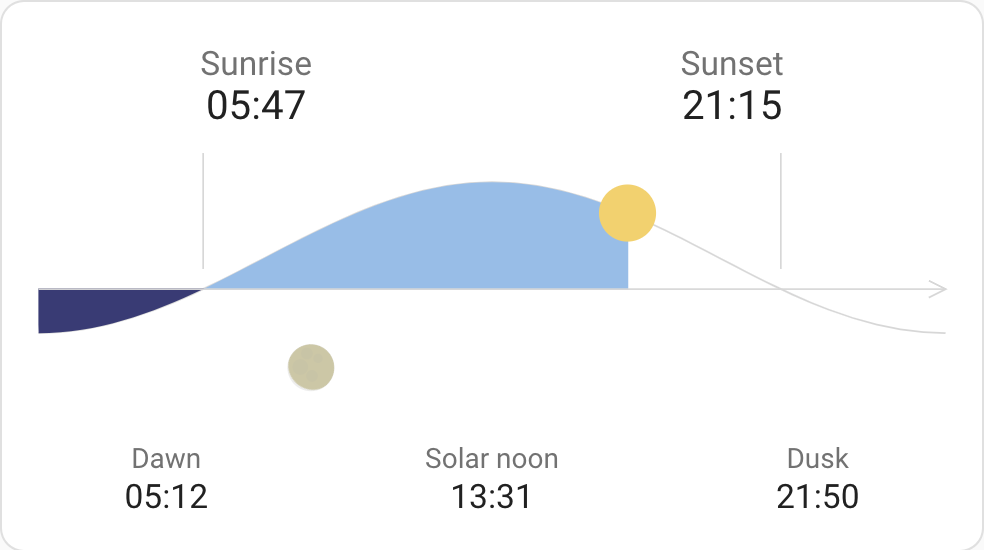 | 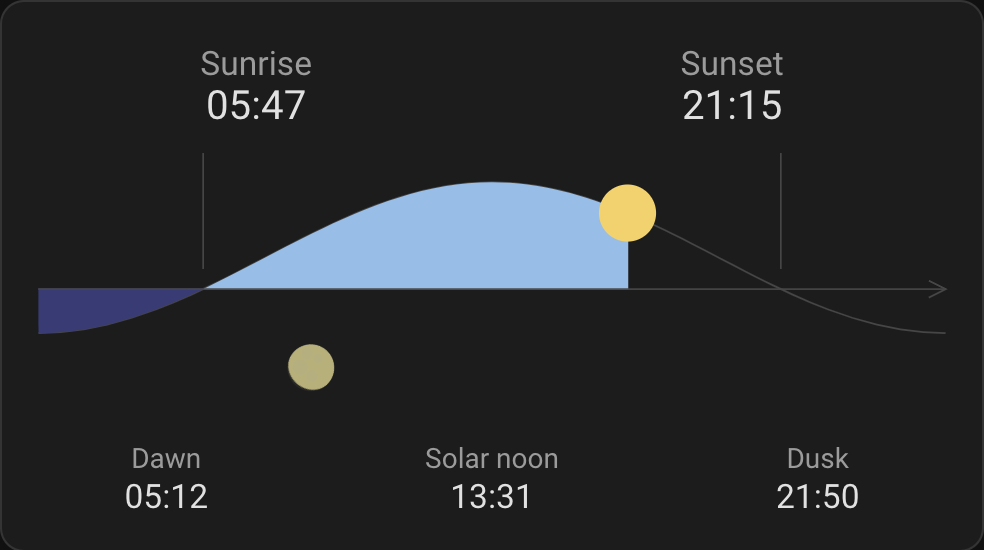 |
| Light theme full look | Dark theme full look |
| :------------------------------------------------------------------------------------------------: | :-----------------------------------------------------------------------------------------------: |
| 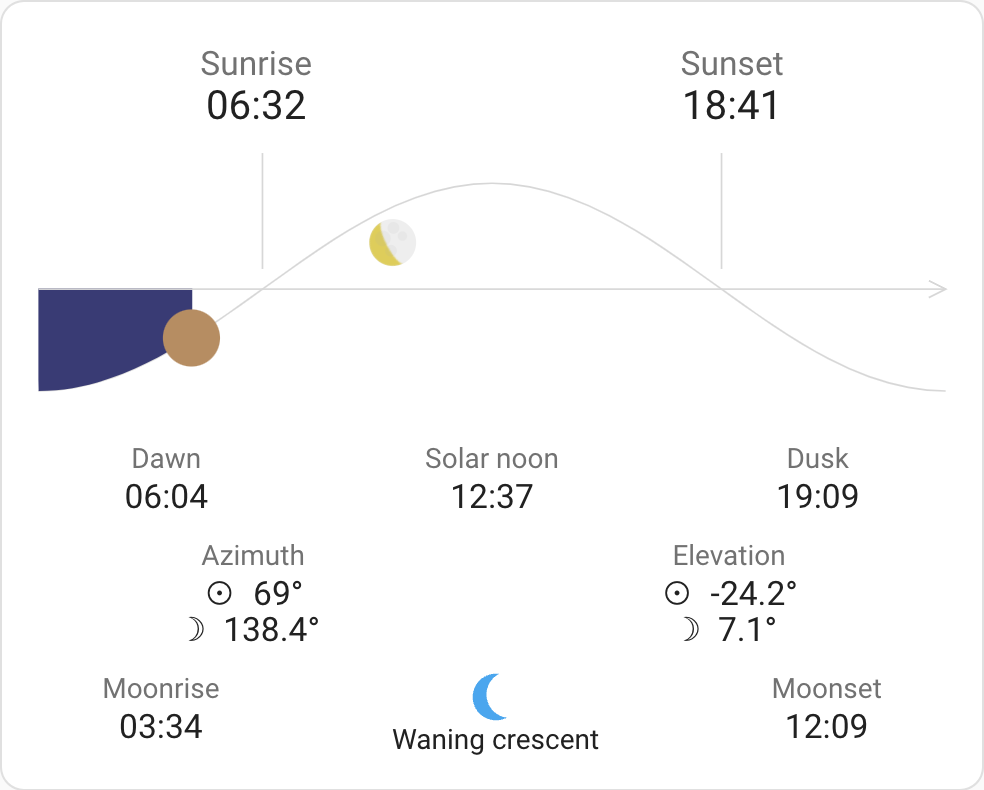 | 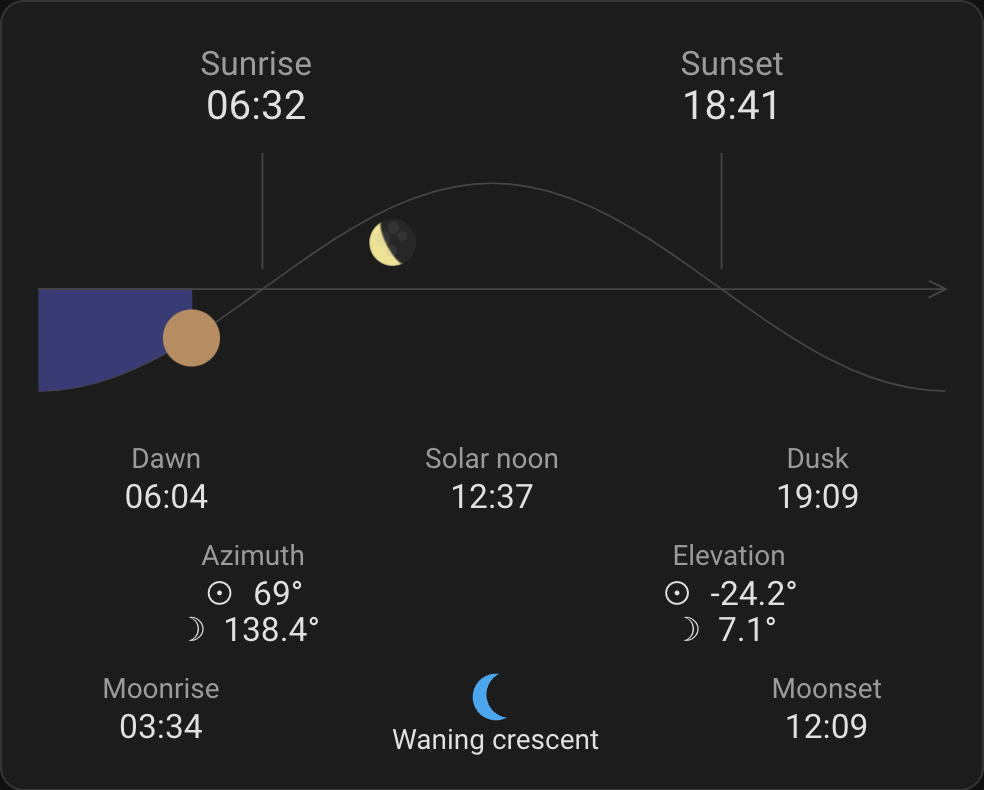 |
### How it works
The card will show the Sun and the Moon as they travel across the horizon from East to West. Both celestial bodies will be shown when above or below the horizon.
The current view shows a period of 24 hours centered around the local solar noon. This means that the Sun will continue to travel to the far end of the graph until it reaches solar midnight, which may be some time before or after midnight in your local time zone. Once solar midnight is reached, the view will reset and start showing the data for the next day.
In the Northern hemisphere, East is on the left, South is in the middle (when the Sun is in its highest position), and West is on the right. You are facing South and the Sun travels left-to-right.
In the Southern hemisphere, West is on the left, North is in the middle (when the Sun is in its highest position), and East is on the right. You are facing North and the Sun travels right-to-left. You can disable the direction flip by setting `southern_flip: false`. This will also affect the sunset/sunrise, dawn/dusk, and moonrise/moonset times shown on the card.
The elevation of the Sun follows a predetermined curve that approximates the actual elevation, while the elevation of the Moon affects its vertical position in the graph. The scale for the Moon elevation is logarithmic, so lower elevations will appear higher (above horizon) or lower (below horizon).
If showing the moon phase is enabled, the icon will be rotated to match the approximate view for your latitude. You can disable this by setting `moon_phase_rotation: 0` or set a different angle to match your location or preferences.
## Installation
Please ensure you have [HACS](https://hacs.xyz/) and the [Sun integration](https://www.home-assistant.io/integrations/sun/) enabled in your Home Assistant setup.
If you have My Home Assistant configured, simply click here:
[](https://my.home-assistant.io/redirect/hacs_repository/?owner=rejuvenate&repository=lovelace-horizon-card)
Otherwise follow these steps:
1. Make sure the [HACS](https://github.com/custom-components/hacs) component is installed and working.
1. Search for "Horizon Card" or `lovelace-horizon-card` in HACS and install the latest version.
### Manual Installation
Installation via HACS is recommended, but a manual setup is supported.
Show detailed instructions
1. Download the latest [lovelace-horizon-card.js](https://github.com/rejuvenate/lovelace-horizon-card/releases/latest/download/lovelace-horizon-card.js) file.
1. If necessary, create a `www` folder in your configuration folder (where `configuration.yaml` is found).
1. Copy the downloaded file into your `www` folder.
1. Add the resources, depending on whether you manage your Lovelace resources via the UI or YAML:
1. **UI:** Go to [](https://my.home-assistant.io/redirect/lovelace_resources) and click **Add resource** _(or navigate to Settings -> Dashboards -> Resources -> Add Resource)_ and enter:
**URL**: `/local/lovelace-horizon-card.js`
**Type**: JavaScript Module
1. **YAML:** Add the configuration to your `ui-lovelace.yaml`:
```yaml
resources:
- url: /local/lovelace-horizon-card.js
type: module
```
1. Restart Home Assistant.
## Setup
### Using UI
1. Access your dashboard, enter edit mode, and click on **Add card**. You should be able to find **Custom: Horizon Card** in the list.
2. The card opens in its visual editor, where every option is available as a form control (see [Visual editor](#visual-editor) below). You can switch to **Show code editor** for raw YAML at any time.
> Note: If **Custom: Horizon Card** doesn't appear, clear the cache and reload the page.
### Using YAML
1. Add a new card with `type: custom:horizon-card` to your cards list and include any additional configuration from the Config section below.
> Note: If you encounter an error like _Custom element doesn't exist_, clear the cache and reload the page.
## Configuration
### Visual editor
The card ships with a full visual editor. After adding it from the dashboard UI, every option below
is available as a form control, with the less common ones grouped into collapsible **Fields**,
**Advanced**, **Location and format** and **Debug** sections. Prefer YAML? Use **Show code editor** in
the same dialog; the two are interchangeable. The editor writes the same config keys documented
here, and only the options you actually change from their defaults, so it keeps your YAML tidy.
Latitude and longitude are set as a pair; clear both fields to go back to using the Home Assistant
location.
### General options
| Name | Accepted values | Description | Default |
| ------------------- | ------------------------------- | ---------------------------------------------------------------- | -------------------------------------------------------------- |
| title | _string_ | Card title | Doesn't display a title by default |
| icon | _string_ | Icon shown before the title in the header (any `mdi:` icon) | No icon |
| moon | _boolean_ | Shows the Moon together with the Sun | `true` |
| sun | _boolean_ | Shows the Sun in the graph | `true` |
| sunrise_sunset_lines | _boolean_ | Shows the vertical sunrise and sunset lines in the graph | `true` |
| graph | _boolean_ | Shows the horizon graph | `true` |
| refresh_period | _number_ | Refresh period between updates, in seconds (`0` disables refresh) | `20` |
| fields | See [below](#visibility-fields) | Fine-tuned control over visible fields | |
| southern_flip | _boolean_ | Draws the graph and accompanying times in the opposite direction | `true` in the Southern hemisphere, `false` in the Northern one |
| moon_phase_rotation | _number_ | Angle in degrees for rotating the moon phase icon | Determined from the latitude |
_Example: [here](#example-config)_
### Advanced options
In general, you should not need to set any of these as they override Home Assistant's settings or set debug options.
| Name | Accepted values | Description | Default |
| ------------- | -------------------------------------------- | ----------------------------------------------------------------------------------------------------------------------------- | ----------------------------------------------------------- |
| dark_mode | _boolean_ | Forces the card's dark colour palette on or off | Follows the Home Assistant theme |
| language | See [below](#languages) | Changes card language | Home Assistant profile language or English if not supported |
| time_format | `language`, `12`, `24` | Set to `12` or `24` to force 12/24 hour clock, `language` follow the language representation | `language` |
| number_format | `language`, `comma_decimal`, `decimal_comma` | Set to `comma_decimal` or `decimal_comma` to force 123.45/123,45 number format, `language` follow the language representation | `language` |
| latitude | _number_ | Latitude used for calculations | Home Assistant latitude |
| longitude | _number_ | Longitude used for calculations | Home Assistant longitude |
| elevation | _number_ | Elevation (above sea) used for calculations | Home Assistant elevation |
| time_zone | _string_ | Time zone (IANA) used for calculations and time presentation | Home Assistant time zone |
| now | _Date_ | Overrides the current moment shown on the card | Current time |
| debug_level | _number_ | Sets debug level, `0` (no debug), `1` and `2` | `0` |
_Example: [here](#example-config)_
### Visibility Fields
Supported settings inside the `fields` setting:
| Name | Accepted values | Description | Default |
| -------------- | --------------- | --------------------------- | -------------------- |
| sunrise | _boolean_ | Show sunrise time | `true` |
| sunset | _boolean_ | Show sunset time | `true` |
| dawn | _boolean_ | Show dawn time | `true` |
| noon | _boolean_ | Show solar noon time | `true` |
| dusk | _boolean_ | Show dusk time | `true` |
| azimuth | _boolean_ | Show Sun and Moon azimuth | `false` |
| sun_azimuth | _boolean_ | Show Sun azimuth | Value of `azimuth` |
| moon_azimuth | _boolean_ | Show Moon azimuth | Value of `azimuth` |
| elevation | _boolean_ | Show Sun and Moon elevation | `false` |
| sun_elevation | _boolean_ | Show Sun elevation | Value of `elevation` |
| moon_elevation | _boolean_ | Show Moon elevation | Value of `elevation` |
| moonrise | _boolean_ | Show moonrise time | `false` |
| moonset | _boolean_ | Show moonset time | `false` |
| moon_phase | _boolean_ | Show the Moon phase | `false` |
To hide **all** fields at once, set `fields: false` (instead of an object) — handy for a graph-only card.
_Example: [here](#example-config)_
### Languages
Supported options for the `language` setting:
- `bg` Bulgarian
- `ca` Catalan
- `cs` Czech
- `da` Danish
- `de` German
- `el` Greek
- `en` English
- `es` Spanish
- `et` Estonian
- `fa` Persian
- `fi` Finnish
- `fr` French
- `gl` Galician
- `he` Hebrew
- `hr` Croatian
- `hu` Hungarian
- `is` Icelandic
- `it` Italian
- `ja` Japanese
- `ko` Korean
- `lt` Lithuanian
- `lv` Latvian
- `ms` Malay
- `nb` Norwegian (Bokmål)
- `nl` Dutch
- `nn` Norwegian (Nynorsk)
- `pl` Polish
- `pt` Portuguese (Portugal)
- `pt-BR` Portuguese (Brazil)
- `ro` Romanian
- `rs` Serbian
- `ru` Russian
- `sk` Slovak
- `sl` Slovenian
- `sv` Swedish
- `tr` Turkish
- `uk` Ukrainian
- `ur` Urdu
- `zh-Hans` Chinese, simplified
- `zh-Hant` Chinese, traditional
> **Contributing a translation?** Just add a `.json` file under [`src/assets/localization/languages/`](src/assets/localization/languages/) — copy `en.json`, translate the values, and set `languageName`. The list above and the internal index are regenerated automatically when you open a pull request, so there is nothing else to run or edit.
_Example: [here](#example-config)_
### Example config
The following YAML configuration illustrates the use of all options.
```yaml
type: custom:horizon-card
title: Example Horizon Card
moon: true
sun: true
graph: true
refresh_period: 20
fields:
sunrise: true
sunset: true
dawn: true
noon: true
dusk: true
azimuth: true
sun_azimuth: true
moon_azimuth: true
elevation: true
sun_elevation: true
moon_elevation: true
moonrise: true
moonset: true
moon_phase: true
southern_flip: false
moon_phase_rotation: -10
language: en
time_format: language
number_format: language
latitude: 42.55
longitude: 23.25
elevation: 1500
time_zone: Europe/Sofia
now: 2023-07-06T00:30:05+0300
debug_level: 0
```
### Card background and embedding
The card renders inside Home Assistant's standard `ha-card`, so its background, border and shadow follow your theme, and the title uses the standard `card-header`. Restyle it with a theme, [Uix](https://github.com/Lint-Free-Technology/uix) or [card-mod](https://github.com/thomasloven/lovelace-card-mod). The examples use Uix (the recommended option, and a drop-in replacement for card-mod); for card-mod, replace the `uix:` key with `card_mod:`.
**Transparent card** (remove the background, border and shadow, for example to blend into a dashboard):
```yaml
type: custom:horizon-card
uix:
style: |
ha-card {
--ha-card-background: none;
--ha-card-box-shadow: none;
--ha-card-border-width: 0;
}
```
Set `graph: false` for a values-only card, or `fields: false` for a graph-only one.
For finer control (an edge-to-edge graph, recolouring individual elements or styling a single field), every drawn element has a stable CSS class and every colour is an `--hc-*` variable. The colours can be set straight in a Home Assistant theme, which is the fastest option since they apply through the normal CSS cascade, or targeted with Uix or card-mod. The names are in the card's source, and [`tests/manual/styling-and-embedding.yaml`](tests/manual/styling-and-embedding.yaml) has a worked example for each case.
**Theming**
Because the `--hc-*` colours are ordinary CSS variables, you can set them from a [Home Assistant theme](https://www.home-assistant.io/integrations/frontend/#defining-themes). Themes are a standard Home Assistant feature, not something specific to this card. List the variables without the leading `--` (Home Assistant adds it):
```yaml
# configuration.yaml (or a file under your themes/ folder)
frontend:
themes:
my_theme:
hc-daytime-past-color: "#7fc8a9"
hc-nighttime-past-color: "#2b2d42"
hc-sun-color: "#ff7043"
hc-moon-color: "#cfd8dc"
```
Select the theme as usual (in your user profile, or per dashboard). The colours are ordinary CSS variables resolved through the normal cascade, so a theme, a card-mod/Uix override on `ha-card`, or a per-element override all take effect (and update live) with no extra styling integration.
**Graph height**
By default the graph crops its height to fit the Sun and Moon, so there are no large empty margins above or below the arc, and the Moon stays fully visible. The frame follows the sky day by day, so the card height varies a little with the season. Two CSS variables control it (viewBox units, where the horizon sits at 84):
| Variable | Default | Description |
| -------------------------- | ------- | -------------------------------------------------------- |
| `--hc-graph-above-horizon` | `auto` | Fixed height above the horizon, or `auto` to fit content |
| `--hc-graph-below-horizon` | `auto` | Fixed height below the horizon, or `auto` to fit content |
Set a number to pin one or both sides (for example `--hc-graph-above-horizon: 55`). To turn the fitting off and keep the classic fixed frame, set `--hc-graph-above-horizon: 84` and `--hc-graph-below-horizon: 66`.
**Common recipes**
A few tweaks that come up often. Colours are `--hc-*` variables, so they work in a theme or in Uix/card-mod. Anything that is not a colour (text case, font size, line thickness) is an ordinary CSS property, so it needs Uix or card-mod rather than a theme.
Title-case the field names, so `sunrise` reads as `Sunrise`:
```yaml
uix:
style: |
.horizon-card-field-name {
text-transform: capitalize;
}
```
Make the text bigger. The card is sized in `em`, so one rule scales all of it:
```yaml
uix:
style: |
.horizon-card {
font-size: 1.2em;
}
```
Thicker graph lines, which helps on dark themes and low-contrast or e-ink screens. The width is in viewBox units (the graph is 550 wide) and the default is `1`:
```yaml
uix:
style: |
.horizon-card-sun-path,
.horizon-card-horizon-line,
.horizon-card-sunrise-line,
.horizon-card-sunset-line {
stroke-width: 2px;
}
```
Darken the shadowed side of the Moon. This is a colour, so a theme works too:
```yaml
# in a theme
hc-moon-shadow-color: "#111111"
```
```yaml
# or on a single card
uix:
style: |
ha-card {
--hc-moon-shadow-color: #111111;
}
```
Recolour the small Moon-phase icon shown with the fields:
```yaml
uix:
style: |
ha-card {
--hc-moon-phase-icon-color: #4fc3f7;
}
```
To hide the sunrise and sunset lines outright, use `sunrise_sunset_lines: false`. To do it in CSS instead, for example to switch them off only under one theme, set their colour to transparent:
```yaml
uix:
style: |
ha-card {
--hc-sunrise-line-color: transparent;
--hc-sunset-line-color: transparent;
}
```
Every drawn element has a stable class, all of them listed in [`tests/manual/styling-and-embedding.yaml`](tests/manual/styling-and-embedding.yaml), so you can target any part the same way.
## Development
### Prepare the environment
1. Install [`nvm`](https://github.com/nvm-sh/nvm) and run `nvm install && nvm use` to use the right Node.js version
2. Enable [corepack](https://github.com/nodejs/corepack). Run `corepack enable`
3. Install dependencies, run `yarn install`
### Build the project
Run `yarn build`
### Pre-releases (beta)
Stable releases are cut by merging to `main` with a `release:*` label. To ship a beta instead, run the **Build & Pre-release (beta)** workflow (Actions tab) from the branch you want, with a semver pre-release tag such as `v2.0.0-beta.1`. It publishes a pre-release, so only HACS users who enable **Show beta versions** on the repository are offered it, and it does not affect the next stable version number.