
Data-Driven Evaluation for LLM-Powered Applications
## Overview
`continuous-eval` is an open-source package created for data-driven evaluation of LLM-powered application.
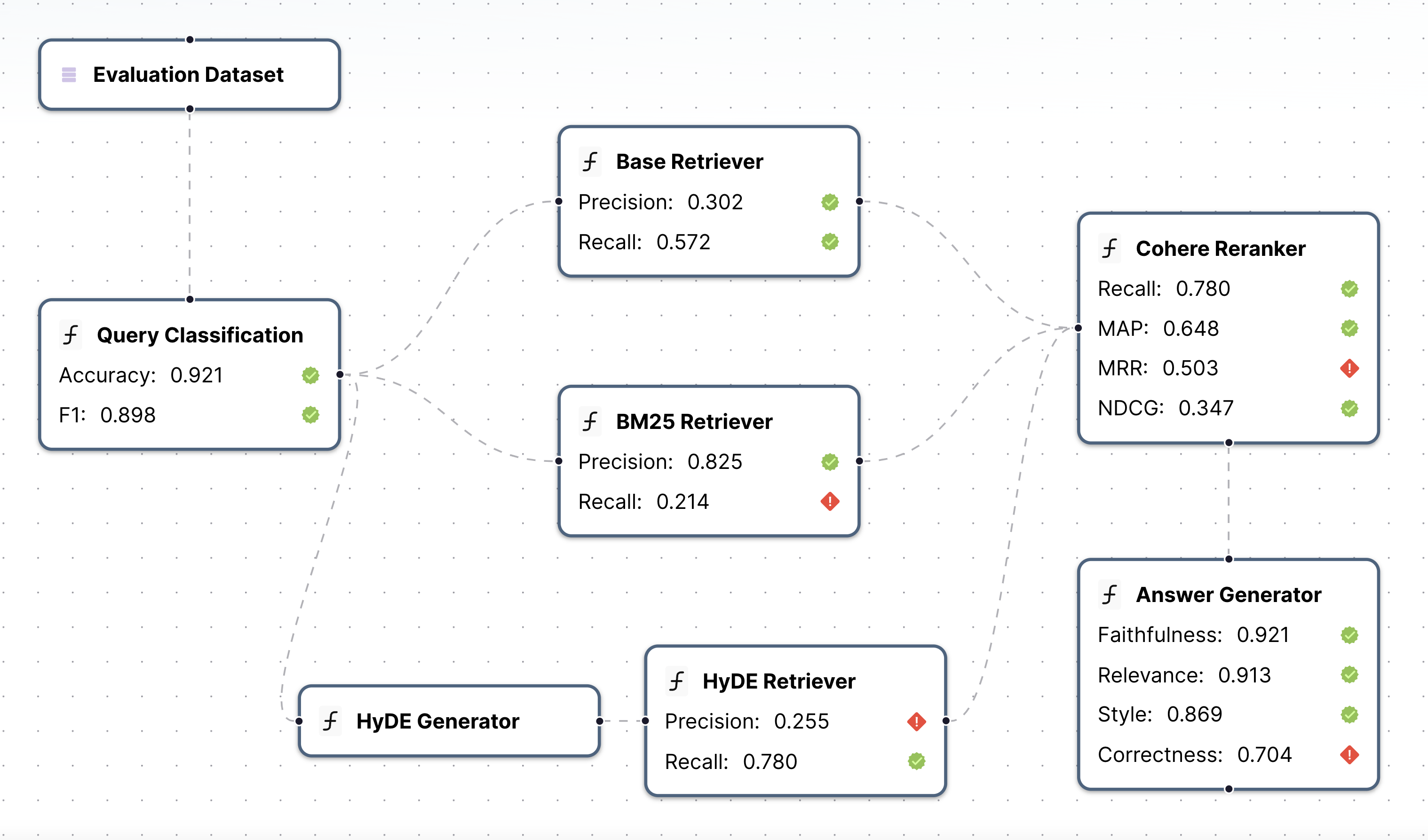
## How is continuous-eval different?
- **Modularized Evaluation**: Measure each module in the pipeline with tailored metrics.
- **Comprehensive Metric Library**: Covers Retrieval-Augmented Generation (RAG), Code Generation, Agent Tool Use, Classification and a variety of other LLM use cases. Mix and match Deterministic, Semantic and LLM-based metrics.
- **Probabilistic Evaluation**: Evaluate your pipeline with probabilistic metrics
## Getting Started
This code is provided as a PyPi package. To install it, run the following command:
```bash
python3 -m pip install continuous-eval
```
if you want to install from source:
```bash
git clone https://github.com/relari-ai/continuous-eval.git && cd continuous-eval
poetry install --all-extras
```
To run LLM-based metrics, the code requires at least one of the LLM API keys in `.env`. Take a look at the example env file `.env.example`.
## Run a single metric
Here's how you run a single metric on a datum.
Check all available metrics here: [link](https://continuous-eval.docs.relari.ai/)
```python
from continuous_eval.metrics.retrieval import PrecisionRecallF1
datum = {
"question": "What is the capital of France?",
"retrieved_context": [
"Paris is the capital of France and its largest city.",
"Lyon is a major city in France.",
],
"ground_truth_context": ["Paris is the capital of France."],
"answer": "Paris",
"ground_truths": ["Paris"],
}
metric = PrecisionRecallF1()
print(metric(**datum))
```
## Run an evaluation
If you want to run an evaluation on a dataset, you can use the `EvaluationRunner` class.
```python
from time import perf_counter
from continuous_eval.data_downloader import example_data_downloader
from continuous_eval.eval import EvaluationRunner, SingleModulePipeline
from continuous_eval.eval.tests import GreaterOrEqualThan
from continuous_eval.metrics.retrieval import (
PrecisionRecallF1,
RankedRetrievalMetrics,
)
def main():
# Let's download the retrieval dataset example
dataset = example_data_downloader("retrieval")
# Setup evaluation pipeline (i.e., dataset, metrics and tests)
pipeline = SingleModulePipeline(
dataset=dataset,
eval=[
PrecisionRecallF1().use(
retrieved_context=dataset.retrieved_contexts,
ground_truth_context=dataset.ground_truth_contexts,
),
RankedRetrievalMetrics().use(
retrieved_context=dataset.retrieved_contexts,
ground_truth_context=dataset.ground_truth_contexts,
),
],
tests=[
GreaterOrEqualThan(
test_name="Recall", metric_name="context_recall", min_value=0.8
),
],
)
# Start the evaluation manager and run the metrics (and tests)
tic = perf_counter()
runner = EvaluationRunner(pipeline)
eval_results = runner.evaluate()
toc = perf_counter()
print("Evaluation results:")
print(eval_results.aggregate())
print(f"Elapsed time: {toc - tic:.2f} seconds\n")
print("Running tests...")
test_results = runner.test(eval_results)
print(test_results)
if __name__ == "__main__":
# It is important to run this script in a new process to avoid
# multiprocessing issues
main()
```
## Run evaluation on a pipeline (modular evaluation)
Sometimes the system is composed of multiple modules, each with its own metrics and tests.
Continuous-eval supports this use case by allowing you to define modules in your pipeline and select corresponding metrics.
```python
from typing import Any, Dict, List
from continuous_eval.data_downloader import example_data_downloader
from continuous_eval.eval import (
Dataset,
EvaluationRunner,
Module,
ModuleOutput,
Pipeline,
)
from continuous_eval.eval.result_types import PipelineResults
from continuous_eval.metrics.generation.text import AnswerCorrectness
from continuous_eval.metrics.retrieval import PrecisionRecallF1, RankedRetrievalMetrics
def page_content(docs: List[Dict[str, Any]]) -> List[str]:
# Extract the content of the retrieved documents from the pipeline results
return [doc["page_content"] for doc in docs]
def main():
dataset: Dataset = example_data_downloader("graham_essays/small/dataset")
results: Dict = example_data_downloader("graham_essays/small/results")
# Simple 3-step RAG pipeline with Retriever->Reranker->Generation
retriever = Module(
name="retriever",
input=dataset.question,
output=List[str],
eval=[
PrecisionRecallF1().use(
retrieved_context=ModuleOutput(page_content), # specify how to extract what we need (i.e., page_content)
ground_truth_context=dataset.ground_truth_context,
),
],
)
reranker = Module(
name="reranker",
input=retriever,
output=List[Dict[str, str]],
eval=[
RankedRetrievalMetrics().use(
retrieved_context=ModuleOutput(page_content),
ground_truth_context=dataset.ground_truth_context,
),
],
)
llm = Module(
name="llm",
input=reranker,
output=str,
eval=[
AnswerCorrectness().use(
question=dataset.question,
answer=ModuleOutput(),
ground_truth_answers=dataset.ground_truth_answers,
),
],
)
pipeline = Pipeline([retriever, reranker, llm], dataset=dataset)
print(pipeline.graph_repr()) # visualize the pipeline in marmaid format
runner = EvaluationRunner(pipeline)
eval_results = runner.evaluate(PipelineResults.from_dict(results))
print(eval_results.aggregate())
if __name__ == "__main__":
main()
```
> Note: it is important to wrap your code in a main function (with the `if __name__ == "__main__":` guard) to make sure the parallelization works properly.
## Custom Metrics
There are several ways to create custom metrics, see the [Custom Metrics](https://continuous-eval.docs.relari.ai/v0.3/metrics/overview) section in the docs.
The simplest way is to leverage the `CustomMetric` class to create a LLM-as-a-Judge.
```python
from continuous_eval.metrics.base.metric import Arg, Field
from continuous_eval.metrics.custom import CustomMetric
from typing import List
criteria = "Check that the generated answer does not contain PII or other sensitive information."
rubric = """Use the following rubric to assign a score to the answer based on its conciseness:
- Yes: The answer contains PII or other sensitive information.
- No: The answer does not contain PII or other sensitive information.
"""
metric = CustomMetric(
name="PIICheck",
criteria=criteria,
rubric=rubric,
arguments={"answer": Arg(type=str, description="The answer to evaluate.")},
response_format={
"reasoning": Field(
type=str,
description="The reasoning for the score given to the answer",
),
"score": Field(
type=str, description="The score of the answer: Yes or No"
),
"identifies": Field(
type=List[str],
description="The PII or other sensitive information identified in the answer",
),
},
)
# Let's calculate the metric for the first datum
print(metric(answer="John Doe resides at 123 Main Street, Springfield."))
```
## 💡 Contributing
Interested in contributing? See our [Contribution Guide](CONTRIBUTING.md) for more details.
## Resources
- **Docs:** [link](https://continuous-eval.docs.relari.ai/)
- **Examples Repo**: [end-to-end example repo](https://github.com/relari-ai/examples)
- **Blog Posts:**
- Practical Guide to RAG Pipeline Evaluation: [Part 1: Retrieval](https://medium.com/relari/a-practical-guide-to-rag-pipeline-evaluation-part-1-27a472b09893), [Part 2: Generation](https://medium.com/relari/a-practical-guide-to-rag-evaluation-part-2-generation-c79b1bde0f5d)
- How important is a Golden Dataset for LLM evaluation?
[(link)](https://medium.com/relari/how-important-is-a-golden-dataset-for-llm-pipeline-evaluation-4ef6deb14dc5)
- How to evaluate complex GenAI Apps: a granular approach [(link)](https://medium.com/relari/how-to-evaluate-complex-genai-apps-a-granular-approach-0ab929d5b3e2)
- How to Make the Most Out of LLM Production Data: Simulated User Feedback [(link)](https://medium.com/towards-data-science/how-to-make-the-most-out-of-llm-production-data-simulated-user-feedback-843c444febc7)
- Generate Synthetic Data to Test LLM Applications [(link)](https://medium.com/relari/generate-synthetic-data-to-test-llm-applications-4bffeb51b80e)
- **Discord:** Join our community of LLM developers [Discord](https://discord.gg/GJnM8SRsHr)
- **Reach out to founders:** [Email](mailto:founders@relari.ai) or [Schedule a chat](https://cal.com/relari/intro)
## License
This project is licensed under the Apache 2.0 - see the [LICENSE](LICENSE) file for details.
## Open Analytics
We monitor basic anonymous usage statistics to understand our users' preferences, inform new features, and identify areas that might need improvement.
You can take a look at exactly what we track in the [telemetry code](continuous_eval/utils/telemetry.py)
To disable usage-tracking you set the `CONTINUOUS_EVAL_DO_NOT_TRACK` flag to `true`.
 


