---
title: Contributing
---
# Contributing to React Router
Thanks for contributing, you rock!
When it comes to open source, there are many different kinds of contributions that can be made, all of which are valuable. Here are a few guidelines that should help you as you prepare your contribution.
## Open Governance Model
Before going any further, please read the Open Governance [blog post](https://remix.run/blog/rr-governance) and [document](https://github.com/remix-run/react-router/blob/main/GOVERNANCE.md) for information on how we handle bugs/issues/feature proposals in React Router.
## Setup
Before you can contribute to the codebase, you will need to fork the repo. This will look a bit different depending on what type of contribution you are making:
- All new features, bug-fixes, or **anything that touches `react-router` code** should be branched off of and merged into the `dev` branch
- Changes that only touch documentation can be branched off of and merged into the `main` branch
The following steps will get you set up to contribute changes to this repo:
1. Fork the repo (click the Fork button at the top right of [this page](https://github.com/remix-run/react-router))
2. Clone your fork locally
```bash
# in a terminal, cd to parent directory where you want your clone to be, then
git clone https://github.com//react-router.git
cd react-router
# if you are making *any* code changes, make sure to checkout the dev branch
git checkout dev
```
3. Install dependencies and build. React Router uses [pnpm](https://pnpm.io), so you should too. If you install using `npm`, unnecessary `package-lock.json` files will be generated.
## Think You Found a Bug?
Please conform to the issue template and provide a **minimal** and **runnable** reproduction. Best is a pull request with a [failing test](https://github.com/remix-run/react-router/blob/dev/integration/bug-report-test.ts). Next best is a link to [StackBlitz](https://reactrouter.com/new), CodeSandbox, or GitHub repository that illustrates the bug.
## Issue Not Getting Attention?
If you need a bug fixed and nobody is fixing it, your best bet is to provide a fix for it and make a [pull request](https://help.github.com/en/github/collaborating-with-issues-and-pull-requests/creating-a-pull-request). Open source code belongs to all of us, and it's all of our responsibility to push it forward.
## Proposing New or Changed API?
⚠️ _Please do not start with a PR for a new feature._
New features need to go through the process outlined in the [Open Governance Model](https://github.com/remix-run/react-router/blob/main/GOVERNANCE.md#new-feature-process) and can be started by opening a [Proposal Discussion](https://github.com/remix-run/react-router/discussions/new?category=proposals) on GitHub. Please provide thoughtful comments and some sample code that show what you'd like to do with React Router in your app. It helps the conversation if you can show us how you're limited by the current API first before jumping to a conclusion about what needs to be changed and/or added.
We have learned by experience that small APIs are usually better, so we may be a little reluctant to add something new unless there's an obvious limitation with the current API. That being said, we are always anxious to hear about cases that we just haven't considered before, so please don't be shy! :)
## Adding an Example?
Examples can be added directly to the `main` branch. Create a branch off of your local clone of `main`. Once you've finished, create a pull request and outline your example.
## Making a Pull Request?
Pull requests need only the approval of two or more collaborators to be merged; when the PR author is a collaborator, that counts as one.
When creating the PR in GitHub, make sure that you set the base to the correct branch. If you are submitting a PR that touches any code, this should be the `dev` branch. You set the base in GitHub when authoring the PR with the dropdown below the "Compare changes" heading: 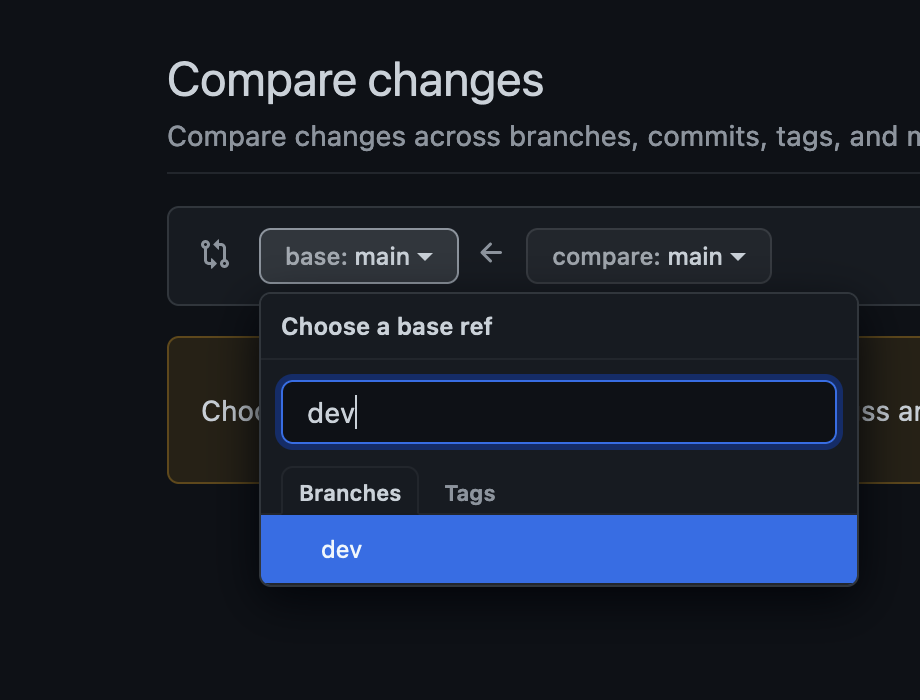 ### Tests
All commits that fix bugs or add features need one or more tests.
Do not merge code without tests!
### Docs + Examples
All commits that change or add to the API must be done in a pull request that also updates all relevant examples and docs.
Documentation is located in the `docs` directory. Once changes make their way into the `main` branch, they will automatically be published to the docs site.
If you want to preview how the changes will look on the docs site, clone the [`react-router-website` repository](https://github.com/remix-run/react-router-website) and follow the instructions in `README.md` to view your changes locally.
## Development
### Packages
React Router uses a monorepo to host code for multiple packages. These packages live in the `packages` directory.
We use [pnpm workspaces](https://pnpm.io/workspaces/) to manage installation of dependencies and running various scripts. To get everything installed, make sure you have [pnpm installed](https://pnpm.io/installation), and then run `pnpm install` from the repo root.
### Building
Calling `pnpm build` from the root directory will run the build, which should take only a few seconds. It's important to build all the packages together because the individual packages have dependencies on one another.
### Testing
Before running the tests, you need to run a build. After you build, running `pnpm test` from the root directory will run **every** package's tests. If you want to run tests for a specific package, use `pnpm test packages//`:
```bash
# Test all packages
pnpm test
# Test only @react-router/dev
pnpm test packages/react-router-dev/
```
## Repository Branching
This repo maintains separate branches for different purposes. They will look something like this:
```
- main > the most recent release and current docs
- dev > code under active development between stable releases
- v6 > the most recent code for a specific major release
```
There may be other branches for various features and experimentation, but all of the magic happens from these branches.
## Releases
Please refer to [DEVELOPMENT.md](https://github.com/remix-run/react-router/blob/main/DEVELOPMENT.md) for an outline of the release process.
### Tests
All commits that fix bugs or add features need one or more tests.
Do not merge code without tests!
### Docs + Examples
All commits that change or add to the API must be done in a pull request that also updates all relevant examples and docs.
Documentation is located in the `docs` directory. Once changes make their way into the `main` branch, they will automatically be published to the docs site.
If you want to preview how the changes will look on the docs site, clone the [`react-router-website` repository](https://github.com/remix-run/react-router-website) and follow the instructions in `README.md` to view your changes locally.
## Development
### Packages
React Router uses a monorepo to host code for multiple packages. These packages live in the `packages` directory.
We use [pnpm workspaces](https://pnpm.io/workspaces/) to manage installation of dependencies and running various scripts. To get everything installed, make sure you have [pnpm installed](https://pnpm.io/installation), and then run `pnpm install` from the repo root.
### Building
Calling `pnpm build` from the root directory will run the build, which should take only a few seconds. It's important to build all the packages together because the individual packages have dependencies on one another.
### Testing
Before running the tests, you need to run a build. After you build, running `pnpm test` from the root directory will run **every** package's tests. If you want to run tests for a specific package, use `pnpm test packages//`:
```bash
# Test all packages
pnpm test
# Test only @react-router/dev
pnpm test packages/react-router-dev/
```
## Repository Branching
This repo maintains separate branches for different purposes. They will look something like this:
```
- main > the most recent release and current docs
- dev > code under active development between stable releases
- v6 > the most recent code for a specific major release
```
There may be other branches for various features and experimentation, but all of the magic happens from these branches.
## Releases
Please refer to [DEVELOPMENT.md](https://github.com/remix-run/react-router/blob/main/DEVELOPMENT.md) for an outline of the release process.