---
Renegade is an on-chain dark pool, an MPC-based DEX for anonymous crosses at midpoint prices.
## Renegade Relayers
This repository contains the core networking and cryptographic logic for each
relayer node in the Renegade p2p network.
At a high level, the dark pool works as follows: Each relayer maintains some
set of plaintext orders known only to the relayer. For example, an OTC desk
could run a relayer in-house, whereby the relayer would manage all trading
intentions for that desk. In general, a relayer has no ability to modify an
order; relayers simply view plaintext orders.
Relayers gossip about encrypted order state, and perform 2-party
[MPCs](https://docs.renegade.fi/core-concepts/mpc-explainer) to run CLOB
matching engine execution. The output of the MPC does not consist of the
matched token outputs directly; rather, relayers collaboratively prove a
particular NP statement, `VALID MATCH MPC`. Defined precisely in the Renegade
[whitepaper](https://whitepaper.renegade.fi), this statement claims that each
party does indeed know valid input orders and balances, that the matching
engine was executed correctly, and that the matched token outputs were
correctly encrypted under each relayer's public key.
By proving `VALID MATCH MPC` inside of a MPC, Renegade maintains complete
privacy, both pre- and post-trade. For full cryptographic details, see the
[documentation](https://docs.renegade.fi).
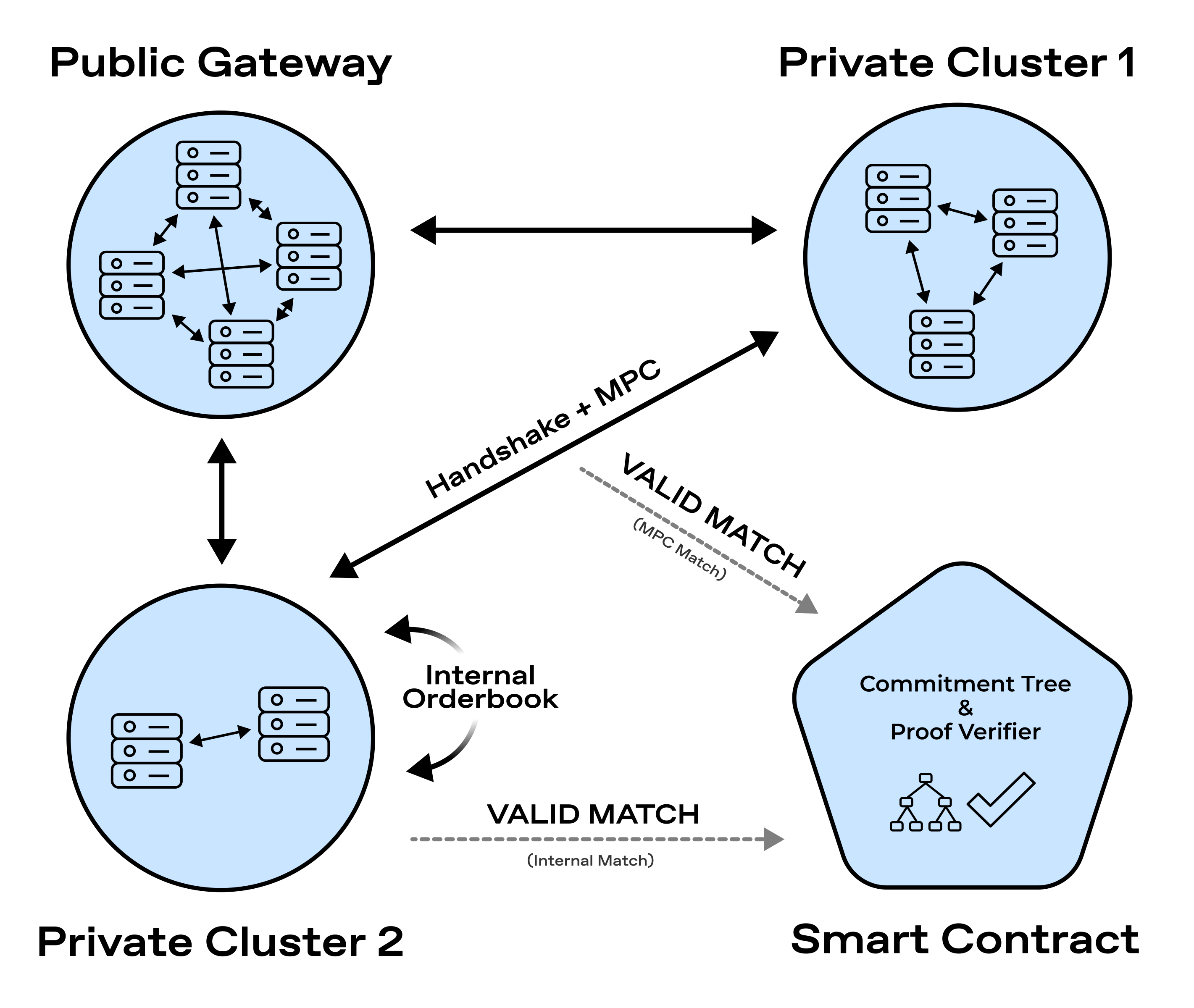
Relayers are organized into fail-stop fault-tolerant clusters that replicate
and horizontally scale matching engine execution for increased trading
throughput.
Note that even though intra-cluster logic depends on fail-stop assumptions, the
inter-cluster semantics operate under a Byzantine fail-arbitrary assumption.
See the below diagram for a visualization of the network architecture,
depicting both intra-cluster replication and inter-cluster MPCs.
## Relayer Development Setup
To run a local instance of the relayer, simply run the project in the top-level
directory and specify a port for inbound access:
```
cargo run -- -p 8000
```
To view a list of configuration options available to the CLI:
```
cargo run -- --help
```
To run the unit tests for the workspace, run
```
cargo test --workspace -- --skip integration
```
Finally, in order to run integration tests for any of the crates in the
workspace, first run
```
./bin/setup.zsh
```
to setup the `cargo integrate` command. Then, run `cargo integrate
` for the desired crate. For example, to run the integration tests
for the `circuits` crate, which holds ZK and MPC circuit definitions, run:
```
cargo integrate circuits
```