Usage
=====
This document describes how to use [actionlint](..).
## `actionlint` command
With no argument, actionlint finds all workflow files in the current repository and checks them.
```sh
actionlint
```
When paths to YAML workflow files are given as arguments, actionlint checks them.
```sh
actionlint path/to/workflow1.yaml path/to/workflow2.yaml
```
When `-` argument is given, actionlint reads inputs from stdin and checks it as workflow source.
```sh
cat path/to/workflow.yaml | actionlint -
```
To know all flags and options, see an output of `actionlint -h` or [the online command manual][cmd-manual].
### Ignore some errors
To ignore some errors, `-ignore` option offers to filter errors by messages using regular expression. The option is repeatable.
The regular expression syntax is the same as [RE2][re2].
```sh
actionlint -ignore 'label ".+" is unknown' -ignore '".+" is potentially untrusted'
```
`-shellcheck` and `-pyflakes` specifies file paths of executables. Setting empty string to them disables `shellcheck` and
`pyflakes` rules. As a bonus, disabling them makes actionlint much faster Since these external linter integrations spawn many
processes.
```sh
actionlint -shellcheck= -pyflakes=
```
### Format error messages
`-format` option can flexibly format error messages with [Go template syntax][go-template].
Before explaining the formatting details, let's see some examples.
#### Example: Serialized into JSON
```sh
actionlint -format '{{json .}}'
```
Output:
```
[{"message":"unexpected key \"branch\" for ...
```
#### Example: Markdown
````sh
actionlint -format '{{range $err := .}}### Error at line {{$err.Line}}, col {{$err.Column}} of `{{$err.Filepath}}`\n\n{{$err.Message}}\n\n```\n{{$err.Snippet}}\n```\n\n{{end}}'
````
Output:
````markdown
### Error at line 21, col 20 of `test.yaml`
property "platform" is not defined in object type {os: string}
```
key: ${{ matrix.platform }}-node-${{ hashFiles('**/package-lock.json') }}
^~~~~~~~~~~~~~~
```
````
#### Example: Serialized in [JSON Lines][jsonl]
```sh
actionlint -format '{{range $err := .}}{{json $err}}{{end}}'
```
Output:
```
{"message":"unexpected key \"branch\" for ...
{"message":"character '\\' is invalid for branch ...
{"message":"label \"linux-latest\" is unknown. ...
```
#### Example: [Error annotation][ga-annotate-error] on GitHub Actions
````sh
actionlint -format '{{range $err := .}}::error file={{$err.Filepath}},line={{$err.Line}},col={{$err.Column}}::{{$err.Message}}%0A```%0A{{replace $err.Snippet "\\n" "%0A"}}%0A```\n{{end}}' -ignore 'SC2016:'
````
Output:
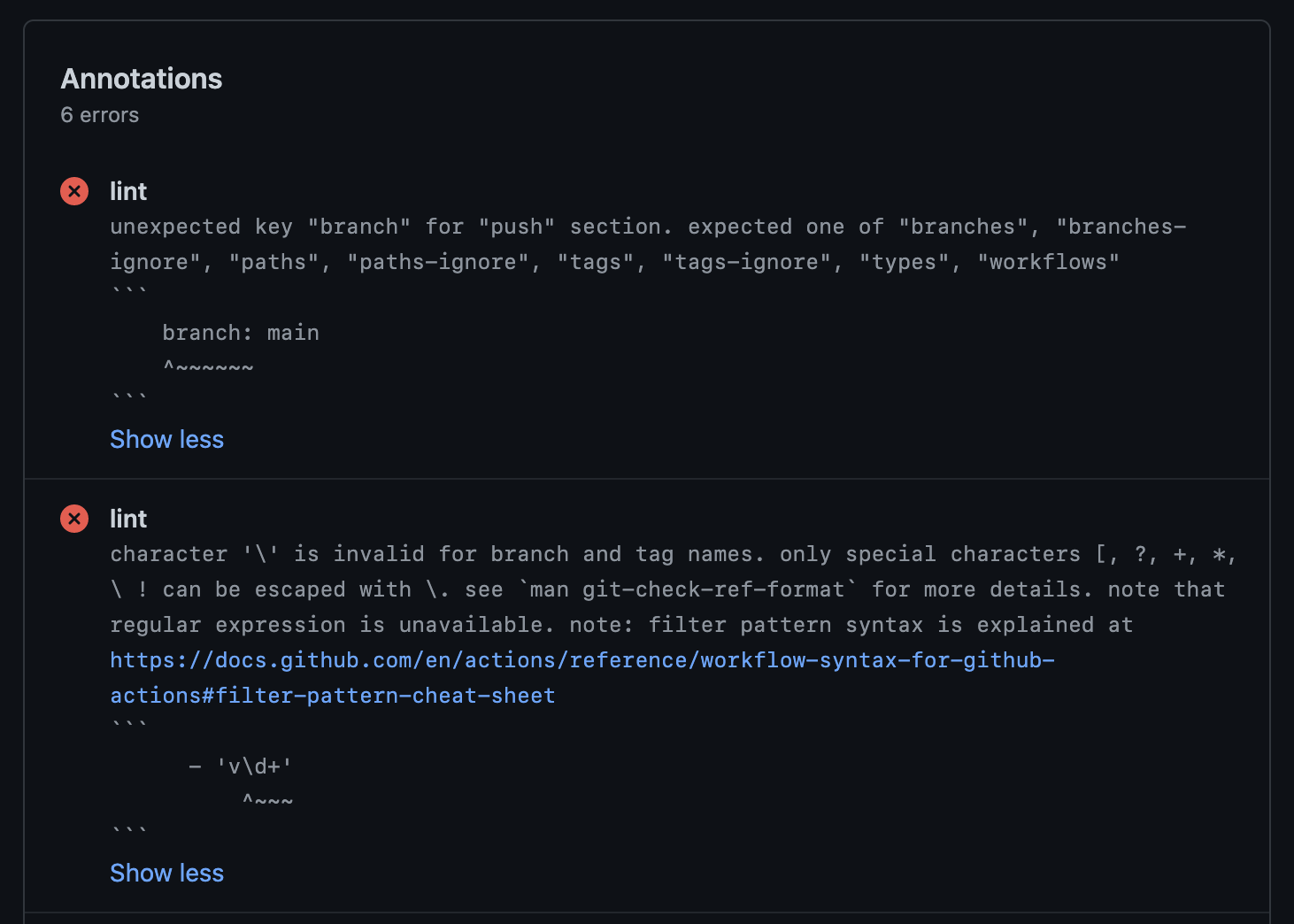 To include newlines in the annotation body, it prints `%0A`. (ref [actions/toolkit#193](https://github.com/actions/toolkit/issues/193)).
And it suppresses `SC2016` shellcheck rule error since it complains about the template argument.
Basically it is more recommended to use [Problem Matchers](#problem-matchers) or reviewdog as explained in
['Tools integration' section](#tools-integ) below.
#### Example: [SARIF format][sarif]
[The Static Analysis Results Interchange Format (SARIF)][sarif] is a standardized format for the results of static analysis tools.
Since this practical format is much more complex than the above examples, the template is not written here. Please read
[the template file in test data](../testdata/format/sarif_template.txt).
Outputs are also too large to be written here. Please read [the output example in test data](../testdata/format/test.sarif).
#### Formatting syntax
In [Go template syntax][go-template], `.` within `{{ }}` means the target object. Here, the target object is a sequence of error
objects.
The sequence can be traversed with `range` action, which is like `for ... = range ... {}` in Go.
```
{{range $err := .}} this part iterates error objects with the iteration variable $err {{end}}
```
The error object has the following fields.
| Field | Description | Example |
|----------------------|-------------------------------------------------------|------------------------------------------------------------------|
| `{{$err.Message}}` | Body of error message | `property "platform" is not defined in object type {os: string}` |
| `{{$err.Snippet}}` | Code snippet to indicate error position | ` node_version: 16.x\n ^~~~~~~~~~~~~` |
| `{{$err.Kind}}` | Name of rule the error belongs to | `expression` |
| `{{$err.Filepath}}` | Canonical relative file path of the error position | `.github/workflows/ci.yaml` |
| `{{$err.Line}}` | Line number of the error position (1-based) | `9` |
| `{{$err.Column}}` | Column number of the error's start position (1-based) | `11` |
| `{{$err.EndColumn}}` | Column number of the error's end position (1-based) | `23` |
Functions called in `{{ }}` placeholder are template actions. There are many actions defined by Go standard library. In addition,
there are a few custom actions defined by actionlint. Most useful action would be `json` as we already used it in the above JSON
example. List of all custom actions are as follows:
| Action | Description | Example usage |
|------------------|----------------------------------------------------------------------------------|-------------------------------------------|
| `json x` | Serialize `x` as JSON string followed by newline character | `{{json $err}}` |
| `replace x y z` | Replace string `y` with `z` in `x` | `{{replace $err.Filepath "\\" "/"}}` |
| `toPascalCase x` | Convert `x` into PascalCase (e.g. 'foo-bar' to 'FooBar') | `{{toPascalCase $err.Kind}}` |
| `allKinds` | Return an array of kind objects. The kind object is explained in the below table | `{{range $ = allKinds}}{{$.Name}}{{end}}` |
| `getVersion` | Return the version of actionlint as string | `{{getVersion}}` |
The kind object returned from `allKinds` action has the following fields.
| Field | Description | Example |
|-------------------------|-------------------------------|---------------------------------------------|
| `{{$kind.Name}}` | Name of the kind | `syntax-check` |
| `{{$kind.Description}}` | Short description of the kind | `Checks for GitHub Actions workflow syntax` |
For example, the following simple iteration body
```
line is {{$err.Line}}, col is {{$err.Column}}, message is {{$err.Message | printf "%q"}}
```
will produce output like below.
```
line is 21, col is 20, message is "property \"platform\" is not defined in object type {os: string}"
```
In `{{ }}` placeholder, input can be piped and action can be used to transform texts. In above example, the message is piped with
`|` and transformed with `printf "%q"`.
Note that special characters escaped with backslash like `\n` in the format string are automatically unescaped.
### Exit status
`actionlint` command exits with one of the following exit statuses.
| Status | Description |
|--------|---------------------------------------------------------|
| `0` | The command ran successfully and no problem was found |
| `1` | The command ran successfully and some problem was found |
| `2` | The command failed due to invalid command line option |
| `3` | The command failed due to some fatal error |
## Use actionlint on GitHub Actions
Preparing `actionlint` executable with the download script is recommended. See [the instruction](install.md#download-script) for
more details. It sets an absolute file path of downloaded executable to `executable` output in order to use the executable in the
following steps easily.
Here is an example of simple workflow to run actionlint on GitHub Actions. Please ensure `shell: bash` since the default
shell for Windows runners is `pwsh`.
```yaml
name: Lint GitHub Actions workflows
on: [push, pull_request]
jobs:
actionlint:
runs-on: ubuntu-latest
steps:
- uses: actions/checkout@v4
- name: Download actionlint
id: get_actionlint
run: bash <(curl https://raw.githubusercontent.com/rhysd/actionlint/main/scripts/download-actionlint.bash)
shell: bash
- name: Check workflow files
run: ${{ steps.get_actionlint.outputs.executable }} -color
shell: bash
```
Or simply download the executable and run it in one step:
```yaml
- name: Check workflow files
run: |
bash <(curl https://raw.githubusercontent.com/rhysd/actionlint/main/scripts/download-actionlint.bash)
./actionlint -color
shell: bash
```
The download script allows to specify the version of actionlint and the download directory. Try to give `--help` argument
to the script for more usage details.
If you want to enable [shellcheck integration](checks.md#check-shellcheck-integ), install `shellcheck` command. Note that
shellcheck is [pre-installed on Ubuntu worker][preinstall-ubuntu].
If you want to [annotate errors][ga-annotate-error] from actionlint on GitHub, consider using
[Problem Matchers](#problem-matchers).
If you prefer Docker image to running a downloaded executable, using [actionlint Docker image](#docker) is another option.
```yaml
name: Lint GitHub Actions workflows
on: [push, pull_request]
jobs:
actionlint:
runs-on: ubuntu-latest
steps:
- uses: actions/checkout@v4
- name: Check workflow files
uses: docker://rhysd/actionlint:latest
with:
args: -color
```
## Online playground
Thanks to WebAssembly, actionlint playground is available on your browser. It never sends any data to outside your browser.
https://rhysd.github.io/actionlint/
Paste your workflow content to the code editor at left pane. It automatically shows the results at right pane. When editing
the workflow content in the code editor, the results will be updated on the fly. Clicking an error message in the results
table moves a cursor to position of the error in the code editor.
## [Docker][docker] image
[Official Docker image][docker-image] is available. The image contains `actionlint` executable and all dependencies (shellcheck
and pyflakes).
Available tags are:
- `actionlint:latest`: Latest stable version of actionlint. This image is recommended.
- `actionlint:{version}`: Specific version of actionlint. (e.g. `actionlint:1.7.10`)
Just run the image with `docker run`:
```sh
docker run --rm rhysd/actionlint:latest -version
```
To check all workflows in your repository, mount your repository's root directory as a volume and run actionlint in the mounted
directory. When you are at a root directory of your repository:
```sh
docker run --rm -v $(pwd):/repo --workdir /repo rhysd/actionlint:latest -color
```
To check a file with actionlint in a Docker container, pass the file content via stdin and use `-` argument:
```sh
cat /path/to/workflow.yml | docker run --rm -i rhysd/actionlint:latest -color -
```
Or mount the workflows directory and pass the paths as arguments:
```sh
docker run --rm -v /path/to/workflows:/workflows rhysd/actionlint:latest -color /workflows/ci.yml
```
## Using actionlint from Go program
Go APIs are available. See [the Go API document](api.md) for more details.
## Tools integration
### reviewdog
[reviewdog][] is an automated review tool for various code hosting services. It officially [supports actionlint][reviewdog-actionlint].
You can check errors from actionlint easily with inline review comments at pull request review.
The usage is easy. Run `reviewdog/action-actionlint` action in your workflow as follows.
```yaml
name: reviewdog
on: [pull_request]
jobs:
actionlint:
runs-on: ubuntu-latest
steps:
- uses: actions/checkout@v4
- uses: reviewdog/action-actionlint@v1
```
### Problem Matchers
[Problem Matchers][problem-matchers] is a feature to extract GitHub Actions annotations from terminal outputs of linters.
Copy [actionlint-matcher.json][actionlint-matcher] to `.github/actionlint-matcher.json` in your repository.
Then enable the matcher using `add-matcher` command before running `actionlint` in the step of your workflow.
```yaml
- name: Check workflow files
run: |
echo "::add-matcher::.github/actionlint-matcher.json"
bash <(curl https://raw.githubusercontent.com/rhysd/actionlint/main/scripts/download-actionlint.bash)
./actionlint -color
shell: bash
```
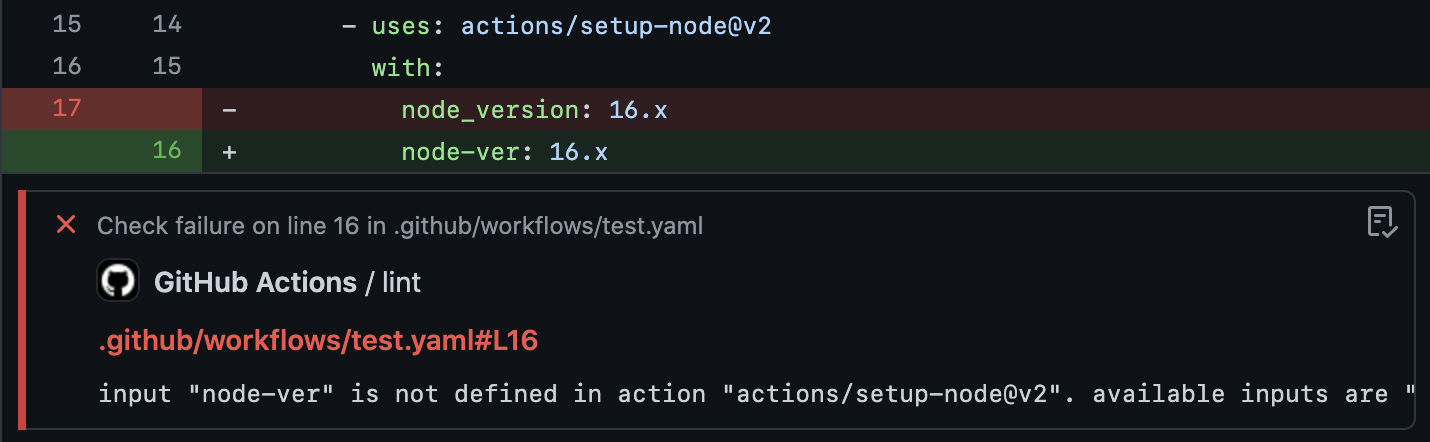
When you change your workflow and the changed line causes a new error, CI will annotate the diff with the extracted error message.
To include newlines in the annotation body, it prints `%0A`. (ref [actions/toolkit#193](https://github.com/actions/toolkit/issues/193)).
And it suppresses `SC2016` shellcheck rule error since it complains about the template argument.
Basically it is more recommended to use [Problem Matchers](#problem-matchers) or reviewdog as explained in
['Tools integration' section](#tools-integ) below.
#### Example: [SARIF format][sarif]
[The Static Analysis Results Interchange Format (SARIF)][sarif] is a standardized format for the results of static analysis tools.
Since this practical format is much more complex than the above examples, the template is not written here. Please read
[the template file in test data](../testdata/format/sarif_template.txt).
Outputs are also too large to be written here. Please read [the output example in test data](../testdata/format/test.sarif).
#### Formatting syntax
In [Go template syntax][go-template], `.` within `{{ }}` means the target object. Here, the target object is a sequence of error
objects.
The sequence can be traversed with `range` action, which is like `for ... = range ... {}` in Go.
```
{{range $err := .}} this part iterates error objects with the iteration variable $err {{end}}
```
The error object has the following fields.
| Field | Description | Example |
|----------------------|-------------------------------------------------------|------------------------------------------------------------------|
| `{{$err.Message}}` | Body of error message | `property "platform" is not defined in object type {os: string}` |
| `{{$err.Snippet}}` | Code snippet to indicate error position | ` node_version: 16.x\n ^~~~~~~~~~~~~` |
| `{{$err.Kind}}` | Name of rule the error belongs to | `expression` |
| `{{$err.Filepath}}` | Canonical relative file path of the error position | `.github/workflows/ci.yaml` |
| `{{$err.Line}}` | Line number of the error position (1-based) | `9` |
| `{{$err.Column}}` | Column number of the error's start position (1-based) | `11` |
| `{{$err.EndColumn}}` | Column number of the error's end position (1-based) | `23` |
Functions called in `{{ }}` placeholder are template actions. There are many actions defined by Go standard library. In addition,
there are a few custom actions defined by actionlint. Most useful action would be `json` as we already used it in the above JSON
example. List of all custom actions are as follows:
| Action | Description | Example usage |
|------------------|----------------------------------------------------------------------------------|-------------------------------------------|
| `json x` | Serialize `x` as JSON string followed by newline character | `{{json $err}}` |
| `replace x y z` | Replace string `y` with `z` in `x` | `{{replace $err.Filepath "\\" "/"}}` |
| `toPascalCase x` | Convert `x` into PascalCase (e.g. 'foo-bar' to 'FooBar') | `{{toPascalCase $err.Kind}}` |
| `allKinds` | Return an array of kind objects. The kind object is explained in the below table | `{{range $ = allKinds}}{{$.Name}}{{end}}` |
| `getVersion` | Return the version of actionlint as string | `{{getVersion}}` |
The kind object returned from `allKinds` action has the following fields.
| Field | Description | Example |
|-------------------------|-------------------------------|---------------------------------------------|
| `{{$kind.Name}}` | Name of the kind | `syntax-check` |
| `{{$kind.Description}}` | Short description of the kind | `Checks for GitHub Actions workflow syntax` |
For example, the following simple iteration body
```
line is {{$err.Line}}, col is {{$err.Column}}, message is {{$err.Message | printf "%q"}}
```
will produce output like below.
```
line is 21, col is 20, message is "property \"platform\" is not defined in object type {os: string}"
```
In `{{ }}` placeholder, input can be piped and action can be used to transform texts. In above example, the message is piped with
`|` and transformed with `printf "%q"`.
Note that special characters escaped with backslash like `\n` in the format string are automatically unescaped.
### Exit status
`actionlint` command exits with one of the following exit statuses.
| Status | Description |
|--------|---------------------------------------------------------|
| `0` | The command ran successfully and no problem was found |
| `1` | The command ran successfully and some problem was found |
| `2` | The command failed due to invalid command line option |
| `3` | The command failed due to some fatal error |
## Use actionlint on GitHub Actions
Preparing `actionlint` executable with the download script is recommended. See [the instruction](install.md#download-script) for
more details. It sets an absolute file path of downloaded executable to `executable` output in order to use the executable in the
following steps easily.
Here is an example of simple workflow to run actionlint on GitHub Actions. Please ensure `shell: bash` since the default
shell for Windows runners is `pwsh`.
```yaml
name: Lint GitHub Actions workflows
on: [push, pull_request]
jobs:
actionlint:
runs-on: ubuntu-latest
steps:
- uses: actions/checkout@v4
- name: Download actionlint
id: get_actionlint
run: bash <(curl https://raw.githubusercontent.com/rhysd/actionlint/main/scripts/download-actionlint.bash)
shell: bash
- name: Check workflow files
run: ${{ steps.get_actionlint.outputs.executable }} -color
shell: bash
```
Or simply download the executable and run it in one step:
```yaml
- name: Check workflow files
run: |
bash <(curl https://raw.githubusercontent.com/rhysd/actionlint/main/scripts/download-actionlint.bash)
./actionlint -color
shell: bash
```
The download script allows to specify the version of actionlint and the download directory. Try to give `--help` argument
to the script for more usage details.
If you want to enable [shellcheck integration](checks.md#check-shellcheck-integ), install `shellcheck` command. Note that
shellcheck is [pre-installed on Ubuntu worker][preinstall-ubuntu].
If you want to [annotate errors][ga-annotate-error] from actionlint on GitHub, consider using
[Problem Matchers](#problem-matchers).
If you prefer Docker image to running a downloaded executable, using [actionlint Docker image](#docker) is another option.
```yaml
name: Lint GitHub Actions workflows
on: [push, pull_request]
jobs:
actionlint:
runs-on: ubuntu-latest
steps:
- uses: actions/checkout@v4
- name: Check workflow files
uses: docker://rhysd/actionlint:latest
with:
args: -color
```
## Online playground
Thanks to WebAssembly, actionlint playground is available on your browser. It never sends any data to outside your browser.
https://rhysd.github.io/actionlint/
Paste your workflow content to the code editor at left pane. It automatically shows the results at right pane. When editing
the workflow content in the code editor, the results will be updated on the fly. Clicking an error message in the results
table moves a cursor to position of the error in the code editor.
## [Docker][docker] image
[Official Docker image][docker-image] is available. The image contains `actionlint` executable and all dependencies (shellcheck
and pyflakes).
Available tags are:
- `actionlint:latest`: Latest stable version of actionlint. This image is recommended.
- `actionlint:{version}`: Specific version of actionlint. (e.g. `actionlint:1.7.10`)
Just run the image with `docker run`:
```sh
docker run --rm rhysd/actionlint:latest -version
```
To check all workflows in your repository, mount your repository's root directory as a volume and run actionlint in the mounted
directory. When you are at a root directory of your repository:
```sh
docker run --rm -v $(pwd):/repo --workdir /repo rhysd/actionlint:latest -color
```
To check a file with actionlint in a Docker container, pass the file content via stdin and use `-` argument:
```sh
cat /path/to/workflow.yml | docker run --rm -i rhysd/actionlint:latest -color -
```
Or mount the workflows directory and pass the paths as arguments:
```sh
docker run --rm -v /path/to/workflows:/workflows rhysd/actionlint:latest -color /workflows/ci.yml
```
## Using actionlint from Go program
Go APIs are available. See [the Go API document](api.md) for more details.
## Tools integration
### reviewdog
[reviewdog][] is an automated review tool for various code hosting services. It officially [supports actionlint][reviewdog-actionlint].
You can check errors from actionlint easily with inline review comments at pull request review.
The usage is easy. Run `reviewdog/action-actionlint` action in your workflow as follows.
```yaml
name: reviewdog
on: [pull_request]
jobs:
actionlint:
runs-on: ubuntu-latest
steps:
- uses: actions/checkout@v4
- uses: reviewdog/action-actionlint@v1
```
### Problem Matchers
[Problem Matchers][problem-matchers] is a feature to extract GitHub Actions annotations from terminal outputs of linters.
Copy [actionlint-matcher.json][actionlint-matcher] to `.github/actionlint-matcher.json` in your repository.
Then enable the matcher using `add-matcher` command before running `actionlint` in the step of your workflow.
```yaml
- name: Check workflow files
run: |
echo "::add-matcher::.github/actionlint-matcher.json"
bash <(curl https://raw.githubusercontent.com/rhysd/actionlint/main/scripts/download-actionlint.bash)
./actionlint -color
shell: bash
```
When you change your workflow and the changed line causes a new error, CI will annotate the diff with the extracted error message.
 ### super-linter
[super-linter][] is a Bash script for a simple combination of various linters, provided by GitHub. It has support for actionlint.
Running super-linter in your repository automatically runs actionlint.
To ignore some errors, please add `-ignore` option by using [`GITHUB_ACTIONS_COMMAND_ARGS` environment variable][super-linter-env-var].
Please see [super-linter/super-linter#1852](https://github.com/super-linter/super-linter/issues/1852) for the discussion.
### pre-commit
[pre-commit][] is a framework for managing and maintaining multi-language Git pre-commit hooks. actionlint is available as a
pre-commit hook to check workflow files in `.github/workflows/` directory.
Add this to your `.pre-commit-config.yaml` in your repository:
```yaml
---
repos:
- repo: https://github.com/rhysd/actionlint
rev: v1.7.10
hooks:
- id: actionlint
```
As alternatives to `actionlint` hook, `actionlint-docker` or `actionlint-system` hooks are available.
| Hook ID | Explanation |
|-|-|
| `actionlint` | Automatically installs `actionlint` command in isolated `$GOPATH` directory using [Go toolchain][go-install]. |
| `actionlint-docker` | Automatically pulls [the actionlint Docker image](#docker). |
| `actionlint-system` | Uses system-installed `actionlint` command. The command is necessary to be [installed manually](install.md). |
### VS Code
[Linter extension][vsc-extension] for [VS Code][vscode] is available. The extension automatically detects `.github/workflows`
directory, runs `actionlint` command, and reports errors in the code editor while editing workflow files.
### Emacs
Plugins for both [Flycheck][emacs-flycheck] and [Flymake][emacs-flymake] are available via [MELPA][emacs-melpa].
Their respective repositories are [flycheck-actionlint][emacs-flycheck-extension] and [flymake-actionlint][emacs-flymake-extension].
### Vim and Neovim
[nvim-lint][] supports actionlint on Neovim. The plugin automatically and asynchronously runs actionlint and notifies errors
on the fly when you edit GitHub Actions CI workflows. Please read the plugin's documentation for more details.
[ALE][vim-ale] supports actionlint on Vim and Neovim. Similar to nvim-lint, The plugin automatically and asynchronously runs
actionlint and notifies errors on the fly when you edit GitHub Actions CI workflows. Please read the plugin's documentation for
more details.
### Pulsar Edit
A [Linter package][pulsar-linter] for [Pulsar Edit][pulsar] is available. The package automatically detects a `workflows`
directory, executes the `actionlint` command on any detected GitHub Actions files within the directory, and reports returned
information in the code editor display tab while editing workflow files.
### Nova
[Nova.app][nova] is a MacOS only editor and IDE. The [Actionlint for Nova][nova-extension] allows you to get inline feedback
while editing actions.
### trunk
[trunk][trunk-io] is an extendable superlinter with a builtin language server and preexisting issue detection. Actionlint is
integrated [here](https://github.com/trunk-io/plugins).
Once you have [initialized trunk in your repo](https://docs.trunk.io/docs/check-get-started), to enable at the latest actionlint
version, just run:
```bash
trunk check enable actionlint
```
or if you'd like a specific version:
```bash
trunk check enable actionlint@1.7.10
```
or modify `.trunk/trunk.yaml` in your repository to contain:
```yaml
lint:
enabled:
- actionlint@1.7.10
```
Then just run:
```bash
trunk check
```
and it will check your modified files via actionlint, if applicable, and show you the results. Trunk also will detect preexisting
issues and highlight only the newly added actionlint issues. For more information, check the [trunk docs][trunk-docs].
You can also see actionlint issues inline in VS Code via the [Trunk VS Code extension][trunk-vscode].
---
[Checks](checks.md) | [Installation](install.md) | [Configuration](config.md) | [Go API](api.md) | [References](reference.md)
[reviewdog-actionlint]: https://github.com/reviewdog/action-actionlint
[reviewdog]: https://github.com/reviewdog/reviewdog
[cmd-manual]: https://rhysd.github.io/actionlint/usage.html
[re2]: https://golang.org/s/re2syntax
[go-template]: https://pkg.go.dev/text/template
[jsonl]: https://jsonlines.org/
[ga-annotate-error]: https://docs.github.com/en/actions/learn-github-actions/workflow-commands-for-github-actions#setting-an-error-message
[sarif]: https://docs.oasis-open.org/sarif/sarif/v2.1.0/sarif-v2.1.0.html
[problem-matchers]: https://github.com/actions/toolkit/blob/master/docs/problem-matchers.md
[super-linter]: https://github.com/github/super-linter
[super-linter-env-var]: https://github.com/super-linter/super-linter#environment-variables
[actionlint-matcher]: https://raw.githubusercontent.com/rhysd/actionlint/main/.github/actionlint-matcher.json
[preinstall-ubuntu]: https://github.com/actions/virtual-environments/blob/main/images/linux/Ubuntu2004-README.md
[pre-commit]: https://pre-commit.com
[go-install]: https://go.dev/doc/install
[docker]: https://www.docker.com/
[docker-image]: https://hub.docker.com/r/rhysd/actionlint
[vsc-extension]: https://marketplace.visualstudio.com/items?itemName=arahata.linter-actionlint
[vscode]: https://code.visualstudio.com/
[emacs-melpa]: https://melpa.org/
[emacs-flymake]: https://www.gnu.org/software/emacs/manual/html_node/flymake/
[emacs-flymake-extension]: https://github.com/ROCKTAKEY/flymake-actionlint
[emacs-flycheck]: https://www.flycheck.org/
[emacs-flycheck-extension]: https://github.com/tirimia/flycheck-actionlint
[nvim-lint]: https://github.com/mfussenegger/nvim-lint
[vim-ale]: https://github.com/dense-analysis/ale
[pulsar]: https://pulsar-edit.dev/
[pulsar-linter]: https://web.pulsar-edit.dev/packages/linter-github-actions
[nova-extension]: https://extensions.panic.com/extensions/org.netwrk/org.netwrk.actionlint/
[nova]: https://nova.app
[trunk-io]: https://docs.trunk.io/docs
[trunk-docs]: https://docs.trunk.io/docs/check
[trunk-vscode]: https://marketplace.visualstudio.com/items?itemName=trunk.io
### super-linter
[super-linter][] is a Bash script for a simple combination of various linters, provided by GitHub. It has support for actionlint.
Running super-linter in your repository automatically runs actionlint.
To ignore some errors, please add `-ignore` option by using [`GITHUB_ACTIONS_COMMAND_ARGS` environment variable][super-linter-env-var].
Please see [super-linter/super-linter#1852](https://github.com/super-linter/super-linter/issues/1852) for the discussion.
### pre-commit
[pre-commit][] is a framework for managing and maintaining multi-language Git pre-commit hooks. actionlint is available as a
pre-commit hook to check workflow files in `.github/workflows/` directory.
Add this to your `.pre-commit-config.yaml` in your repository:
```yaml
---
repos:
- repo: https://github.com/rhysd/actionlint
rev: v1.7.10
hooks:
- id: actionlint
```
As alternatives to `actionlint` hook, `actionlint-docker` or `actionlint-system` hooks are available.
| Hook ID | Explanation |
|-|-|
| `actionlint` | Automatically installs `actionlint` command in isolated `$GOPATH` directory using [Go toolchain][go-install]. |
| `actionlint-docker` | Automatically pulls [the actionlint Docker image](#docker). |
| `actionlint-system` | Uses system-installed `actionlint` command. The command is necessary to be [installed manually](install.md). |
### VS Code
[Linter extension][vsc-extension] for [VS Code][vscode] is available. The extension automatically detects `.github/workflows`
directory, runs `actionlint` command, and reports errors in the code editor while editing workflow files.
### Emacs
Plugins for both [Flycheck][emacs-flycheck] and [Flymake][emacs-flymake] are available via [MELPA][emacs-melpa].
Their respective repositories are [flycheck-actionlint][emacs-flycheck-extension] and [flymake-actionlint][emacs-flymake-extension].
### Vim and Neovim
[nvim-lint][] supports actionlint on Neovim. The plugin automatically and asynchronously runs actionlint and notifies errors
on the fly when you edit GitHub Actions CI workflows. Please read the plugin's documentation for more details.
[ALE][vim-ale] supports actionlint on Vim and Neovim. Similar to nvim-lint, The plugin automatically and asynchronously runs
actionlint and notifies errors on the fly when you edit GitHub Actions CI workflows. Please read the plugin's documentation for
more details.
### Pulsar Edit
A [Linter package][pulsar-linter] for [Pulsar Edit][pulsar] is available. The package automatically detects a `workflows`
directory, executes the `actionlint` command on any detected GitHub Actions files within the directory, and reports returned
information in the code editor display tab while editing workflow files.
### Nova
[Nova.app][nova] is a MacOS only editor and IDE. The [Actionlint for Nova][nova-extension] allows you to get inline feedback
while editing actions.
### trunk
[trunk][trunk-io] is an extendable superlinter with a builtin language server and preexisting issue detection. Actionlint is
integrated [here](https://github.com/trunk-io/plugins).
Once you have [initialized trunk in your repo](https://docs.trunk.io/docs/check-get-started), to enable at the latest actionlint
version, just run:
```bash
trunk check enable actionlint
```
or if you'd like a specific version:
```bash
trunk check enable actionlint@1.7.10
```
or modify `.trunk/trunk.yaml` in your repository to contain:
```yaml
lint:
enabled:
- actionlint@1.7.10
```
Then just run:
```bash
trunk check
```
and it will check your modified files via actionlint, if applicable, and show you the results. Trunk also will detect preexisting
issues and highlight only the newly added actionlint issues. For more information, check the [trunk docs][trunk-docs].
You can also see actionlint issues inline in VS Code via the [Trunk VS Code extension][trunk-vscode].
---
[Checks](checks.md) | [Installation](install.md) | [Configuration](config.md) | [Go API](api.md) | [References](reference.md)
[reviewdog-actionlint]: https://github.com/reviewdog/action-actionlint
[reviewdog]: https://github.com/reviewdog/reviewdog
[cmd-manual]: https://rhysd.github.io/actionlint/usage.html
[re2]: https://golang.org/s/re2syntax
[go-template]: https://pkg.go.dev/text/template
[jsonl]: https://jsonlines.org/
[ga-annotate-error]: https://docs.github.com/en/actions/learn-github-actions/workflow-commands-for-github-actions#setting-an-error-message
[sarif]: https://docs.oasis-open.org/sarif/sarif/v2.1.0/sarif-v2.1.0.html
[problem-matchers]: https://github.com/actions/toolkit/blob/master/docs/problem-matchers.md
[super-linter]: https://github.com/github/super-linter
[super-linter-env-var]: https://github.com/super-linter/super-linter#environment-variables
[actionlint-matcher]: https://raw.githubusercontent.com/rhysd/actionlint/main/.github/actionlint-matcher.json
[preinstall-ubuntu]: https://github.com/actions/virtual-environments/blob/main/images/linux/Ubuntu2004-README.md
[pre-commit]: https://pre-commit.com
[go-install]: https://go.dev/doc/install
[docker]: https://www.docker.com/
[docker-image]: https://hub.docker.com/r/rhysd/actionlint
[vsc-extension]: https://marketplace.visualstudio.com/items?itemName=arahata.linter-actionlint
[vscode]: https://code.visualstudio.com/
[emacs-melpa]: https://melpa.org/
[emacs-flymake]: https://www.gnu.org/software/emacs/manual/html_node/flymake/
[emacs-flymake-extension]: https://github.com/ROCKTAKEY/flymake-actionlint
[emacs-flycheck]: https://www.flycheck.org/
[emacs-flycheck-extension]: https://github.com/tirimia/flycheck-actionlint
[nvim-lint]: https://github.com/mfussenegger/nvim-lint
[vim-ale]: https://github.com/dense-analysis/ale
[pulsar]: https://pulsar-edit.dev/
[pulsar-linter]: https://web.pulsar-edit.dev/packages/linter-github-actions
[nova-extension]: https://extensions.panic.com/extensions/org.netwrk/org.netwrk.actionlint/
[nova]: https://nova.app
[trunk-io]: https://docs.trunk.io/docs
[trunk-docs]: https://docs.trunk.io/docs/check
[trunk-vscode]: https://marketplace.visualstudio.com/items?itemName=trunk.io