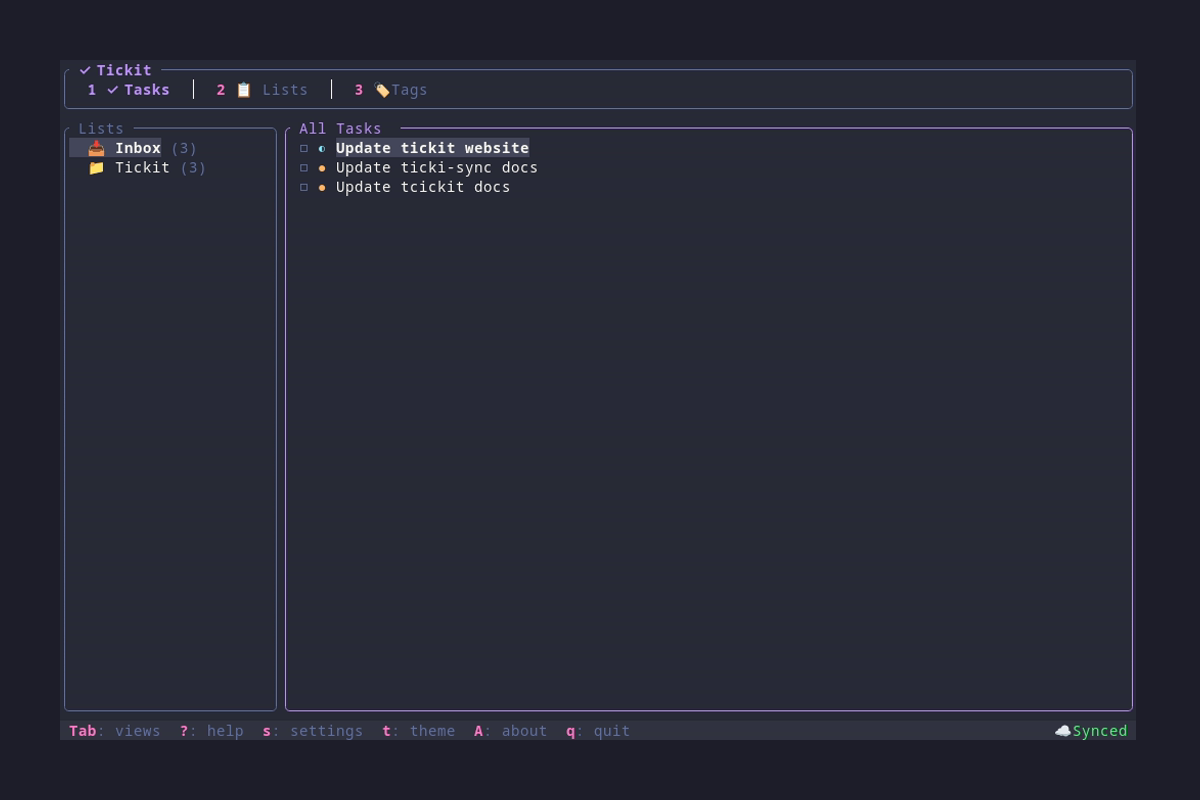
Tickit Tasks

βœ… Tickit

A stunning terminal-based task manager

Organize your tasks, lists, and tags β€” all from your terminal.

Release Crates.io License Rust Version


## πŸ“– Table of Contents - [✨ Features](#-features) - [πŸš€ Quick Start](#-quick-start) - [πŸ’» CLI Commands](#-cli-commands) - [⌨️ Keybindings](#️-keybindings) - [🎨 Themes](#-themes) - [πŸ“€ Export Formats](#-export-formats) - [☁️ Sync (Optional)](#️-sync-optional) - [πŸ—οΈ Architecture](#️-architecture) - [πŸ”§ Building from Source](#-building-from-source) - [🀝 Contributing](#-contributing) - [πŸ“„ License](#-license)
## ✨ Features
### πŸ“‹ Task Management Create, edit, and complete tasks with titles, descriptions, URLs, and priority levels. ### πŸ“ Lists Organize tasks into lists with custom icons. Default Inbox for quick capture. ### 🏷️ Tags Add colorful tags for flexible categorization and filtering. ### πŸ–₯️ Beautiful TUI A gorgeous terminal interface with vim-style navigation and real-time updates. ### ⌨️ Full CLI Script your task management with powerful command-line tools. ### πŸ“€ Export Anywhere Export to JSON, todo.txt, Markdown, or CSV formats.

### Feature Highlights | Feature | Description | |---------|-------------| | ⚑ **Priority Levels** | Low, Medium, High, Urgent | | πŸ”— **Task URLs** | Attach links and open them with `o` | | 🎨 **15 Built-in Themes** | From Dracula to Cyberpunk | | βš™οΈ **Settings Dialog** | Configure sync, notifications, and themes in-app | | πŸ’Ύ **SQLite Storage** | Fast, reliable, self-contained | | πŸ” **Filter & Search** | By list, tag, or completion status | | βœ… **Toggle Completed** | Show/hide completed tasks | | πŸ“… **Due Dates** | Set deadlines for your tasks | | πŸ”” **Desktop Notifications** | Alerts for due and overdue tasks | | πŸ”„ **Auto-Update** | Check for updates from TUI or CLI | | ☁️ **Optional Sync** | Self-hosted sync server for multiple devices |
## πŸš€ Quick Start ### Installation #### From Source ```bash git clone https://github.com/ricardodantas/tickit cd tickit cargo install --path . ``` #### From crates.io (coming soon) ```bash cargo install tickit ``` ### First Run Simply launch the TUI: ```bash tickit ``` Your tasks are stored in SQLite at `~/.config/tickit/tickit.sqlite`.
## πŸ’» CLI Commands Tickit provides a full CLI for scripting and quick actions. ### Adding Tasks ```bash # Simple task tickit add "Buy groceries" # With priority and list tickit add "Review PR" --priority high --list Work # With URL and tags tickit add "Read article" --url "https://example.com" --tags reading,tech # With description tickit add "Write report" --description "Q4 summary for the team" ``` ### Listing Tasks ```bash # Show incomplete tasks tickit list # Include completed tasks tickit list --all # Filter by list tickit list --list Work # Filter by tag tickit list --tag urgent # Output as JSON tickit list --json ``` ### Completing Tasks ```bash # Mark as complete (partial match supported) tickit done "Buy groceries" # Mark as incomplete tickit undo "Buy groceries" ``` ### Deleting Tasks ```bash # Delete with confirmation tickit delete "Old task" # Skip confirmation tickit delete "Old task" --force # Short alias tickit rm "Old task" -f ``` ### Managing Lists ```bash # List all lists tickit lists # Add a new list tickit lists add "Shopping" --icon "πŸ›’" # Delete a list tickit lists delete "Old List" ``` ### Managing Tags ```bash # List all tags tickit tags # Add a new tag tickit tags add "urgent" --color "#ff0000" # Delete a tag tickit tags delete "old-tag" ``` ### Exporting Tasks ```bash # Export to JSON (default) tickit export --output tasks.json # Export to todo.txt format tickit export --format todotxt # Export to Markdown tickit export --format markdown --output tasks.md # Export specific list to CSV tickit export --format csv --list Work --output work.csv ``` ### Updating Tickit ```bash # Check for updates and install if available tickit update ``` The update command automatically detects whether you installed via Cargo or Homebrew and uses the appropriate update method.
## ⌨️ Keybindings ### Global | Key | Action | |-----|--------| | `Tab` | Next view | | `Shift+Tab` | Previous view | | `1` `2` `3` | Jump to view (Tasks, Lists, Tags) | | `s` | Open settings | | `t` | Open theme picker | | `A` | About Tickit | | `?` / `F1` | Show help | | `S` / `Ctrl+s` | Sync with server (if configured) | | `q` | Quit | | `Ctrl+c` / `Ctrl+q` | Force quit | ### Navigation | Key | Action | |-----|--------| | `↑` / `k` | Move up | | `↓` / `j` | Move down | | `←` / `h` | Focus sidebar | | `β†’` / `l` | Focus main | | `g` / `Home` | Go to first item | | `G` / `End` | Go to last item | ### Tasks View | Key | Action | |-----|--------| | `Enter` / `Space` | Toggle task complete | | `n` | Create new task | | `e` | Edit selected task | | `d` / `Delete` | Delete selected task | | `p` | Cycle priority | | `o` | Open task URL | | `c` | Toggle show completed | | `r` | Refresh | ### Lists/Tags View | Key | Action | |-----|--------| | `n` | Create new item | | `e` | Edit selected item | | `d` / `Delete` | Delete selected item | ### Task Editor | Key | Action | |-----|--------| | `Tab` | Next field | | `Shift+Tab` | Previous field | | `Enter` | Save task | | `Esc` | Cancel | | `Space` | Toggle tag (in Tags field) | | `j` / `k` | Navigate options |
## 🎨 Themes Tickit includes **15 beautiful themes** based on popular terminal and editor color schemes. Press `t` in the TUI to open the theme picker with live preview. ### Available Themes | Theme | Description | |-------|-------------| | πŸ¦‡ **Dracula** | Dark purple aesthetic (default) | | πŸŒ™ **One Dark Pro** | Atom's iconic dark theme | | ❄️ **Nord** | Arctic, bluish color palette | | 🐱 **Catppuccin Mocha** | Warm pastel dark theme | | β˜• **Catppuccin Latte** | Warm pastel light theme | | 🎸 **Gruvbox Dark** | Retro groove colors | | πŸ“œ **Gruvbox Light** | Retro groove, light variant | | πŸŒƒ **Tokyo Night** | Futuristic dark blue | | πŸŒ… **Solarized Dark** | Precision colors, dark | | 🌞 **Solarized Light** | Precision colors, light | | 🎨 **Monokai Pro** | Classic syntax highlighting | | 🌹 **RosΓ© Pine** | All natural pine with soho vibes | | 🌊 **Kanagawa** | Inspired by Katsushika Hokusai | | 🌲 **Everforest** | Comfortable green forest theme | | πŸŒ† **Cyberpunk** | Neon-soaked futuristic theme |
## πŸ“€ Export Formats ### JSON Full data export with all fields β€” perfect for backups or integrations. ```bash tickit export --format json --output tasks.json ``` ```json { "tasks": [ { "id": "...", "title": "Buy groceries", "priority": "high", "completed": false, "list": "Shopping", "tags": ["errands"] } ] } ``` ### todo.txt Compatible with the [todo.txt](http://todotxt.org/) format: ``` (A) 2024-01-01 Task title +Project @context due:2024-01-15 ``` ```bash tickit export --format todotxt ``` ### Markdown Human-readable format with checkboxes: ```markdown ## πŸ“₯ Inbox - [ ] πŸ”΄ Urgent task - [x] Completed task ## πŸ“‹ Work - [ ] 🟑 Review PR ``` ```bash tickit export --format markdown ``` ### CSV Spreadsheet-compatible format for Excel, Google Sheets, etc. ```bash tickit export --format csv --output tasks.csv ```
## πŸ—οΈ Architecture Tickit is a single binary with both CLI and TUI modes. ``` β”Œβ”€β”€β”€β”€β”€β”€β”€β”€β”€β”€β”€β”€β”€β”€β”€β”€β”€β”€β”€β”€β”€β”€β”€β”€β”€β”€β”€β”€β”€β”€β”€β”€β”€β”€β”€β”€β”€β”€β”€β”€β”€β”€β”€β”€β”€β”€β”€β”€β”€β”€β”€β”€β”€β”€β”€β”€β”€β”€β”€β”€β”€β” β”‚ User β”‚ β””β”€β”€β”€β”€β”€β”€β”€β”€β”€β”€β”€β”€β”€β”€β”€β”€β”€β”€β”€β”€β”€β”€β”€β”€β”€β”€β”€β”€β”€β”€β”€β”€β”€β”€β”€β”€β”€β”€β”€β”€β”€β”€β”€β”€β”€β”€β”€β”€β”€β”€β”€β”€β”€β”€β”€β”€β”€β”€β”€β”€β”€β”˜ β”‚ β”Œβ”€β”€β”€β”€β”€β”€β”€β”€β”€β”€β”€β”€β”€β”€β”€β”΄β”€β”€β”€β”€β”€β”€β”€β”€β”€β”€β”€β”€β”€β”€β”€β” β–Ό β–Ό β”Œβ”€β”€β”€β”€β”€β”€β”€β”€β”€β”€β”€β”€β”€β”€β”€β”€β”€β”€β”€β”€β”€β”€β”€β”€β”€β” β”Œβ”€β”€β”€β”€β”€β”€β”€β”€β”€β”€β”€β”€β”€β”€β”€β”€β”€β”€β”€β”€β”€β”€β”€β”€β”€β”€β”€β”€β”€β” β”‚ tickit (TUI) β”‚ β”‚ tickit (CLI) β”‚ β”‚ β€’ Browse tasks β”‚ β”‚ β€’ Add tasks β”‚ β”‚ β€’ Manage lists/tags β”‚ β”‚ β€’ List/filter tasks β”‚ β”‚ β€’ Change themes β”‚ β”‚ β€’ Complete/delete β”‚ β”‚ β€’ Visual editing β”‚ β”‚ β€’ Export data β”‚ β””β”€β”€β”€β”€β”€β”€β”€β”€β”€β”€β”€β”€β”€β”€β”€β”€β”€β”€β”€β”€β”€β”€β”€β”€β”€β”˜ β””β”€β”€β”€β”€β”€β”€β”€β”€β”€β”€β”€β”€β”€β”€β”€β”€β”€β”€β”€β”€β”€β”€β”€β”€β”€β”€β”€β”€β”€β”˜ β”‚ β”‚ β””β”€β”€β”€β”€β”€β”€β”€β”€β”€β”€β”€β”€β”€β”€β”€β”¬β”€β”€β”€β”€β”€β”€β”€β”€β”€β”€β”€β”€β”€β”€β”€β”˜ β–Ό β”Œβ”€β”€β”€β”€β”€β”€β”€β”€β”€β”€β”€β”€β”€β”€β”€β”€β”€β”€β”€β”€β”€β”€β”€β”€β”€β”€β”€β”€β”€β”€β”€β”€β”€β”€β”€β”€β”€β”€β”€β”€β”€β”€β”€β”€β”€β”€β”€β”€β”€β”€β”€β”€β”€β”€β”€β”€β”€β”€β”€β”€β”€β” β”‚ SQLite Database β”‚ β”‚ ~/.config/tickit/tickit.sqlite β”‚ β””β”€β”€β”€β”€β”€β”€β”€β”€β”€β”€β”€β”€β”€β”€β”€β”€β”€β”€β”€β”€β”€β”€β”€β”€β”€β”€β”€β”€β”€β”€β”€β”€β”€β”€β”€β”€β”€β”€β”€β”€β”€β”€β”€β”€β”€β”€β”€β”€β”€β”€β”€β”€β”€β”€β”€β”€β”€β”€β”€β”€β”€β”˜ ``` ### Data Model ``` β”Œβ”€β”€β”€β”€β”€β”€β”€β”€β”€β”€β”€β”€β”€β”€β”€β”€β”€β”€β” β”Œβ”€β”€β”€β”€β”€β”€β”€β”€β”€β”€β”€β”€β”€β”€β”€β”€β”€β”€β” β”‚ Lists β”‚ β”‚ Tags β”‚ β”‚ β€’ id β”‚ β”‚ β€’ id β”‚ β”‚ β€’ name β”‚ β”‚ β€’ name β”‚ β”‚ β€’ icon β”‚ β”‚ β€’ color β”‚ β”‚ β€’ is_inbox β”‚ β””β”€β”€β”€β”€β”€β”€β”€β”€β”€β”€β”€β”€β”€β”€β”€β”€β”€β”€β”˜ β””β”€β”€β”€β”€β”€β”€β”€β”€β”€β”€β”€β”€β”€β”€β”€β”€β”€β”€β”˜ β”‚ β”‚ β”‚ β”‚ 1:N β”‚ M:N β–Ό β–Ό β”Œβ”€β”€β”€β”€β”€β”€β”€β”€β”€β”€β”€β”€β”€β”€β”€β”€β”€β”€β”€β”€β”€β”€β”€β”€β”€β”€β”€β”€β”€β”€β”€β”€β”€β”€β”€β”€β”€β”€β”€β”€β”€β”€β”€β”€β”€β”€β”€β”€β”€β”€β”€β”€β”€β”€β”€β”€β”€β”€β”€β”€β”€β” β”‚ Tasks β”‚ β”‚ β€’ id, title, description, url β”‚ β”‚ β€’ priority (Low, Medium, High, Urgent) β”‚ β”‚ β€’ completed, completed_at β”‚ β”‚ β€’ list_id, tag_ids[] β”‚ β”‚ β€’ due_date, created_at, updated_at β”‚ β””β”€β”€β”€β”€β”€β”€β”€β”€β”€β”€β”€β”€β”€β”€β”€β”€β”€β”€β”€β”€β”€β”€β”€β”€β”€β”€β”€β”€β”€β”€β”€β”€β”€β”€β”€β”€β”€β”€β”€β”€β”€β”€β”€β”€β”€β”€β”€β”€β”€β”€β”€β”€β”€β”€β”€β”€β”€β”€β”€β”€β”€β”˜ ``` ### File Locations | File | Path | Purpose | |------|------|---------| | Database | `~/.config/tickit/tickit.sqlite` | Tasks, lists, tags | | Config | `~/.config/tickit/config.toml` | Theme and settings | | Device ID | `~/.config/tickit/.device_id` | Unique device identifier for sync |
## ☁️ Sync (Optional) Tickit can sync your tasks across multiple devices using a self-hosted sync server. **Sync is completely optional.** Tickit works fully offline by default. ### Setting Up Sync 1. **Deploy tickit-sync server** β€” see [github.com/ricardodantas/tickit-sync](https://github.com/ricardodantas/tickit-sync) 2. **Generate an API token:** ```bash tickit-sync token --name "my-laptop" ``` 3. **Configure Tickit client** (`~/.config/tickit/config.toml`): ```toml [sync] enabled = true server = "https://your-server.com" token = "your-generated-token" interval_secs = 300 # auto-sync every 5 minutes ``` 4. **Manual sync:** Press `S` (Shift+S) or `Ctrl+S` in the TUI 5. **Or configure in-app:** Press `s` to open Settings and toggle sync options ### Sync Features - **Self-hosted**: Run on your own server, keep your data private - **Multi-device**: Sync between desktop, laptop, and mobile (tickit-mobile) - **Conflict resolution**: Last-write-wins with conflict detection - **Offline-first**: Changes sync when connection is available - **In-app settings**: Toggle sync, adjust interval from the Settings dialog
## πŸ”§ Building from Source ### Requirements - **Rust 1.93+** (uses Edition 2024 features) - **Linux**, **macOS**, or **Windows** ### Build ```bash # Clone the repository git clone https://github.com/ricardodantas/tickit cd tickit # Build release binary cargo build --release # The binary will be at: # - target/release/tickit # Or install directly cargo install --path . ``` ### Development ```bash # Run TUI in development cargo run # Run CLI commands cargo run -- add "Test task" cargo run -- list # Run tests cargo test # Run linter cargo clippy # Format code cargo fmt ```
## 🀝 Contributing Contributions are welcome! ### Quick Start for Contributors 1. Fork the repository 2. Create a feature branch: `git checkout -b feature/amazing-feature` 3. Make your changes 4. Run tests: `cargo test` 5. Run clippy: `cargo clippy` 6. Format: `cargo fmt` 7. Commit: `git commit -m "Add amazing feature"` 8. Push: `git push origin feature/amazing-feature` 9. Open a Pull Request ### Project Structure ``` tickit/ β”œβ”€β”€ src/ β”‚ β”œβ”€β”€ main.rs # CLI entry point β”‚ β”œβ”€β”€ lib.rs # Library root β”‚ β”œβ”€β”€ app/ # TUI application β”‚ β”‚ β”œβ”€β”€ mod.rs # App initialization β”‚ β”‚ β”œβ”€β”€ events.rs # Key event handling β”‚ β”‚ β”œβ”€β”€ state.rs # Application state β”‚ β”‚ └── ui.rs # UI rendering β”‚ β”œβ”€β”€ config.rs # Configuration loading β”‚ β”œβ”€β”€ db.rs # SQLite operations β”‚ β”œβ”€β”€ export.rs # Export formats β”‚ β”œβ”€β”€ models.rs # Data models β”‚ └── theme.rs # Color themes β”œβ”€β”€ screenshots/ # Screenshots for docs β”œβ”€β”€ scripts/ # Helper scripts └── tests/ # Integration tests ```
## πŸ“„ License This project is licensed under the **MIT License** β€” see the [LICENSE](LICENSE) file for details. ---

Built with πŸ¦€ Rust and ❀️ by Ricardo Dantas