
# MCP Camoufox


The most feature-rich stealth browser MCP server. **133 tools** for full browser control powered by [Camoufox](https://github.com/daijro/camoufox) — a Firefox fork with C++ level anti-detection that bypasses Cloudflare, bot detection, and anti-automation.
> **One command. No Python. No manual setup. Everything auto-installs.**
```bash
claude mcp add camoufox -- npx -y mcp-camoufox@latest
```
## What Can It Do?
- Login to Google, ChatGPT, GitHub — without getting blocked
- Fill forms, click buttons, type text, upload files
- Manage cookies, localStorage, sessions across visits
- Take screenshots, export PDFs, capture network traffic
- Work with multiple tabs, iframes, dialogs
- Execute JavaScript, inspect elements, scroll pages
- Scrape structured data (job listings, products) with auto-detected selectors
- All while being **undetectable** by anti-bot systems
## Comparison
| MCP Server | Tools | Stealth | npx Install | Persistent Session |
| --------------------------------------------------------------- | ------- | ------- | ----------- | ------------------ |
| Chrome DevTools MCP | 30+ | No | Built-in | Yes |
| whit3rabbit/camoufox-mcp | 1 | Yes | Yes | No |
| redf0x1/camofox-mcp | 47 | Yes | Yes | Yes |
| Sekinal/camoufox-mcp | 49 | Yes | No (clone) | Yes |
| Playwright CLI | 60+ | No | Yes | Yes |
| [**mcp-camoufox**](https://github.com/RobithYusuf/mcp-camoufox) | **133** | **Yes** | **Yes** | **Yes** |
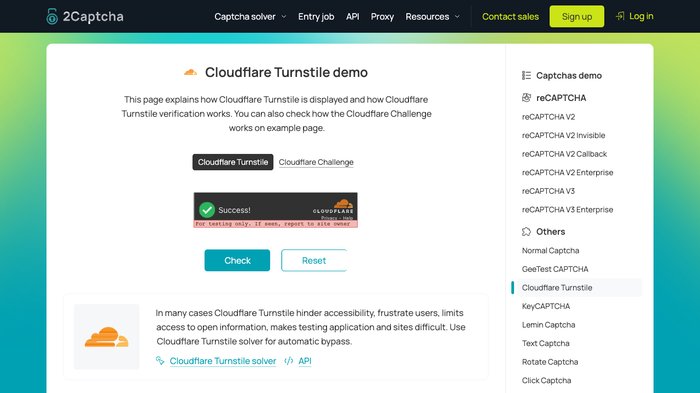 `click_turnstile()` auto-detects the widget via 6 selector fallback (`iframe[src*=challenges.cloudflare.com]`, `[data-sitekey]`, `.cf-turnstile`, …), computes checkbox position (offset_x=30 from widget left), and clicks with a 3-step Bezier-like approach — combined with Camoufox's native `humanize` + `disable_coop` for cross-origin iframe click.
**Scope:** works on **Interactive Turnstile** (visible iframe widget). **Managed Challenge** interstitials ("Just a moment...") render the widget in shadow DOM — not supported here; use sister project [mcp-stealth-chrome](https://github.com/RobithYusuf/mcp-stealth-chrome) (Chrome+CDP) for those. Real-world bypass success also depends on IP reputation and browser fingerprint — code alone doesn't guarantee it.
### 🧪 bot.sannysoft.com → Firefox Fingerprint Pass
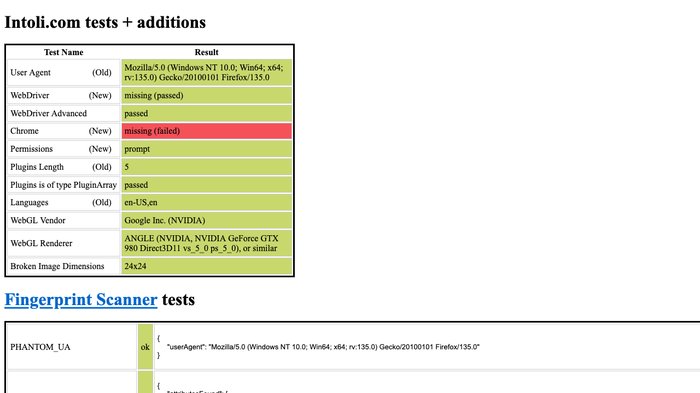 User Agent reports `Firefox/135.0`, WebDriver missing, WebDriver Advanced passed, Permissions prompt, Plugins length 5 passed, Languages `en-US,en`, WebGL Intel HD Graphics — all green. ("Chrome: missing" is expected — Camoufox spoofs Firefox, not Chrome.)
### 🔍 browserscan.net/bot-detection → All Categories Normal
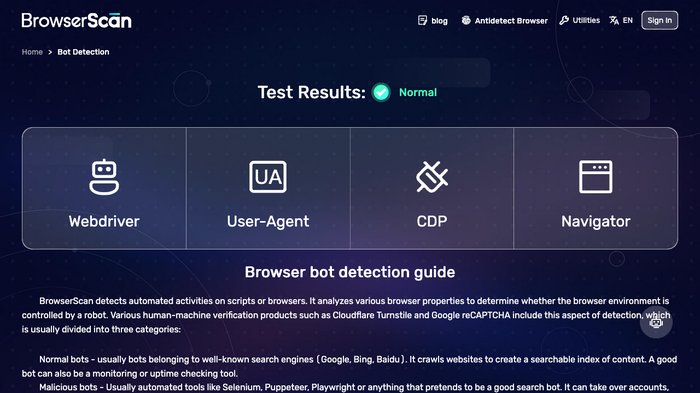 WebDriver, User-Agent, CDP, Navigator — every detection category returns **"Normal"**. Camoufox's C++-level Firefox patches leave zero automation signals.
## Setup
One command for Claude Code:
```bash
claude mcp add camoufox -- npx -y mcp-camoufox@latest
```
Every other client takes the same server block — only the config file differs:
```json
{
"mcpServers": {
"camoufox": {
"command": "npx",
"args": ["-y", "mcp-camoufox@latest"]
}
}
}
```
| Client | Config file |
| --- | --- |
| Claude Code | `claude mcp add camoufox --scope user -- npx -y mcp-camoufox@latest` (drop `--scope user` for project-only) |
| Claude Desktop | macOS `~/Library/Application Support/Claude/claude_desktop_config.json` · Windows `%APPDATA%\Claude\claude_desktop_config.json` · Linux `~/.config/Claude/claude_desktop_config.json` |
| Cursor | `~/.cursor/mcp.json` (global) or `.cursor/mcp.json` (project) |
| Windsurf | `~/.windsurf/mcp.json` or `.windsurf/mcp.json` — uses `"servers"` instead of `"mcpServers"` |
| VS Code (Continue / Cline / Kilo) | `~/.continue/config.json` or `.vscode/mcp.json` |
| Factory (Droid) | `~/.factory/mcp.json` or `.factory/mcp.json`, with `"type": "stdio"` — or `droid mcp add camoufox "npx -y mcp-camoufox@latest"` |
| Antigravity | `~/.gemini/antigravity/mcp_config.json` (global only) |
Two clients need a different shape:
```jsonc
// OpenCode — ~/.config/opencode/opencode.json ("local", not "stdio"; command is one array)
{ "mcp": { "camoufox": { "type": "local", "command": ["npx", "-y", "mcp-camoufox@latest"], "enabled": true } } }
// Trae — ~/.trae/mcp.json (mcpServers is an ARRAY)
{ "mcpServers": [ { "name": "camoufox", "command": ["npx", "-y", "mcp-camoufox@latest"] } ] }
```
### Requirements
**Node.js 18+ is the only prerequisite** (`node --version`). The Camoufox browser binary (~80 MB)
downloads itself on first launch — nothing else to install.
On **Windows** the same one-liner works; there is no standalone `.exe` because this is a Node package.
The browser lands in `%LOCALAPPDATA%\camoufox`, profile/screenshots/sessions in
`%USERPROFILE%\.camoufox-mcp\`, and output paths accept either `C:\path\file.json` or `C:/path/file.json`.
| Requirement | Version | Check |
| ----------- | ------- | ---------------- |
| **Node.js** | 18+ | `node --version` |
That's all. Camoufox browser binary (~80MB) downloads automatically on first launch.
## All 133 Tools
Grouped by area. **[→ Full reference, every tool and parameter](https://github.com/RobithYusuf/mcp-camoufox/blob/main/docs/TOOLS.md)**
| Category | Tools | For example |
| -------- | ----- | ----------- |
| Browser Lifecycle | 4 | `browser_launch`, `browser_close`, `reset_profile` |
| Navigation | 4 | `navigate`, `go_back`, `go_forward` |
| DOM & Content | 7 | `browser_snapshot`, `screenshot`, `get_text` |
| Element Interaction | 12 | `click`, `click_text`, `click_role` |
| Keyboard | 2 | `type_text`, `press_key` |
| Mouse XY | 4 | `mouse_click_xy`, `mouse_move`, `click_turnstile` |
| Wait | 7 | `wait_for`, `wait_for_navigation`, `wait_for_url` |
| Tabs | 4 | `tab_list`, `tab_new`, `tab_select` |
| Cookies | 3 | `cookie_list`, `cookie_set`, `cookie_delete` |
| Local Storage | 3 | `localstorage_get`, `localstorage_set`, `localstorage_clear` |
| Session Storage | 3 | `sessionstorage_get`, `sessionstorage_set`, `sessionstorage_clear` |
| JavaScript | 2 | `evaluate`, `inject_init_script` |
| Element Inspection | 5 | `inspect_element`, `get_attribute`, `query_selector_all` |
| Frames | 2 | `list_frames`, `frame_evaluate` |
| Batch Operations | 6 | `batch_actions`, `fill_form`, `login_classic` |
| Viewport | 2 | `get_viewport_size`, `set_viewport_size` |
| Scroll | 2 | `scroll`, `scroll_to` |
| Dialog | 2 | `dialog_handle`, `dialog_auto_handle` |
| Accessibility | 1 | `accessibility_snapshot` |
| Console & Network | 9 | `console_start`, `console_get`, `network_start` |
| Compound (reduce round-trips) | 4 | `wait_and_snapshot`, `back_and_snapshot`, `reload_and_snapshot` |
| Smart Selectors (skip snapshot) | 3 | `find_by_text`, `find_by_label`, `find_by_placeholder` |
| Session Portability | 7 | `cookie_export`, `cookie_import`, `cookie_export_file` |
| Humanize / Anti-Bot | 5 | `humanize_click`, `humanize_type`, `mouse_drift` |
| Session Warmup & Detection | 2 | `session_warmup`, `detect_anti_bot` |
| Assertions | 4 | `assert_element_visible`, `assert_text_present`, `assert_url_matches` |
| Workflow Helpers | 3 | `click_and_wait`, `wait_for_network_idle`, `describe_page` |
| Scraping & Extraction | 4 | `detect_content_pattern`, `extract_structured`, `extract_table` |
| Browserless HTTP | 5 | `http_request`, `http_session_cookies`, `scrape_markdown` |
| Storage Inspection | 4 | `storage_snapshot`, `storage_diff`, `indexeddb_list` |
| Debug | 6 | `server_status`, `get_page_errors`, `export_har` |
| Site Automation | 2 | `chatgpt_generate_image`, `chatgpt_generate_batch` |
32 categories, 133 tools. The full table lives in
[docs/TOOLS.md](https://github.com/RobithYusuf/mcp-camoufox/blob/main/docs/TOOLS.md) so this page stays readable — nothing was dropped, and a script
checks both against the running server's tool registry.
## Examples
**Read a page without launching anything.** The browser costs seconds and ~400 MB; most fetches don't
need a DOM. `smart_fetch` only starts one if the response looks anti-bot blocked.
```
scrape_markdown(url="https://example.com/docs") # clean markdown, no browser
smart_fetch(url="https://shop.example.com/item/42") # escalates only if blocked
http_request(url="https://api.example.com/v1/me") # reuses the browser's cookies
```
**Log in, then hit the API cheaply.** Log in once with the browser, then stay browserless.
```
browser_launch(url="https://app.example.com/login")
smart_fill(fields_json='{"Email":"me@x.com","Password":"secret"}', submit_label="Sign in")
wait_for_change() # returns when the page really reacts
http_request(url="https://app.example.com/api/orders") # same session, no browser work
```
**Fill a form without a snapshot.** `smart_fill` matches by label; `form_introspect` tells you what a
form wants and why it is rejecting a submit.
```
form_introspect() # labels, types, required, validation state
smart_fill(fields_json='{"Customer name":"Rina","E-mail address":"rina@x.com"}')
```
**Find out why a click did nothing** — before spending the click.
```
assert_clickable(selector="#submit")
# FAIL: covered by div.overlay — that element would receive the click
```
**Run a whole sequence in one call.** Resumable: a failure tells you the index to restart from.
```
workflow_run(steps=[
{tool: "navigate", args: {url: "https://example.com"}},
{tool: "smart_fill", args: {fields_json: '{"Search":"camoufox"}'}},
{tool: "click_text", args: {text: "Search", within: "@dialog"}},
{tool: "wait_for_change", args: {}}
])
```
**Search through an engine you control** (self-hosted SearXNG, or Brave/Tavily/Exa with a key).
```
search(query="firefox tls fingerprint", endpoint="http://127.0.0.1:8899")
scrape_markdown(url="