[notebooks](https://github.com/roboflow/notebooks) | [supervision](https://github.com/roboflow/supervision) | [autodistill](https://github.com/autodistill/autodistill) | [maestro](https://github.com/roboflow/multimodal-maestro)
[](https://badge.fury.io/py/inference)
[](https://pypistats.org/packages/inference)
[](https://hub.docker.com/u/roboflow)
[](https://github.com/roboflow/inference/blob/main/LICENSE.core)
## Make Any Camera an AI Camera
Inference turns any computer or edge device into a command center for your computer vision projects.
* 🛠️ Self-host [your own fine-tuned models](https://inference.roboflow.com/quickstart/explore_models/)
* 🧠 Access the latest and greatest foundation models (like [Florence-2](https://blog.roboflow.com/florence-2/), [CLIP](https://blog.roboflow.com/openai-clip/), and [SAM2](https://blog.roboflow.com/what-is-segment-anything-2/))
* 🤝 Use [Workflows](https://inference.roboflow.com/workflows/about/) to track, count, time, measure, and visualize
* 👁️ Combine ML with traditional CV methods (like OCR, Barcode Reading, QR, and template matching)
* 📈 Monitor, record, and analyze predictions
* 🎥 [Manage](https://inference.roboflow.com/workflows/video_processing/overview/) cameras and video streams
* 📬 Send notifications when events happen
* 🛜 Connect with external systems and APIs
* 🔗 [Extend](https://inference.roboflow.com/workflows/create_workflow_block/) with your own code and models
* 🚀 Deploy production systems at scale
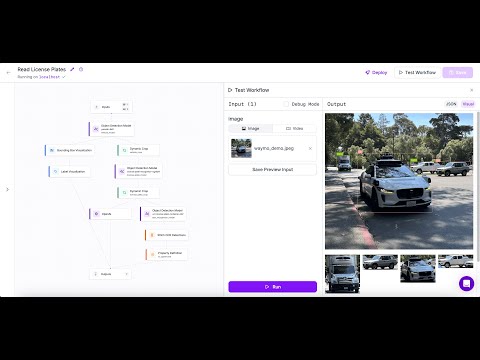
See [Example Workflows](https://inference.roboflow.com/workflows/gallery/) for common use-cases like detecting small objects with SAHI, multi-model consensus, active learning, reading license plates, blurring faces, background removal, and more.
[Time In Zone Workflow Example](https://github.com/user-attachments/assets/743233d9-3460-442d-83f8-20e29e76b346)
## 🔥 quickstart
[Install Docker](https://docs.docker.com/engine/install/) (and
[NVIDIA Container Toolkit](https://docs.nvidia.com/datacenter/cloud-native/container-toolkit/latest/install-guide.html)
for GPU acceleration if you have a CUDA-enabled GPU). Then run
```
pip install inference-cli && inference server start --dev
```
This will pull the proper image for your machine and start it in development mode.
In development mode, a Jupyter notebook server with a quickstart guide runs on
[http://localhost:9001/notebook/start](http://localhost:9001/notebook/start). Dive in there for a whirlwind tour
of your new Inference Server's functionality!
Now you're ready to connect your camera streams and
[start building & deploying Workflows in the UI](https://app.roboflow.com/workflows)
or [interacting with your new server](https://inference.roboflow.com/workflows/create_and_run/)
via its API.
## 🛠️ build with Workflows
A key component of Inference is [Workflows](https://roboflow.com/workflows), composable blocks of common functionality that give models a common interface to make chaining and experimentation easy.

With Workflows, you can:
* Detect, classify, and segment objects in images using state-of-the-art models.
* Use Large Multimodal Models (LMMs) to make determinations at any stage in a workflow.
* Seamlessly swap out models for a given task.
* Chain models together.
* Track, count, time, measure, and visualize objects.
* Add business logic and extend functionality to work with your external systems.
Workflows allow you to extend simple model predictions to build computer vision micro-services that fit into a larger application or fully self-contained visual agents that run on a video stream.
[Learn more](https://roboflow.com/workflows), read [the Workflows docs](https://inference.roboflow.com/workflows/about/), or [start building](https://app.roboflow.com/workflows).