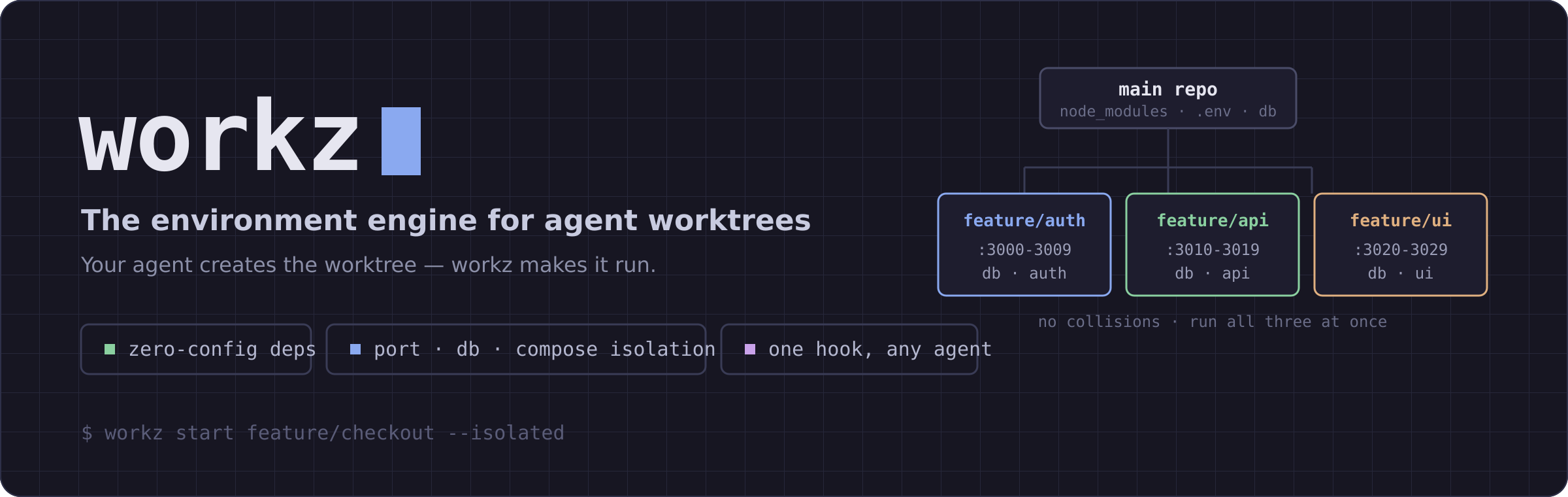




Your agent creates the worktree — workz makes it run.
Dependencies linked, .env copied, a unique port range, its own database and compose project. Zero config.

---
## Why
Claude Code, Cursor, and Codex all create git worktrees for parallel work now. But a fresh worktree is inert:
```bash
git worktree add ../feature-x feature/x && cd ../feature-x
# .env? gone. node_modules? gone — reinstall and wait.
# dev-server port? same as every other worktree. database? shared.
```
Every one of those tools ships a *worktree-create hook* and tells you to write the setup command yourself. **workz is that command** — and it's the only tool that also gives each worktree its own ports, database, and compose project.
## Quickstart
```bash
# 1. install (latest — from source)
cargo install --git https://github.com/rohansx/workz
# packaged releases: `cargo install workz` · `brew install rohansx/tap/workz`
# 2. in your repo — guided setup (detects your stack, writes .workz.toml)
workz init
# 3. spin up an isolated worktree that's ready to run
workz start feature/checkout --isolated
```
That's it: `node_modules` symlinked, `.env` copied, `PORT=3000-3009`, `DB_NAME` and `COMPOSE_PROJECT_NAME` set — you're dropped into a worktree you can `dev` immediately, with no collisions against your other worktrees.
## Use it as a hook
Let your editor/agent create worktrees natively; point its setup hook at `workz sync`. `workz hook ` prints the exact recipe (and `--install` writes it):
| Host | Recipe |
|---|
| Cursor | .cursor/worktrees.json → { "setup-worktree": ["workz","sync","--isolated","--quiet"] } |
| worktrunk | [hooks] → create = "workz sync --isolated --quiet" |
| Claude Code | WorktreeCreate hook → workz sync --isolated --quiet "$WORKTREE_PATH" |
| anything else | workz sync --isolated --quiet <path> |
```bash
workz hook cursor --install # writes .cursor/worktrees.json
workz hook claude # prints the Claude Code hook to paste
```
`--json` makes sync output machine-readable; `--quiet` stays silent on success (warnings to stderr).
## Commands
| Command | Does |
|---------|------|
| `workz init` | Guided setup: detect the stack, write `.workz.toml`, install a hook (`-y` for defaults) |
| `workz start ` | Create a worktree + sync (`--isolated`, `--create-db`, `--docker`, `--ai`, `--base`) |
| `workz sync [path]` | Make a worktree runnable — the hook command (`--isolated`, `--json`, `--quiet`, `--no-install`) |
| `workz` / `workz status` | Every worktree at a glance: branch, dirty state, size, port range |
| `workz switch [query]` | Fuzzy-jump between worktrees |
| `workz list` | List worktrees (`ls`) |
| `workz done [branch]` | Remove a worktree (`--force`, `--delete-branch`, `--cleanup-db`) |
| `workz clean` | Prune stale worktrees (`--merged` removes merged branches) |
| `workz conflicts` | Files modified in more than one worktree — catch clashes before merge |
| `workz doctor` | Diagnose broken symlinks, orphaned ports, stale config (`--fix` repairs) |
| `workz hook ` | Print/install the worktree-hook recipe for a host |
| `workz mcp` | Run the MCP server (below) |
| `workz shell-init ` | Shell integration for zsh/bash/fish |
## Environment isolation
`--isolated` gives each worktree its own port range, database, and compose project:
```bash
workz start feat/auth --isolated # PORT 3000-3009 DB_NAME=feat_auth COMPOSE_PROJECT_NAME=feat_auth
workz start feat/api --isolated # PORT 3010-3019 DB_NAME=feat_api COMPOSE_PROJECT_NAME=feat_api
```
Values land in a **managed block** in `.env.local`, so they sit alongside — and never overwrite — your own secrets:
```dotenv
STRIPE_SECRET_KEY=sk_live_… # your line, preserved
# >>> workz managed — do not edit between these markers >>>
PORT=3010
DB_NAME=feat_api
DATABASE_URL=postgres://admin:…@localhost:5432/feat_api # derived from yours, db name swapped
COMPOSE_PROJECT_NAME=feat_api
# <<< workz managed <<<
```
- If your `.env.local` already has a `DATABASE_URL`, workz keeps its driver/host/port/credentials and only swaps the database name.
- Add `--create-db` to actually create the Postgres database (`createdb`), or `--create-db --from-db dev` to clone it from a template. `workz done --cleanup-db` drops it.
- Port ranges are tracked in `~/.config/workz/ports.json` and released on `workz done`. `workz doctor --fix` reclaims orphans.
## What gets synced
**Symlinked** (project-aware — only what's relevant):
| Project | Directories |
|---------|-------------|
| Node.js | `node_modules`, `.next`, `.nuxt`, `.svelte-kit`, `.turbo`, `.parcel-cache`, `.angular` |
| Rust | `target` |
| Python | `.venv`, `venv`, `__pycache__`, `.mypy_cache`, `.pytest_cache`, `.ruff_cache` |
| Go | `vendor` |
| Java/Kotlin | `.gradle`, `build` |
| IDE | `.vscode`, `.idea`, `.cursor`, `.claude`, `.zed` |
**Copied**: `.env`, `.env.*`, `.envrc`, `.tool-versions`, `.npmrc`, `.yarnrc.yml`, `.secrets*`, and more.
**Auto-installed** from the lockfile: `bun` / `pnpm` / `yarn` / `npm ci` / `uv` / `poetry` / `pipenv` / `pip` (skip with `--no-install`).
Symlinked `node_modules` breaks a Vite/Vitest/pnpm setup? Override per directory:
```toml
[sync.overrides]
node_modules = "copy" # copy instead of symlink
".vscode" = "ignore" # skip entirely
```
## Configuration
Project `.workz.toml` overrides global `~/.config/workz/config.toml`:
```toml
[sync]
symlink_add = ["my-large-cache"] # extend the built-in defaults
copy_add = ["config/local.json"]
ignore_add = ["logs"]
[sync.overrides]
node_modules = "copy"
[hooks]
post_start = "pnpm install --frozen-lockfile"
pre_done = "docker compose down"
[isolation]
base_port = 3000
port_range_size = 10
```
Zero config works out of the box for Node, Rust, Python, Go, and Java. Run `workz doctor` if anything looks off.
## MCP server
An MCP server so agents can manage — and provision — worktrees themselves:
```bash
claude mcp add workz -- workz mcp
```
Tools: `workz_start`, `workz_sync` (deps + env + isolation, returns JSON), `workz_list`, `workz_status`, `workz_done`, `workz_conflicts`.
## Shell setup
```bash
eval "$(workz shell-init zsh)" # zsh / bash
workz shell-init fish | source # fish
```
Adds `cd`-on-switch and tab completions.
---
MIT OR Apache-2.0 · Where workz is headed: V2.md