OpenAPI UI
OpenAPI/Swagger UI document, quickly generate mock params and call api, also simplified postman tool



English |
简体中文
## Screen Shot
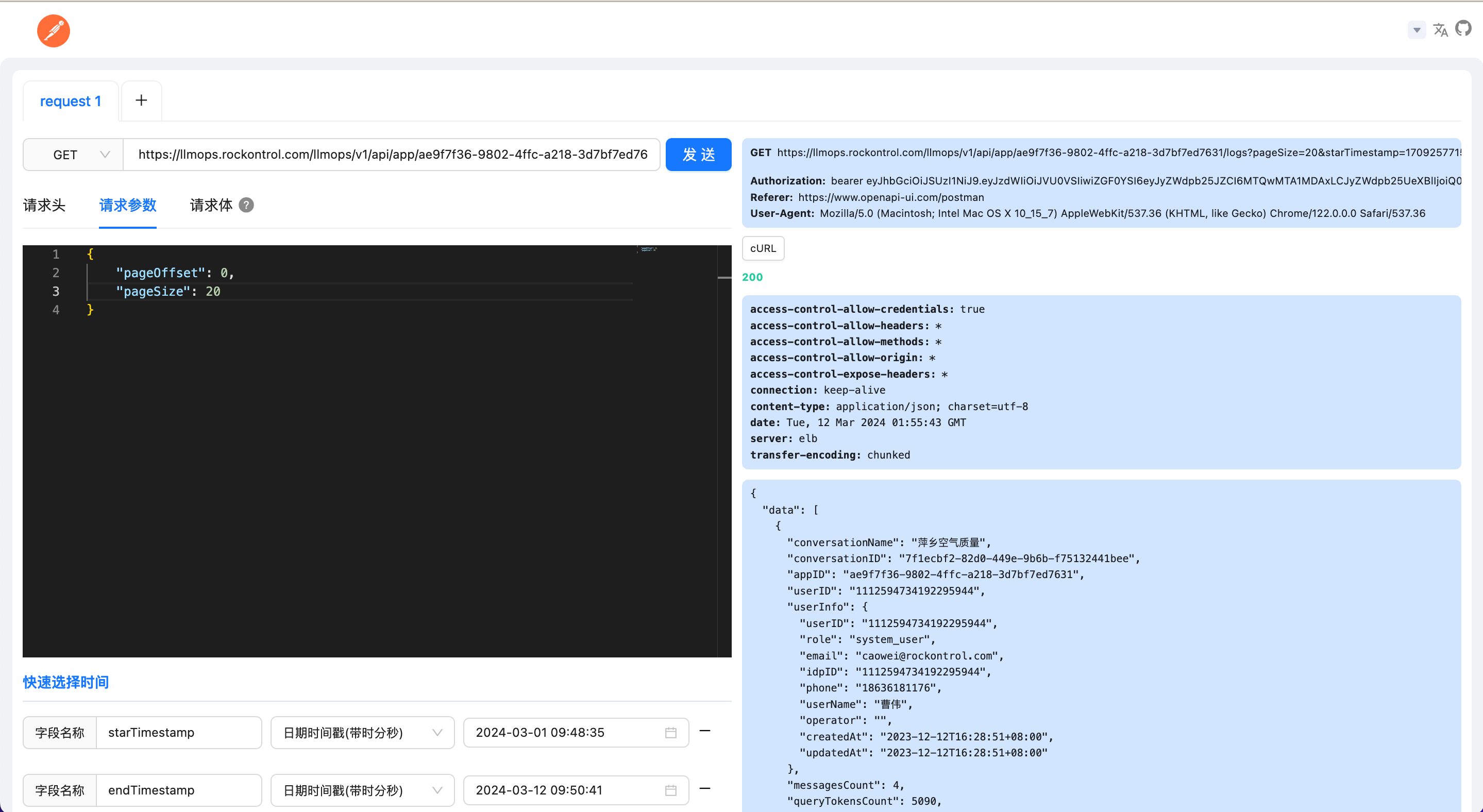 ## Website domain
* CN: [www.openapi-ui.com](https://www.openapi-ui.com), support http,https
* US: [doc.openapi-ui.com](https://doc.openapi-ui.com)
* US2: [docs.openapi-ui.com](https://docs.openapi-ui.com)
## Usage
### With CDN
`spec-url` is `full path`
```tsx
openAPI UI
```
`spec-url` is `path`
```tsx
openAPI UI
```
### With React(or With Vue)
```tsx
import { useEffect } from "react";
const SetUpOpenApiUI = () => {
useEffect(() => {
import("openapi-ui-dist")
}, []);
return (
);
}
export const openapiRoutes = {
path: "/openapi",
id: "openapi",
element: ,
};
```
### With Go Web Framework
- [go-openapi-ui](https://github.com/rookie-luochao/go-openapi-ui)
### With Nodejs Web Framework
- [nodejs-openapi-ui](https://github.com/openapi-ui/nodejs-openapi-ui)
## Quick start
```bash
# node version >= 18
# download node_modules
pnpm install
# or make install
# start
npm run dev
# or make dev
```
## Some script
```bash
# build
npm run build
# or make build
# make docker image
make docker-build
# run docker image
make docker-run
# make docker image and run docker image
make docker-build-run
```
## Support data format
* swagger2.json/swagger2.yml
* openapi3.json/openapi3.yml
## How to use
* enter swagger2/openapi3 api gateway URL, refresh the page to update the interface
* upload swagger2/openapi3 file
* enter swagger2/openapi3 text
## Global config
* supports configure request timeout, the default request timeout is 2 minutes
* supports configure request Authorization, Authorization can be overridden in the current request
## Share URL
* url can only be shared when imported through url mode
* copy the url and share it with those who need it, they can echo the url to the specified interface
## Mock request params
1. if the schema contains the format field, then use [openapi-sampler](https://github.com/Redocly/openapi-sampler) to mock request params
2. if the schema does not contain the format field, then use faker to mock request params
## Request error message display rules
1. if the returned structure contains a message field, display the message field
2. if the returned structure contains a msg field, display the msg field
3. if the returned result is a string, display the string
4. display AxiosResponse.statusText field
5. display AxiosError.message field
## Connect intranet api
* if unable to connect intranet api, you can run this project locally or use docker to deploy this project locally or on the server
## Support multiple api gateway URL
* the caching strategy used is session storage, so you can open multiple pages at the same time
## Docker deploy, support env variable injection
```bash
# pull Docker image
docker pull ghcr.io/rookie-luochao/openapi-ui:latest
# start container, nginx reverse proxy custom port, for example: docker run -d -p 8081:80 ghcr.io/rookie-luochao/openapi-ui:latest
docker run -d -p 80:80 -e APP_CONFIG=env=zh,appNameZH=简洁美观的接口文档 ghcr.io/rookie-luochao/openapi-ui:latest
```
## Node version
node >= 18
## Website domain
* CN: [www.openapi-ui.com](https://www.openapi-ui.com), support http,https
* US: [doc.openapi-ui.com](https://doc.openapi-ui.com)
* US2: [docs.openapi-ui.com](https://docs.openapi-ui.com)
## Usage
### With CDN
`spec-url` is `full path`
```tsx
openAPI UI
```
`spec-url` is `path`
```tsx
openAPI UI
```
### With React(or With Vue)
```tsx
import { useEffect } from "react";
const SetUpOpenApiUI = () => {
useEffect(() => {
import("openapi-ui-dist")
}, []);
return (
);
}
export const openapiRoutes = {
path: "/openapi",
id: "openapi",
element: ,
};
```
### With Go Web Framework
- [go-openapi-ui](https://github.com/rookie-luochao/go-openapi-ui)
### With Nodejs Web Framework
- [nodejs-openapi-ui](https://github.com/openapi-ui/nodejs-openapi-ui)
## Quick start
```bash
# node version >= 18
# download node_modules
pnpm install
# or make install
# start
npm run dev
# or make dev
```
## Some script
```bash
# build
npm run build
# or make build
# make docker image
make docker-build
# run docker image
make docker-run
# make docker image and run docker image
make docker-build-run
```
## Support data format
* swagger2.json/swagger2.yml
* openapi3.json/openapi3.yml
## How to use
* enter swagger2/openapi3 api gateway URL, refresh the page to update the interface
* upload swagger2/openapi3 file
* enter swagger2/openapi3 text
## Global config
* supports configure request timeout, the default request timeout is 2 minutes
* supports configure request Authorization, Authorization can be overridden in the current request
## Share URL
* url can only be shared when imported through url mode
* copy the url and share it with those who need it, they can echo the url to the specified interface
## Mock request params
1. if the schema contains the format field, then use [openapi-sampler](https://github.com/Redocly/openapi-sampler) to mock request params
2. if the schema does not contain the format field, then use faker to mock request params
## Request error message display rules
1. if the returned structure contains a message field, display the message field
2. if the returned structure contains a msg field, display the msg field
3. if the returned result is a string, display the string
4. display AxiosResponse.statusText field
5. display AxiosError.message field
## Connect intranet api
* if unable to connect intranet api, you can run this project locally or use docker to deploy this project locally or on the server
## Support multiple api gateway URL
* the caching strategy used is session storage, so you can open multiple pages at the same time
## Docker deploy, support env variable injection
```bash
# pull Docker image
docker pull ghcr.io/rookie-luochao/openapi-ui:latest
# start container, nginx reverse proxy custom port, for example: docker run -d -p 8081:80 ghcr.io/rookie-luochao/openapi-ui:latest
docker run -d -p 80:80 -e APP_CONFIG=env=zh,appNameZH=简洁美观的接口文档 ghcr.io/rookie-luochao/openapi-ui:latest
```
## Node version
node >= 18

 ## Website domain
* CN: [www.openapi-ui.com](https://www.openapi-ui.com), support http,https
* US: [doc.openapi-ui.com](https://doc.openapi-ui.com)
* US2: [docs.openapi-ui.com](https://docs.openapi-ui.com)
## Usage
### With CDN
`spec-url` is `full path`
```tsx
## Website domain
* CN: [www.openapi-ui.com](https://www.openapi-ui.com), support http,https
* US: [doc.openapi-ui.com](https://doc.openapi-ui.com)
* US2: [docs.openapi-ui.com](https://docs.openapi-ui.com)
## Usage
### With CDN
`spec-url` is `full path`
```tsx