# App Store Connect CLI

Latest Release GitHub Stars Go Version License Homebrew

asc -- App Store Connect CLI

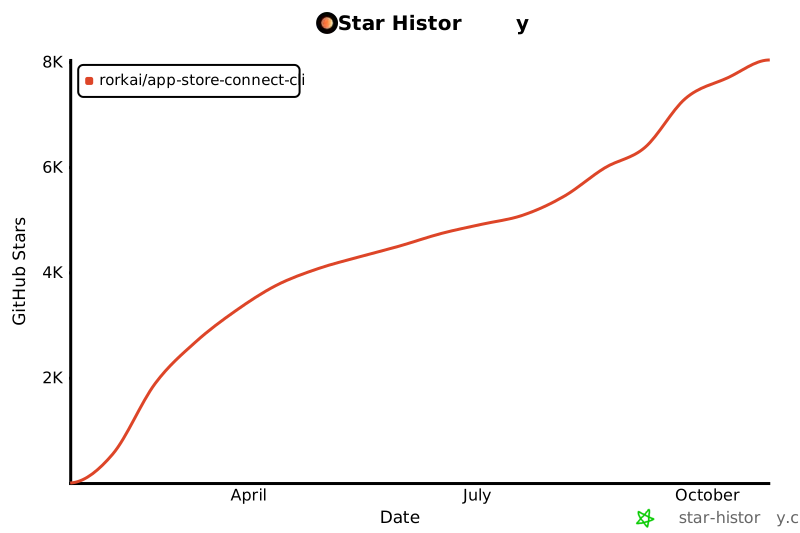
A fast, lightweight, and scriptable CLI for the App Store Connect API. Automate iOS, macOS, tvOS, and visionOS release workflows from your terminal, IDE, or CI/CD pipeline. ## Table of Contents - [asc skills](#asc-skills) - [Sponsors](#sponsors) - [Quick Start](#quick-start) - [Troubleshooting](#troubleshooting) - [Privacy and telemetry](#privacy-and-telemetry) - [Support](#support) - [Wall of Apps](#wall-of-apps) - [Common Workflows](#common-workflows) - [Commands and Reference](#commands-and-reference) - [Documentation](#documentation) - [Contributing](#contributing) - [License](#license) ## asc skills Agent Skills for automating `asc` workflows including builds, TestFlight, metadata sync, submissions, and signing: https://github.com/rorkai/app-store-connect-cli-skills Install them globally so they are available across projects: ```bash asc install-skills ``` Direct install: ```bash npx skills add rorkai/app-store-connect-cli-skills --global --agent codex ``` ## Quick Start If you want to confirm the binary works before configuring authentication: ```bash asc version asc --help ``` ### 1. Install ```bash # Homebrew (recommended) brew install asc # Install script (macOS/Linux) curl -fsSL https://asccli.sh/install | bash ``` ```powershell # Windows (WinGet, once the package is accepted) winget install asc # Exact fallback when scripting winget install --id Rorkai.ASC --exact ``` The WinGet package is tracked in [GitHub Discussion #1552](https://github.com/rorkai/App-Store-Connect-CLI/discussions/1552). Until it appears in `winget search asc`, Windows users can download the signed release binaries directly from the [GitHub releases page](https://github.com/rorkai/App-Store-Connect-CLI/releases/latest). For source builds and contributor setup, see [CONTRIBUTING.md](CONTRIBUTING.md). ### 2. Authenticate ```bash asc auth login \ --name "MyApp" \ --key-id "ABC123" \ --issuer-id "DEF456" \ --private-key /path/to/AuthKey.p8 \ --network ``` Generate API keys at: https://appstoreconnect.apple.com/access/integrations/api If you are running in CI, a headless shell, or a machine where keychain access is not available, use config-backed auth instead: ```bash asc auth login \ --bypass-keychain \ --name "MyCIKey" \ --key-id "ABC123" \ --issuer-id "DEF456" \ --private-key /path/to/AuthKey.p8 ``` ### 3. Validate auth ```bash asc auth status --validate asc auth doctor ``` ### 4. First command ```bash asc apps list --output table asc apps list --output json --pretty ``` ### Output defaults (TTY-aware) `asc` chooses a default `--output` based on where stdout is connected: - Interactive terminal (TTY): `table` - Non-interactive output (pipes/files/CI): `json` You can still set a global preference: ```bash export ASC_DEFAULT_OUTPUT=markdown ``` And explicit flags always win: ```bash asc apps list --output json ``` ### Stability labels `asc` uses visible lifecycle labels so you can judge support expectations before depending on a command in CI or scripts: - No label: stable public CLI contract for normal use - `[experimental]`: useful, but still evolving; expect sharper edges and faster iteration - `DEPRECATED:` or deprecation warnings: compatibility path kept during migration, but not the long-term home ## Troubleshooting ### Homebrew - Refresh Homebrew first: `brew update && brew upgrade asc` - Check which binary you are running: `which asc` - Confirm the installed version: `asc version` - If Homebrew is behind the latest GitHub release, use the install script from `https://asccli.sh/install` ### WinGet - Refresh WinGet sources first: `winget source update` - Prefer the short install once available: `winget install asc` - If the short name ever becomes ambiguous, use the package identifier: `winget install --id Rorkai.ASC --exact` - Confirm the installed command resolves: `Get-Command asc` and `asc version` ### Authentication - Validate the active profile: `asc auth status --validate` - Run the auth health check: `asc auth doctor` - If keychain access is blocked, retry with `ASC_BYPASS_KEYCHAIN=1` or re-run `asc auth login --bypass-keychain` - Use `asc auth login --local --bypass-keychain ...` when you want repo-local credentials in `./.asc/config.json` ### Output - `asc` defaults to `table` in an interactive terminal and `json` in pipes, files, and CI - Use an explicit format when scripting or sharing repro steps: `--output json`, `--output table`, or `--output markdown` - Use `--pretty` with JSON when you want readable output in terminals or bug reports - Set a personal default with `ASC_DEFAULT_OUTPUT`, but remember `--output` always wins ## Privacy and telemetry `asc` sends pseudonymous command-level usage telemetry by default to help maintainers understand which commands are used and where reliability work is needed. Local events include a random installation ID, which lets events from one installation be grouped over time; it is not derived from an Apple account or machine identifier. Telemetry includes the CLI version, operating system and architecture, registered command path, duration, runtime context, invocation source, a bounded outcome class, and the HTTP status when an API request fails. It may include a sanitized public flag name. It does **not** include raw arguments, stderr, error messages, flag values, response bodies, credentials, private keys, Apple account, team, or issuer IDs, app or bundle IDs, usernames, hostnames, repository names, or file paths. Review or change telemetry at any time: ```bash asc telemetry status asc telemetry disable asc telemetry reset-id ``` `ASC_TELEMETRY_DISABLED=1` and `DO_NOT_TRACK=1` also disable telemetry. See the [telemetry reference](commands/telemetry.mdx) for the exact event payload, runtime handling, collector endpoint, and all controls. ## Support - Use [GitHub Discussions](https://github.com/rorkai/App-Store-Connect-CLI/discussions) for install help, authentication setup, workflow advice, and "how do I...?" questions - Use [GitHub Issues](https://github.com/rorkai/App-Store-Connect-CLI/issues) for reproducible bugs and concrete feature requests - See [SUPPORT.md](SUPPORT.md) for the support policy and bug-report checklist - Before filing an auth or API bug, retry with `ASC_BYPASS_KEYCHAIN=1`; if it is safe to do so, include redacted output from `ASC_DEBUG=api asc ...` or `asc --api-debug ...` ## Wall of Apps [See the Wall of Apps →](https://asccli.sh/#wall-of-apps) Want to add yours? `asc apps wall submit --app "1234567890" --confirm` The command uses your authenticated `gh` session to fork the repo and open a pull request that updates `docs/wall-of-apps.json`. It resolves the public App Store name, URL, and icon from the app ID automatically. For manual entries that are not on the public App Store yet, use `--link` with `--name`. Use `asc apps wall submit --dry-run` to preview the fork, branch, and PR plan before creating anything. ## Common Workflows ### TestFlight feedback and crashes ```bash asc testflight feedback list --app "123456789" --paginate asc testflight crashes list --app "123456789" --sort -createdDate --limit 10 asc testflight crashes log --submission-id "SUBMISSION_ID" ``` ### Builds and distribution ```bash asc builds upload --app "123456789" --ipa "/path/to/MyApp.ipa" asc builds list --app "123456789" --output table asc testflight groups list --app "123456789" --output table ``` For macOS TestFlight distribution, upload the exported `.pkg` first, then add the processed build to a beta group: ```bash asc builds upload --app "123456789" --pkg "./build/MyMacApp.pkg" --version "1.2.3" --build-number "42" --wait --output json asc builds add-groups --app "123456789" --build-number "42" --version "1.2.3" --platform MAC_OS --group "Internal Testers" ``` `--app` is the App Store Connect app ID. If you use local Xcode build flags such as `--archive-path`, also pass exactly one of `--workspace` or `--project` plus `--scheme`; otherwise use a pre-exported `.ipa` or `.pkg` upload. Add `--submit --confirm` to `asc builds add-groups` when distributing to an external TestFlight group that needs beta app review submission. ### Release (high-level App Store publish flow) ```bash # Optional: preview the staging plan before submission asc release stage --app "123456789" --version "1.2.3" --build "BUILD_ID" --copy-metadata-from "1.2.2" --dry-run # Canonical upload + attach + submit command asc publish appstore --app "123456789" --ipa "/path/to/MyApp.ipa" --version "1.2.3" --submit --confirm # Monitor status after submission asc status --app "123456789" --watch ``` Lower-level submission lifecycle commands (for debugging or partial workflows): ```bash # Canonical readiness check asc validate --app "123456789" --version "1.2.3" asc submit status --version-id "VERSION_ID" asc submit cancel --version-id "VERSION_ID" --confirm ``` ### Review status and blockers ```bash asc review status --app "123456789" asc review doctor --app "123456789" ``` ### Metadata and localization ```bash asc localizations list --app "123456789" --type app-info asc metadata init --dir "./metadata" --version "1.2.3" --locale "en-US" asc metadata apply --app "123456789" --version "1.2.3" --dir "./metadata" --dry-run asc metadata keywords audit --app "123456789" --version "1.2.3" --blocked-terms-file "./blocked-terms.txt" asc apps info view --app "123456789" --output json --pretty ``` Use `asc metadata keywords audit` before `sync` or `apply` when you want an ASO-focused review of live keyword metadata across locales. It reports duplicate phrases, repeated terms across locales, overlap with localized app name or subtitle, byte-budget usage, and optional blocked terms from repeated `--blocked-term` flags or a text file. ### Screenshots and media ```bash asc screenshots plan --app "123456789" --version "1.2.3" --review-output-dir "./screenshots/review" asc screenshots apply --app "123456789" --version "1.2.3" --review-output-dir "./screenshots/review" --confirm asc screenshots list --version-localization "VERSION_LOCALIZATION_ID" asc video-previews list --app "123456789" ``` Uploading screenshots for a single locale: ```bash asc apps list asc versions list --app "APP_ID" asc localizations list --version "VERSION_ID" --output json --locale "en-US" | jsonpp asc screenshots upload --version-localization "VERSION_LOCALIZATION_ID" --path "./screenshots/en-US" --device-type "IPHONE_65" --replace --max-screenshots 10 ``` `VERSION_LOCALIZATION_ID` is the App Store version localization resource ID from `data[].id`, not the locale code from `attributes.locale`. ### Signing and bundle IDs ```bash asc certificates list asc profiles list asc bundle-ids list ``` ### Workflow automation ```bash asc workflow validate asc workflow run --dry-run testflight_beta VERSION:1.2.3 ``` ### Verified local Xcode -> TestFlight workflow See [docs/WORKFLOWS.md](docs/WORKFLOWS.md) for a copyable `.asc/deployment.json`, `.asc/workflow.json`, and `ExportOptions.plist` that use `asc builds next-build-number`, `asc xcode inject`, `asc xcode archive`, `asc xcode export --timeout 10m`, and `asc publish testflight --group ... --wait`. Add `--submit --confirm` when distributing to an external TestFlight group that needs beta app review submission. ```bash asc workflow validate asc xcode inject --manifest .asc/deployment.json --set version=1.2.3 --set build_number=42 --dry-run --output json asc workflow run --dry-run testflight_beta VERSION:1.2.3 asc workflow run testflight_beta VERSION:1.2.3 ``` ### Xcode Cloud workflows and build runs ```bash # Trigger from a pull request asc xcode-cloud run --workflow-id "WORKFLOW_ID" --pull-request-id "PR_ID" # Rerun from an existing build run with a clean build asc xcode-cloud run --source-run-id "BUILD_RUN_ID" --clean # Fetch a single build run by ID asc xcode-cloud build-runs get --id "BUILD_RUN_ID" ``` ### Apple Ads campaign management Apple Ads uses separate OAuth credentials from App Store Connect: ```bash asc ads auth login --name "Marketing" --client-id "SEARCHADS_CLIENT_ID" --team-id "SEARCHADS_TEAM_ID" --key-id "KEY_ID" --private-key ./ads-key.pem --org "123456" asc ads auth discover --output json asc ads campaigns --org "123456" --limit 100 --output json asc ads reports campaigns --org "123456" --file reporting-request.json --output json ``` See [guides/apple-ads-playbooks.mdx](guides/apple-ads-playbooks.mdx) for operator playbooks covering credential safety, org inspection, read-only smoke tests, reporting, raw API usage, and guarded mutations. ### StoreKit Retention Messaging Retention Messaging uses a dedicated In-App Purchase API key, separate from App Store Connect API credentials: ```bash asc storekit auth login --name Production --key-id "KEY_ID" --issuer-id "ISSUER_ID" --private-key ./SubscriptionKey.p8 --bundle-id com.example.app asc storekit auth doctor --environment sandbox --network asc storekit retention-messaging messages list --environment sandbox --output json asc storekit retention-messaging endpoint view --environment production ``` See [docs/architecture/storekit-retention-messaging.md](docs/architecture/storekit-retention-messaging.md) for the endpoint map, message and image requirements, environment variables, and the full sandbox verification sequence. ## Commands and Reference Use built-in help as the source of truth: ```bash asc --help asc --help asc --help ``` Reference hierarchy: - `asc --help`: authoritative command and flag surface - `docs/COMMANDS.md`: generated top-level taxonomy map - `asc docs show workflows`: curated workflow recipes - `asc docs show reference`: repo-local quick reference template used by `asc init` For full command families, flags, and discovery patterns, see: - [docs/COMMANDS.md](docs/COMMANDS.md) ## Documentation - [docs/CI_CD.md](docs/CI_CD.md) - CI/CD integration guides (GitHub Actions, GitLab, Bitrise, CircleCI) - [docs/COMMANDS.md](docs/COMMANDS.md) - Command families and reference navigation - [docs/WORKFLOWS.md](docs/WORKFLOWS.md) - Reusable workflow patterns, including local Xcode to TestFlight - [guides/apple-ads-playbooks.mdx](guides/apple-ads-playbooks.mdx) - Apple Ads operator playbooks - [docs/architecture/storekit-retention-messaging.md](docs/architecture/storekit-retention-messaging.md) - Retention Messaging setup and sandbox verification - [docs/API_NOTES.md](docs/API_NOTES.md) - API quirks and behaviors - [docs/CONTRIBUTING.md](docs/CONTRIBUTING.md) - CLI development and testing notes - [docs/TESTING.md](docs/TESTING.md) - Testing patterns and conventions - [docs/openapi/README.md](docs/openapi/README.md) - Offline OpenAPI snapshot + update flow - [CONTRIBUTING.md](CONTRIBUTING.md) - Contribution guide ## Acknowledgements Local screenshot framing uses Koubou (pinned to `0.18.1`) for deterministic device-frame rendering. GitHub: https://github.com/bitomule/koubou Simulator UI automation for screenshot capture and interactions uses AXe CLI. GitHub: https://github.com/cameroncooke/AXe ## Contributing Contributions are welcome. See [CONTRIBUTING.md](CONTRIBUTING.md) for details. ## License MIT License - see [LICENSE](LICENSE) for details. ## Star History [![Star History Chart](https://api.star-history.com/svg?repos=rorkai/App-Store-Connect-CLI&type=Date)](https://star-history.com/#rorkai/App-Store-Connect-CLI&Date) ---
This project is an independent, unofficial tool and is not affiliated with, endorsed by, or sponsored by Apple Inc. App Store Connect, TestFlight, Xcode Cloud, and Apple are trademarks of Apple Inc., registered in the U.S. and other countries.