NoMoreIDE Logo # NoMoreIDE **The AI-native terminal workbench for the post-IDE development loop.** [![npm version](https://img.shields.io/npm/v/nomoreide?style=flat-square&color=0ea5e9&label=npm)](https://www.npmjs.com/package/nomoreide) [![npm downloads](https://img.shields.io/npm/dm/nomoreide?style=flat-square&color=6366f1)](https://www.npmjs.com/package/nomoreide) [![GitHub stars](https://img.shields.io/github/stars/Rorogogogo/nomoreide?style=flat-square&color=f59e0b)](https://github.com/Rorogogogo/nomoreide/stargazers) [![License: AGPL-3.0](https://img.shields.io/badge/license-AGPL--3.0%20%2B%20Commercial-22c55e?style=flat-square)](LICENSE) [![Node.js ≥20](https://img.shields.io/badge/node-%E2%89%A520-3b82f6?style=flat-square&logo=node.js&logoColor=white)](https://nodejs.org) [![MCP Ready](https://img.shields.io/badge/MCP-ready-a855f7?style=flat-square)](https://modelcontextprotocol.io) Give your coding agents and yourself a **shared local control surface** for services, ports, logs, Git review, GitHub workflows, database work, and MCP workflows — no IDE required. [Product Tour](#product-tour) · [Download for macOS](#macos-desktop-app) · [MCP Setup](#connect-your-ai-agent) · [CLI Reference](#cli) · [Architecture](#architecture)
--- > Documentation reviewed for NoMoreIDE **v0.1.99** in **August 2026**. The canonical human and AI references are at [nomoreide.com/docs](https://www.nomoreide.com/docs). ## Product Tour
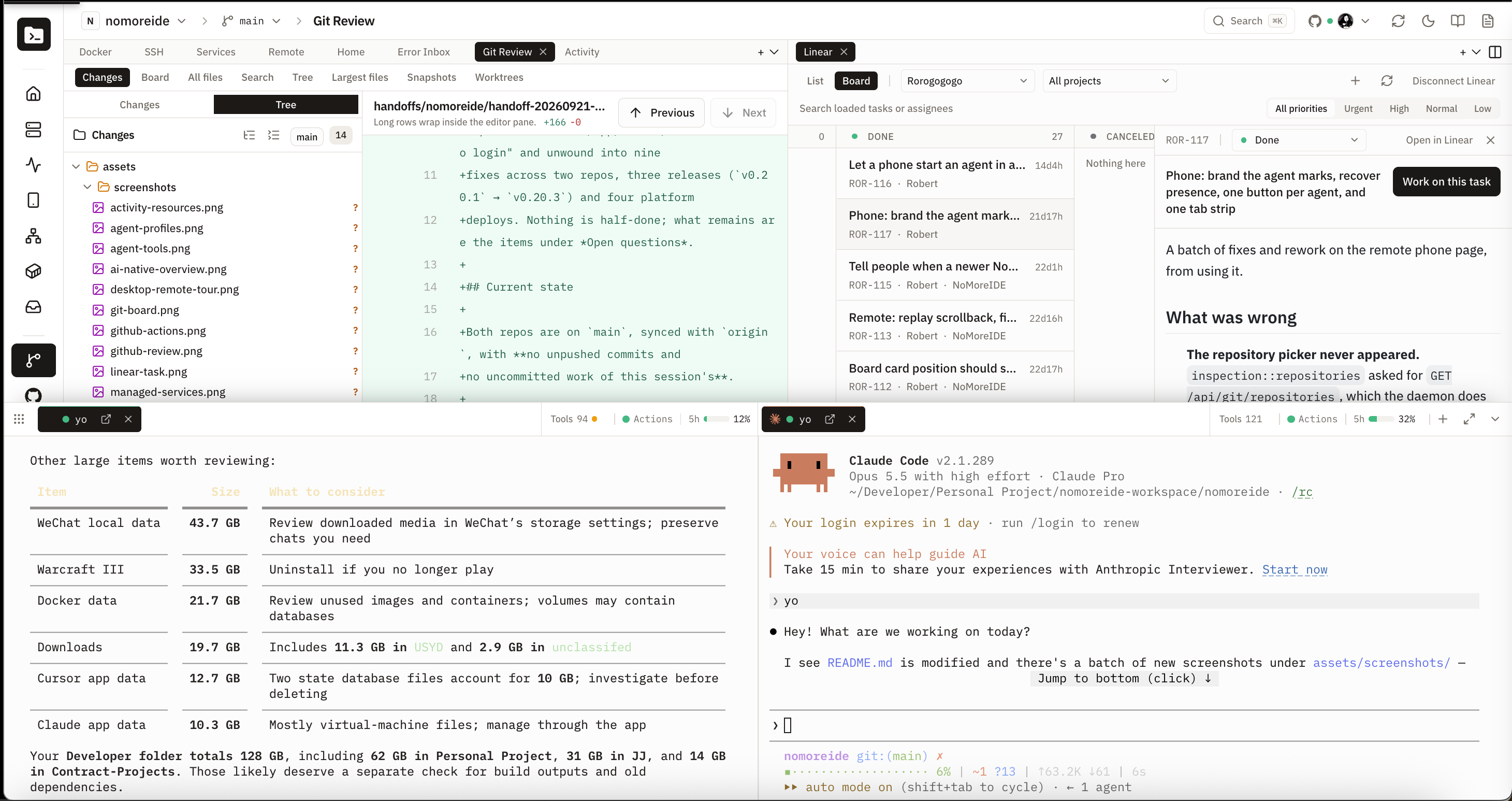
NoMoreIDE workbench showing Git Review with a file tree and inline diff, a Linear task board, and two agent terminals

An AI-native workbench connects agents, Git, services, GitHub Actions, and Vercel into one development workflow — no IDE required. Use the interface yourself or let agents use MCP tools to manage services, operate Git, read logs, and inspect CI and deployment information. Send supported files, diffs, and service context directly to your agent.
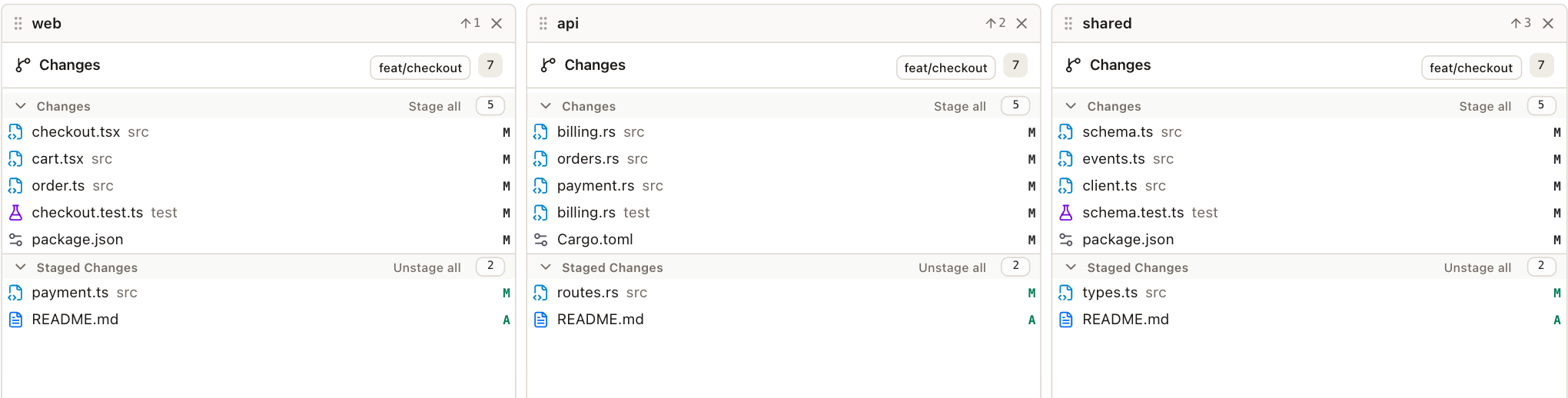
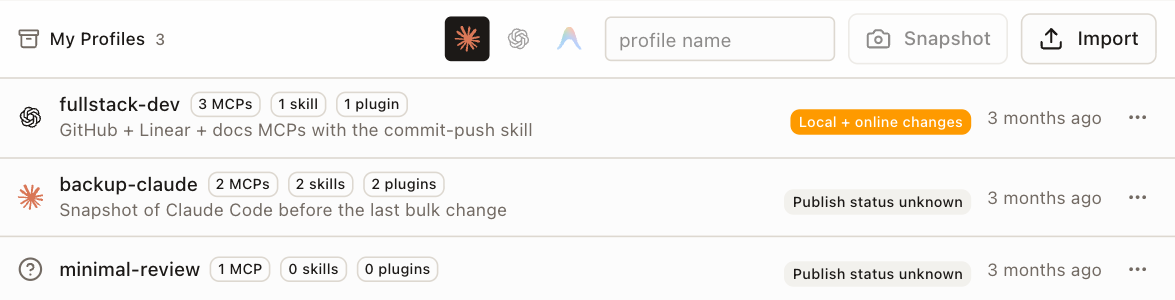
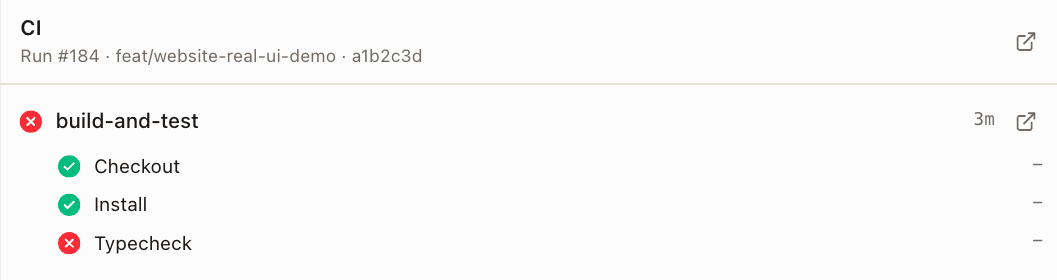
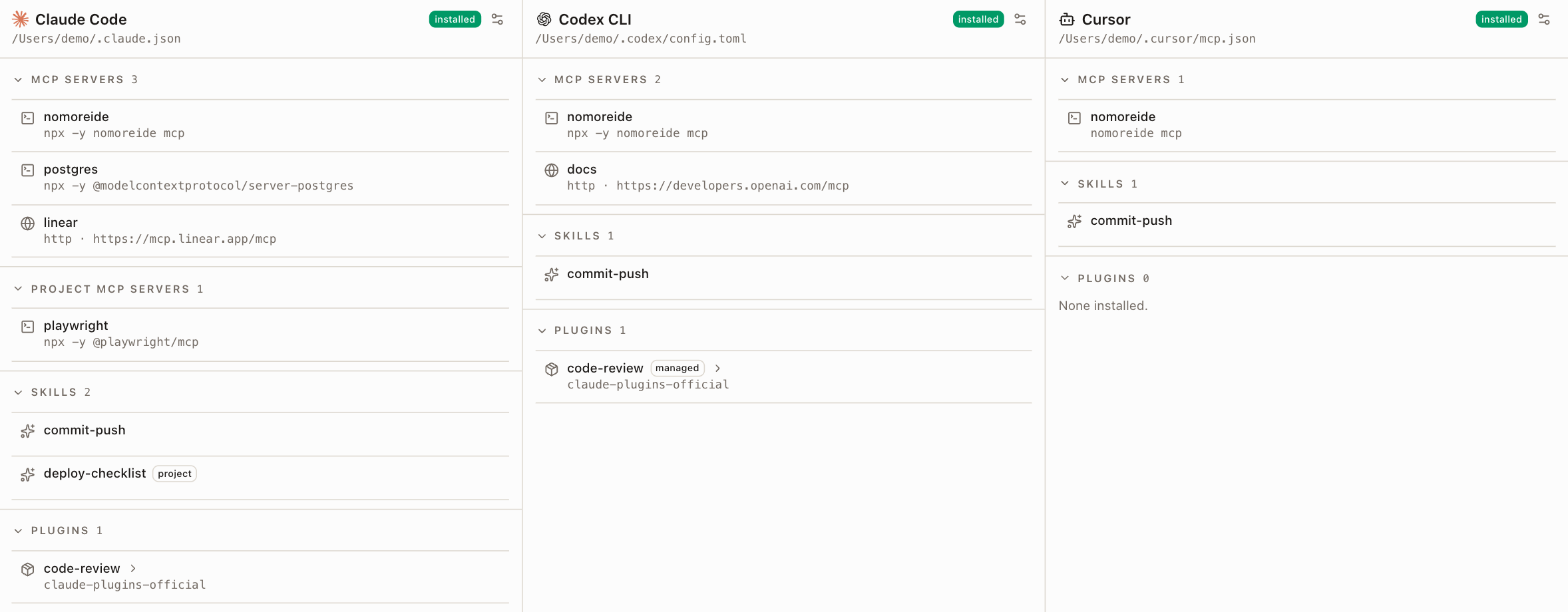
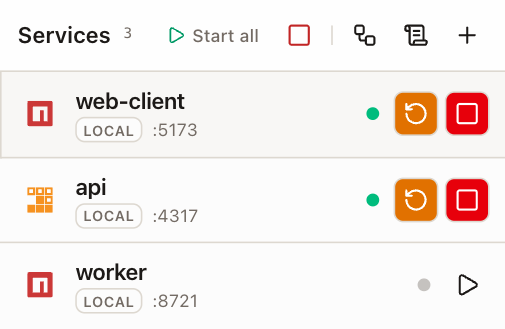
Focused views: cross-repo Git, GitHub Actions, agents, profiles, and services ### Cross-repository Git Board See changes and staging state for several repositories together. This example uses three simulated repositories. Actual Git Board with web, api, and shared repository columns using demo data ### GitHub Actions integration Inspect workflow runs, jobs, failed steps, and logs alongside your development work. GitHub Actions job showing successful Checkout and Install steps and a failed Typecheck step; demo data ### Multiple agents and shareable profiles Manage supported agent tools and configurations in one place. Save supported MCP, skills, and plugin configuration as a profile, then export or publish it for others. Claude Code, Codex CLI, and Cursor configuration panels using demo data Profile snapshot and import controls with saved agent configuration profiles; demo data ### Managed services for agent testing Agents can use MCP to inspect service status, read logs, and start, stop, or restart managed services. Reuse running services and inspect ports before starting another process. Managed web-client and api services running, with a stopped worker and service controls; demo data The focused views in this section use demonstration data.
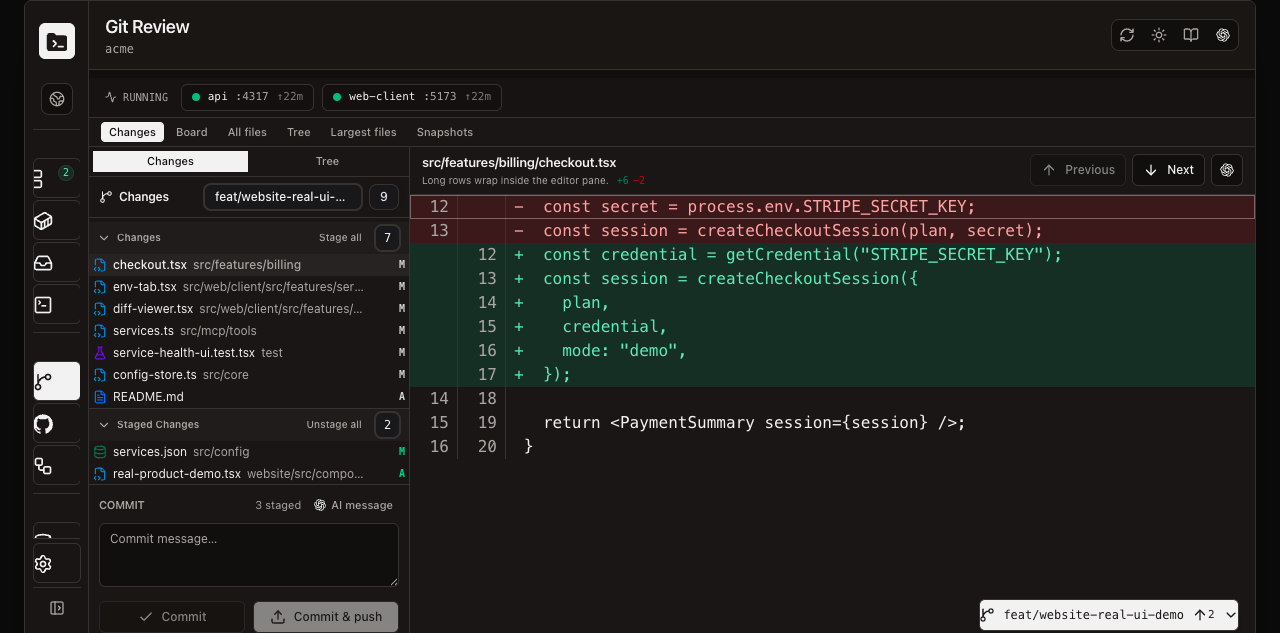
NoMoreIDE Git Review showing running services, changed and staged files, an inline diff, commit controls, and the agent terminal dock Review a repository, inspect a diff, stage and commit changes, watch running services, and hand context to an agent without leaving the workbench. Try the interactive demo—it uses safe mock data.
--- ## What Is NoMoreIDE? NoMoreIDE is the shared local control plane between you and your coding agents. The native macOS app, web dashboard, TUI, CLI, and MCP server all operate on the same services, repositories, logs, databases, workflows, and agent configuration. - **For humans:** one place to run services, inspect activity and Docker resources, review Git worktrees and GitHub changes, diagnose Vercel deployments, browse databases, and open terminals. - **For agents:** structured MCP tools expose the same live project state to Claude Code, Codex CLI, Gemini CLI, Cursor, Windsurf, and other MCP clients. - **For safety:** destructive Git operations are omitted, database writes require human approval, secrets are redacted from shared profiles, and NoMoreIDE does not kill processes it did not start. --- ## Download or Run NoMoreIDE ### macOS Desktop App Prefer a native app? Download the latest universal DMG for both Apple silicon and Intel Macs: **[Download NoMoreIDE for macOS](https://www.nomoreide.com/#download)** · [View all releases](https://github.com/Rorogogogo/nomoreide/releases) > **First launch:** NoMoreIDE is currently unsigned and not notarized, so macOS will block it the first time you open it. After dragging NoMoreIDE to Applications, try to open it once, then go to **System Settings → Privacy & Security**, click **Open Anyway**, and confirm with Touch ID or your password. ### CLI, Web UI, TUI, and MCP Server One command, no Node.js: ```bash curl -fsSL https://www.nomoreide.com/install.sh | sh ``` It works out your OS and architecture, downloads the matching release, **verifies its SHA-256 against the release's `SHA256SUMS`**, and installs into `~/.local/bin` — a single self-contained binary, with the dashboard beside it under `~/.local/share/nomoreide`. Prebuilt for macOS (Apple silicon and Intel) and Linux (x86_64 and arm64). ```bash # a specific version, or somewhere else curl -fsSL https://www.nomoreide.com/install.sh | sh -s -- --version 0.1.103 curl -fsSL https://www.nomoreide.com/install.sh | sh -s -- --prefix /usr/local # and to remove it again curl -fsSL https://www.nomoreide.com/install.sh | sh -s -- --uninstall ``` Every archive also carries [build provenance](https://docs.github.com/actions/security-guides/using-artifact-attestations-to-establish-provenance-for-builds) signed through Sigstore, so you can check where it was built rather than only that it downloaded intact: ```bash gh attestation verify nomoreide-0.1.103-aarch64-apple-darwin.tar.gz --repo Rorogogogo/nomoreide ```
Or install it from npm npm ships the same native binaries as the archives above. `nomoreide` is a small shim whose per-platform `optionalDependencies` mean npm downloads exactly one binary for your machine — no build, and no Node.js needed to *run* it. Node 20 or newer is needed to launch the shim itself. ```bash npm install -g nomoreide ```
Use the agent-specific commands below to connect NoMoreIDE as an MCP server. --- ## Connect Your AI Agent Install the NoMoreIDE MCP server together with its triggerable debugging skill: ```bash nomoreide setup codex nomoreide setup claude nomoreide setup gemini nomoreide setup cursor nomoreide setup windsurf ``` Run the command for your agent, then start a new agent session. The skill routes run, start, debug, crash, log, health, and port-conflict requests through the shared NoMoreIDE daemon instead of launching duplicate development processes. NoMoreIDE also advertises the same behavior through MCP initialization instructions for clients that support them. Setup writes the absolute path of the installed binary, so an agent launched from a desktop session finds it whether or not it inherited your shell's PATH. Setup is idempotent, and running it again after an upgrade replaces NoMoreIDE's own entry in place — including an older `npx -y nomoreide` one, which it recognises and upgrades. It stops only when the `nomoreide` MCP server already configured is **not** one of ours; review it, then rerun with `--force` to replace it and keep a backup. A `nomoreide-debug` skill that differs from the bundled one is copied aside and replaced, and the backup path is printed. Project-scoped MCPs and skills are not changed by this user-level setup and can override it inside that project. The agent-specific commands below install only the local stdio MCP server and remain available for manual setup. ### Claude Code ```bash claude mcp add --transport stdio nomoreide -- nomoreide mcp ``` > Want to share the config with your whole team? Use project scope to commit a `.mcp.json`: > > ```bash > claude mcp add --transport stdio --scope project nomoreide -- nomoreide mcp > ``` Then confirm inside Claude Code: ``` /mcp ```
Manual config (.mcp.json or Claude settings) ```json { "mcpServers": { "nomoreide": { "command": "npx", "args": ["-y", "nomoreide"] } } } ```
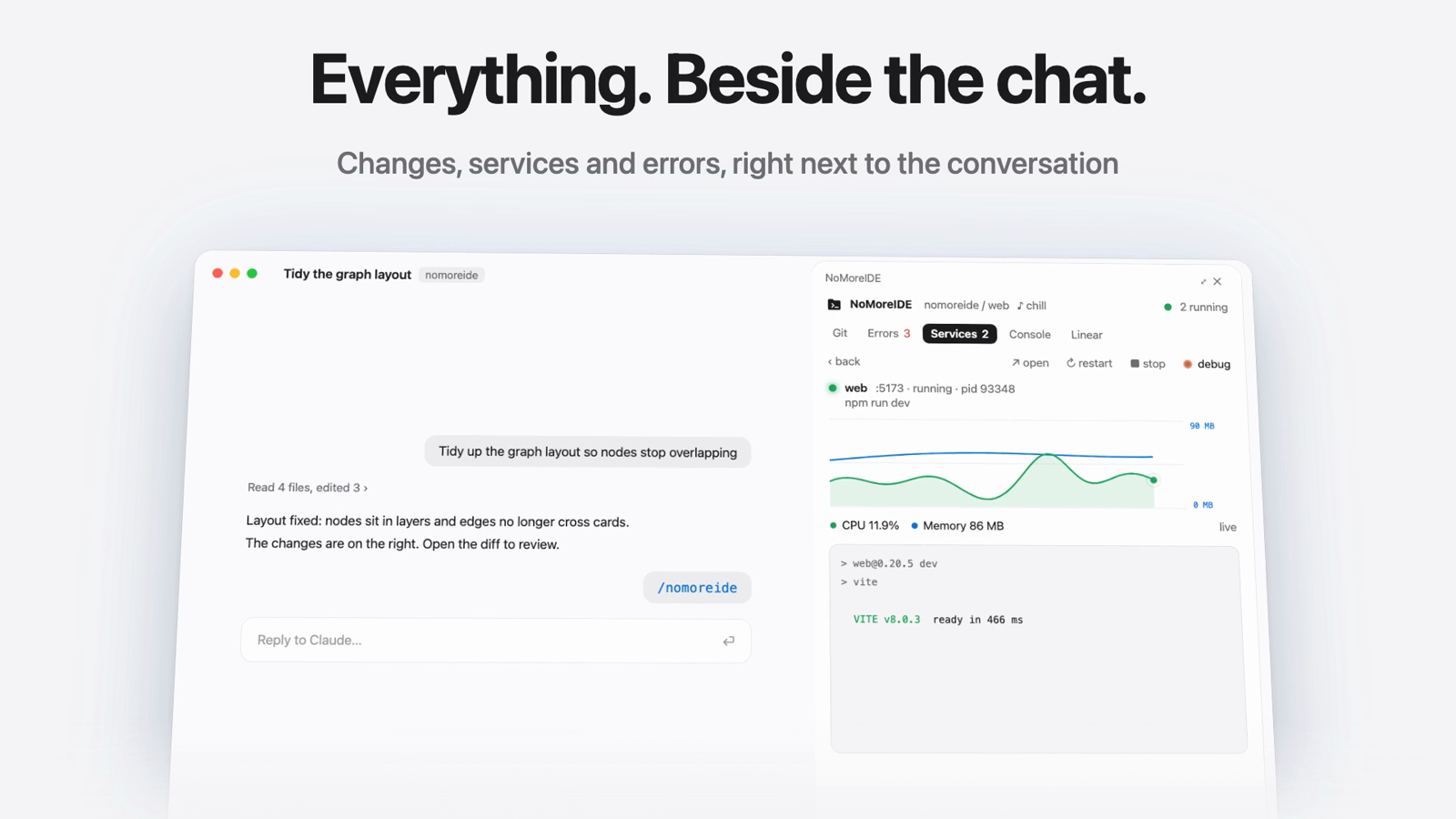
#### NoMoreIDE pane (optional) A side pane inside Claude Code, in the terminal and in the desktop app's Code tab: Git review with fetch, pull and push, the branch's pull request and GitHub Actions runs, a file browser with line-by-line editing, captured errors, managed services with machine activity and a read-only look into registered databases, the agent console (what the AI changed, usage, installed tools) and Linear tasks. It reads the running NoMoreIDE daemon. `install.sh` adds it for you when the `claude` CLI is on your PATH; to add it yourself, run this inside Claude Code (2.1.275 or later): ``` /plugin install nomoreide --marketplace Rorogogogo/nomoreide ``` Answer `y` to add the marketplace and pick a scope, then open the pane with `/nomoreide`. The NoMoreIDE pane open beside a Claude Code conversation, showing running services; click to watch the 40-second tour ▶ [Watch the 40-second tour](apps/website/public/videos/claude-code-pane.mp4) --- ### Codex CLI ```bash codex mcp add nomoreide -- nomoreide mcp ```
Manual config (~/.codex/config.toml) ```toml [mcp_servers.nomoreide] command = "npx" args = ["-y", "nomoreide"] ```
Then confirm inside Codex: ``` /mcp ``` --- ### Gemini CLI Open your Gemini CLI settings file (`~/.gemini/settings.json` or the path shown by `gemini config`) and add: ```json { "mcpServers": { "nomoreide": { "command": "nomoreide", "args": ["mcp"] } } } ``` If Gemini CLI does not inherit your shell's PATH, use the absolute path (`~/.local/bin/nomoreide`, spelled out) — which is what `nomoreide setup gemini` writes for you. Restart Gemini CLI, then verify: ``` /mcp ``` --- ### Local Checkout (any agent) If you prefer to point agents at a locally built binary instead of an installed release, build it and name it directly — `cargo build --release` puts it at `target/release/nomoreide`: ```json { "mcpServers": { "nomoreide": { "command": "/absolute/path/to/nomoreide/target/release/nomoreide", "args": ["mcp"] } } } ``` Running `nomoreide setup ` from a checkout writes exactly this, naming whichever binary ran it. --- ## Architecture ```mermaid graph TD subgraph Agent["AI Agent (Claude / Codex / Gemini / Cursor / Windsurf)"] A[Coding Agent CLI] end subgraph NoMoreIDE MCP[MCP Server
stdio transport] PM[Process Manager] GM[Git Manager] LS[Log Store] CS[Config Store
nomoreide.config.json] Desktop[macOS Desktop App] WS[Web Server
:4317] TUI[Terminal UI] end subgraph Services["Your Dev Services"] S1[backend :3001] S2[frontend :5173] S3[db :5432] end A -- MCP stdio --> MCP MCP --> PM MCP --> GM MCP --> LS MCP --> CS PM --> S1 PM --> S2 PM --> S3 LS --> PM Desktop --> PM Desktop --> GM Desktop --> LS WS --> PM WS --> GM WS --> LS TUI --> PM TUI --> LS ``` --- ## Feature Overview | Feature | CLI | TUI | Desktop / Web | MCP | |---|:---:|:---:|:---:|:---:| | Start / stop / restart services | ✓ | ✓ | ✓ | ✓ | | Bundle orchestration | ✓ | ✓ | ✓ | ✓ | | Port conflict detection | | | ✓ | ✓ | | Real-time log streaming | ✓ | ✓ | ✓ | ✓ | | Activity and resource monitoring | | | ✓ | | | Docker resources and Compose | | | ✓ | | | Git status & diff | ✓ | | ✓ | ✓ | | Stage / unstage / commit | ✓ | | ✓ | ✓ | | Branch management | ✓ | | ✓ | ✓ | | Clone, push, worktrees, and snapshots | | | ✓ | ✓ | | GitHub PRs / issues / Actions | | | ✓ | ✓ | | Vercel projects / deployments / logs | | | ✓ | ✓ | | Reusable git/GitHub workflows | | | ✓ | | | Event-driven workflow triggers | | | ✓ | | | Database browse and SQL query | ✓ | | ✓ | ✓ | | Human-approved SQL writes | | | ✓ | | | Agent tools, hooks, plugins, usage | | | ✓ | | | Agent environments (live MCPs & skills) | ✓ | | ✓ | ✓ | | Agent profiles (snapshot / apply / share) | ✓ | | ✓ | ✓ | | Hosted profile registry (publish / install) | ✓ | | ✓ | ✓ | | Safe Git (no force-push, no reset) | ✓ | | ✓ | ✓ | --- ## Running the Interfaces ### MCP Server (default) ```bash nomoreide # or from source: npm run dev ``` ### Terminal UI ```bash nomoreide tui ``` Use `↑`/`↓` to select a service, `S` to start it, `X` to stop it, and `R` to restart it. Press `B` to manage bundles and `L` to follow the selected service's logs. In logs, use the arrow keys or Page Up/Page Down to inspect history and `End` to return to the live tail. `Esc` returns to services and `Q` quits; services continue running in the daemon. ### Attach your terminal to the agent dock On macOS or Linux, start a managed shell from your terminal: ```bash cd /path/to/project nomoreide attach # Inside the attached shell: claude # or: codex ``` The command prefers the running desktop app and adds the shell to its bottom agent dock. If the desktop is closed, it starts or connects to the standalone daemon; use `nomoreide web` to see that dock. `nomoreide attach --daemon` explicitly selects the standalone daemon. The tab recognizes foreground Claude Code and Codex processes and returns to Shell when they exit. Use **Bring back** in the dock to take control there without restarting the shell. To move it back to your current terminal, use the session ID printed by the CLI: ```bash nomoreide attach --session cli:SESSION_ID ``` Only one surface controls the terminal at a time. Closing the external terminal leaves the managed session in the dock; `exit` inside the shell ends it. Attach starts a new shell in your current directory, so run it before starting your agent. It does not adopt a process already running in an unmanaged terminal. Recognition supplies the agent name and icon, not conversation or approval state; attached shells retain shell permissions and do not accept automatic agent-prompt insertion. ### Database CLI ```bash nomoreide db list nomoreide db schemas app nomoreide db objects app --schema public nomoreide db describe app --key nomoreide db script app --key nomoreide db sample app public.users --limit 25 nomoreide db query app --sql "SELECT * FROM users" --limit 25 ``` ### Web Dashboard ```bash nomoreide web # custom port: nomoreide web --port=4320 ``` The web dashboard is available at `http://127.0.0.1:4317` by default. --- ## CLI ### Services ```bash # Register a local service nomoreide add service backend \ --command "npm run dev" \ --cwd /absolute/path/to/backend \ --port 3001 # Register a Docker Compose service nomoreide add service api \ --kind docker-compose \ --cwd /absolute/path/to/infra \ --compose-file docker-compose.yml \ --compose-service api \ --port 3001 # Register a remote SSH service (uses your local SSH config and agent) nomoreide add service staging-api \ --kind ssh \ --host devbox \ --cwd /srv/app \ --command "npm run dev" \ --port 3001 # Register a bundle (ordered group of services) nomoreide add bundle full-stack db backend frontend # List everything nomoreide list # Lifecycle nomoreide start backend nomoreide stop backend nomoreide restart backend nomoreide start full-stack nomoreide stop full-stack # Logs (in-memory, current process) nomoreide logs backend ``` ### Git NoMoreIDE exposes **read-safe** Git operations only — no hard reset, no clean, no force push, no branch deletion. ```bash # Status & diff nomoreide git status --cwd /path/to/repo nomoreide git diff --cwd /path/to/repo # Staging & committing nomoreide git stage --cwd /path/to/repo Cargo.toml README.md nomoreide git unstage --cwd /path/to/repo Cargo.toml nomoreide git commit --cwd /path/to/repo --message "feat: add dashboard" # History nomoreide git log --cwd /path/to/repo # Branches nomoreide git branch --cwd /path/to/repo nomoreide git fetch --cwd /path/to/repo nomoreide git switch --cwd /path/to/repo feature/my-work nomoreide git create-branch --cwd /path/to/repo feature/new-work # Register repos for the web UI nomoreide git add-repo app --path /path/to/repo nomoreide git select-repo app ``` ### Agent Environments & Profiles Inspect and manage your coding agents' MCP servers and skills (Claude Code, Codex CLI, Antigravity), and bundle them into portable profiles. ```bash # Live agent configuration (read-only) nomoreide agents status # per-agent install state, MCP + skill counts nomoreide agents doctor # config sanity checks nomoreide agents read claude # dump one agent's live config as JSON # Profiles: named bundles of MCP servers + skills nomoreide profile list nomoreide profile snapshot claude my-setup # capture an agent's live config nomoreide profile apply my-setup codex --dry-run nomoreide profile apply my-setup codex # backs up the config first nomoreide profile export my-setup # credential-redacted .tar.gz nomoreide profile import my-setup.tar.gz --as teammate-setup # Hosted registry (sign in via the web UI, or set NOMOREIDE_API_TOKEN) nomoreide profile publish my-setup --slug my-setup --title "My Setup" nomoreide profile install my-setup ``` Exports and published packages never contain raw secrets — secret-looking values are redacted to `${credentials.*}` placeholders that importers fill from their own environment. --- ## MCP Tools All tools are prefixed with `nomoreide_` and are available to any connected MCP client. ### Service Tools | Tool | Description | |---|---| | `nomoreide_list_services` | List all registered services and bundles | | `nomoreide_register_service` | Register a new service | | `nomoreide_start_service` | Start a registered service | | `nomoreide_stop_service` | Stop a running service | | `nomoreide_restart_service` | Restart a running service | | `nomoreide_read_logs` | Read recent in-memory logs for a service | | `nomoreide_register_bundle` | Register a bundle of services | | `nomoreide_start_bundle` | Start all services in a bundle | | `nomoreide_stop_bundle` | Stop all services in a bundle | | `nomoreide_status` | Overall server status | | `nomoreide_service_context` | Build a copy-paste agent context packet for a service | | `nomoreide_service_health` | Computed health summaries (one service or all) | | `nomoreide_timeline` | Recent debug timeline events (optionally per service) | | `nomoreide_open_ui` | Open the local web UI | | `nomoreide_close_ui` | Close the local web UI | ### Git Tools | Tool | Description | |---|---| | `nomoreide_git_status` | Show working tree status | | `nomoreide_git_diff` | Show unstaged diff | | `nomoreide_git_staged_diff` | Show staged diff | | `nomoreide_git_log` | Show recent commits | | `nomoreide_git_branches` | List branches | | `nomoreide_git_fetch` | Fetch from remote | | `nomoreide_git_switch_branch` | Switch to a branch | | `nomoreide_git_create_branch` | Create a new branch | | `nomoreide_git_stage` | Stage specific files | | `nomoreide_git_unstage` | Unstage specific files | | `nomoreide_git_commit` | Commit staged changes | | `nomoreide_git_push` | Push a reviewed branch with resolved credentials | | `nomoreide_git_clone` | Clone an HTTPS or SSH repository into a scoped destination | | `nomoreide_git_register_repository` | Register a repo path | | `nomoreide_git_select_repository` | Select the active repo | | `nomoreide_git_worktrees` / `create_worktree` / `select_worktree` / `prune_worktrees` | Inspect and manage isolated Git worktrees | | `nomoreide_snapshots_list` / `nomoreide_snapshot_create` | Inspect or create safe repository snapshots | ### Database Tools | Tool | Description | |---|---| | `nomoreide_list_databases` | List registered database connections with masked URLs | | `nomoreide_register_database` / `nomoreide_check_database` | Register or verify a connection without exposing credentials | | `nomoreide_db_schemas` / `nomoreide_db_objects` | Walk the live database catalog | | `nomoreide_db_object_details` | Read structure, definitions, and executable create scripts | | `nomoreide_db_tables` | List tables and views for a connection | | `nomoreide_db_sample` | Sample rows and schema metadata | | `nomoreide_db_query` | Run read-only SQL queries; writes are rejected and staged for the Web UI SQL console | ### GitHub Tools | Tool | Description | |---|---| | `nomoreide_github_set_token` | Store a GitHub token for API access | | `nomoreide_github_list_prs` / `nomoreide_github_get_pr` | Inspect pull requests | | `nomoreide_github_get_pr_diff` | Fetch a pull request diff | | `nomoreide_github_create_pr` / `nomoreide_github_merge_pr` | Create or merge pull requests with explicit user intent | | `nomoreide_github_list_issues` / `nomoreide_github_get_issue` | Inspect issues | | `nomoreide_github_list_issue_comments` / `nomoreide_github_add_issue_comment` | Read or add issue and PR comments | | `nomoreide_github_create_issue` | Create an issue | | `nomoreide_github_get_commit_ci` | Inspect commit check status | | `nomoreide_github_list_workflow_runs` | List recent GitHub Actions workflow runs | ### Vercel Tools | Tool | Description | |---|---| | `nomoreide_vercel_list_projects` | List accessible Vercel projects for the selected scope | | `nomoreide_vercel_list_deployments` | List project deployments and current state | | `nomoreide_vercel_get_deployment` | Inspect one deployment and its metadata | | `nomoreide_vercel_deployment_logs` | Read deployment build logs for diagnosis | Vercel MCP tools are read-only. Redeploy, cancel, promote, and rollback remain explicit human actions in the dashboard. ### Agent Environment & Profile Tools | Tool | Description | |---|---| | `nomoreide_agents_status` / `nomoreide_agents_read_configs` | Live agent install state and MCP/skill configuration | | `nomoreide_agents_doctor` | Agent config sanity checks | | `nomoreide_agents_add_mcp` / `nomoreide_agents_remove_mcp` | Add or remove an MCP server (config backed up first) | | `nomoreide_agents_move_mcp_scope` / `nomoreide_agents_move_skill_scope` | Copy/move MCPs and skills between agents and scopes | | `nomoreide_agents_snapshot_agent` | Back up an agent's config files | | `nomoreide_profiles_list` / `get` / `create` / `update` / `delete` | Profile CRUD | | `nomoreide_profiles_snapshot` / `nomoreide_profiles_apply` | Capture a live agent into a profile / apply one (dry-run preview) | | `nomoreide_profiles_export` / `nomoreide_profiles_import` | Credential-redacted portable archives | | `nomoreide_profiles_publish` / `nomoreide_profiles_install_from_registry` | Share profiles through the hosted registry | | `nomoreide_profiles_register_github` | Register a GitHub repo as a registry profile | | `nomoreide_docs` | Fetch a focused documentation topic or canonical docs links | --- ## Example Configurations ### Service Definition (via MCP) ```json { "name": "backend", "command": "npm run dev", "cwd": "/absolute/path/to/project/backend", "port": 3001, "env": { "NODE_ENV": "development" }, "description": "REST API server" } ``` ### Bundle Definition (via MCP) ```json { "name": "full-stack", "services": ["db", "backend", "frontend"] } ``` Start the whole stack in one call: ```json { "name": "full-stack" } ``` --- ## Safety Model NoMoreIDE is designed to be **safe for AI agents to call without guard rails**: - Does not scan or enumerate the whole filesystem - Does not kill processes it did not start - Reports port conflicts instead of terminating the occupying process - Git tools omit all destructive operations (no `reset --hard`, `clean`, `push --force`, or `branch -D`) - Database MCP tools are read-only; writes are staged for the human-only SQL console - Database writes require explicit unlock, preview, and commit - GitHub create/comment/merge tools require a configured token and explicit user intent - Vercel MCP tools are read-only; deployment mutations remain in the human dashboard - Agent environment writes create backups; exported and published profiles redact credentials - Config is scoped to `~/.config/nomoreide/config.json` - Logs are written only to `~/.nomoreide/logs/` --- ## Development ```bash npm test # run the full test suite (vitest) npm run build # compile TypeScript → dist/ npm run dev # run from source (tsx) ``` --- ## Contributing Issues and pull requests are welcome at [github.com/Rorogogogo/nomoreide](https://github.com/Rorogogogo/nomoreide/issues). If this tool saved you from opening VS Code today, consider leaving a ⭐. ---
AGPL-3.0 + Commercial · Built by [Rorogogogo](https://github.com/Rorogogogo)
## License This project is **dual-licensed**: - 🆓 **AGPL-3.0** — free for personal use, open-source forks, and projects themselves open-sourced under a compatible license. See [LICENSE](LICENSE). - 💼 **Commercial license** — required for closed-source products, proprietary internal tools, or paid / hosted services where AGPL-3.0's copyleft and network-use obligations don't fit. See [COMMERCIAL.md](COMMERCIAL.md). ### Do I need a commercial license? | Use case | License | |---|---| | Personal use / running locally | AGPL-3.0 (free) | | Forking and publishing under AGPL-3.0 | AGPL-3.0 (free) | | Bundling into a closed-source product | **Commercial** | | Hosting a modified version as a SaaS without publishing source | **Commercial** | | Internal company tool not open-sourced | **Commercial** | For a commercial license, contact **Robert Wang** at **xwang.robert@gmail.com** — see [COMMERCIAL.md](COMMERCIAL.md) for what to include in your request.