> [!IMPORTANT]
> ## ▶ To play, get the [XI on Anything launcher](#install-players)
>
> **The launcher installs and updates everything for you.** You don't need to build this repo
> to play. Paste into Terminal:
>
> ```bash
> curl -fsSL https://raw.githubusercontent.com/rubymatrix/xi-on-anything/main/install.sh | bash
> ```
>
> Needs an Apple silicon Mac (M1 or later) and your own copy of FINAL FANTASY XI.
> This repo is the source of the recompiler and game host, for anyone who wants to build it.
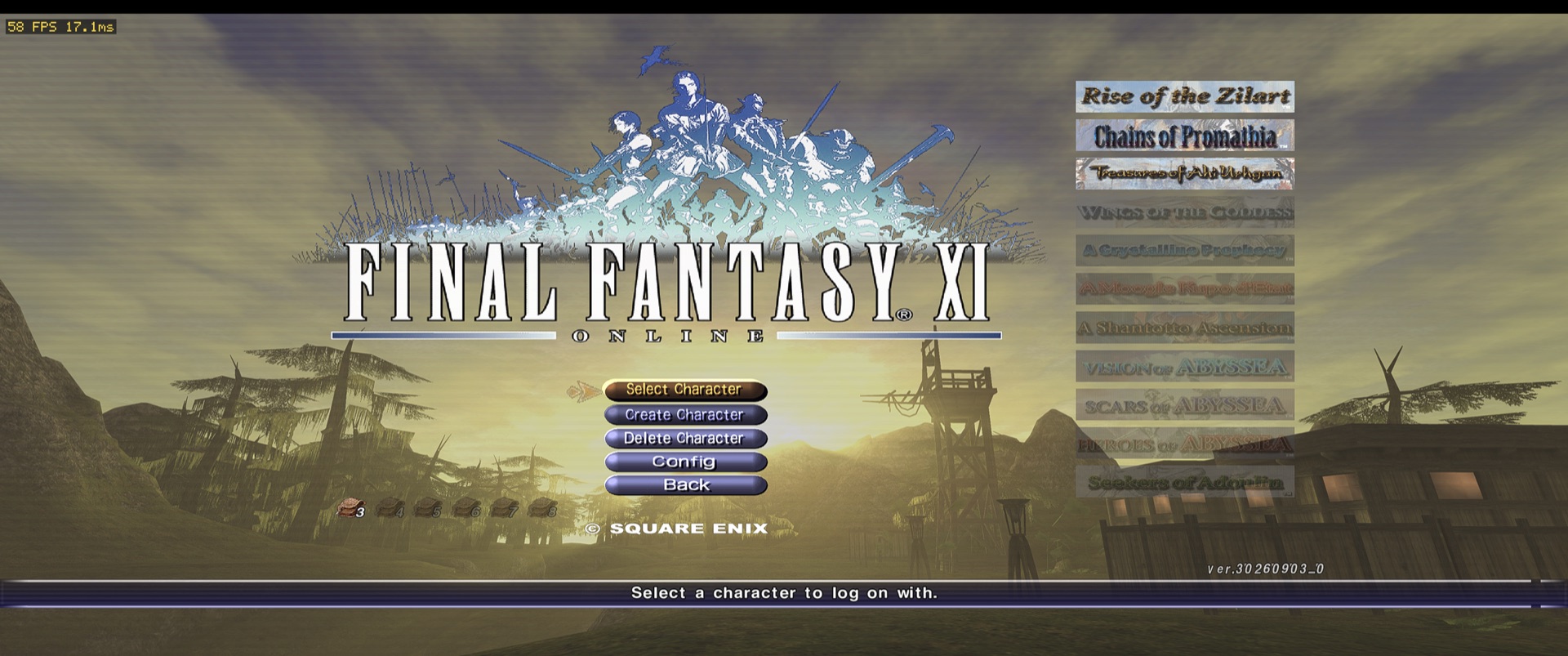
FINAL FANTASY XI running natively on Apple silicon Macs, with no Wine or Rosetta. The game's
`FFXiMain.dll` (and `FFXi.dll`) are statically recompiled from 32-bit x86 to C on your own machine,
from your own install, and run on a platform layer written for macOS: Win32, Direct3D 8 on Metal,
audio, input and sockets. This repo holds the recompiler, its runtime, that platform layer, and
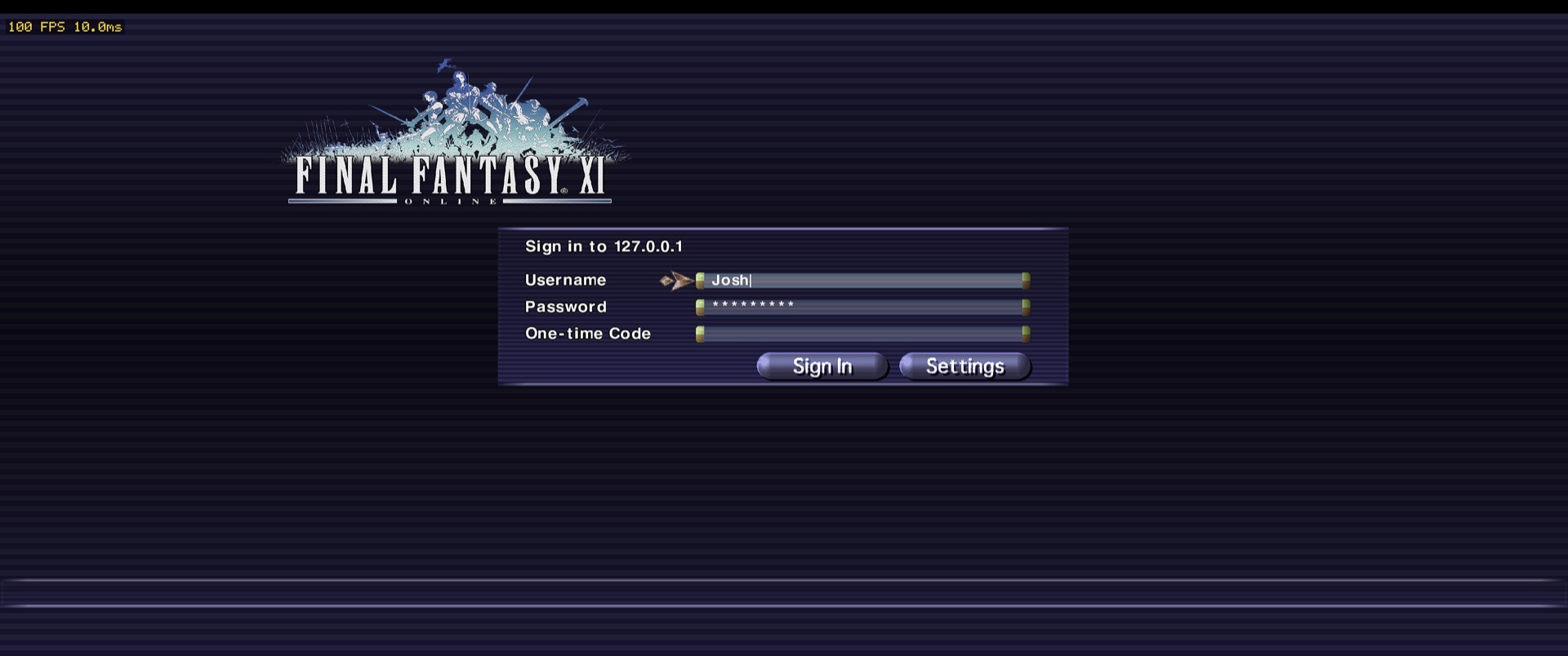
`host64`, the game host, with its own sign-in screen drawn in the game's UI art.
XI on Anything runs on Apple silicon Macs today, with more platforms planned.
**Works with [LandSandBoat](https://github.com/LandSandBoat/server) servers.** Sign in with a
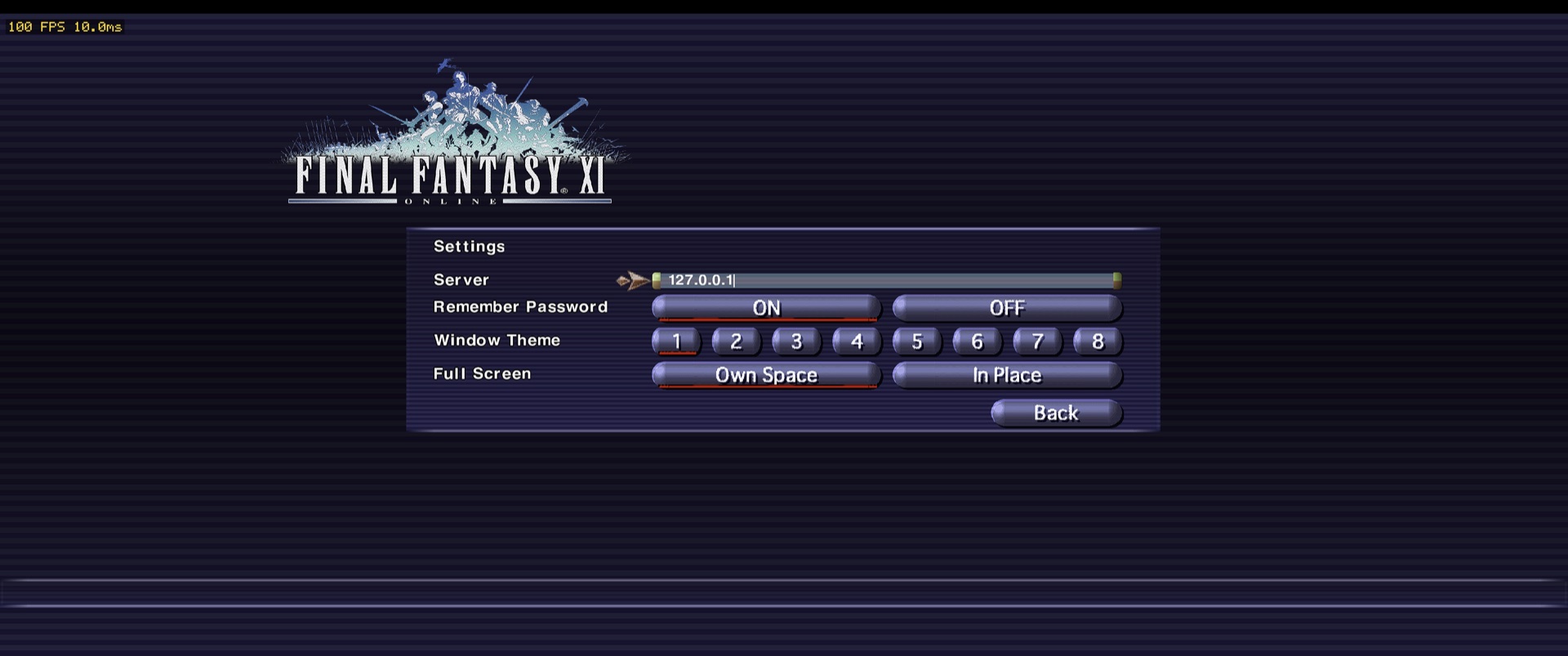
username, password and one-time code, or a server launcher's token; pick the server in the
sign-in screen's Settings.
Experimental: an [Android build](docs/android.md), tested on a Pixel Fold. Desktop defaults are
unchanged.
## What's better than the original
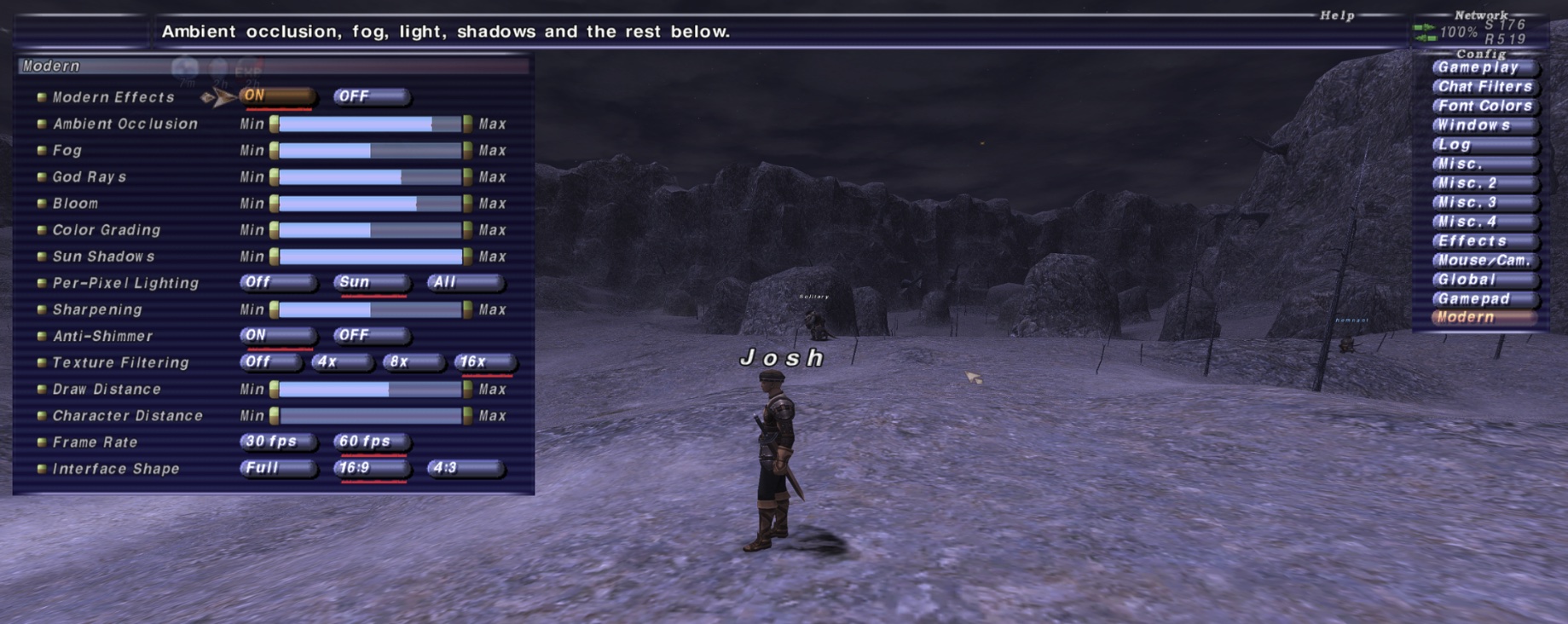
- **A Modern page in the game's own Config menu**, next to Gameplay, Windows and the rest:
- ambient occlusion, fog, god rays, bloom, color grading and sun shadows, each with a slider
- per-pixel lighting (off, sun only, all lights), sharpening and anti-shimmer
- texture filtering up to 16x, and longer draw and character distances
- 30 or 60 fps
- interface shape: full width, 16:9 or 4:3
- the occlusion check: off (everything counts as seen, the fastest) or exact
- **Widescreen and ultrawide**: the 3D view widens with the window instead of stretching a 4:3
view, the interface can stay 16:9 in the middle of an ultrawide, and nameplates keep their shape.
- **A native sign-in screen** in the game's own window themes and font, with the password kept in
the macOS Keychain.
- **DAT overlays** for a server's own DATs, without touching the install.
- **Discord Rich Presence**: your character, jobs and zone on your Discord profile while you play,
straight to the Discord app's local socket (no SDK, nothing to install).
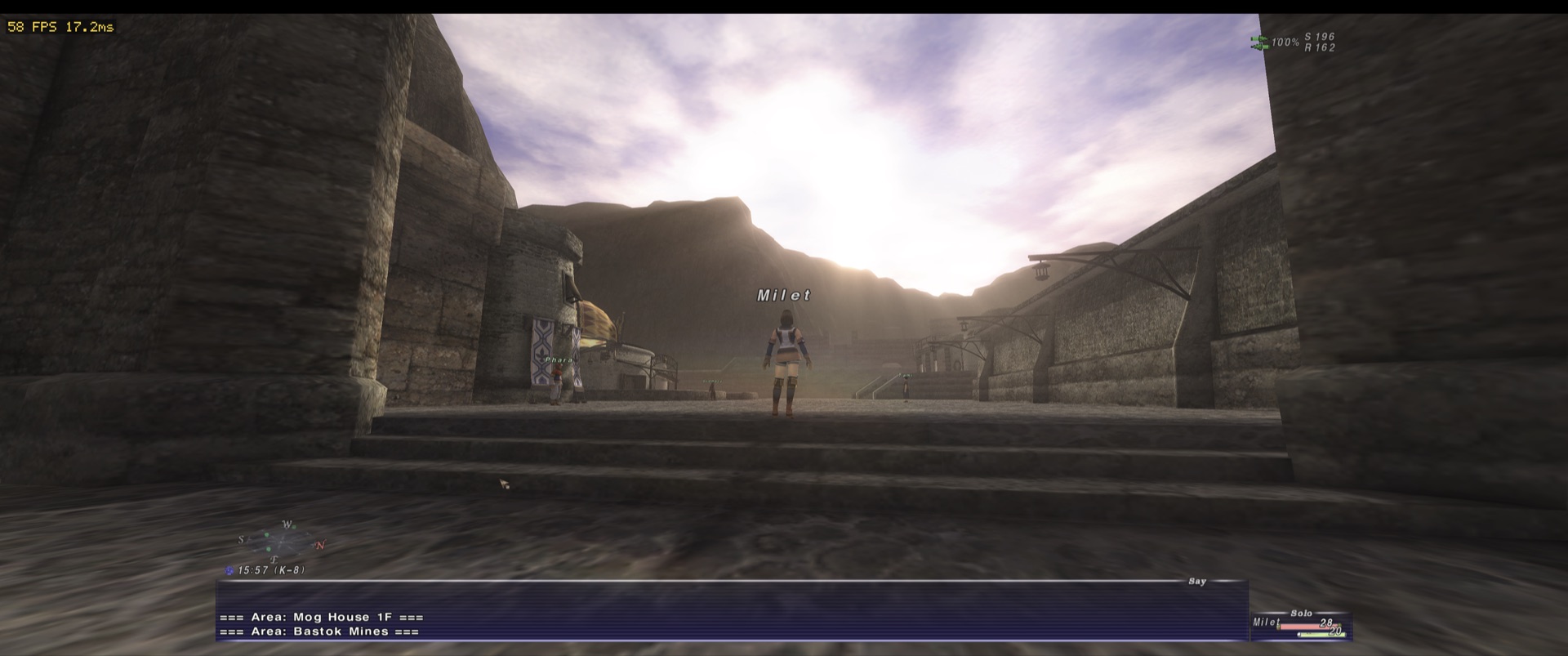
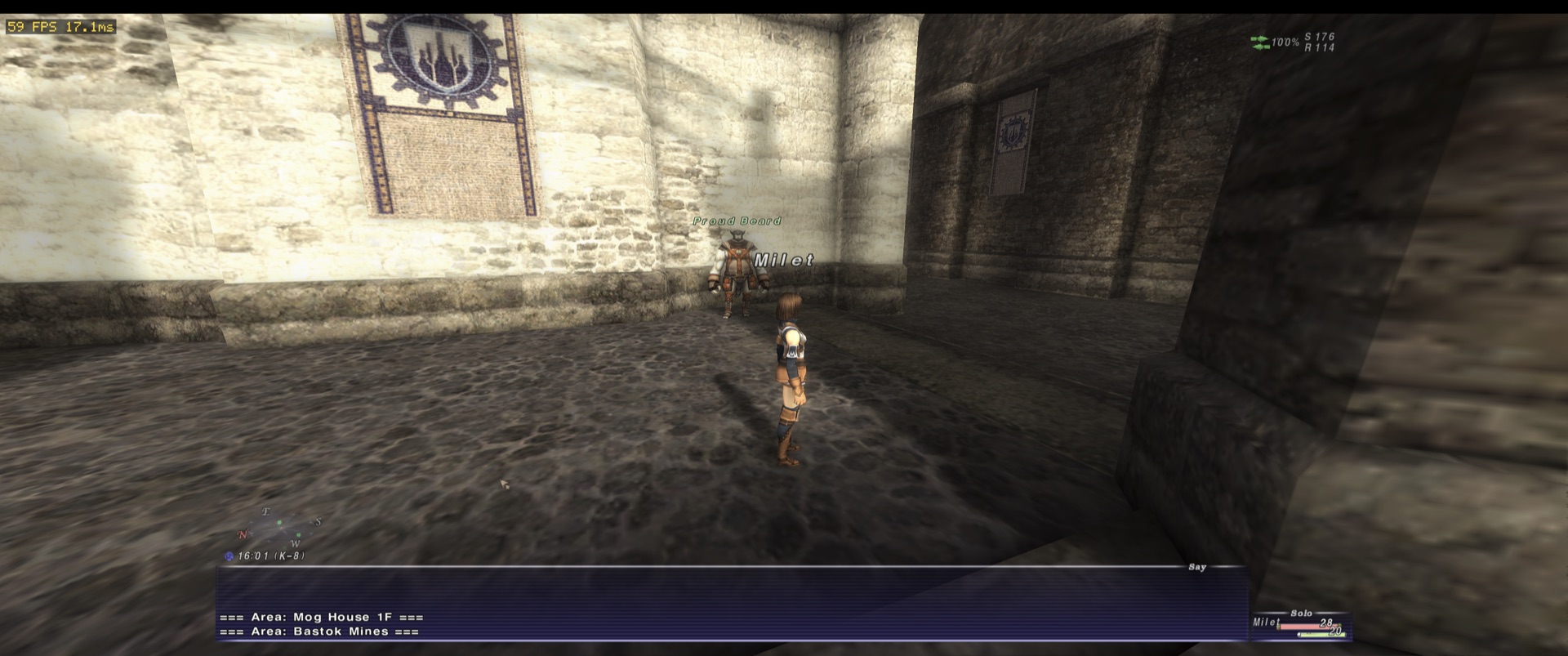
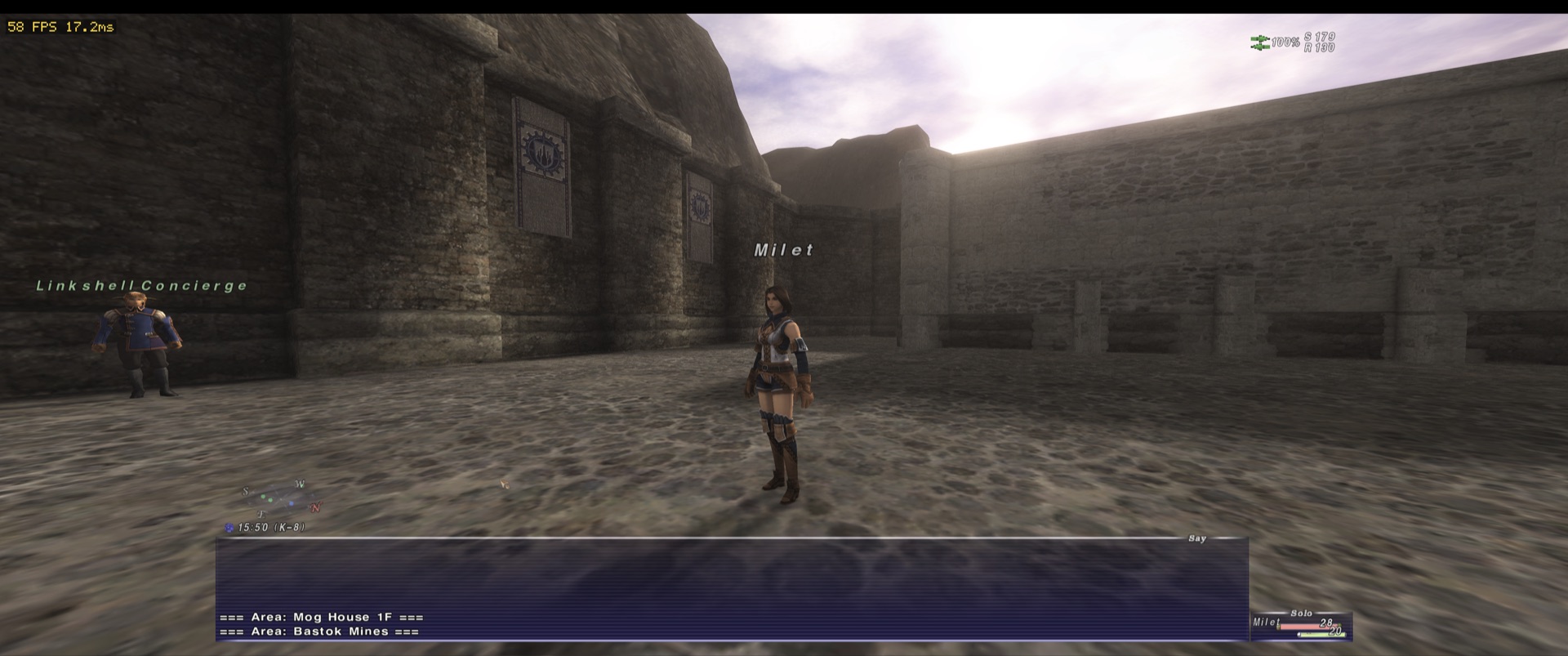
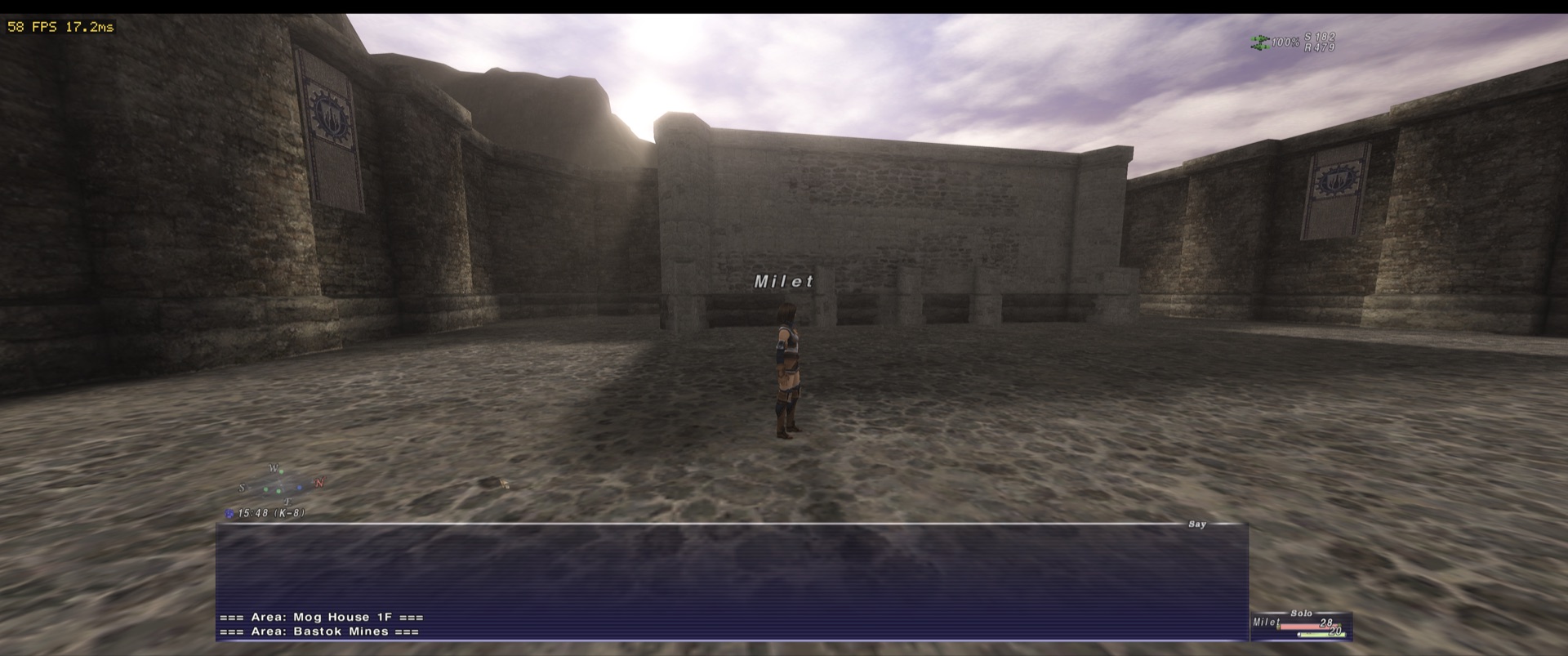
## Screenshots
## Ashita and Windower addons
> [!NOTE]
> In progress. Every official Ashita v4 and Windower 4 addon loads and runs in the addon test host,
> but this hasn't been played in the live game yet.
Ashita v4 and Windower 4 **Lua addons** run unmodified, with those projects' own libraries, on
XI on Anything's own addon host: no DLL injection, no Windows. Each addon gets its own LuaJIT state;
the host provides Ashita's and Windower's Lua APIs over the recompiled game, and draws their ImGui
windows, text and images over the game's frame.
- `tools/setup.py` fetches Ashita's and Windower's addons, libraries and resources (pinned
versions from their own repositories) into
`~/Library/Application Support/FFXIRecompile/FFXI/ashita` and `.../windower`, laid out like
their installs. Put third-party addons in the same folders.
- Load them as you would there: `/addon load `, `//lua load `, or at start from
`ashita/scripts/default.txt` or `windower/scripts/init.txt`. `/bind`, `/alias` and
`//exec` work too.
- Addons that patch the game's code (instantchat, macrofix, fastswap and the like) work through
translated variants of the patched functions, chosen while the addon's bytes are in place.
- **Native plugins** (Ashita and Windower DLLs) don't run: they're 32-bit Windows code. Addons that
need one (Windower's Timers-based ones, for example) won't either.
See [docs/addon-compat-design.md](docs/addon-compat-design.md) for how it works.
## Install (players)
Paste into Terminal:
```bash
curl -fsSL https://raw.githubusercontent.com/rubymatrix/xi-on-anything/main/install.sh | bash
```
It downloads the launcher's latest release from this repo's
[Releases](https://github.com/rubymatrix/xi-on-anything/releases), checks it against the release's
checksums, installs **XI on Mac.app** into Applications and opens it. The launcher signs you in,
builds the game from your own game files and keeps both up to date. Run the same line again to
reinstall. The app is not signed with an Apple Developer ID yet, so a copy downloaded in a browser
is blocked by macOS: use the line above instead.
### Steam Deck and Linux (x86_64)
Once, in Desktop Mode (on a Deck: Steam menu, Power, Switch to Desktop; then open Konsole), paste the
same line. It installs the launcher as an AppImage in `~/Applications`, adds **XI on Anything** to
Steam (Library, Non-Steam) and to the applications menu. Back in Game Mode, everything else happens
there, with the controller: pick your game folder (the launcher finds installs in your home folder,
on an SD card and in Proton prefixes), and it builds the game for your Deck from your own files
(a while, once per game update), keeps itself up to date, and starts the game full screen.
Nothing to install first: the launcher fetches its compiler (zig) and the prebuilt rest of the client
(the Linux kit, `tools/linux/kit.sh`) itself. Needs glibc 2.35 or later and Vulkan 1.3 (a Deck,
and any current distribution with Mesa or NVIDIA's driver).
## Install from source
To build the game straight from this repo without the launcher, you need a Mac with Apple silicon
(M1 or later), macOS 12 or later, about 3 GB free, and the game files your private server gives
you: a `FINAL FANTASY XI` folder (with `FFXiMain.dll` and
`ROM` in it). Put that folder anywhere, e.g. in
`~/Games`, then paste this into Terminal:
```
curl -fsSL https://raw.githubusercontent.com/rubymatrix/xi-on-anything/main/tools/install-source.sh | bash
```
It installs Apple's command line tools if they are missing (a dialog: click Install), finds the
game folder (or asks you to choose it), builds the game for your Mac from your own game files
(a few minutes the first time), puts **Final Fantasy XI** in `/Applications` and starts it.
Before building it asks:
- **Server**: the name or address to sign in to (blank: `127.0.0.1`).
- **Resolution** and **window mode** (windowed, borderless window, borderless full screen, full
screen). The menus' resolution and the interface's shape follow: menus at half the window's
height, and wider than 16:9 the interface stays 16:9 in the middle (`--ui-aspect`).
- **DAT overlay folder**: a server's own DATs (see [DAT overlays](#dat-overlays---dats); blank: none).
Each question starts from what you have now, so on an update Enter keeps it. The options
`--server`, `--resolution WxH`, `--window-mode 0-3` and `--dats |none` answer instead, e.g.
`curl -fsSL .../tools/install-source.sh | bash -s -- --server play.example.net --resolution 2560x1440`.
Run the same line again to update, or after your server hands out a new game version. To name the
folder yourself: `curl -fsSL .../tools/install-source.sh | bash -s -- --game ~/Games/"FINAL FANTASY XI"`. The
build's output is in `~/Library/Application Support/FFXIRecompile/source/build/setup.log`. From a
clone of this repo, `./setup.command` does the same with the clone.
To test the installer from a clone, uncommitted changes included, without touching your own app
or settings: `python3 tests/setup_test.py` checks the questions and the saved files they update,
and `tools/test_install.sh` runs `tools/install-source.sh` as a player would, piped to bash, with everything in a
sandbox folder. By default it stops after the questions; `--full` builds and installs into the
sandbox, `--saved` starts from copies of your saved settings (an update), `--sandbox `
reuses one (`--help`).
## Rules
- **No Square Enix bytes in this repo, ever.** No retail DLLs, no unpacked images, no DAT files, and
**no generated C**. Generated code is derived from the game, so it is produced on the player's
own machine from their own install. `.gitignore` enforces the obvious paths; the rule applies
everywhere.
- What *is* committed: the recompiler, the runtime, the platform layer, tests, and per-build
**metadata**: addresses and shapes only (function ranges, switch tables, tail jumps), keyed by
the SHA-256 of the retail DLL.
- **LandSandBoat packet captures** are committed too, as the maintainers agreed: the replay suite's
recordings in `tools/replay/scenes/`, so every machine and CI plays the same scenes. They are what
a server sent, not game files.
- Every supported build is listed in `meta/builds.json`, keyed by the SHA-256 of its retail
`FFXiMain.dll` and `FFXi.dll`. `tools/prepare.py` identifies the install's build and records it in
`generated/build.json`; the build tools read it from there.
| build | `FFXiMain.dll` SHA-256 | client version | taken from |
| --- | --- | --- | --- |
| 2026-08-22 | `6f8844eb…3c3b` | `30260805_0` | a retail install |
| 2026-09-03 | `f2245d1c…23e4` | `30260903_0` | a private-server install (no `patch.ver`) |
| 2025-12-26 | `f5ed4c3b…a7f6` | `30251226_0` | loose `FFXiMain.dll`/`FFXi.dll`, an older client than 2026-08-22 (no `patch.ver`) |
| 2025-11-12 | `bda769e2…0d9a` | `30251101_2` | a private-server install (`patch.ver` present) |
New labels are the date of the PE timestamp (2026-08-22 predates that rule).
## Inputs
Everything the build reads is in this repository.
| input | here |
| --- | --- |
| per-build metadata `ffxi-recomp-meta/1` (addresses and shapes, no bytes) | `meta/..meta.json` |
| the builds, their hashes, and the few addresses the runtime and tests name | `meta/builds.json` (written to `generated/build.h`) |
| static unpacker for the packed `.text` | `tools/unpack.py` |
| the specifications the runtime implements: gamecore slots, the gamecore and D3D8 surfaces | `specs/` |
The metadata comes from a Ghidra-based discovery pass over each build's unpacked DLLs:
`discovery/` (Ghidra post-scripts and the per-build manual verdicts), run by `tools/discover.py`.
The committed metadata is what the build uses; the pass is only needed for a new build.
## Building
### macOS (arm64)
Copy the Windows install's `SquareEnix` folder (`FINAL FANTASY XI`, and the viewer folder beside
it if the install has one) to the Mac, e.g. `~/SquareEnix`, where the build tools look by default.
```
pip3 install capstone pefile # SDL3 and mbedtls are vendored in third_party/, built with clang
python3 tools/build_posix.py prepare --game ~/SquareEnix/"FINAL FANTASY XI"
python3 tools/build_posix.py boot64 --game ~/SquareEnix/"FINAL FANTASY XI" # boot test
python3 tools/build_posix.py host64 --game ~/SquareEnix/"FINAL FANTASY XI" # build/host64
python3 tools/build_posix.py gfxtest # Metal back end + D3D8 front end, offscreen, no game needed
build/gfx_test --window # the same, then two seconds of frames to a window
# MTL_DEBUG_LAYER=1: Metal API validation
```
Run `prepare` again whenever the install changes (a new game version); `host64` and `boot64`
re-translate and rebuild what changed.
### Linux (x86_64)
Vulkan 1.3 (`runtime/portable/gfx_vulkan.c`), SDL3 from the system (3.2 or later, through
pkg-config), glslang for the shaders. `tools/linux/Dockerfile` is a box with all of it, and Mesa's
software Vulkan for the tests:
```
docker build -t xi-linux tools/linux
docker run --rm -v "$PWD":/src -w /src xi-linux python3 tools/build_posix.py gfxtest
docker run --rm -v "$PWD":/src -v "":/game:ro -w /src xi-linux \
sh -c 'python3 tools/build_posix.py prepare --game /game && python3 tools/build_posix.py host64 --game /game'
# FFXI_VK_VALIDATION=1: the Khronos validation layer
```
The kit the launcher builds the Steam Deck's client from is `tools/linux/kit.sh` (zig, static SDL3
and glslang; CI publishes it as the `kit-linux` pre-release): everything that is not the game,
prebuilt, so the player's machine needs only zig and python3 to make `host64` from their files
(`build_posix.py host64 --kit`).
### Windows
```
python tools\prepare.py [--game ""] # identify the build, unpack into generated\
python tools\build.py difftest # x86: translate the CRT slice, differential test
python tools\build.py host # x86: the stand-in FFXiMain.dll + boot test
python tools\build.py boot64 # x64: the portable runtime + boot test
python tools\install.py install # put the stand-in in the game folder (restore: undo)
python tools\trace_report.py [--seq ] # resolve a boundary trace
python tools\build.py host64 # x64: the game host (SDL3 at C:\Dev\SDL3)
```
## The sign-in screen and `Final Fantasy XI.app`
Started without a way in on its command line (no `--session`, nor `--user` with a password or token),
`host64` shows its own sign-in screen before the game, in the game's own UI art read from the
install (window themes, font, title art; `host/datui.c`), in the window the game then takes over.
It signs in to a **LandSandBoat server** (username, password, one-time code), with the server,
whether to remember the password (macOS Keychain) and the window theme in its **Settings**. It
keeps its files in `~/Library/Application Support/FFXIRecompile/FFXI` (or `--data-dir`):
`signin.cfg`, `settings.reg` (the display settings, written once with defaults), `saved.reg` (the
game's own saves), `host64.log` when started from Finder, and an optional `background.png`/`.jpg` behind the
screen. Cmd+Q, the Dock's Quit and Ctrl+C quit at any point.
`python3 tools/build_posix.py app` makes `build/Final Fantasy XI.app`: `host64` with its libraries
and `ffxi.reg`, and first-run defaults in its `Info.plist` so it starts from Finder with no
command line (`host/appdefaults.h`):
```
python3 tools/build_posix.py app --game --server \
--resolution 2560x1440 --menu-resolution 1280x720 --window-mode 3 --background
```
The values go into the built app only. It is signed with the code-signing identity
`FFXI Local Code Signing` when the login keychain has one (or `--sign-identity`), else ad hoc. Ad hoc,
every rebuild is a new app to macOS, which then asks again before the app reads its saved password;
signed with one certificate, "Always Allow" holds. `tools/setup.py` makes it on its first run. By hand, make the certificate once (self-signed; it needs no
trust settings), with a `cs.cnf` of:
```
[req]
distinguished_name = dn
x509_extensions = ext
prompt = no
[dn]
CN = FFXI Local Code Signing
[ext]
basicConstraints = critical, CA:false
keyUsage = critical, digitalSignature
extendedKeyUsage = critical, codeSigning
```
then:
```
/usr/bin/openssl req -x509 -newkey rsa:2048 -nodes -keyout key.pem -out cert.pem -days 3650 -config cs.cnf
/usr/bin/openssl pkcs12 -export -inkey key.pem -in cert.pem -name "FFXI Local Code Signing" -out cs.p12 -passout pass:x
security import cs.p12 -k ~/Library/Keychains/login.keychain-db -P x -T /usr/bin/codesign
rm key.pem cs.p12
```
The button art is the screen's own
(`tools/make_ui_art.py`, `assets/ui/`); `third_party/stb/stb_image.h` (public domain) reads
pictures.
## Running: `host64`
`host64` does what the retail launcher and COM do for FFXI on Windows: it maps the game's DLLs,
starts them, and runs the game with its own gamecore in place of the retail core library. It
takes its options as `--name value` pairs.
```
build/host64 --game [options]
```
To sign in to a LandSandBoat server from the command line instead of the sign-in screen:
```
build/host64 --game ~/SquareEnix/"FINAL FANTASY XI" \
--server --user \
--reg ffxi.reg --reg-overlay build/settings.reg --dats ~/FFXI/DATs
```
### Options
| option | what it does |
| --- | --- |
| `--game ` | **Required.** The `FINAL FANTASY XI` folder, with the viewer folder beside it if the install has one. On macOS both are mounted where a retail Windows install puts them. |
| `--server ` | Where the game's servers are. The lobby and every other host under the game's domain resolve here instead of through DNS; the LandSandBoat sign-in connects here too. Default `127.0.0.1`. `--lobby` is an older name for it. |
| `--session ` | A session value for this sign-in (16 characters, or 32 hex digits), from a launcher that signed in and keeps that sign-in open while the game runs. Skips the sign-in screen; nothing is redirected and `--server` is not used: the game's hosts resolve through DNS. |
| `--auth ` | With `--session`: the 0x34-byte authCode block the game sends its lobby (104 hex digits), as the launcher that signed in made it. `host64` passes the bytes to the game unchanged. Without it the block is zeros, which a LandSandBoat lobby accepts. |
| `--user ` | Sign in to a LandSandBoat server with this account, before anything is loaded. |
| `--pass ` | The account's password. Without it, `host64` reads `FFXI_PASSWORD`, else the sign-in screen asks for it. Prefer those: a password on the command line ends up in your shell history. |
| `--otp ` | The two-factor code, for an account that has one. |
| `--login-token ` | A single-use launch token from a server's own launcher (for example a Discord login). It stands in for the password. |
| `--trust on` | xiloader's "trust this computer": with an account's two-factor code, the server hands out a token that stands in for the code for 30 days, kept in the keychain per `--server` name and account (the sign-in screen's Settings has the same switch). Where there is no keychain (Windows, for now) nothing is kept. |
| `--authport`, `--dataport`, `--viewport` | LandSandBoat's ports, by default 54231 (sign-in, TLS), 54230 (data), 54001 (lobby view). |
| `--loader-version ` | The loader version sent at sign-in, `2.2.0` by default (current xiloader). LandSandBoat refuses a version it does not expect; when its refusal names the one it wants (`2.1.x`), `host64` signs in again once with that (an `x` as 0). The sign-in screen remembers the version (`loader_version=` in `signin.cfg`), including one a server asked for. |
| `--reg ` | A registry export to load (up to 8; later files win). The game reads its settings (resolution, window mode, sound) from its own registry keys. `ffxi.reg` in this repo is a starting point. |
| `--reg-overlay ` | Where the game saves settings it changes. It is loaded after the `--reg` files, and those are never rewritten. |
| `--data-dir ` | Where `host64` writes its own files (the `patch.ver` it makes for an install without one). Default: beside `host64`. |
| `--reg-final ` | Loaded after the overlay, so its values win over what the game saved (up to 8). Without one, the sign-in screen loads its `settings.reg` here. |
| `--dats ` | DAT overlays, the way XIPivot does them (up to 8; the first folder given wins). See below. |
| `--fps-divisor ` | The game's frame divisor: `1` is 60 fps (the default here), `2` is 30 fps as shipped, `0` uncapped (for measurements). |
| `--aspect ` | The 3D scene's aspect ratio. `auto` (the default) follows the window's shape, as Ashita's aspect addon does, so a widescreen or ultrawide window sees more to the sides instead of a 4:3 view stretched across it. `off` leaves it to the game; a shape (`16:9`, `1.778`) fixes it. |
| `--ui-aspect ` | Keep the interface at this shape, full height and centered, in a wider window (`16:9` on an ultrawide), instead of stretched across it. The 3D world still fills the window. The mouse is mapped to match, so the sides outside the box can't be clicked. Off by default (`off`); an app bundle's `FFXIUIAspect` key is the default. Best with a 16:9 menu resolution (960x540). |
| `--nameplates fix\|off` | The names over characters' heads. The game sizes them across by the window's width and down by its height, so they widen with the window (1.8 times at 3440x1440); `fix`, the default, keeps the shape they have in a 4:3 window. Builds with a `nameplate_scale` hook in `meta/builds.json` only. |
| `--nameplate-scale ` | Their size: `1.25`, or across x down (`1x1.2`). 1 by default. |
The install folder is never written. The registry's install paths are set to where the game
actually is, and an install that has no `patch.ver` (common for private-server installs) gets one
for its build's version, kept next to `host64` (or in `--data-dir`).
### DAT overlays (`--dats`)
A private server often ships its own DATs: era item and spell text, zones, menus. `--dats` loads
them without touching the install. A folder can be:
- **one overlay**: it holds `ROM`, `ROM2`, …, `sound`, `sound2`, … folders laid out like the
install's; or
- **a folder of overlays**: each subfolder that holds those is an overlay, in name order.
```
DATs/
era-dats/
ROM/301/12.DAT
ROM2/14/5.DAT
ROM255/6/1.DAT
```
When the game opens a path through a `ROM\` or `sound\` folder, `host64` looks for the rest of
the path (`ROM2\14\5.DAT`, ignoring case) in the overlays first, then in the install. Folders that
exist only in an overlay (`ROM255` above) work too. The overlays are indexed once at start-up, and
the log reports each one: `[recomp] dats: era-dats, 163 files`.
### Environment variables
| variable | what it does |
| --- | --- |
| `FFXI_PASSWORD` | The LandSandBoat password when `--pass` is not given. |
| `FFXI_DATS_TRACE=1` | Log every file an overlay supplies: `[dats] -> `. |
| `FFXI_PROFILE=1` | Every 2 seconds, log a frame breakdown (game code, API calls, draws, GPU time) and the most-called APIs. |
| `FFXI_FPS=0` | Hide the frame-rate overlay. |
| `FFXI_DISCORD=0` | No Discord Rich Presence. |
| `FFXI_DISCORD_NAME=0` | Rich Presence without the character's name (jobs and zone only). |
| `FFXI_DISCORD_APP_ID` | The Discord application the presence is shown as, in place of the built-in one. |
| `FFXI_PROBE=gpu` | Read the game's 16×16 occlusion probe from the GPU, whatever Config > Modern's Occlusion Check says. By default it answers "visible" at once, which saves 7–8 ms a frame. |
| `FFXI_DRAWLOG=` | While `.go` exists, write the next frame's draws to `` (return addresses on the guest stack, texture, vertex box), then remove `.go`. For finding which game code draws what. |
| `FFXI_ASYNC_READBACK=1` | Small read-only surface locks take the newest finished copy instead of waiting for the GPU. |
| `FFXI_VSYNC=0` | Never wait for the display, for measuring frame rates past its refresh rate. |
| `FFXI_NATIVE_GEOMETRY=1` | Skin characters with [SSE-order kernels](docs/shared-graphics-optimizations.md) (NEON or SSE2) instead of the translated x87 code, on builds with a verified layout (2025-11-12). The same output as the original's SSE path; no measured FPS gain on desktop. |
| `FFXI_CACHE_DIR` | Where the pipeline cache goes. Default `~/Library/Caches/FFXI`. |
| `FFXI_RECOMP_TRACE=1` | Log every shim call, and every failed `CreateFileA` / `FindFirstFileA` path. |
| `FFXI_RECOMP_MISSING=1` | Log imports that have no shim. |
| `MTL_DEBUG_LAYER=1` | Metal API validation. |
## Supporting a new client version
A game update replaces `FFXiMain.dll` and often `FFXi.dll`. The metadata holds absolute addresses,
so every build needs its own entry before it can be translated. `prepare` refuses a build it
does not know:
```
.../FFXiMain.dll is build , which meta/builds.json does not know
```
In Claude Code, the `game-version-update` skill (`.claude/skills/`) runs all of this: hand it the
install folder. By hand:
1. **Identify and unpack.**
```
python tools/newbuild.py identify --game "" # hashes, label, version
python tools/newbuild.py unpack --game "" # into generated/images/